

I believe it is now removed. It was on their forum.Originally Posted by aln688

http://vip.asus.com/forum/view.aspx?...Language=en-us



I believe it is now removed. It was on their forum.
http://vip.asus.com/forum/view.aspx?...Language=en-us
Asus Rampage Extreme (1202 Q743A798)
E8500 @ 4.2GHz 3837B215 @ 1.360v
G.Skill 2000Mhz RipJaws 8GB DDR3 @ 1830 MHz 9 - 8 - 8 - 20 2T with 1.70v
EVGA GTX 260 @ 725/1450/2250
2 X WD Green 1TB (RAID 0) Intel Matrix
4 X Seagate 1TB (RAID 5) 3ware 9500S-4LP
LG GGC-H20L Blue-Ray Dual Layer
Corsair 620HX
Thermalright Kandalf
Auzentech X-Fi Forte
Samsung 275TPlus (Digital) and Viewsonic N3250w
Hi mrcape
some more details in my earlier post on this kit:
http://www.xtremesystems.org/FORUMS/...postcount=1704
so far the CS3222271 is OK for 32M at 950mhz/CL7 at ~ 1.96V, but I have to keep vDIMM as low as possible to avoid stability getting worse as vDIMM increases.
i found that any setting over 1.90V causes errors (in memtest86+/HCI). This (still) applies at all the clocks I've tested, so Memtest stable clocking is limited by vDIMM for now.
over 2.0V .......not so useful
voltages were just set roughly for the 475x9 Everest screens, but for 32M and IBT runs in the earlier post (linked above), here's what I used:
i'm just moving CPUPLL (with SB) around relative to vCore, and also to keep PLL above (or below) the vNB in use (including reported vNB droop).
475x9.5/1:2 (4512mhz) (32M)
vCore 1.3750 LLC on - higher than needed for 32M but already Prime/IBT tested.
vTT 1.39V - as tested with above vCore
GTLs +40, AUTO, AUTO, AUTO, NB AUTO - as tested with above vCore.
the rest roughly set for 32M pass, as DIMMs fail 86+/HCI at this CL7 memory clock.
vPLL 1.55V
vNB 1.51V
vDIMM 1.96V
SB1.5 1.55V
562x8/5:8 (4495mhz) (32M)
vCore 1.3750 LLC on
vTT 1.39V
vPLL 1.60V
vNB 1.59V
vDIMM 1.90V
SB1.5 1.60V
GTLs as above, but not tested further with these settings.
562x7/5:8 (3933mhz) (IBT x 10)
vCore 1.25V LLC off
vTT 1.26V
vPLL 1.51V
vNB 1.59V
vDIMM 1.90V
SB1.5 1.51V
GTLs as above, but not tested further with these settings.
Maximus V GENE [0086] :: 3770K L212B244 :: H70 :: EB3103A (PSC)
CL|WCL|RTL performance (SB) : 32M scaling charts : PSC WCL > CL performance bug
I'm not sure. The drives are definitely defective except for the remaining WD velociraptor. Now the WD 400G is 3 years old but the 150 Velociraptor is only a few months old but what are the chances of both drives failing with the same. It's not even a question if they are defunct so now I'm going to switch the remaining drive over to another sata connection and check.Code 0225 - too many errors found
WOW, this is freaking me out!
That's really odd, I've never heard of anything like that. Try this, it's the LifeGuard Diagnostics for your drive, burn it to CD and boot from it, making sure the defective drive is plugged in a SATA port:
http://support.wdc.com/product/downl...sid=30&lang=en
Last edited by aln688; 12-16-2008 at 06:46 PM.
Good idea, attaching a fan isn't a major operation either, especially with the metal wire clips Thermalright provides.
For the thermal compound, the instructions say to apply it to both the HR-05 and the chip, do you think only applying it to the HR-05 will be sufficient? Applying it to both seems like too much TIM will be between the HR-05 and the chip.
Thanks so much, I'm glad I asked. I hadn't realized there was an NB droop. I'm not yet shooting for IBT stability, just 32m stable with mem as fast as possible at high fsb. Will be benching a few e86 soon.
I have 2 kits I've been testing, a Kingston HyperX 2000mhz 2x1gb kit and Gskill 1600mhz HZ 2x1gb kit. I can confirm the Gskill are D9GTS ICs, not sure what's on the Kingston, but the Gskill are doing much better. Haven't tried going below spec vdimm on either kit yet. The Kingston are rated 2.0v, which seemed high, they are really flaky so far. The Gskill do well at 2.1v. I'll try a wider range soon.
Looking forward to reviewing your posts later.
Regards
Edit - also should mention I'm running 401 bios, is there a better one out?
Last edited by mrcape; 12-16-2008 at 10:35 PM.
Hi Aln688, agreed - I would apply it to one only - usually the one with the smallest footprint which is the chip on the motherboard in most cases. I'm sure the TIM looses effectiveness when it is too thick.
My rig :-
CPU: QX9770-C1 @ 4038MHz.
GPU: XFX GTX280 XT O/C. Audio: Creative X-Fi Elite Pro.
MEM: Corsair Dominator 2x1Gb TWIN3X2048-1800C7DFIN G @ 7-7-7-20 1T 1901MHz.
DRIVES: Samsung F1 1TB & 2x500Gb Hitachi SATA 2.
2xSamsung 20xDVD-RW SATA.
O/S: Vista Ultimate 32bit SP1.
M/B: Asus Rampage Extreme. Bios : 1003.
PSU: Enermax Infinity 720w (waiting for Enermax Revolution 1050w).
CASE: CM Cosmos S RC-1100 v2.
LOOP 1: <- Black Ice Stealth 360 -> EK Multi-Opt 150 Rev2 -> Swiftech MCP655 -> Swiftech Apogee GTZ -> EK NB SMAX -> : Tygon R3603 tubing and EK barbs all 1/2in ID.
24/7 SETTINGS : FSB 475, Ratio x8.5, Strap 333, DRAM 1901 @ 2.06v, CPUv 1.47, LLC DIS, GTLs +40+40+40+40 NB +60, PLLv 1.59, VTT 1.40, NBv 1.59, SB1.5 1.58, SB1.05 1.10
That's how I arrived at discerning the faulty drives. I even used the WD program to ZERO the drives but no luck they are both FUBAR. In all my years I've never encountered 2 drives being damaged on the same system - it's not logical. At the moment I'm still running my primary Velicoraptor and added an additional drive for back and will keep them closely monitored. If this happens again then I'm going to look for a sata controller card.
Last edited by Think; 12-17-2008 at 07:40 AM.
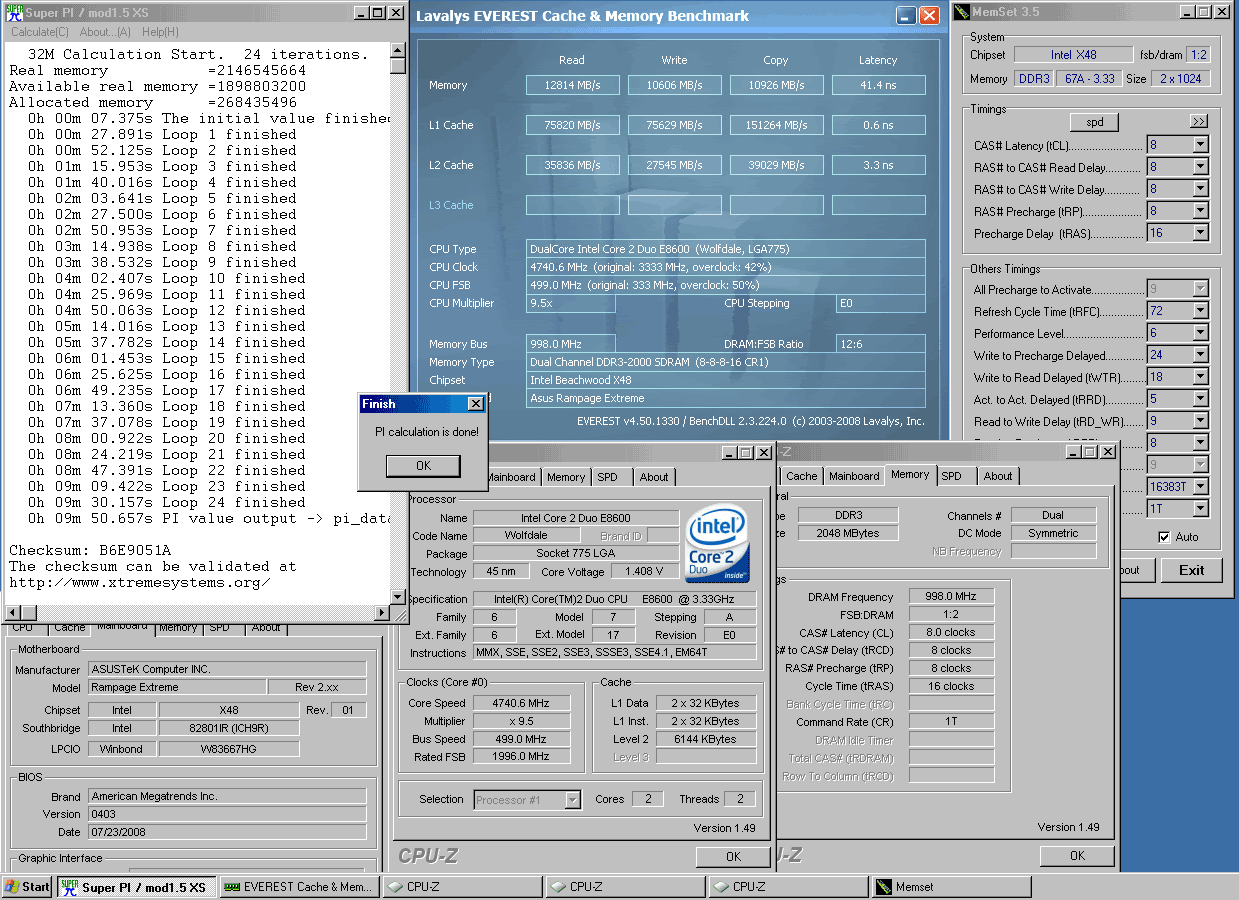
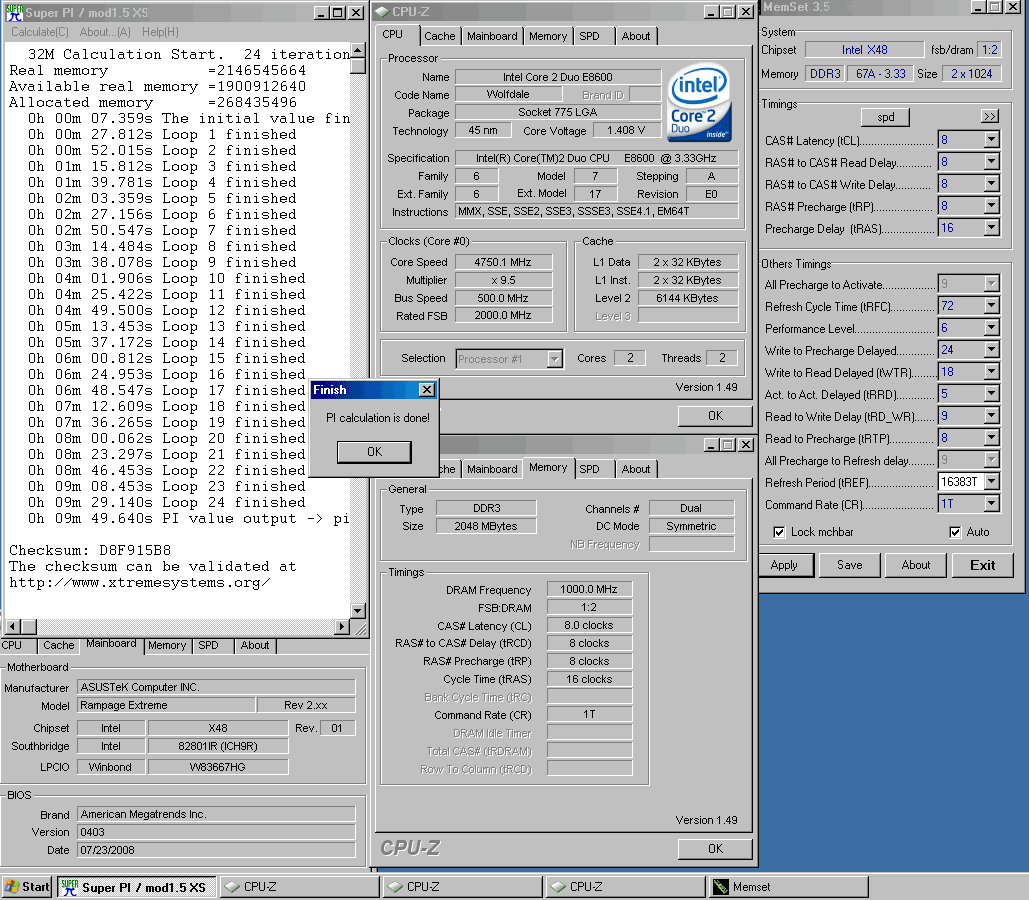
Some CL8 32M runs, with the CS3222271. CL7 to follow.
32M details: XP SP2, 1 hard disk, no tweaks or C/W, tREF adjusted in Memset as shown.
BIOS 1001 and 0403 / vDIMM 1.90-1.95V / vNB 1.6-1.72V
a 200/333 strap comparison first(0403 BIOS)
500x9 / 1:2 / 333 strap / CL8 / CT Strong / tRD7
the extra Read from 200 strap/tRD 6 beats the 333strap/tRD 7 by almost 2.5 seconds for 500x9 time.
500x9 / 1:2 / 200 strap / CL8 / CT Strong / tRD6
the board loosens at 500FSB on any strap, so booting at 499FSB gives better bandwidth and latency.
(2-300Mb/s Read and 0.5ns Latency difference going from 499-500FSB for same other settings)
500x9 / 1:2 / 200 strap / CL8 / CT Strong / tRD6 / tRFC 72
(499FSB boot + 1mhz FSB Joystick + tREF 16383T)
I gave up trying to get 'close' to 10 minutes with CL8 and 4500mhz
499x9.5 / 1:2 / 200 strap / CL8 / CT Strong / tRD6 / tRFC 72
(tREF 16383T)
500x9.5 / 1:2 / 200 strap / CL8 / CT Strong / tRD6 / tRFC 72
(499FSB boot + 1mhz FSB Joystick + tREF 16383T)
Everest scores might have been better but CPU stuck at 50% load after 32M
625x7.5 / 5:8 / 333 strap / CL8 / CT Auto / tRD9
(tRFC AUTO (110) / tREF 6240)

Maximus V GENE [0086] :: 3770K L212B244 :: H70 :: EB3103A (PSC)
CL|WCL|RTL performance (SB) : 32M scaling charts : PSC WCL > CL performance bug
What I wonder about is, how is a new SATA card going to help? You think the ICH9R damaged the drive somehow? I would think it's electrical, maybe the PSU, that's more likely than the drive controller damaging it. My old Raptor had a five year warranty, does yours have the same? I'd send it to WD and see what they say. Just an idea.

This mobo really kicks asses
DiKKeneK fan !!
Nice 32m runs Cheapseats. Best efficiency I got so far war 11min flat at 4ghz. Iknow acouple guys were able to get around 10:50 with copywaza tweaks, maxmem etc..
Edit - wow, toyten that is a nice run
Last edited by mrcape; 12-19-2008 at 10:07 PM.
Yes, they are both being sent out with expedited replacement. I can't see it being the powersupply since they were still operating but generating errors until one finally collapsed. The other Velicoraptor that works has always been connected to the same powersupply so the only conclusion could be the motherboard IC9 for those particular ports?.
Don't know but will soon find out with these drives installed and running. I will test them thoroughly to see what happens in the next few days.
Thanks.
Could very easily be the PSU. If your PSU is unhappy with the balance of the load you're splitting across the different rails, or it's just not great quality, you're possibly getting high ripple. Lots of ripple == components that operate fine for a while, since they're getting the "right" voltage, but die because of minute fluctuations. What is your PSU?
It could very well also be your controller, by the way...I've only heard of a controller doing that once before (680i), but I supposed it could happen again.
PCPower 860Watt unit - 3 months old running:
- # 860W Continuous (930W Peak) @ 50�XC
- # Heavy-Duty Caps, Inductors, Heat Sinks, Etc.
- # External Fine-Tune Voltage Adjust (+3.3, +5, +12)
- # Premium Sag and Surge Protection (.985 PFC)
- # 80+ Certified Ultra-High Efficiency (84% Typical)
- # +12VDC @ 64A/70A Peak(Powerful Single Rail)
- # Ultra-Tight Voltage Regulation (+VDC @ 1.5%)
- # 24-pin, 8-pin, and 4-pin M/B Connectors
- # 4 PCI-E and 15 Drive Connectors
- # NVIDIAR SLI Certified (up to Dual 9800 GX2)
- # CrossFire Certified
- # Ultra-High Reliability (200,000 Hr. MTBF)
- # Individual 14-point Certified Test Report
- # Industry's Strongest Warranty Program (7 yrs)
Running:
One - Asus 4870x2
Intel QX9650 - 4Ghz
4 Gigs of ram
2 Velociraptors 150 each
1 WD Cavalier 400G
1 Plextor DVD burner
7 120mm fans
2 fluorescent black lights
2 12V pumps - Swiftech MCP655
Not much. I had a 750was PCpower running more then that at one time without a fuss. System is running so far, Primed for 12 hours without a problem but you never know.
I had all three harddrives on one of the single 3 prong outputs of the powersupply so maybe it was too much for that rail?...hmm..wonder how I could figure this out?
I'm using cellshock 1800 and a q9450, my voltages are:
at 3.6 (450*8)
and if i use 2x1gb I can run prime95 without problems
AI OVERCLOCK TUNER ==================== MANUAL
OC FROM CPU LEVEL ==================== AUTO
OC FROM MEMORY LEVEL UP ============== AUTO
FSB FREQUENCY ======================= 450
CPU RATIO SETTING ==================== 08
CPU CONFIGURATION
CPU CLOCK SKEW ====================== AUTO
NB CLOCK SKEW ======================= AUTO
FSB STRAP TO NORTH BRIDGE ============= 400
PCIE FREQUENCY ====================== 100
DRAM FREQUENCY ===================== 1800
DRAM COMAND RATE =================== 2N
DRAM TIMING CONTROL ================= MANUAL
CAS LATENCY ======================== 8
RAS TO CAS DELAY ==================== 7
RAS PRE TIME ======================== 6
RAS ACT TIME ======================= 21
RAS TO RAS DELAY =================== Auto
REF CYCLE TIME ===================== 72
WRITE RECOVERY TIME ================ Auto
READ TO PRE TIME =================== Auto
READ TO WRITE DELAY S/D ============= Auto
WRITE TO READ DELAY S =============== Auto
WRITE TO READ DELAY D =============== Auto
READ TO READ DELAY S ================ Auto
READ TO READ DELAY D ================ Auto
WRITE TO WRITE DELAY S ============== Auto
WRITE TO WRITE DELAY D ============== Auto
WRITE TO PRE DELAY ================== Auto
READ TO PRE DELAY=================== Auto
PRE TO PRE DELAY==================== Auto
ALL PRE TO ACT DELAY================= Auto
ALL PRE TO REF DELAY================= Auto
DRAM STATIC READ CONTROL =========== DISABLED
DRAM DYNAMIC WRITE CONTROL ========= DISABLED
DRAM SKEW CONTROL ================= Auto
AI CLOCK TWISTER =================== AUTO
AI TRANSACTION BOOSTER ============= AUTO
EPU II PHASE CONTROL =============== AUTO
CPU VOLTAGE ====================== 1.35000
LOAD-LINE CALIBRATION ============== ENABLED
CPU PLL VOLTAGEM ================== 1.56
FSB TERMINATION VOLTAGEM ========== 1.33
CPU GTLVREF 0 ===================== +50
CPU GTLVRED 1 ===================== +50
CPU GTLVRED 2 ===================== +50
CPU GTLVRED 3 ===================== +50
NB GTLVRED ======================= +60
NORTH BRIDGE VOLTAGE ============== 1.55
DRAM VOLTAGEM ==================== 1.90
NB DDRVREF ======================== AUTO
DDR3 CHANNEL A VREF ================ AUTO
DDR3 CHANNEL B VREF ================ AUTO
SOUTH BRIDGE 1.5 VOLTAGE =========== 1.51106
SOUTH BRIDGE 1.05 VOLTAGE ========== 1.06039
CPU SPREAD SPRECTRUM ============== DISABLED
PCIE SPREAD SPECTRUM ============== DISABLED
ADVANCED
CPU CONFIGUTION
CPU RATION SETTING ================= 08
C1E SUPORT ======================== DISABLED
CPU TM FUNCTION =================== DISABLED
MAX CPUID VALUE LIMIT =============== DISABLED
VANDERPOOL TECHNOLOGY ============= ENABLED
EXECUTE DISABLED BIT ================ DISABLED
CORE MULTI- PRECESSING ============== ENABLED
but if i try using 4x 1gb I can only ruum 2 testes without errors,
I've raised th nb voltage to 1.59 and I can run 4 prime testes then th cpu reboots.
In single post here u say that can be usesd 4x1gb ajusting ddrref acoirding tho recomendations, do you know what is the value?
I want to put my system stable at 450*8
Can you please help?
Last edited by frank.lopez; 12-19-2008 at 03:58 AM.
Asus Rampage eXtreme + Intel® Core™2 Quad (Q9450) + 4Gb CellShock 14400+ EVGA GeForce 9800GTX + Asus PG 191 + SupremeFX X-Fi + WD Velociraptor 150Gb + Seagate Sata II 750GB + COOLER MASTER CM 690 Window + LC POWER ARKANGEL 850W. (High Flow Water Cooled)
Help Save Lives Join World Community Grid!
This mobo really DOES kick ass
All air (intel stock cooler), i was looking for a max fsb, haven't found it yet :p this is a wall caused by temperature/voltage equation i believe:
MAX FSB Valid 650 would crash during validation !
More to come this weekend (ln2)
PCPC is a great manufacturer. Besides that, that unit (or at least it's 1000W big brother) controls ripple superbly. The only better power supply you can get at that wattage is the Antec Signature, and that's only for slightly better voltage regulation. Seriously. That thing is great. One question though: are you using the true SATA connectors, or the ones adapted from the Molex leads?
nice one how much volts on northbridge
The true sata connections are being used.
Most important settings i used:
DRAM SRC disabled
DRAM DWC disabled
vcore 1.4
LLC enabled
FSB TV 1.35
CPU GTL Vref (0) +40mv
NB 1.6
NB DDR Vref +12.5mv
SB 1.5 @ 1.6
SB 1.05 @ 1.1
What's not listed is or on auto (CPU/NB clock skew and DRAM skew control as well!) or irrelevant
thanks diegis on i got to 635 using higher northbridge but other settings were on auto (cpugtl and nbddrvref both sbs) i'll give it a bash
thanks
Glen
No problem
With those settings, i boot @ 635 no sweat
Last edited by Diegis0n; 12-19-2008 at 12:34 PM.
Considering your PSU is an excellent model and I personally don't think it's the ICH9R, it could be the drives themselves. You made an interesting point about the ports on the board being faulty, that is a possibility but I haven't heard of anyone else having this type of problem. Regardless of the problem source, I hope you get your repaired drives back quickly.
I agree...I don't know what the problem could be. The model is great, and the ICH9R is unlikely to kill the drives. If it were bad, it could corrupt them, but it's unlikely to kill the drives through the SATA cable.
The PSU could be defective (unlikely), or it could be that you're drawing too much power through one cable (also unlikely). Please keep us posted!
 Posting Permissions


 Reply With Quote






Bookmarks