

Use Memtest Boot CD Test #7 to find out which CPU REF and MCH Ref you should use with this CPU.Originally Posted by gyasih

If those settings are not set properly it will result in the problems you describing.




Use Memtest Boot CD Test #7 to find out which CPU REF and MCH Ref you should use with this CPU.
If those settings are not set properly it will result in the problems you describing.
//RETIRED-o00o--°(_)°--o00o-OVERCLOCKER//
I will try when I get home. What are the proper Advanced Settings (C1E, TM2)?
Hello, first time OC'er here having some fun with my UD3P and Q9650. I've been reading the Noob OC guides as well as viewing other peoples specs/settings to help get me started. I OC'd to 3.6 and ran Prime small blend overnight, one of the cores had an error ("Rounding was 0.49..., expected less than 0.4") after 2 hours, all of the other cores made it through the night. I also ran memtest for 90 minutes with zero errors. Here are my settings:
Computer Specs:Code:MB Intelligent Tweaker(M.I.T.) Robust Graphics Booster ...............: Auto CPU Clock Ratio ...........................: 9 CPU Frequency............................: 3.60GHz Clock Chip Control Standard Clock Control CPU Host Clock Control..................: [Enabled] CPU Host Frequency (Mhz) .............: 400Mhz PCI Express Frequency (Mhz) .........:100 C.I.A.2 ..................................:[Disabled] Advanced Clock Control CPU Clock Drive...........................: 800mV PCI Express Clock Drive.................: 900 mV CPU Clock Skew (ps)....................: 0ps MCH Clock Skew (ps)....................: 0ps DRAM Performance Control Performance Enhance...................: [STANDARD] (G)MCH Frequency Latch...............: [Auto] System Memory Multiplier ...............: 2.00B Memory Frequency (Mhz) ..............: 800*.......800 DRAM Timing Selectable .................: [Manual] Standard Timing Control CAS Latency Time........................5*......5 tRCD .........................................5*......5 tRP'...........................................5*......5 tRAS........................................15*......5 Advanced Timing Control - I didn't touch anything in here, everything is set to Auto. Motherboard Voltage Control Load-Line Calibration.....................: Enabled CPU Vcore….……….......1.25000V*...: 1.35 CPU Termination…..... 1.200V*.......: 1.2 CPU PLL…………………....1.500V*.......: 1.5 CPU Reference.……….....0.76V*.......: .76 MCH/ICH MCH Core….1.100V*...........:1.24 MCH Reference….…….0.76V*.............: .76 MCH/DRAM Ref.…......0.900V*...........: Auto ICH I/O……………….....1.550V..............: Auto ICH Core…………...……1.100V..............: Auto DRAM DRAM Voltage …1.800V*............: 1.84 DRAM Termination ..…0.900V*.............: .92 Channel A Reference 0.900V*.............: .92 Channel B Reference 0.900V*.............: .92 Advanced Settings Limit CPUID Max. to 3.....................: [Disabled] No-Execute Memory Protect............: [Disabled] CPU Enhanced Halt (C1E)................: [Disabled] C2/C2E State Support....................: [Disabled] x C4/C4E State Support..................: [Disabled] CPU Thermal Monitor 2(TM2) ...........: [Disabled] CPU EIST Function.........................: [Disabled] Virtualization Technology................: [Disabled]
Q9650 in EP45-UD3P w/ Xigmatek HDT-S1823 HSF
4 x 2 Gb Gskill DDR2 800 / 5-5-5-15 / 1.8-1.9v
Quadro FX 1500 GPU
Corsair TX750W PSU
Any advice on my settings are greatly appreciated. I'm certainly no expert but I think my vcore is a tad high for a 3.6 OC, I'm sure I could lower it but I was just trying to give myself headroom to OC higher, and my temps were fine.... oh speaking of:
3.6 OC
idle temps: 33/33/25/31
load temps: 60/58/50/50
Should I loosen my RAM timings? 5-7-7-20?
Should I specify the (G)MCH Freq Latch? My options are 266, 200, 333 and 400.
I really have no idea what the MCH and ICH voltages should be... I based mine off of what I saw other people had.
Pretty much same thing with the RAM voltages, my RAM has 1.8-1.9 on the box so I just chose 1.84?!?
Thank you for your time!!
Change the things noted by the ***; if i didnt overlook anything "that" should get you stable up to approx 4 ghz. Try to keep your Vcore, Vtt, and MCH core pretty close to each other. Also to set your refs; set your vtt to 1.2, then set your mch/ref to .76 (or whatever the default is) then set your cpu/ref to .76 (default).
Then; increase your VTT (cpu termination) to whatever you want.
Usually one click or so below your Vcore. Your CPU and MCH refs will change when you change your VTT. You may need to adjust them later, but this should get your started. After you have a good overclock, you can try to lower the voltages one at a time, while testing each change.
Set your Vcore and Vtt with prime95 small fft, and mch core/refs with memtest.
With these voltages; you can start @ 3.6Ghz and then see how far you can go up before you need to change anything. This should get you started anyway.
OOPS,,,,You got lots o'ram...You may need more MCH core for that and also your DRAM/voltage might need to be increased also,
good luck
Im not familar with that ram, but it may need 2 or 2.1 volts ??? but dont try it until someone else (more familiar with that particular ram) chimes in
Last edited by mreld3r; 03-16-2009 at 05:46 PM.
See post #2751 by my friend radaja this should help
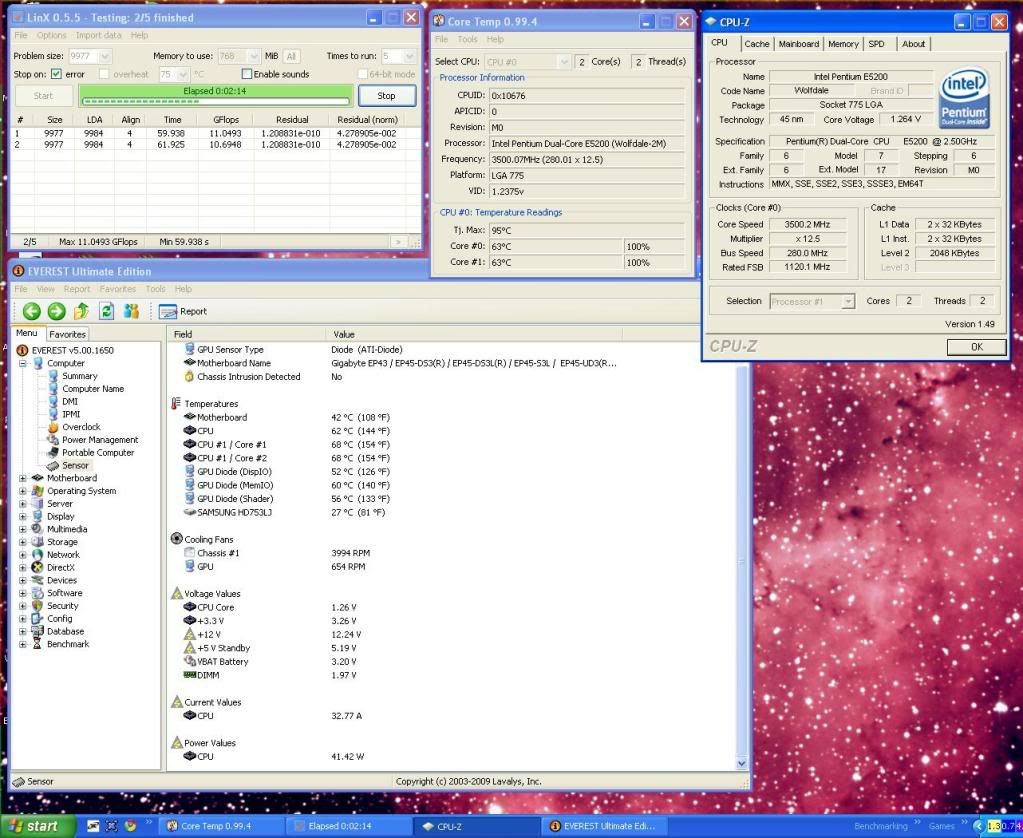
Does anyone else think my temps are bit high, considering the volts, room is ~26C, its only drawing 40watts on power and it is with a IFX-14 with a 3000RPM fan?
My Q6600 @ 3.6GHz would use 140watts, 1.3v and in a ~26C room it would run at those temps.
So are E5200's normally this hot?
Thanks
Last edited by fatguy1992; 03-17-2009 at 12:18 AM.
Yep, that is pretty high for that amount of voltage.
------------------------------------------------------------------------------------------------------
Crunch with us, the XS WCG team
------------------------------------------------------------------------------------------------------
Thanks what I was thinking, i'll re-apply the thermalpaste
Hi folks,
Appreciate any tips on this. I was able to push my e7300 past 3.4ghz, I'm now running a stable 3.6ghz... but I can't seem to push it further than that. Also, FSB doesn't seem to like when i push it past 400mhz.
e7300 @ 3.6ghz 400x9@ 1.408v
Xigmatek Dark Knight CPU Cooler
corsair ballistix tracer PC6400 5/5/5/18 @1066mhz
gigabyte ep45 ud3p
corsair vx550
HIS Radeon 4830 @650/1000
Was able to get 483fsb to pass small ffts overnight, running blend now
I have the same board with corsair DDR3 1600 and i cant get it stable.
can u please share the template u use for those settings? how stable is with prime95 and IBT?
DFI LT P35-T2R
E8400
2x2 OCZ DDR2 PC2-8000 Platinum XTC
700W OCZ
7950GX2
2x250GB WD
20" Samsung 205BW
different hardware configurations may or will have different results, i think.
i ran super_pi test only, but after that it (usually) requires and i would add a few more volts for prime95.
i'm not interested in running the IBT yet.
==========================
btw, here's a little comparison between my own boards.
super_pi 32m times of EP45-UD3R DDR2 XP x64 OS vs. EP45T-UD3R DDR3 Vista 32-bit.

Thanks mreld3r... very helpful. I entered the values you suggested... first thing, when I entered 1.34 for VTT and MCH Core the CPU and MCH References automatically changed to .848.... Is that ok or was I supposed to try and keep them at .76?
I was able to get into windows just fine up to 450x9 and run my typical software without any noticeable problems. I ran into problems though with memtest and prime blends (they failed immediately)... prime small fft's ran fine on a short 10 minute test but my temps during that were: 70/66/58/58 and the cpu read 71. This is too high correct?
Due to the memtest and prime blends errors I assume the RAM settings need to be tweaked?
Code:MB Intelligent Tweaker(M.I.T.) Robust Graphics Booster ...............: Auto CPU Clock Ratio ...........................: 9 CPU Frequency............................: 3.60GHz Clock Chip Control Standard Clock Control CPU Host Clock Control..................: [Enabled] CPU Host Frequency (Mhz) .............: 400Mhz PCI Express Frequency (Mhz) .........:100 C.I.A.2 ..................................:[Disabled] Advanced Clock Control CPU Clock Drive...........................: 800mV PCI Express Clock Drive.................: 900 mV CPU Clock Skew (ps)....................: 0ps MCH Clock Skew (ps)....................: 0ps DRAM Performance Control Performance Enhance...................: [STANDARD] (G)MCH Frequency Latch...............: [Auto] System Memory Multiplier ...............: 2.00D Memory Frequency (Mhz) ..............: 800*.......800 DRAM Timing Selectable .................: [Manual] Standard Timing Control CAS Latency Time........................5*......5 tRCD .........................................5*......5 tRP'...........................................5*......5 tRAS........................................15*......15 Advanced Timing Control - I didn't touch anything in here, everything is set to Auto. Motherboard Voltage Control Load-Line Calibration.....................: Enabled CPU Vcore….……….......1.25000V*...: 1.35 CPU Termination…..... 1.200V*.......: 1.34 CPU PLL…………………....1.500V*.......: 1.5 CPU Reference.……….....0.76V*.......: .848 MCH/ICH MCH Core….1.100V*...........:1.34 MCH Reference….…….0.76V*.............: .848 MCH/DRAM Ref.…......0.900V*...........: Auto ICH I/O……………….....1.550V..............: Auto ICH Core…………...……1.100V..............: Auto DRAM DRAM Voltage …1.800V*............: 1.9 DRAM Termination ..…0.900V*.............: normal Channel A Reference 0.900V*.............: normal Channel B Reference 0.900V*.............: normal Advanced Settings Limit CPUID Max. to 3.....................: [Disabled] No-Execute Memory Protect............: [Disabled] CPU Enhanced Halt (C1E)................: [Disabled] C2/C2E State Support....................: [Disabled] x C4/C4E State Support..................: [Disabled] CPU Thermal Monitor 2(TM2) ...........: [Disabled] CPU EIST Function.........................: [Disabled] Virtualization Technology................: [Disabled]
Jor3lBR-memtest passed just fine after 23 tries, i put my setting in the template below. Anything in parenthesis is what I manually put into settings.. OS still won't install.
MB Intelligent Tweaker(M.I.T.)
Robust Graphics Booster ...............: Auto
CPU Clock Ratio ...........................: 9
CPU Frequency............................: 3.00GHz
Clock Chip Control
Standard Clock Control
CPU Host Clock Control..................: [Enabled]
CPU Host Frequency (Mhz) .............: (316)
PCI Express Frequency (Mhz) .........100)
C.I.A.2 ..................................:[Disabled]
Advanced Clock Control
CPU Clock Drive...........................: 700mV
PCI Express Clock Drive.................: 700mV
CPU Clock Skew (ps)....................: 0ps
MCH Clock Skew (ps)....................: 0ps
DRAM Performance Control
Performance Enhance...................
(G)MCH Frequency Latch...............: [Auto]
System Memory Multiplier ...............: (2.66 D)
Memory Frequency (Mhz) ..............: 800*.......843
DRAM Timing Selectable .................: [Manual]
Standard Timing Control
CAS Latency Time........................5*......(5)
tRCD .........................................5*......( 5)
tRP'...........................................5*. .....(5)
tRAS........................................15*... ...(18)
Advanced Timing Control
tRRD........... 3
tWTR..........3
tWR............6
tRFC............42
tRTP............3
Channel A Settings
Static Tread.............10
..............................0
..............................0
..............................0
..............................0
Trd2rd.....................8
Twr2wr....................8
Twr2rd.....................7
Trd2wr......................9
Motherboard Voltage Control
Load-Line Calibration.....................: Enabled (disabled)
CPU Vcore….……….......1.325*...: (1.4)
CPU Termination…..... 1.200V*.......: (1.38)
CPU PLL…………………....1.500V*.......: (Auto)
CPU Reference.……….....0.76V*.......: (Auto)
MCH/ICH MCH Core….1.100V*...........: (Auto)
MCH Reference….…….0.76V*.............: (Auto)
MCH/DRAM Ref.…......0.900V*...........: Auto
ICH I/O……………….....1.50V..............: Auto
ICH Core…………...……1.100V..............: Auto
DRAM DRAM Voltage …1.800V*............: (1.9)
DRAM Termination ..…0.900V*.............: (Auto)
Channel A Reference 0.900V*.............: (Auto)
Channel B Reference 0.900V*.............: (Auto)
Advanced Settings
Limit CPUID Max. to 3.....................: [Disabled]
No-Execute Memory Protect............: [Disabled]
CPU Enhanced Halt (C1E)................: [Disabled]
C2/C2E State Support....................: not present
x C4/C4E State Support..................: not present
CPU Thermal Monitor 2(TM2) ...........: [Disabled]
CPU EIST Function.........................: [Disabled]
Virtualization Technology................: [Disabled]
Last edited by gyasih; 03-17-2009 at 11:23 AM. Reason: clarity
 please help lads
I wanted to ask if anyones computer hangs at start up,particulary on the logo page,stays there for 5 mins,and can also hang on the page were it says welcome,
maybe this has something to do with my current overclock,has anyone else experienced this,any help would be great.cheers
regs
paul
[B]BIOS F10
WINDOWS XP& W7
I7 920@3.99GHZ 1.23VCORE
3X2 GIG OCZ GOLD 1520MHZ
SAMSUNG F3 500GB
AKASA NERO CPU COOLER
GA-EX58-UD5
250 GTS
ASUS ESSENCE STX
ANTEC 1200
ANTEC CP 850 PSU
sometimes after I change some bios settings mine will hang on the windows screen that says 'loading user settings' for a minute or two.
 Bios settings for gyasih
Try This for starter (you had loads of settings way off including some mem timings):
Code:MB Intelligent Tweaker(M.I.T.) Robust Graphics Booster ...............: Auto CPU Clock Ratio ...........................: 9 CPU Frequency............................: 3.00GHz Clock Chip Control Standard Clock Control CPU Host Clock Control..................: [Enabled] CPU Host Frequency (Mhz) .............: (316) PCI Express Frequency (Mhz) .........:(100) C.I.A.2 ..................................:[Disabled] Advanced Clock Control CPU Clock Drive...........................: 900mV** PCI Express Clock Drive.................: 900mV** CPU Clock Skew (ps)....................: 0ps MCH Clock Skew (ps)....................: 50ps** DRAM Performance Control Performance Enhance...................:( [STANDARD] ) (G)MCH Frequency Latch...............: [Auto] System Memory Multiplier ...............: (2.66 D) Memory Frequency (Mhz) ..............: 800*.......843 DRAM Timing Selectable .................: [Auto]** Standard Timing Control CAS Latency Time........................5*......(a) tRCD .........................................5*......(a) tRP'...........................................5*......(a) tRAS........................................15*......(a) Advanced Timing Control tRRD........... auto tWTR..........a tWR............a tRFC............a tRTP............a Channel A Settings Static Tread.............a ..............................a ..............................a ..............................a ..............................a Trd2rd.....................a Twr2wr....................a Twr2rd.....................a Trd2wr......................a Motherboard Voltage Control Load-Line Calibration.....................: Enabled (disabled) CPU Vcore….……….......1.325*...: (1.4) CPU Termination…..... 1.200V*.......: (1.200)** CPU PLL…………………....1.500V*.......: (Normal) ** CPU Reference.……….....0.76V*.......: (0.760)** MCH/ICH MCH Core….1.100V*...........: (1.300)** MCH Reference….…….0.76V*.............: (0.800)** MCH/DRAM Ref.…......0.900V*...........: Auto ICH I/O……………….....1.50V..............: Normal** ICH Core…………...……1.100V..............: Normal** DRAM DRAM Voltage …1.800V*............: (Auto)** DRAM Termination ..…0.900V*.............: (Auto)** Channel A Reference 0.900V*.............: (Auto)** Channel B Reference 0.900V*.............: (Auto)** Advanced Settings Limit CPUID Max. to 3.....................: [Disabled] No-Execute Memory Protect............: [Enabled]** CPU Enhanced Halt (C1E)................: [Disabled] C2/C2E State Support....................: not present x C4/C4E State Support..................: not present CPU Thermal Monitor 2(TM2) ...........: [Disabled] CPU EIST Function.........................: [Disabled] Virtualization Technology................: [Disabled]
//RETIRED-o00o--°(_)°--o00o-OVERCLOCKER//
It hangs up when my OC is bad. I normally don't wait for it to fix itself, I hit the reset button. If it does it again I shut it down and turn the power switch off a couple times for around 30 seconds or so. That normally takes care of it. Then go back into bios and try different settings..
Jor3lBR-my memory is actually rated 5-5-5-18, I incorrectly wrote 5-5-5-15. Would that change anything you suggested? My memory is also 800Mhz.
makes sense
I agree with you.pity because it was appeared to be rock solid,was gaming for 3 hours without any problems 4.2@ vcore 1.28, maybe i will put a few more volts through it.take care bud
regs
paul
[B]BIOS F10
WINDOWS XP& W7
I7 920@3.99GHZ 1.23VCORE
3X2 GIG OCZ GOLD 1520MHZ
SAMSUNG F3 500GB
AKASA NERO CPU COOLER
GA-EX58-UD5
250 GTS
ASUS ESSENCE STX
ANTEC 1200
ANTEC CP 850 PSU
anyone else notice that the ga-ep45-ud3r f7 bios just went back too f7a beta?
CPU----------------------Xeon W3520 @ 4.2
MOTHERBOARD---------Evga Classified 760
MEMORY-----------------G.Skill (3 x 2GB) DDR3 2000mhz
COOLING----------------Thermalright TRUE120
VIDEO--------------------eVGA 285 GTX (720/1620/2780)
MONITOR----------------BenQ FP241VW
STORAGE----------------4x 32gb Super Talent Ultra Drive ME SSDs in Raid 0, 1x WD Black 1TB Storage
POWER------------------Corsair-750TX
Seem to have figured out the hi temps on this thing. After reapplying thermal paste half a dozen times or so and trying different brands/types I turned the 120 facing up towards the top and temps went down considerably, also they evened back out within 1c to 2c of each other. I quess it wasnt making even contact. To test it I tried 4.5ghz at 1.45v and reached 72c max before failing Prime one core. A step in the right direction anyway.
System passes memtest, but still crashes during OS install
[QUOTE=calpolyarc;3722882]Thanks mreld3r... very helpful. I entered the values you suggested... first thing, when I entered 1.34 for VTT and MCH Core the CPU and MCH References automatically changed to .848.... Is that ok or was I supposed to try and keep them at .76?
I was able to get into windows just fine up to 450x9 and run my typical software without any noticeable problems. I ran into problems though with memtest and prime blends (they failed immediately)... prime small fft's ran fine on a short 10 minute test but my temps during that were: 70/66/58/58 and the cpu read 71. This is too high correct?
Due to the memtest and prime blends errors I assume the RAM settings need to be tweaked?
you may wanna ask Jor or someone else for help getting a lotta ram stable, I only use 2 gigs here. And its not hard to get 2 gigs stable. I just wanted to help you get started. There a lotta very smart people in this thread that can help you a lot better than me. As far as the temps are concerned; Im not much help there either. I dont worry about temps. As long as it doesn't shut down on me, im happy. Especially during small fft's and IBT. I gotta old-timey cooler.
Oh yea, the refs are supposed to change with the Vtt. You may need to adjust the mch/ref to help pass prime-blend and memtest and maybe some more mch core?
Last edited by mreld3r; 03-17-2009 at 08:03 PM.
So I guess there is something wrong with your OS, have you tried another installation CD?! Maybe Windows & Beta for free just to double check.
//RETIRED-o00o--°(_)°--o00o-OVERCLOCKER//
 Posting Permissions



 Reply With Quote


Bookmarks