OK! Installion done:

Press restart now.
BOINC that's what we wanna see!
Locate console/terminal:

Write:
Code:
1.
wget http://boinc.berkeley.edu/dl/boinc_6.6.4_i686-pc-linux-gnu.sh <- 32b
or
wget http://boinc.berkeley.edu/dl/boinc_6.6.4_x86_64-pc-linux-gnu.sh <- x64
or you can use any other earlier version instead of those i listed :)

2. sh boinc_6.6.4_x86_64-pc-linux-gnu.sh <- x64
or
sh boinc_6.6.4_i686-pc-linux-gnu.sh <-32b

With 64bit version remember to install ia32-libs
2a.
sudo apt-get install ia32-libs

*HINT* You can use tab in console ;) first letter of file *tab*
Now in console reads:
use /home/*username*/BOINC/run_manager to start BOINC
Lets not do that yet. Lets set the autostart 
Autostart boinc on boot
Locate Sessions name service (System - > Preferences - > Sessions), just try follow what i do next :P

Press Add

Press browse


Press add:

If you have this kinda view front of you, well you've done it right.

Time to reboot
The power buttons are located at right upper corner, restart your rig from there lets test does the autostart work and then you can setup your account data for boinc
If you see this window when the desktop has been loaded you can say success!

AND what comes to my low res i were runnin that OS from vmware
Here's some good guide made by karl_eller which can be found from end of second page:
Setting up Remote Desktop for Ubuntu + Monitoring and Overclocking with Ubuntu
I should also point out that this guide works great for installing Ubuntu on a USB disk, just select the USB disk when doing the "Guided, use the whole disk" part. Then on this screen, click "Advanced" and choose to install GRUB on the USB (usually something like sdb1) rather than HDD:

While this does technically put the swap partition on the USB drive, on my E7200 with 2Gb RAM, Linux doesn't use ANY of the Swap partition, and barely 1/4 of the RAM, so I'm not worried about constant swap read/writes destroying the USB drive.
Monitoring and Overclocking with Ubuntu
So you've followed s0lid's excellent guide so far, and you have your shiny new Ubuntu machine up and crunching. However now you want to be able to check on the PC without having to have a screen/keyboard attached to it, and most importantly you want to keep an eye on temps and be able to overclock. That's where this little guide comes in.
First:
Setting up Remote Desktop
OK, first things first, you are most likely going to want to set a static IP to your machine, if you haven't done so already. Static IP addresses make it much easier for configuring things like remote desktop, since the IP of the machine won't change when the PC and/or router restarts.
To do this, find the network icon in the top-right, right-click on it and click "Edit Connections", which should bring up a screen like this:
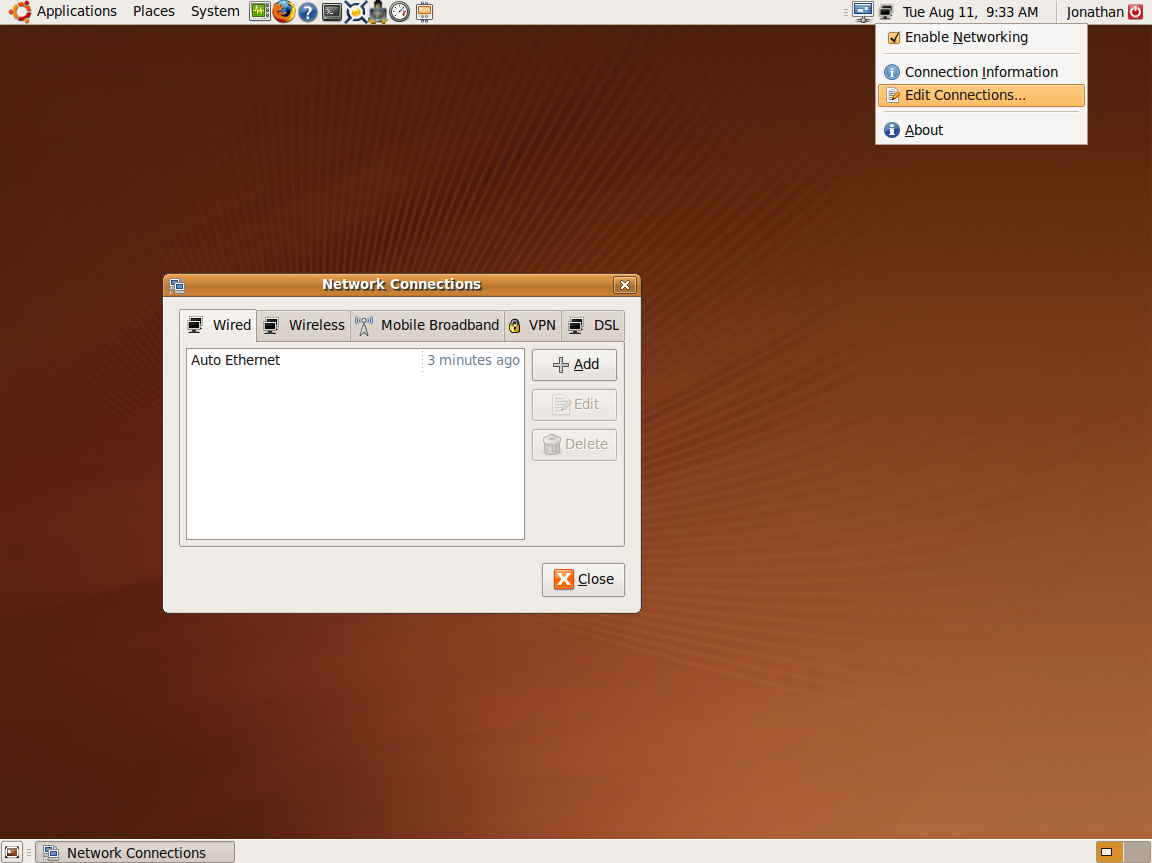
Click on "Auto Ethernet" (or whatever your connection may be called), then click "Edit". Click the "IPv4 Settings" tab and select "Manual" from the method drop-down menu.
Now you'll need to enter in the desired IP address, netmask and default gateway. The IP address will depend on how your network is configured, although in most cases it will be something like 192.168.1.xxx (where xxx is between 1 and 255). I suggest starting from a high-ish number (eg 80 or higher) so that the router's DHCP still has plenty of IPs for automatic assignment. Netmask is usually 255.255.255.0, although that might be different depending on your network setup. Gateway is the IP of your modem, usually something like 192.168.1.1 or 10.0.0.1.
Once you've done that, enter the IP for your router (and any alternate IPs it may have) in the "DNS Servers" box, and you'll wind up with something that looks a little like this:
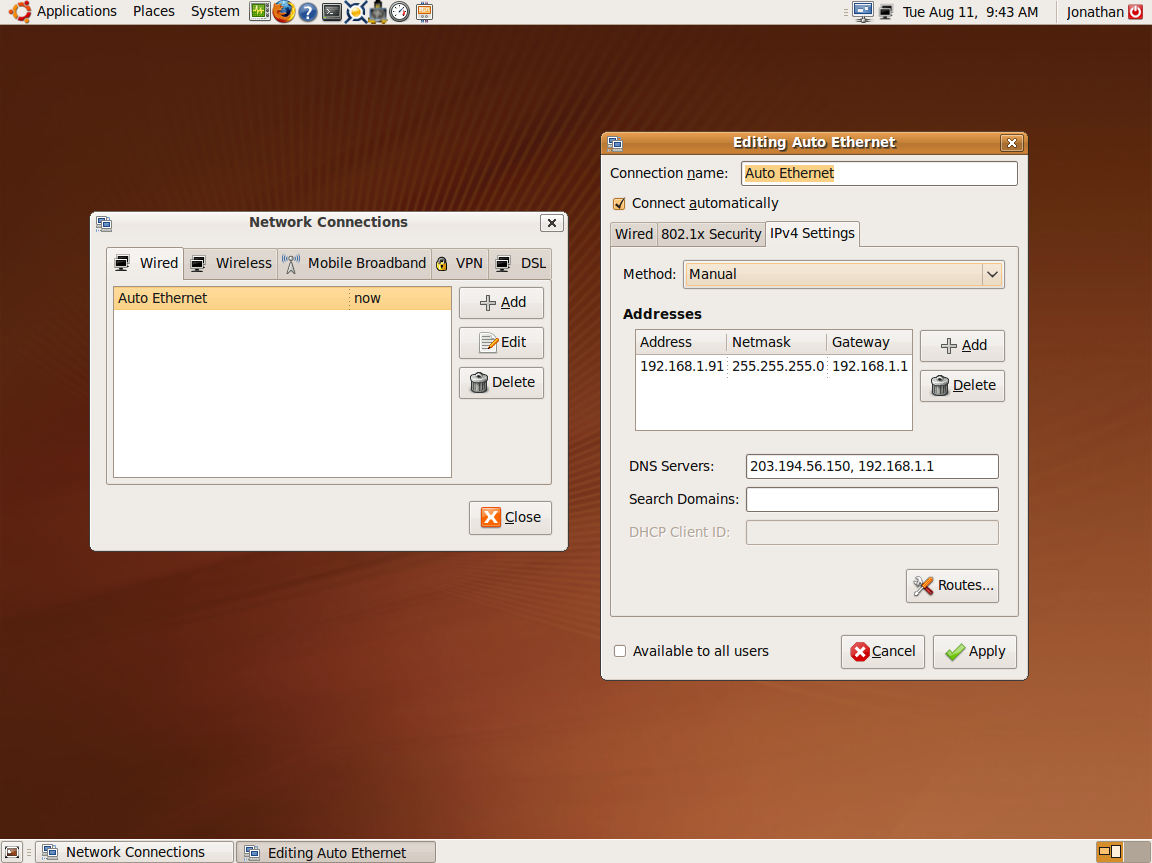
Click "Apply" and then close the "Network Connections" window. To check it is configured properly, right-click the Network icon again, untick "Enable Networking", and then tick it again. If all is well, you should have net connection again, and the "Connection Information" window (again found by right-clicking the Network icon) should show the correct IP Address and Primary/Secondary DNS's.
Right, so that's your static IP set up. Now lets get some kind of remote desktop happening.
To do that, click: System > Preferences > Remote Desktop, like thus (although you most likely won't have boxes ticked):
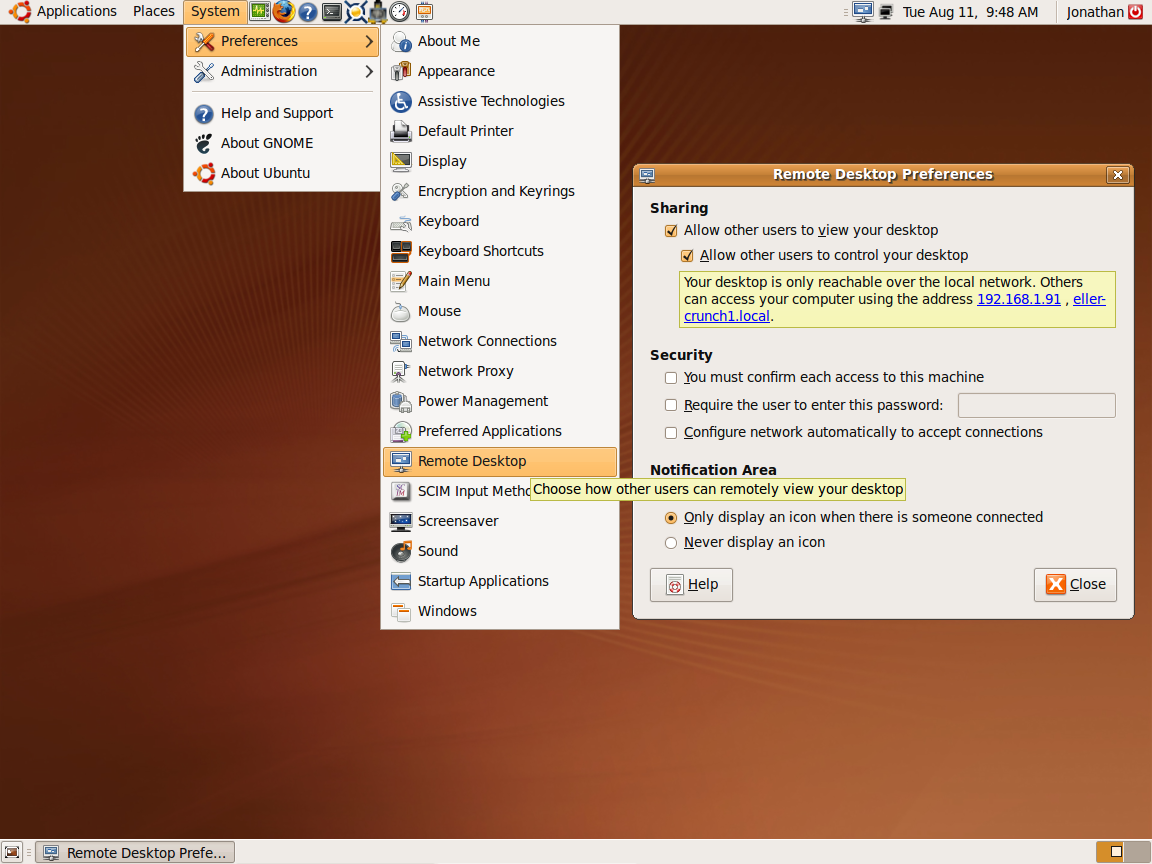
Just a random note, with this window, unlike a lot of other settings windows, changes are applied immediately upon ticking/unticking a box instead of waiting for Apply/Cancel, so if you're running this headless, make sure you don't untick "Allow other users to view your desktop" or "allow other users to control your desktop" while using a VNC program, otherwise you may find yourself locked out like I did 
So now, you want to tick "Allow other users to view your desktop", "allow other users to control your desktop", and make sure that "You must confirm each access to this machine" is UNticked. Password is optional (Remote Desktop will only accept connections from the local network by default, AFAIK), depending on how much you trust other users of your local network. You should wind up with a screen that looks like the above.
What this does is enable Ubuntu's built in VNC program, so you are obviously going to need a program to connect to a VNC server. I personally use UltraVNC which has a really nice little stand-alone VNC Viewer.
To double check everything is working, use your VNC program of choice to try connecting to the Ubuntu machine. I use the IP Address (hence setting a static IP), since I have isses connecting to hostnames on a mixed Windows/Linux network. If it works, contgratulations! If it doesn't, you'll need to re-check your network settings.
Temperature monitoring
So we're accessing this machine remotely and it's crunching 24/7. But there is a heat-wave coming, or you're wanting to OC a bit, and you want to be able to check temperatures. Luckily, Linux has you covered. Open up a terminal window, and enter the following:
Code:
sudo apt-get install lm-sensors gkrellm
enter your root password and answer "y" to any prompts.
This installs the lm-sensors package (one of the most common, and really the only, temp sensor package in Ubuntu) and the GNU Krell Monitors, a nice little sidebar-like program that reads lm-sensors.
If you have any problems installing by the terminal, you can install them via the Synaptics Package Manager. Click System > Administration > Synaptics Package Manager, search for the 2 packages ("lm-sensors" and "gkrellm"), mark them for install and then click "apply".
Now you have them installed, you need to configure lm-sensors. In a terminal window, enter:
Code:
sudo sensors-detect
It will now ask you a bunch of prompts as to if it should scan or load certain things, you will want to enter "Yes" to all of them. Once it has finished scanning, it will give you a summary and ask you to press Enter a couple of times to continue. Do so. You'll end up with a terminal that looks a little like this:
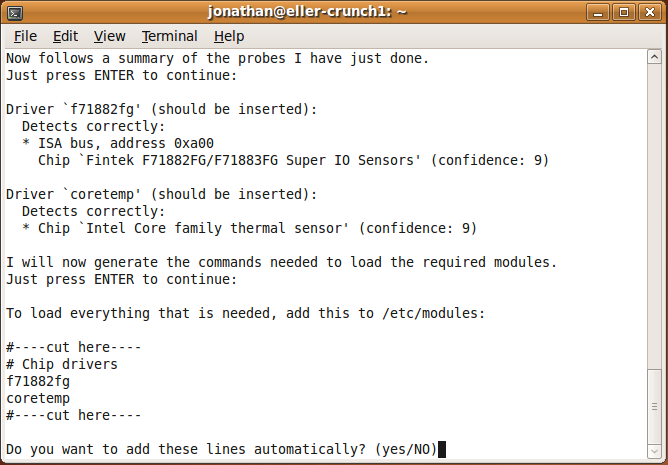
Pay attention to the stuff between the two "#----cut here----", these are the sensors that have been detected on your motherboard. They will vary from board-to-board, although all of them should have at least "coretemp" in common. Enter "yes" for the last prompt, and you've finished sensors-detect.
Now all that does is detect what sensors are available, it doesn't actually install the modules required to read them (despite what it might say about editing /etc/modules), you'll need to enter each one manually using:
Code:
sudo modprobe [module name]
For example, on my MSI P35 Neo2-FR, sensors-detect found "f71882fg" and "coretemp", so I entered:
Code:
sudo modprobe f71882fg
sudo modprobe coretemp
Once you've done that, check that lm-sensors is working, by typing
into a terminal. You should end up with something that looks a little like:
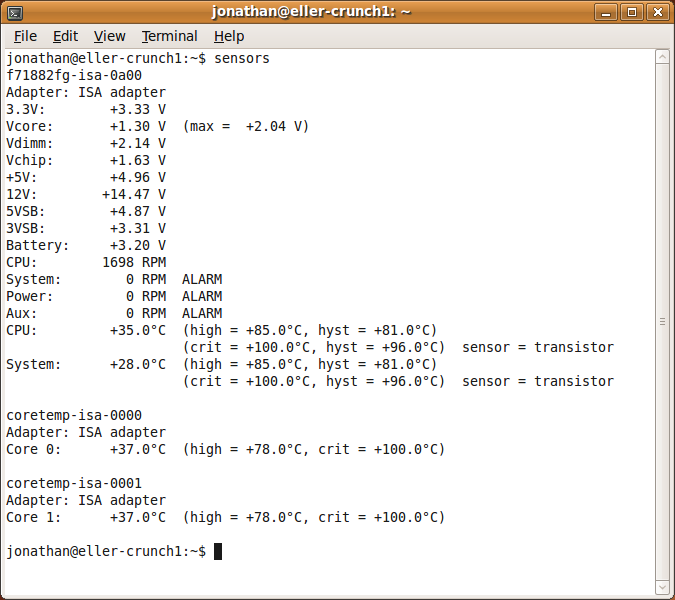
Of course the actual output will vary a lot depending on what sensors your motherboard has, but you can at least see the temps for each core, vCore and System (usually the Northbridge, but YMMV). As you can see, not all the voltage readings are entirely trustworthy, depending on what sensors you have and what your board can monitor. You'll need to figure out what can be believed and what can be ignored. In my case, only vCore reads even remotely close to what it should be, so I'm ignoring the rest of the voltage readings.
OK, so that's lm-sensors installed and configured. But terminals are boring, and it doesn't update, so we need something that can read lm-sensors real-time and give us some nice pretty graphs and stuff. This is where Gkrellm comes in. You can launch it by clicking Applications > System Tools > GKrellM System Monitor.
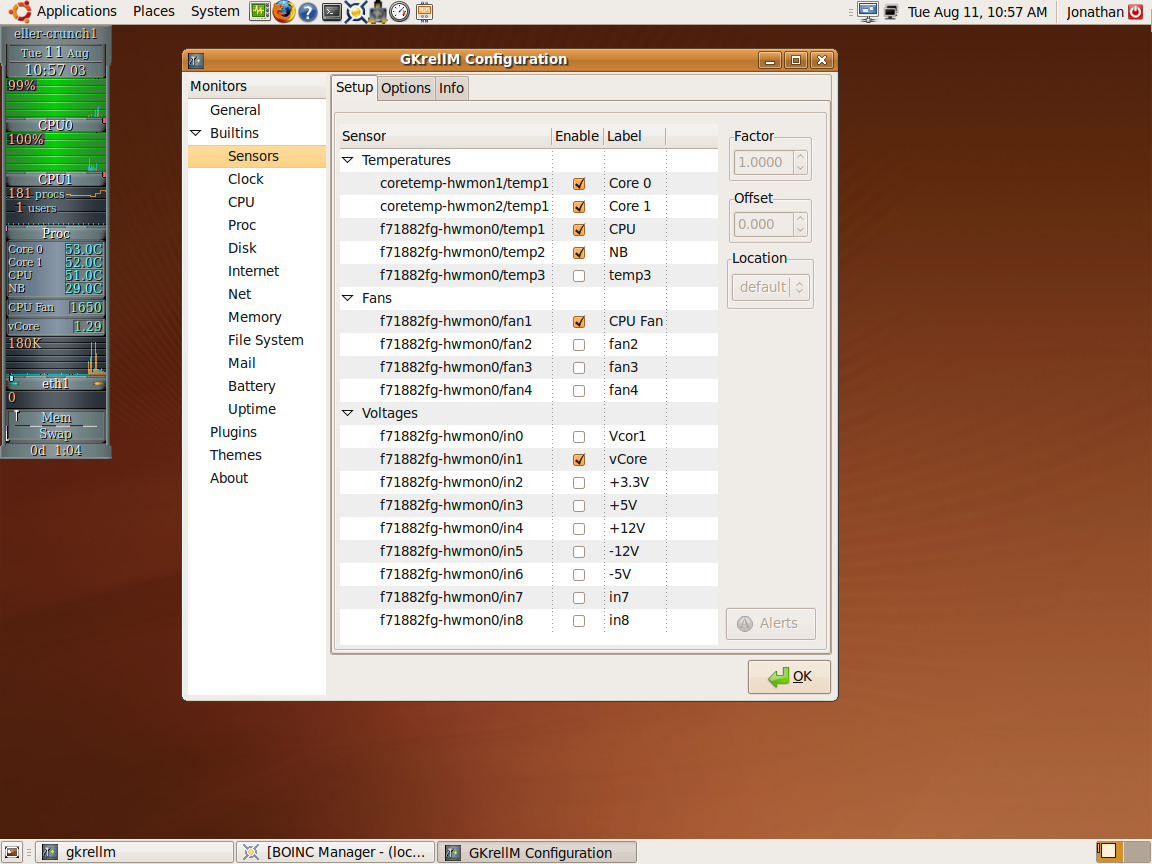
To open the Configuration, either click anywhere on the GKrellM window and hit F1, or right-click on the hostname and click "Configuration". The sensors and other items can be found by expanding "Builtins". I won't bother going into what different things do and how they should be set up, as it'll add way too much to this already kinda lengthy How-to, and I'm sure most of you can figure it out.
This is how mine looks:
Overclocking and stress-testing tools
When it comes to tools for OC'ing, Ubuntu doesn't have a whole lot in it's repositories. However tools do exist, and they are pretty handy. Two that I use are PerlMon, a CPU-Z equivalent, and SysTester, which basically runs X threads of Y loops of Z length SuperPi, and error checks the whole way, rather than making you validate a checksum at the end. I find around 30 loops of 8M digits on all cores gives you a fairly good indication as to if it's WCG stable or not. But as with all OC'ing, YMMV, and the amount of time taken to complete these loops will vary a lot depending on your clock speed.
------------------
Hopefully I was able to help people out with this little addition to s0lid's existing Ubuntu guide.
Eller


 How-To: Ubuntu cruncher! Install and forget


 Reply With Quote

 i7 920@2.8
  X3220@3.0
 X3220@2.4
  E8400@4.05
  E6600@2.4
 Originally Posted by Frisch


 Crunching XS:


Bookmarks