

Is he perhaps using Vista? and your benching under XP...That could explain the difference.....but im not quite sure.Originally Posted by rob[GL]





Is he perhaps using Vista? and your benching under XP...That could explain the difference.....but im not quite sure.
well 05 dont benefit from quad core, .... much maybe a bit ,
E6600 @ 3.6
IN9 32x MAX
EVGA 8800Ultra
750W
False. Im running 1235MHz core on 2x6-pins.
Ok just curious
Did this card come with an acutal DVD copy of HL2 episode 2? Or just a pre-order #?
___
CPU: Brisbane 3600+ @ 2.85ghz + Coolermaster Hyper TX/Fm92
MB: Biostar 550 SE
RAM: 2 x 1gb Super Talent pc6400
GFX: Sapphire X1950XT + Thermalright HR-03
PSU: OCZ GameXstream 600w (Scythe S-Flex 800rpm inside)
Case: Lian-Li PC-7B PlusII
Sound: X-fi x-music
the game isnt out yet.. it make sense to assume that its a preorder/discount number, which u can start a steam account and enter it i think when the game is out so u dont need to pay ... like what AMD did with including HL2 with X2
E6600 @ 3.6
IN9 32x MAX
EVGA 8800Ultra
750W
HL2 came bundled with 9800 (whats X2??)
FX8350 @ 4.0Ghz | 32GB @ DDR3-1200 4-4-4-12 | Asus 990FXA @ 1400Mhz | AMD HD5870 Eyefinity | XFX750W | 6 x 128GB Sandisk Extreme RAID0 @ Aerca 1882ix with 4GB DRAM
eXceed TJ07 worklog/build
yah... i'm understand is you meaning since first post.
Hey ! don't serious he is funny
Yes have the copy HL2 episode 2
yah yah.. what you use the driver version ?, i'll try again on my E6700 and new driver 8.37 but now card not put in my hand, i send to friend for review when it back i come to update again
Last edited by ZoLKoRn; 05-15-2007 at 02:50 AM.
Sorry For My English
OverclockZone Team
THAILAND
What kind of Audio is integrated to these cards?
impressive results & I wait to see core1GHz as soon.
Hmmm, more rumors dispelled... Thanks for that info. Have you done any tests on power draw from your system?
Also, do you think you can get more from the card with an 8 pin configured PSU?
Last edited by SPQQKY; 05-15-2007 at 07:40 AM.
Cursed be the ground for our sake. Both thorns and thistles it shall bring forth for us. For out of the ground we are taken for the dust we are and to the dust we shall return
Heat
I have got my card today... i just can't make run 3D06... games run fine.. (Good quality, i m impressed..) any tips at launch? ( the screen of start of 3D06 stay.. i have install the version coming with the card ( Full version of 3D06)..
Badly my OCZ have be kill this morning, so i have need use a Enermax 620W Liberty.. with the 2x 6pin PCi express...
someone know if the demo of Ruby is leaked allready ?

add "-nosysinfo" to 3DMark shortcut.
Thanks cadaveca,,,
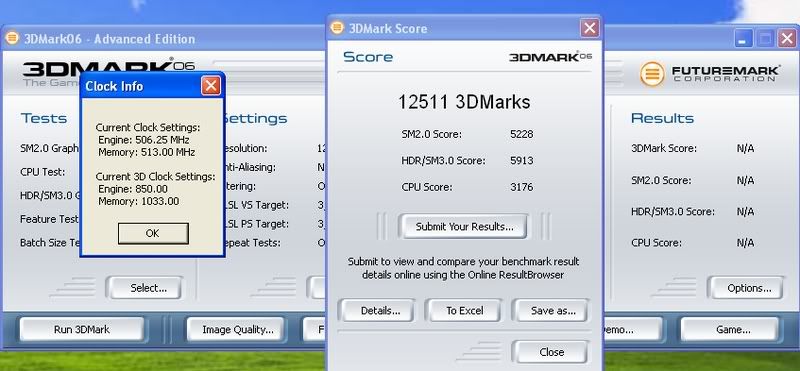
umm those scores seem low ....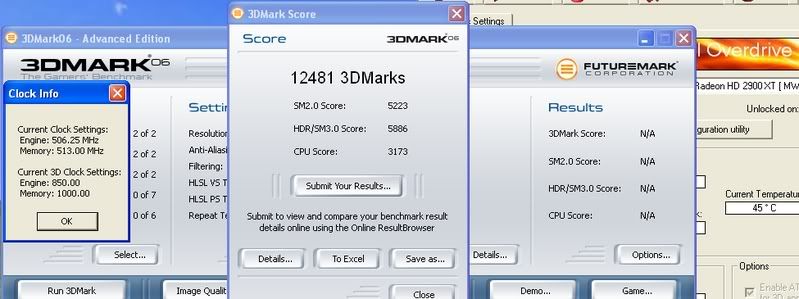
you know what I don't understand, I have a PSU with a 8-pin power connector, but it is already in use by the mobo, and I don't think the mobo would OC as good if it wasn't there, I mean, I don't know any PSU on the market that has two of these cables?
EDIT: forget this, just read on an another forum about this. I think I'll use dual 6-pin, or an adapter...
Last edited by marauder16; 05-15-2007 at 12:00 PM.
DFI ICFX3200 07/30 w/ MCW30
E6600 L632A407 w/ EK Supreme
Powercolor HD3870 w/ MCW60
OCZ Reaper 2x2GB CAS4
WD Caviar Black 1TB
Silverstone Strider 750W
MM U2-UFO Extended CYO
CPU & NB loop = PA120.3, DDC 18W w/ Petra's top, 7/16''
VGA loop = PA120.2, DDC 18W w/ Petra's top, 7/16''
10 fans on 7V, PX-750A, all on SM 930BF
" Having a DFI board is like having a hot girlfriend thats a total b1tch" ...
12500 is wha´t i get wiht my oced 8800gtx so low it not hehe
E6600"L630A446"? @3600@1.?v cooled by Tunic Tower sitting on Abit AB9 Quad GT played on ASUS 8800GTX opperated by a lazy slacker!
i think there was a promotion with AMD X2 4000 seris with a free copy of HL2 game
E6600 @ 3.6
IN9 32x MAX
EVGA 8800Ultra
750W
these things are so easy to o/c maybe 880 on core and 1150 stable on memory today idk :0

I don't think this has been answered yet, but how is CCC overdrive itself showing an option for 1100mhz to be available in overclocking the memory? Is this only with older drivers as I thought the newer drivers only allowed up to 900mhz if overclocking through CCC Overdrive?
Silverstone Temjin TJ-09BW w/ Silverstone DA750
Asus P8P67
2600K w/ Thermalright Venomous X Black w/ Sanyo Denki San Ace 109R1212H1011
8GB G.Skill DDR-1600 7-8-7-24
Gigabyte GTX 460 1G
Modded Creative X-Fi Fatal1ty w/ Klipsch Promedia 2.1
1 X 120GB OCZ Vertex
1 X 300GB WD Velociraptor HLFS
1 X Hitachi 7K1000 1TB
Pioneer DVR-216L DVD-RW
Windows 7 Ultimate 64
ohh go on techpowerup .com and find amd gpu clock tool
the 8 pin is a new connector.. for OC you can use 2x 6pin connector (one go on the 8pin).. Actually Enermax have galaxy DXX with 2x 8 pins and 2x 6pins...they sell too new cable with 8 pins for modular version ( you just need buy the cable.. alone..) OCZ, Silverstone and many other have release PSU with the 8 pin..
@Cantakerous.. for see overdrive function, you need the 8 pins... if you are using 2x 6pins Pciexpress connector, you can use AMD clock tool, like have say momomo... (i m sure with only one PCIexpresss 6 pin, the soft should work too.. not sure i have try..)
for the 3DMark boot up issue:
rename/remove the file called "direcpll.dll" from windows\system32\Futuremark\MSC -folder (WinXP, under Vista this file is in a different folder, use search to locate it)
other option is to use "-nosysteminfo" switch in the 3DMark shortcut, but then you wont be able to send results to ORB
so the other way allows submissions? I wondered how people were posting screens of 3Dmark recognizing the card, but my 3Dmark is blank!
Thanks Macci!
Vista file location : C:windows\system32\Futuremark
file removal works, BTW.
Last edited by cadaveca; 05-15-2007 at 03:13 PM.
I remember that very file having issues with Aquamark successfully running and displaying a score when the X800 series cards came out. An updated version of that file had to be placed in the Aquamark directory for the test to completely finish and not end with a solid black screen.
Silverstone Temjin TJ-09BW w/ Silverstone DA750
Asus P8P67
2600K w/ Thermalright Venomous X Black w/ Sanyo Denki San Ace 109R1212H1011
8GB G.Skill DDR-1600 7-8-7-24
Gigabyte GTX 460 1G
Modded Creative X-Fi Fatal1ty w/ Klipsch Promedia 2.1
1 X 120GB OCZ Vertex
1 X 300GB WD Velociraptor HLFS
1 X Hitachi 7K1000 1TB
Pioneer DVR-216L DVD-RW
Windows 7 Ultimate 64
Hey you should try removing the plastic and fan, attaching 2-120mm fans and let us know if you get any temp drops!?
Opteron 170 CCB1E 0550VPMW @ 2.65ghz 1.275 vcore (Big Typhoon) capable of 3ghz
OCZ Gold DDR400@2-2-2-5
74GB Raptor
DFI UT Ultra-D
Gigabyte 6600gt
 Posting Permissions


 Reply With Quote


Bookmarks