

nevermind



F8c, dated November 24th 2006...few days old so i suspect an F8d is in the works. One thing i noticed in bios was profiles, never noticed this before but was probably present in F8b.
You can press F11 to save a profile and you can save these profiles to bios....you can choose from 8 custom profiles and name them as you want, F12 is also another new option which allows you to either load a profile from bios or use the last known good bios/profile. Intel AHCI and SATA bios ROM remain unchanged, JMicron is still updated to 1.06.59.
The overclocking persists, and i think it's releated to FSB.
As you can see from the screen shot below i input my standard 425x8, but once again upon shutting down the PC it freezes/no POST. I have to push the reset buton whereby i POST but upon entering bios my CPU Host Clock Control is disabled.
Thus i have tried something different, FSB of 345x8 and 345x9..both work and i can shut down the PC and reboot (but have since learned that these settings will not work either), anything over 350FSB won't work...it's like we're back to the old days of bios version F1-F4. Appears this new bios is back to beng FSB limited. Something GB are aware of and have said they are coming up with a new method for FSB overclocking.
My current settings are 345x9=3.1GHz running a 4:5 devider on the memory giving me 862Mhz with 4-4-4-12 set manually. [update] - on further use the bios is still unstable at anything above 266FSB, i tried 340, 334, 300...it's the same scenario, once you power down and push the power on the PC hangs, it will sit there for 30 seconds or so and then POST, but your overclocking settings are disabled.
Clearly the Watch Clock Timeout issue has not been addressed in this bios.
Last edited by Richard Dower; 11-28-2006 at 04:08 PM.
Gigabyte EP45-DQ6 - rev 1.0, F13a bios | Intel Q9450 Yorkfield 413x8=3.3GHz | OCZ ProXStream 1000W PSU | Azuen X-Fi Prelude 64MB X-RAM| WD VelociRaptor 74HLFS-01G6U0 16MB cache 74GB - 2 drive RAID 0 64k stripe | ASUS 9800GT Ultimate 512MB RAM (128 SP!!) | G.SKILL PC2-8800 4GB kit @ 1100MHz | OCZ ATV Turbo 4GB USB flash | Scythe Ninja Copper + Scythe 120mm fan | BenQ M2400HD 24" 16:9 LCD | Plextor 716SA 0308; firmware 1.11 | Microsoft Wireless Entertainment Desktop 8000 | Netgear RangeMax DG834PN 108mbps; firmware 1.03.39 + HAWKING HWUG1 108mbps USB dongle | Digital Doc 5+ | 7 CoolerMaster 80mm blue LED fans | Aopen H700A tower case | Vista Home Premium - 32bit, SP1
Richard please share it with us and new BIOS for DS4 means F7 would have profile option? or GB put it into F8Originally Posted by Richard Dower
Last edited by HamidFULL; 11-28-2006 at 11:27 AM.
www.HotOverclock.com Founder & Editor in Chief
---------------------
Upgrading to X58 ...
Q6600 G0 @ 3.8GHz FSB 423MHz w/Swiftech H2O 120 Compact Dual 120mm fan Last OC Details Here
abit IX38 QuadGT Rev1.0 (X38 Rev.01)
4x1GB Patriot +SL PC2-6400 Based on Aeneon AET760UD00-25D Chips! @ 1:1 1000MHz 5-4-4-8 2.0v
Sapphire Radeon HD 4850 A2 Normal Edition @ Core 820MHz Mem 2100MHz
Display 19" LG FLATRON L1960TR LCD Contrast 3000:1 Response Time 2ms Lightning Fast!! w/f-Engine Chip and DFC Technology
HDD 250GB Seagate Barracuda 7200.10 ST3250820AS
HDD 120GB Maxtor Max.10 6L120M0
PSU Zalman ZM1000-HP 1000 Watt Six 12v Rail and Dual Seperate Board
A4Tech X7 Gaming Mouse X-750BF Dual Laser Engin w/2500DPI
More about my Memory : it can do 950MHz 4-4-4-8 2.0v Stable and 1100MHz 5-7-7-12 2.2v Stable and 1200MHz 6-8-8-21 2.3v not Stable!
I hope Gigabyte will release DQ6 F8 with the DS4 F8 final (skip F7?)
Last edited by iceblade; 11-28-2006 at 01:01 PM.
I hope they have the same for the DS3. I miss that from my Ultra-D.
Why are they doing the DS3 and DS6 but nothing for the DS4?
Silverstone TJ07
i7 920
EVGA X58
Corsair Dominator 6gb 1600GT 2000MHz 8-8-8-20
Thermochill PA120.3
Big NG fan controller
Heat Killer v3 CPU Acetal
EK Full block GPU
ATI 5870
Corsair HX850
1X 1TB Samsung
1X 500GB Seagate
1X Crucial SSD 64GB OS
Im sure richard posted a post a few pages back stating that he cannot share his bioses. And secondly i think there working on ds3 and dq6 cause they re widely available around the world unlike the ds4 which is only available in Europe i believe.
I second that. I still hope they will release a new BIOS for the DS4 as soon as the new BIOS for DQ6 is released because they are more or less the same board. If only we could have a more "official" report on that, it would be much appreciated
Last edited by iceblade; 11-28-2006 at 02:38 PM.
What is it about the ds4 that it's only available in Europe? I'd bet there also working on the ds4 bios.
| Intel Core i7-2600K | ASRock P67 EXTREME4 GEN3 | G.SKILL Sniper Series 8GB (2 x 4GB) DDR3 1866 | EVGA GTS 450 |
| Swiftech APOGEE Drive II CPU Waterblock with Integrated Pump | XSPC RX360 | Swiftech MCP655-B Pump | XSPC Dual 5.25in. Bay Reservoir |
| Thermaltake 850W PSU | NZXT SWITCH 810 | Windows 7 64-bit |
[SIGPIC][/SIGPIC]
I'm not "working" on anything per se, i'm not a beta tester as one would know them. Just an end user who's playing around with a beta bios and reporting his experince, bad or good.
Since i have a DQ6 thats all that concerns me, in terms of beta. There is no benefit for anyone to be using these early DQ6 betas....they are too immature to be useful, overclocking is not possible at this stage.
The big one i'm hoping for is updated AHCI and SATA bios ROM's...then i'll put some HDTach numbers up and also show how SATA optical drives work. The profiles have nothing to do with the SLI profiles seen on recent AMD boards, it's more like saving a set of bios settings, say "Richard1" and another profile would have another set of settings "Richard2"...one profile could have say 400x9 while the other has 425x8 etc.
You can save upto 8 profiles in bios, you can boot from a specdic profile or your last known good profile/boot up. It's an intersting additional as it would allow you to save various overclock settings in bios and test each one, without having to input/change bios setting each time you want to test an overclock setting.
Last edited by Richard Dower; 11-28-2006 at 04:18 PM.
Gigabyte EP45-DQ6 - rev 1.0, F13a bios | Intel Q9450 Yorkfield 413x8=3.3GHz | OCZ ProXStream 1000W PSU | Azuen X-Fi Prelude 64MB X-RAM| WD VelociRaptor 74HLFS-01G6U0 16MB cache 74GB - 2 drive RAID 0 64k stripe | ASUS 9800GT Ultimate 512MB RAM (128 SP!!) | G.SKILL PC2-8800 4GB kit @ 1100MHz | OCZ ATV Turbo 4GB USB flash | Scythe Ninja Copper + Scythe 120mm fan | BenQ M2400HD 24" 16:9 LCD | Plextor 716SA 0308; firmware 1.11 | Microsoft Wireless Entertainment Desktop 8000 | Netgear RangeMax DG834PN 108mbps; firmware 1.03.39 + HAWKING HWUG1 108mbps USB dongle | Digital Doc 5+ | 7 CoolerMaster 80mm blue LED fans | Aopen H700A tower case | Vista Home Premium - 32bit, SP1
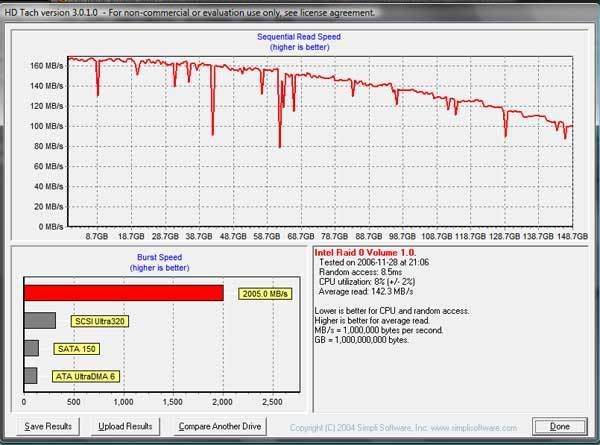
HD Tach, see my sig for drives used and stripe size. The numbers are somewhat average compared to others screenies i have seen. However you must remember that folks don't normally post Stripe size, i've used different Stripe sizes and they do make a difference in raw figures.
32K Stripe can add another 10-12MB/s...also note that my drivers are the latest 6.2.0.2002...but, you need a corresponding bios ROM to go with said drives.
I'm using Intel SATA bios ROM 6.0.0.1022 which is the oldest avialable, but GB say they have and will update the bios ROM to 6.2.0.2002.
As such i hope numbers will change when this happens, i can't swear to this but i think overclocking helps HD Tach numbers.
Gigabyte EP45-DQ6 - rev 1.0, F13a bios | Intel Q9450 Yorkfield 413x8=3.3GHz | OCZ ProXStream 1000W PSU | Azuen X-Fi Prelude 64MB X-RAM| WD VelociRaptor 74HLFS-01G6U0 16MB cache 74GB - 2 drive RAID 0 64k stripe | ASUS 9800GT Ultimate 512MB RAM (128 SP!!) | G.SKILL PC2-8800 4GB kit @ 1100MHz | OCZ ATV Turbo 4GB USB flash | Scythe Ninja Copper + Scythe 120mm fan | BenQ M2400HD 24" 16:9 LCD | Plextor 716SA 0308; firmware 1.11 | Microsoft Wireless Entertainment Desktop 8000 | Netgear RangeMax DG834PN 108mbps; firmware 1.03.39 + HAWKING HWUG1 108mbps USB dongle | Digital Doc 5+ | 7 CoolerMaster 80mm blue LED fans | Aopen H700A tower case | Vista Home Premium - 32bit, SP1
Richard,
Have you tried uping the fsb with easy tune/clockgen? Perhaps this would help? Glad to know they are updating some other things in the bios/raid drivers. I'm very happy with the F7 bios as I've hit easily 480+ FSB...still can't keeps temps down enough tho to make it to 4ghz but 3.8 is ok
E6600 @ 3.8Ghz (8x476) 1.625v(1.58v actual)|Gigabyte GA965-DQ6 (F9)|G.Skill 2GB PC6400 2.25v (44412)|Tuniq Tower|X-fi 7.1|8800GTX|RAID0 74GB Raptors
Hello, all
My first post here; great forum!
Getting DS3/E6300 system parts this week...anyone having good results with the F8i bios? I'm going to be using Crucial Ballistix DDR2 1000 (2.2v), and I've anxiously been tracking this thread.
Thanks!
Q6600 G0 @ 3.41 [380x9, 1.50v] | 8 gb G.Skill DDR2-1000
ASUS Maximus Formula | Corsair HX620W
eVGA 8800 GTS 512
Raptor WD1500AHFD (C) | WD 1600JD x2 RAID 1
WD3000JD | BigAss Thermalright Ultra-120 eXtreme
Vista 64 SP1
Heheh Rich, I think I beat you

lol you can't use the bug!!!
FX8350 @ 4.0Ghz | 32GB @ DDR3-1200 4-4-4-12 | Asus 990FXA @ 1400Mhz | AMD HD5870 Eyefinity | XFX750W | 6 x 128GB Sandisk Extreme RAID0 @ Aerca 1882ix with 4GB DRAM
eXceed TJ07 worklog/build
GB just updated their website to show the 965p boards with revision numbers next to their names. As in GA-965P-DS3 (rev. 1.x).
Last edited by JPH1589; 11-29-2006 at 08:52 AM. Reason: Decided to hold my tongue
Abit IP35 Pro 1.1 w/Xeon 3050 @ 3.2ghz
4x1024 Ballistix DDR2 @ 1000mhz
2x80GB Hitachi Sata II Raid 0
Evga 8800GTS 320mb 600/1390/850
Asus Lightscribe Sata
Hauppauge HVR-1600
Vista Ultimate 64 bit
Hmm, the profile thing seems cool, like cmos reloaded in the DFI boards. Sucks about the fsb limit though, I guess it's best to stay with F7 for now. Thanks for sharing Richard.
MB Reviewer for HWC
Team OCX Bench Team
Some screenies of the DQ6 hitting 500FSB
http://www.sparkgameservers.com/soul...hots/6x500.jpg
http://www.sparkgameservers.com/soul...hots/7x500.jpg
http://www.sparkgameservers.com/soul...hots/8x486.jpg
http://www.sparkgameservers.com/soul...hots/9x434.jpg
http://www.sparkgameservers.com/soul...nShots/mem.jpg
E6600 @ 3.8Ghz (8x476) 1.625v(1.58v actual)|Gigabyte GA965-DQ6 (F9)|G.Skill 2GB PC6400 2.25v (44412)|Tuniq Tower|X-fi 7.1|8800GTX|RAID0 74GB Raptors
Are you using that partition trick?, on a fresh install i get 141MB/s...seems to drop down when software gets pushed onto the drive.
Gigabyte EP45-DQ6 - rev 1.0, F13a bios | Intel Q9450 Yorkfield 413x8=3.3GHz | OCZ ProXStream 1000W PSU | Azuen X-Fi Prelude 64MB X-RAM| WD VelociRaptor 74HLFS-01G6U0 16MB cache 74GB - 2 drive RAID 0 64k stripe | ASUS 9800GT Ultimate 512MB RAM (128 SP!!) | G.SKILL PC2-8800 4GB kit @ 1100MHz | OCZ ATV Turbo 4GB USB flash | Scythe Ninja Copper + Scythe 120mm fan | BenQ M2400HD 24" 16:9 LCD | Plextor 716SA 0308; firmware 1.11 | Microsoft Wireless Entertainment Desktop 8000 | Netgear RangeMax DG834PN 108mbps; firmware 1.03.39 + HAWKING HWUG1 108mbps USB dongle | Digital Doc 5+ | 7 CoolerMaster 80mm blue LED fans | Aopen H700A tower case | Vista Home Premium - 32bit, SP1
New JMicron drivers:
http://www.station-drivers.com/telec...1.17.06.04.exe
Gigabyte EP45-DQ6 - rev 1.0, F13a bios | Intel Q9450 Yorkfield 413x8=3.3GHz | OCZ ProXStream 1000W PSU | Azuen X-Fi Prelude 64MB X-RAM| WD VelociRaptor 74HLFS-01G6U0 16MB cache 74GB - 2 drive RAID 0 64k stripe | ASUS 9800GT Ultimate 512MB RAM (128 SP!!) | G.SKILL PC2-8800 4GB kit @ 1100MHz | OCZ ATV Turbo 4GB USB flash | Scythe Ninja Copper + Scythe 120mm fan | BenQ M2400HD 24" 16:9 LCD | Plextor 716SA 0308; firmware 1.11 | Microsoft Wireless Entertainment Desktop 8000 | Netgear RangeMax DG834PN 108mbps; firmware 1.03.39 + HAWKING HWUG1 108mbps USB dongle | Digital Doc 5+ | 7 CoolerMaster 80mm blue LED fans | Aopen H700A tower case | Vista Home Premium - 32bit, SP1
Revision 2.0 boards are due soon, December. Apparently there is some layout differences and some changes to the voltage regulation.
Gigabyte EP45-DQ6 - rev 1.0, F13a bios | Intel Q9450 Yorkfield 413x8=3.3GHz | OCZ ProXStream 1000W PSU | Azuen X-Fi Prelude 64MB X-RAM| WD VelociRaptor 74HLFS-01G6U0 16MB cache 74GB - 2 drive RAID 0 64k stripe | ASUS 9800GT Ultimate 512MB RAM (128 SP!!) | G.SKILL PC2-8800 4GB kit @ 1100MHz | OCZ ATV Turbo 4GB USB flash | Scythe Ninja Copper + Scythe 120mm fan | BenQ M2400HD 24" 16:9 LCD | Plextor 716SA 0308; firmware 1.11 | Microsoft Wireless Entertainment Desktop 8000 | Netgear RangeMax DG834PN 108mbps; firmware 1.03.39 + HAWKING HWUG1 108mbps USB dongle | Digital Doc 5+ | 7 CoolerMaster 80mm blue LED fans | Aopen H700A tower case | Vista Home Premium - 32bit, SP1
Finally my hdtach reports some real numbers. Thanks!
Not too bad for my $40 hard drives.

Abit IP35 Pro 1.1 w/Xeon 3050 @ 3.2ghz
4x1024 Ballistix DDR2 @ 1000mhz
2x80GB Hitachi Sata II Raid 0
Evga 8800GTS 320mb 600/1390/850
Asus Lightscribe Sata
Hauppauge HVR-1600
Vista Ultimate 64 bit
Naa it happened when I turn on write back cache I think.
HDtech scores is not effected by overclocking, at least on standard HD setup, don't see how raid would be any better since limitation is STILL hardrive.
I guess I wasn't clear. The new driver allowed me to get acurate numbers form HDTach. That is all I was saying.
Abit IP35 Pro 1.1 w/Xeon 3050 @ 3.2ghz
4x1024 Ballistix DDR2 @ 1000mhz
2x80GB Hitachi Sata II Raid 0
Evga 8800GTS 320mb 600/1390/850
Asus Lightscribe Sata
Hauppauge HVR-1600
Vista Ultimate 64 bit
 Posting Permissions


 Reply With Quote
Bookmarks