

What Sparky said.
Make sure you are following the instructions from the first page to the 't'. These boards are very picky.



What Sparky said.
Make sure you are following the instructions from the first page to the 't'. These boards are very picky.
Cruncher #1: EVGA Z68 FTW | i7-2600k @ 4.5 | 6GB Ram
Cruncher #2: Supermicro Dual-Socket | 2 x 6-core Opterons | 4GB Ram
Cruncher #3: 8-core Xserve 1,1
T400 for non-crunching
"But don't think you'll run me over - It's, ah, planting season here in Texas... and the farm is growing..." -Otis11 on crunching WCG

and yeah i know they take a while my sammy prob takes a full 60seconds to post. i let it sit there for like 15min and still nothing. tried it with and without drives/usb drive, tried with 2 videocards, moved the ram around, removed some. still no go.Originally Posted by Sparky

did all of that except ram, i did one stick in each of the blue slots. all the parts are correct, as they came from shoota or were the same exact thing he had before.
and as for setup, what is there to mess up? put it together, plug drive to sata 20.
it starts i get post lights etc, and everything gets warm/hot but no video.
a brand new HD5450
and shoota's used pci thing, that im guessing he used in this board before. nither show any video.
again what is differant really about this build that building any other computers, other than the obvious 4p, etc..

Ah that's a problem. Don't go by slot color, it is misleading. Fill ALL of CPU0 memory slots first (two blue, two black). Then, move on to CPU1 memory slots. If you put 2 per CPU bank, it won't work. Been there, done that.
The Cardboard Master Crunch with us, the XS WCG team
Intel Core i7 2600k @ 4.5GHz, 16GB DDR3-1600, Radeon 7950 @ 1000/1250, Win 10 Pro x64
populate all four dimms for cpu0 and nothing else.
Cruncher #1: EVGA Z68 FTW | i7-2600k @ 4.5 | 6GB Ram
Cruncher #2: Supermicro Dual-Socket | 2 x 6-core Opterons | 4GB Ram
Cruncher #3: 8-core Xserve 1,1
T400 for non-crunching
"But don't think you'll run me over - It's, ah, planting season here in Texas... and the farm is growing..." -Otis11 on crunching WCG
silly enterprise mobos.
somone should put this in post #1 here. as this would be part of everyones setup.
thanks guys lets see how it goes tonight when or if I ever get off work.. today sucks and its only 10:45am... only 6 hours and some change to go..
it's 2pm here
Cruncher #1: EVGA Z68 FTW | i7-2600k @ 4.5 | 6GB Ram
Cruncher #2: Supermicro Dual-Socket | 2 x 6-core Opterons | 4GB Ram
Cruncher #3: 8-core Xserve 1,1
T400 for non-crunching
"But don't think you'll run me over - It's, ah, planting season here in Texas... and the farm is growing..." -Otis11 on crunching WCG
yeah yeah yeah... tell me time traveler, what are the lottery numbers.
If I told you we'd have to split it..
Cruncher #1: EVGA Z68 FTW | i7-2600k @ 4.5 | 6GB Ram
Cruncher #2: Supermicro Dual-Socket | 2 x 6-core Opterons | 4GB Ram
Cruncher #3: 8-core Xserve 1,1
T400 for non-crunching
"But don't think you'll run me over - It's, ah, planting season here in Texas... and the farm is growing..." -Otis11 on crunching WCG
and you guys would have to use it build crunchers
still wont do anything.
filled just cpu0, filled cpu0+cpu1, put 2 sticks in each, filled cpu0 cpu1 and 2 sticks in 3and4.. still no go.
i love my luck with computers, i dont think ive ever had a new computer build working in the same week that it arrived.. allah must hate me or somthing..
The battery might be dead.
but it was just working like an hour before he pulled it and shipped.. :'(
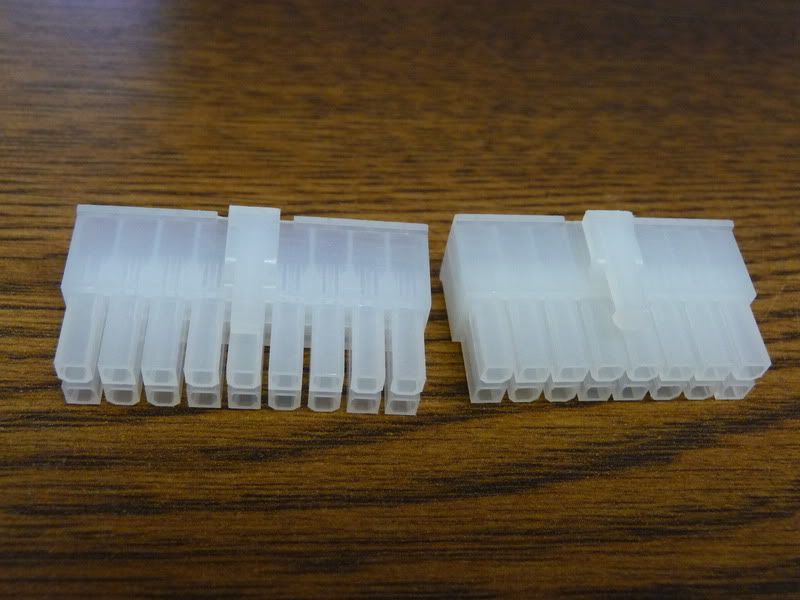
so ive found the oem style psu plugs
16/18 pin in clear/white
anyone interested? 2$ for each one is what i was quoted. so it may be slight more after shipping but. still cheap. im glad i found em ive had arima for like 4 days and im already tired of all the adapter cables and such.
Last edited by NKrader; 03-01-2012 at 03:17 PM.
Would this allow me to plug in the power connectors with out turning some backwards?
Make sure each ram slot in the center of the board is populated.
Cruncher #1: EVGA Z68 FTW | i7-2600k @ 4.5 | 6GB Ram
Cruncher #2: Supermicro Dual-Socket | 2 x 6-core Opterons | 4GB Ram
Cruncher #3: 8-core Xserve 1,1
T400 for non-crunching
"But don't think you'll run me over - It's, ah, planting season here in Texas... and the farm is growing..." -Otis11 on crunching WCG
yes i got that part
its booting now, now i cant get it to boot orinstall from usb, it fails halfway thru talking about "root=" somthing. ive tried remaking the usb stick a few times now.. bleh.
but 4 days down now it bootsi think im good for the night. LOL
they would go into the plugs like the original psu google had would.
Use an optical drive to install the OS.
Would you then need replace those plugs with plugs on your PS. Pretty cool
Yeah I had NO luck booting from USB. I used a random SATA DVD-ROM drive I had lying around - I didn't know they made DVD-ROMs in SATA (yeah, reader only, doesn't even burn CDs).
The Cardboard Master Crunch with us, the XS WCG team
Intel Core i7 2600k @ 4.5GHz, 16GB DDR3-1600, Radeon 7950 @ 1000/1250, Win 10 Pro x64
I would use an optical drive too. Much easier
Cruncher #1: EVGA Z68 FTW | i7-2600k @ 4.5 | 6GB Ram
Cruncher #2: Supermicro Dual-Socket | 2 x 6-core Opterons | 4GB Ram
Cruncher #3: 8-core Xserve 1,1
T400 for non-crunching
"But don't think you'll run me over - It's, ah, planting season here in Texas... and the farm is growing..." -Otis11 on crunching WCG
lol luckally i got a cdrom recently. i didnt have any for like 2 years. had to barrow one to install xp on sammy.
burning now
edit.............................................. .......................
there is no ide on this mobo.. wtf.
well im down until i can find sata cdrom
Last edited by NKrader; 03-01-2012 at 08:05 PM.
You could always try installing linux to the hdd using a different computer..
Cruncher #1: EVGA Z68 FTW | i7-2600k @ 4.5 | 6GB Ram
Cruncher #2: Supermicro Dual-Socket | 2 x 6-core Opterons | 4GB Ram
Cruncher #3: 8-core Xserve 1,1
T400 for non-crunching
"But don't think you'll run me over - It's, ah, planting season here in Texas... and the farm is growing..." -Otis11 on crunching WCG
My boards boot from USB fine
Some boards you have to plug in the USB stick into a powered up machine, then reboot and enter the BIOS so you can select the USB stick as the primary HDD before it will boot from it.
[SIGPIC][/SIGPIC]
it does the same thing with all the computers I try it on.. same error from cd version tried mutli harddrives on multi systems, remade the usb one 3x... wth ubuntu.. i need a linux that works please..
Did you confirm the checksum on the download you're using? It might have been corrupt.
[SIGPIC][/SIGPIC]
im on the quad arima right now
 Posting Permissions


 Reply With Quote


Bookmarks