MMM
Page 4 of 12 FirstFirst 1234567 ... LastLast
Results 76 to 100 of 299

Thread: First IOXTREME Review

  1. #76
    SLC
    Join Date
    Oct 2004
    Location
    Ottawa, Canada
    Posts
    2,795
    Quote Originally Posted by Computurd View Post
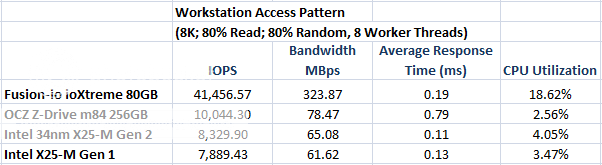
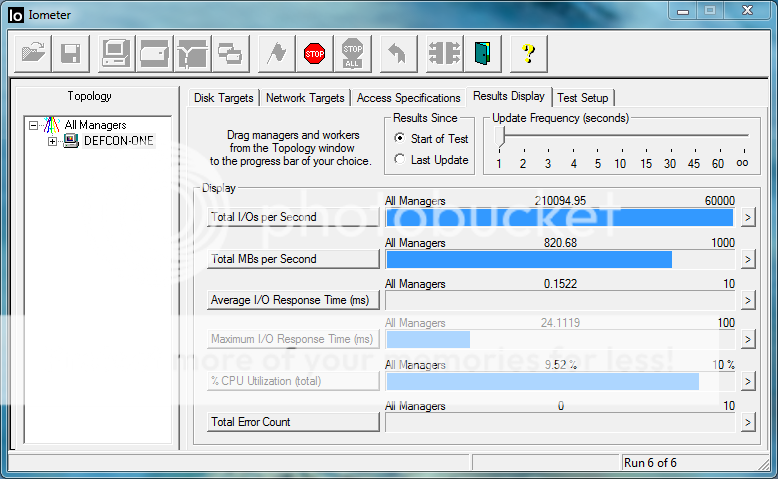
    @one hertz ..so then you are saying that because of both the latency and the IOPS that the lsi is crap correct? well then you are saying the exact same thing about the i/o extreme as i am posting the SAME LATENCY and HIGHER IOPS than that card in all of the benchmarks . 55687 is the iops on my card, in 8k, which is higher than the i/o extreme, at 41k, and my average response time is around .18, while its is .19...so then the x-25 is faster than the io extreme is exactly what you are saying. please inform me as to how you are reasoning this, i would like to see. also please include the links promised, as i am eager to learn. ia m not understanding the hype on this thing, even what the linked video shows me is not impressive AT ALL.

    A SINGLE X-25 gives you 135 mbps in 4k 100 percent random??? i would like to see that screenie.
    I already mentioned this before, but the ioxtreme (like the x25-m) is not good at writing. Those iometer setups combine reading with writing. I know the M becomes very very slow when those are done together and I am assuming the ioxtreme is similar. If it is just reading, the numbers will be very different, as we will probably (hopefully) see when lowfat and I get one.

    I should have said access time not latency. Access time of ioxtreme is 0.08. Acards + 1231 are 0.05 or so. Yours is 0.22?

    Yes, a single x25-m gives 135mbps at 4kb 100% reads que @ 32. This is the official spec for the drive as well, as you can see on the Intel site. Realistically on a used drive I believe it is a bit less though. Like 125. I dont have an x25-m to give you a screenie, but this is a pretty basic and well known spec of the drive...

    You know if you just ran l4d and measured your loading time you would see things for yourself...

  2. #77
    Xtreme Guru
    Join Date
    Aug 2009
    Location
    Wichita, Ks
    Posts
    3,887
    Look very carefully at the average response time on the graph here. .19


    Now look at this run, case in point..

    also on the video it shows access time over .1 and hdtach rounds on access time measurement, hdtach is very inaccurate with access times so we should probably disregard that, but i believe in the video they are testing pure read performance. I understand it is fast in certain scenarios, i just personally do not see the need for these restrictions, it can be fast, and write. Mine does. maybe that is why in why the anandtech article speaking of real world usage patterns, where they actually used the drives in input/output loads of an os, the vertex beats the x-25 series under heavy load usage. The x-25 does best it in two other scenarios, granted.http://www.anandtech.com/storage/sho...spx?i=3667&p=8
    I am not understanding these limitations with writing however, these are "next-gen" devices. anyone who has not read the above link should take the time to read just that page. it is very eye-opening and has tons of useful info. show me again where it says that a single x-25m gives you 135 MBPS throughput at 4k? i cant seem to find it all i have seen around these parts is crystal disk mark screenies saying 40 MBPS...perhaps i am looking in the wrong place again. like with the tons of reviews saying the lsi is crap, i still cant find any of those either.in the post your harddrive benchmarks thread here on the site, i am seeing tons of these drives with anywhere from 20 to 40!! 4K throughput, but not one with anything EVEN CLOSE to 125. i also checked intel's site, and couldnt find anything saying that. here is one for example http://www.xtremesystems.org/forums/...&postcount=684. those 4k results on there is what i am referring to.
    Last edited by Computurd; 11-20-2009 at 08:01 AM.
    "Lurking" Since 1977


    Jesus Saves, God Backs-Up
    *I come to the news section to ban people, not read complaints.*-[XC]Gomeler
    Don't believe Squish, his hardware does control him!

  3. #78
    SLC
    Join Date
    Oct 2004
    Location
    Ottawa, Canada
    Posts
    2,795
    http://www.xtremesystems.org/forums/...9&postcount=33

    150mbps for a single x25m. The benchies you've seen are at lower ques.

    Intel site:
    http://download.intel.com/design/fla...eam/322296.pdf
    Page 8.

    I say for the third time, just run L4D and you will see for yourself.

  4. #79
    Xtreme Guru
    Join Date
    Aug 2009
    Location
    Wichita, Ks
    Posts
    3,887
    I do not own l4d and dont intend to. I do not run games as benchmarks, too many variables. then you will complain about my tri-sli and overclock and ram speeds.
    that is why i run benchmarks, it does the most that can be done to alleviate the BS. One benchmark i do not use is as ssd as it is unreliable when benching hardware raid solutions. it works fine on normal ssd's but gives borked, random unreproducale results in tandem with hardware raid. that is a known problem with many benchmark programs that is why professionals, intel included, run i/i meter.

    on the page 8 of that intel pdf it says nothing of 4k random access MBPS. it says about iops. not what you are saying it says. i looked at that very white paper before i posted above.

    on AS SSD i believe the 4k-64 means 64 queue depth, but i am not sure. that is not what i am speaking of. the 4k on my results is 150+ with crystal bench mark. there isnt a x-25 out there that can get close to that 4k throughput. I have posted every test imaginable to prove to you what i am saying.

    Now you are down to saying..."run a game you will see?"
    surely you are joking.

    i believe that no matter what i post here, you will continue to say something else different. i have beat it at iops.; i have matched access/response times. i have matched it , or beat it at all throughputs. i am more than willing to run any i/o meter test that you wish to prove yourself correct. but you aren't. period.
    i could post a video of this raid card growing legs, walking on water, curing cancer, then creating world peace. you will come back with...that card is crap. i was thinking of taking my card off of this slot that has the nf200 and pulling my other two video cards, because that adds about .05 latency to my array, as the nf200 is a bastage. but what would be the point? i have beat the thing without even disabling services or turning off my gadgets on my desktop for the love of christ.
    by the very logic you proclaim then the i/o extreme is a piece of crap as well. this lsi has beat the 1231 with ACARDS IN RAID 0 at iops. still a piece of crap! LOL
    you have to also understand, that 4k is not the end all, or even the begin all, of storage solutions. you have such a narrow view of performance that it is laughable.
    here is annandtechs results for different computer usage patterns:
    The light trace is composed of 37,501 reads and 20,268 writes. Over 30% of the IOs are 4KB, 11% are 16KB, 22% are 32KB and approximately 13% are 64KB in size. Less than 30% of the operations are absolutely sequential in nature. Average queue depth is 6.09 IOs

    heavy trace:The benchmark is 22 minutes long and it consists of 128,895 read operations and 72,411 write operations. Roughly 44% of all IOs were sequential. Approximately 30% of all accesses were 4KB in size, 12% were 16KB in size, 14% were 32KB and 20% were 64KB. Average queue depth was 3.59.

    he gaming trace is made up of 75,206 read operations and only 4,592 write operations. Only 20% of the accesses are 4KB in size, nearly 40% are 64KB and 20% are 32KB. A whopping 69% of the IOs are sequential, meaning this is predominantly a sequential read benchmark. The average queue depth is 7.76 IOs.

    now these are people who know what they are talking about. professional. note that the gaming trace, which is what you are purportedly using your system for, has the LOWEST MIX of 4k reads. interesting. ALSO the highest percentage of sequential IO's. and what is that queue depth of?? 7.76!! that is extremelly lower than the x-25 64 queue depth results you keep mentioning. so then would you say that this lsi would absolutely KILL that l4d loading time, eh?? 1.75 gb/s seq should just about do it.
    your basic understanding of storage and usage within an operating system are flawed. somewhere along the lines you began to believe that 4k is the answer to everything. which would be nice seeing as how my card absolutely owns at it
    i implore you to read this link http://www.anandtech.com/storage/sho...spx?i=3667&p=8
    Last edited by Computurd; 11-20-2009 at 12:29 PM.
    "Lurking" Since 1977


    Jesus Saves, God Backs-Up
    *I come to the news section to ban people, not read complaints.*-[XC]Gomeler
    Don't believe Squish, his hardware does control him!

  5. #80
    Xtreme Guru
    Join Date
    Aug 2009
    Location
    Wichita, Ks
    Posts
    3,887
    There has been much much discussion about what the computer really uses as it loads and uses an OS., what is the mix of reads/writes, inputs/outputs, randoms/sequentials? Over at OCZ they took a program, much like anandtech did, and monitored the usage of the operating system throughout all phases of use. from this they derived a I/O meter profile, it mirrors real usage, that you can download, that has a realistic mix of computer inputs/outputs. I would love for more people to run it, as it is real world test. the profile is called BOOTUP and they need to include it with downloads of I/O meter!!
    you can get it here: http://www.ocztechnologyforum.com/fo...05&postcount=2
    i really wish more people would get their heads outta the sand on these things, as you can see from the articles at anandtech, and other very highly respected sites, real world usage actually entails a very small mix of random 4k file usage.
    "Lurking" Since 1977


    Jesus Saves, God Backs-Up
    *I come to the news section to ban people, not read complaints.*-[XC]Gomeler
    Don't believe Squish, his hardware does control him!

  6. #81
    I am Xtreme
    Join Date
    Oct 2005
    Location
    Grande Prairie, AB, CAN
    Posts
    6,140
    Quote Originally Posted by Computurd View Post
    There has been much much discussion about what the computer really uses as it loads and uses an OS., what is the mix of reads/writes, inputs/outputs, randoms/sequentials? Over at OCZ they took a program, much like anandtech did, and monitored the usage of the operating system throughout all phases of use. from this they derived a I/O meter profile, it mirrors real usage, that you can download, that has a realistic mix of computer inputs/outputs. I would love for more people to run it, as it is real world test. the profile is called BOOTUP and they need to include it with downloads of I/O meter!!
    you can get it here: http://www.ocztechnologyforum.com/fo...05&postcount=2
    i really wish more people would get their heads outta the sand on these things, as you can see from the articles at anandtech, and other very highly respected sites, real world usage actually entails a very small mix of random 4k file usage.
    Not necessarily. Iometer isn't a good representation of real world tasks. yHell I don't think any synthethic benchmark is. That is what all these 'respected sites' problems are. It takes much less time and effort for them to do a synthetic bench than running applications/games that people actually use.

    The 'bootup' Iometer config scaled almost perfectly for me when adding another drive to the array. Yet photoshop and game load times didn't differ at all.

    http://www.xtremesystems.org/forums/...d.php?t=232796

  7. #82
    Xtreme Guru
    Join Date
    Aug 2009
    Location
    Wichita, Ks
    Posts
    3,887
    the fact that your photoshop and game load times didnt differ is probably because of your cpu and GPU . your input/output is far over what they can handle already, load wise. they are bottlenecks now!!!! you have turned the bottleneck from your storage system, into your cpu. run the programs at 2.6 on yer cpu, then run them at 4.6 . they will load faster of course, but note that you did not have to change your storage system to do it. that is the purpose of these benchmarks. to eliminate other bottlenecks as areas of contention.
    you can feed them information faster at that point, but you cant make them process it faster.
    "Lurking" Since 1977


    Jesus Saves, God Backs-Up
    *I come to the news section to ban people, not read complaints.*-[XC]Gomeler
    Don't believe Squish, his hardware does control him!

  8. #83
    Xtreme Member
    Join Date
    Feb 2009
    Posts
    257
    Computurd- you seem stuck in the world of benchmark numbers. Benchmarking only works when you know how to interpret the results well, and know what exactly it is you need to benchmark. Why don't you list some applications or games that you actually use and you can do a comparison with the guys here. What's the point of having awesome benchmark numbers, but yet the applications and games you use don't run any better?

  9. #84
    Xtreme Mentor
    Join Date
    May 2006
    Location
    Croatia
    Posts
    2,542
    Quote Originally Posted by SteveRo View Post
    This might be vaporware (?) but take a look at the fusionio Octal -

    http://www.fusionio.com/load/media-d...ctal-Study.pdf
    Looks like a billion dollars!

    and finally some room in the data center for that pool table
    Quote Originally Posted by LexDiamonds View Post
    Anti-Virus software is for n00bs.

  10. #85
    Xtreme Guru
    Join Date
    Aug 2009
    Location
    Wichita, Ks
    Posts
    3,887
    well griff805- i would be happy to oblige LOL. there is nothing that i run on my system that does not run, immediately. period. i post to desktop about 10 seconds after raid cad initialization, and everything runs on demand. i usually run at 4.4 on a i7 920, 12gb of ram blasting away at 2045 7-8-7-24. I also have tri-sli-260's on a Evga classified motherboard, audio by creative as well. umm thats about it for rig specs. watercooled with a honda radiator.
    I play RTS gaming quite a bit, with multimonitor setup. supcom and fa and universe at war. the obligitory crysis as well. again, no wait for anything. I DO bench quite a bit for fun or boredom. really stopped playing with the array for a few months until here recently...heh. i have never set there with a stopwatch and timed anything, because there is nothing to time. instantaneous.
    i do manipulate video quite a bit from home recordings, tons and tons of hd pictures as well. my games and manipulating of files, etc DO run faster LOL.
    #13 on futuremark hall of fame for pcmark vantage, high ranking on the hwbots for pcmark05 as well...but i dont use dice or ln2 or anything like that, but my storage system allows me to beat computers with MUCH higher overclocks. it suits me. seriously though it is all about performance with me, and benchmarks are the only way to prove that unfortunately IS by benchmarks. i havent benched my computer at all for the last few months until recently.my system is well rounded, and performs well at everything. i fit all three categories in the anandtech profiles of usage. just depends on what im doing that day. its amazing that you get told repeatedly how inferior your equipment is, kinda riled me up. but oh well i feel like i have derailed the thread here,....sorry.
    "Lurking" Since 1977


    Jesus Saves, God Backs-Up
    *I come to the news section to ban people, not read complaints.*-[XC]Gomeler
    Don't believe Squish, his hardware does control him!

  11. #86
    SLC
    Join Date
    Oct 2004
    Location
    Ottawa, Canada
    Posts
    2,795
    Quote Originally Posted by Computurd View Post
    I do not own l4d and dont intend to. I do not run games as benchmarks, too many variables. then you will complain about my tri-sli and overclock and ram speeds.
    Running games/apps is the only way to really measure performance. You can run from it all you like, but I have a feeling you are already aware of how slow your PC is in comparison to others.

    that is why i run benchmarks, it does the most that can be done to alleviate the BS. One benchmark i do not use is as ssd as it is unreliable when benching hardware raid solutions. it works fine on normal ssd's but gives borked, random unreproducale results in tandem with hardware raid. that is a known problem with many benchmark programs that is why professionals, intel included, run i/i meter.
    Yes, AS SSD doesn't work well with cache. Do not tell me about iometer. I have started getting people to use it about a year ago, back when hdtach was king. Then ATTO came around and I was still trying (failing) to get people to use iometer due to people like Tony (ignorant at that time) saying ATTO is a great measure simply because it showed overrated results and was quick and simple. Only very recently did people accept it. So please don't tell me about it.

    on the page 8 of that intel pdf it says nothing of 4k random access MBPS. it says about iops. not what you are saying it says. i looked at that very white paper before i posted above.
    basic math fail... 35000 iops @ 4kb = 140,000 kb/s.

    on AS SSD i believe the 4k-64 means 64 queue depth, but i am not sure. that is not what i am speaking of. the 4k on my results is 150+ with crystal bench mark. there isnt a x-25 out there that can get close to that 4k throughput. I have posted every test imaginable to prove to you what i am saying.
    Yes it means 64 queue depth. It does the same speed at 32 (in fact I dont think Intel SSD support/do anything past 32). Are you saying your iometer run showing 35k iops was with less queue? Your CM run is 100% cache. Take your own advice and use iometer.

    Now you are down to saying..."run a game you will see?"
    surely you are joking.
    Not joking at all. Your L4D will take 9++ seconds to load and you will see. It doesn't have to be l4d. You must game a lot if you have tri sli, so you have to have a lot of games.

    i believe that no matter what i post here, you will continue to say something else different. i have beat it at iops.; i have matched access/response times. i have matched it , or beat it at all throughputs. i am more than willing to run any i/o meter test that you wish to prove yourself correct. but you aren't. period.
    You haven't posted anything but useless 8k runs that involve 20% writes. And in those useless 8k runs you get smoked by mere 2x x25-Es. Your access time is 0.23ms (looked at some of your benchmarks from before), which gets beat by 2x by almost any ssd. Your 4kb random iops is equal to a single x25-m (ioxtreme is a few times more than this). Max throughput is irrelevant.

    i could post a video of this raid card growing legs, walking on water, curing cancer, then creating world peace. you will come back with...that card is crap. i was thinking of taking my card off of this slot that has the nf200 and pulling my other two video cards, because that adds about .05 latency to my array, as the nf200 is a bastage. but what would be the point? i have beat the thing without even disabling services or turning off my gadgets on my desktop for the love of christ.
    You haven't beat anything. And turning off services and such doesn't change iops by more than 1%.

    by the very logic you proclaim then the i/o extreme is a piece of crap as well. this lsi has beat the 1231 with ACARDS IN RAID 0 at iops. still a piece of crap! LOL
    Perhaps at an irrelevant IOPS setting at an irrelevant queue.

    you have to also understand, that 4k is not the end all, or even the begin all, of storage solutions. you have such a narrow view of performance that it is laughable.
    here is annandtechs results for different computer usage patterns:
    The light trace is composed of 37,501 reads and 20,268 writes. Over 30% of the IOs are 4KB, 11% are 16KB, 22% are 32KB and approximately 13% are 64KB in size. Less than 30% of the operations are absolutely sequential in nature. Average queue depth is 6.09 IOs

    heavy trace:The benchmark is 22 minutes long and it consists of 128,895 read operations and 72,411 write operations. Roughly 44% of all IOs were sequential. Approximately 30% of all accesses were 4KB in size, 12% were 16KB in size, 14% were 32KB and 20% were 64KB. Average queue depth was 3.59.

    he gaming trace is made up of 75,206 read operations and only 4,592 write operations. Only 20% of the accesses are 4KB in size, nearly 40% are 64KB and 20% are 32KB. A whopping 69% of the IOs are sequential, meaning this is predominantly a sequential read benchmark. The average queue depth is 7.76 IOs.
    I have posted this EXACT ARTICLE BEFORE IN THIS VERY THREAD. Read post #32. I do NOT think 4kb is the only measure; it is one of the relevant ones. Try to read before posting.

    now these are people who know what they are talking about. professional. note that the gaming trace, which is what you are purportedly using your system for, has the LOWEST MIX of 4k reads. interesting. ALSO the highest percentage of sequential IO's. and what is that queue depth of?? 7.76!! that is extremelly lower than the x-25 64 queue depth results you keep mentioning. so then would you say that this lsi would absolutely KILL that l4d loading time, eh?? 1.75 gb/s seq should just about do it.
    Funny. The 8k you keep running isn't even a part of the trace. And you are certainly not running queue of 8 with 1 worker like the article suggests. Try that out and see what happens. And that 8 is average. Meaning, it ranges with use from 1 to whatever the max is. Your 4kb bandwidth @ queue of 1 is like 17mbps (comparing to ioxtreme which is 40+).

    There has been much much discussion about what the computer really uses as it loads and uses an OS., what is the mix of reads/writes, inputs/outputs, randoms/sequentials? Over at OCZ they took a program, much like anandtech did, and monitored the usage of the operating system throughout all phases of use. from this they derived a I/O meter profile, it mirrors real usage, that you can download, that has a realistic mix of computer inputs/outputs. I would love for more people to run it, as it is real world test. the profile is called BOOTUP and they need to include it with downloads of I/O meter!!
    you can get it here: http://www.ocztechnologyforum.com/fo...05&postcount=2
    i really wish more people would get their heads outta the sand on these things, as you can see from the articles at anandtech, and other very highly respected sites, real world usage actually entails a very small mix of random 4k file usage.
    You can not mirror real world usage with iometer. It is impossible. The config they have made has absolutely no relation to the real world. It is just a read/write test with 4kb-64kb files @ queue 64. First of all the queue is all wrong as you have already mentioned.

    Second of all (and more importantly) this approach is inherently wrong. Let me dumb it down for you so you can hopefully understand. Say you have a program that does 100% reads for 5 seconds and 100% writes for another 5 seconds. Tracing it and converting it to iometer would run this "real world simulation" as 10 seconds of 50% reads/50% writes, which would produce a result that is COMPLETELY UNRELATED to the performance of the original application. Running a very complicated simulation, like bootup just makes it even more useless if that is even possible.

  12. #87
    Xtreme Guru
    Join Date
    Aug 2009
    Location
    Wichita, Ks
    Posts
    3,887
    I love your point by point refutations..perhaps i should do that as well to make my posts look as long and important as yours!!

    Running games/apps is the only way to really measure performance. You can run from it all you like, but I have a feeling you are already aware of how slow your PC is in comparison to others.
    simply not true. i wait for nothing, i was past that point with a rocket raid 3520 and eight vertex

    Yes, AS SSD doesn't work well with cache. Do not tell me about iometer. I have started getting people to use it about a year ago, back when hdtach was king. Then ATTO came around and I was still trying (failing) to get people to use iometer due to people like Tony (ignorant at that time) saying ATTO is a great measure simply because it showed overrated results and was quick and simple. Only very recently did people accept it. So please don't tell me about it.
    your agreeing with me. wow that is nice.

    basic math fail... 35000 iops @ 4kb = 140,000 kb/s.
    touche`

    Yes it means 64 queue depth. It does the same speed at 32 (in fact I dont think Intel SSD support/do anything past 32). Are you saying your iometer run showing 35k iops was with less queue? Your CM run is 100% cache. Take your own advice and use iomete
    used for comparison only, as it was what i could find with a quick search. also believe me, only things i really trust is everest and i/o meter. agreeing with me..in a way...again

    Not joking at all. Your L4D will take 9++ seconds to load and you will see. It doesn't have to be l4d. You must game a lot if you have tri sli, so you have to have a lot of games.
    i do have lots of games, however i have never had to wait for anything long enough to say...GEE this is taking so long i should time it. i dont wait. i can guarantee that it wont take that long. feel free to send me a copy of the game.

    ou haven't posted anything but useless 8k runs that involve 20% writes. And in those useless 8k runs you get smoked by mere 2x x25-Es. Your access time is 0.23ms (looked at some of your benchmarks from before), which gets beat by 2x by almost any ssd. Your 4kb random iops is equal to a single x25-m (ioxtreme is a few times more than this). Max throughput is irrelevant.
    max throughput is relevant entirely. as you agree with the anandtech post, then you see that in a gaming mode it is 60 percent sequential...how in the hell does that not matter? it is the vast majority of the reads. 8k was only as frame of reference, working from the benchmarks provided to me by the review. how can i compare my settings to theirs if they dont have it listed??? when i show you better access times, you dont acknowledge them.


    You haven't beat anything. And turning off services and such doesn't change iops by more than 1%.
    i beg to differ.

    Perhaps at an irrelevant IOPS setting at an irrelevant queue.
    again anything that i post that is good is irrelevant. it does not support your statement. so therefore it means nothing, you are like the gestapo LOL.
    you refuse to acknowledge anything that even remotely differs with your pinhole view of computing.
    it was so irrelevant that stevero, who you have said that you trust implicitly, posted them. do you need to revise your stance on his benchmarks??????

    I have posted this EXACT ARTICLE BEFORE IN THIS VERY THREAD. Read post #32. I do NOT think 4kb is the only measure; it is one of the relevant ones. Try to read before posting.
    i thought after reading your other statements throughout the whole entirety of this thread that maybe you should read it again. you don't get it. you keep repeating the same mantra. 4k 4k 4k 4k 4k 4k 4k

    Funny. The 8k you keep running isn't even a part of the trace. And you are certainly not running queue of 8 with 1 worker like the article suggests. Try that out and see what happens. And that 8 is average. Meaning, it ranges with use from 1 to whatever the max is. Your 4kb bandwidth @ queue of 1 is like 17mbps (comparing to ioxtreme which is 40+).
    yes it isnt part of the trace. i have only ran it because that is one of many comparisons i have made to the benchmarks provided in the review. if they had one at some other size as well i would run it. i believe i have ran almost all of them...40+?? i missed that part!i have reached over 90 before with one worker? would you care to see the screenshot? i never tire of posting them.

    You can not mirror real world usage with iometer. It is impossible. The config they have made has absolutely no relation to the real world. It is just a read/write test with 4kb-64kb files @ queue 64. First of all the queue is all wrong as you have already mentioned.

    Second of all (and more importantly) this approach is inherently wrong. Let me dumb it down for you so you can hopefully understand. Say you have a program that does 100% reads for 5 seconds and 100% writes for another 5 seconds. Tracing it and converting it to iometer would run this "real world simulation" as 10 seconds of 50% reads/50% writes, which would produce a result that is COMPLETELY UNRELATED to the performance of the original application. Running a very complicated simulation, like bootup just makes it even more useless if that is even possible.
    partially true, partially not. unfortunately we cannot get a perfect picture of system usage, however we can get close. you assign levels of access to the individual components, giving some more precedence than others, giving you an albeit imperfect, yet blurry view. you dont agree with it because it makes your solutions, such as i/o extreme and x-25, slow. they cannot do read and write at the same time and have decent numbers. how real world is THAT???? and with the way that things are going with you and your acceptance of things, it doesnt matter how close we get anyway tbh. its like the access times. i show you how i actually have faster access than the i/o extreme and you immediately start another thread in the forum about how the computer industry in general must be measuring access times incorrectly.
    dude that is awesome.
    because someone has results you either A: dont agree with or B: dont believe, you begin to question the industry as a whole. you are awesome i love these long talks with you in circles. what is in that guys signature, particles rules of internet or something? i would look it up but god im sick of looking things up, i must save myself for refuting your next post. anyways it goes something like this:
    Whoever repeats the same thing over and over for the longest period of time will win
    i believe you are banking on that my friend, as your posts are becoming increasingly repetitive. but hey, im here all night!
    Last edited by Computurd; 11-20-2009 at 04:33 PM.
    "Lurking" Since 1977


    Jesus Saves, God Backs-Up
    *I come to the news section to ban people, not read complaints.*-[XC]Gomeler
    Don't believe Squish, his hardware does control him!

  13. #88
    Xtreme Guru
    Join Date
    Aug 2009
    Location
    Wichita, Ks
    Posts
    3,887
    Yes it means 64 queue depth. It does the same speed at 32 (in fact I dont think Intel SSD support/do anything past 32)
    has that ever occurred to you that is a limitation of that drive? a liimitation that could be overcome by what?? cmon humor me....thats right folks!!! RAID CARD!!!
    "Lurking" Since 1977


    Jesus Saves, God Backs-Up
    *I come to the news section to ban people, not read complaints.*-[XC]Gomeler
    Don't believe Squish, his hardware does control him!

  14. #89
    SLC
    Join Date
    Oct 2004
    Location
    Ottawa, Canada
    Posts
    2,795
    Quote Originally Posted by Computurd View Post
    max throughput is relevant entirely. as you agree with the anandtech post, then you see that in a gaming mode it is 60 percent sequential...how in the hell does that not matter? it is the vast majority of the reads. 8k was only as frame of reference, working from the benchmarks provided to me by the review. how can i compare my settings to theirs if they dont have it listed??? when i show you better access times, you dont acknowledge them.
    69% sequential throughput at block sizes of 4kb-64kb is not max throughput. Max throughput is 100% sequential, block size of like 512kb. Max throughput it irrelevant.

    again anything that i post that is good is irrelevant. it does not support your statement. so therefore it means nothing, you are like the gestapo LOL.
    you refuse to acknowledge anything that even remotely differs with your pinhole view of computing.
    Because almost everything you posted so far is irrelevant to real world. Iometer is mostly irrelevant to the real world to begin with. Go ahead and post something as per the anand benchmark. i.e. 1 worker, 8 queue, 4kb-64kb size, reads, partially random.

    it was so irrelevant that stevero, who you have said that you trust implicitly, posted them. do you need to revise your stance on his benchmarks??????
    I trust that his results are true. Different things.

    i thought after reading your other statements throughout the whole entirety of this thread that maybe you should read it again. you don't get it. you keep repeating the same mantra. 4k 4k 4k 4k 4k 4k 4k
    You can read 4kb as "small files in general". 4kb is just an example.

    yes it isnt part of the trace. i have only ran it because that is one of many comparisons i have made to the benchmarks provided in the review. if they had one at some other size as well i would run it. i believe i have ran almost all of them...40+?? i missed that part!i have reached over 90 before with one worker? would you care to see the screenshot? i never tire of posting them.
    CM works fine on devices that have no cache (ioxtreme). It is showing 40-odd mb/s. No, you did not reach 90mb/s with 4kb 100% random, 100% reads, 1 worker, 1 queue.

    paritally true, partially not. unfortunately we cannot get a perfect picture of system usage, however we can get close. and with the way that things are going with you and your acceptance of things, it doesnt matter how close we get anyway tbh.
    I tried my best to explain it to you. I really did.

    its like the access times. i show you how i actually have faster access than the i/o extreme and you immediately start another thread in the forum about how the computer industry in general must be measuring access times incorrectly.
    dude that is awesome.
    You seem to have read that thread, so go ahead and read what access time is. Hint: queue of anything but 1 is not the measure of access time. Stop being so self centered. That thread has nothing to do with you.

    i believe you are banking on that my friend, as your posts are becoming increasingly repetitive. but hey, im here all night!
    Because you do not understand the basics so I have to keep trying to get my point across, which unfortunately leads to me repeating myself.

  15. #90
    Xtreme Guru
    Join Date
    Aug 2009
    Location
    Wichita, Ks
    Posts
    3,887
    69% sequential throughput at block sizes of 4kb-64kb is not max throughput. Max throughput is 100% sequential, block size of like 512kb. Max throughput it irrelevant.
    nice of you to explain that for us. however, max throughput as i am referring to it is the reads not being entirely random. the less random the reads, the closer to max thouroughut is the thought i am trying to convey. my reads at 4k random, vs 4k entirely sequential are two different beasts entirely, that i assure you. non-random aka sequential does equal max throughput of that file size. MAX throughput of ANY file size is entirely relevant.

    here is anandtechs direct A whopping 69% of the IOs are sequential, meaning this is predominantly a sequential read benchmark"

    not 69 percent sequential throughput.
    69 PERCENT OF THE INPUT/OUTPUTS are sequential. ( so 69percent of the reads are 100 percent sequential) i am trying hard to explain here.
    the input/outputs are NOT 69 percent sequential. again failed logic. i am trying hard to explain here

    Because almost everything you posted so far is irrelevant to real world. Iometer is mostly irrelevant to the real world to begin with. Go ahead and post something as per the anand benchmark. i.e. 1 worker, 8 queue, 4kb-64kb size, reads, partially random.
    i already have, and it was better. thus invoking cries of "it sucks!!" from you.

    I trust that his results are true. Different things(I.E. stevero results).
    explain how it is different when he runs it? are his 8k magically better than others?

    You can read 4kb as "small files in general". 4kb is just an example.
    like 8k??? i thought that 8k is between 4-64k. but then you state 8k is irrelevant. strange. it is closest to your favorite number., how is it irrelevant?

    You seem to have read that thread, so go ahead and read what access time is. Hint: queue of anything but 1 is not the measure of access time. Stop being so self centered. That thread has nothing to do with you.
    i find it amazing that you make that post within five minutes of my screenshot showing better access times than the i/o extreme. but i will take the self centered comment with a grain of salt.

    Because you do not understand the basics so I have to keep trying to get my point across, which unfortunately leads to me repeating myself.
    you are trying to define what the basics are, according to YOU. however you have flawed reasoning.
    Last edited by Computurd; 11-20-2009 at 05:20 PM.
    "Lurking" Since 1977


    Jesus Saves, God Backs-Up
    *I come to the news section to ban people, not read complaints.*-[XC]Gomeler
    Don't believe Squish, his hardware does control him!

  16. #91
    SLC
    Join Date
    Oct 2004
    Location
    Ottawa, Canada
    Posts
    2,795
    Quote Originally Posted by Computurd View Post
    i already have, and it was better. thus invoking cries of "it sucks!!" from you.
    You haven't posted anything at queue 8, 1 worker. I've attached an iometer test which is a conversion of the anand gaming trace. It doesn't really mean real world performance, but since you believe it does, you can knock yourself out.

    1 worker
    94% reads
    20% 4KB - made this into 25% (amplified everything to make it total 100% access specification since anand didnt specify 100% of it)
    20% 32KB - made into 25%
    40% 64KB - made into 50%
    69% sequential
    queue depth 8 IOs (7.76 was anand's trace, but I am not sure it works in decimals).
    3minutes
    10,000,000 sectors

    Anyhow, anyone that understands about storage has had their laughs by now.
    Attached Files Attached Files

  17. #92
    Xtreme Guru
    Join Date
    Aug 2009
    Location
    Wichita, Ks
    Posts
    3,887
    hold on one minute here, i am wanting you to explain yourself here. i made an edit while you werent looking apparently.

    69% sequential throughput at block sizes of 4kb-64kb is not max throughput. Max throughput is 100% sequential, block size of like 512kb. Max throughput it irrelevant.
    nice of you to explain that for us. however, max throughput as i am referring to it is the reads not being entirely random. the less random the reads, the closer to max thouroughut is the thought i am trying to convey. my reads at 4k random, vs 4k entirely sequential are two different beasts entirely, that i assure you. non-random aka sequential does equal max throughput of that file size. MAX throughput of ANY file size is entirely relevant.

    here is anandtechs direct A whopping 69% of the IOs are sequential, meaning this is predominantly a sequential read benchmark"

    not 69 percent sequential throughput.
    69 PERCENT OF THE INPUT/OUTPUTS are sequential. ( so 69percent of the reads are 100 percent sequential) i am trying hard to explain here.
    the input/outputs are NOT 69 percent sequential. again failed logic. i am trying hard to explain here

    who is laughing now? and at whom? your whole basis of your argument that it is for game loading. you dont get it.
    Last edited by Computurd; 11-20-2009 at 05:28 PM.
    "Lurking" Since 1977


    Jesus Saves, God Backs-Up
    *I come to the news section to ban people, not read complaints.*-[XC]Gomeler
    Don't believe Squish, his hardware does control him!

  18. #93
    SLC
    Join Date
    Oct 2004
    Location
    Ottawa, Canada
    Posts
    2,795
    Quote Originally Posted by Computurd View Post
    max throughput as i am referring to it is the reads not being entirely random. the less random the reads, the closer to max thouroughut is the thought i am trying to convey.
    The max throughput of the device is the maximum mbps it can spit out at you. This is achieved at 100% seq, 100% read, and large blocks.

    my reads at 4k random, vs 4k entirely sequential are two different beasts entirely, that i assure you. non-random aka sequential does equal max throughput of that file size.
    Yes, they are entirely different. Yes if you go 100% sequential, that will be your maximum iops at your selected file size. Edit: not true for raid setups with no read ahead.

    MAX throughput of ANY file size is entirely relevant.
    I don't completely understand what you mean there.

    here is anandtechs direct A whopping 69% of the IOs are sequential, meaning this is predominantly a sequential read benchmark"

    not 69 percent sequential throughput.
    69 PERCENT OF THE INPUT/OUTPUTS are sequential. ( so 69percent of the reads are 100 percent sequential) i am trying hard to explain here.
    the input/outputs are NOT 69 percent sequential. again failed logic. i am trying hard to explain here
    Yes, 69 percent of the accesses are sequential... This can not be interpreted in any other manner. A single IO can not be partially sequential. It is either sequential or it is not. This is how iometer does it too. i.e. if you want to do 100 4kb reads, and set it as 69% sequential, 69 of them will be sequential and 31 wont be. I do not understand what you thought I meant.
    Last edited by One_Hertz; 11-20-2009 at 05:44 PM.

  19. #94
    Xtreme Guru
    Join Date
    Aug 2009
    Location
    Wichita, Ks
    Posts
    3,887
    exactly what you said. you said:
    69% sequential throughput at block sizes of 4kb-64kb isnot max throughput. Max throughput is 100% sequential, block size of like 512kb. Max throughput it irrelevant.
    emphasis added of course. but i refuse to debate grammar. but you are revising your statement now i see. from what i understand this is what you are saying, which would mirror what the article says:

    A input/ouput is either sequential, or not.
    69 percent of input/ouput commands are sequential under normal gaming scenarios.
    so sequential throughput is relevant. because it is NOT random in 69 percent of the input/output.

    can you agree to that much^^^ because i believe that max throughput of any block size is the maximum sequential access, non random access, of that block. i mean of course it is. that is the very definition of maximum. the most.
    so how can you say that maximum sequential speed is irrelevant? that would mean that not only is max throughput of a small file block relevant, it is MORE RELEVANT than random. it is a 2 to 1 ratio. making it absolutely more important. this raid card will blow it away at 4k sequential. would you like to see some? that is where we are getting lines crossed. this thing is WAY faster at sequential than any last-gen card. positively torches them.
    this has not been the crux of our debate of course,, but now young padawan...
    "Lurking" Since 1977


    Jesus Saves, God Backs-Up
    *I come to the news section to ban people, not read complaints.*-[XC]Gomeler
    Don't believe Squish, his hardware does control him!

  20. #95
    Xtreme Guru
    Join Date
    Aug 2009
    Location
    Wichita, Ks
    Posts
    3,887
    ....you see why i say, i dont wait. ever. for anything. this controller is fast a little bit at sequentials. this is 4k 100percent sequential. so IF SEVENTY PERCENT of I/O commands during gaming are sequential...guess what? that is one worker. that is the smallest block.


    now i brace myself for the onslaught of x-25 specs that are faster, single drive, for gaming than my array. and also others benchmarks lol now i think were getting somewhere. i think the only thing for us to solve this is to wait until you get your drive. the 1231 can barely hit that with its largest block size in maximum sequential, right?
    Last edited by Computurd; 11-20-2009 at 08:19 PM.
    "Lurking" Since 1977


    Jesus Saves, God Backs-Up
    *I come to the news section to ban people, not read complaints.*-[XC]Gomeler
    Don't believe Squish, his hardware does control him!

  21. #96
    SLC
    Join Date
    Oct 2004
    Location
    Ottawa, Canada
    Posts
    2,795
    You can't just pick a single access measure you like and run that. Why haven't you ran my iometer test file I provided which combines everything anand has said?

    To the other post: your definition of max throughput is different from normal. I stand by my definition of the term. Throughput is the rate at which data can be moved. Your max throughput is roughly 1.75gb/s I believe. That number is irrelevant. That is what I was saying.
    Last edited by One_Hertz; 11-20-2009 at 08:23 PM.

  22. #97
    Xtreme Guru
    Join Date
    Aug 2009
    Location
    Wichita, Ks
    Posts
    3,887
    well, you were the one who said it best, inaccurate picture
    but i also agree that it is a hazy picture. what were your results, and have you imbedded a virus?
    "Lurking" Since 1977


    Jesus Saves, God Backs-Up
    *I come to the news section to ban people, not read complaints.*-[XC]Gomeler
    Don't believe Squish, his hardware does control him!

  23. #98
    Xtreme Guru
    Join Date
    Aug 2009
    Location
    Wichita, Ks
    Posts
    3,887
    To the other post: your definition of max throughput is different from normal. I stand by my definition of the term. Throughput is the rate at which data can be moved. Your max throughput is roughly 1.75gb/s I believe. That number is irrelevant. That is what I was saying.
    yes you can. if you are comparing two controllers, one that tops out at 2.85 GB/s and one that tops out around 800mb/s, would it not be suffice enough to say that the IOP on the latter is considerably faster? and i mean not by a little. A LOT. i have not even topped out this card. it is impossible at this point, it is designed for 6gb/s devices man. IN PARRALLEL. wait until ocz next round of sandforce ssd with the 6gb/s sas connections, jesus then it will be a real slobberknocker, of course then there wont be ANY question. the top of this card with 6 gb/s devices is 2.85 gbps. let that sink in bro. with a sas connection which allows parallelism. jesus lord the magnitude will be shocking. have you pondered the thought that areca is not making a sata3 controller???that the 18xx series is going to be SAS??? 6 GB/S??? are you seeing a pattern developing here? this is next gen, that is last, get over it.
    Last edited by Computurd; 11-20-2009 at 08:34 PM.
    "Lurking" Since 1977


    Jesus Saves, God Backs-Up
    *I come to the news section to ban people, not read complaints.*-[XC]Gomeler
    Don't believe Squish, his hardware does control him!

  24. #99
    SLC
    Join Date
    Oct 2004
    Location
    Ottawa, Canada
    Posts
    2,795
    Quote Originally Posted by Computurd View Post
    yes you can. if you are comparing two controllers, one that tops out at 1.75 GB/s and one that tops out around 800mb/s, would it not be suffice enough to say that the IOP on the latter is considerably faster? and i mean not by a little. A LOT. i have not even topped out this card. it is impossible at this point, it is designed for 6gb/s devices man. IN PARRALLEL. wait until ocz next round of sandforce ssd with the 6gb/s sas connections, jesus then it will be a real slobberknocker, of course then there wont be ANY question. the top of this card with 6 gb/s devices is 2.85 gbps. let that sink in bro. with a sas connection which allows parallelism. jesus lord the magnitude will be shocking. have you pondered the thought that areca is not making a sata3 controller???that the 18xx series is going to be SAS??? 6 GB/S??? are you seeing a pattern developing here? this is next gen, that is last, get over it.
    The cpu on your raid card can be as fast as you want it to be. The problem that it is emulating SATA through SAS.

    I get 7100 iops on the so called anand test.

  25. #100
    Xtreme Guru
    Join Date
    Aug 2009
    Location
    Wichita, Ks
    Posts
    3,887
    UMMM.... dude, what were you running that bench on because you are not gonna believe this....this might be a little faster than a x-25...maybe just a tiny little bit....like maybe on the magnitude of...i am not sure if it is running correctly. it cant be.
    Last edited by Computurd; 11-20-2009 at 09:06 PM.
    "Lurking" Since 1977


    Jesus Saves, God Backs-Up
    *I come to the news section to ban people, not read complaints.*-[XC]Gomeler
    Don't believe Squish, his hardware does control him!

Page 4 of 12 FirstFirst 1234567 ... LastLast

Bookmarks

Bookmarks

Posting Permissions

  • You may not post new threads
  • You may not post replies
  • You may not post attachments
  • You may not edit your posts
  •