

have you tested any other p55's? i cant afford to buy more than one mobo right now with my hours cut back so i want to buy right the first time..



have you tested any other p55's? i cant afford to buy more than one mobo right now with my hours cut back so i want to buy right the first time..
upgrading...cooler master cm690 case, corsair hx850, samsung 1tb x 3, optiarc burners x2, gskill 4gb ripjaws, working on the rest again
Guys, This board & i5 750 $300 at Fry's, end at 10/15/2009
http://newspaperads.mercurynews.com/...id=32664&type=
WOW BUT is that in store only?? id love that deal but im no where even close to a fry's...
upgrading...cooler master cm690 case, corsair hx850, samsung 1tb x 3, optiarc burners x2, gskill 4gb ripjaws, working on the rest again
I am not sure, I think you can purchase online, better call them for details. That is about $130off, awesome deal.
nope just did its in store only believe me i tried...
Last edited by zfactor; 10-09-2009 at 04:39 PM.
upgrading...cooler master cm690 case, corsair hx850, samsung 1tb x 3, optiarc burners x2, gskill 4gb ripjaws, working on the rest again
I have switched my cooler to a TRUE with push/pull fans which has helped to control my temps at 19x200. I still can't get my (x20) turbo multi to work.I think it may be BIOS related and I have an i5 750 inbound and I should be able to test that chip later this week.

Last edited by PolRoger; 10-12-2009 at 03:17 PM.
Ryzen 9 on the test bench... Sometimes older generation/tech as well.
Nice vcore.Originally Posted by PolRoger


Here is mine with a Corsair H50 Cooler

CPU: i7-860 @4GHZ
Mobo: eVGA P55-FTW
RAM: 4Gigs G.SKILL Ripjaws DDR3 2000 (PC3 16000)
Cooler: CORSAIR H50 (Water)
PSU: Antec TruePower TP-750 750W
GPU: XFX 5850 Unlocked @ 950x1170 1.2v
Case: Cooler Master HAF-932
Very nice oc, great temps. Which video card is that, 5850 or 5870?
diesel what kind of temps under load with say prime? interested in that cooler as well
upgrading...cooler master cm690 case, corsair hx850, samsung 1tb x 3, optiarc burners x2, gskill 4gb ripjaws, working on the rest again
Thanks chief! It's a 5850 and I'm loving it. Best bang for the buck.
I have to say I'm very impressed with this little cooler. Quality is top notch.
I wanted a quick water cooling solution. I wanted to save headaches I had on my last custom water loop.
Regarding the temps. I was able to take it at 4Ghz and ran it on Prime for almost one hour but the temps were hitting upper 70's and some times hitting 81-83.
I finally found the sweet spot for my liking at 3.8Ghz
I like to keep the temps below 80. That's just me
Here a little sample for few minutes. However I was able to run it at 3.8Ghz for several hours and the temps were always the same
BTW, on the picture the temps show lower 30's on idle but that was right after stress test. Normally hangs on the upper 20's on idle.

Last edited by xXxDieselxXx; 10-12-2009 at 05:43 AM.
CPU: i7-860 @4GHZ
Mobo: eVGA P55-FTW
RAM: 4Gigs G.SKILL Ripjaws DDR3 2000 (PC3 16000)
Cooler: CORSAIR H50 (Water)
PSU: Antec TruePower TP-750 750W
GPU: XFX 5850 Unlocked @ 950x1170 1.2v
Case: Cooler Master HAF-932
I've been testing overclocks with the Turbo fully enabled...
With vdroop
C1E: disabled
Speedstep: enabled
Turbo: enabled
C-state: enabled
On my cpu: 195 x22 for 1 thread (4.29Ghz), x21 for 2 threads (4095Ghz) and x20 for 8 threads (3.9Ghz) with ~1.39 vcore on idle and 1 or 2 threads ~1.34 vcore with load and 8 threads.

Ryzen 9 on the test bench... Sometimes older generation/tech as well.
very nice Roger
OBSIDIAN 800D, ASRock P67 Professional, Intel 2600K [UNLOCKED] watercooled by Ybris Black Sun (HWLabs Black Ice SR1-360 w/Nanoxia 2K, Swiftech MCP655 + Res XSPC), 4GB KINGSTON LoVo, SSD 128GB Crucial RealSSD C300, HDD Seagate Barracuda 250GB/500GB, Corsair HX 750w, nVidia 260 GTX XFX Black Edition, X-FI Xtreme Gamer
just got my board will be plyin with it soon
i just gotta say what a difference the lotes socket makes
you can just feel the xtra pressure and see that you got good contact on pins
zfactor if you buy any other board you be wastin $
Last edited by zsamz_; 10-23-2009 at 01:53 PM.
maximus IV extreme
gigabut p67-ud7
p67 sabertooth
2500k+2600k
antec 1200watt
EVGA classified 760
920 Batch# 3849B018 4.985ghz@1.52vgtx285 ftw sli
OCZ3RPR1866LV6GK hypers
dfi ut p35
gigabut p35c-ds3r
gigabut x38-d6q
ballistix 85001240mhz@2.02v
Congrats zsamz, please post your results.
as soon as i get this damn megahalems to fit in the 775 holes
cant even buy an addapter in canada yet
n i dont wanna spend 40$ for 1 from the us lol
so moddin 1
edit: if you dont own a megahalems its a pure shame
make sure you get the socket addapter modin the backplate was a pain
i thought my coolmaster 212 was good the megahalems totaly owned it -10c is just somethin else
my 212 beat my true
@4.1 my max temp reached 75c instead of 85 while priming
@4.0 max was 70c
i reduced volts to 1.39 stable for 4.1
new bios no good
august 18 bios is more stable now if they add b2b in 8-18 bios n start from there lol
Last edited by zsamz_; 10-24-2009 at 04:36 AM.
maximus IV extreme
gigabut p67-ud7
p67 sabertooth
2500k+2600k
antec 1200watt
EVGA classified 760
920 Batch# 3849B018 4.985ghz@1.52v
OCZ3RPR1866LV6GK hypers
dfi ut p35
gigabut p35c-ds3r
gigabut x38-d6q
ballistix 8500
Sorry for asking a noob question, but why are some folks using an Intel XEON X3460 over a regular i7/i5?
Asus RIVE | Intel Core i7-3960X | Prolimatech Megahalems |Corsair AX860i | Cosmos S | Asus HD 7970 Matrix Platinum | Windows 7 Ultimate 64 | 16GB Corsair Dominator GT | Samsung S27A950D | ASUS Xonar D2X | Samsung 256GB SSD 840 PRO |
Very nice zsamz.
Was reading that on these i7 cpu's the vdimm has to be within .5v of vtt. Is this correct or did I misunderstand this?
Last edited by OC Nub; 10-24-2009 at 08:25 AM.
If I'm not mistaken X34xx Xeons are Lynnfield dies binned on their IMC performance (they have to be able to support buffered memory) and if they are anything like the Bloomfield based Xeons (w35xx) it could mean better electrical properties across the rest of the CPU die aswell => potentially higher overclocks.
Last edited by sholvaco; 10-24-2009 at 09:24 AM.
i learned somethin
i got 210x20 stable
hopefully it will work with new bios
i gonna make u guys waitbeen awake all night
OC Nub i'll pm you
maximus IV extreme
gigabut p67-ud7
p67 sabertooth
2500k+2600k
antec 1200watt
EVGA classified 760
920 Batch# 3849B018 4.985ghz@1.52v
OCZ3RPR1866LV6GK hypers
dfi ut p35
gigabut p35c-ds3r
gigabut x38-d6q
ballistix 8500
Thanks zsamz, hope you are on to something there.
Still Tweaking mine.. Still working on vcore
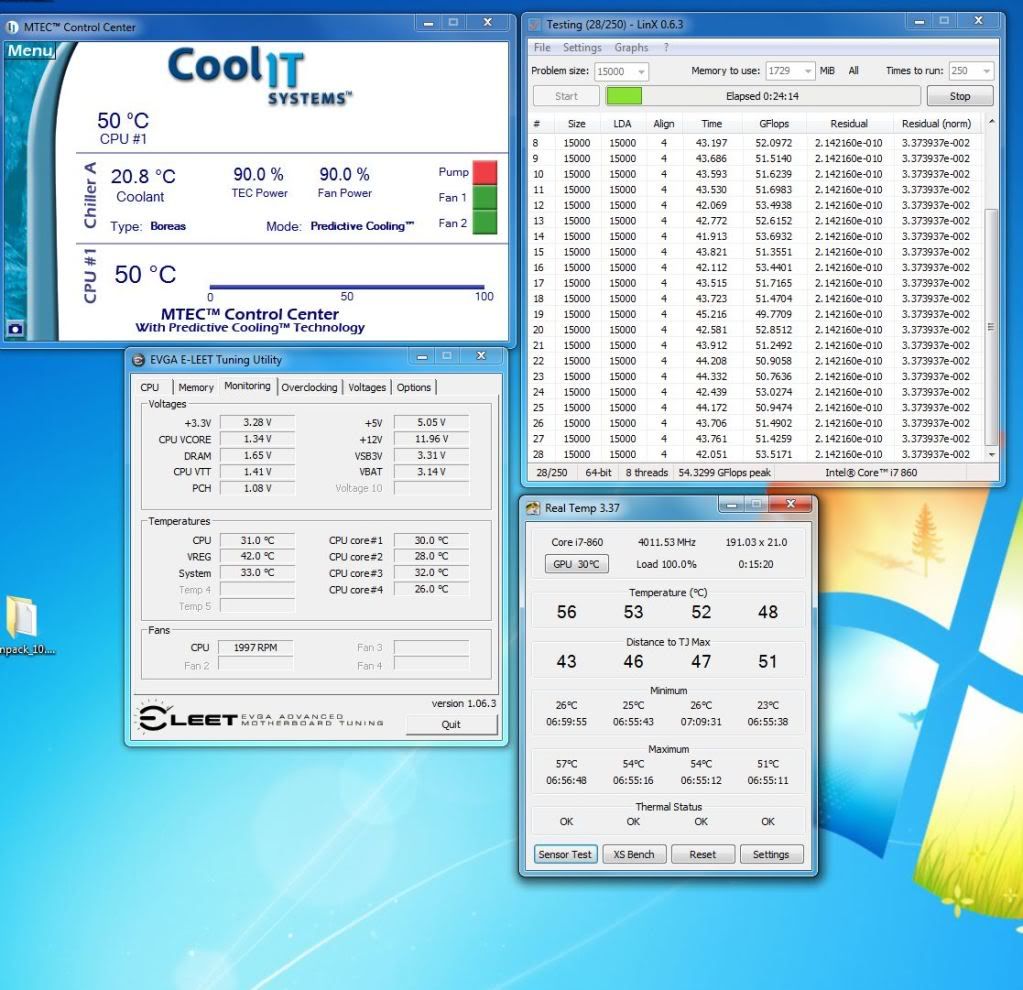
Core I5 750 4Ghz
4Gig Ram
Koolance 360 CPU BLOCK
Exos 2.5 1/2 Tubing
EVGA GTX 480
Danger Den GTX 480
Cheers for clearing that up m8y so given the choice between the standard i7 860 and an Xeon X3460 the Xeon would be worth the extra $
Asus RIVE | Intel Core i7-3960X | Prolimatech Megahalems |Corsair AX860i | Cosmos S | Asus HD 7970 Matrix Platinum | Windows 7 Ultimate 64 | 16GB Corsair Dominator GT | Samsung S27A950D | ASUS Xonar D2X | Samsung 256GB SSD 840 PRO |
completely @ default/stock ... i'm waiting for the new block ...
OBSIDIAN 800D, ASRock P67 Professional, Intel 2600K [UNLOCKED] watercooled by Ybris Black Sun (HWLabs Black Ice SR1-360 w/Nanoxia 2K, Swiftech MCP655 + Res XSPC), 4GB KINGSTON LoVo, SSD 128GB Crucial RealSSD C300, HDD Seagate Barracuda 250GB/500GB, Corsair HX 750w, nVidia 260 GTX XFX Black Edition, X-FI Xtreme Gamer
New BIOS out - A39. Original post, quote here:
On a side note, next week is an OC competition at TRP so I'll have some new benchmarks to post.This BIOS is ONLY for the EVGA P55 FTW Motherboard (part number 132-LF-E657- )
A39 Updates:
* Improved XMP Support
* Supports New 1.35v DRAMs
* Improves Xeon CPU Support
This package contains the necessary Flash Tool and ROM file to Flash your EVGA Motherboard. Please check to ensure that you downloaded the right package for your motherboard.
-------------------------------------------------------------------------------------
This flash is designed for Windows 32Bit/64Bit or DOS mode.
* Download the following .zip file: E657_A39.zip
* First go into your BIOS and load defaults, save and exit
* Go into the folder where you unzipped this package and run the appropriate batch file.
o For Windows XP, Vista or 7 32Bit: AFUWIN32.BAT
o For Windows XP, Vista or 7 64Bit: AFUWIN64.BAT
o If in DOS Mode: AFUDOS.BAT
* Press Y in CAPITAL LETTERS to start the flash process
* DO NOT TURN OFF POWER OR RESET DURING THE FLASH PROCESS
* After the flashing is finished, shut down the computer. Then power on again and go into BIOS, Load Defaults, Save and Exit.
Warning:
**Do not restart or interrupt your PC while the flash is ongoing
**Do not Flash BIOS on overclocked settings
**It is always recommended to power-down after flash
[XC] gomeler - Public note: If you PM me to tell me that I am disrespectful at least have space in your PM box so I can tell you I don't care.
[XC] gomeler - I come to the news section to ban people, not read complaints.
I heart gomeler!
 Posting Permissions


 Reply With Quote


Bookmarks