

You're not going to get much of a hand out Godmyster. Do what most of do, read up, make an attempt and post your results.Originally Posted by Godmyster




You're not going to get much of a hand out Godmyster. Do what most of do, read up, make an attempt and post your results.
GB 790XTA UD4
GSkill Pi Black 2000 Cas9
ASUS 4870
Enermax Revolution 1050+
http://www.heatware.com/eval.php?id=67661
Godmyster, what kind of help do you need? Do you have any problems with your rig? Or you want quick (or complete) OCing guide? Please ask more detailed questions, not like "I want to know all about UD5, what I didn't know yet. Wanna anyone help me?".
You can easily go for 3.8-4.2 Ghz on good air, up to 4.66 (222 QPI) on water, and even more on extreme cooling.
I am on Extreme, so can't advice you what BIOS is better. Try last final F5 and if you wouldn't like it, try read this topic from the beginning.
---
ReverendMaynard, QPI/Vtt higher then Vcore is needed for working combination of low CPU clock and high Memory multiplier, due to need of 2xMem Uncore multiplier. For example, in my 24/7 profile (193x21, Mem 10x, Uncore 20x) i need 1.3750 Vcore and 1.495 QPI/Vtt for 12h Prime stability.
as u can see i have this new rig, and ive seen the bios and looks completly diferente to what i was used too... so wanted some help on the Ocing
CPU: i7 920 batch #3838B556 D0
Motherboard: Gigabyte EX58-UD5
Memory: Gskill 3x1Gb 1600
Graphic: Sapphire 4890 1GB
HDD: 2x F3 500 Raid 0
I understand that Code, but what kind of realworld benefits do you get from raising the QPI/VTT almost .2v over intels 1.35v spec without having the cpu frequency to drive it home?
Makes little sense to run it that way from a performance aspect so explain why you need to run like that.
Here are my 24/7 game settings (GRID gets a little micro stutter with HT on) 18x uncore 8x memory.
http://clubnboc.com/forum/index.php?...ach=1675;image
Also, the all of the bios's for the Gigabyte X58 line are identical.
Last edited by ReverendMaynard; 03-18-2009 at 10:38 AM.
GB 790XTA UD4
GSkill Pi Black 2000 Cas9
ASUS 4870
Enermax Revolution 1050+
http://www.heatware.com/eval.php?id=67661
ReverendMaynard, I am software developer, and my system is used for compilation and data processing. I did some benches with VS 2008, GCC 4 compilers and my DP software, and realised that memory frequency is much better then CPU frequency for it. So I found maximum stable memory freq (~970 Mhz 7-7-7-20-1T) and set up my 24/7 profile for it. If I can save only 1 or 2 seconds from every compile->link->run sequence, then I can save about 2 hours of a week. It is my realword benefit.
Last edited by CodeRush; 03-18-2009 at 10:59 AM. Reason: Typos :)
That's exactly the answer I was looking for Code, thanks for explaining it
GB 790XTA UD4
GSkill Pi Black 2000 Cas9
ASUS 4870
Enermax Revolution 1050+
http://www.heatware.com/eval.php?id=67661
anyone willing to help me with me Ocing on my new system?
CPU: i7 920 batch #3838B556 D0
Motherboard: Gigabyte EX58-UD5
Memory: Gskill 3x1Gb 1600
Graphic: Sapphire 4890 1GB
HDD: 2x F3 500 Raid 0
Here's what I did
set QPi/vtt to 1.35v
set Vcore to 1.40
Qpi to 36x
memory multiplier to 8x
uncore x17 (2xmem mult + 1)
performance enhance std
memory timings as per manufacturers spec (I have OCZ 1600MHz hence 8,8,8,24 at 1.64v)
leave turbo and hyperthreading enabled
take bclk up in 5Mhz increments from 170. I stopped at 190, happy with 21x190
Stable at 100% CPU load for 8 hours although temps get up to mid 80s.
i have started trying to see how far I can get Vcore back down and dropped Bclk to 180 to try and reduce temps under full load
Core i7 920 @ 3.99GHz (21x190)
Noctua NHU12P push/pull
Gigabyte UD5 F5g
3x2Gb OCZ Gold 1600MHz @8x190
Thermaltake Armor
Nvidia GTX 260 maxcore
So does bios F5g on the UD5 fix the phantom post issues? or is it only F5 final and beyond? Sometimes my raid card doesn't initialize right during the second power on and it's annoying to have to go into the bios and reorder the disk priority again after I get it to initialize correctly.. Anyone else with an Areca card and the double post notice that? hrm.. well.. I am looking to get on a bios that doesn't do that soon..
Gigabyte x58 UD5 / core i7 920 @ 3.8 / 6G ddr3 / 100G Patriot Inferno + 500G WD / gtx470 SLI watercooled / x-fi / 1KW enermax / 5760x1080 surround
Gigabyte z68x-ud3-b3 / core i5 2400 @ 3.6 / 8G ddr3 / 120G Intel 510 + 120G Adata S599 + 2x 1T WD blue / Zotac gt430 / x-fi / 500w ocz / 1920x1200
DFI pro875B / pressy 2.8 / 2g corsair xms pro / 6800gt agp / 150g raptor x / 500w ultra x-connect / lots of UV lighting / smiles
MSI K7N2 Delta-L / Athlon xp2600+ / 1G ocz platinum / chaintech TNT2 / 2x Diamond Monster 3D II SLI / Audigy / more smiles
Hi Rev,
Sorry the F5G does not fix double start issue at least not for me. Have yet to find bios that does while oc.
Btw is the Areca card worth having for Raid rather than on board - much better performance???? May be interested in getting an areca myself.
Mark
The XMP profiles of 1600Mhz and 1866Mhz for the OCZ PC#-12800 DDR3-1600MHz triple channel ram has 1.4 QPI/VTT as standard. Plus I am running the 1600Mhz XMP profile at 1688Mhz same timings.
Looks like I have another week or two to play with this rig, so I may mount a couple of fans to cool down the mobo.
[SIGPIC][/SIGPIC] CoolerMaster Stacker 830SE|Antec Signature 850W|Gigabyte X58A-UD5 F5 slic2.1
Intel Core i7 930 16x200@3,200Mhz|vcore 1.14|Intel Stock CPU Cooler
GSKILL DDR3 Perfect Storm 2000 @6-6-6-16-1T 1600Mhz|ATI 5870 1024MB 850/1200
Windows 7 Ultimate x64 bootdisk: Crucial RealSSD-C300 128GB SATA-III
I got straight onto F6C after building UD5 on F3 and haven't looked back.
No double post, ET6 works in vista x64, 211 BCLK no problem.
Just make sure you flash your bios with default settings running, ie. No overclocked settings before you flash.
[SIGPIC][/SIGPIC] CoolerMaster Stacker 830SE|Antec Signature 850W|Gigabyte X58A-UD5 F5 slic2.1
Intel Core i7 930 16x200@3,200Mhz|vcore 1.14|Intel Stock CPU Cooler
GSKILL DDR3 Perfect Storm 2000 @6-6-6-16-1T 1600Mhz|ATI 5870 1024MB 850/1200
Windows 7 Ultimate x64 bootdisk: Crucial RealSSD-C300 128GB SATA-III
That's high QPI/VTT for 1600mhz memory man. Is it the CAS7 stuff? Glad I got these Pi's for cheap, they are ultra flexible.
GB 790XTA UD4
GSkill Pi Black 2000 Cas9
ASUS 4870
Enermax Revolution 1050+
http://www.heatware.com/eval.php?id=67661
Hi - ok, thanks.. from the looks of things I might give F6c a go (thanks Alcibiades for your input on that)...
as for the Areca card... it's a decent card, great vista64 driver support, 256mb ddr2 (so would be great for SSD raid) but my two raptor-x's are only SATA1 so I am not pushing the card very hard I think... I get 160mb/s sustained reads... as a pci-e 1x the best BW I will ever get out of it is 250mb/s or so.. I kind of wonder how well it would do with a pair of fast SATA2 drives on it.. anyways, it's a decent card but not sure how much better it would be than the intel ICH10R.. I like having my OS on an external raid card so I can transplant the system onto a new board quickly if I need to.. it's saved me several times in the past so I just have been in the habit of doing that.
Gigabyte x58 UD5 / core i7 920 @ 3.8 / 6G ddr3 / 100G Patriot Inferno + 500G WD / gtx470 SLI watercooled / x-fi / 1KW enermax / 5760x1080 surround
Gigabyte z68x-ud3-b3 / core i5 2400 @ 3.6 / 8G ddr3 / 120G Intel 510 + 120G Adata S599 + 2x 1T WD blue / Zotac gt430 / x-fi / 500w ocz / 1920x1200
DFI pro875B / pressy 2.8 / 2g corsair xms pro / 6800gt agp / 150g raptor x / 500w ultra x-connect / lots of UV lighting / smiles
MSI K7N2 Delta-L / Athlon xp2600+ / 1G ocz platinum / chaintech TNT2 / 2x Diamond Monster 3D II SLI / Audigy / more smiles
whats the best bios around for the UD5?
CPU: i7 920 batch #3838B556 D0
Motherboard: Gigabyte EX58-UD5
Memory: Gskill 3x1Gb 1600
Graphic: Sapphire 4890 1GB
HDD: 2x F3 500 Raid 0
Anyone else have noise problems with their sound card when the Gigabyte (Jmicron) IDE and SATA are enabled? I just flashed over to f6c to give it a try and when I reconfigured my bios settings I forgot to disable it. The dreaded static/chugging rhythm was back on my X-fi card. I've experienced it with this card before, its a static popping that maintains a certain rhythm, about the same rhythm as a car or motorcycle engine at high idle that is missing on one cylinder. I almost ditched this card for the PCI-E titanium version a while back but put it back on the shelf, Creative has done a lot more to earn my scorn than to earn my hardware dollars in recent years. However, the Auzentech card looks promising.
In Bailout America, bank robs YOU
Gigabyte EX58-Extreme Bios F5h
i7-920 @ 190x20 HT on Turbo on
6 GB OCZ XMP Ready DDR3-1600
300GB Velociraptor (OS)- 2x250GB WD (storage)
EVGA 8800GTX
Samsung 2433BW 24" LCD - X-fi Platinum
Iwaki RD30 24v pump/Meanwell 150 power supply
Swiftech GTZ, PA 120.3, MCW60, Enzo chipset block
Vista Business 64bit
PCPC Silencer 750W PSU
Did you remember to turn off the on-board sound and any other features you don't need? If nothing works on F6c, you can always just flash back to a different BIOS.
For my part I know nothing with any certainty, but the sight of the stars makes me dream.
.
.
Yep, actually all I needed to do was disable the extra IDE/Sata in the bios and the noise was gone. There must have been some IRQ sharing going on, and the X-fi is a spoiled brat, it doesn't play nice with others.
In Bailout America, bank robs YOU
Gigabyte EX58-Extreme Bios F5h
i7-920 @ 190x20 HT on Turbo on
6 GB OCZ XMP Ready DDR3-1600
300GB Velociraptor (OS)- 2x250GB WD (storage)
EVGA 8800GTX
Samsung 2433BW 24" LCD - X-fi Platinum
Iwaki RD30 24v pump/Meanwell 150 power supply
Swiftech GTZ, PA 120.3, MCW60, Enzo chipset block
Vista Business 64bit
PCPC Silencer 750W PSU
Hi,
Thanks for the info on the Areca card - might give it a try as you pointed out it also gives you extra flexibility by being able to transplant to another board quickly.
Mark
Hi all,
As title really - any feedback on bios F6E for UD5 board? Is it any good ie
no problem with flashing, and how are voltage requirements on this bios against the others. I tried F6A and found I needed higher voltage for same overclock and S3 resume still no dice - so any news on F6E - is it worth trying? Quick flash works ok or not?
Mark
Qflash has been corrected in all BIOS's posted after 3/11/09 for the X58 series
~ <Mushkin Enhanced Alpha Team ~
GIGABYTE Reviews - X58A-OC ~ P67A-UD7 ~ P67A-UD4 ~ 5870 SOC
<Mushkin Reviews - 998966 Radioactive ~ 998826 Ridgeback ~ 998679 Blackline
Crucial Reviews - C300 SSD ~ Blue Tacer DDR3
Just flashed to F6h seems ok so far ,prime stable at 4.0gig came from f5 and q flash worked great
Gigabyte P67A-UD7-B3,i7-2600K,8GB G.Skill DDR3 PC3-14900 1866MHz RipjawsX,WD velociraptor 150Gig in Raid 0,Pioneer BD-RWBDR-203,Tagan 1100W,Win 7 64bit,hd6970,Viewsonic VX2435wm

Playing with the board for a week now and rather impressed. Only SS for now because of GOOC deadline. Mem controller on this cpu isnt great, next week tests on air with i7 920. For now under mach II:

anyone know any other way to update the bios? my @bios is telling me to deactivate Dynamic Energy Saver but then says Terminate Dynamic Energy Saver Failed
CPU: i7 920 batch #3838B556 D0
Motherboard: Gigabyte EX58-UD5
Memory: Gskill 3x1Gb 1600
Graphic: Sapphire 4890 1GB
HDD: 2x F3 500 Raid 0
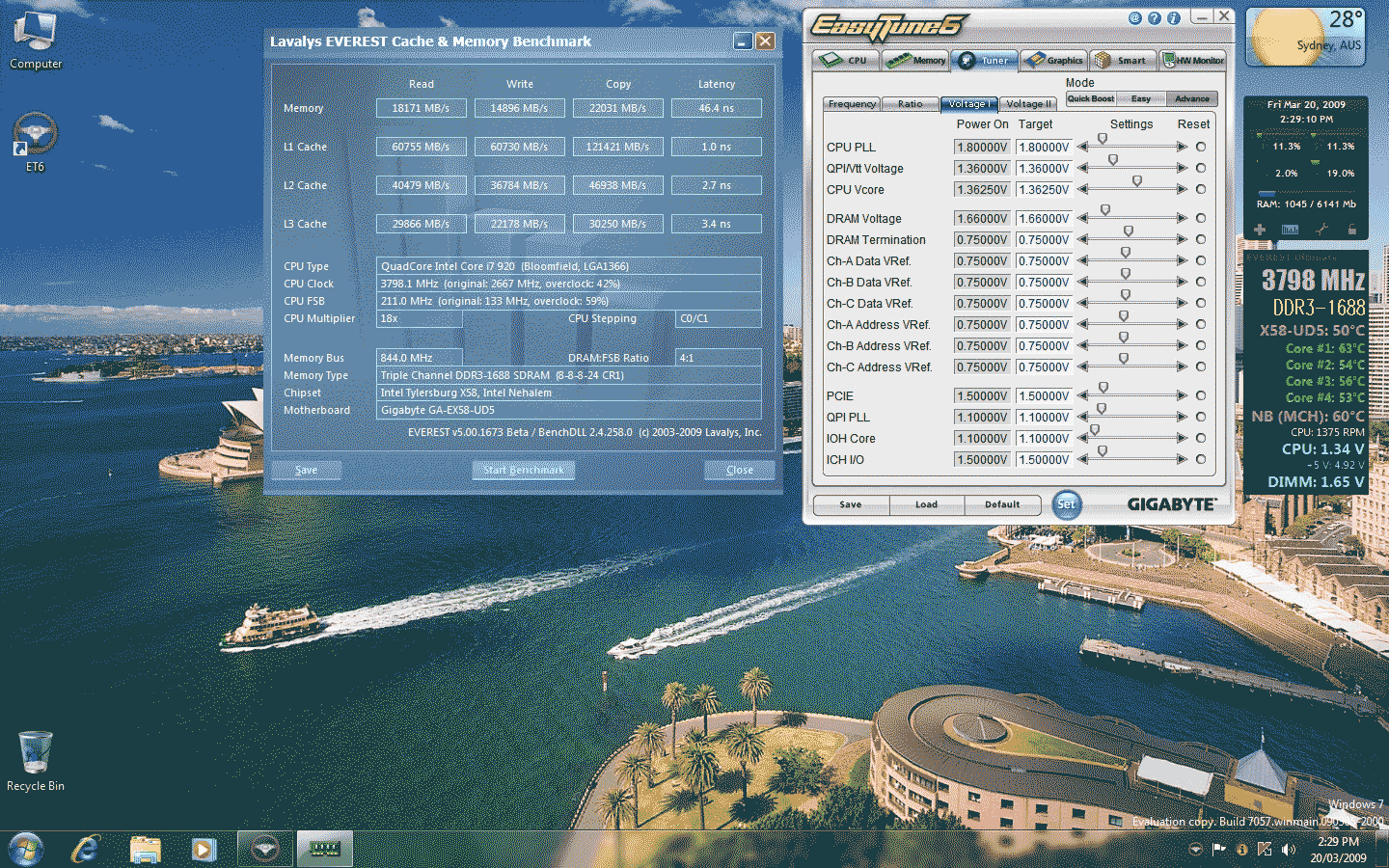
Well ReverendMaynard I took your advice and tried to find a good setting with a lower QPI/VTT.
Dropped QPI/VTT from 1.4 to 1.36, All MCH settings back to auto and NB temp drops 5 degrees. CPU from 4Ghz to 3.8, memory performance still at 1688Mhz. CPU load temp after 30 minutes ~70-72 degrees.
Here it is in glorious windows 7 16 colours
[SIGPIC][/SIGPIC] CoolerMaster Stacker 830SE|Antec Signature 850W|Gigabyte X58A-UD5 F5 slic2.1
Intel Core i7 930 16x200@3,200Mhz|vcore 1.14|Intel Stock CPU Cooler
GSKILL DDR3 Perfect Storm 2000 @6-6-6-16-1T 1600Mhz|ATI 5870 1024MB 850/1200
Windows 7 Ultimate x64 bootdisk: Crucial RealSSD-C300 128GB SATA-III
 Posting Permissions




 Reply With Quote


Bookmarks