

niceeeee oneOriginally Posted by Zucker2k

at 4400 you feel the speeeeed
cheers
Sergio


niceeeee one
cheers
Sergio
Intel Core i9-7980XE@ 4.8GHz 18C/18TH (Direct Die Contact)
ASRock X299 OC Formula
ADATA XPG SPECTRIX D80 (4x8GB) DDR4-3800C17 B-Die
1x Intel Optane SSD 905P 480GB
4x HP EX950 NVMe 2TB on ASRock ULTRA M.2 CARD
EVGA RTX 2080TI KINGPIN 2190/8000 Stock Cooling AIO 240
SilverStone ST1500W-TI TITANIUM
Alphacool Custom Water Cooling
I've been through the same mate, i was 2,5 month trying to reach something stable
Cheers
Sergio
Intel Core i9-7980XE@ 4.8GHz 18C/18TH (Direct Die Contact)
ASRock X299 OC Formula
ADATA XPG SPECTRIX D80 (4x8GB) DDR4-3800C17 B-Die
1x Intel Optane SSD 905P 480GB
4x HP EX950 NVMe 2TB on ASRock ULTRA M.2 CARD
EVGA RTX 2080TI KINGPIN 2190/8000 Stock Cooling AIO 240
SilverStone ST1500W-TI TITANIUM
Alphacool Custom Water Cooling
I have the same batch # and have been ready to ditch this chip since day 1. Still trying though.
why? because it runs too hot?
Q9650 E0 1.2 VID 445x9 4320mhz 1.344v @ 480*9
GIGABYTE EP45-UD3R
Mushkin 2x2gb 1066 DDR2 5-5-5-15 2.1v
Lapped TRUE w/ 110cfm Panaflo (shrouded)
Corsair HX620 Modular
CoolerMaster 690 Case
EVGA 9800GTX+
I saw you had the same batch number, but your vid was below 1.25 correct? What has been your max stable thus far?
Asus Rampage III Formula
I7 970 (200x23=4610)
EK Supreme HF Copper
Swiftech 420 QP w/ (4) Scythe GT AP-15 (1850 RPM)
Swiftech 355 w/ ek X-Top v2
(3) Asus 5850 (1050/1250/1.3v)
(3) EK 5850 FC
Swiftech 220 QP w/ (2) Scythe GT AP-15 (1850 RPM)
Swiftech 355 w/ ek X-Top v2
Cosair HX850
(3) 2GB Gskill F3-12800CL7T-6GBPI
(1) Intel X25-M G2
(3) WD Black 1TB
What do you think has been cached? I have superfetch disabled, and a ton of encoder apps in the background.
Thanks Andres, yeah, I'm definitely feeling the speed.

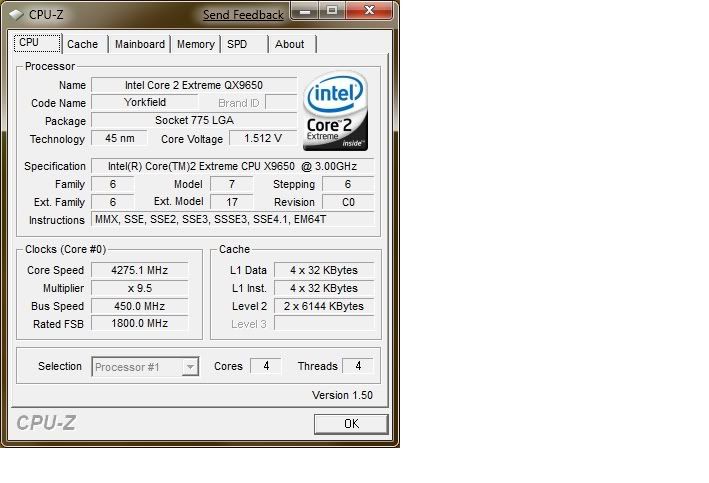
I just flashed my BIOS, gave my QX9650 a good kicking, got her at 440*10 again - YAY!!! Not stable yet but hey ho
~Bex
PROJECT :: The Xtreme (WET) Dream!!!
PERSONAL H2O BESTS :
E8600 @ 4.8GHzE6750 @ 4GHz
PERSONAL AIR BESTS :
Sempron140 @ 4Ghz (Stock Cooler)i7 3960x @ 5.4ghz (Air Cooler)
Bex : "Who said girls can't play PC games or overclock!? Do I look like your imagination!?"
Aaron : "TBH, a girl doing all that is a pretty perfect girl!"
Swift_Wraith : "could someone please check bex for a penis?"
^^^
Best I have been able to do Prime stable is 4.1ghz-483x8.5. Stock VID is 1.21v. Had some temp issues but think I got it worked out now. Not real pleased with it after seeing what some of these guys are hitting. The boys at Intel must have shown up hungover that Monday, or maybe I still haven't figures it out. Will just have to make the best of it. Going to shoot for high FSB with lower multi I guess.

Nice job Sergio! Can't seem to get lower then that
//RETIRED-o00o--°(_)°--o00o-OVERCLOCKER//
Yes, it was running real hot, hope its under control now. Turned the HS facing up towards the top and reapplied the thermal paste. Helped quite a bit.
A Picture says a 1000 words m8.
Your screen shots shoes 6069MB Cached.
Turning it off is pointless, may as well run XP then.
Armchair quarterbacking is pointless. I had task manager open, available ram was like 7Gbs, started Ripbot264, and watched windows eat the ram to the last drop in less than a minute. Instead of trying to prove something that I know for a fact is wrong, do this: turn of superfetch. run an app, vista keeps it in memory, run another, same happens until system runs out of available ram and THEN vista starts to unload inactive programs from cached memory to make room for the active ones. Superfetch pre-emptively loads programs based on your usage habits into memory, with superfetch off, windows caches programs you've run for as long as there is space in memory for them. With ripbot264, obviously windows is not offloading all the working files to hard drive. This is where the speed factor kicks in because cached ram is 17x faster than a file on a hard drive. With the file sizes and high encoding settings I was dealing with, windows had use for every bit of the 8GBs on the system.
Thank you mate I will keep on testing this weekend
Cheers
Sergio
Intel Core i9-7980XE@ 4.8GHz 18C/18TH (Direct Die Contact)
ASRock X299 OC Formula
ADATA XPG SPECTRIX D80 (4x8GB) DDR4-3800C17 B-Die
1x Intel Optane SSD 905P 480GB
4x HP EX950 NVMe 2TB on ASRock ULTRA M.2 CARD
EVGA RTX 2080TI KINGPIN 2190/8000 Stock Cooling AIO 240
SilverStone ST1500W-TI TITANIUM
Alphacool Custom Water Cooling
We don't do your type of new football in Scotland.
Also I don't need told how Vista works as I am an officially MS Beta Tester, but going by your screens it does look like its Cached so look at it from anothers point of view.
Also I have tried it and if you have prefetch off and do a clean startup after that it will not Cache any of it, but your still has over 6GB.

Where and when did you guys get those "bad" chips?
Asus Rampage Formula X48
Intel Q9650 @ 4.33GHZ
OCZ Platinum DDR2-800
Palit 4870x2
Creative Xi-Fi Extreme Music
Corsair HX1000
LL 343B Case
Thermochill 120.3
2xMCP355
KL 350AT
KL 4870X2 FC WB
DD Chipset Block
Thanks for confirming that; I beta test MS software too. I did try to tell you, prefetch is the culprit. Like I said, you have to look at what I'm doing with the computer, and not just task manager in isolation.
PS: I actually prefer soccer to the football we have here.
Hi all, following this page for a while, yet first post.
Got a Q9650 L829A405 chip with VID of 1.225
With my old Gigabyte P35-DS3R board (no PLL/LLC options) I can get it upto 3800 max with 1.296V load, yet not completely stable. So Im going the P45 route shortly
Anyways, got a question about the sensors.
The sensors of my chip are a bit weird, and I dont know which one to trust.
Core # 0 = 34C Idle, Load = 58
Core # 1 = 34C Idle, Load = 57
Core # 2 = 37C Idle, Load = 49
Core # 3 = 40C Idle, Load = 48
Measured with coretemp and realtemp, show same results.
This is prime small fft load, with a lapped TRUE S-Flex 1600 slipstream and AS5. I gues core #0 and #1 have the correct temperatures?
Yay - I think I broke the FSB barrier on the maximus - I'm at 455FSB
I might push her some more tonight if I get the chance...
I know it's not good v's but hey ho, I wanna see how far she'll go before I try and settle on stability.... Temps are good though - under prime shes not passed 60
~Bex
PROJECT :: The Xtreme (WET) Dream!!!
PERSONAL H2O BESTS :
E8600 @ 4.8GHz
PERSONAL AIR BESTS :
Sempron140 @ 4Ghz (Stock Cooler)
Bex : "Who said girls can't play PC games or overclock!? Do I look like your imagination!?"
Aaron : "TBH, a girl doing all that is a pretty perfect girl!"
Swift_Wraith : "could someone please check bex for a penis?"
Very nice Bex, but you have a little ways to go.Highest I took my x38 Maximus Formula was 475, lost that screenie.
:o Well in that case I will HAVE to try more! I aim to beat, or at least be on par!
~Bex
PROJECT :: The Xtreme (WET) Dream!!!
PERSONAL H2O BESTS :
E8600 @ 4.8GHz
PERSONAL AIR BESTS :
Sempron140 @ 4Ghz (Stock Cooler)
Bex : "Who said girls can't play PC games or overclock!? Do I look like your imagination!?"
Aaron : "TBH, a girl doing all that is a pretty perfect girl!"
Swift_Wraith : "could someone please check bex for a penis?"
Goodluck; try dropping multi and see what she can do.
Very powerfull these cpus are : 9x467 was very easy to achieve with these settings:
Vcore: 1.2875
Cpu PLL: 1.52
Cpu GTL (0/2): 0.635
Cpu GTL (1/3): 0.670
FSB Termination: 1.22
Dram: 1.96
NB GTL: 0.665
NB Voltage: 1.22
Default VID is 1.25V
Prime Blend +8h:
http://img3.imageshack.us/my.php?ima...q96509x467.gif
Asus P5Q Deluxe
Q9650@4.2GHz, 1.2875V
2x2GB Mushkin XP6400
Club3D Radeon 4870X2
Samsung SATA DVD-burner
1.25TB HDD
Chiectec full tower
Zalman ZM850-HP
BenQ G2400W
Vista64 Ultimate
Watercooled with PA120.3 & BIX3,Laing DDC,Swiftech Apogee GT & EK FC Acetal blocks
nice mate
Intel Core i9-7980XE@ 4.8GHz 18C/18TH (Direct Die Contact)
ASRock X299 OC Formula
ADATA XPG SPECTRIX D80 (4x8GB) DDR4-3800C17 B-Die
1x Intel Optane SSD 905P 480GB
4x HP EX950 NVMe 2TB on ASRock ULTRA M.2 CARD
EVGA RTX 2080TI KINGPIN 2190/8000 Stock Cooling AIO 240
SilverStone ST1500W-TI TITANIUM
Alphacool Custom Water Cooling
today i started testing 4140/1227 on my same 4104/1216 settings with 1,232vcore just added a notch of MCH and went to Windows 7 x64 7057 to do some memtest, temps are 27C and more on my room, when temps go a bit down will test blend

Intel Core i9-7980XE@ 4.8GHz 18C/18TH (Direct Die Contact)
ASRock X299 OC Formula
ADATA XPG SPECTRIX D80 (4x8GB) DDR4-3800C17 B-Die
1x Intel Optane SSD 905P 480GB
4x HP EX950 NVMe 2TB on ASRock ULTRA M.2 CARD
EVGA RTX 2080TI KINGPIN 2190/8000 Stock Cooling AIO 240
SilverStone ST1500W-TI TITANIUM
Alphacool Custom Water Cooling
 Posting Permissions


 Reply With Quote





Bookmarks