

Nice
What PLL and VTT did u use for that 4.2GHz OC and ur 4.5GHz OC?



Nice
What PLL and VTT did u use for that 4.2GHz OC and ur 4.5GHz OC?

if i remember right it was x0.63V and +0.025 i think.
for 4500...
vcore was 1.800V
It was my first time benching with Dice
Last edited by joker_x3; 01-23-2009 at 03:02 AM.
1.8 = Ouch
im running 1.280v @ 3600 mhz and im stable for all my games which works for me..its not 100% stable but i never have a 100% load so its fine with me..
also ill be doing another overclock session tomorrow night since its supposed to be nice and chilly
Case---------CM Cosmos (http://www.xtremesystems.org/Forums/...d.php?t=194812 )
Power Supply-CM RealPower 850W
Processor-----Intel Q6600 SLACR @ 3.6ghz 1.44v
Motherboard--DFI x48 UT-T2R
RAM----------G Skill Black Pi 2x2GB DDR2-900 @ 450mhz 4-3-3-6 CR1
GPU----------Dual GTX 275 896MB (usually stock speeds)
HDD----------Dual VelociRaptor 150GB(Raid 0) 320GB Backup
Audio--------Razer AC-1 (On sale on woot for 50$
Mouse/KB----Razer Copperhead/Logitech G15
Watercooling: AquaComputer Cuplex HD, MCW 60's, 2x120mm Radiator, MCP655, EK Multi-Res.
I can run 1.26x vcore at 3.6GHz and it runs BF2 fine (thats about all I play).
Originally Posted by fatguy1992

can't run over 3.4 without 1.4v unstable and bad temps (true 120)
q6700 3.4 (8*425), 4gig 1066, 4870 1g @ 855/1100, pcp&c 750, emu0404
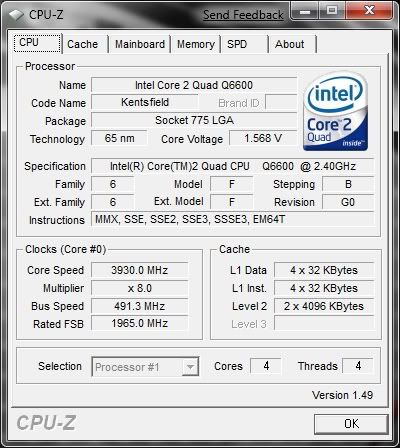
well, tonight didnt do to much good for me with my new ram and all....i coudlnt go higher than 4233mhz for my cpu, no matter how much voltage i added. i might ahve needed to mess with my GTL's but i wasnt in the mood for it.
so instead of going for max cpu i tried max fsb and this is what i came up with before i got fed up with countless BSODs
Case---------CM Cosmos (http://www.xtremesystems.org/Forums/...d.php?t=194812 )
Power Supply-CM RealPower 850W
Processor-----Intel Q6600 SLACR @ 3.6ghz 1.44v
Motherboard--DFI x48 UT-T2R
RAM----------G Skill Black Pi 2x2GB DDR2-900 @ 450mhz 4-3-3-6 CR1
GPU----------Dual GTX 275 896MB (usually stock speeds)
HDD----------Dual VelociRaptor 150GB(Raid 0) 320GB Backup
Audio--------Razer AC-1 (On sale on woot for 50$
Mouse/KB----Razer Copperhead/Logitech G15
Watercooling: AquaComputer Cuplex HD, MCW 60's, 2x120mm Radiator, MCP655, EK Multi-Res.
Impressive clocks with the 680i.... care to post some of your BIOS options/ voltages that enabled such success? Is the DFI board a unique design compared to the numerous nVidia reference design knockoffs (evga, etc)?
For the most part, I've been happy with my 680i, but I know the board is what is limiting my OC on the Q6600...
i7-2600K @ 4806Mhz 102.3x47 1.368v LinX stable
MSI P67 GD-80
16Gb Corsair 8-8-8-24 1T 818.2Mhz
MSI GTX560Ti 1005/2250 1.062v
Crucial m4 256Gb SSD
Corsair TX850 | 64bit WIN7 Pro
Custom watercooling
47" 1080p LCD | Onkyo 876/ Polk 5.1 surround

Nice clocks... though it seems how nice of a chip I get I can't break 3.6GHz... when I get a DMM and figure out what's going on with my PSU, it's overclocking time...
1.7%
my Q66 runs 24/7 with 1.3V @ 3600MHz Prime Stable :>
main rig.
CPU: Core 2 Q6600 @ 4500 MHz | GPU: XFX HD 4890 XXX | Mainboard: Gigabyte Ep45-UD3P | Memory: 2x 2GB DDR2-800 Mushkin white @ 500MHz | HDD: 150GB WD RaptorX, 4x 500GB WD | PSU: BeQuite E5 700W | Case: Chieftec Mesh Big
that's impressive. what's your batch and VID? is it new l8 Q6600?

Awesome job, mate
Intel Q9650 @500x9MHz/1,3V
Asus Maximus II Formula @Performance Level=7
OCZ OCZ2B1200LV4GK 4x2GB @1200MHz/5-5-5-15/1,8V
OCZ SSD Vertex 3 120Gb
Seagate RAID0 2x ST1000DM003
XFX HD7970 3GB @1111MHz
Thermaltake Xaser VI BWS
Seasonic Platinum SS-1000XP
M-Audio Audiophile 192
LG W2486L
Liquid Cooling System :
ThermoChill PA120.3 + Coolgate 4x120
Swiftech Apogee XT, Swiftech MCW-NBMAX Northbridge
Watercool HeatKiller GPU-X3 79X0 Ni-Bl + HeatKiller GPU Backplate 79X0
Laing 12V DDC-1Plus with XSPC Laing DDC Reservoir Top
3x Scythe S-FLEX "F", 4x Scythe Gentle Typhoon "15", Scythe Kaze Master Ace 5,25''
Apple MacBook Pro 17` Early 2011:
CPU: Sandy Bridge Intel Core i7 2720QM
RAM: Crucial 2x4GB DDR3 1333
SSD: Samsung 840 Pro 256 GB SSD
HDD: ADATA Nobility NH13 1GB White
OS: Mac OS X Mavericks
i believe my batch is l787 something and my VID is 1.2125
i can get my bios a bit later today hopefully. and yes the DFI board actually uses the 680i LT chipset, but has all of the 680i full features. it was a weird choice on DFI's part but the board rocks if you ask me.
Case---------CM Cosmos (http://www.xtremesystems.org/Forums/...d.php?t=194812 )
Power Supply-CM RealPower 850W
Processor-----Intel Q6600 SLACR @ 3.6ghz 1.44v
Motherboard--DFI x48 UT-T2R
RAM----------G Skill Black Pi 2x2GB DDR2-900 @ 450mhz 4-3-3-6 CR1
GPU----------Dual GTX 275 896MB (usually stock speeds)
HDD----------Dual VelociRaptor 150GB(Raid 0) 320GB Backup
Audio--------Razer AC-1 (On sale on woot for 50$
Mouse/KB----Razer Copperhead/Logitech G15
Watercooling: AquaComputer Cuplex HD, MCW 60's, 2x120mm Radiator, MCP655, EK Multi-Res.
ho2 old score Q6600 G0 @ 4050 3D-mark06 ASUS P5K
http://www.hwbot.org/searchResults.d...inTotalPoints=
Mine is a 1.2V VID one, but unfortunately I need a better psu to clock it properly. 4.05Ghz@1.472V (idle that is, under load even less) the best so far for some 3dmark runs. Above that voltage my rig just switches off when cpu under load.
CoolerMaster RC-690 :: Asus Maximus IV GENE-Z :: intel i5 2500K @ Noctua NH-D14 :: 2x2GB Mushkin 996783 Blackline 1600Mhz CL7 :: Samsung F1 HD642JJ 640GB :: Samsung F2 EcoGreen HD154UI 1.5TB :: Pioneer DVR-212D :: Creative SB X-FI :: Corsair HX520W :: Genius SW-5.1 HT DHT510 :: Dell Ultrasharp U2311H :: Razer Diamondback Acid Green
Im working with my project (Abit IP35 Pro + Q6600 G0 => 4GHz 24/7)... ATM with stock PWM cooling but I have another board where Im planning new cooling atm.
Whats you're best stats atm 24/7 use? What cooling?
What kind of room temps do you have?
Unless you have like 10C or 5C room temps, u'd need good water cooling for better.
Room temp normal, about 22-24c
Computer temps:
CPU 60c, System 25c, PWM 80c, Cores 64, 64, 58, 60.
Other vids default but CPU 1.315 (actual 1.23 - 1.24 with 100% load), ICH 1.09V (actual 1.10V).
Running 400x8, MEM 1:1.
I havent changed anything else that I just mentioned. Should I try something to lower PWM temp? I've done that mod to use bolts on PWM and changed that temptape to better thermal grease. Also 80mm fan near PWM...
I think there's got to be bad contact... Or can it just be so hot with this setup?
are you sure it's your PSU? my friend has a q9450 and he said his would do the same thing under load but it turns out it was his GTL settings so i started messing with mine lately and i think im starting to get a better hold on it. you might want to check that. (i have a coolermaster true power 850, my friend has a corsair hx1000)
Case---------CM Cosmos (http://www.xtremesystems.org/Forums/...d.php?t=194812 )
Power Supply-CM RealPower 850W
Processor-----Intel Q6600 SLACR @ 3.6ghz 1.44v
Motherboard--DFI x48 UT-T2R
RAM----------G Skill Black Pi 2x2GB DDR2-900 @ 450mhz 4-3-3-6 CR1
GPU----------Dual GTX 275 896MB (usually stock speeds)
HDD----------Dual VelociRaptor 150GB(Raid 0) 320GB Backup
Audio--------Razer AC-1 (On sale on woot for 50$
Mouse/KB----Razer Copperhead/Logitech G15
Watercooling: AquaComputer Cuplex HD, MCW 60's, 2x120mm Radiator, MCP655, EK Multi-Res.
I purchased a couple of packets of ramsinks and applied them to all mosfets and virtually every chip on my mobo that was big enough to apply one to. Certainly helps keep things cool and only cost pennies.
I have Abit IP35 Pro, stock cooling is heatpipe cooling PWM - NB - SB...
I think I gotta find PWM water block from somewhere...
Well either that or my mobo. Don't have gtl settings on my p35. I think...
CoolerMaster RC-690 :: Asus Maximus IV GENE-Z :: intel i5 2500K @ Noctua NH-D14 :: 2x2GB Mushkin 996783 Blackline 1600Mhz CL7 :: Samsung F1 HD642JJ 640GB :: Samsung F2 EcoGreen HD154UI 1.5TB :: Pioneer DVR-212D :: Creative SB X-FI :: Corsair HX520W :: Genius SW-5.1 HT DHT510 :: Dell Ultrasharp U2311H :: Razer Diamondback Acid Green
prettyu nice cpu you got there
Thanks sylle, and joshua7 try benching one night in the cold, see if you get any improvements
Case---------CM Cosmos (http://www.xtremesystems.org/Forums/...d.php?t=194812 )
Power Supply-CM RealPower 850W
Processor-----Intel Q6600 SLACR @ 3.6ghz 1.44v
Motherboard--DFI x48 UT-T2R
RAM----------G Skill Black Pi 2x2GB DDR2-900 @ 450mhz 4-3-3-6 CR1
GPU----------Dual GTX 275 896MB (usually stock speeds)
HDD----------Dual VelociRaptor 150GB(Raid 0) 320GB Backup
Audio--------Razer AC-1 (On sale on woot for 50$
Mouse/KB----Razer Copperhead/Logitech G15
Watercooling: AquaComputer Cuplex HD, MCW 60's, 2x120mm Radiator, MCP655, EK Multi-Res.
-7c this morning.....got a slight increase in FSB
 Posting Permissions


 Reply With Quote
Bookmarks