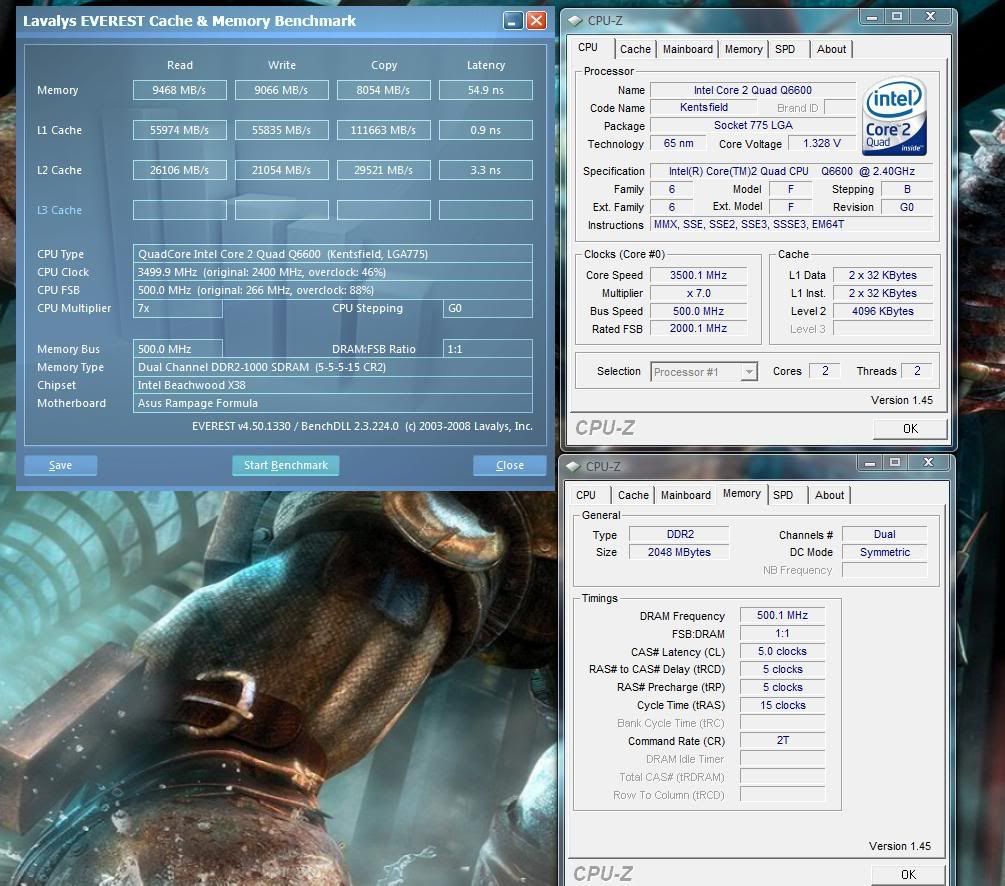
care to share your settings?
Workstation >>> ASUS P8P67 WS Revolution :: Intel Core i7 2600K @ 4.5GHz - 1.29v :: 16GB Corsair Vengeance 1600MHz CL8 :: ASUS GTX 580 DIRECTCU II :: Creative X-Fi Titanium HD :: 80GB Intel X25-M G2 :: 4 x 150gb Velociraptor [RAID-0] :: 1TB Western Digital Black
Laptop >>> MSI GX740 :: Intel Core i7 920XM :: 8GB Kingston HyperX CL9 :: Radeon 5870M @ 800MHz - 0.98v :: 160GB Intel X25-M G2 :: 500GB Western Digital Scorpio Black @ OBHD
These are my settings for 3.5Ghz (7x500) and 8GB on Max Formula running with RF bios 0403:
Extreme Tweaker
Ai Overclock Tuner : Manual
OC From CPU Level Up : AUTO
CPU Ratio Control : Manual
- Ratio CMOS Setting : 7
FSB Frequency : 500
FSB Strap to North Bridge : 333
PCI-E Frequency: 110
DRAM Frequency: DDR2-1000 (1:1)
DRAM Command Rate : 2T
DRAM Timing Control: Manual
CAS# Latency : 5
RAS# to CAS# Delay : 5
RAS# Precharge : 5
RAS# ActivateTime : 15
RAS# to RAS# Delay : 3
Row Refresh Cycle Time : Auto (for 52, can't be set manually in bios)
Write Recovery Time : 6
Read to Precharge Time : 3
Read to Write Delay (S/D) : 8
Write to Read Delay (S) : 3
Write to Read Delay (D) : 5
Read to Read Delay (S) : 4
Read to Read Delay (D) : 6
Write to Write Delay (S) : 4
Write to Write Delay (D) : 6
Write to PRE Delay : 14
Read to PRE Delay : 5
PRE to PRE Delay : 1
ALL PRE to ACT Delay : 6
ALL PRE to REF Delay : 6
DRAM Static Read Control: Auto
Ai Clock Twister : Auto
Transaction Booster : Manual
Common Performance Level [9]
Pull-In of CHA PH1 Disabled
Pull-In of CHA PH2 Disabled
Pull-In of CHA PH3 Disabled
Pull-In of CHA PH4 Disabled
Pull-In of CHA PH5 Disabled
Pull-In of CHB PH1 Disabled
Pull-In of CHB PH2 Disabled
Pull-In of CHB PH3 Disabled
Pull-In of CHB PH4 Disabled
Pull-In of CHB PH5 Disabled
CPU Voltage : 1.320 (CPU-Z)
CPU PLL Voltage : 1.50v
North Bridge Voltage : 1.65v
DRAM Voltage : 1.80v
FSB Termination Voltage : 1.50v
South Bridge Voltage : 1.050v
SB 1.5V Voltage : 1.50v
Loadline Calibration : Enabled
CPU GTL Reference : 0.67X
North Bridge GTL Reference : 0.67X
DDR2 Channel A REF Voltage : Auto
DDR2 Channel B REF Voltage : Auto
DDR2 Controller REF Voltage : Auto
Advanced CPU Configuration:
Everything Disabled
Sweet man!! I'll have to give that a go on my rig.. Any other bench's/gaming issues???
X299X Aorus Master
I9 10920x
32gb Crucial Ballistix DDR4-4000
EVGA 2070 Super x2
Samsung 960 EVO 500GB
4 512gb Silicon Power NVME
4 480 Adata SSD
2 1tb HGST 7200rpm 2.5 drives
X-Fi Titanium
1200 watt Lepa
Custom water-cooled View 51TG
Very very nice Q6600 you got yourself Zucker2k m8![]()
I won't comment on NB voltage as high since you use high FSB on 8Gb RAM, and I suppose you tried to lower a notch, right? On the other side, VTT at 1.5v is about 25% out of intel specs, so as if you were giving your vcore some 1.875v
Your vDDR voltage is impressingly low at 1000MHz, you got there great sticks. Giving them some 2.0 to 2.1v would be safe (unless the maximus overshoot them as it is known for...) and could give you some better clocks
Overall, I can only say you got a great benchmarking performance there with 500 FSB on a quad + 8Gb RAM on the X38.
But, I doubt it is the sweet spot for your setup. You have a good CPU and memory combo running high specs on low voltages. Your Q6600 will be safe with up to 1.45v real vcore and your memory could kick the 1200MHz at 2.10 safe voltage. Your CPU should easily be stable at 3.9GHz at an acceptable vcore (1.45-1.47v) which on 8x multi will give you 488FSB and 976MHz on the RAM at strap 333 or if you manage strap 266 stable you'd outpass 1200MHz on the RAM
In the worst scenario (3.9GHz CPU, strap 333, memory at 976MHz), running the memory lower than 1000 MHz, you could tighten the timings, the TRFC or at least enable static read control and some more relaxed booster settings to get better bandwidth. Even at same memory settings than your actual 500FSB performance, the +400 MHz on the CPU will compensate the small decrease in memory bandwidth.
Maybe you tried it all, but I'm certain, 8x480 to 8x488MHz is a better 24/7 setup in your case and should give you lower vNB and lower VTT
Q6600 G0 L740B126 Lapped, 2x1Gb Kingston HyperX DDR2-1200
Gigabyte 8800 GTS 512Mb OC 756-1890-1000
TT Toughpower 750 W (W0116) new 8xPCI-E Rev.
Western Digital Caviar SE16 WD6400 AAKS rocks
WC: Swiftech H2O-Apex Ultra 220 GT + PA120.3 5v
OCZ XTC RAM Cooler, HR-05 IFX + 80mm FAN (NB), 2x HR-09U type 2 (mosfets), Modded Zalman ZM NB-47J (SB), Arctic-Cooling MX-2
Vista 32 bits
------------
- ASUS P5K Premium bios 0612: (3.84GHz 8x480) @1.432v
------------
- P5B Deluxe: 3.60GHz (9x400) @1.33v *** Old Setup (P5B deluxe)
OCCT 2.x Final Download
Mehh this is 65nm Quad Q6600 not a 45nm architecture. So usually you can pump the vcore up to 1.55V with a good cooling. Though very high vtt is not recommended. Pump up the voltage until it dies...lololol rolftomato
Still it an impressive result with a retail kits. Should be better if there a long prime or occt shots.
Last edited by jonny_ftm; 05-17-2008 at 10:35 AM.
Q6600 G0 L740B126 Lapped, 2x1Gb Kingston HyperX DDR2-1200
Gigabyte 8800 GTS 512Mb OC 756-1890-1000
TT Toughpower 750 W (W0116) new 8xPCI-E Rev.
Western Digital Caviar SE16 WD6400 AAKS rocks
WC: Swiftech H2O-Apex Ultra 220 GT + PA120.3 5v
OCZ XTC RAM Cooler, HR-05 IFX + 80mm FAN (NB), 2x HR-09U type 2 (mosfets), Modded Zalman ZM NB-47J (SB), Arctic-Cooling MX-2
Vista 32 bits
------------
- ASUS P5K Premium bios 0612: (3.84GHz 8x480) @1.432v
------------
- P5B Deluxe: 3.60GHz (9x400) @1.33v *** Old Setup (P5B deluxe)
OCCT 2.x Final Download
How stable is this with prime, orthos or looped 3DMark?
Run P95 blend overnight for 7hrs 41 minutes before thread one crapped out.
Edit: Will try again after some fine-tuning, got two other quads that do 500fsb easy so I'm playing with those now. 7:41 is pretty stable for me tho. Small ffts is cake walk; blend is the main thing with 8GBs as the NB is stressed more @ 1.65v+
Last edited by Zucker2k; 05-17-2008 at 11:43 AM.
Is this so? Why can't it be set manually in bios? The only way I could get a decent OC on the Maximus formula bios was to set this to 55 with 8gb of RAM.
I'm Going to be pushing my new Q9550 and I'm thinking of converting to Rampage bios, but this could be a deal breaker.
Bookmarks