MMM
Results 1 to 25 of 86

Thread: Asus Maximus SE X38 WC with MIPS Mosfets, SB,NB

Hybrid View

  1. #1
    Xtreme Mentor
    Join Date
    Sep 2007
    Location
    Ohio
    Posts
    2,977
    Good luck neo... You already know my stance I'm sure.

    Heat fan, and Acetone.
    Asus Maximus SE X38 / Lapped Q6600 G0 @ 3.8GHz (L726B397 stock VID=1.224) / 7 Ultimate x64 /EVGA GTX 295 C=650 S=1512 M=1188 (Graphics)/ EVGA GTX 280 C=756 S=1512 M=1296 (PhysX)/ G.SKILL 8GB (4 x 2GB) SDRAM DDR2 1000 (PC2 8000) / Gateway FPD2485W (1920 x 1200 res) / Toughpower 1,000-Watt modular PSU / SilverStone TJ-09 BW / (2) 150 GB Raptor's RAID-0 / (1) Western Digital Caviar 750 GB / LG GGC-H20L (CD, DVD, HD-DVD, and BlueRay Drive) / WaterKegIII Xtreme / D-TEK FuZion CPU, EVGA Hydro Copper 16 GPU, and EK NB S-MAX Acetal Waterblocks / Enzotech Forged Copper CNB-S1L (South Bridge heat sink)

  2. #2
    Xtreme Member
    Join Date
    Dec 2007
    Location
    Stockholm Sweden
    Posts
    480
    FuZion Intel 775 Pro-Mount Set


    By neo_rtr at 2008-02-18

    Retention backplate for Mosfet ASUS 1, 3, 3a water blocks.
    http://ekwaterblocks.com/


    By neo_rtr, shot with DiMAGE X1 at 2008-02-18
    [Asus P8Z77 WS Z77] [i7 3770K] [Apogee HD waterblock]
    [16GB G.Skill DDR3 PC3-19200 2400MHz TridentX Series CL10 (10-12-12-31) Dual Channel kit]
    [Zotac GTX 680][Watercool Heatkiller GPU-X3 GTX680 Hole]
    [2x ThermoChill PA120.3][2x Laing DDC-1T-PLUS - XSPC Dual 5.25"Bay Reservoir ][Stacker 832][PSU:ThermalTake 1200W][2x 24" Screens BenQ G2420]
    Current Rig ASUS P8Z77 WS - ATX / Z77 Intel Core i7-3770K CM Stacker + 2nd WC Casehttp://img49.imageshack.us/my.php?image=pict0157dh0.jpg
    Project Blue Orbit - Phase 2
    http://www.xtremesystems.org/forums/...d.php?t=243865

    Build With MIPS freezers NB,SB,Mosfets

  3. #3
    Xtreme Member
    Join Date
    Dec 2007
    Location
    Stockholm Sweden
    Posts
    480

    Asus Maximus Removal of Fusion Block

    Talonman was kind to provide a collection of posts regarding the removal of the Removal of Fusion Block
    Many thanks to all the guys that contribute with much effort to this collection.


    This is all the posts I can find on the matter:
    My advice on the removal of the stock ROG cooling:
    It took me a good 10 minutes with the hair dryer, warming the heat sink, before the stock goop let me gently wiggle the ROG cooling free.
    Remove the 4 screws and all pins before starting. The entire cooling rig is all connected, and will want to move as 1 big unit.
    You will need to make sure to give the SB some heat too. It has to let go at the same time that the NB does.
    Never pull up! Just gently wiggle side to side. It will start to move when it's ready. Pulling up can cause your NB'es IHS to come off too. Most of us like it on, and think it works well with waterblocks.
    Ware a glove as the sink get's hot with the hair dryer's heat blowing on it.
    Mine was coaxed off successfully.
    Try to avoid over heating the mobo if possible. Mabey use a towel as a heat shield for the chips?
    The stock goop will be semi-molten when it slides free. It is the ideal time to use some acetone to clean the rest off.


    From Malik:
    http://www.xtremesystems.org/forums/...4&postcount=96 click for pictures

    Quote Originally Posted by Eastcoasthandle View Post
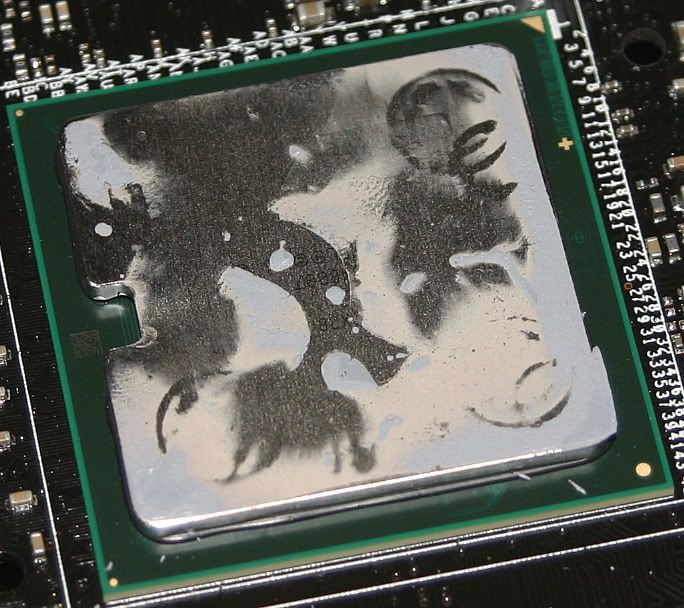
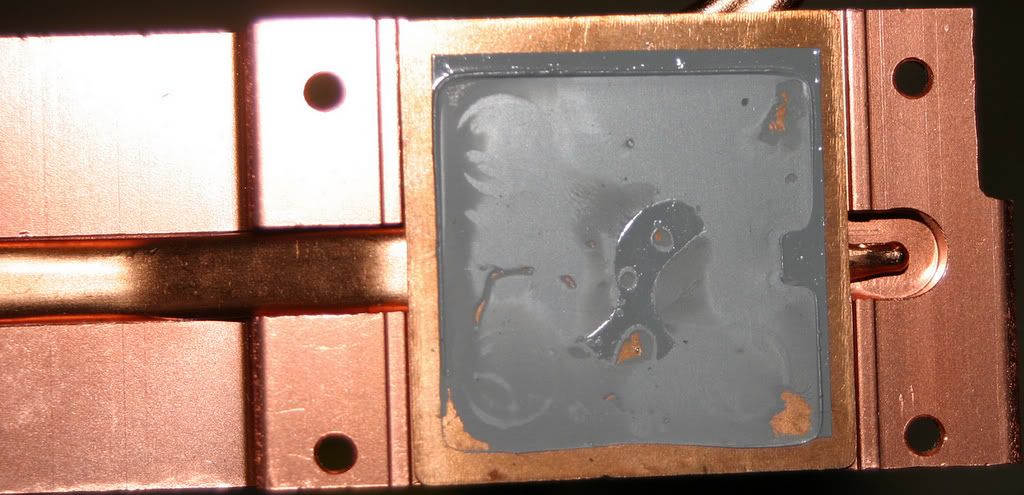
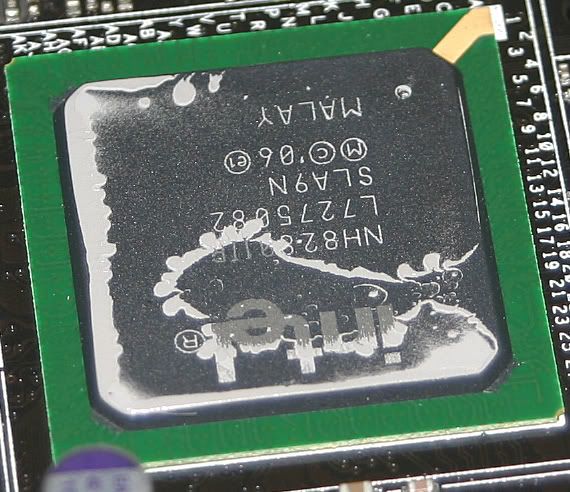
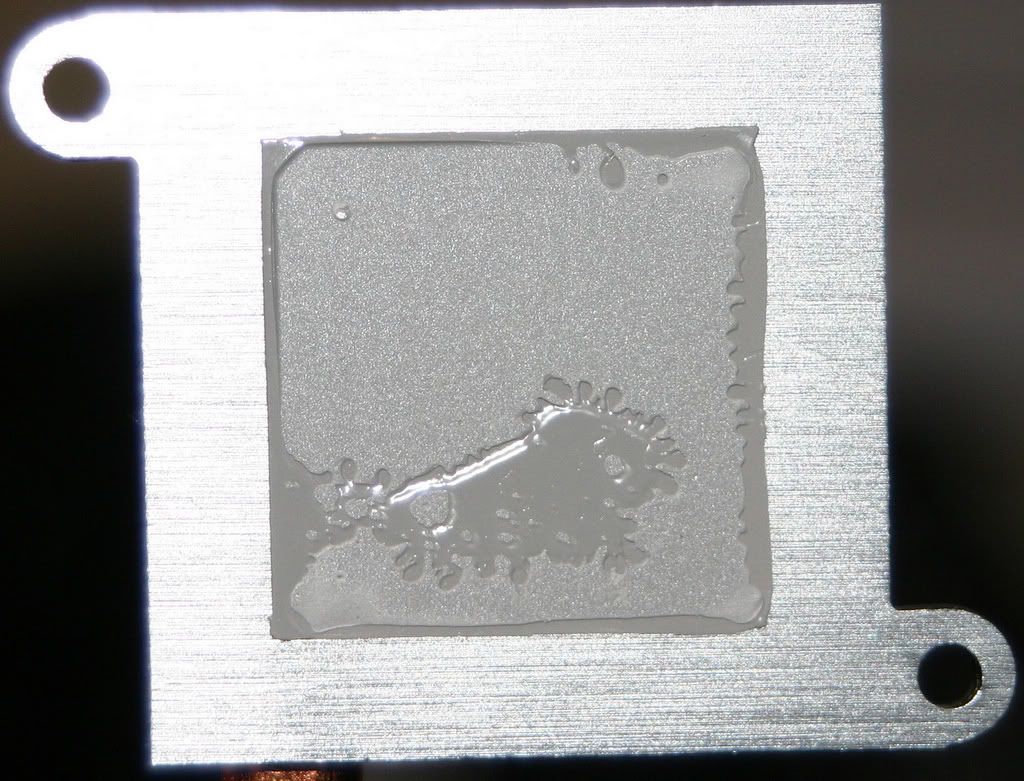
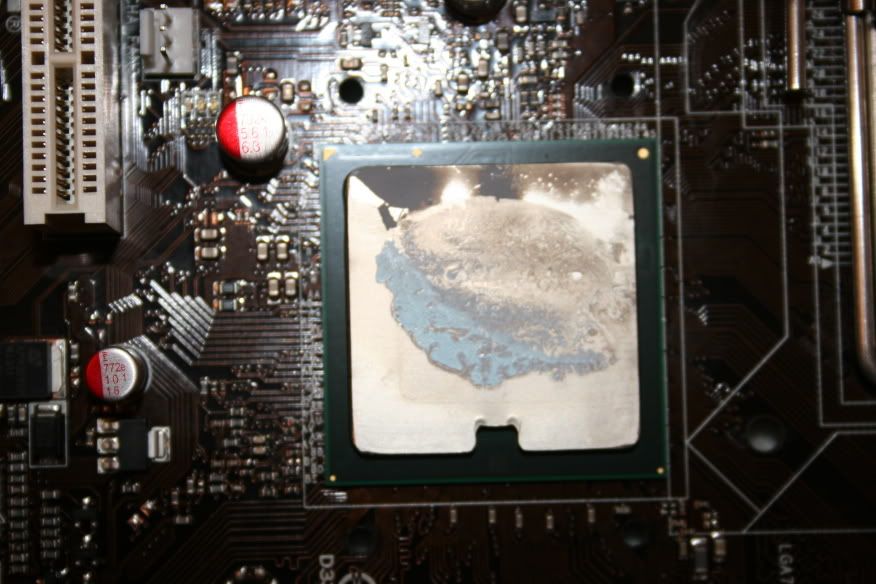
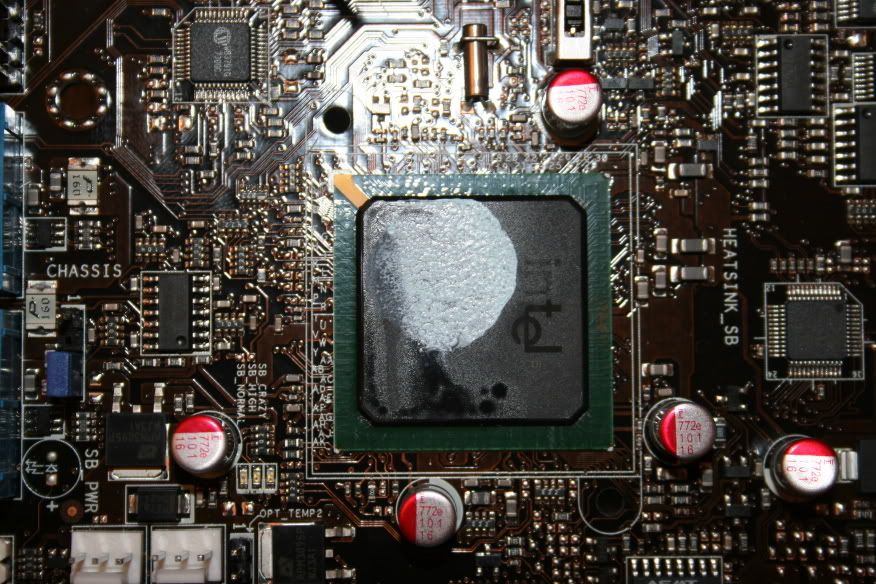
    Below are some pics showing the removal of the N/S bridge heat sinks. With the help of cadaveca I came up with the idea of refrigerating the Maximus Formula MB (with the plastic covering)for 3 hours in order to remove the north/south bridge heat sinks. Heat didn't loosens the thermal compound found on this motherboard for me but cold temperatures did. Once the board was chilled for 3 hours the north/south bridge heat sinks popped right off without any real force. I offer this advice as a possible solution for removing bonded type of thermal compound from the north/south bridge heat sinks. Please keep in mind that applying either heat or cold or both temperatures can damage your motherboard. You try this at your own risk.


    NB.


    NB HS.


    SB.


    SB HS.

    Sidenote:
    This method is not for everyone and you do so at your own risk.
    Quote Originally Posted by KALISPIMENTA;2669574[B
    Why we should re-paste everything.I re-pasted everything with MX-2 [/B]


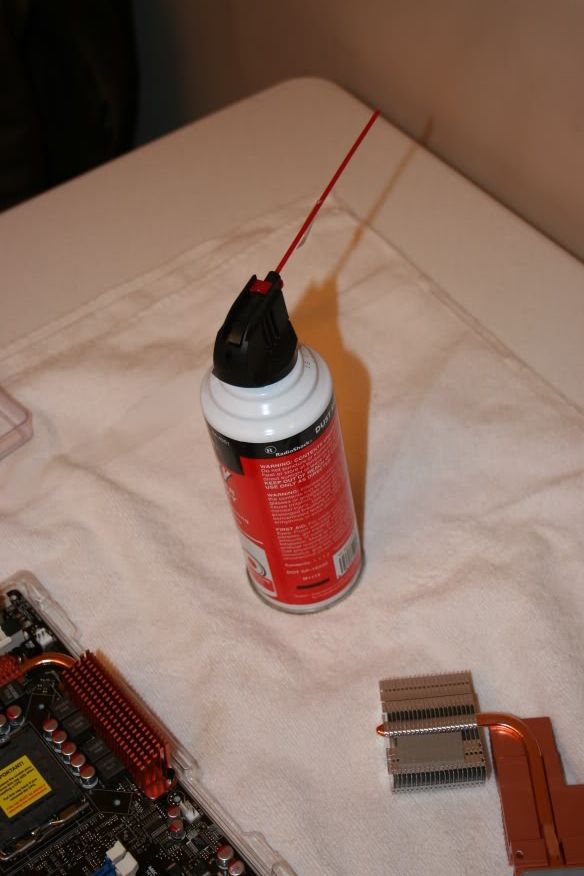
    To remove the heatsink i used a compressed air can,turn it upside down and spray the top of the heat sink for like 8-10 seconds a liquid should come out making the sink very cold, so cold it should come right out,sure beats waiting for it in the fridge
    Quote Originally Posted by Exahertz View Post
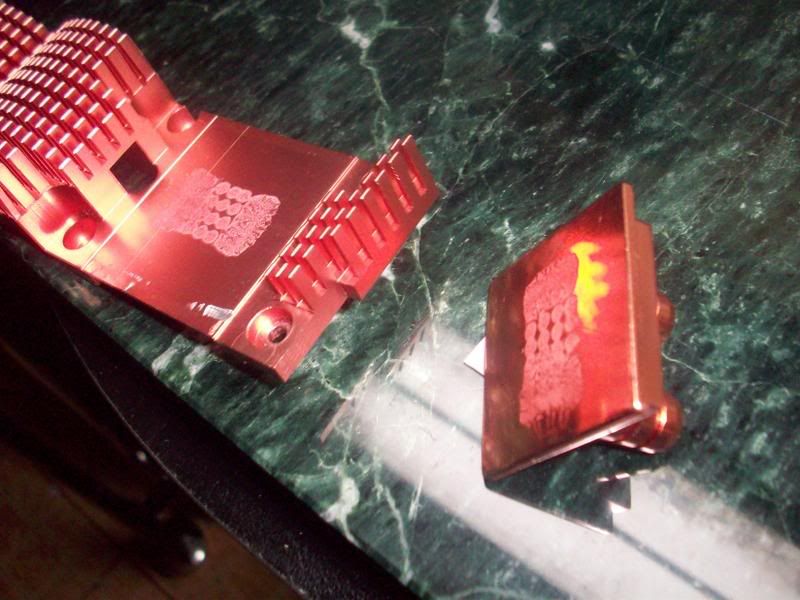
    just figured id point this out, look at how little contact area the TIM is making to the stock NB heatpipe cooler
    Quote Originally Posted by Exahertz View Post
    I had to pri the heat pipe off of the south bridge so i could remove the north bridge. its very easy to pop off i might add.
    Quote Originally Posted by shim-on View Post

    [QUOTE=awhir;2596002]

    From systemviper
    http://www.xtremesystems.org/forums/...90&postcount=1


    This is the post from CLUNK
    with the following note
    UPDATE 18-10-07: CAUTION! - I have seen a couple of people damage their boards so far because the thermal cement that Asus use is just too strong. See this post for what can happen if you aren't careful enough. If possible, remove the fusion block and replace the thermal cement on the NB and SB BEFORE you fire the board up for the first time. The cement seems to harden and cure when it gets hot, so be aware of that.

    So, I started by removing the Fusion block - it came off with a small amount of pressure. I used a small pair of fine nosed angled pliers. I covered the area close to the NB with masking tape, so the PCB wouldn't get scratched if there was any slippage, and gently used the angled nose of the pliers to lever up the block. Start at one corner and work your way along and you should hear the cement give way as you get to the next corner. The SB came off at the same time for me, but if not, just use the same method, and take your time.
    http://www.clunk.org.uk/forums/723-post10.html

    And here when things went wrong by RevolutionX
    http://www.clunk.org.uk/forums/1330-post164.html

    Quote Originally Posted by deepcover View Post
    I just wanted to further confirm that removal of the NB heatsink on the Maximus Formula (non-SE) was a snap with the circuit freeze spray as was stated earlier. I sprayed it on the SB and the heatsink came loose on its own. The NB I sprayed for about 3-4 minutes and pryed it gently with a screwdriver and it popped right off. I've been using my MB for a month prior to removal of the NB heatsink. The freeze spray costs 8 bucks at Radio Shack or Fry's electronics. I also reused the backplate of the NB by removing the bolts with a plyer and widening the holes a little with a drill. I used the SB heatsink as a backplate for the SB. I used the rubber washers that were allready on the SB and extra plastic washers to ensure that there was enough space between the backplate, the PCB, and the motherboard tray. The cement was removed easily from the NB and SB with acetone as someone stated earlier.


    Last edited by neo_rtr; 03-14-2008 at 10:03 PM.
    [Asus P8Z77 WS Z77] [i7 3770K] [Apogee HD waterblock]
    [16GB G.Skill DDR3 PC3-19200 2400MHz TridentX Series CL10 (10-12-12-31) Dual Channel kit]
    [Zotac GTX 680][Watercool Heatkiller GPU-X3 GTX680 Hole]
    [2x ThermoChill PA120.3][2x Laing DDC-1T-PLUS - XSPC Dual 5.25"Bay Reservoir ][Stacker 832][PSU:ThermalTake 1200W][2x 24" Screens BenQ G2420]
    Current Rig ASUS P8Z77 WS - ATX / Z77 Intel Core i7-3770K CM Stacker + 2nd WC Casehttp://img49.imageshack.us/my.php?image=pict0157dh0.jpg
    Project Blue Orbit - Phase 2
    http://www.xtremesystems.org/forums/...d.php?t=243865

    Build With MIPS freezers NB,SB,Mosfets

  4. #4
    Xtreme Member
    Join Date
    Dec 2007
    Location
    Stockholm Sweden
    Posts
    480

    Removing the Fusion Block

    I started taking off the 4 screws around the Northbridge and then i removed with a bent long noise plier the plastic pins from the south bridge and the mosfets

    Removing the plastic pin off the mosfet
    I did the following press it with the noisetip and with my fingernail press it again to come out from the other side.

    By neo_rtr, shot with DiMAGE X1 at 2008-02-20

    Removing the South/North Bridge

    I started with a COMPRESSED AIR CAN to cool it down. Besides the fact that it came all over did do a thing. Both chips are rocksolid and nothing i did made it better.
    At the time i try to put dentalfloss between the heatsink and the chipset to see if there is a gap so i could try that first. Well that did not work.
    Then i tried to move it sidewise. nope that did not helped either.
    I tried to put a plastic card and see if i could get anywhere under the heatsink but as the space is limited came up empty handed.

    Took the hairdryer and sterted with it. after several minutes i trought give it a go.. BIG Nothing. either chips didnt want to move a mm.

    Back to the aircan. with the MB inverted pressed for several secs and in did it become very cold. Then again try to move it sideways.nothing.

    After spending about 1 hour trying to cold.warm,cold etc i was ready to give up.
    then .....

    I cut a piece of a credit card.put it between the MB and the heat sink. again some with the aircan to get it cold and then put the tip of the screwdriver and with a twist i heard the CRACK!!! resulting to 5 years of my life scared sh...less.
    But to my big surprise the SB come off!!!
    So i did the same for the NB with the same crack and 5 more years gone,

    By neo_rtr, shot with DiMAGE X1 at 2008-02-20


    By neo_rtr, shot with DiMAGE X1 at 2008-02-20


    By neo_rtr, shot with DiMAGE X1 at 2008-02-20

    Apparently the thermalp ast ASUS is using was rock solid. Pieces that i removed after where hard like stone and did not gave much to heat.
    Remember that i been using the MB since Dec07 about 3months solid.

    The SB ws removed clean with very few traces of the thermal paste.
    The NB was few spots what i tried to clean with ArticClean 1,2 with no luck. After about 1hours used aceton and it removed in a sec.
    This brings me to the point. IF it was posible to put some aceton between the chips and the heatsink it would make life much easier to remove them. Just need a way to get it there.
    Last edited by neo_rtr; 03-14-2008 at 10:02 PM.
    [Asus P8Z77 WS Z77] [i7 3770K] [Apogee HD waterblock]
    [16GB G.Skill DDR3 PC3-19200 2400MHz TridentX Series CL10 (10-12-12-31) Dual Channel kit]
    [Zotac GTX 680][Watercool Heatkiller GPU-X3 GTX680 Hole]
    [2x ThermoChill PA120.3][2x Laing DDC-1T-PLUS - XSPC Dual 5.25"Bay Reservoir ][Stacker 832][PSU:ThermalTake 1200W][2x 24" Screens BenQ G2420]
    Current Rig ASUS P8Z77 WS - ATX / Z77 Intel Core i7-3770K CM Stacker + 2nd WC Casehttp://img49.imageshack.us/my.php?image=pict0157dh0.jpg
    Project Blue Orbit - Phase 2
    http://www.xtremesystems.org/forums/...d.php?t=243865

    Build With MIPS freezers NB,SB,Mosfets

  5. #5
    Xtreme Member
    Join Date
    Dec 2007
    Location
    Stockholm Sweden
    Posts
    480

    Freezer installation

    I used the thermalpad from the original mosfets and installed the MIPS freezers with backplates from EK.
    the screws provided by MIPS fit with the backplates.


    By neo_rtr at 2008-02-20

    The Northbridge
    Used the original backplate and screws to install it. fits perfect.

    By neo_rtr, shot with DiMAGE X1 at 2008-02-20
    Also take a look at the SB, IT come below the VGA and gives plenty of space for the tubbing. 3/8 iam using


    By neo_rtr at 2008-02-20


    By neo_rtr, shot with DiMAGE X1 at 2008-02-20

    backplates

    By neo_rtr at 2008-02-20
    All of them worked of just fine..


    By neo_rtr at 2008-02-20
    [Asus P8Z77 WS Z77] [i7 3770K] [Apogee HD waterblock]
    [16GB G.Skill DDR3 PC3-19200 2400MHz TridentX Series CL10 (10-12-12-31) Dual Channel kit]
    [Zotac GTX 680][Watercool Heatkiller GPU-X3 GTX680 Hole]
    [2x ThermoChill PA120.3][2x Laing DDC-1T-PLUS - XSPC Dual 5.25"Bay Reservoir ][Stacker 832][PSU:ThermalTake 1200W][2x 24" Screens BenQ G2420]
    Current Rig ASUS P8Z77 WS - ATX / Z77 Intel Core i7-3770K CM Stacker + 2nd WC Casehttp://img49.imageshack.us/my.php?image=pict0157dh0.jpg
    Project Blue Orbit - Phase 2
    http://www.xtremesystems.org/forums/...d.php?t=243865

    Build With MIPS freezers NB,SB,Mosfets

  6. #6
    Xtreme Member
    Join Date
    Dec 2007
    Location
    Stockholm Sweden
    Posts
    480

    Tubbing

    Well I will go from the following loop.
    PA120.3 Mosfet1->Mosfet2->CPU->NB->SB->tank->pump
    the reason it that it just fits the iverted MB better in my case.

    By neo_rtr, shot with DiMAGE X1 at 2008-02-20

    the gtx8800oc is and will not be WC. maybe in the future
    What you need to look is how nice the SB and the tubbing fits.

    By neo_rtr, shot with DiMAGE X1 at 2008-02-20

    There is enough space and the tubbing is not getting on the vga

    By neo_rtr, shot with DiMAGE X1 at 2008-02-20

    In place and ready for test!!

    By neo_rtr, shot with DiMAGE X1 at 2008-02-20

    By neo_rtr at 2008-02-20
    [Asus P8Z77 WS Z77] [i7 3770K] [Apogee HD waterblock]
    [16GB G.Skill DDR3 PC3-19200 2400MHz TridentX Series CL10 (10-12-12-31) Dual Channel kit]
    [Zotac GTX 680][Watercool Heatkiller GPU-X3 GTX680 Hole]
    [2x ThermoChill PA120.3][2x Laing DDC-1T-PLUS - XSPC Dual 5.25"Bay Reservoir ][Stacker 832][PSU:ThermalTake 1200W][2x 24" Screens BenQ G2420]
    Current Rig ASUS P8Z77 WS - ATX / Z77 Intel Core i7-3770K CM Stacker + 2nd WC Casehttp://img49.imageshack.us/my.php?image=pict0157dh0.jpg
    Project Blue Orbit - Phase 2
    http://www.xtremesystems.org/forums/...d.php?t=243865

    Build With MIPS freezers NB,SB,Mosfets

  7. #7
    Xtreme Member
    Join Date
    Dec 2007
    Location
    Stockholm Sweden
    Posts
    480
    New Front


    By neo_rtr at 2008-04-09
    [Asus P8Z77 WS Z77] [i7 3770K] [Apogee HD waterblock]
    [16GB G.Skill DDR3 PC3-19200 2400MHz TridentX Series CL10 (10-12-12-31) Dual Channel kit]
    [Zotac GTX 680][Watercool Heatkiller GPU-X3 GTX680 Hole]
    [2x ThermoChill PA120.3][2x Laing DDC-1T-PLUS - XSPC Dual 5.25"Bay Reservoir ][Stacker 832][PSU:ThermalTake 1200W][2x 24" Screens BenQ G2420]
    Current Rig ASUS P8Z77 WS - ATX / Z77 Intel Core i7-3770K CM Stacker + 2nd WC Casehttp://img49.imageshack.us/my.php?image=pict0157dh0.jpg
    Project Blue Orbit - Phase 2
    http://www.xtremesystems.org/forums/...d.php?t=243865

    Build With MIPS freezers NB,SB,Mosfets

Bookmarks

Bookmarks

Posting Permissions

  • You may not post new threads
  • You may not post replies
  • You may not post attachments
  • You may not edit your posts
  •