

Man, why don't you tell me where do you have C1E option and what bios version are you using ??Originally Posted by Arne




Man, why don't you tell me where do you have C1E option and what bios version are you using ??
The ide channel on this board, is it run specifically off the marvell controller
Well, look at that quote. I have actually beta 1.63b, so i can't say you for sure where its located. Often its under CPU features etc but it should be under AO.
Relax guys, there is no C1E option in any bios release (for this board).
You can only disable/enable EIST.
Mr. wise guy, better look at the bios more carefully, because there is no "Advanced options", and in nowhere there is a C1E option.
Is it hidden in CPU Fetures? Hit F4 and see. Thats the way MSi does things, the way they have it on my P6N.
EVGA 780I P02bios
E8400@3.6
BFG 9600gt SLI 710/1000
2x2g GSkill ddr2
Sceptre 20.1 naga
Antec SP500/TT Sli psu
OMG,.. ok I will take a picture with my mobile. I've used Bios 1.1, 1.6, 1.83beta and i always see the option ok, i will reboot now. O_o
*Edit: i dont see it anymore, maybe it is not supported on this board, or it is not in all BIOS's version.
Last edited by [LCN]Knowledge; 02-07-2008 at 06:48 PM.
Excuse me for my English
I've used the MSI P35 NEO2-FIR with 4 different BIOS and never seen a C1E option in any of them, if you want to enable/disable speedstep just use the EIST option in "Cell Menu".
Does anyone know how compatible this mobo is with a-data sdram?
My computer will not come on anymore. If I have the power supply plugged into the 8pin, it will not even jumpstart. If I take out the 8pin, the board will power up but not get past 4 red LEDs. Is it dead?
i7 2700k 4.60ghz -- Z68XP-UD4 F6F -- Ripjaws 2x4gb 1600mhz -- 560 Ti 448 stock!? -- Liquid Cooling Apogee XT -- Claro+ ATH-M50s -- U2711 2560x1440
Majestouch 87 Blue -- Choc Mini Brown -- Poker Red -- MX11900 -- G9
It's what I'm doing and it seems to work fine (and enabled the "minimal power management" energy profile in windows also), but I don't understand why C1E is missing in a P35 bios.
Could a xp user with this board check in
device manager/Universal Serial Bus Controllers
I have 8 Intel ICH9 USB xxxxx entries
and
8 USB Root Hub
is this what you are showing also
thanks
Mine shows the same thing.
Same here
Check the previous page for my posts regarding A-Data memory.
What's a good voltage for memory for this board, enough to not kill the memory? Is 2.2 high enough? I currently don't have air blowing on the memory also. I am using Crucial Ballistixwith a E8400.
Hey what memory are you using and what are the timings? Did you do anything to the VTT FSB Voltage, NB Voltage, SB I/O Power and the SB Core Power?
Last edited by dropglock; 02-09-2008 at 12:14 AM.
E8400 @ 4006ghz Q746 1/4/08
Scythe SCKTN-2000 100mm Sleeve "Katana 2"
MSI Neo2-FR bios 1.8
(2x1gb)Crucial Ballistix 6400
Western Digital Caviar 250GB
ZOTAC GeForce 8800GT
COOLER MASTER Elite 330
Corsair vx550w PSU
I'm using 4 x 1GB GSKill DDR2 800 GBPK at 4-4-4-12 and 667 Mhz (333 x 2 x 1). This setup was the best with my 975x PowerUp, I still should try at 835 Mhz (333 x 2 x 1.25). The voltages are ALL stock, my memory at 1.9v (when I try at 835, I will put voltage at 1.95). My Q6600 G0 is running at 333 x 9 (FSB jumpers at 333mhz) with stock voltage and has a VID of 1.2125. With four sticks installed, the memory is hotter, but I have a side 80mm fan flowing over them.
For the memory, 2.2v is fairly high for me, but look at the specs to see the range accepted, mine has 1.9 to 2.0v, but all depends at what frecuencies do you want to overclock your memory, but I advise to you that the temperature rise very quickly with high voltages.
Hybrid
viktor92
Thanks for that, the reason.............when I install the intel chipset drivers they take out the usb root hub with the yellow! need to uninstall/reboot to fix
Share some results with you guys here.
-E8400 wk43 w/Ultima90i
All on air...
3D06 @ 501x9, gpu@stock :
http://i76.photobucket.com/albums/j3...3d06_stock.jpg
Nuclearus Multicore managed 16K :
http://i76.photobucket.com/albums/j3..._nuclearus.jpg
Spi32m @ 1:1 :
http://i76.photobucket.com/albums/j3..._hwmonitor.jpg
Btw, system is inside my little iCute QH-01 casing...
Bump up gpu clocks abit...
then tried to clear 16k with higher cpu speed...
Have not login to ORB for a very long time...
took more than 10 tries to remember my email n password...
then managed to logged in... faintz...
Heres the compare link :
http://service.futuremark.com/compare?3dm06=5154609
http://i76.photobucket.com/albums/j3...0420252164.jpg
Kept vcore @ 1.55v...
514x9.... 515x9 no go....
i guess need cooler temps... too hot...
http://valid.x86-secret.com/show_oc.php?id=310620
http://i76.photobucket.com/albums/j3...spi1m_cpuz.jpg
Oh yah,
btw Cpuz 1.44 is in...
http://www.cpuid.com/cpuz.php
Will try better cooling another time...
I'm using D9GMH,
I guess your ballistix are using similar chips too...
For regular 24/7 usage,
I do not go above 1.95vdimm.
My daily settings are 445x9(bios 1.3v), mems@890mhz 5-5-4-10@1.9v.
Its good enough for me.
1.45/1.5/1.6/1.15 respectively for the rest.
Same here.
Here's my 24/7 settings. I got some questions though. Do you guys think I need to reinstall my heatsink because 76 degrees is high! And are these bio's settings safe enough to last me 2 years? And what's up with the system information under OCCT? Its all wrong. Thanks.
and the bios settings.
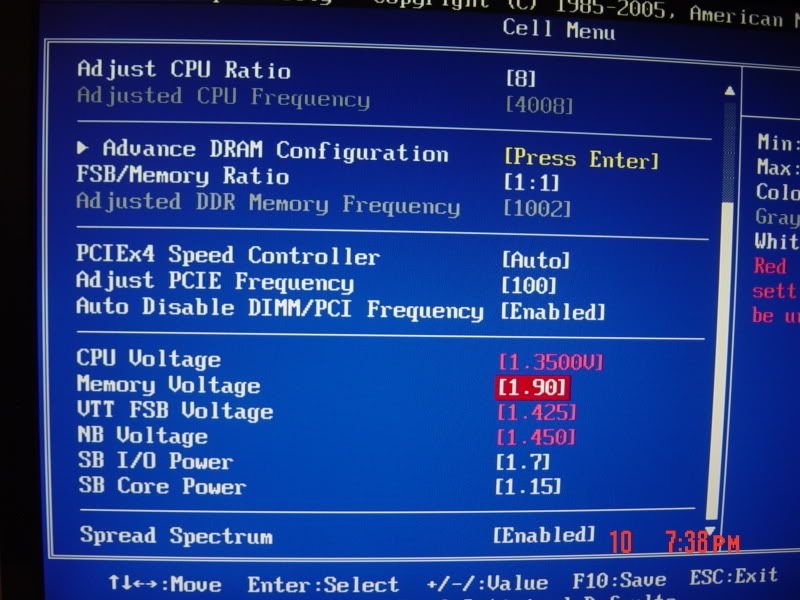
E8400 @ 4006ghz Q746 1/4/08
Scythe SCKTN-2000 100mm Sleeve "Katana 2"
MSI Neo2-FR bios 1.8
(2x1gb)Crucial Ballistix 6400
Western Digital Caviar 250GB
ZOTAC GeForce 8800GT
COOLER MASTER Elite 330
Corsair vx550w PSU
More info on high Wolfdale temp readings
http://www.xtremesystems.org/forums/...postcount=1259
-
Last edited by WSX; 02-10-2008 at 08:27 PM.
Nice
http://www.1cup1coffee.com - Play flash games in school
If you guys are still looking for the C1E option in the MSI P35 Bios here's a few pics to show you exactly where it should be.............At least this is where its at on my MSI P35 board..............

Main screen, go to the advanced bios features (second option)
Advanced bios features, go to CPU features (third from bottom).
CPU features when you first go into them.
Press F4 when you're in the CPU features menu and you should see the C1E option come up.
This is he way it works on my current MSI P35 board as well as my old MSI P6N board, it's a standard MSI option as far as I know................
"Two things are infinite: the universe and human stupidity; and I'm not sure about the the universe."........Albert Einstein
Mountain Mods U2 UFO Chassis / ASUS P6T / Intel Core i7 920 / G.Skill Pi-Black DDR3-1600 6 GB / Sapphire HD4870 Toxic / WD Black 500 gig / Lite-On Optic Drives / SilverStone 700w.
Cooling: CPU Loop: Thermochill PA120.3 Radiator / Swiftech MCP655 Pump / XSPC Delta V3 / "T" Line
GPU Loop: Swiftech MCR120 / Swiftech MCP350 Pump / XSPC Razor / Swiftech Micro Rez.
 Posting Permissions



 Reply With Quote


Bookmarks