

tictac, you need to start modding bioses and making cool little amd tweaking utilities again like in the K7 days.Originally Posted by tictac


tictac, you need to start modding bioses and making cool little amd tweaking utilities again like in the K7 days.
Formerly XIP, now just P.
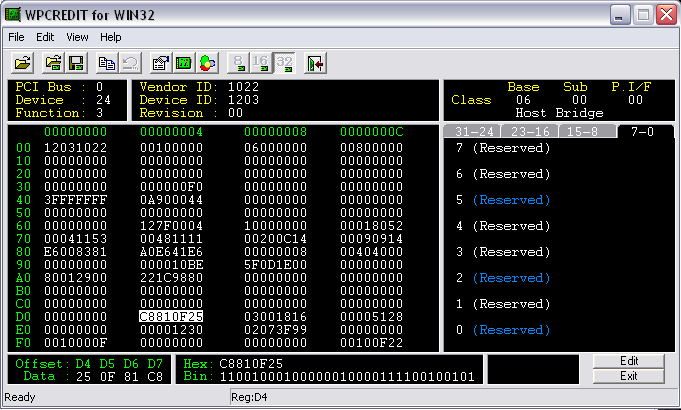
k, this is as far as I got. Now what?
Is it the first 5 bits on the righthand side....?
Not sure if I want to do this
Last edited by Chaos-Storm; 11-25-2007 at 07:41 PM.
yes that is the number set it ... after set you need to restart te computer to make the new NB speed take effect...
after you shutdown the computer the setting will be gone.. so no worry
to make it easier number shown in that place represent
00001b = NB Multiplier 5x
00010b = NB Multiplier 6x
00011b = NB Multiplier 7x
00100b = NB Multiplier 8x
00101b = NB Multiplier 9x
00111b = NB Multiplier 10x
NB Speed = NB multiplier x HTT
Good Luck
Last edited by tictac; 11-25-2007 at 08:39 PM.
Good TicTac! Should be very intresting to run Phenom on 790FX and set up the NB speed to different levels and see how the processors efficiency increases.
This was originally one of AMD's weapons I think but to run the IMC/L3 cache faster than the processor itself (async like the ALU's in the Netburst architecture).
It's surely one of the bottlenecks in the processors performance. The L3 add's about ~20ns memorylatency. Phenom looks good, but is too early and not finished, just released in a crappy form.
Ivy Bridge 3770K @ ????MHz
6c Intel Xeon X7460 24MB cache 16GB RAM 22TB HDD fileserver
Dual Intel Xeon E5620 workstation
SB 2600K @ 5016MHz 1.37v HT on AIR primestable
AMD Athlon X3 425 @ B25 4GHz+ AIR
AMD Athlon X2 6400+ @ 3811MHz AIR
AMD Athlon X2 3600+ @ 3200MHz AIR
AMD Athlon XP 1700+ @ 2714MHz AIR
Thermalright Ultra-120 Extreme
Corsair 8GB XMS3 2000MHz
ATI Radeon HD5850 @ 1000MHz+/1200MHz+
Windows 7 Enterprise x64
Corsair HX750W
 Posting Permissions

 you need to get your hand dirty before it done.. LOL

Bookmarks