

they are going to EOL this board? what do they plan to do with the maximus extreme? with the way things are going, there's newcomin' out every 2 weeks! It never ends! :O


they are going to EOL this board? what do they plan to do with the maximus extreme? with the way things are going, there's new
ASUS Maximus Formula SE | Intel C2Q6600 G0 9x400 (3.6Ghz) 0701 Bios (temp issues) | Swiftech H20-220 Apex Ultra Liquid Cooling Kit with Apogee GT block | 2048 MB Corsair Dominator PC2-8500 5-5-5-15 | BFG 7900GTX OC | Windows Vista Ultimate | Raptor X 150G
Originally Posted by chocobo15

yes, high temp sensor reading should be the small bug in 0701 bios !
u should use core temp reading which is more reliable !
very good oc result
what were your voltage settings with this setup?!?!
i was using the asus suite HWmonitor thingamajiggy to monitor my temps, but i'm guessing its directly related to the bios so it would read the same temps as the bios temps
O well, i'd rather be on the safe side, i'll flash back when they fix those silly little bugs
ASUS Maximus Formula SE | Intel C2Q6600 G0 9x400 (3.6Ghz) 0701 Bios (temp issues) | Swiftech H20-220 Apex Ultra Liquid Cooling Kit with Apogee GT block | 2048 MB Corsair Dominator PC2-8500 5-5-5-15 | BFG 7900GTX OC | Windows Vista Ultimate | Raptor X 150G

I stand corrected because I have not seen anyone achieve over 470 fsb on this board and was very pleasantly surprised and impressed to see that high of an FSB.
Now the details :
Exact temp on the CPU
Cooling for the NB? Temp of the NB.
Anyone else out here getting anything close to these results with a dual or quad on SS, water or air?
Interesting my max FSB on air chipset cooling is lower than on my blackpearl considerably
You must have a nice Q6600 to hit 467x9 on air...and its not an ES either so im very jealous...
Last edited by sdumper; 11-09-2007 at 03:33 PM.
Never empower an idiot with a response....
http://en.wikipedia.org/wiki/Troll_%28Internet%29
Seller/Buyer Reputation:
Heatware: http://www.heatware.com/eval.php?id=50905
Ebay: {Family Account} Kasyg3 http://myworld.ebay.com/kasyg3/
Ebay: {My personal Account} Sdumper http://myworld.ebay.com/sdumper/
iTrader: http://www.blazingpc.com/forum/itrader.php?u=28
If you like I can setup my board on air tomorrow and provide a breakdown of settings, as far as I can recall voltages were not excessive for me for the air cooling..
regards
Raja
Sure if you dont mind but im more interested in me at the moment so can you show me the quad on air?
Does the chipset water cooling give you a significant boost? I will cool the chipset with water on monday but will not have my cascade up and ready until early december to really see what this board can do. The voltage options look impressive though so maybe I will be able to get somewhere on this:
http://www.blazingpc.com/forum/showt...ex.html?t=6625
Never empower an idiot with a response....
http://en.wikipedia.org/wiki/Troll_%28Internet%29
Seller/Buyer Reputation:
Heatware: http://www.heatware.com/eval.php?id=50905
Ebay: {Family Account} Kasyg3 http://myworld.ebay.com/kasyg3/
Ebay: {My personal Account} Sdumper http://myworld.ebay.com/sdumper/
iTrader: http://www.blazingpc.com/forum/itrader.php?u=28
All excellent tips there, thanks.
I have gone through all the voltage settings and put them on the highest green setting BEFORE they change to Yellow, with the exception of the DRAM voltage, which I have set to 1.90V which gives me a 2.0V actual reading. Have enabled Static Read Control and Disabled Transaction Booster with Relax Level 1 as suggested.
Right I have pushed my FSB up to 400 then lowered to the nearest RAM speed, which of course is 800mhz. I have just run 3DMark06 without any bother and now have a score of 9114 (see image)from my previous 8837!
Can I break 10,000 with my E6550 and the rest of my setup I wonder?? Keep the tips coming PLEASE!
Mobo: Asus Maximus Formula SE (0802 Bios - Air Cooled using Thermalright HR-05 IFX coolers on NB & SB)
Proc: Intel C2Q Q9550 2.83ghz FSB1333 12mb (o/c to 3.41ghz 8.5x 400fsb) with Thermalright Ultra 120 eXtreme cooler
Mem: Kingston Hyper-X 2gb(2x1gb) 1066mhz 5-5-5-15 (KHX8500D2K2/2G)
VGA: XFX 8800GTS 640mb
PSU: Antec Neo HE 650w Blue
Case: Antec P182SE with 4x 120mm fans
Sound: Auzentech X-Fi Prelude (in PCI slot above graphics card)
Drives: Intel X25-M 80gb SSD - 36gb WD Raptor - 320mb Seagate SATA-II - 320gb Hitachi in an Antec MX-1 ESATA Caddy - Sony SATA DVD-RW
Op Sys: Win XP Pro
Display: Benq 24" Q24WS
Controls: Logitech G15 Keyboard and MX1100R Mouse
Printer: Epson R800
ISP: Be Value 12mb ADSL (England)
I asked you'd before if you flashed to 0701 ??? BUMP
Still glad you got ya old temps back
Question : Why do some overclockers switch into d*ckmode when money is involved
Remark : They call me Pro AsusSaaya yupp, I agree
Raju, another thing do you have a voltage meter handy? I would really like a verification of the boards real voltage because it seems to overvolt like crazy...
Never empower an idiot with a response....
http://en.wikipedia.org/wiki/Troll_%28Internet%29
Seller/Buyer Reputation:
Heatware: http://www.heatware.com/eval.php?id=50905
Ebay: {Family Account} Kasyg3 http://myworld.ebay.com/kasyg3/
Ebay: {My personal Account} Sdumper http://myworld.ebay.com/sdumper/
iTrader: http://www.blazingpc.com/forum/itrader.php?u=28

Tried 4x1024 (CellShock & Ballistix) tonight, think it could be done with less vdimm.
Max 3D05 and 06 on dice:
@sdumper, idle temps on cpu with solid were approx -65 in windows (E6600, Q = air only). NB cooling stock (not even reapplied TIM yet). On mem i have 2x92mm, one of them blows over NB as wel.
Last edited by Viss; 11-09-2007 at 03:48 PM.
yeah I use my DMM no probs, I have listed the main overvolts in the At review for the 0505. Ram is around 0.04, VTT around 0.03 or so, chipset is nigh on bios set value with 0505, have not tried new bios yet.. Have to have a voltmeter for the reviews otherwise I would not know what the overvolts stated ever were...
regards
Raja
Last edited by Raja@ASUS; 11-09-2007 at 03:50 PM.
loc.o Awesome results!!!!
Very good to know maybe im just not cold enough right now im sitting at about -35c actual head temp evap -45c
Raju i havent read your review
Is the overvolting real or just reporting incorrectly?
Never empower an idiot with a response....
http://en.wikipedia.org/wiki/Troll_%28Internet%29
Seller/Buyer Reputation:
Heatware: http://www.heatware.com/eval.php?id=50905
Ebay: {Family Account} Kasyg3 http://myworld.ebay.com/kasyg3/
Ebay: {My personal Account} Sdumper http://myworld.ebay.com/sdumper/
iTrader: http://www.blazingpc.com/forum/itrader.php?u=28
it's real man, actual measurement points..
Ouch good to know!!
Never empower an idiot with a response....
http://en.wikipedia.org/wiki/Troll_%28Internet%29
Seller/Buyer Reputation:
Heatware: http://www.heatware.com/eval.php?id=50905
Ebay: {Family Account} Kasyg3 http://myworld.ebay.com/kasyg3/
Ebay: {My personal Account} Sdumper http://myworld.ebay.com/sdumper/
iTrader: http://www.blazingpc.com/forum/itrader.php?u=28
Does the latest bios allow 4:5?
im running 602 at 4:5 just fine so far.
7820X | Asrock X299 Taichi XE | Gigabyte 1080 Ti Xtreme | 32GB Memoriez | Corsair HXi1000 | 500GB 960 Evo
This bloody board still isn't stable. I've just had a random reboot (had to be hardware related as nothing was running) after several days and OCCT/Prime runs showed it to be stable.
I'm just fed up of this board now. Unless some miracle bios comes out soon, I'm going to sell up and got for a QuadGT instead. Save myself £50 and get a decent board.
| Asus nVidia 580 GTX @ 850MHz |
| Windows 7 x64 Ultimate | Mac OS X 10.6.8 | Mac OS X 10.7.2 |
| Intel Core i7 970 @ 4.2GHz | Gigabyte X58A-UD9 | 12GB Corsair 2000MHz 8-8-8-24 |
| HTC HD2 | MIUI 1.10.21 | Android 2.3.7 | TyTung 12.4 Kernel |

New Builds Coming Soon..
Kup this is an awesome board...im using 0701 bios and am rock stable at 4150 cpu and 1104 ram....
yes im on phase but the board is awesome it just takes some tweaking
Never empower an idiot with a response....
http://en.wikipedia.org/wiki/Troll_%28Internet%29
Seller/Buyer Reputation:
Heatware: http://www.heatware.com/eval.php?id=50905
Ebay: {Family Account} Kasyg3 http://myworld.ebay.com/kasyg3/
Ebay: {My personal Account} Sdumper http://myworld.ebay.com/sdumper/
iTrader: http://www.blazingpc.com/forum/itrader.php?u=28
Please give me a few pointers, I'm completely stumped. What settings are you running for those speeds? ( I know I can't do those CPU clocks, but I can to get a good FSB)
I like the board, and it's VERY fast, but right now, I'm able to get higher FSB and CPU clocks out of my aging Striker Extreme...and after blowing £200 on this new board, that upsets me!
EDIT: I've been on 0701 since it came out, just not updated sig...
| Asus nVidia 580 GTX @ 850MHz |
| Windows 7 x64 Ultimate | Mac OS X 10.6.8 | Mac OS X 10.7.2 |
| Intel Core i7 970 @ 4.2GHz | Gigabyte X58A-UD9 | 12GB Corsair 2000MHz 8-8-8-24 |
| HTC HD2 | MIUI 1.10.21 | Android 2.3.7 | TyTung 12.4 Kernel |
New Builds Coming Soon..
sorry, did you want max quad fsb on air? If it's Prime then around 450, for benching around 475-480 tops, depending on the benchmark in question.
The chipset water cooling won't give a massive boost per se, but adds stability when the temps run under 47 degrees. The fly in the ointment is the block to heatsink contact. I use 2x120mm fans with water cooling for best results, not really practical 24/7, but ok for benching.
nice cascade plans btw, that thing will be a beast. Mine is dual 1.5hp rotaries and idles at around -118..
regards
Raja
Last edited by Raja@ASUS; 11-09-2007 at 04:42 PM.

Thank you for getting me to try my RAM again. I'm now running DDR1080 5-5-5-12 PL 8 on these G.Skills PC8000. At first it kept crashing on the firefly bench in 3dm06. Took me about an hour to realize that my 2hr prime vCore wasn't stable. I was at 1.38v. Now I went back to 1.435 BIOS and it's solid agian. I'm going to post My setting as of now in a few minutes. Maybe it can help some others get to at least 450.
3600 mhz DDR 1080 5-5-5-12 PL 8

Maglin
Intel i7-3770K
AsRock Z77 Extreme4
4x8GB G.Skill DDR3 2400
Silverstone 850w Single rail PSU
HD 6850
WC w/ Fusion / EK NB-Max / EK NB Asus4 / EK Mosfet Asus3a x2 / TC 120.3 / DDC 3.2 w/DDC1s top
Here are my current settings. I'm still going to work on getting some of the voltages down and getting some of the auto voltages set to what is stable so I don't have to worry about them changing and causing instability between boots.
I have noticed one thing not mentioned in this thread yet. Transaction Booster is just a stupid name for memory performance Level. If Disabled it starts at PL 7 and it goes up from the relax level which can be 0-7. And if Trans Booster is enabled it starts at I think 6 and goes down from what you put into Boost Level (name changes according to if TB is enabled or not).
Code:BIOS 0701 Extreme Tweaker Ai Overclock Tuner : Manual OC From CPU Level Up : AUTO CPU Ratio Control : Manual - Ratio CMOS Setting : 8 FSB Frequency : 450 FSB Strap to North Bridge : 333 PCI-E Frequency: 100 DRAM Frequency: DDR2-1081 DRAM Command Rate : 2T DRAM Timing Control: Manual CAS# Latency : 5 RAS# to CAS# Delay : 5 RAS# Precharge : 5 RAS# ActivateTime : 12 RAS# to RAS# Delay : 3 Row Refresh Cycle Time : Auto Write Recovery Time : 6 Read to Precharge Time : 3 Read to Write Delay (S/D) : 8 Write to Read Delay (S) : 3 Write to Read Delay (D) : 5 Read to Read Delay (S) : 4 Read to Read Delay (D) : 6 Write to Write Delay (S) : 4 Write to Write Delay (D) : 6 DRAM Static Read Control: Enabled (Doesn't seem to effect bench's?) Ai Clock Twister : STRONG Transaction Booster : Disabled Relax Level : 1 CPU Voltage : 1.43125v CPU PLL Voltage : Auto North Bridge Voltage : 1.61v DRAM Voltage : 2.00v FSB Termination Voltage : 1.54v South Bridge Voltage : AUTO Loadline Calibration : ENABLED CPU GTL Reference : .63x North Bridge GTL Reference : .67x DDR2 Channel A REF Voltage : AUTO DDR2 Channel B REF Voltage : AUTO DDR2 Controller REF Voltage : DDR2_REF SB 1.5V Voltage : AUTO NB LED Selection : NB Volt SB LED Selection : SB Volt CPU LED Selection : CPU VOlt Voltiminder LED : ENABLED CPU Spread Spectrum : Enabled PCIE Spread Spectrum : Enabled
Maglin
Intel i7-3770K
AsRock Z77 Extreme4
4x8GB G.Skill DDR3 2400
Silverstone 850w Single rail PSU
HD 6850
WC w/ Fusion / EK NB-Max / EK NB Asus4 / EK Mosfet Asus3a x2 / TC 120.3 / DDC 3.2 w/DDC1s top
Cheers for the settings, Maglin. I'm going to give them a go over the weekend, see how Folding holds up, as I find in the long term Folding is harder to get stable than Prime or OCCT... Just my experience!
I know the CPU is good for 3.9GHz at these volt so it won't be that causing the mistakes.
And as I'm typing this Folding just got an EUE...apparently these settings aren't going to work for me...hmm....
| Asus nVidia 580 GTX @ 850MHz |
| Windows 7 x64 Ultimate | Mac OS X 10.6.8 | Mac OS X 10.7.2 |
| Intel Core i7 970 @ 4.2GHz | Gigabyte X58A-UD9 | 12GB Corsair 2000MHz 8-8-8-24 |
| HTC HD2 | MIUI 1.10.21 | Android 2.3.7 | TyTung 12.4 Kernel |
New Builds Coming Soon..
 Posting Permissions


 Reply With Quote
 but max FSB ive managed so far: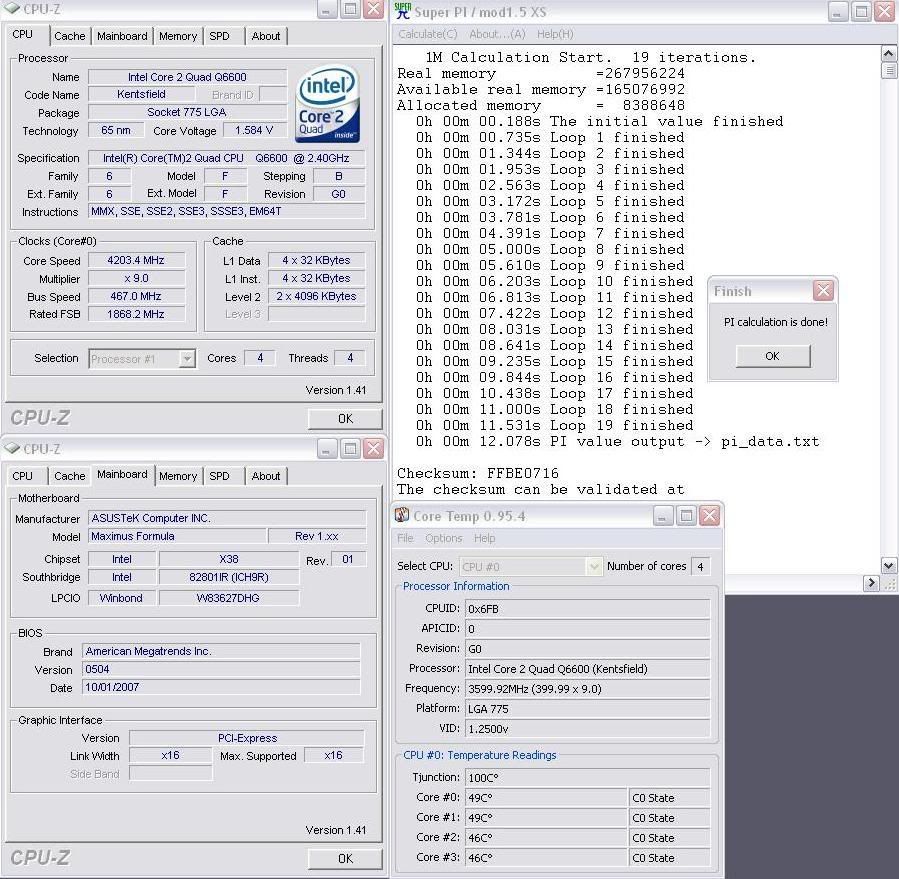
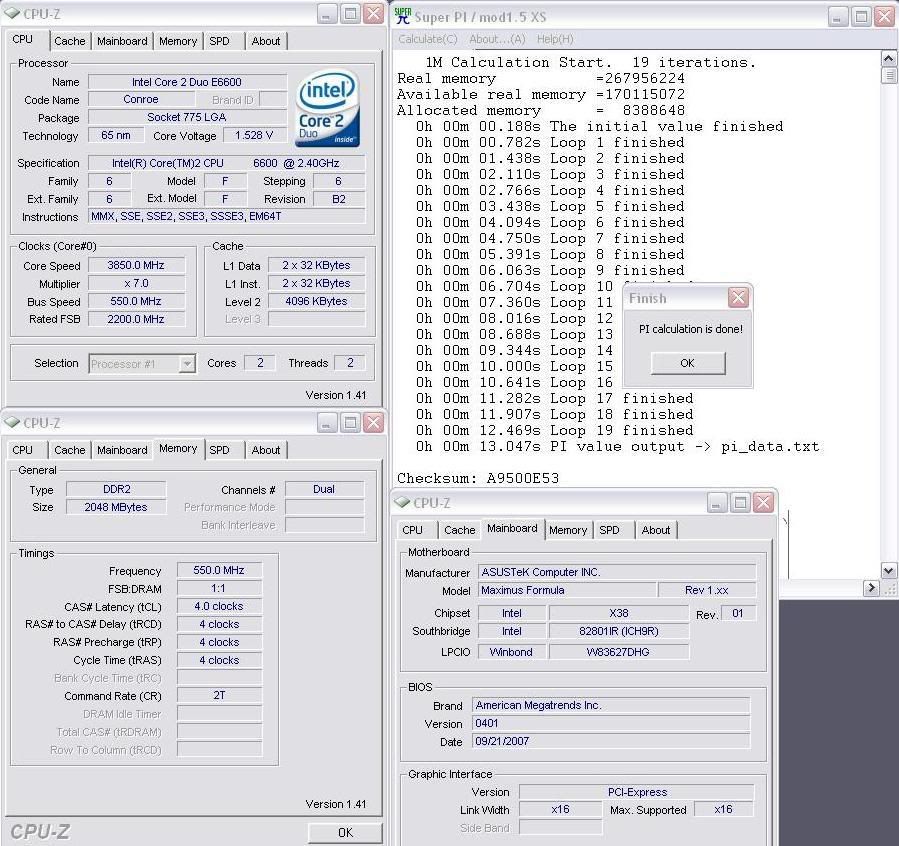


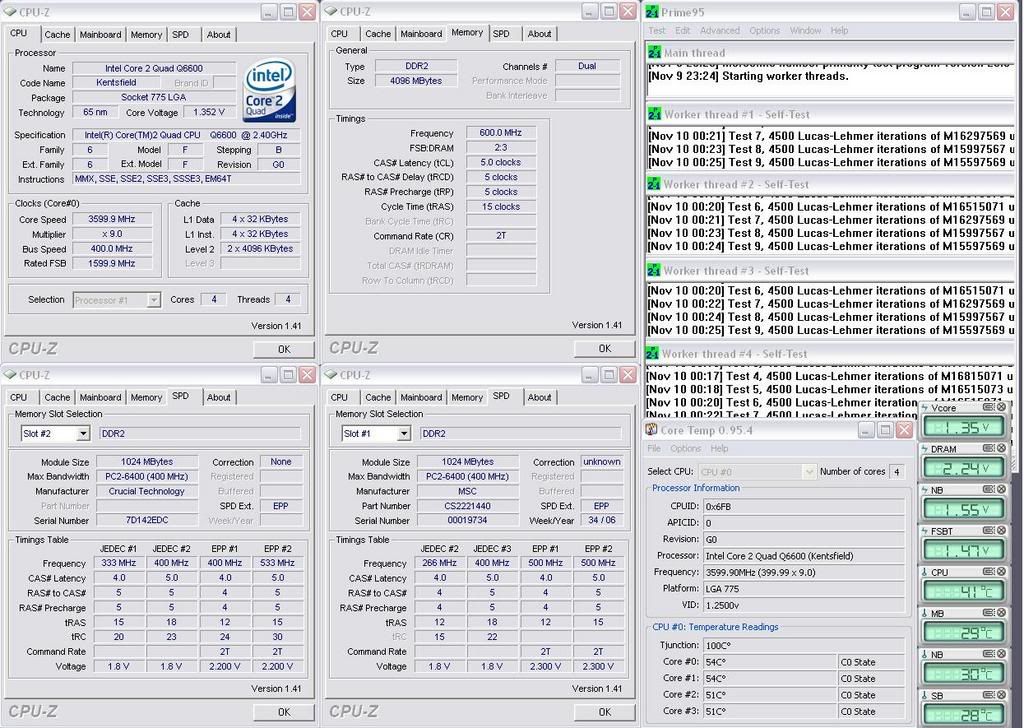
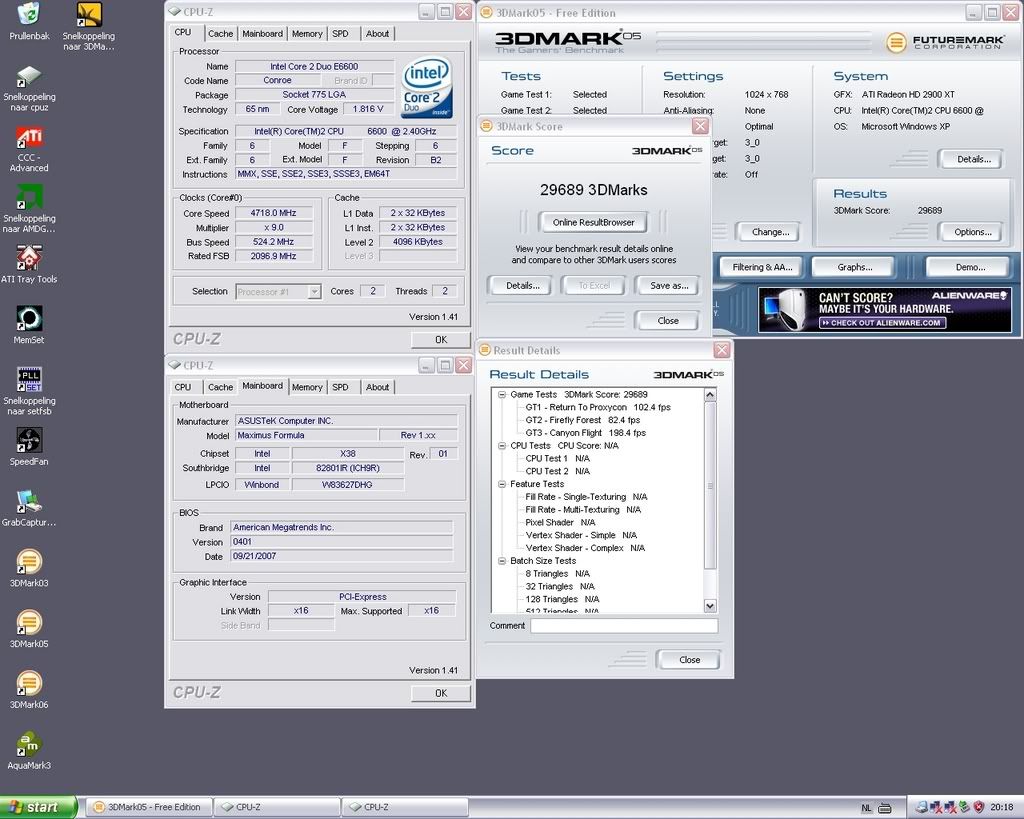


Bookmarks