MMM
Results 1 to 25 of 8487

Thread: ASUS P5W DH - Problems + Fixes Thread

Hybrid View

  1. #1
    Registered User
    Join Date
    Jul 2007
    Posts
    21
    Quote Originally Posted by sesdave View Post
    To help more detail is required e.g your setup,psu etc and all your current Bios settings.
    Sorry it took me so long to respond. I've been busy.

    System information:

    CPU: E6400
    Motherboard: P5W DH Deluxe Bios: 2004
    Memory: 2X1GB Geil 800 MHz
    Graphics Card: X1950XT Sapphire 256mb
    Hard Drive: RAID10 250 barracuda's
    Sound Card: X-Fi XtremeMusic
    Power Supply: 600W GameXStream
    Case: TT Armor Modded
    CPU cooling: Fugly Stinger WC
    GPU cooling: Maze 4 WC
    Memory cooling: Fans
    Case cooling: 3X120(Silverstone) 2X80's TT Stock


    Problem:
    Using SetFSB to test, I can set the fst to any number lower than 356.8, but when i set it to 356.8, the computer freezes up.
    Last edited by ae804; 07-23-2007 at 06:31 PM.

  2. #2
    Xtreme Enthusiast k0nsl's Avatar
    Join Date
    Feb 2005
    Location
    Scandinavia
    Posts
    815
    Quote Originally Posted by ae804 View Post
    Sorry it took me so long to respond. I've been busy.

    System information:

    CPU: E6400
    Motherboard: P5W DH Deluxe Bios: 2004
    Memory: 2X1GB Geil 800 MHz
    Graphics Card: X1950XT Sapphire 256mb
    Hard Drive: RAID10 250 barracuda's
    Sound Card: X-Fi XtremeMusic
    Power Supply: 600W GameXStream
    Case: TT Armor Modded
    CPU cooling: Fugly Stinger WC
    GPU cooling: Maze 4 WC
    Memory cooling: Fans
    Case cooling: 3X120(Silverstone) 2X80's TT Stock


    Problem:
    Using SetFSB to test, I can set the fst to any number lower than 356.8, but when i set it to 356.8, the computer freezes up.
    You forgot the BIOS settings. We have a similar problem in that both of us are stuck between 360 or in that area. I can get to that, but it isn't stable.

    Right now I can not even overclock more than 2,2GHz as this 2205 BIOS does not save vcore values and even disables the option whenever the chance arises. I am starting to become very tired of this now...but the board in general is really a good board.


    When you were born, you were crying and everyone around you was smiling. Live your life so that when you die, you're smiling and everyone around you is crying.

  3. #3
    Registered User
    Join Date
    Jul 2007
    Posts
    21
    Quote Originally Posted by k0nsl View Post
    You forgot the BIOS settings. We have a similar problem in that both of us are stuck between 360 or in that area. I can get to that, but it isn't stable.

    Right now I can not even overclock more than 2,2GHz as this 2205 BIOS does not save vcore values and even disables the option whenever the chance arises. I am starting to become very tired of this now...but the board in general is really a good board.
    After reading this post, I begin to wonder if our problems lie in the cooling on the north bridge. Maybe we're creating too much heat on it and it's throttling some how.

    Just a thought, but as for the Bios Settings... I'm too lazy to type everything in, but here are some pics. I just made an album for them as it seems to be easier, and I don't take up space in this thread

    Enjoy!
    Last edited by ae804; 07-23-2007 at 08:24 PM.

  4. #4
    Xtreme Member
    Join Date
    Mar 2007
    Location
    North Yorkshire
    Posts
    422
    Quote Originally Posted by ae804 View Post
    After reading this post, I begin to wonder if our problems lie in the cooling on the north bridge. Maybe we're creating too much heat on it and it's throttling some how.

    Just a thought, but as for the Bios Settings... I'm too lazy to type everything in, but here are some pics. I just made an album for them as it seems to be easier, and I don't take up space in this thread

    Enjoy!
    have you done the MB cooling mod foir the NB/SB?
    http://www.xtremesystems.org/forums/...d.php?t=106563
    if not it is worth doing plus get a 40mm fan and stick it on the NB - it helps a lot. Also - here is a link to a useful O/C guide http://forumz.tomshardware.com/hardw...ict197995.html

    From the pics you have posted I would disable all Q fan control also memory remap unless you have 4GB. Set FSB - 1.3 or 1.4v ,MCH = 1.65 and maybe up the memory volts - I dont know what they are speced for. I couldn't see the vcore setting but follow the guide recommendation and see how you get on. Your PSU might be a bit light for this board - nearer 600w or above is what is recommended
    Q6600 - L729A959
    VID1.2625 @3.72GHz (465x8) 1.4625v(BIOS)
    P5K Premium (0702 BIOS)
    Win7 Ultimate x64
    Ultima-90
    4x1GB Ballistix 8500C5 @ 1166 5-5-5-12 2.2v
    MSI 5770 Hawk 1030/1330 - 1.25v
    2 x Hitachi T7K500 320MB - Matrix RAID 0/1
    Hiper Type R 680w

  5. #5
    Registered User
    Join Date
    Jul 2007
    Posts
    21
    Quote Originally Posted by sesdave View Post
    have you done the MB cooling mod foir the NB/SB?
    http://www.xtremesystems.org/forums/...d.php?t=106563
    if not it is worth doing plus get a 40mm fan and stick it on the NB - it helps a lot. Also - here is a link to a useful O/C guide http://forumz.tomshardware.com/hardw...ict197995.html

    From the pics you have posted I would disable all Q fan control also memory remap unless you have 4GB. Set FSB - 1.3 or 1.4v ,MCH = 1.65 and maybe up the memory volts - I dont know what they are speced for. I couldn't see the vcore setting but follow the guide recommendation and see how you get on. Your PSU might be a bit light for this board - nearer 600w or above is what is recommended
    Thanks, I'll give that a try. I'm thinking I can get a small fan from work, and probably use that. I also have a couple chipset coolers (TT Spirit II's). If i get some time, I'll try that.

    as for the PSU... I wish I could figure out a way to test if it's the PSU with out buying a new one. I don't want to spend $150 just to realize it's something else, any suggestions? Maybe unplug all but 1 of the hdd's and one of my Optical drives??? Would that give me enough leeway to work some magic?
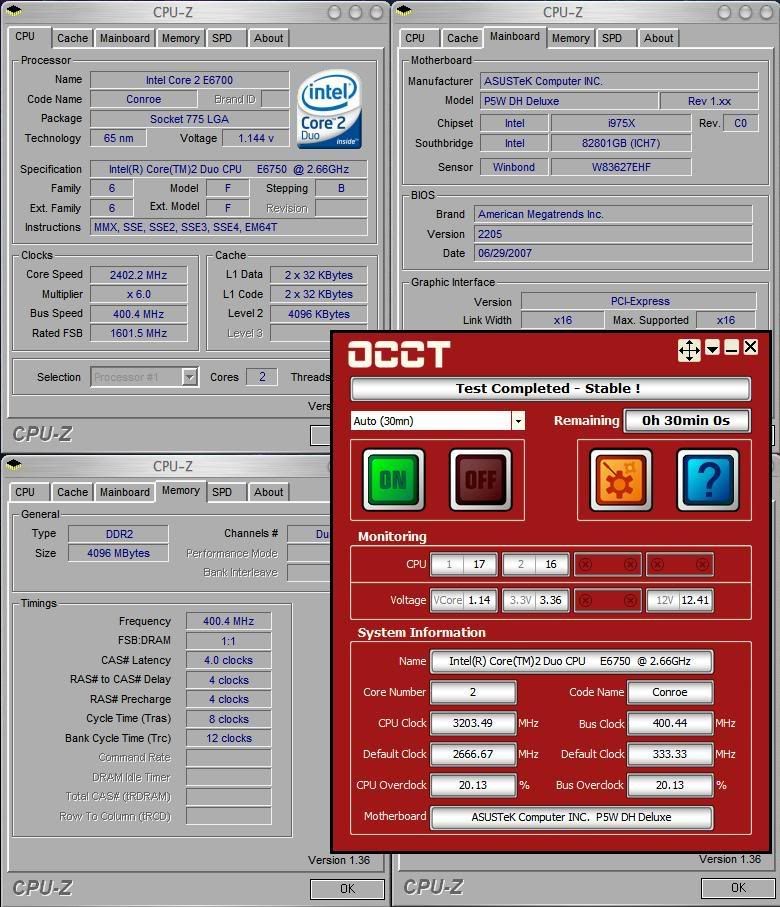

    Thanks,
    AE

  6. #6
    Xtreme Member
    Join Date
    Mar 2007
    Location
    North Yorkshire
    Posts
    422
    Quote Originally Posted by ae804 View Post
    Thanks, I'll give that a try. I'm thinking I can get a small fan from work, and probably use that. I also have a couple chipset coolers (TT Spirit II's). If i get some time, I'll try that.

    as for the PSU... I wish I could figure out a way to test if it's the PSU with out buying a new one. I don't want to spend $150 just to realize it's something else, any suggestions? Maybe unplug all but 1 of the hdd's and one of my Optical drives??? Would that give me enough leeway to work some magic?

    Thanks,
    AE
    Lawrywild installed the spirit !! on the NB - search for his post re clip connection and removing existing heatpipe. To remove existing NB,mofset and Southbridge heatsinks use a click type pen barrel rather than long nose plier to compress the heatsink pins. It fits just right to compress the pins enough to allow withdrawl without any damage. Someone else posted that when you have removed NB and Mofset you can heat it up and it will just seperate else just cut it near the mofset. I wouldnt bother replacing the SB with a spirit 11 - it doesnt get that hot and the spirit !! would propbably get in the way of Graphic cards e.g 8800's. I found I had to offset the 40mm fan on it to allow the card install. I am not saying your PSU is a problem just that a good clean and accurate delivery of required voltage is important when overclocking. I thought you stated a 480w PSU in a previous post but I see you have a 600w gamestream - that will be fine.
    Last edited by sesdave; 07-24-2007 at 09:06 AM.
    Q6600 - L729A959
    VID1.2625 @3.72GHz (465x8) 1.4625v(BIOS)
    P5K Premium (0702 BIOS)
    Win7 Ultimate x64
    Ultima-90
    4x1GB Ballistix 8500C5 @ 1166 5-5-5-12 2.2v
    MSI 5770 Hawk 1030/1330 - 1.25v
    2 x Hitachi T7K500 320MB - Matrix RAID 0/1
    Hiper Type R 680w

  7. #7
    Xtreme Member
    Join Date
    Aug 2006
    Posts
    300
    here is my chipset blocks. It works out fine for me.

    PS: tube is 3/4 http://www.mips-computer.de/index.htm
    Attached Thumbnails Attached Thumbnails Click image for larger version. 

Name:	p5wdh_set[1].jpg 
Views:	1710 
Size:	85.4 KB 
ID:	62084  
    Last edited by ntvh; 07-24-2007 at 03:37 PM.
    P5W DH Deluxe, E8400 3.0Ghz 2 water cooling: Nautilus for NB,SB & Chipset and Storm for CPU w/ P120.3 Rad, swiftech pump.

    http://valid.x86-secret.com/show_oc.php?id=179464

  8. #8
    Registered User
    Join Date
    Jul 2007
    Posts
    21
    Quote Originally Posted by sesdave View Post
    Lawrywild installed the spirit !! on the NB - search for his post re clip connection and removing existing heatpipe. To remove existing NB,mofset and Southbridge heatsinks use a click type pen barrel rather than long nose plier to compress the heatsink pins. It fits just right to compress the pins enough to allow withdrawl without any damage. Someone else posted that when you have removed NB and Mofset you can heat it up and it will just seperate else just cut it near the mofset. I wouldnt bother replacing the SB with a spirit 11 - it doesnt get that hot and the spirit !! would propbably get in the way of Graphic cards e.g 8800's. I found I had to offset the 40mm fan on it to allow the card install. I am not saying your PSU is a problem just that a good clean and accurate delivery of required voltage is important when overclocking. I thought you stated a 480w PSU in a previous post but I see you have a 600w gamestream - that will be fine.

    good to know. My south bridge hasn't really been showing any temp problems. It's been pretty constant around 35-40'C.

    Another question, Do I have to do anything to cool the msofets if I change the NB?

    Status update: Up to page 100/530 (I changed it so there would be 10 posts per page.... seems like i'm moving quick that way :p)

  9. #9
    I am Xtreme
    Join Date
    Jul 2005
    Posts
    4,811
    Will the P5W DH Deluxe be compatible with Penryn?
    [SIGPIC][/SIGPIC]

  10. #10
    Xtreme Member
    Join Date
    Mar 2007
    Location
    North Yorkshire
    Posts
    422
    Not on this list of Asus compatible MBs http://event.asus.com/mb/45nm/
    Q6600 - L729A959
    VID1.2625 @3.72GHz (465x8) 1.4625v(BIOS)
    P5K Premium (0702 BIOS)
    Win7 Ultimate x64
    Ultima-90
    4x1GB Ballistix 8500C5 @ 1166 5-5-5-12 2.2v
    MSI 5770 Hawk 1030/1330 - 1.25v
    2 x Hitachi T7K500 320MB - Matrix RAID 0/1
    Hiper Type R 680w

  11. #11
    Xtreme Member
    Join Date
    Sep 2006
    Location
    Columbia, SC
    Posts
    183
    Quote Originally Posted by sesdave View Post
    Not on this list of Asus compatible MBs http://event.asus.com/mb/45nm/
    Well, it'll be sad to only get 18 months out of my P5W if I have to replace it to use a Penryn. I'd have to settle for a quad CPU with hyperthreading rather than dump the motherboard too. Already I see awful performance just using 802.11G to transfer files to the C2D computer, where moving my USB mouse around to the right spot becomes an adventure, so I want more guts. I can't always use Vista due to hardware incompatibility so no amount of thread handling improvements there mean much to me. Maybe if I run a cable through the attic things would work better all around, but that still costs more than I want to spend. Not sure where the next upgrade really needs to go.

    Amazon is delaying the $79 power supply to December 21 as "unavailable", despite listing other vendors as low as $119, so I'm stuck at a very reliable 30% overclock (~2.4Ghz) until then, when I might be able to get back to 2.87Ghz to help overcome performance issues...
    P5W DH Deluxe 1.02G
    Q9450 @ various settings like underclocked to 2.32Ghz until a good BIOS comes along...

Tags for this Thread

Bookmarks

Bookmarks

Posting Permissions

  • You may not post new threads
  • You may not post replies
  • You may not post attachments
  • You may not edit your posts
  •