

So i guess AMD`s x99 equivalent got semi official now.
From news section:
Originally Posted by Mumak




So i guess AMD`s x99 equivalent got semi official now.
From news section:
Intel 5960X@4.2Ghz[Prime stable]@4.5 [XTU stable] 1.24v NB@3.6ghz Asrock X99 Extreme 3 4x8GB Corsair Vengeance@3200 16-17-17
Sapphire nitro+ VEGA 56 Samsung SSD 850 256GB Crucial MX100 512GB HDD:WD10TB WD:8TB Seagate8TB
That would indeed be cool!
However, I also can't help but wonder if all that was done was added support based on the speculation? In other words, merely adding in a chip that incorporates twice that of what Ryzen has?
On the flip side, it could be real as I guess one would need to know the hardware ID (CPUID) to detect it in the first place, no?
Interesting either way you slice it
And somna bish... I've been recommending the Beta as I assumed, since it's usually thus, that the Beta would've been far newer :S Yet, its version is 5.47 and latest release is 5.50... Whoops. However... I DID lose an Auxiliry Temp reading with v5.50 We'll see if I decide to keep using it or not I guess.
The way these kinda software is written, if they say they added support for something, its real.Same for cpuz and gpuz and most similar software.
Of course it doesnt mean that its gonna be released as a product you can buy for 100%, but its like 99%.And the way mr Mumak replied in the news section suggests he has real world data from such systems.It just makes me happy :-) . AMD after so much waiting, is getting back in the game BIG TIME.Other leaks suggest that threadripper cpus, are based of a B2 stepping, so thats something to look forward to also.And as they are made from 4 ccx`s, no more 16gb fast memory bottleneck.(which may be resolved either way in B2).
Intel 5960X@4.2Ghz[Prime stable]@4.5 [XTU stable] 1.24v NB@3.6ghz Asrock X99 Extreme 3 4x8GB Corsair Vengeance@3200 16-17-17
Sapphire nitro+ VEGA 56 Samsung SSD 850 256GB Crucial MX100 512GB HDD:WD10TB WD:8TB Seagate8TB
Ok gents.
This proves 2 things.
32gb dual rank is possible
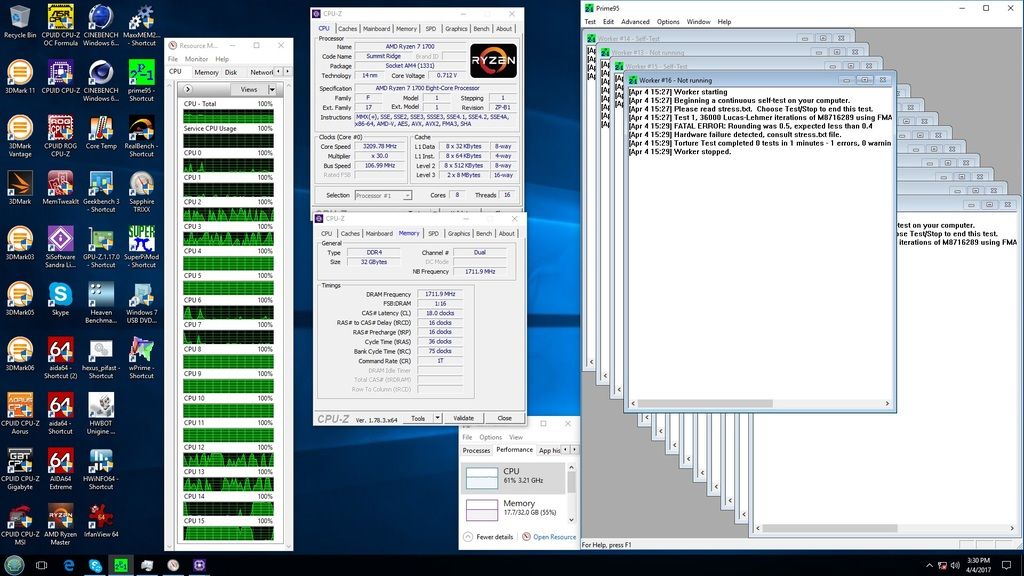
Prime 95 BLEND WORKS!!!! for testing IMC/memory.
if used properly........
Prime blend ticked then ticked custom then set 29gb memory use........
3390 32gb DUAL RANK 17-16-16-34 set in bios stock voltage.
Same but over 3400 just for a nice reference point and basically to say STFU you guys are doing it wrong....( those of you that claim it does not work )
heatware chew*
I've got no strings to hold me down.
To make me fret, or make me frown.
I had strings but now I'm free.
There are no strings on me
Well done chew* on dual rank modules! This is the first I see someone clocking them above 3000MHz! Magic
RiG1: Ryzen 7 1700 @4.0GHz 1.39V, Asus X370 Prime, G.Skill RipJaws 2x8GB 3200MHz CL14 Samsung B-die, TuL Vega 56 Stock, Samsung SS805 100GB SLC SDD (OS Drive) + 512GB Evo 850 SSD (2nd OS Drive) + 3TB Seagate + 1TB Seagate, BeQuiet PowerZone 1000W
RiG2: HTPC AMD A10-7850K APU, 2x8GB Kingstone HyperX 2400C12, AsRock FM2A88M Extreme4+, 128GB SSD + 640GB Samsung 7200, LG Blu-ray Recorder, Thermaltake BACH, Hiper 4M880 880W PSU
SmartPhone Samsung Galaxy S7 EDGE
XBONE paired with 55''Samsung LED 3D TV
So here's a question for the extreme folks...
Despite being early days with Ryzen and that we're still figuring out the chip, etc. Does anyone know why this might be happening?
Currently I have a fully stock Ryzen 1700X and only thing of note is running DDR4 @ 3200 with 14-15-14-35 1.36V.
If I run 14-15-15 timings, I'm pretty sure this does not happen. However, if set at either 14-14-15 or 14-15-14, when running AIDA64's System Stability Test on ONLY the "Stress Cache", it'll typically FAIL either within a few seconds or a few minutes. If I run it on ONLY the "Stress System Memory", it will run and run and run no problem. If I run it on "Stress CPU" and "Stress FPU" (both toggled), it'll run and run and run. If I run it with all four checked, it will run and run and run. If I go back to JUST the Cache test checked? It fails, runs a little longer, but ultimately fails...
The first red F = initial test on JUST the Cache, which failed (top and bottom chart log at different speeds)
First green ✓ = running just Memory test, I manually stopped it since it was passing.
Second green ✓ = running CPU, FPU, Cache, Memory. I let it run even longer since temp slowly crept to 71C (aka 51C), but canceled it.
The finale red F = once again just running Cache, and while it didn't immediately fail like the first, it failed within 10seconds.
So ultimately my question becomes: Is this common when tightening timings, that the Cache is effected as well, and can become unstable? o_0

Last edited by Formula350; 04-04-2017 at 01:10 PM.
yes that's IMC/MEMORY failures
That's why I test like this.
Always been like this on AMD.
A happy imc is a happy ocing chip.....
heatware chew*
I've got no strings to hold me down.
To make me fret, or make me frown.
I had strings but now I'm free.
There are no strings on me
That's good to know that they're related despite seeming unrelated. lol
But... what still confuses me is why it would work just fine when all 4 systems (CPU+FPU+Cache+RAM) are being stressed at the same time, but fail when only Cache is being stressed?
Also then, what's the "fix" for that in terms of Ryzen? More VCore? More CPU-NB? More DIMM Voltage?
There was a considerable jump in performance it seems, at least as far as AIDA's memory benches are concerned, when going from 14-15-15 to 14-15-14. So that might be something to look into on your end, for better Pi scores.
Soc vdimm dram just to name a few....somtimes less volts helps vs more.
heatware chew*
I've got no strings to hold me down.
To make me fret, or make me frown.
I had strings but now I'm free.
There are no strings on me
chew*, sorry to bother you with a very secondary question: Your Asus B350 Prime only seems to have 3 (4 pin) fan connectors (1 CPU+ 2 CHA), can both types be set with Q-Fan controlling PWM or DC voltage regulation, or there's no DC option for CPU (or even for chassis fans?). A big thanks!
It's alright chew*, I got dis!
Hey, I know someone with that board, let me ask 'em!
Hey chew*! I gots a question for you... lol I kid, I kid!
On a serious note...:P Alley, I downloaded the manual and it says: "2 x Chassis Fan connector (Support DC & PWM mode)"
So all 3 are
Well SoC (CPU-NB) was at default (0.960V) and the DRAM was 1.36V as per G.Skill at 3200 (that's what 1.35V applies on the Titanium). I set the SoC to 1.0275V and that didn't help any, which I know the limit is 1.2V (at least on air), but given the otherwise stable operation I was hoping I didn't need much more. I assume that "VDIMM" then would be DRAM VPP Voltage? Default on that shows 2.5V, but I wouldn't know if to set that higher or lower heh
Last edited by Formula350; 04-04-2017 at 06:49 PM.
Thanks, I've also checked the manual but couldn't understand if it's also possible for the CPU header to have DC regulation, as that line seems to confirm only the chassis headers. That's why I've asked.
In the MSI's B350 Tomahawk's manual screenshots it seems possible to use DC both for CPU or chassis, but the Asus doesn't have sub-menus explained.
Try vtt @ 50% vddr
heatware chew*
I've got no strings to hold me down.
To make me fret, or make me frown.
I had strings but now I'm free.
There are no strings on me
I presume that's the "DRAM Channel VREF Voltage", since that's what shows as being 1/2 of default DRAM Voltage.
IOW, DRAM Voltage at default is 1.2V, and DRAM Ch VREF V at default is 0.600V
So being I'm running at DRAM V @ 1.36V, I should set VREF V to 0.725V?
What's a tad alarming is the stupid MSI Command Center (which I don't use), shows even 0.610V as being "red", even though it's Max is 1.235V
I only ask, because when I googled what VTT the best example explaining stuff for both Intel and AMD says:
"Termination voltage: This is the voltage that is used to feed the termination logic inside the memory chips. By default, it is set at half of the VDDQ/SSTL voltage (“memory voltage”). This option, if available, will be listed as “Termination Voltage” or “DRAM Termination.” Pay attention, because this voltage with AMD CPUs is called VTT, but with Intel CPUs VTT is the processor’s secondary voltage (see previous page)."
Unfortunately on my Titanium all I have for DRAM voltages is:
DRAM Voltage: Default 1.2V / Mine 1.35V
DRAM VPP Voltage: Default 2.5V / Mine 2.5V
DRAM CH_A VREF Voltage: Default 0.6V / Mine 0.6V
DRAM CH_B VREF Voltage: Default 0.6V / Mine 0.6V
Oh how I miss the days when terminology was much simpler
EDIT: Yea, doesn't sound like that is the one I want on my motherboard.
"Reference voltage: The memory reference voltage “configures” both the memory controller and the memory module with the voltage level that separates what is to be considered a “0” or a “1,” i.e., voltages found on the memory bus below the reference voltage are to be considered a “0,” and voltages above this level are to be considered a “1.” By default, this voltage level is half of the SSTL voltage (a.k.a. 0.500x), but some motherboards allow you to change this ratio, usually through options like “DDR_VREF_CA_A,”"
Also I believe earlier I may have mis-spoke on SoC being CPU-NB. I believe CPU-NB they've kept as the IMC label, and the new "CPU 1P8 Voltage" is the SoC, which is, of course, 1.8V heh
EDIT2: For shiz and giggles I dropped the CPU-NB back to default, and dropped the DRAM Voltage to 1.3V. Right off the bat Windows bootloader threw a kernel issue, about not quite sure what. Either way it had the option of Enter to continue and F8 for boot options. So I assumed instability, but whacked Enter anyways. It boots, surprisingly. In windows, no crash yet, more surprisingly. I check it is indeed running at 1.3V (1.296), so I run the Cache stress. It doesn't instant-fail like normal, and actually it managed to last for 2 minutes before failing! That's even at my 14-15-14-35 timings haha
If you weren't already Chewbacca I'd be asking to cut off your legs off at the knees, paint you green, give you some pointy ears, and carry you on my back while I overclock. Then you'd inevitably sigh, and mumble how I'm not teachable, that I'm too old. That's when a whispy-blue Fugger would walk in randomly and say "So was I, if you'll remember". [/end scene] lol (Yea I know that Ben's line I quoted wasn't in response to the "Too old" Yoda comment, don't worry everyone!)
I would suspect that it has DC ability on the main CPU and Pump headers. I only have the MSI X370 Titanium, but all of its fan headers are PWM & DC capable.
Last edited by Formula350; 04-04-2017 at 10:45 PM.
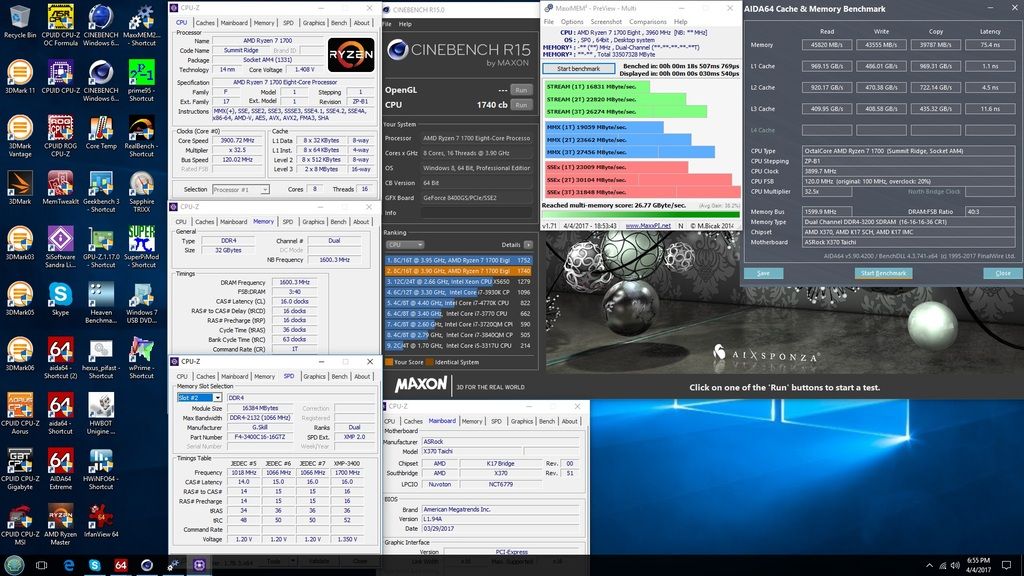
Show is not over yet.......the taichi is just full of tricks......
Cas 16 PC 3200 DUAL RANK 2x 16gb
heatware chew*
I've got no strings to hold me down.
To make me fret, or make me frown.
I had strings but now I'm free.
There are no strings on me
Chew, your screenshots are barely readable, thats a direct link to one:
http://i1253.photobucket.com/albums/...pswazmvzbk.jpg
They are 2x16GB dual rank samsung B-die modules ?
Intel 5960X@4.2Ghz[Prime stable]@4.5 [XTU stable] 1.24v NB@3.6ghz Asrock X99 Extreme 3 4x8GB Corsair Vengeance@3200 16-17-17
Sapphire nitro+ VEGA 56 Samsung SSD 850 256GB Crucial MX100 512GB HDD:WD10TB WD:8TB Seagate8TB
How can you change the VTT?
On AM3+ the VTT is only changeable If the VDDR is @ default
If i use soecial VDDR the VTT is @ 50% of the VDDR of SPD
Did you flash the SPD to change the SPD Voltage & the VTT?
Last edited by techtrancer; 04-05-2017 at 04:03 AM.
FX-9370 @ 4.7 GHz @ 1,44 V | NB @ 2286 MHz @ 1,21V
32 GB 1600 CL11 1,5V @ 846 MHz @ CL 9-9-9 @ 1,4V
MORA 2 + Laing D5 + 9 x 120mm @ 5V
Gigabyte GA-970A UD3 Rev. 1.2
XFX HD7750 2GB Core Edition
Samsung 850 Pro 512GB
I dunno i can zoom in on my smartphone just fine.
Yes its b die dual rank 2x16g
heatware chew*
I've got no strings to hold me down.
To make me fret, or make me frown.
I had strings but now I'm free.
There are no strings on me
Techtrancer you can leave it auto or set it manually on all am4 boards i have used so far.
heatware chew*
I've got no strings to hold me down.
To make me fret, or make me frown.
I had strings but now I'm free.
There are no strings on me
Thank you for Information
FX-9370 @ 4.7 GHz @ 1,44 V | NB @ 2286 MHz @ 1,21V
32 GB 1600 CL11 1,5V @ 846 MHz @ CL 9-9-9 @ 1,4V
MORA 2 + Laing D5 + 9 x 120mm @ 5V
Gigabyte GA-970A UD3 Rev. 1.2
XFX HD7750 2GB Core Edition
Samsung 850 Pro 512GB
Nice one chew*.
I can't boot at anything lower than CAS18 with 4x8GB at 100bclk and 3200 divider on CH6. Passes memory training, but does not POST.
Getting some strange codes or loop no matter voltages. I guess some issue with secondary/tertiary timings.
But with 2666 divider and bclk overclock this is pretty fine.
PS: I see that you most probably came to the same conclusion as me. Running memtest right now at these settings, will take good 2h for 100% coverage.
Last edited by I.nfraR.ed; 04-05-2017 at 11:55 AM.
X6 1090T (1010MPMW) @ 4267MHz 1.44V NB@3229MHz 1.33V | Asus Crosshair IV Formula | 2x2GB Corsair Dominator GTX2 @ 1845MHz 6-6-5-17-22 1T | Asus HD4890 @ 1050/4800 | Corsair HX850W | HAF 932
EK Supreme HF | EK-FC4890LT | MCP655 + Koolance D5 Top | ThermoChill PA120.3 + 3x Enermax Magma | XSPC Bay res | Masterkleer 1/2" UV Red
Nice i was trying 2400 divider and ref clock to 3400 @ rated 16-16-16. Taichi is not cooperating....yet.
But 3200 is fine and running prime like a champ at 16-16-16 ( sticks rated )
Can you try prime blend like i am blend then custom 29gb allocated? Cpu can be stock memory volts stock(1.35)...20 minutes should pick up immediate instability.
Just want the data till i can hands on 4x8 myself
It may be time to open pandoras box....4x dual rank dimms.
Seeing as i cracked 2x dual rank im bored again.
Or AMD has threatened to make me use ECC memory....challenge accepted.
Last edited by chew*; 04-05-2017 at 12:17 PM.
heatware chew*
I've got no strings to hold me down.
To make me fret, or make me frown.
I had strings but now I'm free.
There are no strings on me
After memtest complete I will try higher than 3200, but 3200 14-14-14-34 1T 1.35V seems pretty fine. Straight boot at these settings.
AMD needs to open subtimings, then 3200 divider should be possible at lower CAS. Kinda s*cks for guys with refclk locked boards at the moment.
PS: Ok, I will try Blend as well using your settings.
Last edited by I.nfraR.ed; 04-05-2017 at 12:07 PM.
X6 1090T (1010MPMW) @ 4267MHz 1.44V NB@3229MHz 1.33V | Asus Crosshair IV Formula | 2x2GB Corsair Dominator GTX2 @ 1845MHz 6-6-5-17-22 1T | Asus HD4890 @ 1050/4800 | Corsair HX850W | HAF 932
EK Supreme HF | EK-FC4890LT | MCP655 + Koolance D5 Top | ThermoChill PA120.3 + 3x Enermax Magma | XSPC Bay res | Masterkleer 1/2" UV Red
The asus prime x370 pro is tuned different. It kicks the ch6 azz @ 3200 divider. I would not count out non ref clock completely.
But it ends there once ch6 goes diff strap bclock...game over.
heatware chew*
I've got no strings to hold me down.
To make me fret, or make me frown.
I had strings but now I'm free.
There are no strings on me
Oh let me know if over 3400 instafails prime blend if you could. Since these are 3400 rated tough call which is to blame over 3400...imc or ram..
heatware chew*
I've got no strings to hold me down.
To make me fret, or make me frown.
I had strings but now I'm free.
There are no strings on me
 Posting Permissions


 Reply With Quote


Bookmarks