

I have not even tried F7 yet still rocking F6 lol, any change log? where is f7A?Originally Posted by sin0822




I have not even tried F7 yet still rocking F6 lol, any change log? where is f7A?
Mpower Max | 4770k | H100 | 16gb Sammy 30nm 1866 | GTX780 SC | Xonar Essence Stx | BIC DV62si | ATH AD700 | 550d | AX850 | VG24QE | 840pro 256gb | 640black | 2tb | CherryReds | m60 | Func1030 |
HEAT

Even F8a is out today.
Need a Gigabyte latest BIOS?
Z370 AORUS Gaming 7,
GA-Z97X-SOC Force ,Core i7-4790K @ 4.9 GHz
GA-Z87X-UD3H ,Core i7-4770K @ 4.65 GHz
G.Skill F3-2933C12D-8GTXDG @ 3100 (12-15-14-35-CR1) @1.66V
2xSSD Corsair Force GS 128 (RAID 0), WD Caviar Black SATA3 1TB HDD,
Evga GTS 450 SC, Gigabyte Superb 720W
XSPC RayStorm D5 EX240 (Liquid Ultra)
NZXT Phantom 630 Ultra Tower
Win 7 SP1 x64;Win 10 x64
amazing haha, any change log Mr Stasio?
Hi Sin i thought id leave IMC and VTT on auto just to see what happens. System deffo suffers issues like you said the voltages dont stick. Ive put em both back up now it deff makes a difference to stablity. I do find that by putting too much gives me less scores on cinebench, i suppose its jus bout findin the sweet spot.
Ive been busy testing SniperV2 and 3d benchies with GB 680, everything seems sweet jus movies thru VLC stutter quite a bit. Poss Nvidia driver issue.
Corsair carbide 400R case
Corsair AX-750W PSU
Gigabyte Z77X-UP5 TH (F13a)
Gigabyte GTX 680 OC WF3X
Intel i7 2600K @ 4.8GHz Antec Kuhler 620
Gskill Ripjaw 16GB DDR3 2133 (10 11 10 28 1T) 1.62v
Samsung 840 Pro 256GB Win 8 X64
Samsung F4 2TB
Seagate ST3000DM001 3TB
Pioneer 216BK DVDRW
Liteon iHas 324 DVDRW
Curious, what is the difference between the purple and blue capacitor's, apart from the actual colour? mine are all blue.
I noticed on a forum I regularly use someone has a GA-Z77-UD5H-WiFi and that one has purple capacitor's.
I've installed Bios F8a running fine...
Last edited by Nelly; 05-03-2012 at 01:36 PM.
i5 2500K @ 4.9GHz MSI Z77 MPower G.Skill Trident 8GB 2400C10
EVGA GTX 1070 SC 8GB @ 1784/4004MHz Corsair HX 750 PSU
Samsung 830 256GB Creative ZxR Thermalright Silver Arrow
NEC 24WMGX3 24" TFT Fractal Design Define S Win 7/10 64bit
yea just keep the two within 5mv of each other, so the QPI/VTT 0.005v above IMC voltage. With SB it needs voltage change, but with IB not so much on air.
@Nelly Hi what kind of 3dmark 11 scores you gettin with ur rig?
Ive managed P13249 this is wid MVP.. do u get stutter wid ur 680 using vlc? gamin is smooth so far but only tried 1 game.
I also flashed F8a no probs
Corsair carbide 400R case
Corsair AX-750W PSU
Gigabyte Z77X-UP5 TH (F13a)
Gigabyte GTX 680 OC WF3X
Intel i7 2600K @ 4.8GHz Antec Kuhler 620
Gskill Ripjaw 16GB DDR3 2133 (10 11 10 28 1T) 1.62v
Samsung 840 Pro 256GB Win 8 X64
Samsung F4 2TB
Seagate ST3000DM001 3TB
Pioneer 216BK DVDRW
Liteon iHas 324 DVDRW
Same here for F8a..... all goodalthough the board still dont like 4 x 4GB Samsungs @ 2133+ or even 2 x 4GB above 2200.
Home / Play Rig Asrock Z87 OC Formula/AC, i7 4770K L310B487, 8GB Corsair Dominator Platinum 2666 CL10, BeQuiet Dark Power Pro P8 1200W PSU, 120GB Corsair Force GT SSD, 2 x 1TB WD Sata Drives Mirrored, Palit 680GTX JetStream, Antec Kuhler 920, Windows 10 Pro, Logitech LX700 Deskset, AOC 27" Monitor.
Work 24/7 Rig Gigabyte GA-Z97X-SOC Force, i7 4790K L418C133 ,8GB Team Xtreem LV 2600, PC Power & Cooling 850WPSU, 120GB OCZ Vertex 3 SSD, 2 x 500GB Hitachi Sata Drives Mirrored, Antec Kuhler 620, Windows 10 Pro 64 Bit, Logitech LX700 Deskset, Benq 27" Monitor.
Home NAS DFI P35 T2RL Motherboard, Intel E6850 CPU, 8GB Nanya DDR2 6400, 2X 2TB Toshiba DT01ACA200 SATA Drives, ZFS RAID Mirror On Intel ICH9 AHCI, Artic Blue 850W PSU, Marvell Yukon 88E8053 Gigabit Ethernet, FreeNAS 9.2.1.5 RC, 64-Bit On 4GB USB2 SanDisk Cruizer Blade Thumb Drive.
did you loosen up the 3rd timings?


Hiya i bought a Z77X-D3H yesterday and i have came across a problem my board has stopped running in dual channel memory mode can only get single channel. Has anyone had these problem.
1 & 2 or 3 & 4 slots?
Page 16 in manual.
Last edited by stasio; 05-04-2012 at 06:57 AM.
Need a Gigabyte latest BIOS?
Z370 AORUS Gaming 7,
GA-Z97X-SOC Force ,Core i7-4790K @ 4.9 GHz
GA-Z87X-UD3H ,Core i7-4770K @ 4.65 GHz
G.Skill F3-2933C12D-8GTXDG @ 3100 (12-15-14-35-CR1) @1.66V
2xSSD Corsair Force GS 128 (RAID 0), WD Caviar Black SATA3 1TB HDD,
Evga GTS 450 SC, Gigabyte Superb 720W
XSPC RayStorm D5 EX240 (Liquid Ultra)
NZXT Phantom 630 Ultra Tower
Win 7 SP1 x64;Win 10 x64
Slots 4 and 2 are not letting me boot just goes on a loop. Tryed a stick each. Whenever i try slot1 and 2 ot 3 and 4 for dual channel it goes in a loop.
Looked in bios it channel A that wont accept memory.
Last edited by bro20000; 05-04-2012 at 07:08 AM.
do you have other memory to try?
Yh have try some other memory and same results.
i would RMA the board, that is not a good sign.
Hey if you try to take out the GPU, and run off the iGPU, do you get memory issue? Yesterday i was using a GT220 for the first time on a UD3H, and installing memory, and i kept getting 51 error which i assumed was only for memory. Then I took out the GPU and plugged HDMI into the board, and it worked. I turn the system off and pluged the GPU back into the board and the HDMI into the GPU and no issue.
BTW I did a review of the UD3H, please let me know what you guys think!!!
http://www.xtremesystems.org/forums/...cy-Comparison)
I am going to post up some OC profiles in there later today.
Am just running the hd4000 off the ivybridge. waiting for a 7970 to come. Am going to rma board maybe go for a z77 gene.
"did you loosen up the 3rd timings?"
Yup ......
Home / Play Rig Asrock Z87 OC Formula/AC, i7 4770K L310B487, 8GB Corsair Dominator Platinum 2666 CL10, BeQuiet Dark Power Pro P8 1200W PSU, 120GB Corsair Force GT SSD, 2 x 1TB WD Sata Drives Mirrored, Palit 680GTX JetStream, Antec Kuhler 920, Windows 10 Pro, Logitech LX700 Deskset, AOC 27" Monitor.
Work 24/7 Rig Gigabyte GA-Z97X-SOC Force, i7 4790K L418C133 ,8GB Team Xtreem LV 2600, PC Power & Cooling 850WPSU, 120GB OCZ Vertex 3 SSD, 2 x 500GB Hitachi Sata Drives Mirrored, Antec Kuhler 620, Windows 10 Pro 64 Bit, Logitech LX700 Deskset, Benq 27" Monitor.
Home NAS DFI P35 T2RL Motherboard, Intel E6850 CPU, 8GB Nanya DDR2 6400, 2X 2TB Toshiba DT01ACA200 SATA Drives, ZFS RAID Mirror On Intel ICH9 AHCI, Artic Blue 850W PSU, Marvell Yukon 88E8053 Gigabit Ethernet, FreeNAS 9.2.1.5 RC, 64-Bit On 4GB USB2 SanDisk Cruizer Blade Thumb Drive.
The wi-fi on this mb is advertised as dual-band bluetooth/wi-fi. What I'm wondering is whether the wi-fi would broadcast on both bands to my LG BD670 blu-ray player. It would also be nice if I could set up a DLNA server as well (like on the Asus P8Z77-V Deluxe which unfortunately is out of my budget). The BD670 manual states the following:
This player is equipped with an IEEE 802.11n (Dual-band, 5 GHz and 2.4 GHz band) wireless module,
which also supports the 802.11a/b/g standards.
For the best wireless performance, we recommend
using a IEEE 802.11n certified Wi-Fi network (access
point or wireless router).
Frequency Range for North America
5.15-5.25 GHz (ch. 36-48),
5.725-5.825 GHz (ch. 149-161)
5.825-5.850 GHz (ch.165)
UPDATE: Nevermind, I just answered my own question here:
http://www.gigabyte.us/products/prod...px?pid=4135#ov
Last edited by NLight95; 05-06-2012 at 12:29 PM.
Lian Li PC-A77B, Corsair 750TX PSU | Asus Max Formula->Rampage, 1001 BIOS | E8500 @4303MHz, Xigmatek S1283 | 4GB G.Skill DDR2 1066 | HIS 4890 Turbo | Super Talent FTM32GX25H SSD (boot), WD3000GLFS, ST31500341AS, WD6400AAKS | Pioneer 112D | X-Fi Titanium Fatal1ty Pro | Klipsch ProMedia Ultra 5.1 w/upgraded parts&cooling | LG W2600H 26" monitor | Windows 7 x64
Think It may have something to do with where the PCB was made
Purple= China
Blue= Taiwan
##### Edit #####
Then again I have just seen a UD3H with Purple caps made in Taiwan!!!
Last edited by C-N; 05-08-2012 at 08:23 AM.
Home / Play Rig Asrock Z87 OC Formula/AC, i7 4770K L310B487, 8GB Corsair Dominator Platinum 2666 CL10, BeQuiet Dark Power Pro P8 1200W PSU, 120GB Corsair Force GT SSD, 2 x 1TB WD Sata Drives Mirrored, Palit 680GTX JetStream, Antec Kuhler 920, Windows 10 Pro, Logitech LX700 Deskset, AOC 27" Monitor.
Work 24/7 Rig Gigabyte GA-Z97X-SOC Force, i7 4790K L418C133 ,8GB Team Xtreem LV 2600, PC Power & Cooling 850WPSU, 120GB OCZ Vertex 3 SSD, 2 x 500GB Hitachi Sata Drives Mirrored, Antec Kuhler 620, Windows 10 Pro 64 Bit, Logitech LX700 Deskset, Benq 27" Monitor.
Home NAS DFI P35 T2RL Motherboard, Intel E6850 CPU, 8GB Nanya DDR2 6400, 2X 2TB Toshiba DT01ACA200 SATA Drives, ZFS RAID Mirror On Intel ICH9 AHCI, Artic Blue 850W PSU, Marvell Yukon 88E8053 Gigabit Ethernet, FreeNAS 9.2.1.5 RC, 64-Bit On 4GB USB2 SanDisk Cruizer Blade Thumb Drive.
they ran out of blue caps so they changed the manufacturer and the new manufacturer has different color caps. Same specs.
What sort of BCLK you guys getting on Air/Water?
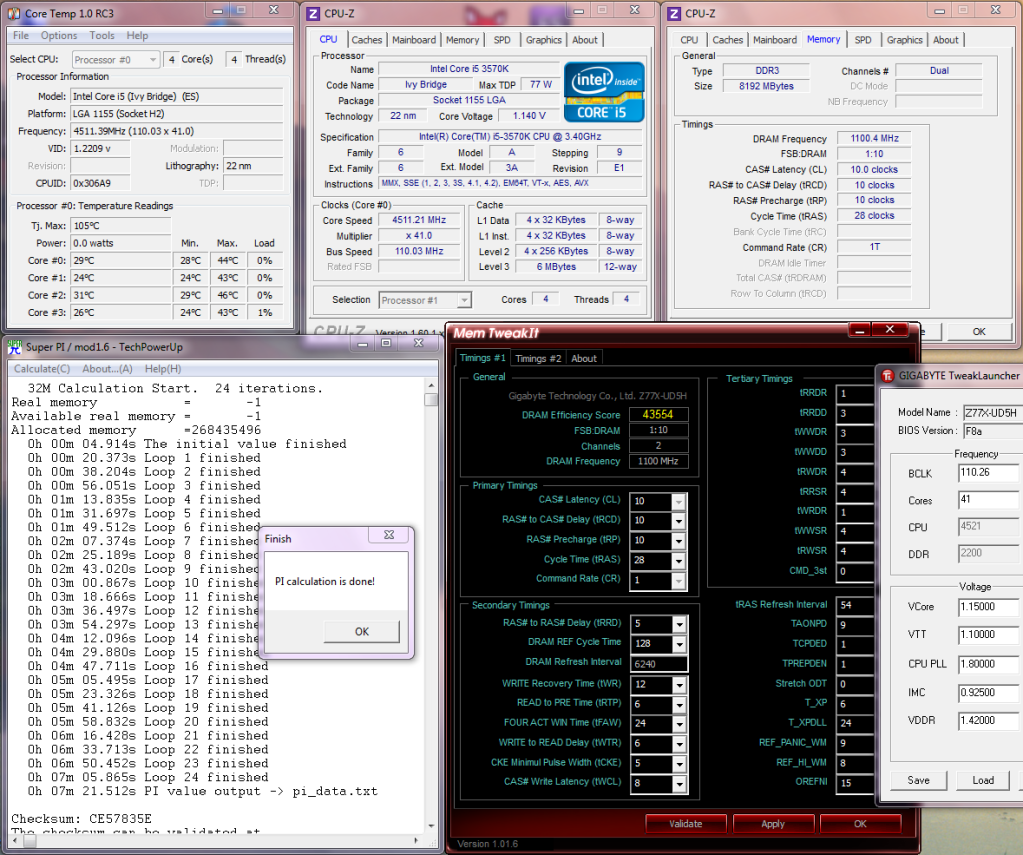
I'm finding about 107 ~ 8 is where my board will boot happy then you need to tease up the BCLK 1 at a time to get to 110.
Home / Play Rig Asrock Z87 OC Formula/AC, i7 4770K L310B487, 8GB Corsair Dominator Platinum 2666 CL10, BeQuiet Dark Power Pro P8 1200W PSU, 120GB Corsair Force GT SSD, 2 x 1TB WD Sata Drives Mirrored, Palit 680GTX JetStream, Antec Kuhler 920, Windows 10 Pro, Logitech LX700 Deskset, AOC 27" Monitor.
Work 24/7 Rig Gigabyte GA-Z97X-SOC Force, i7 4790K L418C133 ,8GB Team Xtreem LV 2600, PC Power & Cooling 850WPSU, 120GB OCZ Vertex 3 SSD, 2 x 500GB Hitachi Sata Drives Mirrored, Antec Kuhler 620, Windows 10 Pro 64 Bit, Logitech LX700 Deskset, Benq 27" Monitor.
Home NAS DFI P35 T2RL Motherboard, Intel E6850 CPU, 8GB Nanya DDR2 6400, 2X 2TB Toshiba DT01ACA200 SATA Drives, ZFS RAID Mirror On Intel ICH9 AHCI, Artic Blue 850W PSU, Marvell Yukon 88E8053 Gigabit Ethernet, FreeNAS 9.2.1.5 RC, 64-Bit On 4GB USB2 SanDisk Cruizer Blade Thumb Drive.
I picked up a "ud5h" a few days back and I'm now running the F8a bios. I've been experiencing some strange lock ups/screen freezes when trying to change settings in BIOS while testing the o.c. on my 3570K. It has happened so far on f4, f6, and f7 bios. I'm not sure if this is just a "sample" peculiarity with my board or if the volts are to low for a given multi or if it might be something else that I'm over looking? I'm even thinking about possibly exchanging the board for another one. I've also noticed that there doesn't seem to be a setting for enabling/disabling PLL overvoltage or a setting for enabling/disabling cpu spread spectrum?
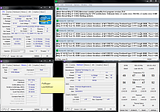
Brief Prime blend @45x:
Last edited by PolRoger; 05-08-2012 at 11:50 AM.
Ryzen 9 on the test bench... Sometimes older generation/tech as well.
I have seen the same thing with mine & thought it was low vcore however it turned out for me anyway to be a memory timing too tight tRWDRDD.... slackened it from 3 ~ 4
Home / Play Rig Asrock Z87 OC Formula/AC, i7 4770K L310B487, 8GB Corsair Dominator Platinum 2666 CL10, BeQuiet Dark Power Pro P8 1200W PSU, 120GB Corsair Force GT SSD, 2 x 1TB WD Sata Drives Mirrored, Palit 680GTX JetStream, Antec Kuhler 920, Windows 10 Pro, Logitech LX700 Deskset, AOC 27" Monitor.
Work 24/7 Rig Gigabyte GA-Z97X-SOC Force, i7 4790K L418C133 ,8GB Team Xtreem LV 2600, PC Power & Cooling 850WPSU, 120GB OCZ Vertex 3 SSD, 2 x 500GB Hitachi Sata Drives Mirrored, Antec Kuhler 620, Windows 10 Pro 64 Bit, Logitech LX700 Deskset, Benq 27" Monitor.
Home NAS DFI P35 T2RL Motherboard, Intel E6850 CPU, 8GB Nanya DDR2 6400, 2X 2TB Toshiba DT01ACA200 SATA Drives, ZFS RAID Mirror On Intel ICH9 AHCI, Artic Blue 850W PSU, Marvell Yukon 88E8053 Gigabit Ethernet, FreeNAS 9.2.1.5 RC, 64-Bit On 4GB USB2 SanDisk Cruizer Blade Thumb Drive.
Thanks C-N
I'll try adjusting that memory timing. I also just happened to swap over to a different kit of ram in an attempt to see if it might be somehow dram related.
Ryzen 9 on the test bench... Sometimes older generation/tech as well.
this happens to me when the system is not stable enough, it will lock up, but it wont do it the same every time. The BIOS puts a load onto the CPU and memory. Try the timings or try more vcore. If you are having odd issues that you think are just odd, then RMA the board.
Yea PLL OV is automatically engaged for ANY OC. This isn't an issue as IB can resume from S3 sleep just fine with it enabled, but a few users have asked for it to be added in for users to disable if they want(mainly SB users). So hopefully we will see a BIOS with it son, as i reported it to HQ.
 Posting Permissions


 Reply With Quote


Bookmarks