

Unplug the USB cable to the monitor and see if the issue persists.
-Raja



Unplug the USB cable to the monitor and see if the issue persists.
-Raja
ASUS North America Technical Marketing - If you are based outside North America and require technical assistance or have a query please contact ASUS Support for your region.
Rampage IV Extreme tweaking guide
ASUS Z77 UEFI Tuning Guide for overclocking
Maximus 5 Gene OC Guide
Maximus VI Series UEFI OC Guide

Raja,
New UEFI for R4E 0077B link.....thanks.
Need a Gigabyte latest BIOS?
Z370 AORUS Gaming 7,
GA-Z97X-SOC Force ,Core i7-4790K @ 4.9 GHz
GA-Z87X-UD3H ,Core i7-4770K @ 4.65 GHz
G.Skill F3-2933C12D-8GTXDG @ 3100 (12-15-14-35-CR1) @1.66V
2xSSD Corsair Force GS 128 (RAID 0), WD Caviar Black SATA3 1TB HDD,
Evga GTS 450 SC, Gigabyte Superb 720W
XSPC RayStorm D5 EX240 (Liquid Ultra)
NZXT Phantom 630 Ultra Tower
Win 7 SP1 x64;Win 10 x64
On the 3:30 post sitting at code 99---it is the r5000hd dvrs that are causing the problem with being recognized by your bios. If I unplug the 2 dvrs then the machine boots in a normal time frame without hanging at a particualr code. This makes sense because typically after a post and boot into windows I get a 'usb device not recognized' erro message and then have to unplug the 2 dvrs and plug them back in to clear the problem. This is running through your bios because I had similar recognition problems with the m4e and m4eZ boards where once I put the dvrs in the system then my c19 keyboard wouldn't get recognized in boot. I'm seeing that happening intermittantly with this board because some of the boots I'll go to hit enter to go to an operating system instead of waiting for the 'time out' and the keyboard won't work. This has been a haunting problem with Asus noards and bios sense I came back to Asus 2 years ago--the problem doesn't exist with Gigabyte or MSI boards so it has something to do with your process for polling the USB connections and how you are handling it---how about working on a fix I don't want to return the board and go to another x79 board from a competitor?Originally Posted by Raja@ASUS

Where are you located? The way to get a fix is to provide full part numbers for those devices to ASUS Support. If the devices are still available to buy then HQ might be able to get hold of them and see what is wrong.
-Raja
ASUS North America Technical Marketing - If you are based outside North America and require technical assistance or have a query please contact ASUS Support for your region.
Rampage IV Extreme tweaking guide
ASUS Z77 UEFI Tuning Guide for overclocking
Maximus 5 Gene OC Guide
Maximus VI Series UEFI OC Guide
hi do you have the exact model of your r5000hd dvrs ? which ports are they hooked up to? thanks
I moved the 2 dvrs to usb 30 ports 2 and 4 and the hold on boot is down to around 20-25 seconds now instead of 3:30 minutes. It still causes some hiccups in the system because i can be working on the desktop; processing files and checking the internet and suddenly the mouse pointer will freeze up-then i get the beep from a usb unplug/plug and then the pointer will free up and continue working. Last time I tried to talk to Asus support about these issues they said that 'they don't test other people equipment for compatibility with asus motherboards, and that they designed things properly according to specs so it would be the fault of someone else's equipment anyway' nice attitude a few years ago. The dvr attachment is from Nextcom a r5000hd and the dvr that doesn't behave well is a dish network 622 a dish network 211 in the system never seems to drop. As i said in the earlier post other usb plugs are Dell 3007,ipod,htc android phone,canon prin,g19 keyboard and g9 mouse, occasionally a blackberry or a portable usb harddrive; nothing of consequence to the problem, common hardware--thanks for your input and help, steve
Rampage-IV-Extreme-ASUS-0703
ftp://61.63.40.137/pub/ASUS/mb/LGA20...-ASUS-0703.zip
Need a Gigabyte latest BIOS?
Z370 AORUS Gaming 7,
GA-Z97X-SOC Force ,Core i7-4790K @ 4.9 GHz
GA-Z87X-UD3H ,Core i7-4770K @ 4.65 GHz
G.Skill F3-2933C12D-8GTXDG @ 3100 (12-15-14-35-CR1) @1.66V
2xSSD Corsair Force GS 128 (RAID 0), WD Caviar Black SATA3 1TB HDD,
Evga GTS 450 SC, Gigabyte Superb 720W
XSPC RayStorm D5 EX240 (Liquid Ultra)
NZXT Phantom 630 Ultra Tower
Win 7 SP1 x64;Win 10 x64
@Raja,
In all your 3930k/3960X MB testing a few days ago, what power supply(s) where you using, please don't say some $400 mini-megawatt PS. I now know now why my Sabertooth x79+3930k won't test and my Rampage III did.
My 4 pin + 8 pin EPS are on one 36A rail, 12V2 is for all external IO devices (drives and things), 12v3 is for 24pin MB, and one Internal PCIe 8 pin, 1 external PCIe 6pin. 12v4 is another PCIE Internal 8 pin and modular external 6 pin.
so my powering off underload is due to OCP on the PS.
I can run at 4.8Ghz @ 1.45, and power my board/cpu and GT 470 in LightRoom 3.5 developing/processing photos, all cores are avg. 70+% utilized.
My 990x overclocked just fine on this power supply becase the board pulled more A from 12v1 rail and not from the 24 pin.
Last edited by DualCpuUser; 11-23-2011 at 01:01 AM.
Now: Asus R4E with Intel i7 IB-E 4930K @ 4.4Ghz, Patriot 2x ( 2x8GB) 2133CL11 @ 2400 CL11-12-12-30-1T-1.64v
Was: Sabertooth x79 and Intel i7 3930k @ 4.8Ghz, G.Skill 1866CL9 1.5v @ 2133 9-11-10-28-1t-1.64v
Galaxy 470 (NVidia 750Mhz/1500Mhz/1730/1.062v)
Corsair Fusion GT 256GB, Crucial C300 256GB SSD Sata III, Seagate 2TB Sata III, Seagate 3TB.
Corsair H80 WC
ROG CPU-Z 1.59
ftp://ftp.cpuid.com/cpu-z/cpu-z_1.59-asus-setup-en.exe
Need a Gigabyte latest BIOS?
Z370 AORUS Gaming 7,
GA-Z97X-SOC Force ,Core i7-4790K @ 4.9 GHz
GA-Z87X-UD3H ,Core i7-4770K @ 4.65 GHz
G.Skill F3-2933C12D-8GTXDG @ 3100 (12-15-14-35-CR1) @1.66V
2xSSD Corsair Force GS 128 (RAID 0), WD Caviar Black SATA3 1TB HDD,
Evga GTS 450 SC, Gigabyte Superb 720W
XSPC RayStorm D5 EX240 (Liquid Ultra)
NZXT Phantom 630 Ultra Tower
Win 7 SP1 x64;Win 10 x64
New UEFI for R4E 0803 with memory timing changes to the gaming OC profile.
If updating from an old BIOS, board will halt at code 70 when you reboot after the flash. This is normal, leave it for a few minutes while the onboard ROMs are updated.
http://www.mediafire.com/file/he37be...-ASUS-0803.rar
ASUS North America Technical Marketing - If you are based outside North America and require technical assistance or have a query please contact ASUS Support for your region.
Rampage IV Extreme tweaking guide
ASUS Z77 UEFI Tuning Guide for overclocking
Maximus 5 Gene OC Guide
Maximus VI Series UEFI OC Guide
3960X CPU
Motherboards ASUS X79 Series
Corsair H100 CPU Cooler
Corsair Vengeance 32GB DDR3 1600 ( 8 Dimm )
Corsair AX 850 Watt PSU
ASUS GTX560 Ti DirectCU II
-Raja
ASUS North America Technical Marketing - If you are based outside North America and require technical assistance or have a query please contact ASUS Support for your region.
Rampage IV Extreme tweaking guide
ASUS Z77 UEFI Tuning Guide for overclocking
Maximus 5 Gene OC Guide
Maximus VI Series UEFI OC Guide
Damn shipping and few shortage
All these UEFI update and new stuff while im waiting for my new gear :<(
Come on USPS and Purolator, gime my stuff !
BTTB - Gigabyte Z87X-OC - WCed I7 4770k - 2x8gb Ballistix 1600mhz - Zotac GTX 780
Asus Xonar Pheobus - OS -> Toshiba Q 256gb - Games -> 2x Agility 4 256gb Raid0
Corsair HX850 - Tecnofront HWD BenchTable - Asus VE278Q 5760x1080
Serveur - Asus Z77m PRO - 2500K - NH-C12P - 4x4gb G.Skill Ares 1600mhz
Agility 4 128gb - Corsair CX430M - 1TB Black - 2TB green - 2TB Red
KatPat - Gigabyte 990FXA-UD3 - FX-8320 - PH-TC14CS - 2x4gb Viper 1600mhz - GTS 450
Samsung Evo 120gb - Corsair HX750 - Bitfenix Survivor White - Asus VE247H
R4E UEFI 079B, for overclocking - more aggressive than 0803:
http://www.mediafire.com/file/wnykfh...ASUS-0079b.rar
ASUS North America Technical Marketing - If you are based outside North America and require technical assistance or have a query please contact ASUS Support for your region.
Rampage IV Extreme tweaking guide
ASUS Z77 UEFI Tuning Guide for overclocking
Maximus 5 Gene OC Guide
Maximus VI Series UEFI OC Guide
Hi Raja,
I just got my deluxe, but it stop at post code 65/b5. Is it a faulty motherboard ? I have re-seat the CPU several times and system no post & the post code remain the same. I also clear the cmos as well but no luck :-(
b5 Intel Core i7 MRC Code - CPU - check above <---- the possiblitiy of faulty Intel 3960x is rare
65 Initialize PS/2 Mouse <----- I am using MS USB wireless mouse & keyboard
Edit: found the post code decoder but seems the new x79 deluxe have issue
Last edited by leotonch; 11-23-2011 at 09:14 AM.
Unplug any other USB devices, also try to boot without keyboard or mouse and see if it still halts. Lastly, use only on DRAM module and see if it makes it further than those codes.
Might be worth listing all your parts also.
ASUS North America Technical Marketing - If you are based outside North America and require technical assistance or have a query please contact ASUS Support for your region.
Rampage IV Extreme tweaking guide
ASUS Z77 UEFI Tuning Guide for overclocking
Maximus 5 Gene OC Guide
Maximus VI Series UEFI OC Guide

First run with R4E @ air, love this board alreadyNot too bad of an IMC either i reckon.
ASUS R4E (0076b)
3930K
G.Skill 19200CL11Q
MSI GTX580 Lightning
Corsair AX1200
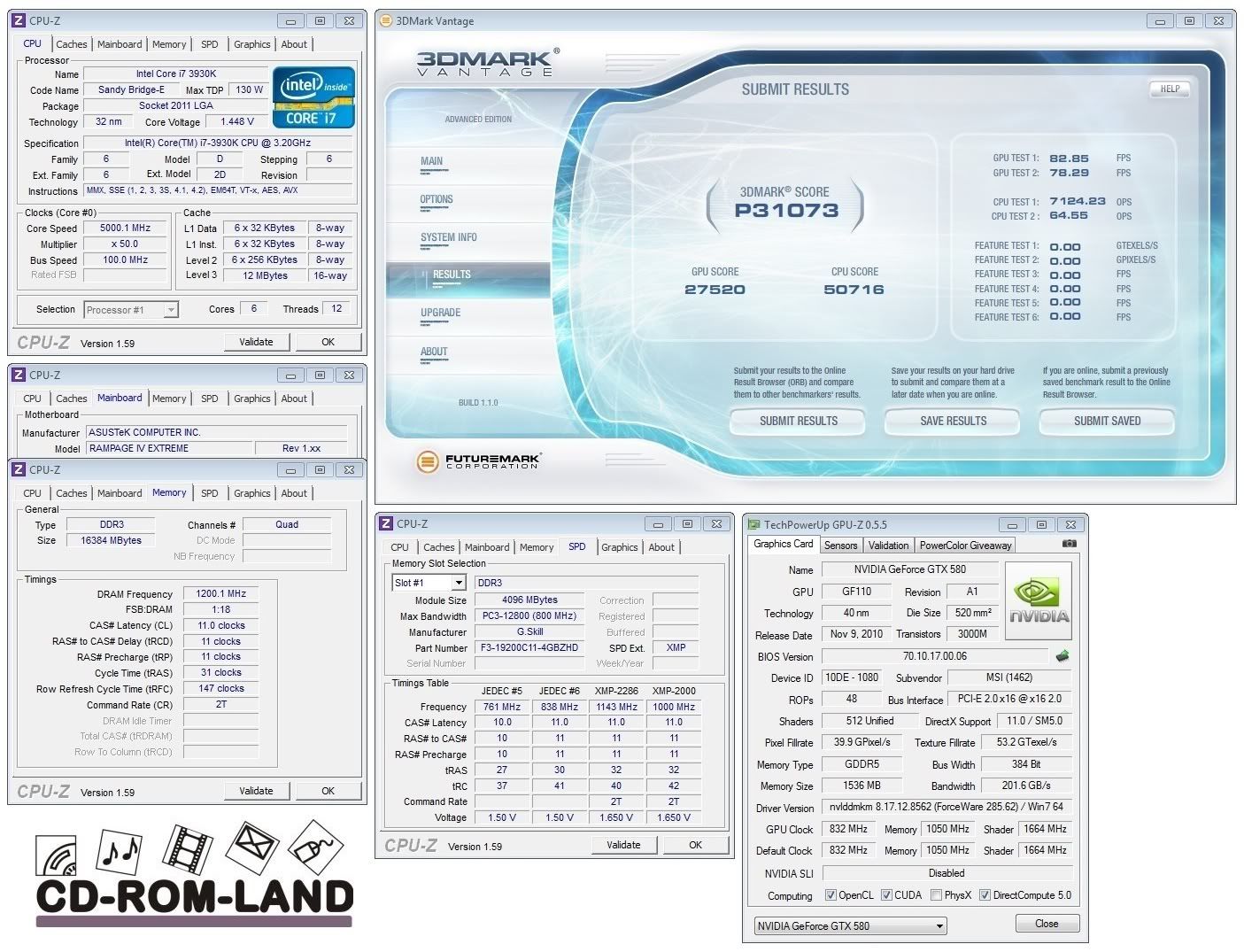
^ Very nice CPU and results!
Hi, I've already unplug everything reset the cmos for 6hrs. Boot with Asus ATI3450 pcie display. Use one dimm only, plug the kb/mouse with the USB 2.0 socket, the 2nd one. It still halts with the same post code b5/65. I also unplug the USB keyboard, also no help.
Config
3960x
Asus ATI 3450 pcie
Ms USB wireless kb&mouse
Kingston 1333 4g c9 ram x 1 for this test
Gigabyte 800w power supply
All components are working before assembly this new system
Contact ASUS Support in HK and see what they advise.
-Raja
ASUS North America Technical Marketing - If you are based outside North America and require technical assistance or have a query please contact ASUS Support for your region.
Rampage IV Extreme tweaking guide
ASUS Z77 UEFI Tuning Guide for overclocking
Maximus 5 Gene OC Guide
Maximus VI Series UEFI OC Guide
GSkill 16GB DDR3-2133 9-11-9 kit @ DDR3-2400 10-12-10-28 1T
3Hours Prime 95, with 14GB assigned:
Uploaded with ImageShack.us
tWR 16
tRTP 6
tFAW 24
tWTR 6
DRAM WL 9
tRRDR 6
tRRDD 6
All others can be left at default.
Last edited by Raja@ASUS; 11-24-2011 at 01:54 AM.
ASUS North America Technical Marketing - If you are based outside North America and require technical assistance or have a query please contact ASUS Support for your region.
Rampage IV Extreme tweaking guide
ASUS Z77 UEFI Tuning Guide for overclocking
Maximus 5 Gene OC Guide
Maximus VI Series UEFI OC Guide
http://www.mediafire.com/file/chm9mb...20V1.00.02.zip
Uploaded with ImageShack.us
A new tool from the ROG Team. Allows you to set overclock thresholds and voltage within the OS for your CPUs. Handy if you're limited by cooling but want to take advantage of higher core speeds during lighter loading. Give it a try!!!!
Enjoy
-Raja
Last edited by Raja@ASUS; 11-23-2011 at 11:08 PM.
ASUS North America Technical Marketing - If you are based outside North America and require technical assistance or have a query please contact ASUS Support for your region.
Rampage IV Extreme tweaking guide
ASUS Z77 UEFI Tuning Guide for overclocking
Maximus 5 Gene OC Guide
Maximus VI Series UEFI OC Guide
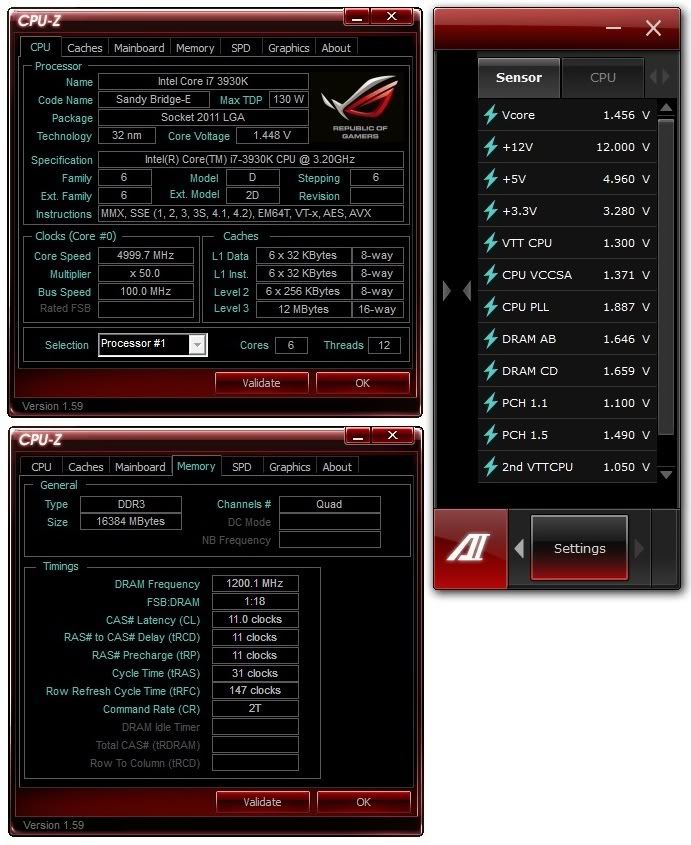
Please start posting ALL your voltages. Seeing just VCORE means nothing from CPUZ, makes it extreamly difficult attempting to reproduce other same cpu results, if you can't see the rest.
Last edited by DualCpuUser; 11-24-2011 at 12:33 AM.
Now: Asus R4E with Intel i7 IB-E 4930K @ 4.4Ghz, Patriot 2x ( 2x8GB) 2133CL11 @ 2400 CL11-12-12-30-1T-1.64v
Was: Sabertooth x79 and Intel i7 3930k @ 4.8Ghz, G.Skill 1866CL9 1.5v @ 2133 9-11-10-28-1t-1.64v
Galaxy 470 (NVidia 750Mhz/1500Mhz/1730/1.062v)
Corsair Fusion GT 256GB, Crucial C300 256GB SSD Sata III, Seagate 2TB Sata III, Seagate 3TB.
Corsair H80 WC
Raja can you give me the secondary timings you set and the vtt and vccsa voltage you use please.
i7 3960X@5ghz, Asus Rampage IV Extreme, 8gb Gskill RipjawsZ PC19200C8, Corsair force GT 240go, 2XGTX Titan, MM Ascension, Seasonic X-serie Gold 1250W, Watercooling
i7 3930K@5ghz, Asus Rampage IV Extreme, 8gb Gskill RipjawsZ PC17000C9, OCZ Vertex 3 120go, GTX670 DCU2 Top, MM Pinnacle, Corsair AX850, Watercooling
No need for stress
VCCSA 1.05V. VDIMM 1.68V.
VCCSA you guys will have to tune yorselves as it is CPU dependant
Timing set will be added to UEFI in a Hynix profile so you guys don't have to do anything but hope you got a CPU that has a strong enough memory controller and good enough DIMMs. You will also need to ensure you can put some time into finding the required VCCSA. In addition I may even post a guide on ROG forums for people who are struggling.
tWR 16
tRTP 6
tFAW 24
tWTR 6
DRAM WL 9
tRRDR 6
tRRDD 6
All others can be left at default.
Last edited by Raja@ASUS; 11-24-2011 at 01:56 AM.
ASUS North America Technical Marketing - If you are based outside North America and require technical assistance or have a query please contact ASUS Support for your region.
Rampage IV Extreme tweaking guide
ASUS Z77 UEFI Tuning Guide for overclocking
Maximus 5 Gene OC Guide
Maximus VI Series UEFI OC Guide
Thank you Raja,
I wasn't really directing the request towards you, but to all that drop their 'success' stories.
But one thing to note for the AI Suite II developers, they need to wrap the application with a window. I went to take an "application" screen shot, and only got the header. How they are drawing it I don'tknow, but "alt-prnt-scrn" didn't capture the whole thing.
I know drivers/kernel not Win32 API's so I don't know what they need to do at the application window to allow it.
I do have a list of UEFI UI suggestions I need to type up though..
R
Last edited by DualCpuUser; 11-24-2011 at 02:36 AM.
Now: Asus R4E with Intel i7 IB-E 4930K @ 4.4Ghz, Patriot 2x ( 2x8GB) 2133CL11 @ 2400 CL11-12-12-30-1T-1.64v
Was: Sabertooth x79 and Intel i7 3930k @ 4.8Ghz, G.Skill 1866CL9 1.5v @ 2133 9-11-10-28-1t-1.64v
Galaxy 470 (NVidia 750Mhz/1500Mhz/1730/1.062v)
Corsair Fusion GT 256GB, Crucial C300 256GB SSD Sata III, Seagate 2TB Sata III, Seagate 3TB.
Corsair H80 WC
 Posting Permissions


 Reply With Quote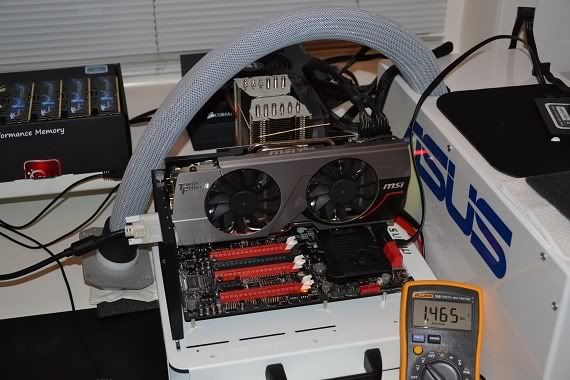


Bookmarks