MMM
Results 1 to 11 of 11

Thread: SSD RAID0 Performance Check/ HD Tune Benchmarked

  1. #1
    Xtreme Member
    Join Date
    Sep 2007
    Posts
    189

    SSD RAID0 Performance Check/ HD Tune Benchmarked

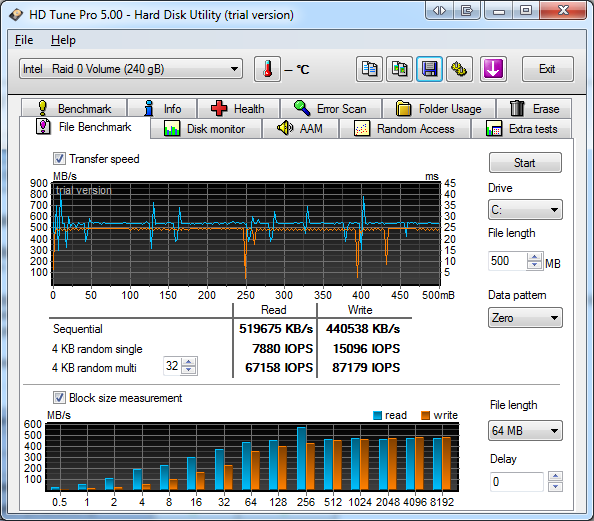
    I wanted to confirm the performance of my SSD's that are in a RAID array and make sure they are performing how they should.
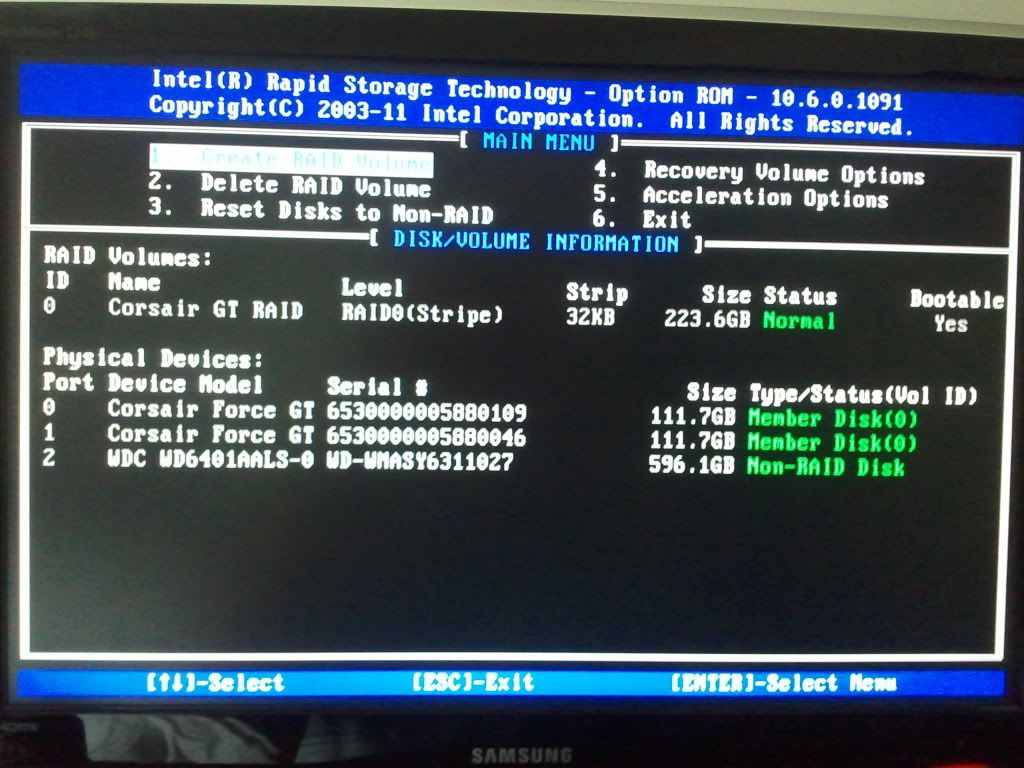
    SSD's are Corsair Force GT 120GB x 2 in a RAID 0. Motherboard is AsRock Z68 Extreme7 Gen3.

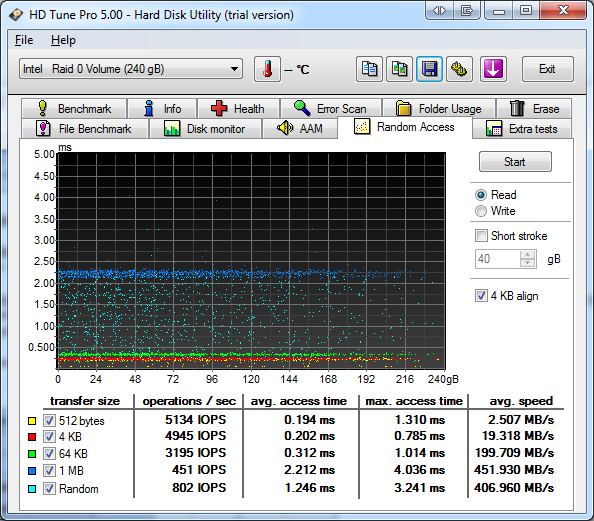
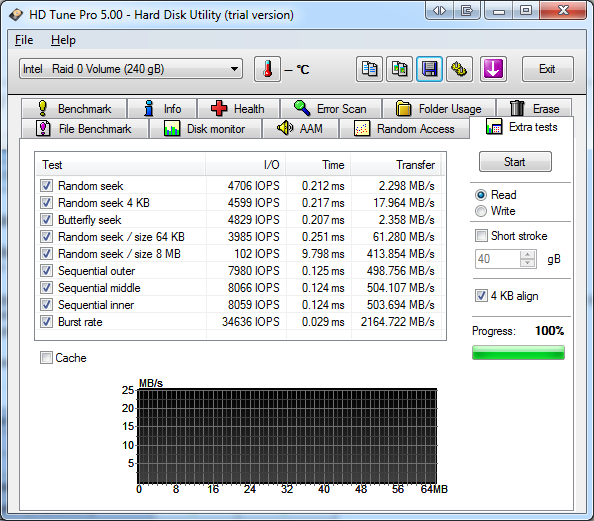
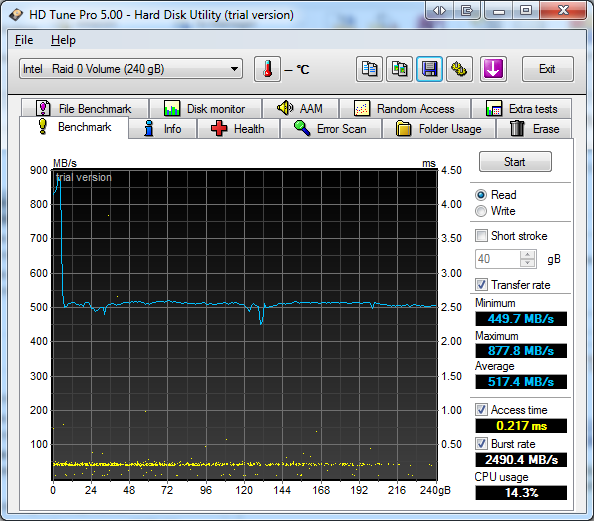
    Below are the the results from HD Tune Pro. If you wouldn't mind commenting on the performance (high, low, on par). I thought that the performance might look a little low but wasn't 100%. I wasn't sure if its the Intel controller limiting the drives or if this is exactly to be expected.

    My access time appears to be double that of a single drive according to this review. Which shows a consistent 0.1 ms. I assume this is partly due to the RAID array.

    http://www.guru3d.com/article/corsai...-ssd-review/11

    I only used HD Tune cause it was simply and easy to use. I know there are some other benchmarks out there but not sure which one's are recommended.

    Thanks in advance for your help.


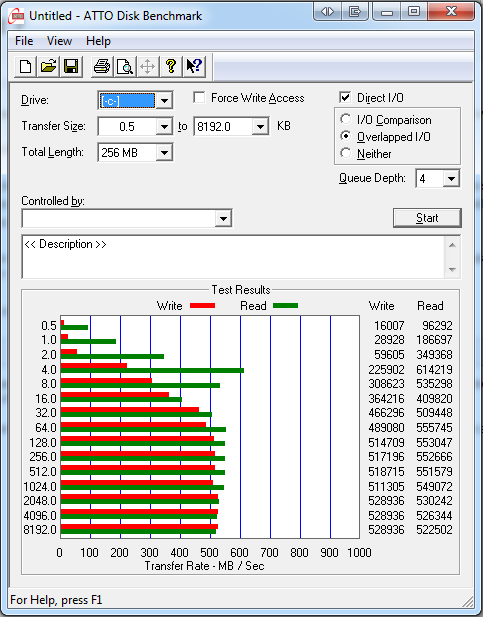
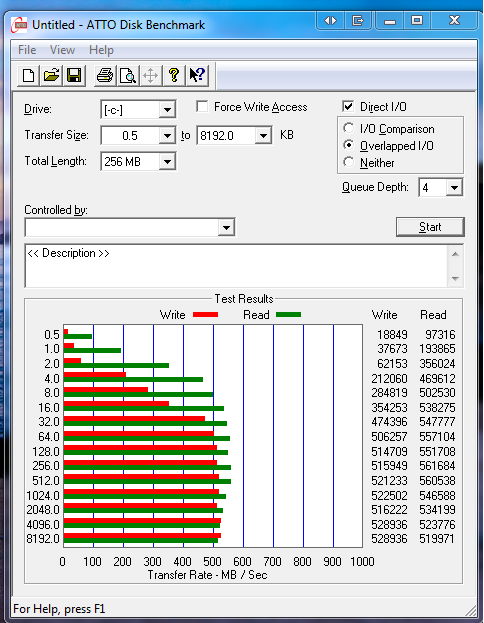
    Added ATTO Benchmark for confirmation

    Last edited by IcY18; 11-16-2011 at 05:19 AM.

  2. #2
    Corsair Rep
    Join Date
    Apr 2004
    Posts
    1,203
    I don't use HD Tune so I can't comment. However, your ATTO score is the score of a single drive or that of a RAID-0 array on SATA II ports or perhaps Marvell ports. Can you confirm that you have the drives connected to the 2 x Intel SATA 3/6Gb ports?
    Yes, Yellowbeard, a tall rough man with a big yellow beard

  3. #3
    Xtreme Member
    Join Date
    Sep 2007
    Posts
    189
    I'm 99% sure that I am on the Intel controller, obviously that is the proper controller to use. I took special care when assembling to ensure the drives went into the right SATA ports for this very reason. Pretty sure i am on ports 0 and 1. You'll notice that on my HD Tune benchmarks it says at the top Intel Raid 0 Volume (240gb). I will double check this though when i get home.

    BTW, I'm on Firmware 1.3.2 and my stripe size is 32kb
    Last edited by IcY18; 11-16-2011 at 12:31 PM.

  4. #4
    Corsair Rep
    Join Date
    Apr 2004
    Posts
    1,203
    If you are on the SATA 3/6Gb ports, then something is wrong. Check your manual to be sure.
    Yes, Yellowbeard, a tall rough man with a big yellow beard

  5. #5
    Xtreme Member
    Join Date
    Sep 2007
    Posts
    189
    To my knowledge i wouldn't be able to use the Intel RAID setup if i wasn't on the Intel SATA ports, and all Intel ports are 3/6 gbps. Also, all SATA cables are made equal correct, no difference between 3GBps and 6GBps right?

    Could previous installs have any effect on performance? Of course the drives were reformatted for a new install but just wanted to check.
    Last edited by IcY18; 11-16-2011 at 06:59 AM.

  6. #6
    Corsair Rep
    Join Date
    Apr 2004
    Posts
    1,203
    Quote Originally Posted by IcY18 View Post
    To my knowledge i wouldn't be able to use the Intel RAID setup if i wasn't on the Intel SATA ports, and all Intel ports are 3/6 gbps.
    No, this is not correct. Only 2 of the 6 Intel ports on your controller are SAT3/6Gb. That's why I suggested that check for sure and verify which ports you are connected to.
    Quote Originally Posted by IcY18 View Post
    Also, all SATA cables are made equal correct, no difference between 3GBps and 6GBps right?
    In theory, on paper and according to the specification, yes. As far as reality and the actual quality, no.
    Yes, Yellowbeard, a tall rough man with a big yellow beard

  7. #7
    Xtreme Member
    Join Date
    Sep 2007
    Posts
    189
    An excerpt from the Asrock manual..

    2.17 Serial ATA3 (SATA3) Hard Disks Installation
    This motherboard adopts Intel® Z68 chipset that supports Serial ATA3 (SATA3) hard
    disks and RAID (RAID 0, RAID 1, RAID 10, RAID 5, Intel Rapid Storage and Intel
    Smart Response Technology) functions for SATA3_0 and SATA3_1 connectors. It
    also adopts ASMedia ASM1061 chipset that supports Serial ATA3 (SATA3) hard
    disks for SATA3_A1 to SATA3_A4 connectors. You may install SATA3 hard disks on
    this motherboard for internal storage devices. This section will guide you to install
    the SATA3 hard disks.

    STEP 1: Install the SATA3 hard disks into the drive bays of your chassis.
    STEP 2: Connect the SATA power cable to the SATA3 hard disk.
    STEP 3: Connect one end of the SATA data cable to the motherboard’s SATA3 connector.
    STEP 4: Connect the other end of the SATA data cable to the SATA3 hard disk.

    Please be noted that SATA3_A1 to SATA3_A4 do not support RAID function.
    If you want to use RAID function on SATA3 connectors, please use
    SATA3_0 and SATA3_1 connectors
    .

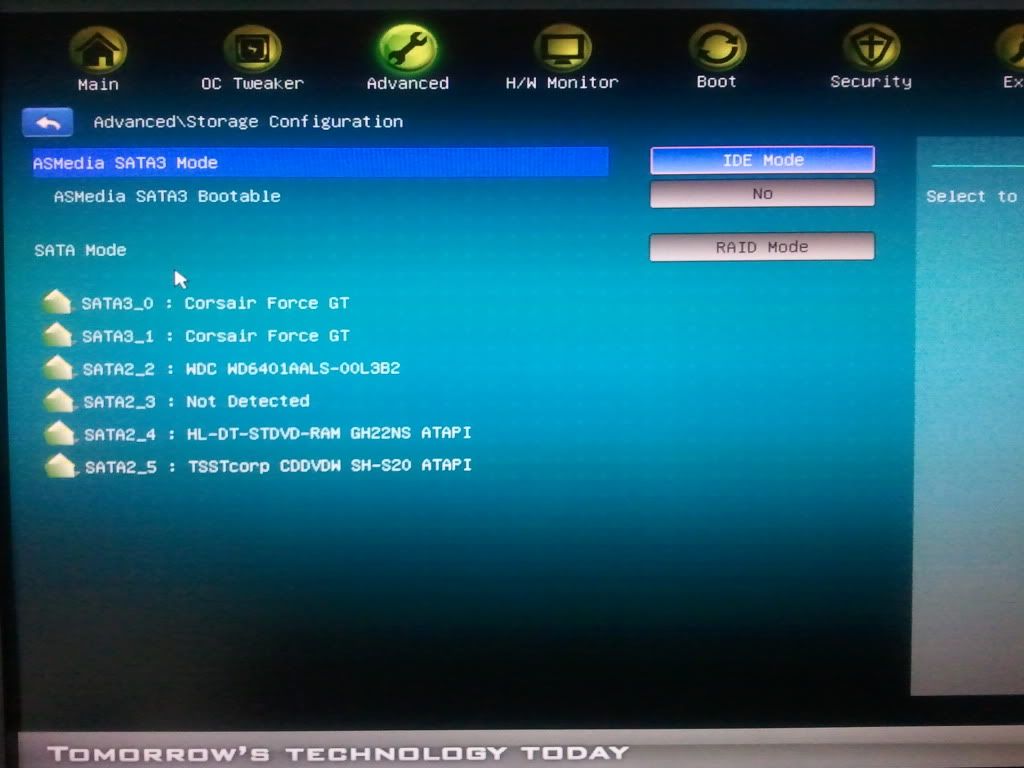
    I will double check what ports they are plugged into. But it appears I have to have them in Ports 0 and 1 for RAID to even be enabled.

  8. #8
    Xtreme Member
    Join Date
    Sep 2007
    Posts
    189
    Cables are definitely plugged into Ports 0 and 1.


    Only thing i notice right now is that one of my SSD's is using a SATA cable from my previous motherboard (Gigabyte P45) and another is using one i bought at a computer store that says 6 GB/s on the right angle connector. I couldn't comment on the quality of these cables at all.
    As far as i was aware there is no difference between SATA2 and SATA3 cables no matter what marketing they put out to say otherwise, similar to HDMI 1.3 1.4 etc...its not the cables that marks the improvement.

    Another benchmark.
    Last edited by IcY18; 11-16-2011 at 12:42 PM.

  9. #9
    Xtreme Member
    Join Date
    Sep 2007
    Posts
    189
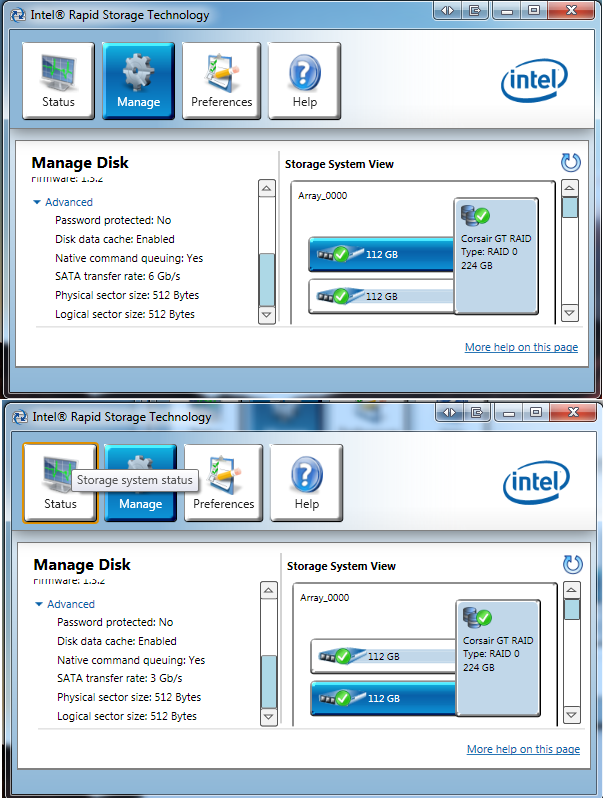
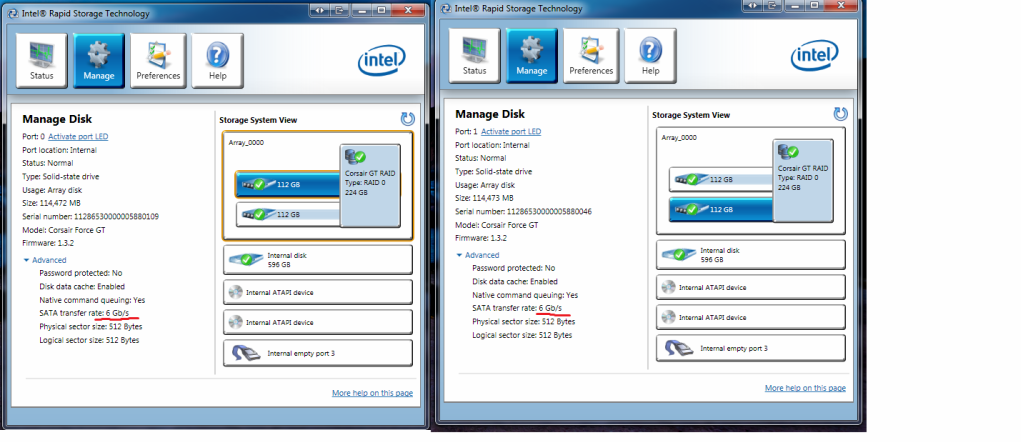
    I found something....For some reason by drive on Port 1( Blue highlighted drive on bottom) is reporting a SATA 3Gb/s connection...i could only guess that this is due to the cable. I will investigate some more

  10. #10
    Xtreme Member
    Join Date
    Sep 2007
    Posts
    189
    Ok so my story continues...

    I went out and replaced my SATA cable with one that says 6GB/s on it. I boot up and the Intel Rapid Storage Technology (IRST) says SATA transfer rate is 6GB/s for both drives. Awesome.

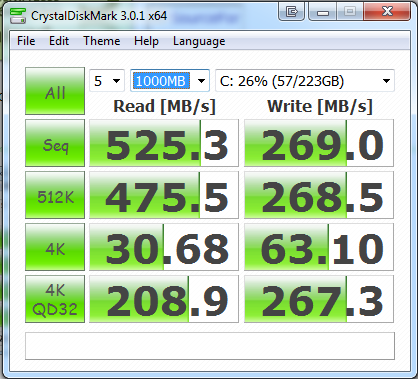
    I run ATTO and Crystal Disk and get these results...Awesome.


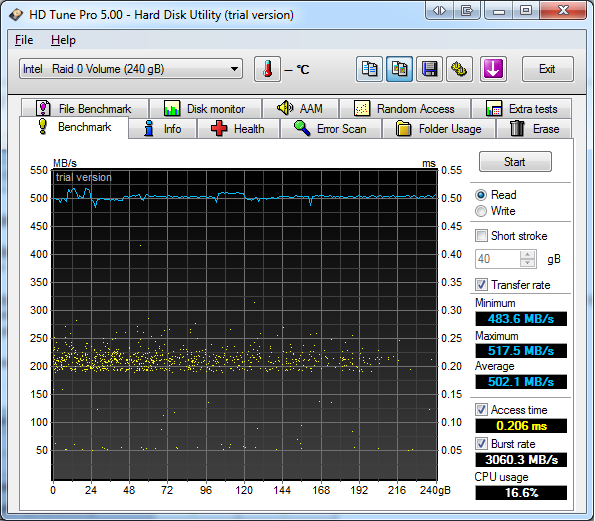
    I then run HD Tune Pro and get these results that are like before


    I then check IRST and it says my drive on Port 1 is back to SATA transfer rate: 3 GB/s

    I run ATTO to confirm and get the lower speeds again...


    What the hell is going on...?

    When i restart my computer the transfer speeds go back to 6Gb/s according to IRST
    Last edited by IcY18; 11-16-2011 at 02:30 PM.

  11. #11
    Corsair Rep
    Join Date
    Apr 2004
    Posts
    1,203
    Glad to see got it sorted. Also, you would not believe how many people have accused Corsair and every other SSD maker of being incompetent (and worse things) when we suggest replacing the SATA cables. You are another example of good fundamental troubleshooting, good work.
    Yes, Yellowbeard, a tall rough man with a big yellow beard

Bookmarks

Bookmarks

Posting Permissions

  • You may not post new threads
  • You may not post replies
  • You may not post attachments
  • You may not edit your posts
  •