

Any one still getting a file block error when trying to update via EZ-Flash? I amOriginally Posted by UrbanSmooth

Never read if there is a fix to this issue? Works fine using asus update, but that's a mighty risky way of updating BIOS.



Any one still getting a file block error when trying to update via EZ-Flash? I am
Never read if there is a fix to this issue? Works fine using asus update, but that's a mighty risky way of updating BIOS.
hm... when i set my RAm on 6-7-6-18 at 1800 BIOS and system detects only 4 of 6Gb =]
* Asrock z77 Extreeme 4 * i7 3770k ** G.Skill Sniper Series 1866 * Asus HD 5850 ** 2TB HDD * 24" Dell UltraSharp * X-Fi ** OCZ ZT 650W * CM Stacker 832B ** Canon 50D * Samsung GNote *

IIRC, it has something to do with a file system used. Are use using FAT32 or NTFS? I use FAT32 with no problems.
IMO, you're pushing it too far. Maybe your RAM just can't work at those tight latencies at 1800MHz.
Maximus 5 Gene | i7-3770K @ 5GHz | ADATA 2x2GB @ 2.6GHz 9-12-10-28-1T | HD7970 @ 1200/6400
Rampage 4 Extreme | i7-3930K @ 5GHz ||| X58-A OC Orange | i7-980X @ 4.6GHz
yeh propably uve got right =] changed =]
* Asrock z77 Extreeme 4 * i7 3770k ** G.Skill Sniper Series 1866 * Asus HD 5850 ** 2TB HDD * 24" Dell UltraSharp * X-Fi ** OCZ ZT 650W * CM Stacker 832B ** Canon 50D * Samsung GNote *
I attempted to update from the HD which is NTFS, but it shouldn't matter which file system is used! Never had this issue before so Asus is doing something wrong.
I'm going to update via USB stick's to see if it makes a difference.
Last edited by Johnmark; 07-14-2010 at 12:17 PM.
I fed up with this board. I owned several ASUS products in the past time but this is the most annoying one. My setup is as follows:
MB: Asus R3E with 0402, 0702, 0802 BIOS
CPU: Intel Core i7 930 Batch 3945
RAM: Corsair Dominator GT 2000C7 6 GB Kit
VGA: Zotac 285 GTX 1 GB
HDD: Seagate 200, 320, 500 and 1500 GB
PSU: Enermax Revolution+ 1250W
Everything is in the case which is LL V2110. When I put rams in red slots I can get a screen which says "Press DEL to run Setup, Press TAB to display BIOS POST message". When press either of DEL or TAB, I get this screen and nothing happens. With CTRL + ALT + DEL, I can restart it. But can not get in the BIOS. The screen I got:
If I put one DIMM in red slot, same thing happens. Also RC Poster reports "Initial USB".
Then if I go with black DIMM slots, it got even worse. No screen, no sound. QLed in MB, hangs on DIMM and RC Poster reports "Memory Detect". I know my RAMs are in working condition.
Any ideas?
Much appreciated.
Last edited by GTi-6; 07-14-2010 at 12:25 PM.
Hi all......
tested all bios and my xeon3520 wall still at qpi over 4000.....
ASUS.......
My xeon on msix58m,ud5 and rampage gene II boot at 224/228 bclk and qpi 4032/4104 smoothly.And push in win at 235......
I paid this card 370 Euro.....
Last edited by Vinsent; 07-14-2010 at 12:31 PM.
Ever read the manual where to put dimms in a specific configuration ? Plz don't tell me you did...
Get the mobo out of the case, do NOT put it back again on your Anti static bag you did before plz ( that is considered as an epic fail ). Unhook all the HD drives and see if you can enter the bios then.
Ever looked in the mirror ? It's not always the motherboard to blame, though that's the easiest ofcourse... just put it on a stick an flash from there... worked everytime here with FAT32
Why don't you fill in a template plz... I've got 3 boards here : one review sample and 2 retails... 225-230Bclock is no prob at all... could be a dud board, that would be a bummer....
Last edited by Leeghoofd; 07-14-2010 at 01:22 PM.
Question : Why do some overclockers switch into d*ckmode when money is involved
Remark : They call me Pro AsusSaaya yupp, I agree
225-230 in qpi slow mode?
Sorry my English ...what "bummer"
Wow~! I guess is not only me with the problem!!!
Try powering up outside of the case... mine did boot it and pass the usb check, entering to the bios... And see if work... then please post your result...
If boot, do this:
- Put in your case.
- Put all the screws except the one i have market with yellow circle in the next picture.
I don't know the reason... is not for shortening because i already tried putting a washer in all the holes... in the back and in the front with same result, no pass USB Check.
Maybe when you screw all, the mobo get bowed... who knows...
But it work to me that way.
Last edited by kpablo; 07-14-2010 at 01:10 PM.
i7 2600K | Asus Maximus IV Extreme | 8GB DDR3 1600 C9 Corsair Vengeance | GTX580 Matrix Platinum | Vertex 2 120GB | Auzen X-Fi HomeTheater HD | Corsair AX1200 | FT02
EK Supreme HF Full Nickel | MCR320 XP + GT AP15| DDC3.25 + EK Top V2| EK Multioption Res X2 150 Advance | Bitspower Fittings & Rotaries
My flickr
Nope mate not slow mode, I don't do fancy high Bclock screenshots. Either it does it at high QPI speed or the board get's a bad rating in the review. I was walling around 230 on watercooling , LN2 got me 3D06 stable at 238Bclock... My 950 walls at 228 on the REX III and UD9 even under LN2. The Xpower needs a trick to get there as that one is completely stuck at 220
I really hope for all board manufacturers that they are making sure the X58 chipsets are sort of binned for these enthousiast boards...
Question : Why do some overclockers switch into d*ckmode when money is involved
Remark : They call me Pro Asus
thanks for reply.....
a gift for me..... you know this trick?
THX Leeghoofd.
Wow, I tried outside of the case, it kind a work. I placed it on Asus cardbox, in first try, it still hanged on Initial USB but if I lift the motherboard 1 cm high from its left, every time I started it, I could get into BIOS. I think there is something wrong underneath the board. Thanks for the tips Leeghoofd nad kpablo.
Also in BIOS my total memory is 6136 MB. It should be 6144, right?
Last edited by GTi-6; 07-14-2010 at 02:16 PM.
i actually have no issue at my timings and i run 12gb (6 sticks)
my issue here is not being able to push to 2000, of which i KNOW these sticks can handle and i KNOW this board can handle with 6 sticks.
any time i increase mem speed to about 1900+, RC poster gets past mem check but hangs on CPU even though i'd either kept it at or slightly below 4.5ghz. at the same time, any time i increase over 4.5ghz, windows refuses to load at all regardless of what speed the memory is at.
my hardware:
CPU - 980x
Memory - G.Skill F3-12800CL7D-4GBECO (6 sticks total)
BIOS - BIOS1 = 0704, BIOS2 = 0802
what i've tried:
- i've tried increasing cpu voltage to counter higher clockings upto 1.55v, no luck...
- i've tried increasing DRAM voltages upto 1.675v, no luck...
- i've tried manually setting uncore, no luck, windows refuses to boot on any setting on any setting other than auto.
- i've tried manually setting QPI data link, no luck, same thing, windows refuses to boot on any setting other than auto.
- i've tried increasing QPI voltage upto 1.5v, no luck...
- i've tried VERY low blck and high multipliers due to seeing reviews about the memory not liking high blck values, no luck...
- i've tried loosening timings on memory as high as 10-10-10-24-88 2N over stock timings of 7-8-7-24-72 2N, no luck...
my goal:
i'd like to hit 4.5ghz cpu w/ 2000 memory. if i can get higher on CPU too that would be awesome aswell since my 100% load temp on the CPU at 4.5ghz is hardly touching 59-60*c.
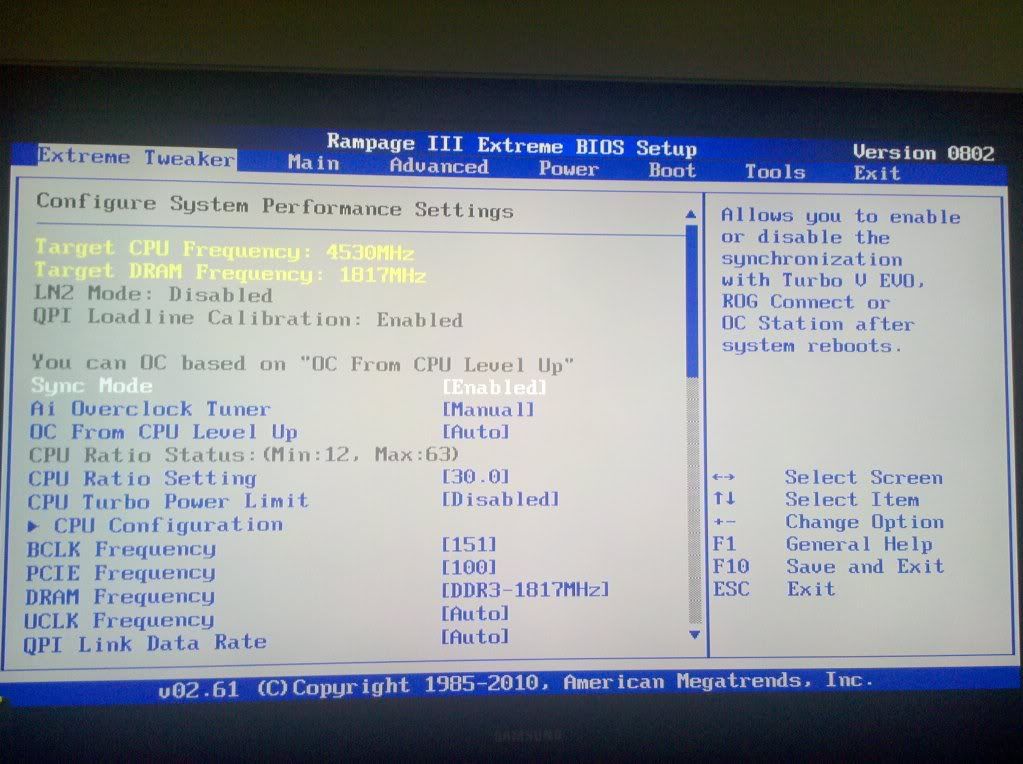
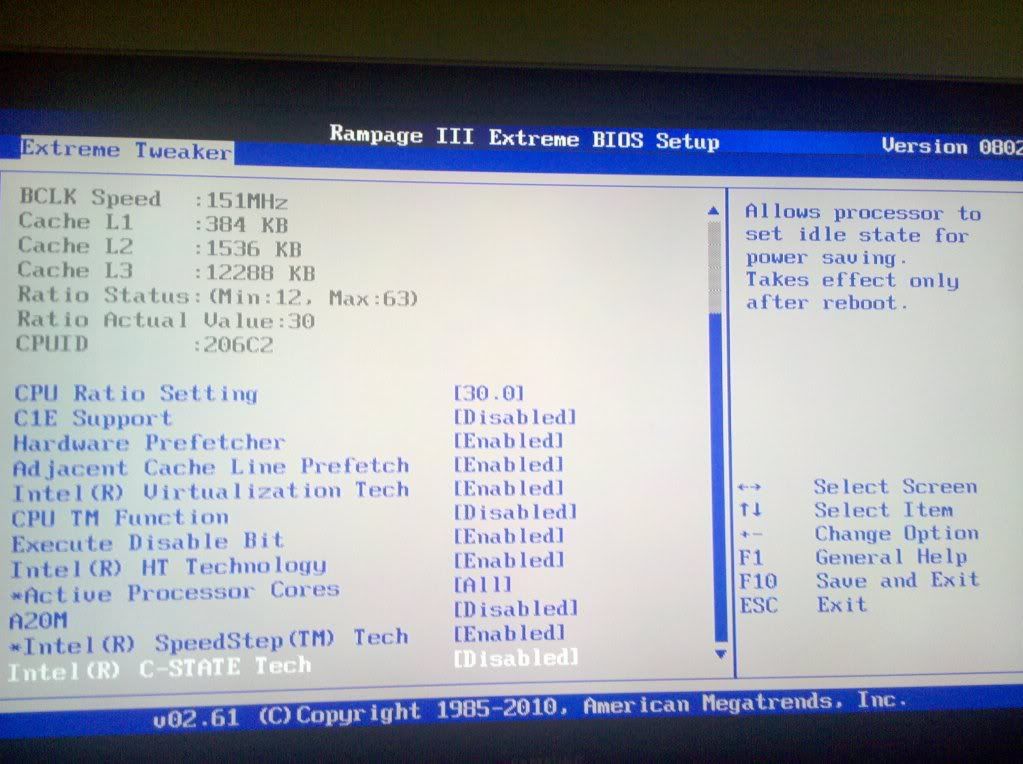
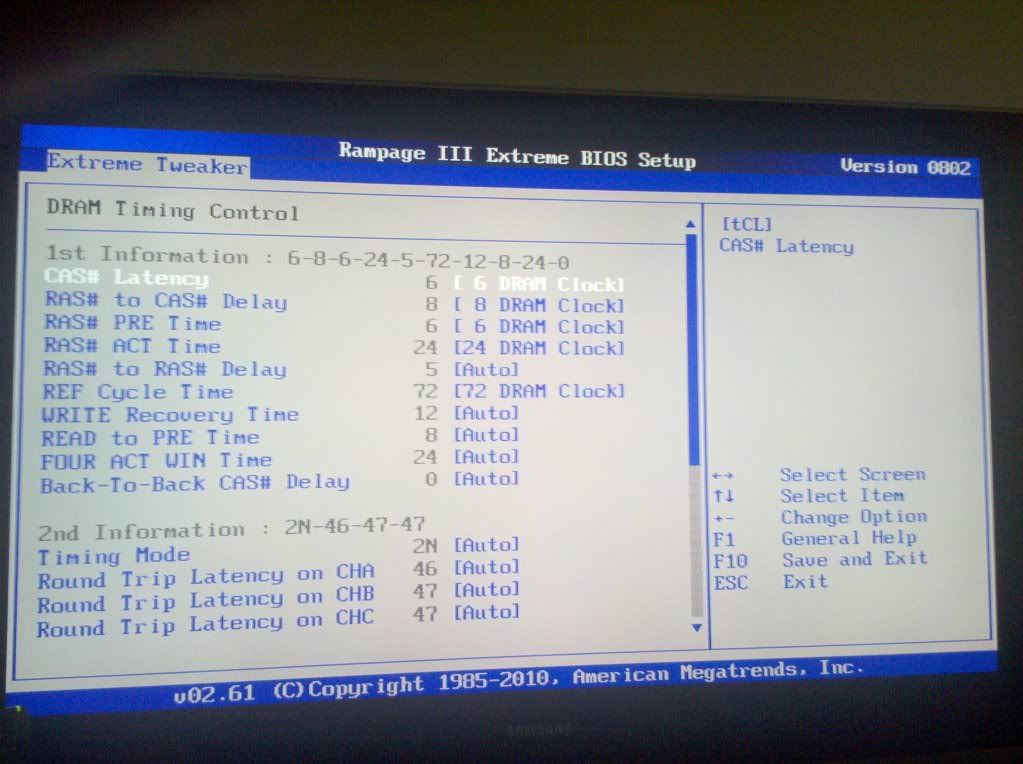
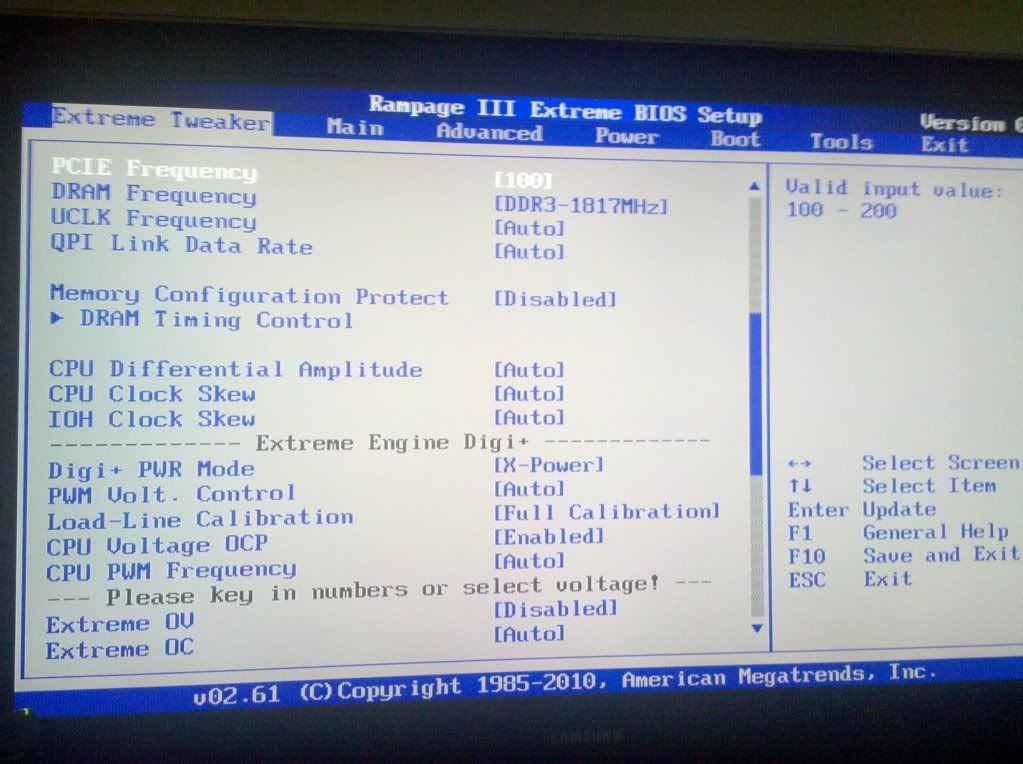
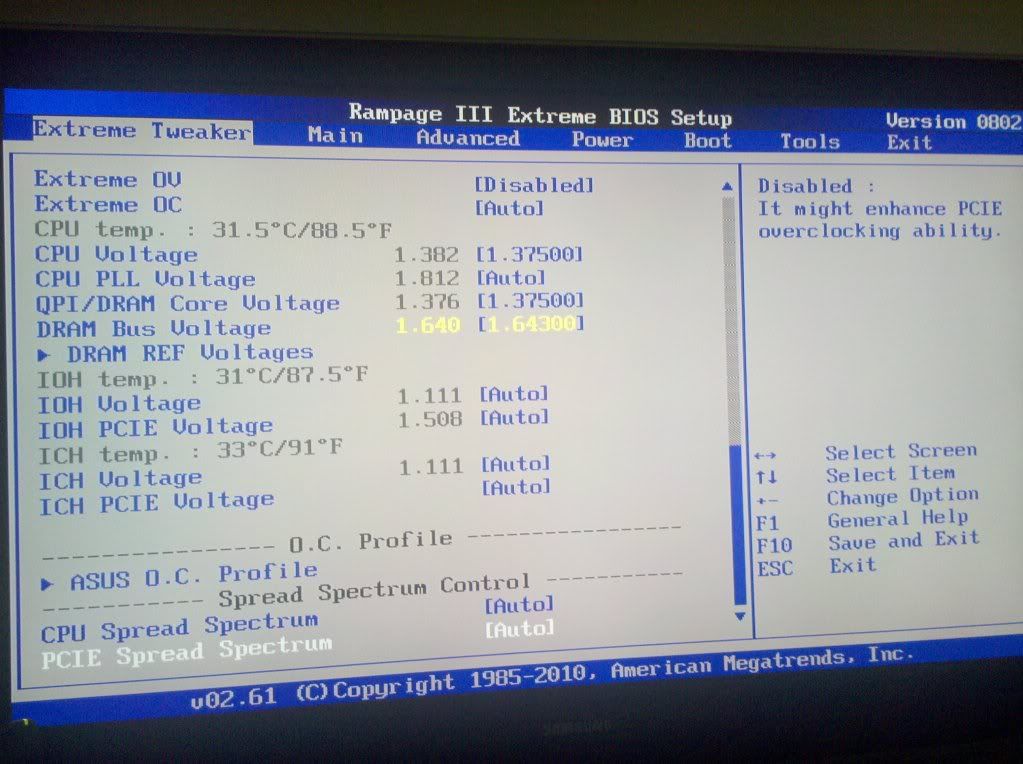
here are some shots of my current stable bios setup: **note, my DRAM voltage can actually be down to 1.6v with what i'm running now, i just hadn't set it back down when i took these images.**
does anyone see anything i'm doing wrong here tht might be causing my problems?
Hi,and new bios.....?
http://www.xtremesystems.org/forums/...d.php?t=253679
oh snap! i'll checkout 0860 and see if it helps.
no luck, same thing, mem boots through bios at 2000mhz now but windows refuses to boot. i tried 1900 and same thing, boots through bios but not windows... i don't even get the loading screen logo for windows, it just restarts as soon as it trys initializing it.
you gonna need more qpi volts for 2000mhz 1.4-1.5v
maximus IV extremegtx580
gigabut p67-ud7
p67 sabertooth
2500k+2600k
antec 1200watt
EVGA classified 760
920 Batch# 3849B018 4.985ghz@1.52vgtx285 ftw sli
OCZ3RPR1866LV6GK hypers
dfi ut p35
gigabut p35c-ds3r
gigabut x38-d6q
ballistix 85001240mhz@2.02v
"Ever looked in the mirror ? It's not always the motherboard to blame, though that's the easiest ofcourse... just put it on a stick an flash from there... worked everytime here with FAT32"
Of course I've looked in a mirror, but what does that have to do with EZ-Flash not working from an NTFS HD?
Will be trying it via USB sticks (FAT32 and NTFS) to see if I can pin point the problem. This board has a tonne of way's to flash the BIOS, so that's not the issue.
Has anyone had success using EZ-Flash with the ROM file located on their NTFS boot drive?
i tried QPI voltage 1.5v and had no luck... think i might need to go even higher? isn't the 1.7v range the "a little too high" zone?
just use the ASUS update utility through windows. i've done it a couple times already and it worked just fine. and yes i've done EZ flash straight from my OS drive off the desktop directory. i did it when i updated to 0704.
i wouldnt go over 1.6v for 24/7
btw what memory you got
maximus IV extreme
gigabut p67-ud7
p67 sabertooth
2500k+2600k
antec 1200watt
EVGA classified 760
920 Batch# 3849B018 4.985ghz@1.52v
OCZ3RPR1866LV6GK hypers
dfi ut p35
gigabut p35c-ds3r
gigabut x38-d6q
ballistix 8500
i listed it already on my OP. G.Skill G.Skill F3-12800CL7D-4GBECO in 12gb (6 stick) setup. i KNOW this memory will do 2000mhz like this being it's been done but it just wont do it for me. soon here i might end up just giving in a buying 12gb worth of kingston HyperX 2000's being they list in the manual as capable of running @ 2000mhz with 6 stick setup CL9 stock... i just don't feel i should have to do that knowing that the G.skill sticks i have should be able to do what i'm asking from them... and i know it's not a bad stick either i've tested every one of them... all are good to go in any slot on the board.
clockin memory on the re3 is way easy
but just cause some sets did 2k dont mean yours will
i wouldnt buy the hyperx you better off with the gskills 2k cas6 stuff
they can list all they want lol my hyperx 2k cas8 kits set the qpi volts to 1.65v in xpm lol
maximus IV extreme
gigabut p67-ud7
p67 sabertooth
2500k+2600k
antec 1200watt
EVGA classified 760
920 Batch# 3849B018 4.985ghz@1.52v
OCZ3RPR1866LV6GK hypers
dfi ut p35
gigabut p35c-ds3r
gigabut x38-d6q
ballistix 8500

holy moly what a threaz
HWbot - Team: XtremeSystems
XS cruncher - Team: XtremeSystems
OCN Feedback
HEAT
*** Being kind is sometimes better then being right.
is there anyone that's gotten 12gb with 6 sticks to 2000 yet then? i'm more than certain i've seen a post SOMEWHERE with someone running that speed without a problem with 4.5+ghz clocking on the cpu.
i really don't care who makes the sticks, just as long as 12gb can run at 2000 without going over 1.65 or atleast without going to far above it for 24/7 use.


 Reply With Quote






Bookmarks