

Originally Posted by Particle

CPU and disk usage graph of a large swap run. Am I right?
*I've been doing a lot of this myself using processor explorer over shorter intervals. So the patterns kinda look familiar...


CPU and disk usage graph of a large swap run. Am I right?
*I've been doing a lot of this myself using processor explorer over shorter intervals. So the patterns kinda look familiar...
Main Machine:
AMD FX8350 @ stock --- 16 GB DDR3 @ 1333 MHz --- Asus M5A99FX Pro R2.0 --- 2.0 TB Seagate
Miscellaneous Workstations for Code-Testing:
Intel Core i7 4770K @ 4.0 GHz --- 32 GB DDR3 @ 1866 MHz --- Asus Z87-Plus --- 1.5 TB (boot) --- 4 x 1 TB + 4 x 2 TB (swap)

Yep!I started it last night primarily as a variable stress test, and the funny part is that I don't remember how big I set it to. It was 22% on summing this morning, so I guess the result will be a surprise. Can't speak for if it'll validate. Runs on my machine frequently don't even at stock.
Particle's First Rule of Online Technical Discussion:
As a thread about any computer related subject has its length approach infinity, the likelihood and inevitability of a poorly constructed AMD vs. Intel fight also exponentially increases.
Rule 1A:
Likewise, the frequency of a car pseudoanalogy to explain a technical concept increases with thread length. This will make many people chuckle, as computer people are rarely knowledgeable about vehicular mechanics.
Rule 2:
When confronted with a post that is contrary to what a poster likes, believes, or most often wants to be correct, the poster will pick out only minor details that are largely irrelevant in an attempt to shut out the conflicting idea. The core of the post will be left alone since it isn't easy to contradict what the person is actually saying.
Rule 2A:
When a poster cannot properly refute a post they do not like (as described above), the poster will most likely invent fictitious counter-points and/or begin to attack the other's credibility in feeble ways that are dramatic but irrelevant. Do not underestimate this tactic, as in the online world this will sway many observers. Do not forget: Correctness is decided only by what is said last, the most loudly, or with greatest repetition.
Rule 3:
When it comes to computer news, 70% of Internet rumors are outright fabricated, 20% are inaccurate enough to simply be discarded, and about 10% are based in reality. Grains of salt--become familiar with them.
Remember: When debating online, everyone else is ALWAYS wrong if they do not agree with you!
Random Tip o' the Whatever
You just can't win. If your product offers feature A instead of B, people will moan how A is stupid and it didn't offer B. If your product offers B instead of A, they'll likewise complain and rant about how anyone's retarded cousin could figure out A is what the market wants.
It should be clearly visible what the size is? Unless you somehow hid the window or something?
The program will validate as long as it finishes - regardless of whether it fixes errors or detects cheating, etc... since those are just flags in the Validation.txt which is protected by the hash.
The only time it won't get to the validation is if it crashes or encounters some error that keeps it from finishing.
You'd have to be very unstable for it crash. And it usually only errors out during IO errors (which is usually insufficient disk space, or a failing disk).
It will also error out if it runs into a clear implementation bug... but hopefully that won't be happenning...
8 hours and only 22%... That's gotta be a gigantic run...
Last edited by poke349; 03-15-2010 at 08:08 AM.
Main Machine:
AMD FX8350 @ stock --- 16 GB DDR3 @ 1333 MHz --- Asus M5A99FX Pro R2.0 --- 2.0 TB Seagate
Miscellaneous Workstations for Code-Testing:
Intel Core i7 4770K @ 4.0 GHz --- 32 GB DDR3 @ 1866 MHz --- Asus Z87-Plus --- 1.5 TB (boot) --- 4 x 1 TB + 4 x 2 TB (swap)
I just didn't remember. I've remoted in and it looks like it's a 100B run. 50h CPU time so far, 3.7TB disk read, and 3.6TB disk written. Works out to an overall average of around 40% CPU and 100MB/s disk (both read and write).
As a thread about any computer related subject has its length approach infinity, the likelihood and inevitability of a poorly constructed AMD vs. Intel fight also exponentially increases.
Likewise, the frequency of a car pseudoanalogy to explain a technical concept increases with thread length. This will make many people chuckle, as computer people are rarely knowledgeable about vehicular mechanics.
When confronted with a post that is contrary to what a poster likes, believes, or most often wants to be correct, the poster will pick out only minor details that are largely irrelevant in an attempt to shut out the conflicting idea. The core of the post will be left alone since it isn't easy to contradict what the person is actually saying.
When a poster cannot properly refute a post they do not like (as described above), the poster will most likely invent fictitious counter-points and/or begin to attack the other's credibility in feeble ways that are dramatic but irrelevant. Do not underestimate this tactic, as in the online world this will sway many observers. Do not forget: Correctness is decided only by what is said last, the most loudly, or with greatest repetition.
When it comes to computer news, 70% of Internet rumors are outright fabricated, 20% are inaccurate enough to simply be discarded, and about 10% are based in reality. Grains of salt--become familiar with them.
Remember: When debating online, everyone else is ALWAYS wrong if they do not agree with you!
Random Tip o' the Whatever
You just can't win. If your product offers feature A instead of B, people will moan how A is stupid and it didn't offer B. If your product offers B instead of A, they'll likewise complain and rant about how anyone's retarded cousin could figure out A is what the market wants.
Ah, you're running it headless...
100b, that would be an awesome entry to the list.
Hopefully I'll be able to fix my workstation over Spring Break.
It went down shortly before I finished v0.5.2. But it did last long enough to do all the critical dev work for v0.5.2.
So it hasn't actually done a full pi computation using swap yet... (hence why the benchmarks that I posted were mostly from my Core i7 lanbox.)
Main Machine:
AMD FX8350 @ stock --- 16 GB DDR3 @ 1333 MHz --- Asus M5A99FX Pro R2.0 --- 2.0 TB Seagate
Miscellaneous Workstations for Code-Testing:
Intel Core i7 4770K @ 4.0 GHz --- 32 GB DDR3 @ 1866 MHz --- Asus Z87-Plus --- 1.5 TB (boot) --- 4 x 1 TB + 4 x 2 TB (swap)
Looks like I'm squarely on track for the worst score on record. It seems to be taking progressively longer for each successive percent. The first ten hours got me to 22%. Another twenty-four have me at 43%. At this pace, I should finish just before we make it back to the moon. heh
As a thread about any computer related subject has its length approach infinity, the likelihood and inevitability of a poorly constructed AMD vs. Intel fight also exponentially increases.
Likewise, the frequency of a car pseudoanalogy to explain a technical concept increases with thread length. This will make many people chuckle, as computer people are rarely knowledgeable about vehicular mechanics.
When confronted with a post that is contrary to what a poster likes, believes, or most often wants to be correct, the poster will pick out only minor details that are largely irrelevant in an attempt to shut out the conflicting idea. The core of the post will be left alone since it isn't easy to contradict what the person is actually saying.
When a poster cannot properly refute a post they do not like (as described above), the poster will most likely invent fictitious counter-points and/or begin to attack the other's credibility in feeble ways that are dramatic but irrelevant. Do not underestimate this tactic, as in the online world this will sway many observers. Do not forget: Correctness is decided only by what is said last, the most loudly, or with greatest repetition.
When it comes to computer news, 70% of Internet rumors are outright fabricated, 20% are inaccurate enough to simply be discarded, and about 10% are based in reality. Grains of salt--become familiar with them.
Remember: When debating online, everyone else is ALWAYS wrong if they do not agree with you!
Random Tip o' the Whatever
You just can't win. If your product offers feature A instead of B, people will moan how A is stupid and it didn't offer B. If your product offers B instead of A, they'll likewise complain and rant about how anyone's retarded cousin could figure out A is what the market wants.
Not necessarily.
There are huge steps in the %s.
I don't remember exactly what they are for 100b: (they differ depending on the size)
22%
~30%
43%
~60%
~79%
Done
The gaps between the %s increase as it goes on.
You're probably nearing the point just before it reaches the next %.
It's true that it will slow down as it goes on - and this because it swaps more and more. But with that many drives, it shouldn't be that much.
Main Machine:
AMD FX8350 @ stock --- 16 GB DDR3 @ 1333 MHz --- Asus M5A99FX Pro R2.0 --- 2.0 TB Seagate
Miscellaneous Workstations for Code-Testing:
Intel Core i7 4770K @ 4.0 GHz --- 32 GB DDR3 @ 1866 MHz --- Asus Z87-Plus --- 1.5 TB (boot) --- 4 x 1 TB + 4 x 2 TB (swap)
yea poke, can you send me the pms id like to see what this can do before MM destroyes us all with his 12core machine hes got... lol
well this sucks, looks like the disks i got wont work, they are to slow to move that amount of data Particle was talking about. maybe ill see if i can use my brothers NAS hes got. do you think on a gigabit line, if i have enough disks for it, that it would be fast enough to handle the bandwidth?
or would it be better to run 7 or 8 drives off the mobo?
poke, here are the updated of my runs i did. they are a bit faster. i had some programs running in the background , and i was doing this over my NetOp and it was slowing down all my runs
Its not overkill if it works.
Do whatever you can to maximize your total combined bandwidth. (though it's still bottlenecked by the slowest drive)
So I don't think gigabit network is gonna work since that's only 128 MB/s. Keep everything on the mobo. SATA and SAS cards are fine - hardware RAID support isn't necessary since the program can take care of that.
Basically, whatever will preserve the combined total bandwidth will work. That seems to be the only thing that matters...
My 4 x 2TB Hitachi drives get about 450 - 480 MB/s. (as measured by process explorer while y-cruncher is running)
I keep them separate and let the program manage them. So no RAID 0.
I have one of these on my workstation:
http://www.newegg.com/Product/Produc...-009-_-Product
It's great and it preserves all the bandwidth. It's cheap because it doesn't have raid.
Next year, that card is gonna to be fully loaded because I'll be moving my 4 x 2TB from my Core i7 machine into my Xeon Workstation.
(Optical Drive + 64 GB SSD + 750GB + 4 x 1TB + 4 x 2TB + 3 external SATA = 14 total = 6 on mobo + 8 on card)
I know of others who are using some more expensive SAS cards... they all work.
I've added Dave's #'s to the list... Devastating - even with v0.4.4...
Main Machine:
AMD FX8350 @ stock --- 16 GB DDR3 @ 1333 MHz --- Asus M5A99FX Pro R2.0 --- 2.0 TB Seagate
Miscellaneous Workstations for Code-Testing:
Intel Core i7 4770K @ 4.0 GHz --- 32 GB DDR3 @ 1866 MHz --- Asus Z87-Plus --- 1.5 TB (boot) --- 4 x 1 TB + 4 x 2 TB (swap)
I have been recording CPU and disk usage for the entire duration of this run at a rate of one sample per second. I'm faced with a dilemma about how to represent it graphically. Since it's obviously impractical to display one x on the graph for each sample, I have to determine how to combine multiple samples. It is the decision to pick between average and peak utilization that I'm not sure of. Average would certainly show the overall load better, but it does little justice to the spiky utilization of a program such as y-cruncher in swap mode and is misleading in terms of making the program appear not to be maximizing system resources. I'll show you what I mean:
Averaged Graph, Peaked Graph
For a graph that's even as wide as the ones above, each "macrosample" still represents just shy of two minutes of time.
Fun Stats: 2.39 quadrillion cycles of CPU time consumed so far, 24.1 trillion bytes read, 23.5 trillion bytes written
As a thread about any computer related subject has its length approach infinity, the likelihood and inevitability of a poorly constructed AMD vs. Intel fight also exponentially increases.
Likewise, the frequency of a car pseudoanalogy to explain a technical concept increases with thread length. This will make many people chuckle, as computer people are rarely knowledgeable about vehicular mechanics.
When confronted with a post that is contrary to what a poster likes, believes, or most often wants to be correct, the poster will pick out only minor details that are largely irrelevant in an attempt to shut out the conflicting idea. The core of the post will be left alone since it isn't easy to contradict what the person is actually saying.
When a poster cannot properly refute a post they do not like (as described above), the poster will most likely invent fictitious counter-points and/or begin to attack the other's credibility in feeble ways that are dramatic but irrelevant. Do not underestimate this tactic, as in the online world this will sway many observers. Do not forget: Correctness is decided only by what is said last, the most loudly, or with greatest repetition.
When it comes to computer news, 70% of Internet rumors are outright fabricated, 20% are inaccurate enough to simply be discarded, and about 10% are based in reality. Grains of salt--become familiar with them.
Remember: When debating online, everyone else is ALWAYS wrong if they do not agree with you!
Random Tip o' the Whatever
You just can't win. If your product offers feature A instead of B, people will moan how A is stupid and it didn't offer B. If your product offers B instead of A, they'll likewise complain and rant about how anyone's retarded cousin could figure out A is what the market wants.
well, i lost my last runit was a small one, only 100 b....
the breaker on the ups poped, but im not sure why that happened. ive had the same rigs running on that line for the last 2 months. got home an hour ago, and the run was gone
Its not overkill if it works.
Sorry, but I had to but your in luck, with 12 gig all I can do is up to one billion..2.5 bil uses like 11.5 gig of memory and 500mb isn't enough left to run the system..I know, I tried it..
I may try bumping up to 4600 to push the small numbers though!
Crunch with us, the XS WCG team
The XS WCG team needs your support.
A good project with good goals.
Come join us,get that warm fuzzy feeling that you've done something good for mankind.
Wow... That's very interesting... I've never profiled a run for longer than 10-20 minutes...
It's almost detailed enough for me to recognize each pattern and match it with where it is in the algorithm.
I agree, neither graph is adequate. The peak utilization graph is too inflated. And the average hides the fact that the program is usually maxing out one resource: 100% cpu or 100% disk. (So it ends up showing both as less than 100% - but they add up to ~100%.)
Due to data dependencies, it's difficult to efficiently do both computation and I/O at the same time... (it's possible, but it's freaking hard to do it... lol
There are few places where it is able to pull off "some" computation and I/O at the same time - and you will notice in those places that cpu utilization + disk utilization > 100%.
But that's insignificant with respect to the entire computation.
Ouch...
I highly doubt that y-cruncher is more stressful than WCG on a quad-socket like yours due to the NUMA effects... Bad luck?
The way I get it to work is to first enable the pagefile.
Then I start a 2.5b run. Once it finishes allocating all the memory and begins to sustain 100% cpu. I kill it. Then I do it again. For a few times.
That will effectively force the system to page itself out of memory enough to do the whole run without thrashing.
Or you can wait... If all goes to plan, v0.5.3 is gonna get an algorithmic improvement that will not only make it faster, but may also lower the memory requirement a bit.
No ETA yet, since I haven't actually started any coding. But the math is finalized...
Last edited by poke349; 03-17-2010 at 10:09 PM.
Main Machine:
AMD FX8350 @ stock --- 16 GB DDR3 @ 1333 MHz --- Asus M5A99FX Pro R2.0 --- 2.0 TB Seagate
Miscellaneous Workstations for Code-Testing:
Intel Core i7 4770K @ 4.0 GHz --- 32 GB DDR3 @ 1866 MHz --- Asus Z87-Plus --- 1.5 TB (boot) --- 4 x 1 TB + 4 x 2 TB (swap)
i was almost 2 days into it when it happened. my problem is the hdd, i just dont have enough for the bandwidth it needs.
the ups is a rack server compatable apc matrix 5kva
Its not overkill if it works.
2 days in... ouch...
What drives are you using? And how much bandwidth are you getting?
It might be that the buffering settings aren't optimal. (both in Windows and in the program)
Main Machine:
AMD FX8350 @ stock --- 16 GB DDR3 @ 1333 MHz --- Asus M5A99FX Pro R2.0 --- 2.0 TB Seagate
Miscellaneous Workstations for Code-Testing:
Intel Core i7 4770K @ 4.0 GHz --- 32 GB DDR3 @ 1866 MHz --- Asus Z87-Plus --- 1.5 TB (boot) --- 4 x 1 TB + 4 x 2 TB (swap)
My 100B run completed yesterday as far as calculation is concerned. It has spent all day today and half of yesterday converting the result to decimal, I imagine. 81.879 hours. I'll post a screen shot once it is 100% complete.
On another note, I have a question for you, Poke: I've noticed that the program has done 45 trillion bytes worth of reads so far. The unrecoverable read error rate for these enterprise-class drives is one per quadrillion bits read. This run has caused about 1/3 of that amount of reads so far and would have simply spun the dial around on regular desktop drives (1 per 100 trillion). Granted, in my case these reads were spread out among 16 individual hard drives. Statistically, I think that increases the expected rate, doesn't it? What happens if an unrecoverable read error is experienced? Does the system just try again and it works, does the calculation get a silent error in it, does it outright crash, etc? With these big runs, this is surely to be encountered from time to time.
As a thread about any computer related subject has its length approach infinity, the likelihood and inevitability of a poorly constructed AMD vs. Intel fight also exponentially increases.
Likewise, the frequency of a car pseudoanalogy to explain a technical concept increases with thread length. This will make many people chuckle, as computer people are rarely knowledgeable about vehicular mechanics.
When confronted with a post that is contrary to what a poster likes, believes, or most often wants to be correct, the poster will pick out only minor details that are largely irrelevant in an attempt to shut out the conflicting idea. The core of the post will be left alone since it isn't easy to contradict what the person is actually saying.
When a poster cannot properly refute a post they do not like (as described above), the poster will most likely invent fictitious counter-points and/or begin to attack the other's credibility in feeble ways that are dramatic but irrelevant. Do not underestimate this tactic, as in the online world this will sway many observers. Do not forget: Correctness is decided only by what is said last, the most loudly, or with greatest repetition.
When it comes to computer news, 70% of Internet rumors are outright fabricated, 20% are inaccurate enough to simply be discarded, and about 10% are based in reality. Grains of salt--become familiar with them.
Remember: When debating online, everyone else is ALWAYS wrong if they do not agree with you!
Random Tip o' the Whatever
You just can't win. If your product offers feature A instead of B, people will moan how A is stupid and it didn't offer B. If your product offers B instead of A, they'll likewise complain and rant about how anyone's retarded cousin could figure out A is what the market wants.
Particle, that would be correct, the error rate for one drive is one in a 10^15 and for 2 drives you would cut that in half ie. 1 in 500 trillion. so for 16 drives. You would have an error for every 15,258,789,062 bytes of data written. You should have had 3000 errors written on that run. 45tb/15gb
umm particle, did you mean to say bits or bytes ?? depending on what it is, my calculations might be off by a factor of 8
Its not overkill if it works.
One per 10^15 bits read. Desktop drives are generally one per 10^14. That works out to one per quadrillion and one per 100 trillion respectively.
I don't think it directly cuts in half. I read an article about it a year or two ago, and it wasn't as straight forward as one would expect. I'll see if I can find it.
Edit: Here it is.
As a thread about any computer related subject has its length approach infinity, the likelihood and inevitability of a poorly constructed AMD vs. Intel fight also exponentially increases.
Likewise, the frequency of a car pseudoanalogy to explain a technical concept increases with thread length. This will make many people chuckle, as computer people are rarely knowledgeable about vehicular mechanics.
When confronted with a post that is contrary to what a poster likes, believes, or most often wants to be correct, the poster will pick out only minor details that are largely irrelevant in an attempt to shut out the conflicting idea. The core of the post will be left alone since it isn't easy to contradict what the person is actually saying.
When a poster cannot properly refute a post they do not like (as described above), the poster will most likely invent fictitious counter-points and/or begin to attack the other's credibility in feeble ways that are dramatic but irrelevant. Do not underestimate this tactic, as in the online world this will sway many observers. Do not forget: Correctness is decided only by what is said last, the most loudly, or with greatest repetition.
When it comes to computer news, 70% of Internet rumors are outright fabricated, 20% are inaccurate enough to simply be discarded, and about 10% are based in reality. Grains of salt--become familiar with them.
Remember: When debating online, everyone else is ALWAYS wrong if they do not agree with you!
Random Tip o' the Whatever
You just can't win. If your product offers feature A instead of B, people will moan how A is stupid and it didn't offer B. If your product offers B instead of A, they'll likewise complain and rant about how anyone's retarded cousin could figure out A is what the market wants.
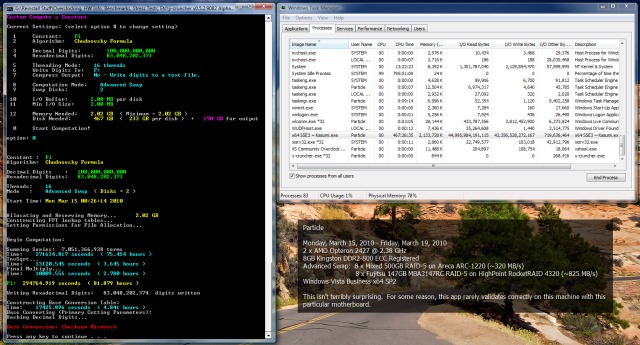
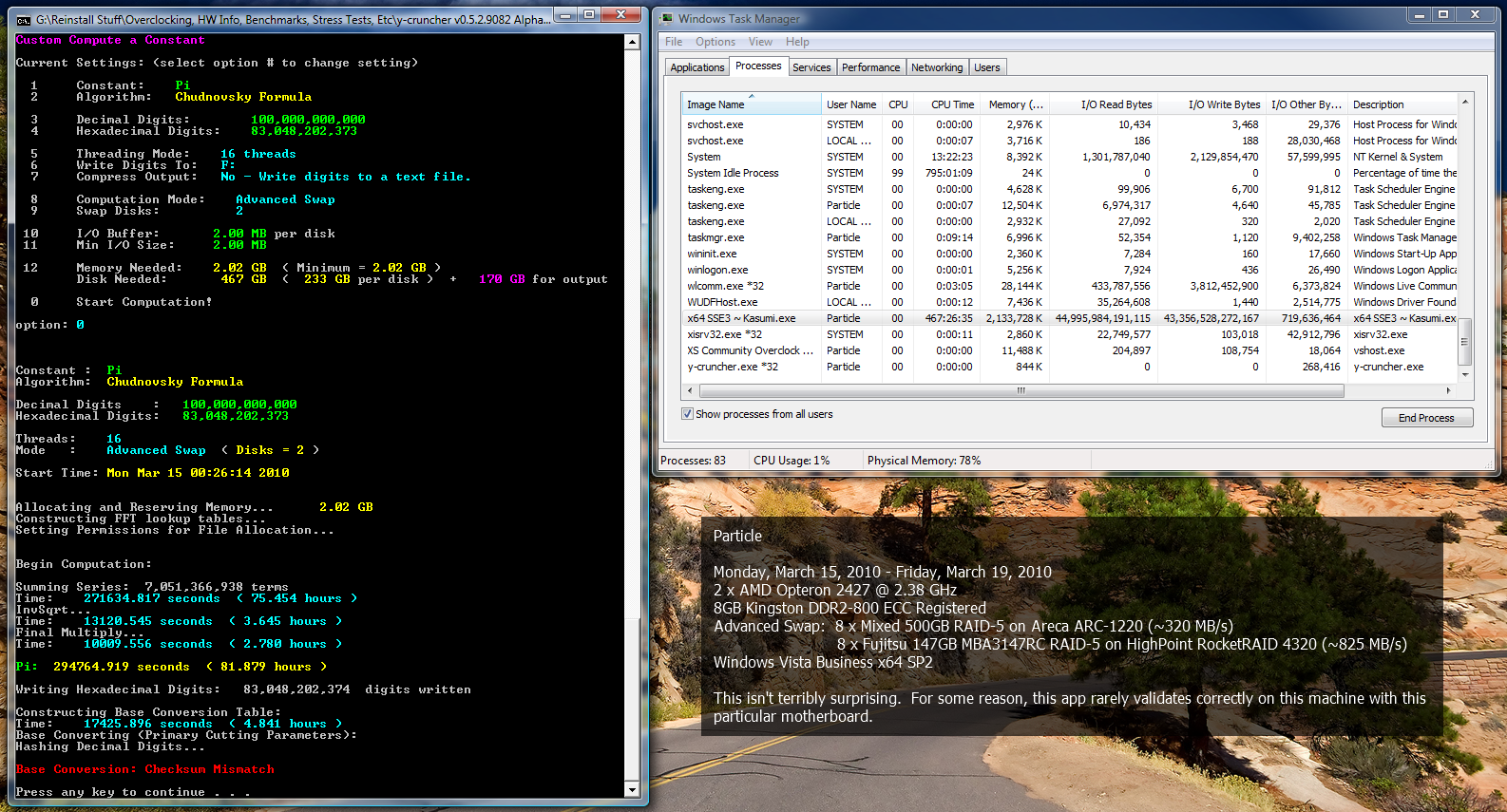
It's complete. Something went wrong with writing the digits to disk, but the calculation itself completed. This isn't the first time, however. I have to wonder if there's a compatibility problem at play in the same way that IBT would fail on my Phenom II X4 940 system even if it was underclocked.
As a thread about any computer related subject has its length approach infinity, the likelihood and inevitability of a poorly constructed AMD vs. Intel fight also exponentially increases.
Likewise, the frequency of a car pseudoanalogy to explain a technical concept increases with thread length. This will make many people chuckle, as computer people are rarely knowledgeable about vehicular mechanics.
When confronted with a post that is contrary to what a poster likes, believes, or most often wants to be correct, the poster will pick out only minor details that are largely irrelevant in an attempt to shut out the conflicting idea. The core of the post will be left alone since it isn't easy to contradict what the person is actually saying.
When a poster cannot properly refute a post they do not like (as described above), the poster will most likely invent fictitious counter-points and/or begin to attack the other's credibility in feeble ways that are dramatic but irrelevant. Do not underestimate this tactic, as in the online world this will sway many observers. Do not forget: Correctness is decided only by what is said last, the most loudly, or with greatest repetition.
When it comes to computer news, 70% of Internet rumors are outright fabricated, 20% are inaccurate enough to simply be discarded, and about 10% are based in reality. Grains of salt--become familiar with them.
Remember: When debating online, everyone else is ALWAYS wrong if they do not agree with you!
Random Tip o' the Whatever
You just can't win. If your product offers feature A instead of B, people will moan how A is stupid and it didn't offer B. If your product offers B instead of A, they'll likewise complain and rant about how anyone's retarded cousin could figure out A is what the market wants.
Oh god... Base conversion checksum failure...
This means that it finished the conversion, but the converted digits failed a redundancy check.
In a more technical explanation:
Before the conversion, the program computes (binary digits mod p), where p is a prime number.
After the conversion, the program computes (decimal digits mod p).
The result MUST match because the modulus will always be the same regardless of the what base the digits are in.
The only thing I can think of that went wrong to get that kind of error would be something to with memory.
Most CPU errors get caught on the spot and will show up as "Multiplication Failure" (the program spends 99% of the time performing multiplications - which almost all have redundancy checks).
Those errors are corrected and the program will proceed normally.
This one wasn't the case...
How much virtual memory did you have remaining during the run?
I have encountered an issue once where Windows will fail to run a thread in the event of insufficient virtual memory. (and still return with a normal return code... so the program doesn't know the thread failed...)
When a hard drive encounters an unrecoverable error, it will be caught via hardware CRC (with extremely high probability) and will return to the OS as a read fault.
(This was thoroughly tested on a failing hard drive that I have.)
When that happens, the program will tell you that it read-faulted. (in bright red text)
Then it will print the error code, pause until you hit enter, and reattempt that I/O command. It will continue to reattempt the I/O (with the pauses) until it either succeeds, or the user decides to kill it. In other words, it will enter an infinite loop if the sector is unreadable. This is intentional by design to allow the user some ability to tweak things and reattempt. (so no, it won't crash)
The probability that a hard drive soft errors AND slips through CRC is extremely low... I believe less than 1 in 10^20 bytes. So if the hard drive returns without an error, the data is correct. If it encounters an error that it can't fix, then it will tell the OS that it the cluster is unreadable.
So yes, 45 TB is already pushing the limit of the specification of these HDs, but it won't fail silently.
(I would like to think that they are built to have a much lower unrecoverable error rate than the specs because I've put nearly a petabyte on all my drives, and I've never had a single error on a drive that wasn't loaded with SMART errors...)
Check the SMART on your drives... I dunno what to say.
Since the program has successfully done 100b at least 3 times on 3 other machines, it makes a software bug unlikely. But I'll keep it an open possibility since the program is multi-threaded... (though I can't do anything unless someone can repro it in some consistent manner)
Main Machine:
AMD FX8350 @ stock --- 16 GB DDR3 @ 1333 MHz --- Asus M5A99FX Pro R2.0 --- 2.0 TB Seagate
Miscellaneous Workstations for Code-Testing:
Intel Core i7 4770K @ 4.0 GHz --- 32 GB DDR3 @ 1866 MHz --- Asus Z87-Plus --- 1.5 TB (boot) --- 4 x 1 TB + 4 x 2 TB (swap)
Another thing:
Exactly what settings did you use? That could make a difference.
When I get back from spring break, I'll try running with the exact same settings you used. And if that gives the same error, I'll have one hell of a bug to fix...
(But at least you can sleep a little easier knowing that it isn't your hardware.)
Anyhow, I have plans to add more redundancy checks into the program over the next few versions. (these will also go along with a more aggressive error-correction)
They will come with some performance overhead, but will be offset by speed optimizations that I'll be doing.
EDIT:
And if you haven't deleted the hexadecimal digits already, you can use the digit viewer (option 4) to see if the hexadecimal digits are correct.
They should be:
Whether or not your hexadecimal digits are correct is irrelevant to the the base conversion failure you got. But at least it ensures that no other errors were made...Code:adf23df916 c2d4167875 8e2bede8c6 e87a5d957b 00c7f252fd : 83,048,202,350 e55d87142f 94e93e4f54 d1a
Last edited by poke349; 03-19-2010 at 07:18 PM.
Main Machine:
AMD FX8350 @ stock --- 16 GB DDR3 @ 1333 MHz --- Asus M5A99FX Pro R2.0 --- 2.0 TB Seagate
Miscellaneous Workstations for Code-Testing:
Intel Core i7 4770K @ 4.0 GHz --- 32 GB DDR3 @ 1866 MHz --- Asus Z87-Plus --- 1.5 TB (boot) --- 4 x 1 TB + 4 x 2 TB (swap)
The settings should all be in the image with the exception of where I set the swap disks to, F:\ and G:\.
I suppose it's technically possible for it to be a memory problem, but I would think it unlikely it since it is ECC/registered. Proactive ECC options are set to maximum, chipkill is enabled, etc. Any single bit error would be corrected and multi-bit errors should at least be detected and cause a BSOD. An IC failure would cause automatic failover to the extra 9th IC per side. *shrug* It's puzzling.
The good news is that Pi itself was calculated correctly, as per the attachment.
Would it be possible to redo just the base conversion part? The Pi information is already there, and if there's a reproducible problem that should make it a lot quicker to validate. If it doesn't occur again, it could be indicative of some hardware problem or maybe just a fluke due to planetary alignment or whatnot. Either way, it would be helpful for both of us.
PS: Can you provide an MD5, SHA, SFV, or similar (or better yet, all) checksum for the Pi output file?
Edit #2: I don't run with any virtual memory. I did run low on physical memory late last night, but I closed some big apps before it ran out entirely. I was playing Battlefield: Bad Company 2 at the time and killed it quickly.
Last edited by Particle; 03-19-2010 at 08:08 PM.
As a thread about any computer related subject has its length approach infinity, the likelihood and inevitability of a poorly constructed AMD vs. Intel fight also exponentially increases.
Likewise, the frequency of a car pseudoanalogy to explain a technical concept increases with thread length. This will make many people chuckle, as computer people are rarely knowledgeable about vehicular mechanics.
When confronted with a post that is contrary to what a poster likes, believes, or most often wants to be correct, the poster will pick out only minor details that are largely irrelevant in an attempt to shut out the conflicting idea. The core of the post will be left alone since it isn't easy to contradict what the person is actually saying.
When a poster cannot properly refute a post they do not like (as described above), the poster will most likely invent fictitious counter-points and/or begin to attack the other's credibility in feeble ways that are dramatic but irrelevant. Do not underestimate this tactic, as in the online world this will sway many observers. Do not forget: Correctness is decided only by what is said last, the most loudly, or with greatest repetition.
When it comes to computer news, 70% of Internet rumors are outright fabricated, 20% are inaccurate enough to simply be discarded, and about 10% are based in reality. Grains of salt--become familiar with them.
Remember: When debating online, everyone else is ALWAYS wrong if they do not agree with you!
Random Tip o' the Whatever
You just can't win. If your product offers feature A instead of B, people will moan how A is stupid and it didn't offer B. If your product offers B instead of A, they'll likewise complain and rant about how anyone's retarded cousin could figure out A is what the market wants.
Ah... so you were low on memory.
I encountered almost the exact same problem in one of my tests.
But I wasn't able to reproduce it so I never did a fix or a work-around for it.
Since you spent a good 90 hours running this, I'm gonna give you the explanation that you deserve.
(Since you're a programmer, I'll can go into detail here.)
When I killed off the pagefile, and set the program to use almost all the ram, what would happen is that windows would spawn all the threads that it needs. But it wouldn't run all of them. Some of the threads would just sit idle (Task Manager shows 13% cpu usage on 8 logical cores, but with 16+ threads.)
I was only able to repro this in like 3 out of some 20 tries... And of the 3, I noticed that 2 of them didn't use all the cpu, and terminated them. The 3rd one was a 5 billion digit test. I didn't kill it because I was away for something else. When I got back, it finished, but the decimal digits fell ~3000 short of 5 billion.
Then when the wait function is called on each thread, each thread is terminated normally. But the threads that didn't run properly also terminated - without doing what they were supposed to.
The return value of those wait functions is 0 - no error. Which tricks the program into thinking that the threads finished what they were supposed to.
Then the computation would go on with the incomplete data. All redundancy checks are only done within the arithmetic. But since an entire thread (along with all the arithmetic that should be done with it) was omitted, the incorrect data is able to slip through all error-detection and make it all the way to end result.
Last question is why it died in the conversion and not earlier.
In my 5 billion digit test, the failed threads happened at the very beginning.
Because of the way the algorithm works, all the work done in the beginning only affects the latter digits. So when the error occurred on the very first set of threads, it only messed up the last 3000 digits.
The base conversion has a much larger load-balancing problem then the rest of the computation. So my trick to "fixing" that is to run double the # of threads that the computation normally uses.
more threads = more memory
If you were right at that threshold...
I know what I need to do now. I need to put in a hand-shaking protocol into all thread destruction to actually confirm if they finished properly...
And should a failure occur, I'll need to print an error at the least, and if possible, attempt to roll back to the last sync point and re-run. (which isn't always possible if the work is done in place)
Not an easy task, since it's incompatible with my threading API. But I feel this is necessary.
I get the feeling that this whole thread-stalling thing might be an OS problem. At the very least, the wait functions should return an error instead of 0.
I've triple-checked my threading API and even tested it by intentionally causing thread-creation failures. And it holds together and prints the appropriate error message when it's supposed to.
So I'm starting to think that it is yet another bug in Windows... (I've found more before, but I'll get my house burned down if I disclose them publicly... lol)
Thanks for your help. I definitely ignored a problem that I shouldn't have.
EDIT:
Yes, it's possible to just redo the conversion. I intentionally have it write the hex first for just a scenario, but it was only meant for the world record attempts, so I never actually added a feature for it in the program. (Should it happen on a world record run, I can write a parser for the hex digits and reload at the conversion. But it has never actually happened so I don't have the parser yet...)
The conversion behaves the same way regardless of what you're computing. So you can test it by computing Square Root of n or Golden Ratio to xx digits. (they compute very quickly, so the conversion dominates the total time)
Last edited by poke349; 03-19-2010 at 09:16 PM.
Main Machine:
AMD FX8350 @ stock --- 16 GB DDR3 @ 1333 MHz --- Asus M5A99FX Pro R2.0 --- 2.0 TB Seagate
Miscellaneous Workstations for Code-Testing:
Intel Core i7 4770K @ 4.0 GHz --- 32 GB DDR3 @ 1866 MHz --- Asus Z87-Plus --- 1.5 TB (boot) --- 4 x 1 TB + 4 x 2 TB (swap)
i read what he wrote, and understand it. but its still hard to believe. it sounds like hes making an assumption that the dice have memory
i verry well could be wrong, or maybe he was trying to dumb it down so anyone could understand it. it just feels like to me hes missing something
Its not overkill if it works.
I think those are specified error rates. Actual error rates would be lower.
I've put at least several petabytes of I/O on my normal desktop hard drives over the past year and a half... and I can tell you 99.99999% certainty that the actual unrecoverable read error rate is lower than that.
Particle, I just took a closer look at your screenie. You left the memory at the minimum 2.02 GB. That's just the minimum to run the computation.
You can actually increase it - which makes it faster. That's probably why it took so long.
EDIT: About the validation errors that you usually get. Which error is it? The frequency sanity check? Or the timer sanity check?
I'm curious, since the program might be being overly aggressive with the anti-cheat protection.
Last edited by poke349; 03-19-2010 at 10:16 PM.
Main Machine:
AMD FX8350 @ stock --- 16 GB DDR3 @ 1333 MHz --- Asus M5A99FX Pro R2.0 --- 2.0 TB Seagate
Miscellaneous Workstations for Code-Testing:
Intel Core i7 4770K @ 4.0 GHz --- 32 GB DDR3 @ 1866 MHz --- Asus Z87-Plus --- 1.5 TB (boot) --- 4 x 1 TB + 4 x 2 TB (swap)
 Posting Permissions


 Reply With Quote



Bookmarks