

This is supposed to be X58 SLI thread and not Classified. Don't confuse people. Go create your own thread...Originally Posted by marcolecorse




This is supposed to be X58 SLI thread and not Classified. Don't confuse people. Go create your own thread...


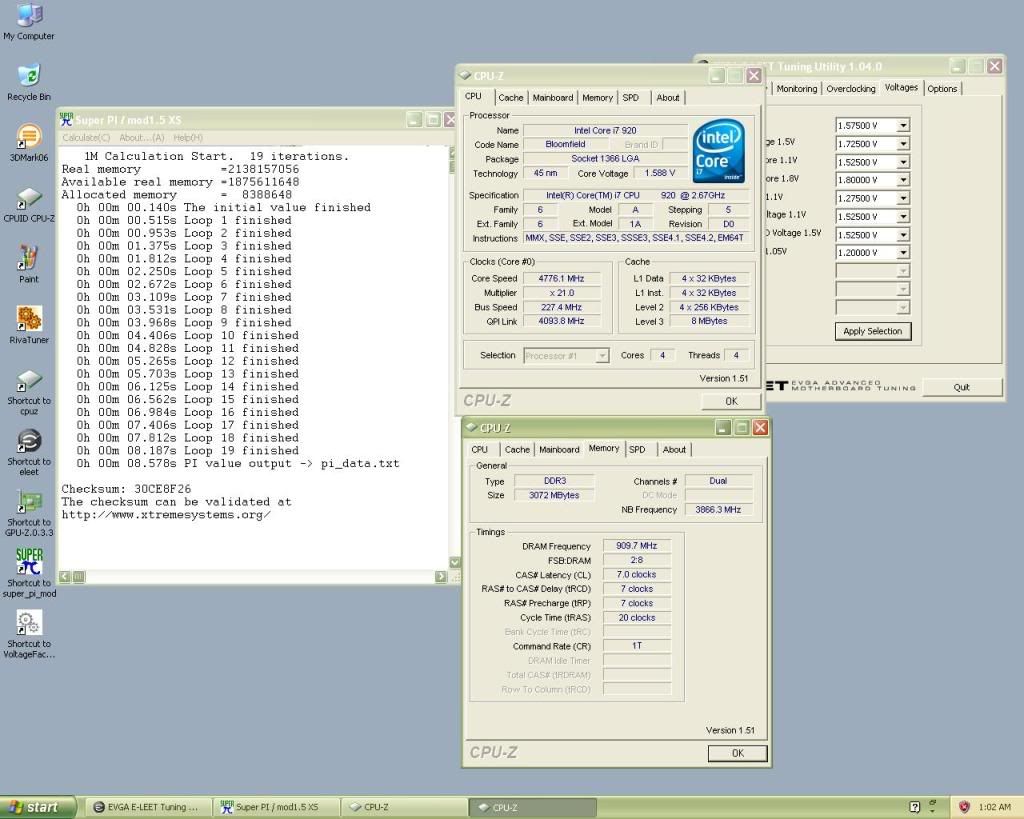
i finally had time to play with my new 920 D0
seems like i got a nother power hungry chip, my previous C0 was even more hungry for voltage.
Last edited by Solarfall; 07-03-2009 at 02:55 PM.
Evga X58 sli under cascade
http://www.xtremesystems.org/forums/...d.php?t=219788
Evga X58 Sli ultimate overclocking/ overview/ discussion thread
http://www.xtremesystems.org/forums/...d.php?t=221082
proud owner of E8600 Q822A435
Fantastic result - which bios are you using?
My 920D0 is volt hungry above 4.2ghz (only needs 1.36v for this) too - needs 1.5v for 4.3ghz and 1.56v for 4.4ghz
Last edited by maverik-sg1; 07-05-2009 at 01:07 PM.
im using the latest E758SZ2F ( witch can be found on the 1 page of this thread) it seems to be pretty good judging from that short session i did. sound like in not the only one that has a chip that need lots of voltage in order to go higher then too bad this chip seems to have a cold boot issues when i tested this thing with my cascade yesterday (233 was a piece of cake
Evga X58 sli under cascade
http://www.xtremesystems.org/forums/...d.php?t=219788
Evga X58 Sli ultimate overclocking/ overview/ discussion thread
http://www.xtremesystems.org/forums/...d.php?t=221082
proud owner of E8600 Q822A435

OK,
Great thread! I did not read the whole thing but my board is on its way(758TR), still need to get everything else CPU, and Ram. Question anybody using this NB/SB water block(Bitspower Black Freezer), or know if there any good? Also is new egg selling DO's yet?
Thanks all!
http://www.performance-pcs.com/catal...ducts_id=24929
RIVE/3930K Water
16GB Gskill Ripjaw X 2133
2X Intel CherryVille 520 60GB Raid O
2X HD 7970 VisionTec
Corsair AX1200
Biostar TP45HP
personally i would not get that nb/ sb block.. water cooling nb or sb on x58 boards does not help in overclocking at all, other factors come to play on this chipset and besided the nb really does not run "that" hot that i would see water cooling it being necessary if your overclocking.. if its just a looks, then by all means go for it
Evga X58 sli under cascade
http://www.xtremesystems.org/forums/...d.php?t=219788
Evga X58 Sli ultimate overclocking/ overview/ discussion thread
http://www.xtremesystems.org/forums/...d.php?t=221082
proud owner of E8600 Q822A435
^^^ word.
GB 790XTA UD4
GSkill Pi Black 2000 Cas9
ASUS 4870
Enermax Revolution 1050+
http://www.heatware.com/eval.php?id=67661
Word taken,
I can't do a cascade or afford it. But I am water cooling the CPU or will so this is why I was asking. So just leaving it stock will still net good OCing still?
Thank you for the replies
RIVE/3930K Water
16GB Gskill Ripjaw X 2133
2X Intel CherryVille 520 60GB Raid O
2X HD 7970 VisionTec
Corsair AX1200
Biostar TP45HP
i have not problems getting my i7 stable at 4.6ghz -4.7ghz (of course all cpu are individuals and don't all clock the same, as you may know) on just watercooling and so said it shortly yes you can get some pretty nice ocing results with conventional watercooling rig. if you have any troubles in ocing you chip just let us know and im sure that people including me will be more than happy to give you some insight what to focus on while your trying to get the max out of you cpu
btw just out of curiosity what sort of water cooling stuff do you have.. blocks, rads, pumps etc?
Evga X58 sli under cascade
http://www.xtremesystems.org/forums/...d.php?t=219788
Evga X58 Sli ultimate overclocking/ overview/ discussion thread
http://www.xtremesystems.org/forums/...d.php?t=221082
proud owner of E8600 Q822A435
2 swiftech MCR 320's for my GPU 4870X2 Also the EK nickel plated water blocks-
EK-FC4870 X2 CF-NK
Three Swiftech MCP655 variable pumps
tygon 1/2 ID tubing
1 Thermochill PA 120.3 for the CPU
I 'm looking to go higher than 4.7 as I know an air cooled do stepping CPU on the classified will do 5 ghz, if you think not visit 411 Overkill.com forum. Here is his CPU-Z course this is not stable(like I care) Nordic did the run.
http://valid.canardpc.com/show_oc.php?id=589790
I just didn't get the classified cause I do not need ALL the PCIe, so I'm hoping this is the same board.
Again thanks for all the help
Last edited by jaggerwild; 07-07-2009 at 05:00 PM.
RIVE/3930K Water
16GB Gskill Ripjaw X 2133
2X Intel CherryVille 520 60GB Raid O
2X HD 7970 VisionTec
Corsair AX1200
Biostar TP45HP
and sift through the endless fanboy postings to look at a rig that can do 5ghz for a cpuz screenshot? Na lol.
Good luck in your 5ghz none subzero adventure.
Nice pics though, and killer avatar
GB 790XTA UD4
GSkill Pi Black 2000 Cas9
ASUS 4870
Enermax Revolution 1050+
http://www.heatware.com/eval.php?id=67661
LOL That's why I posted his link I'd be happy to come close again that is not stable.
RIVE/3930K Water
16GB Gskill Ripjaw X 2133
2X Intel CherryVille 520 60GB Raid O
2X HD 7970 VisionTec
Corsair AX1200
Biostar TP45HP
I'll tell ya man, 4.6-4.7 is going to be a good number to hit, validations just don't cut it anymore lol.
But I'll be cheering you one man regardless. Nothing wrong with setting the bar high
GB 790XTA UD4
GSkill Pi Black 2000 Cas9
ASUS 4870
Enermax Revolution 1050+
http://www.heatware.com/eval.php?id=67661
hey jaggerwild you could try and old trick that i and few others that tried, mix ice with salt and then burying the rad under that
Evga X58 sli under cascade
http://www.xtremesystems.org/forums/...d.php?t=219788
Evga X58 Sli ultimate overclocking/ overview/ discussion thread
http://www.xtremesystems.org/forums/...d.php?t=221082
proud owner of E8600 Q822A435
Thanks Solar!
My prior best was a cooler outside the window in winter, @ over 5Ghz on my E8600. The cooler was filled with part anti freeze, part distilled water, and re-useable ice packs inside to keep the cold. Where I'm at now can't get Deice, thing now is where I'll get the CPU. My only option is New Egg as I'm so isolated in deep Mississippi.
Thanks Reverend,
You gotta cheer me on as I'm from Niagara Falls(NY side) I hear they have a nude beach this time of year in TO, I'll need photo's 4 proof
Keep the ideals coming!
Last edited by jaggerwild; 07-08-2009 at 05:31 AM. Reason: Smell checker
RIVE/3930K Water
16GB Gskill Ripjaw X 2133
2X Intel CherryVille 520 60GB Raid O
2X HD 7970 VisionTec
Corsair AX1200
Biostar TP45HP
I'm north of Toronto, but yeah there is no law against topless ladies on ANY beach in Ontario as far as I know. I see them all over, especially on Lake Simcoe which is in my area.
GB 790XTA UD4
GSkill Pi Black 2000 Cas9
ASUS 4870
Enermax Revolution 1050+
http://www.heatware.com/eval.php?id=67661
Cheers mate but I had done absolutely everything with the board possible, including what you suggested, first idea was removing battery and resetting CMOS etc,including discharging the caps.
However got the new RAM and it was just coming up FF code on boot (yep tried everything again) so getting ANOTHER rma done...
Keep telling myself it will be worth it in the end
i5-2500k @ 4.6ghz | Z68X-UD3H-Gen3 | 8GB Ram | EVGA HD GTX570
Isn't FF "Fully Functional"?
GB 790XTA UD4
GSkill Pi Black 2000 Cas9
ASUS 4870
Enermax Revolution 1050+
http://www.heatware.com/eval.php?id=67661
to me it sounds like ether the ram slots are broken or the ram sticks them selfs are incompatible or broken.. have you tested the board with 1 stick of ram ?
Evga X58 sli under cascade
http://www.xtremesystems.org/forums/...d.php?t=219788
Evga X58 Sli ultimate overclocking/ overview/ discussion thread
http://www.xtremesystems.org/forums/...d.php?t=221082
proud owner of E8600 Q822A435
Not when it comes up that instantly on boot, usually means its not even detecting anything. Common fault seen when a board is dead
It originally went over for a faulty RAM port but EVGA tested it fine. I would get BSOD's left, right and centre if using Slot 1 but was fine without that slot being used. Since getting it back I have tested each stick of RAM in each slot and FF always comes up. RAM comes from a known working setup but just since EVGA had the board its now coming up FF.
Thanks for your suggestions but I have tested everything possible with this board, i'm a computer systems engineer and network technican so not shy to some diagnostic testing
RMA is now in progress so should hopefully after this get a brand new board to use
The saga continues
i5-2500k @ 4.6ghz | Z68X-UD3H-Gen3 | 8GB Ram | EVGA HD GTX570
I'm having cold boot issues with this board now, whether at stock or my overclock. I don't know what to think. It'll sit there spinning the fans for a long time and the little P80 won't display anything, not even light up. It'll just sit there spinning the fans. Then after a few more restarts it will eventually boot up. I doubt it's the CPU. I've never thrown enough voltage at it to cause any damage.
Workstation/Playstation: i7 920 D0 @ 3.8, TRUE, EVGA x58, BFG GTX 295, WD 640x2 in RAID 0, 12GB OCZ DDR3, ATCS 840, Dell 24" & Samsung 19", Razer Lycosa and Logitech G9r, HTO Striker, Windows 7 Ult. 64, Antec TruePower 1000w.
Wife's Computer: E4500 @ 3.0GHz on 1.36v, Rocketfish CPU Cooler, Foxconn, 4GB Corsair, Sea 250, Antec Sonata w/500w, ATI 2400, 17" Samsung, Vista Ult. 32.
HTPC: X2 2400BE, 500GB + 750GB + 80GB, ATI 3450 Hybrid CF w/Asus 780G, 4GB A-Data 800MHz DDR2, 32" Westinghouse, XBOX 360 HDDVD (w/o xbox), Aver DTV Tuner, Huappage DTV tuner, Windows 7 32 bit.
PDAs: iPod Touch 16GB and Samsung Omnia
See my work log here: PROJECT ATCS 840
Some boards only work with certain power supply units, if you have access to another PSU I would try that.Fer chits and giggles.
RIVE/3930K Water
16GB Gskill Ripjaw X 2133
2X Intel CherryVille 520 60GB Raid O
2X HD 7970 VisionTec
Corsair AX1200
Biostar TP45HP
how cold are you trying to boot your system ? i've had that same exact thing happening to me many times its no biggie since after few tries the board will always boot.
Evga X58 sli under cascade
http://www.xtremesystems.org/forums/...d.php?t=219788
Evga X58 Sli ultimate overclocking/ overview/ discussion thread
http://www.xtremesystems.org/forums/...d.php?t=221082
proud owner of E8600 Q822A435
I seem to have hit a wall at 220. I can't boot with anything higher, even with low multiplier like 14x. I am LinX (40mins at 25K size) and prime (10+ hrs) stable at 21x210 with just 1.3125vcore and +100mv but I can't seem to move forward beyond this. I am trying 21x215 with HT OFF but no go. Its unstable as hell, no matter what the voltages.
No boot at 14x221, no matter what the voltages! So, what's the secret to high BCLK on evga x58 vanilla board? Are you increasing the BCLK in Eleet after booting with 220?
in the bios, set the PCIE to 104mhz. Adjust a bit higher CPU VTT and you should break the 222 barrier.
GB 790XTA UD4
GSkill Pi Black 2000 Cas9
ASUS 4870
Enermax Revolution 1050+
http://www.heatware.com/eval.php?id=67661
 Posting Permissions




 Reply With Quote






Bookmarks