

Edit: I think the i7 Turbo bug that HW Monitor was exposing in Core i7 systems has finally been fixed.
Check out version 6.0 below to test for any problems.



Edit: I think the i7 Turbo bug that HW Monitor was exposing in Core i7 systems has finally been fixed.
Check out version 6.0 below to test for any problems.
Last edited by unclewebb; 06-07-2009 at 11:14 AM.
http://www.fileden.com/files/2008/3/3/1794507/Turbo.zip
-Added the operating system activity to the CPU Load % results.
-This reduces or eliminates the interference that some third party monitoring programs were causing to the i7 Turbo reported results.
Last edited by unclewebb; 06-07-2009 at 01:32 PM.
Realtemp 3.30 (with newest turbo code) works perfectly for always giving the correct multi, even while running other utilities that dont share well, and it catches turbo throttling as soon as it occurs.
http://www.fileden.com/files/2008/3/...mpBeta_330.zip
Using the old Gigabyte bios F3, only GB bios that has TDP limits for turbo, you can watch turbo throttling as soon as it begins.
Early throttling caught by RT, not yet by cpuz down to 23.8 from 24. My i950 starts to throttle almost right at 100W tdp.
Again throttling to 23.6, not yet caught by cpuz.
Complete throttling/turbo disengaged by 120W, now shown by both cpuz and RT

Please can anyone help me if it's possible to run more TDP on rampage 2 extreme? Yesterday i found out that in linx its changing my multiplier from 26 to something like 25.425....
CPU: Core i7 3960X @ 4700Mhz (WC) Motherboard: Asus Rampage IV Formula Ram: G.Skill RipjawsZ 4x4096MB DDR3 2133 9-11-10-28 VGA: Gigabyte 580 GTX SOC SLI Audio: Asus Essence STX + Magnat Quantum 557 5.1/Onkyo TX-SR607 HDD: SSD OCZ Vertex 3 60GB (system) + OCZ Vertex 3 240GB MAX IOPS (games) PSU: Seasonic SS-1000XP Platinum Keyboard: Logitech G19 Mouse: Logitech G9x + Razer Destructor Screen: LG 30" W3000H-BN S-IPS Case: Corsair Obsidian 800D OS: Win 7 Ultimate 64bit
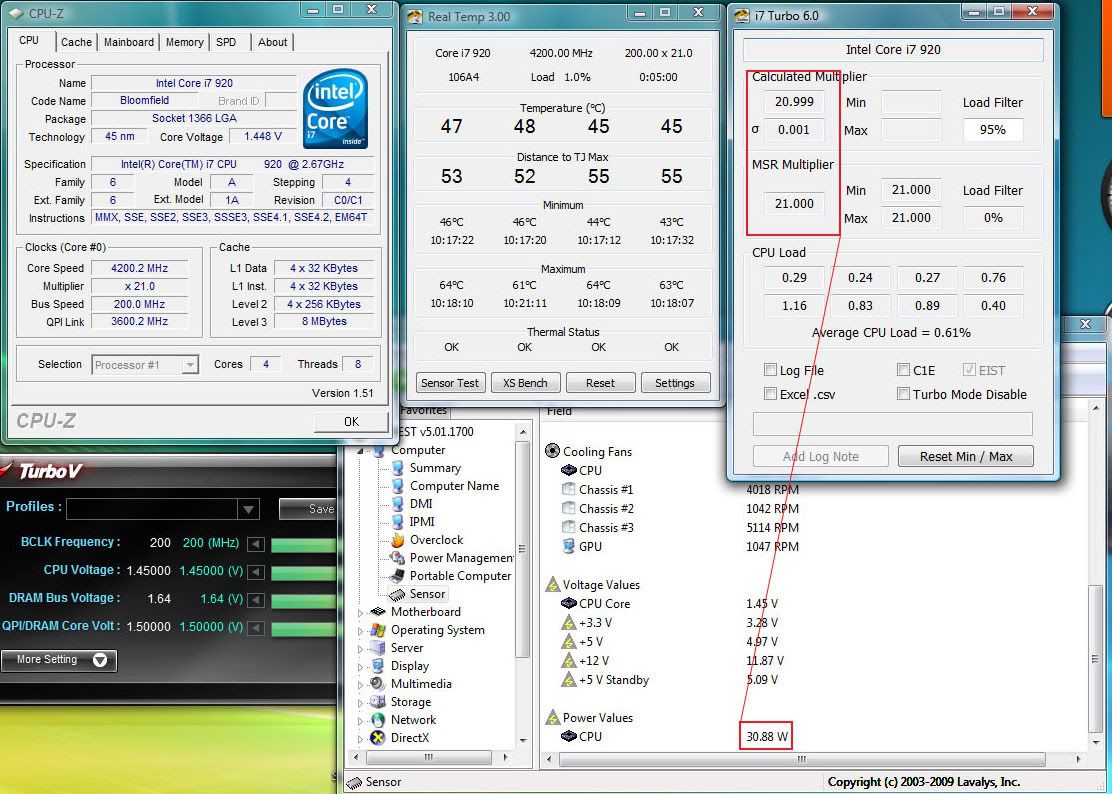
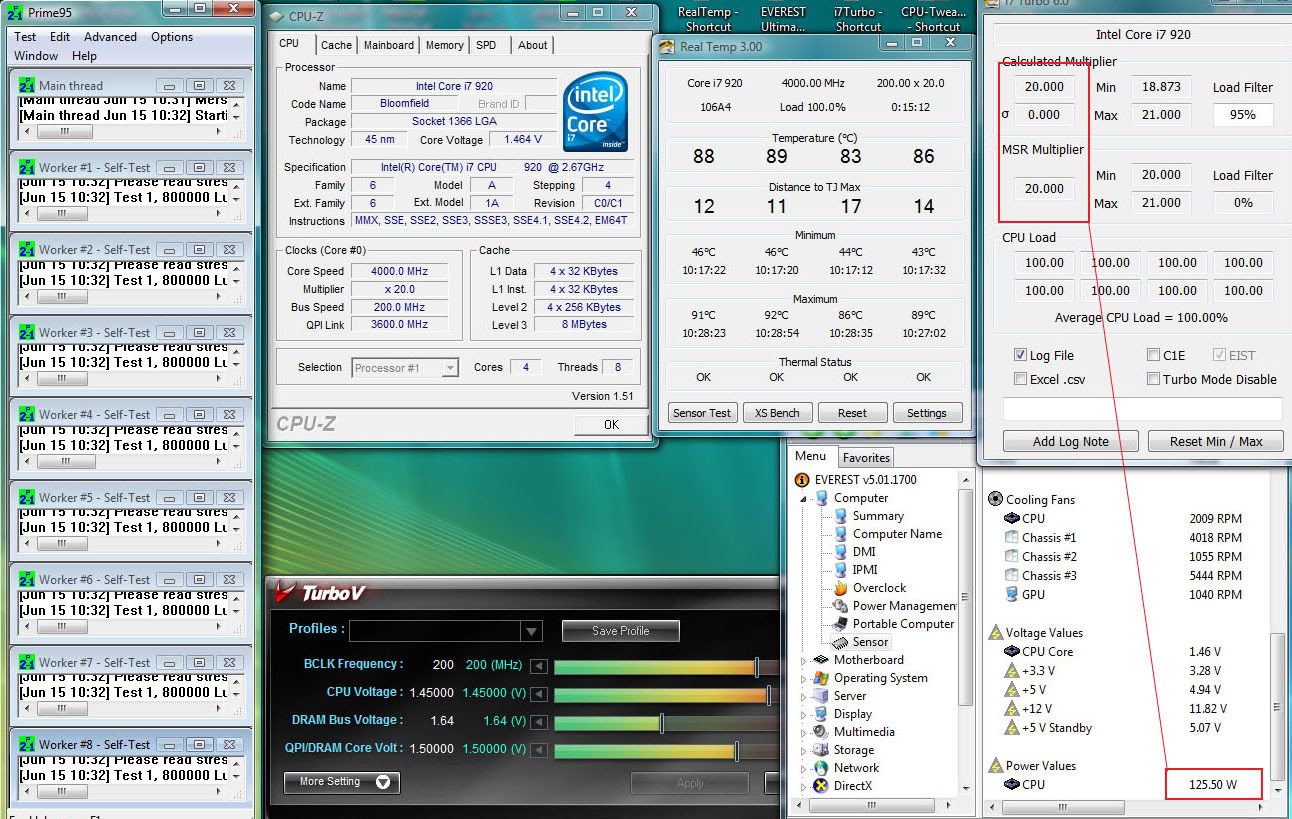
I've got the same problem, ocing a 920 C0/C1 @ 4.2GHz throttling begins:
@ idle
Multis stays @ 21 while cpu consumption is @ 30.88 W
@ full load running prime small ffts
Multis drop @ 20 while cpu consumption is @ 125.50 W
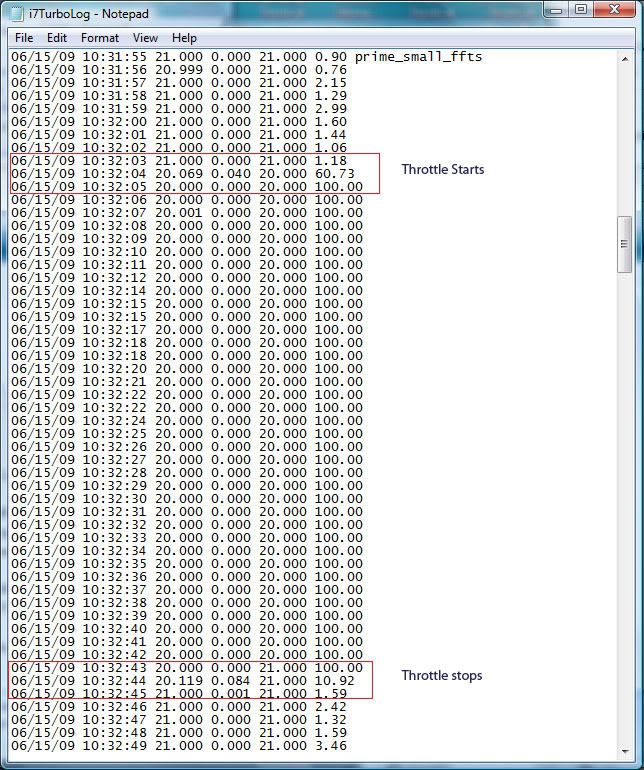
Turbo log file:
Running on ASUS P6T DELUXE V2 bios v.0504
Intel Core i7 980X @ 4.53 GHz 6C-12T / Gigabyte GA-EX58-UD4P / CORSAIR CMG6GX3M3A1866C7 / Ati Radeon Sapphire 5870 1GB DDR5 / CORSAIR CMFSSD-128GBG2D / LG CH08LS10 / Creative X-FI Titanium Fatality /Corsair CMPSU-850HXEU PSU (850W) / Silverstone Temjin SST-TJ07B Case / SAMSUNG SYNCMASTER P2350
Watercool HK CPU LGA1366 Rev. 3.0 LT / DD-CPX-Pro 12V Pump / Swiftech MCR320 360mm / EK-Multioption RES 250 Rev.2 - EK-ANTI-Cyclone / Scythe S-FLEX Fan SFF21G.
ENZOTECH SCW1 vs APOGEE GT
lol nice load temps
CPU: Core i7 3960X @ 4700Mhz (WC) Motherboard: Asus Rampage IV Formula Ram: G.Skill RipjawsZ 4x4096MB DDR3 2133 9-11-10-28 VGA: Gigabyte 580 GTX SOC SLI Audio: Asus Essence STX + Magnat Quantum 557 5.1/Onkyo TX-SR607 HDD: SSD OCZ Vertex 3 60GB (system) + OCZ Vertex 3 240GB MAX IOPS (games) PSU: Seasonic SS-1000XP Platinum Keyboard: Logitech G19 Mouse: Logitech G9x + Razer Destructor Screen: LG 30" W3000H-BN S-IPS Case: Corsair Obsidian 800D OS: Win 7 Ultimate 64bit
Temps really worry me, today I just received my Watercool HK CPU LGA1366 Rev. 3.0 LT and XSPC RX360 Triple Radiator. I'm gonna connect them and see how well they perform.Originally Posted by Papagaj


Intel Core i7 980X @ 4.53 GHz 6C-12T / Gigabyte GA-EX58-UD4P / CORSAIR CMG6GX3M3A1866C7 / Ati Radeon Sapphire 5870 1GB DDR5 / CORSAIR CMFSSD-128GBG2D / LG CH08LS10 / Creative X-FI Titanium Fatality /Corsair CMPSU-850HXEU PSU (850W) / Silverstone Temjin SST-TJ07B Case / SAMSUNG SYNCMASTER P2350
Watercool HK CPU LGA1366 Rev. 3.0 LT / DD-CPX-Pro 12V Pump / Swiftech MCR320 360mm / EK-Multioption RES 250 Rev.2 - EK-ANTI-Cyclone / Scythe S-FLEX Fan SFF21G.
ENZOTECH SCW1 vs APOGEE GT
well that was kinda sarcasm m8.... 92 is way too much
CPU: Core i7 3960X @ 4700Mhz (WC) Motherboard: Asus Rampage IV Formula Ram: G.Skill RipjawsZ 4x4096MB DDR3 2133 9-11-10-28 VGA: Gigabyte 580 GTX SOC SLI Audio: Asus Essence STX + Magnat Quantum 557 5.1/Onkyo TX-SR607 HDD: SSD OCZ Vertex 3 60GB (system) + OCZ Vertex 3 240GB MAX IOPS (games) PSU: Seasonic SS-1000XP Platinum Keyboard: Logitech G19 Mouse: Logitech G9x + Razer Destructor Screen: LG 30" W3000H-BN S-IPS Case: Corsair Obsidian 800D OS: Win 7 Ultimate 64bit
xpatar: You're screwed. The Asus P6T is the Turbo throttling champion.
Turbo throttling can be caused by excessive core voltage, excessive current or when your core temperature gets too high. It looks like you have all three problems.
Even if you get your core temperatures 10C lower, there are still the other two factors that are likely going to cause Turbo throttling at the 4.2 GHz speed that you would like to run at.
It doesn't seem that Asus is ever going to fix this issue so if you want to run over 4 GHz then you will have to get another motherboard. The next board I buy won't be an Asus and I know there are a few more users thinking the same thing because of this issue.
Papagaj: I thought there was a setting in the bios to turn off Turbo throttling on the rampage 2 extreme.
Last edited by unclewebb; 06-15-2009 at 04:16 PM.
Thanks for the reply unclewebb, let's hope that this issue is going to be fixed soon, otherwise I'm going for a new mobo.
Last edited by xpatar; 06-15-2009 at 09:24 PM.
Intel Core i7 980X @ 4.53 GHz 6C-12T / Gigabyte GA-EX58-UD4P / CORSAIR CMG6GX3M3A1866C7 / Ati Radeon Sapphire 5870 1GB DDR5 / CORSAIR CMFSSD-128GBG2D / LG CH08LS10 / Creative X-FI Titanium Fatality /Corsair CMPSU-850HXEU PSU (850W) / Silverstone Temjin SST-TJ07B Case / SAMSUNG SYNCMASTER P2350
Watercool HK CPU LGA1366 Rev. 3.0 LT / DD-CPX-Pro 12V Pump / Swiftech MCR320 360mm / EK-Multioption RES 250 Rev.2 - EK-ANTI-Cyclone / Scythe S-FLEX Fan SFF21G.
ENZOTECH SCW1 vs APOGEE GT
There definitely should be. It was added in a BIOS update iirc, so he should update to the latest BIOS.
Asus Rampage II Gene | Core i7 920 | 6*2GB Mushkin 998729 | BFG GTX280 OCX | Auzentech X-Fi Forte | Corsair VX550
—Life is too short to be bound by the moral, ethical and legal constraints imposed on us by modern day society.
Thanks unclewebb, the tool is actually working
without it as soon as i get to Win 7 desktop i would get stuck at multi 12x
after running your program it's able to stay at multi 21x (even 22x will pop up sometimes) for most of the time.
What is your program doing, could you explain a bit about it? thanks.
DFI UT X58
Thermal Management Control: Enabled
EIST Function: Enabled
CxE Function: AUTO
Last edited by pangingIII; 06-16-2009 at 08:24 AM.
pangingIII: What motherboard are you using? This was mostly a DFI issue but I think some MSI boards also have this problem where the multiplier gets stuck at 12 at full load in Windows 7.
Edit: I see you have the DFI.
Run i7 Turbo to see what it reports when CPU-Z is showing the 22X multi. That might not be 100% accurate. rge and I are going to be doing some more testing in the next day or so to try to prove this one way or the other.
I'd rather not say.What is your program doing, could you explain a bit about it?
I can't give away my secrets. I'll send you a PM.
Edit: You don't like PM messages so I'll come clean. MultiBoost changes a register within the CPU. For some unknown reason this register is getting set to 12 on the DFI boards so adjusting that one register to 21 allows your CPU to run at full speed, including its Turbo feature. A very simple patch until DFI or Windows 7 comes up with the correct fix.
I built MultiBoost into the latest version of RealTemp 3.30.
Just add this to your RealTemp.INI file.
MultiBoost=1
One less program to run that way.
The low core voltage in your screen shot shows that EIST is enabled and has lowered your core voltage which means it has also lowered your multiplier. I'm 99.99999% sure that CPU-Z is not accurate at idle.
Last edited by unclewebb; 06-16-2009 at 08:38 AM.
Unclewebb, I'm totally loving your utilities.
I do have a quick question, or rather two: What is the throttling limit for Core i7 D0's, I had thought it was 80c but is it actually 100c? Intel's page says 67.9°C, but that's not the core temp value they are giving.
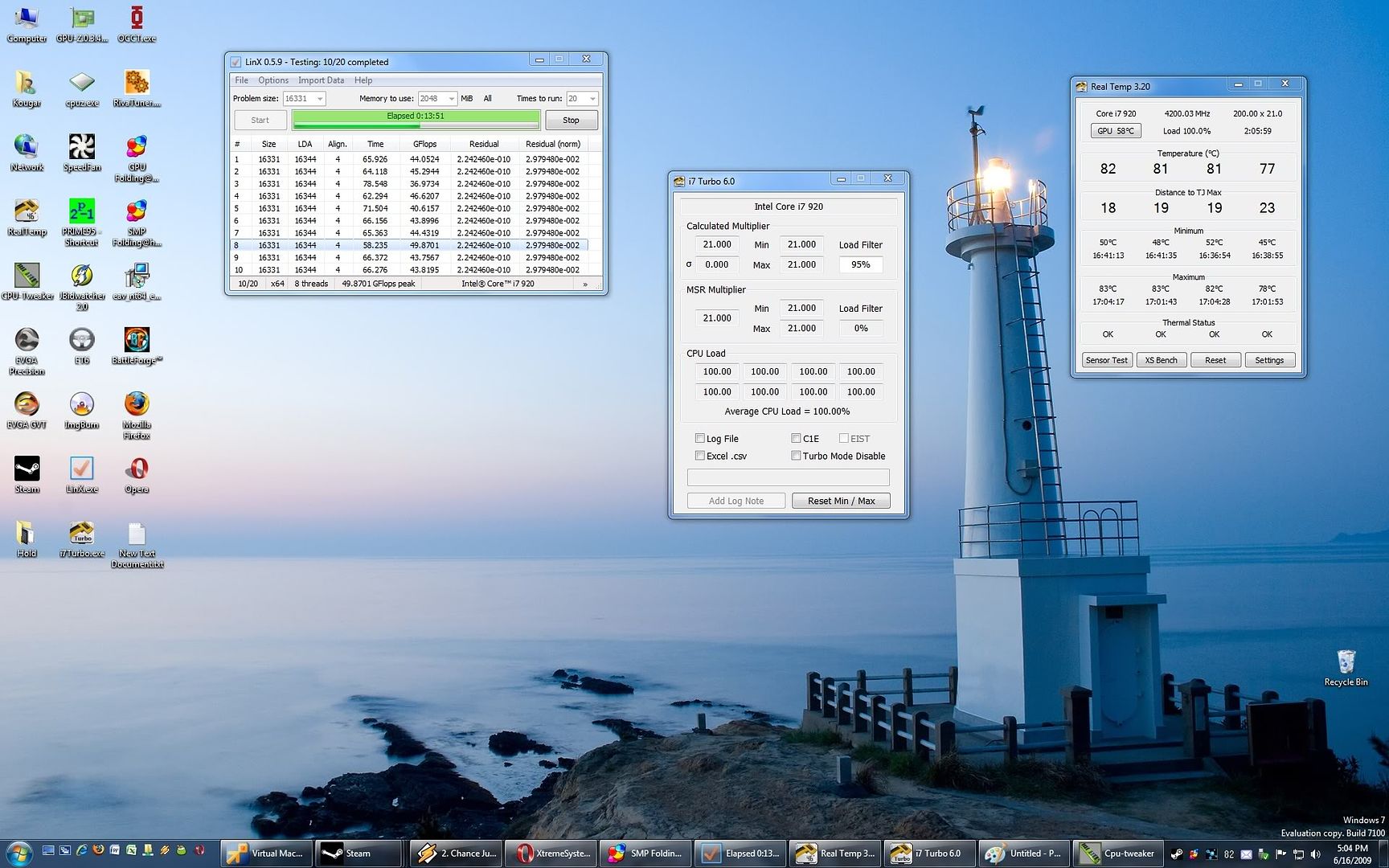
If the CPU begins to throttle back will your i7 Turbo utility detect this? I'm thinking Realtemp would under the Thermal Status field, but after forcing temps to 82c the multi is still at 21 as reported by your tool and no throttling is being reported either. Just wanting to make sure I'm following everything correctly.
Core i7 4790k
ASUS Z97 Pro
Kingston 1600MHz 32GB
EVGA Titan Black (RIP)
ASUS Xonar DX | Corsair Neutron GTX 240GB
Apogee XT + MCP655 & Thermochill Triple 140mm Radiator
Corsair AX1200 PSU | Cooler Master HAF-X | Windows 10
You're most welcome. I was just working on a slightly different version of my i7 Turbo tool today. This one is the V8 version. It will show the calculated multiplier for each thread. After rge does some testing I'll think about releasing it. CPU-Z sometimes shows a +2 Turbo with all 4 cores enabled in the bios and I'm not sure how accurate that is. I'm hoping this new tool can be used to figure this out.
On my Q6600 it's able to show that when running a single threaded app on core 0, core 1 which is joined with core 0 has the same multi but it's two friends for core 2 and core 3 are trying to idle down. I never knew that!
The 67.9°C thermal spec that Intel released is a Tcase temperature which is a temperature measured with a probe located at the geometric center of the IHS. When running a high stress program like some Linpack testing, the theory is that as long as the Tcase stays below this temperature then a user should rarely have to worry about thermal throttling during normal operation. The core temp will approach 100C at full load when the Tcase is at this value.
This spec is designed for system builders. This allows them to design cases and select heatsinks and decide how many fans they are going to need to keep the CPU under that temperature.
Thermal throttling is all controlled by the core temperature sensors. With Core i7, they seem to start thermal throttling right at 100C. The previous Core 2 CPUs that I tested would start a couple of degrees sooner. When thermal throttling starts, that will show up in the RealTemp Thermal Status area and your multiplier will start to rapidly cycle down to 12.
Turbo throttling is different. There are a combination of factors and temperature is just one thing. I think Turbo throttling can start to happen at about 80C to 85C. I don't have enough data about this yet. There may not be an exact temperature number. It also depends on core voltage and current going through the CPU so it might depend on those two as well even when the temps are high.
i7 Turbo and RealTemp 3.30 should both show any Turbo or thermal throttling. The Calculated Multiplier should be the same in both programs now. RealTemp has been using this method since Core i7 was introduced but I recently refined it a little so it shows multiplier steps of 0.2 instead of 0.5 to make sure that it can catch any problems a little sooner.
Thanks for the reply!
Interesting... very interesting. I never would have suspected that either!
So suffice to say the motherboard probe under the CPU socket would be a close temperature, but not this specific one. If the Tcase temp is measured at the surface of the IHS, then methods like watercooling would slightly delay the onset of throttling as this area is cooled better vs air coolers?The 67.9°C thermal spec that Intel released is a Tcase temperature which is a temperature measured with a probe located at the geometric center of the IHS. When running a high stress program like some Linpack testing, the theory is that as long as the Tcase stays below this temperature then a user should rarely have to worry about thermal throttling during normal operation. The core temp will approach 100C at full load when the Tcase is at this value.
Heh, doesn't get much more confusing than that! Here's some data then, no CPU no Turbo throttling at all with >80c on three cores that I can see. Already set the fans to 5V and have the overvolted/overclocked GPU dumping heat into the watercooling loop to create a worst case scenario. I've never seen it reach 83c before.Turbo throttling is different. There are a combination of factors and temperature is just one thing. I think Turbo throttling can start to happen at about 80C to 85C. I don't have enough data about this yet. There may not be an exact temperature number. It also depends on core voltage and current going through the CPU so it might depend on those two as well even when the temps are high.
Edit: Heh, just noticed I'm using 3.20v, will have to fix that.
Last edited by Kougar; 06-16-2009 at 02:29 PM.
Core i7 4790k
ASUS Z97 Pro
Kingston 1600MHz 32GB
EVGA Titan Black (RIP)
ASUS Xonar DX | Corsair Neutron GTX 240GB
Apogee XT + MCP655 & Thermochill Triple 140mm Radiator
Corsair AX1200 PSU | Cooler Master HAF-X | Windows 10
Nice tool Thanks alot.
Never knew x58's had throttling problems with HT, will try and learn more about this subject and try and get to learn how to use this program.
Thanks again
EVGA X58 Classified
Intel Core i7 980X @ 4ghz
EVGA 590 GTX x2 Quad SLI
Corsair Dominator DDR3 12GB PC3-12800C8
Western Digital 150 GB Velociraptor
Corsair AX1200
Asus Xonar Xense
Custom Watercooling
Lian Li Pc-P80 Armoursuit
Since Im using 975EE i have the latest bios which is 1406.... can't find it there( How is it called exactly please and where is it?
/edit never mind got it.... it was right at the main screen
Last edited by Papagaj; 06-16-2009 at 02:53 PM.
CPU: Core i7 3960X @ 4700Mhz (WC) Motherboard: Asus Rampage IV Formula Ram: G.Skill RipjawsZ 4x4096MB DDR3 2133 9-11-10-28 VGA: Gigabyte 580 GTX SOC SLI Audio: Asus Essence STX + Magnat Quantum 557 5.1/Onkyo TX-SR607 HDD: SSD OCZ Vertex 3 60GB (system) + OCZ Vertex 3 240GB MAX IOPS (games) PSU: Seasonic SS-1000XP Platinum Keyboard: Logitech G19 Mouse: Logitech G9x + Razer Destructor Screen: LG 30" W3000H-BN S-IPS Case: Corsair Obsidian 800D OS: Win 7 Ultimate 64bit
is that mean throttling? min 20.996

Usually not. These timers are very precise but sometimes they are not 100% accurate. The best thing to do is to turn on the logging feature and then run Prime95 or LinX and when you're done go back and have a look at the log.
The 20.996 likely occurred during a quick transition from idle to full load.
Kougar: Less core voltage equals less chance of Turbo throttling. Watts is proportional to the square of voltage so a 5% increase in voltage is a more than 10% increase in CPU power consumption and will get you closer to the Turbo throttling point faster twice as fast as a 5% increase in MHz.
rge has been doing some testing and it looks like the newest version of i7 Turbo is going to show when one core jumps up to a +2 Turbo ratio even with 4 cores enabled. Stay tuned for some interesting results.
Last edited by unclewebb; 06-16-2009 at 04:35 PM.
unclewebb and I have been trying to determine when +2 turbo (25 on i950 or 22 on i920) is active. Turning off all cores but 1 in bios is one way of seeing +2.
Another way to get +2 turbo is enabling c3/c6 in bios with all cores active. (C1e/eist can be enabled or disabled). And at least on my bios/mobo, you have to run at stock mhz for this to work.
By running spi, can prove the multi is indeed 25 when all 4 cores are active in bios just asleep via c3/c6 except active one, here are pics with unclewebbs V8 turbo.
pic 1, all cores active in bios with c3/c6 enabled, the loaded core goes near 25, and in proportion to the load.
Using task manager to force spi to stay on thread 0,1 ie core 1, it tends to stay around 24.5 to 24.6...but dont know if v8 program running is inhibiting other cores from fully sleeping, cpuz will bounce back between 24 and 25. I tried running v8 on thread 0 and spi thread 1, but never saw full 25, but still get up to 24.6.
Here is with 1 core active in bios, still c3/c6 enabled....locks on 25.
spi proof of 25 multi at stock with all 4 cores active in bios and c3/c6 enabled
25x133 (1 core active in bios) spi with c3/c6 enabled for apples to apples comparison. 4 runs spi 1m
12.449
12.449
12.480
12.449
Next up 24x133, ie, turbo running spi with all cores active in bios, c3/c6 disabled, so turbo is limited to 24.
12.808
12.824
12.807
12.823
12.808
Next up, 24x133, ie turbo running but with c3/c6 ENABLED, to allow 25 multi to show up...and spi proves it is indeed same speed as proven 25 multi with 1 core active in bios.
12.449
12.386
12.433
12.434
So definitely getting 25 multi with all cores active in bios as long as stock mhz and c3/c6 active.
One other point, enabling c1e, eist, or c3/c6 does slow down spi slightly which is why you have to run 1 active core in bios with c3/c6 enabled for fair comparison.
+1
ditto on that man.
Core i7 920 D0 3844A717 4.40Ghz HT on @1.36v (LinX/Prime/3D stable), Corsair 850W, 12GB OCZ Platinum 1600, P6T Deluxe V2, EVGA GTX 285 SS, OCZ Vortex SSD 30GB x3 RAID0, HAF 932.
Water Cooling Setup: XSPC RX360, MCP355 + XSPC Res Top, Swiftech GTZ, 1/2" Tygon, Scythe S-Flex SFF21F push, 20mm yateloon D12SL-12C pull.
Opteron 148 CABNE 0528 GPMW 3.1Ghz @1.6v Prime Stable. Westy 37" LVM-37W3, DFI Venus 975, 2GB TeamX Cronus Micron, GSkill HZ, Sapphire X1900XTX, Zippy 700W, X-Fi Xtrememusic, 36GB Raptors x2 @Raid-0.
WC Setup: PA120.3 +Shroud, MCP655, STORM, MCW60, 1/2" Tygon, mini res, Yate Loon.
Thanks for the info, and again for your programs.
Has anyone any info about turbo throttling on D0s.
I mean, when does it start (cpu voltage, cpu temp)?
Intel Core i7 980X @ 4.53 GHz 6C-12T / Gigabyte GA-EX58-UD4P / CORSAIR CMG6GX3M3A1866C7 / Ati Radeon Sapphire 5870 1GB DDR5 / CORSAIR CMFSSD-128GBG2D / LG CH08LS10 / Creative X-FI Titanium Fatality /Corsair CMPSU-850HXEU PSU (850W) / Silverstone Temjin SST-TJ07B Case / SAMSUNG SYNCMASTER P2350
Watercool HK CPU LGA1366 Rev. 3.0 LT / DD-CPX-Pro 12V Pump / Swiftech MCR320 360mm / EK-Multioption RES 250 Rev.2 - EK-ANTI-Cyclone / Scythe S-FLEX Fan SFF21G.
ENZOTECH SCW1 vs APOGEE GT
Saying the truth, Asus fixed it on Rampage II Extreme but seems to refuse fixing it in P6T series.
 Posting Permissions


 Reply With Quote






Bookmarks