

This is exactly the settings i'm running on my evga x58. The only pwm frequencies are 800 and 1066 if i recall. My pwms are getting warm though, they get upwards of 87cOriginally Posted by Garrett

Going to switch them to water this week.



This is exactly the settings i'm running on my evga x58. The only pwm frequencies are 800 and 1066 if i recall. My pwms are getting warm though, they get upwards of 87c
What waterblock are you going to use for them?
Workstation/Playstation: i7 920 D0 @ 3.8, TRUE, EVGA x58, BFG GTX 295, WD 640x2 in RAID 0, 12GB OCZ DDR3, ATCS 840, Dell 24" & Samsung 19", Razer Lycosa and Logitech G9r, HTO Striker, Windows 7 Ult. 64, Antec TruePower 1000w.
Wife's Computer: E4500 @ 3.0GHz on 1.36v, Rocketfish CPU Cooler, Foxconn, 4GB Corsair, Sea 250, Antec Sonata w/500w, ATI 2400, 17" Samsung, Vista Ult. 32.
HTPC: X2 2400BE, 500GB + 750GB + 80GB, ATI 3450 Hybrid CF w/Asus 780G, 4GB A-Data 800MHz DDR2, 32" Westinghouse, XBOX 360 HDDVD (w/o xbox), Aver DTV Tuner, Huappage DTV tuner, Windows 7 32 bit.
PDAs: iPod Touch 16GB and Samsung Omnia
See my work log here: PROJECT ATCS 840


damn dude thats quite toasty mine get to around 50c while im benching with my cascade.. i guess its cos i dont use a case
Evga X58 sli under cascade
http://www.xtremesystems.org/forums/...d.php?t=219788
Evga X58 Sli ultimate overclocking/ overview/ discussion thread
http://www.xtremesystems.org/forums/...d.php?t=221082
proud owner of E8600 Q822A435
broke 30k in 3dmark 06 today with the new beta drivers.. im sure i can push this thing even more

Evga X58 sli under cascade
http://www.xtremesystems.org/forums/...d.php?t=219788
Evga X58 Sli ultimate overclocking/ overview/ discussion thread
http://www.xtremesystems.org/forums/...d.php?t=221082
proud owner of E8600 Q822A435
Very impressive! Is that with two GTX 295s?
Workstation/Playstation: i7 920 D0 @ 3.8, TRUE, EVGA x58, BFG GTX 295, WD 640x2 in RAID 0, 12GB OCZ DDR3, ATCS 840, Dell 24" & Samsung 19", Razer Lycosa and Logitech G9r, HTO Striker, Windows 7 Ult. 64, Antec TruePower 1000w.
Wife's Computer: E4500 @ 3.0GHz on 1.36v, Rocketfish CPU Cooler, Foxconn, 4GB Corsair, Sea 250, Antec Sonata w/500w, ATI 2400, 17" Samsung, Vista Ult. 32.
HTPC: X2 2400BE, 500GB + 750GB + 80GB, ATI 3450 Hybrid CF w/Asus 780G, 4GB A-Data 800MHz DDR2, 32" Westinghouse, XBOX 360 HDDVD (w/o xbox), Aver DTV Tuner, Huappage DTV tuner, Windows 7 32 bit.
PDAs: iPod Touch 16GB and Samsung Omnia
See my work log here: PROJECT ATCS 840
nope just one.. check the gpu-z screen
Evga X58 sli under cascade
http://www.xtremesystems.org/forums/...d.php?t=219788
Evga X58 Sli ultimate overclocking/ overview/ discussion thread
http://www.xtremesystems.org/forums/...d.php?t=221082
proud owner of E8600 Q822A435
what waterblock you using on the 295?
Workstation/Playstation: i7 920 D0 @ 3.8, TRUE, EVGA x58, BFG GTX 295, WD 640x2 in RAID 0, 12GB OCZ DDR3, ATCS 840, Dell 24" & Samsung 19", Razer Lycosa and Logitech G9r, HTO Striker, Windows 7 Ult. 64, Antec TruePower 1000w.
Wife's Computer: E4500 @ 3.0GHz on 1.36v, Rocketfish CPU Cooler, Foxconn, 4GB Corsair, Sea 250, Antec Sonata w/500w, ATI 2400, 17" Samsung, Vista Ult. 32.
HTPC: X2 2400BE, 500GB + 750GB + 80GB, ATI 3450 Hybrid CF w/Asus 780G, 4GB A-Data 800MHz DDR2, 32" Westinghouse, XBOX 360 HDDVD (w/o xbox), Aver DTV Tuner, Huappage DTV tuner, Windows 7 32 bit.
PDAs: iPod Touch 16GB and Samsung Omnia
See my work log here: PROJECT ATCS 840
solar what bios do you suggest?
argh i've totally forgot about this thread and the fact that xs experienced that data loss thingie a while back.. anyways to answer to your question i've found that E758SZ21 is a great bios for ocing (best so far with my setup) and the newer E758SZ27 is pretty nice too but i had some memory issues with it. also the new beta E758SZ2D is looking pretty nice so far..
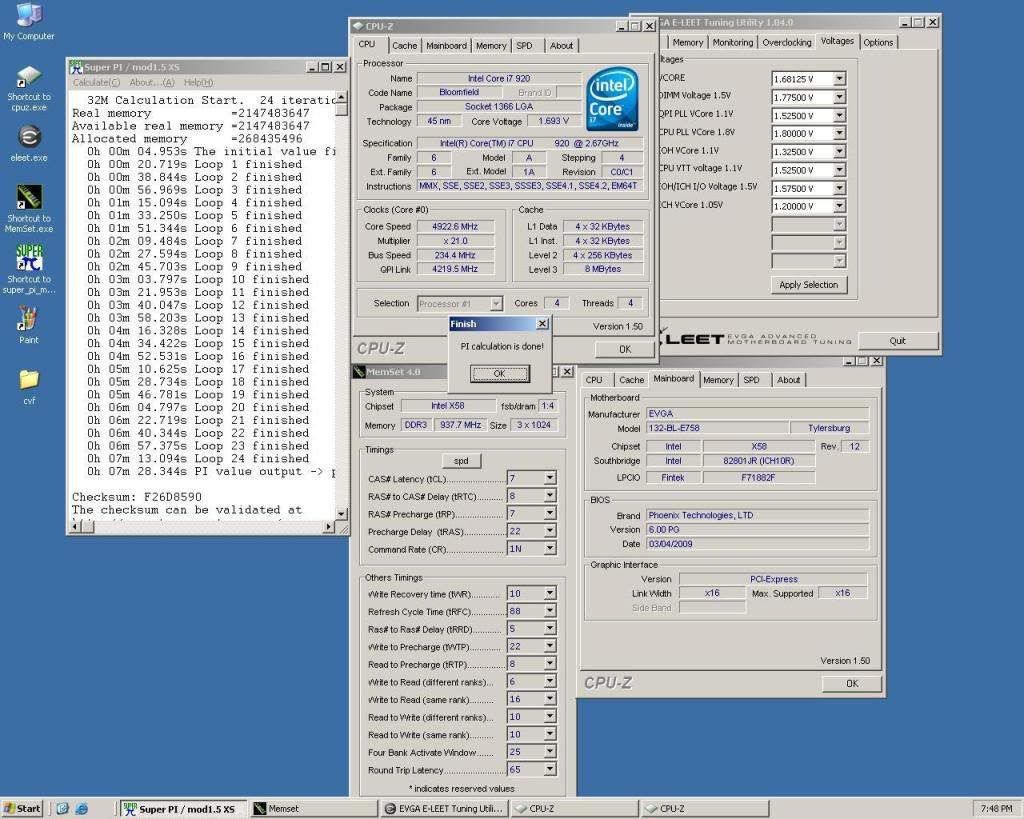
here is the superpi 32m from my last session with my cascade. lol this chip that i have really leaks voltage and needs a huge amount more juice to oc well than other ones i've seen.
Evga X58 sli under cascade
http://www.xtremesystems.org/forums/...d.php?t=219788
Evga X58 Sli ultimate overclocking/ overview/ discussion thread
http://www.xtremesystems.org/forums/...d.php?t=221082
proud owner of E8600 Q822A435
Nice work solar. This board is on it's way so I'll see what I can do with it on straight up water.
GB 790XTA UD4
GSkill Pi Black 2000 Cas9
ASUS 4870
Enermax Revolution 1050+
http://www.heatware.com/eval.php?id=67661
if your board is anything like mine you'll love it. im pretty surprised how easy this board is to overclock so far.
Evga X58 sli under cascade
http://www.xtremesystems.org/forums/...d.php?t=219788
Evga X58 Sli ultimate overclocking/ overview/ discussion thread
http://www.xtremesystems.org/forums/...d.php?t=221082
proud owner of E8600 Q822A435
Agreed! I finally got mine and have now had a couple of days with it. Very pleasant overclocking experience. What a fantastic board. I hit 4.0GHz with my i7 920 on air in minutes. Note, I'm using a TRUE with push-pull fan configurations. Both fans do 110-120cfm, so I'm dissipating a good amount of heat.
20x200 in BIOS yielded 4.189GHz in windows. I'm still figuring that one out ... anyways, that was on 1.49v with calibration enabled. Turbo mode is on at these settings, and HT is disabled. Heat never hits 70c, usually averaging around 64c, the hottest core peaked at 67c under 4 threads of Prime95 testing. Voltage never dropped more than .04, which is decent. I haven't tested with calibration disabled yet. Now, I can "only" get it stable at 4.0GHz with HT and turbo mode enabled, and it requires 1.53-1.54v, along with a boost on the CPU PLL voltage. Heat is in the high 70's for peak and the unit draws so much power with HT on that i had to disconnect everything but the tower from my UPS.That's a tremendous amount of power! The UPS just gave up and shut off while stressing the system with 8 threads of Prime95.
I also ran a test to see how much of a detriment HT would bring to gaming performance in older, and even some newer titles. I posted my results on HardForum, but for you guys I'll put them here.
4.0GHz with HT enabled: average of all bench runs (less than 1k variance between runs) was about 21,300.
4.0GHz without HT: average of runs (again with less than 1k variance between runs) yielded an average of 24,882. HT is really creating some substantial overhead in the system, along with a massive increase in power usage.
So I went back to 4.0GHz without HT, and I've climbed voltages down to 1.45v on the CPU. Runs nice and cool and stable so far. I am at school and I left the system at home running 4 threads of Prime95. If it doesn't throw any errors, then I will drop voltages again and repeat. The x58 has so far been a joy, except one thing:
Mine has a BAD SATA CONTROLLER! I already setup the advanced RMA from EVGA, but it SUCKS that my brand new motherboard is BAD and I have to PAY to replace it. GRRR...
SATA port 5 is bad pretty much all the time, regardless of cable or drive used. And this morning it took 5 reboots to finally get all my drives to wake up! What the heck ....
Workstation/Playstation: i7 920 D0 @ 3.8, TRUE, EVGA x58, BFG GTX 295, WD 640x2 in RAID 0, 12GB OCZ DDR3, ATCS 840, Dell 24" & Samsung 19", Razer Lycosa and Logitech G9r, HTO Striker, Windows 7 Ult. 64, Antec TruePower 1000w.
Wife's Computer: E4500 @ 3.0GHz on 1.36v, Rocketfish CPU Cooler, Foxconn, 4GB Corsair, Sea 250, Antec Sonata w/500w, ATI 2400, 17" Samsung, Vista Ult. 32.
HTPC: X2 2400BE, 500GB + 750GB + 80GB, ATI 3450 Hybrid CF w/Asus 780G, 4GB A-Data 800MHz DDR2, 32" Westinghouse, XBOX 360 HDDVD (w/o xbox), Aver DTV Tuner, Huappage DTV tuner, Windows 7 32 bit.
PDAs: iPod Touch 16GB and Samsung Omnia
See my work log here: PROJECT ATCS 840
It'll have to be stellar to beat this Extreme that I have but I'm hoping for at least a quality benching experience with it.
@ SirKronan - I'm sitting at 24/7 205x21 for 4305mhz at 1.4v HT off with the Extreme.
GB 790XTA UD4
GSkill Pi Black 2000 Cas9
ASUS 4870
Enermax Revolution 1050+
http://www.heatware.com/eval.php?id=67661
Why don't you test it?
Here I can get 4.1GHz with 1.38 vcore and 800KHz. In order to go to 4.2GHz, I have to set 933KHz and 1.44vcore...
Try it, you may be able to set it lower.. and it makes a lot of difference on mosfets' temperatures.. at least here, something around 8ºC.
Core i7 920 2.66 @ 4.2 Ghz Cooled By Thermalright True 120 Copper / eVGA x58 3xSLI / 3x2Gb RAM OCZ Gold 1600MHz 8-8-8-24/ TRI-Crossfire Sapphire HD4870X2 + PowerColor HD4870 1GB / 660 Gb Seagate(RAID0) / Zalman ZM1000-HP
I was running 6GB of OCZ stuff at CAS 8 w/1600MHz speeds. Some people on [H] told me I would likely need to bump voltages above spec to run 6 more gigs at the same speeds. Not so. I just popped in the other 6 and all 12GB of 1600MHz HD video editing glory are running at CAS 8 with the spec'd 1.65v. I haven't tried dialing voltage down on RAM yet. I'm still cranking things down on CPU voltage and stability testing for now.
Reverend and cadupradoo, are you guys running with or without Turbo mode enabled? You're getting similar clocks to me, but with lower voltage. So far mine appears stable at 4.06GHz with 1.45v and Turbo enabled. Turbo actually seems to appear to work, but I don't know if the benefits are tangible, or if it reduces stability at an otherwise stable voltage.
HT seems to do no good but add heat and reduce overall performance on my end.
Workstation/Playstation: i7 920 D0 @ 3.8, TRUE, EVGA x58, BFG GTX 295, WD 640x2 in RAID 0, 12GB OCZ DDR3, ATCS 840, Dell 24" & Samsung 19", Razer Lycosa and Logitech G9r, HTO Striker, Windows 7 Ult. 64, Antec TruePower 1000w.
Wife's Computer: E4500 @ 3.0GHz on 1.36v, Rocketfish CPU Cooler, Foxconn, 4GB Corsair, Sea 250, Antec Sonata w/500w, ATI 2400, 17" Samsung, Vista Ult. 32.
HTPC: X2 2400BE, 500GB + 750GB + 80GB, ATI 3450 Hybrid CF w/Asus 780G, 4GB A-Data 800MHz DDR2, 32" Westinghouse, XBOX 360 HDDVD (w/o xbox), Aver DTV Tuner, Huappage DTV tuner, Windows 7 32 bit.
PDAs: iPod Touch 16GB and Samsung Omnia
See my work log here: PROJECT ATCS 840
I have Turbo On... What I've been reading, especially on evga forum, is that the i7 doens't like even multiplies, so I always try to keep an odd one.
Which doesn't help, because 20 is unstable, and 19 too low.
What are your other voltages? Which PWM are you running on? PCI-E frequency? MCH Strap?
On my first tries I couldn't get 4.0 with less than 1.38V...
Today I use either 4.1 @1.388V or 4.2@1.45
Like you said, HT doesn't seem a big deal to me... It requires a lot more voltage than when it's off. I believe that's one of the keys of achieving a better OC with the i7...
Haven't notice any difference on performance either
Core i7 920 2.66 @ 4.2 Ghz Cooled By Thermalright True 120 Copper / eVGA x58 3xSLI / 3x2Gb RAM OCZ Gold 1600MHz 8-8-8-24/ TRI-Crossfire Sapphire HD4870X2 + PowerColor HD4870 1GB / 660 Gb Seagate(RAID0) / Zalman ZM1000-HP
I think I've got it stable down to the following:
1.425 Vcore
1.65 RAM
1.425 QPI PLL Vcore
2.1 CPU PLL Vcore
1.4 IOH Vcore
1.425 CPU VTT
1.65 IOH/ICH I/O
1.25 ICH Vcore
PCI E is at 100MHz, I think that was the default. In the EVGA OC guide for this board it recommended you manually set the QPI thingy to 4.8Gigawhatevers ... so I did that, too. MCH Strap is set to auto.
Ram is at just under 1600MHz CAS 8 with 1.65v. Seems cool and stable.
Here's someone that blows my mind, though:
http://hardforum.com/showthread.php?t=1393027&page=10
Check out towards the bottom of the page. There's a guy with a variant of the TRUE that's hitting 4.0 with HT enabled on 1.175 volts, and he's posted screen shots. That is crazy low, and he has a screen running all 8 threads of Prime. I have a hard time believing this, especially when I see his temps are higher than mine were even though I was using more voltage at 4.0GHz ... anyways, check that out. Even the BEST D0 stepping's aren't reported to be THAT good yet, are they???
Workstation/Playstation: i7 920 D0 @ 3.8, TRUE, EVGA x58, BFG GTX 295, WD 640x2 in RAID 0, 12GB OCZ DDR3, ATCS 840, Dell 24" & Samsung 19", Razer Lycosa and Logitech G9r, HTO Striker, Windows 7 Ult. 64, Antec TruePower 1000w.
Wife's Computer: E4500 @ 3.0GHz on 1.36v, Rocketfish CPU Cooler, Foxconn, 4GB Corsair, Sea 250, Antec Sonata w/500w, ATI 2400, 17" Samsung, Vista Ult. 32.
HTPC: X2 2400BE, 500GB + 750GB + 80GB, ATI 3450 Hybrid CF w/Asus 780G, 4GB A-Data 800MHz DDR2, 32" Westinghouse, XBOX 360 HDDVD (w/o xbox), Aver DTV Tuner, Huappage DTV tuner, Windows 7 32 bit.
PDAs: iPod Touch 16GB and Samsung Omnia
See my work log here: PROJECT ATCS 840
That's the power of the D0...
It is really amazing the OC they can achieve....It's not fair to compare a C0 stepping with a D0... Basically they achieve 4.0GHz with 1.18~1.2V... which means better temperatures... thats normal for the D0.
So, check if you are stable at these settings... Then try to reduce the voltages.. One step at a time, always checking stability...
Is this CPU VTT voltage the one set in BIOS or the one read in Windows?
I'd start reducing in this order:
IOH VCore -> IOH/ICH I/O -> QPI PLL Vcore-> 2.1 CPU PLL VCore -> ICH VCore
These aren't the most important voltages for 200 BCLK, so I think you can get them a little lower...
The try reducing the VTT, if the 1.425 is the one set in BIOS. If you get a 00000000124 BSOD, try setting the PCI-E at 103MHz. This BSOD is usually insufficient vtt or pci-e. Sometimes can mean vcore as well.
And keep going !
Core i7 920 2.66 @ 4.2 Ghz Cooled By Thermalright True 120 Copper / eVGA x58 3xSLI / 3x2Gb RAM OCZ Gold 1600MHz 8-8-8-24/ TRI-Crossfire Sapphire HD4870X2 + PowerColor HD4870 1GB / 660 Gb Seagate(RAID0) / Zalman ZM1000-HP
Still climbing down, and still finding apparent stability! I'm down to vcore: 1.417 now, and temps rarely hit 60c, and when they do, it's only on the primary core. I'm pretty stoked about my amazing temps on air! The mobo reports temps even lower, but I'm sticking with the higher realtemp numbers. Better to err on the side of caution when it comes to heat. I also dropped a couple of other voltages down, too, and so far Prime95 is happy. I couldn't be happier with this phenomenal motherboard ...
AND, I don't think it has a bad SATA controller anymore!! I switched the SATA power cable out on my modular PSU and now it comes up every time. Could it be that a SATA power cable went bad? I've never seen that happen, but I'm fairly new to modular PSU's. I called EVGA and told them to hold off sending me the replacement board so I could test it some more. So far everything is FLAWLESS since I replaced that power cable. I really don't want to replace a motherboard that overclocks like such a dream come true. I have NEVER had a motherboard THIS GOOD or THIS EASY to overclock THAT HIGH!!! vdroop is worlds better than it was on my crapbox 780i board from them, especially with quad cores.
Thanks for all the knowledge! This is going really well, and I have to thank you guys here and at EVGA and [H], too for all the advice and past experiences.
edit: what would setting the PCI-E at 103 vs the 100 it's set at change? Just curious.
Workstation/Playstation: i7 920 D0 @ 3.8, TRUE, EVGA x58, BFG GTX 295, WD 640x2 in RAID 0, 12GB OCZ DDR3, ATCS 840, Dell 24" & Samsung 19", Razer Lycosa and Logitech G9r, HTO Striker, Windows 7 Ult. 64, Antec TruePower 1000w.
Wife's Computer: E4500 @ 3.0GHz on 1.36v, Rocketfish CPU Cooler, Foxconn, 4GB Corsair, Sea 250, Antec Sonata w/500w, ATI 2400, 17" Samsung, Vista Ult. 32.
HTPC: X2 2400BE, 500GB + 750GB + 80GB, ATI 3450 Hybrid CF w/Asus 780G, 4GB A-Data 800MHz DDR2, 32" Westinghouse, XBOX 360 HDDVD (w/o xbox), Aver DTV Tuner, Huappage DTV tuner, Windows 7 32 bit.
PDAs: iPod Touch 16GB and Samsung Omnia
See my work log here: PROJECT ATCS 840
Now I'm still at 4.0GHz but on 1.4v vcore. That's really good! Temps in the 55's or lower even at full load. VTT is also down to 1.4v, and I put the CPU PLL down to 2.05v as well, down from 2.1.
Workstation/Playstation: i7 920 D0 @ 3.8, TRUE, EVGA x58, BFG GTX 295, WD 640x2 in RAID 0, 12GB OCZ DDR3, ATCS 840, Dell 24" & Samsung 19", Razer Lycosa and Logitech G9r, HTO Striker, Windows 7 Ult. 64, Antec TruePower 1000w.
Wife's Computer: E4500 @ 3.0GHz on 1.36v, Rocketfish CPU Cooler, Foxconn, 4GB Corsair, Sea 250, Antec Sonata w/500w, ATI 2400, 17" Samsung, Vista Ult. 32.
HTPC: X2 2400BE, 500GB + 750GB + 80GB, ATI 3450 Hybrid CF w/Asus 780G, 4GB A-Data 800MHz DDR2, 32" Westinghouse, XBOX 360 HDDVD (w/o xbox), Aver DTV Tuner, Huappage DTV tuner, Windows 7 32 bit.
PDAs: iPod Touch 16GB and Samsung Omnia
See my work log here: PROJECT ATCS 840
1.39 is a go. Now testing with 1.38. I know my test cycles aren't very long, but meh, I'm impatient! Lol.
Workstation/Playstation: i7 920 D0 @ 3.8, TRUE, EVGA x58, BFG GTX 295, WD 640x2 in RAID 0, 12GB OCZ DDR3, ATCS 840, Dell 24" & Samsung 19", Razer Lycosa and Logitech G9r, HTO Striker, Windows 7 Ult. 64, Antec TruePower 1000w.
Wife's Computer: E4500 @ 3.0GHz on 1.36v, Rocketfish CPU Cooler, Foxconn, 4GB Corsair, Sea 250, Antec Sonata w/500w, ATI 2400, 17" Samsung, Vista Ult. 32.
HTPC: X2 2400BE, 500GB + 750GB + 80GB, ATI 3450 Hybrid CF w/Asus 780G, 4GB A-Data 800MHz DDR2, 32" Westinghouse, XBOX 360 HDDVD (w/o xbox), Aver DTV Tuner, Huappage DTV tuner, Windows 7 32 bit.
PDAs: iPod Touch 16GB and Samsung Omnia
See my work log here: PROJECT ATCS 840
Is there a bios that lock the 21x MP on all cores? I have Xeon w3520 d0 and Evga x58.
With the newest bios, the uncore selection is gone.
just turn on the turbo option in bios that should do the trick. thats weird that your uncore selection option is missing, maybe reflashing the bios might do the trick
Evga X58 sli under cascade
http://www.xtremesystems.org/forums/...d.php?t=219788
Evga X58 Sli ultimate overclocking/ overview/ discussion thread
http://www.xtremesystems.org/forums/...d.php?t=221082
proud owner of E8600 Q822A435
Was the uncore selection available before with the Xeon? What I've heard is that this option isn't available on the Xeons, yet..
Core i7 920 2.66 @ 4.2 Ghz Cooled By Thermalright True 120 Copper / eVGA x58 3xSLI / 3x2Gb RAM OCZ Gold 1600MHz 8-8-8-24/ TRI-Crossfire Sapphire HD4870X2 + PowerColor HD4870 1GB / 660 Gb Seagate(RAID0) / Zalman ZM1000-HP
Did not check on the old bios. I got my xeon 2 days ago
I hope for a new bios soon
4,1 ghz @ 1,2v is easy with d0, but d0 is more hot on same voltage than normal 920.
 Posting Permissions



 Reply With Quote



Bookmarks