Results 1 to 25 of 4457

Thread: ASUS Maximus II Formula - new P45 king?

Hybrid View

  1. #1
    Xtreme Member
    Join Date
    Mar 2007
    Posts
    239
    Quote Originally Posted by Grnfinger View Post
    Well I have decided to go back on my word, and buy yet another Asus product.
    I have a kit of Corsair Dominators Vers 1.1 Micron D9GMH (B6-3) Handpicked and wont do 1200MHz on the MIIF but will do 1225MHz on the Maximus X38, so I finally have had enough of "what if I had bought a Rampage" and bought one.
    I've noted you stating the same a few times about how the MIIF and your RAM don't want to play ball and I'm baffled since as you know from my sig (which has been present for a year now or so), the MIIF is just fine with Micron RAM at 1200MHz effective. Also bare in mind I'm running 4 sticks of it.

    I've done 50x of Linx (IBT) on it with all the RAM options checked and it's fine. It's passed MS memory check for ages (over 50 passes) and that also proved it was OK. All this at 2.15V and the timings in my sig - all other RAM options are on auto or disabled except for performance level, transaction booster etc.

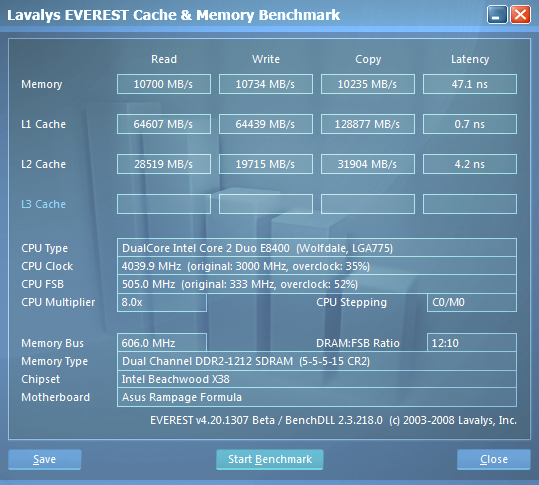
    The MIIF is definitely sensitive to the RAM BIOS settings, it's very easy to break stability. In fact the BIOS is buggy since if it wasn't for the cold boot problem (black screen), I could run my RAM at 5-4-5-18-30 at 1200MHz which gets the latency down to about 50.5ns in Everest.
    + Asus Maximus Formula II (Bios 2202)
    + Intel Xeon X3370 @ 4.04GHz 1.288V (475x8.5) VID 1.250
    + 4GB Kingston HyperX PC2-9600 DDR2 @ 1199MHz 5-5-5-18-2-30 @ 2.15V
    + BFG Tech 9800GTX+ OC @ 760/1890/2250
    + 4x150GB Raptor X in RAID0 via Adaptec 2405 SAS/SATA
    + Samsung SH-203B
    + Chieftec CFT-850-14C
    + Thermalright 120 Ultra Extreme 2000rpm
    + Windows XP Professional x64
    + Samsung 275T

    Laptop Memory UK

  2. #2
    Xtreme Member
    Join Date
    Mar 2007
    Posts
    239
    Hmmm

    Is it just me or has the recent XS Forums downtime caused a loss of some of this thread? Before it got taken down "for testing apparently" two days ago I remember evo posting about how he modded the MIIF 1901 BIOS and inserted the SLI string into it - these posts now seem gone entirely and the latest posts (other than my last one) date back to March 25th.

    Either my eyes are playing up or something is going wrong here. Anyone else notice the step back in time?
    + Asus Maximus Formula II (Bios 2202)
    + Intel Xeon X3370 @ 4.04GHz 1.288V (475x8.5) VID 1.250
    + 4GB Kingston HyperX PC2-9600 DDR2 @ 1199MHz 5-5-5-18-2-30 @ 2.15V
    + BFG Tech 9800GTX+ OC @ 760/1890/2250
    + 4x150GB Raptor X in RAID0 via Adaptec 2405 SAS/SATA
    + Samsung SH-203B
    + Chieftec CFT-850-14C
    + Thermalright 120 Ultra Extreme 2000rpm
    + Windows XP Professional x64
    + Samsung 275T

    Laptop Memory UK

  3. #3
    Banned
    Join Date
    Jul 2004
    Location
    Scotland
    Posts
    926
    Yip the forum has been down more than a hookers pants in recent weeks and posts are gone due to this (not sure if perm).

    I have same Mobo and Ram as you 2 and I cannot even save and exit bios at 1200mhz or about above 1175mhz.

    No amount of voltage or settings change it.

    Hope the newer Rev A3 is better but the lesser models now have Turbo models with DDR21333 support.

  4. #4
    Banned
    Join Date
    Nov 2007
    Posts
    1,941
    Quote Originally Posted by GFORCE100 View Post
    I've noted you stating the same a few times about how the MIIF and your RAM don't want to play ball and I'm baffled since as you know from my sig (which has been present for a year now or so), the MIIF is just fine with Micron RAM at 1200MHz effective. Also bare in mind I'm running 4 sticks of it.

    I've done 50x of Linx (IBT) on it with all the RAM options checked and it's fine. It's passed MS memory check for ages (over 50 passes) and that also proved it was OK. All this at 2.15V and the timings in my sig - all other RAM options are on auto or disabled except for performance level, transaction booster etc.

    The MIIF is definitely sensitive to the RAM BIOS settings, it's very easy to break stability. In fact the BIOS is buggy since if it wasn't for the cold boot problem (black screen), I could run my RAM at 5-4-5-18-30 at 1200MHz which gets the latency down to about 50.5ns in Everest.
    I have 2 MIIF boards, highest I can clock my Micron D9GMH sticks is around 1175MHz or so, regardless of timing or strap I cannot post above that.
    Hoped this board would be a great performer, but sadly its not.

    Just waiting on my mosfet block for the Rampage board, when they arrive I will do a head to head, clock for clock, quad and dualie comparison.
    But I already know who the winner will be

    Quote Originally Posted by e.v.o View Post
    just wait guys.. i will bring you a new bios with all those goodies included in the newer boards. things i'm planning to change:
    update all roms to their newest version
    patch the memory table (ddr2-1300 support)
    get sli working
    maybe qfan plus (very nice.. it controls the opt_fan through opt_temp! great improvement! )

    also i'm planning to patch the audio drivers to a newer version and get the turboV software from the rampage II/p5q turbo running on our MIIF
    It's like polishing a turd, no matter what you do to it, its still a pos

  5. #5
    Banned
    Join Date
    Jul 2004
    Location
    Scotland
    Posts
    926
    At least the guy is trying.

    This is the MFII thread not any other Mobo and I'm kind of glad all the posts are lost that were totally of topic and pic's of Rampage Mobos.

  6. #6
    Xtreme Member
    Join Date
    Mar 2007
    Posts
    239
    Quote Originally Posted by Grnfinger View Post
    I have 2 MIIF boards, highest I can clock my Micron D9GMH sticks is around 1175MHz or so, regardless of timing or strap I cannot post above that.
    Hoped this board would be a great performer, but sadly its not.
    Even if you try the below settings?

    CPU Ratio - 9
    FSB Freq - 450

    Effective CPU clock speed = 4.05GHz.

    RAM/MCH related settings (RAM timings as 5-5-5-18):

    AI Overclock Tuner - Manual
    FSB Strap to NB - Auto
    DRAM Freq - 1199MHz
    DRAM CLK Skew A1 - -50ns
    DRAM CLK Skew A2 - -50ns
    DRAM CLK Skew B1 - -50ns
    DRAM CLK Skew B2 - -50ns
    DRAM Timing Control - Manual
    Performance Level - 7
    DRAM Static Read Control - Disabled
    DRAM Read Training - Disabled
    MEM OC Charger - Enabled
    Ai Clock Twister - Strong
    NB Voltage - 1.35175
    CPU Clock Skew - 200ns
    NB Clock Skew - 100ns
    + Asus Maximus Formula II (Bios 2202)
    + Intel Xeon X3370 @ 4.04GHz 1.288V (475x8.5) VID 1.250
    + 4GB Kingston HyperX PC2-9600 DDR2 @ 1199MHz 5-5-5-18-2-30 @ 2.15V
    + BFG Tech 9800GTX+ OC @ 760/1890/2250
    + 4x150GB Raptor X in RAID0 via Adaptec 2405 SAS/SATA
    + Samsung SH-203B
    + Chieftec CFT-850-14C
    + Thermalright 120 Ultra Extreme 2000rpm
    + Windows XP Professional x64
    + Samsung 275T

    Laptop Memory UK

  7. #7
    Banned
    Join Date
    Nov 2007
    Posts
    1,941
    Quote Originally Posted by GFORCE100 View Post
    Even if you try the below settings?

    CPU Ratio - 9
    FSB Freq - 450

    Effective CPU clock speed = 4.05GHz.

    RAM/MCH related settings (RAM timings as 5-5-5-18):

    AI Overclock Tuner - Manual
    FSB Strap to NB - Auto
    DRAM Freq - 1199MHz
    DRAM CLK Skew A1 - -50ns
    DRAM CLK Skew A2 - -50ns
    DRAM CLK Skew B1 - -50ns
    DRAM CLK Skew B2 - -50ns
    DRAM Timing Control - Manual
    Performance Level - 7
    DRAM Static Read Control - Disabled
    DRAM Read Training - Disabled
    MEM OC Charger - Enabled
    Ai Clock Twister - Strong
    NB Voltage - 1.35175
    CPU Clock Skew - 200ns
    NB Clock Skew - 100ns
    I will try them and report back shortly

  8. #8
    Banned
    Join Date
    Jul 2004
    Location
    Scotland
    Posts
    926
    Quote Originally Posted by GFORCE100 View Post
    Even if you try the below settings?

    CPU Ratio - 9
    FSB Freq - 450

    Effective CPU clock speed = 4.05GHz.

    RAM/MCH related settings (RAM timings as 5-5-5-18):

    AI Overclock Tuner - Manual
    FSB Strap to NB - Auto
    DRAM Freq - 1199MHz
    DRAM CLK Skew A1 - -50ns
    DRAM CLK Skew A2 - -50ns
    DRAM CLK Skew B1 - -50ns
    DRAM CLK Skew B2 - -50ns
    DRAM Timing Control - Manual
    Performance Level - 7
    DRAM Static Read Control - Disabled
    DRAM Read Training - Disabled
    MEM OC Charger - Enabled
    Ai Clock Twister - Strong
    NB Voltage - 1.35175
    CPU Clock Skew - 200ns
    NB Clock Skew - 100ns
    As promised I tried your settings and I knew before I even tried it would be a total waste of time for me (thanks for info though).

    It cant even Post the Bios no matter how much voltage add.

    There is no way getting to 1175mhz needs next to no fancy adjustments then above that it needs major adjustments.

    Asus simply have made a boob of the Bios and support for certain Memory IMO.
    Last edited by humeyboy; 04-22-2009 at 06:54 PM. Reason: Typo's

  9. #9
    Xtreme Member
    Join Date
    Mar 2007
    Posts
    239
    Quote Originally Posted by humeyboy View Post
    As promised I tried your settings and I knew before I even tried it would be a total waste of time for me (thanks for info though).

    It cant even Post the Bios no matter how much voltage add.

    There is no way getting to 1175mhz needs next to no fancy adjustments then above that it needs major adjustments.

    Asus simply have made a boob of the Bios and support for certain Memory IMO.
    Well this proves any of the below:
    1) Not all MIIF boards are equal
    2) Your RAM simply does not want to play ball (compatibility issue).

    It's a pity you don't have access to the Kingston I use as that would prove whether it's your RAM or board. I tend to side with 2 above.
    + Asus Maximus Formula II (Bios 2202)
    + Intel Xeon X3370 @ 4.04GHz 1.288V (475x8.5) VID 1.250
    + 4GB Kingston HyperX PC2-9600 DDR2 @ 1199MHz 5-5-5-18-2-30 @ 2.15V
    + BFG Tech 9800GTX+ OC @ 760/1890/2250
    + 4x150GB Raptor X in RAID0 via Adaptec 2405 SAS/SATA
    + Samsung SH-203B
    + Chieftec CFT-850-14C
    + Thermalright 120 Ultra Extreme 2000rpm
    + Windows XP Professional x64
    + Samsung 275T

    Laptop Memory UK

  10. #10
    Banned
    Join Date
    Nov 2007
    Posts
    1,941
    Quote Originally Posted by GFORCE100 View Post
    Well this proves any of the below:
    1) Not all MIIF boards are equal
    2) Your RAM simply does not want to play ball (compatibility issue).

    It's a pity you don't have access to the Kingston I use as that would prove whether it's your RAM or board. I tend to side with 2 above.
    Well unless his Dominators are vers 1.1 and he pulled 2 stick, 1200MHz will never happen.
    Been very busy last few days, will try out your settings today when I get home from work. I know my ram does 1200+MHz so it will be interesting.


  11. #11
    Xtreme Member
    Join Date
    Mar 2007
    Posts
    239
    I've just been into my BIOS and noticed the above BIOS settings I provided to be slightly erroneous.

    Here's them again with the slight fix included:

    CPU Ratio - 9
    FSB Freq - 450

    Effective CPU clock speed = 4.05GHz.

    RAM/MCH related settings (RAM timings as 5-5-5-18):

    AI Overclock Tuner - Manual
    FSB Strap to NB - Auto
    DRAM Freq - 1199MHz
    DRAM CLK Skew A1 - Delay 50ns
    DRAM CLK Skew A2 - Delay 50ns
    DRAM CLK Skew B1 - Delay 50ns
    DRAM CLK Skew B2 - Delay 50ns
    DRAM Timing Control - Manual
    Performance Level - 7
    DRAM Static Read Control - Disabled
    DRAM Read Training - Disabled
    MEM OC Charger - Enabled
    Ai Clock Twister - Strong
    NB Voltage - 1.35175V
    CPU Clock Skew - 100ns
    NB Clock Skew - 100ns
    + Asus Maximus Formula II (Bios 2202)
    + Intel Xeon X3370 @ 4.04GHz 1.288V (475x8.5) VID 1.250
    + 4GB Kingston HyperX PC2-9600 DDR2 @ 1199MHz 5-5-5-18-2-30 @ 2.15V
    + BFG Tech 9800GTX+ OC @ 760/1890/2250
    + 4x150GB Raptor X in RAID0 via Adaptec 2405 SAS/SATA
    + Samsung SH-203B
    + Chieftec CFT-850-14C
    + Thermalright 120 Ultra Extreme 2000rpm
    + Windows XP Professional x64
    + Samsung 275T

    Laptop Memory UK

Tags for this Thread

Bookmarks

Bookmarks

Posting Permissions

  • You may not post new threads
  • You may not post replies
  • You may not post attachments
  • You may not edit your posts
  •