MMM
Results 1 to 25 of 390

Thread: Tutorial: How to softmod to ANY VGPU you want without hardmods! (1.3~1.6v or more)

Hybrid View

  1. #1
    Xtreme Addict
    Join Date
    Nov 2005
    Location
    UK
    Posts
    1,074
    Thanks for that

    Couple of things, I had to register two ocx files to get it work on Vista64, no big thing.

    regsvr32 C:\Windows\SysWOW64\Comdlg32.ocx

    regsvr32 C:\Windows\SysWOW64\TABCTL32.OCX

    First page works fine. Second page the command line has imported the wrong device ID, should i1 not i3.
    Also the Rivatuner device for the second GPU (4870x2 at least) is /sd2
    Quote Originally Posted by Unwinder View Post
    You should apply changes to both GPU VRMs. CLI works with GPU selected in the main tab of RivaTuner. There is /sd<device_index> or /selectdevice<device_index> command allowing to change device selection via CLI. <device_index> is 0-based logical display device index, i.e. if there are 4 virtual display devices (2 heads representing independent displays for the primary GPU and 2 more heads for the secondary) then your should select the first (0) then the third (2) logical devices when applying the changes. In this example, command line for probing VRMs of both GPUs can look like:

    RivaTuner.exe /sd0 /ri3,70,1a /sd2 /ri3,70,1a

    Final line should be like this
    rivatuner /sd0 /wi1,70,16,31 /wi1,70,18,44 /sd2 /wi1,70,16,31 /wi1,70,18,44


    Last edited by fornowagain; 02-04-2009 at 09:09 AM.

    i7| EX58-EXTREME | SSD M225 | Radbox | 5870CF + 9600GT

  2. #2
    Registered User
    Join Date
    Dec 2006
    Location
    Denmark
    Posts
    58
    Quote Originally Posted by fornowagain View Post
    Thanks for that

    Couple of things, I had to register two ocx files to get it work on Vista64, no big thing.

    regsvr32 C:\Windows\SysWOW64\Comdlg32.ocx

    regsvr32 C:\Windows\SysWOW64\TABCTL32.OCX

    First page works fine. Second page the command line has imported the wrong device ID, should i1 not i3.
    Also the Rivatuner device for the second GPU (4870x2 at least) is /sd2

    Final line should be like this
    rivatuner /sd0 /wi1,70,16,31 /wi1,70,18,44 /sd2 /wi1,70,16,31 /wi1,70,18,44
    Thank you for your feedback

    I know the problem about selecting the devices. The program cant dectect the device id automatically. So i have programmed it to use sd 0 and sd 1. sd 1 is used becuse thats the only id you can use when you are trying to change the voltage on GTX 295's GPU 1. As you said you need to use sd 2 if you want to change the voltage on 4870 X2's GPU 1.

    Im trying to figure out how to build the application so its going to support both cards. But my problem is that this application has to be easy to use and there is a lot of combinations when you are using this mod with different cards and setups (SLi & CF). But if you have some good ideas please contribute
    OCTeamDenmark Staff - Cooled and sponsored by CoolerKit.dk


    Click on the sig to get my HWbot status!

  3. #3
    Registered User
    Join Date
    Jul 2006
    Location
    Maryland - US
    Posts
    96
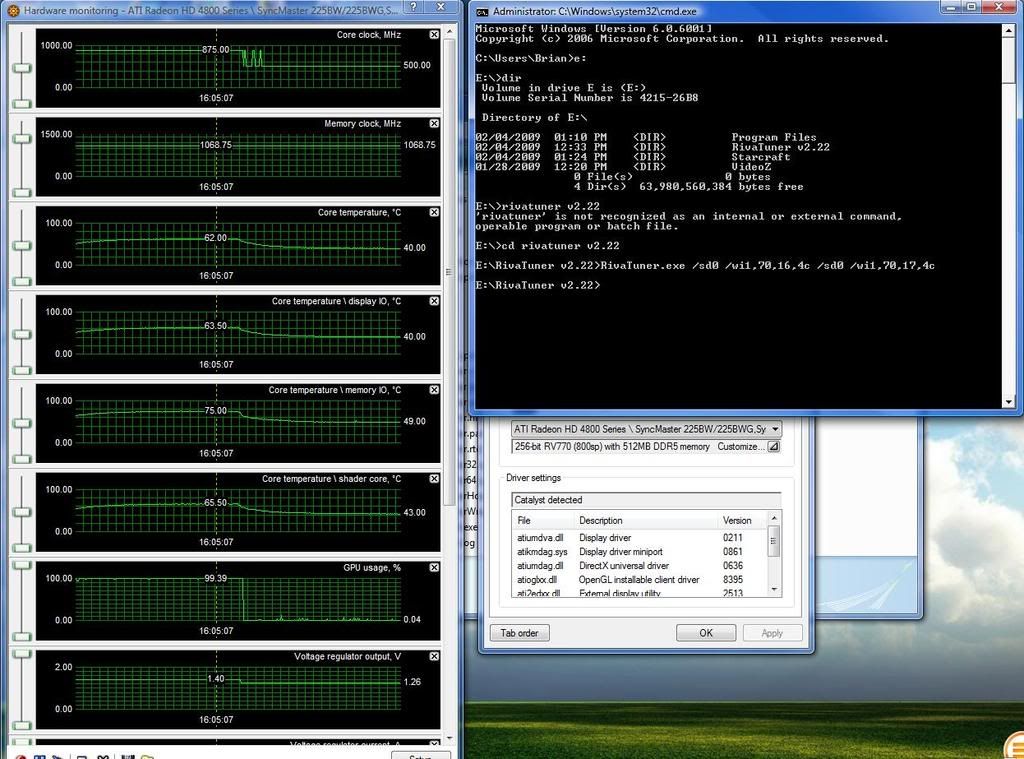
    I can confirm this worked for me.

    I have a screenshot of the final command i ran for my 4870 512mb.
    Voltage bumped from stock 1.26 to 1.40.

    Original voltage i game at 835/1070. After the voltage increase tried gaming at 875/1070 with 1.40 volts viewed in RivaTuner.

    Even with 1.40 volts the card was unstable at the new speeds. Crashed 2 mins. of COD5 multiplayer.


    Cooler Master Stacker 810 WATERCOOLED
    Black Ice GTX 360 // Danger Den TDX CPU WB //
    Maze 4 GPU WB // D5 Pump // SwifTech Micro Res.
    ASUS P5B DELUXE // E8400 @ 4410MHz 490*9 1.41v
    2x2GB MUSHKIN ASCENT DDR2 1066
    SAPPHIRE OC HD5970 2Gb @ 900-1150
    Corsair HX1000w // SB Audigy 4

  4. #4
    Banned
    Join Date
    Jan 2004
    Location
    Saskatoon,Sask Canada
    Posts
    278
    i tried to register the tabctl32.ocx,and the error i get is this

    the specified module could not be found.
    os is xp pro sp2
    any fix for this?

Tags for this Thread

Bookmarks

Bookmarks

Posting Permissions

  • You may not post new threads
  • You may not post replies
  • You may not post attachments
  • You may not edit your posts
  •