

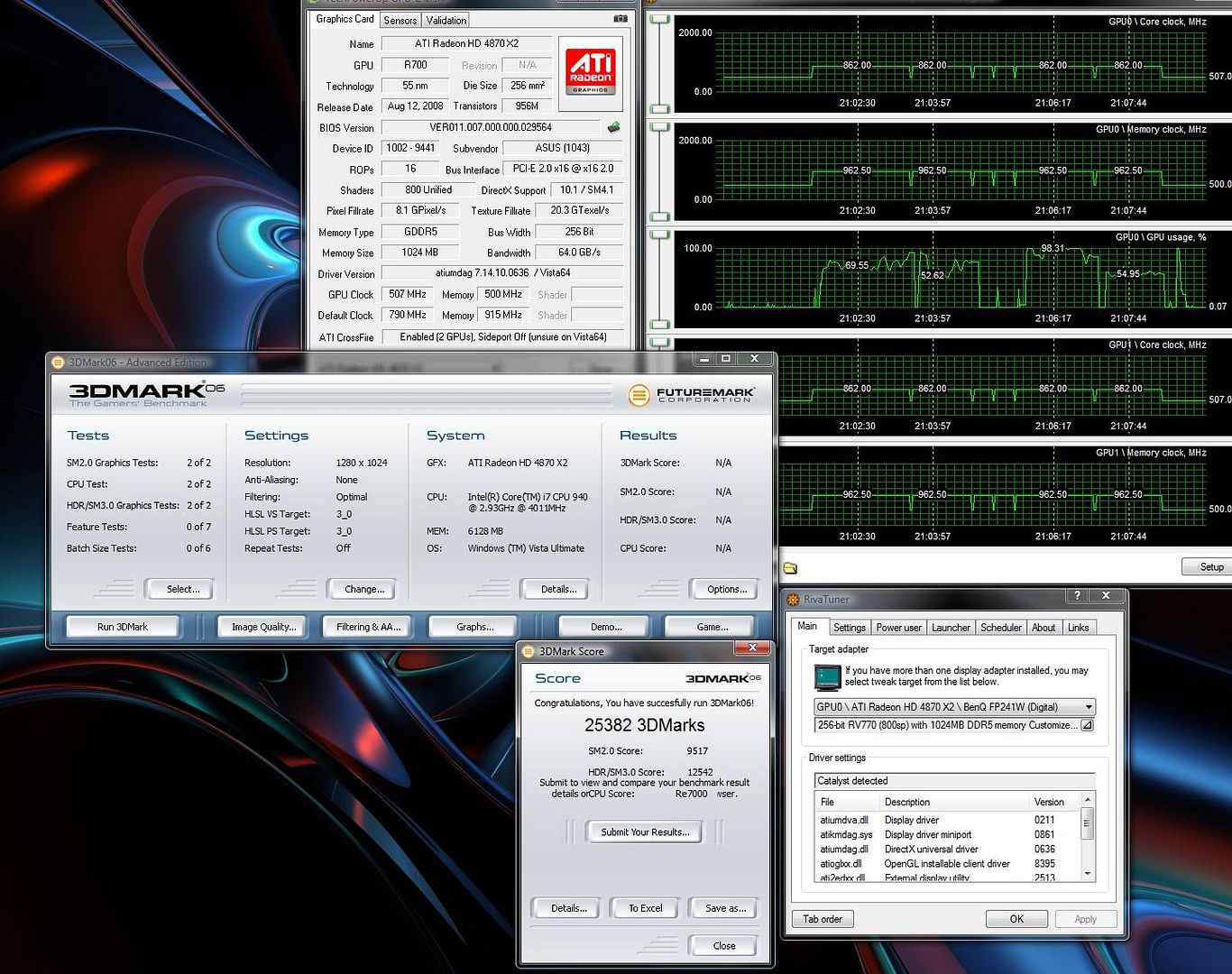
So you're saying you can pass 3dmark06 at 1.36v at 860?Originally Posted by fornowagain

--Matt



So you're saying you can pass 3dmark06 at 1.36v at 860?
--Matt
My Rig :
Core i5 4570S - ASUS Z87I-DELUXE - 16GB Mushkin Blackline DDR3-2400 - 256GB Plextor M5 Pro Xtreme

i can pass 3dmark06 at with 860 on the cores, but any higher and it just locks up or reboots, or i get a driver recovery (if i'm lucky) on the firefly test
Last edited by Pyr0; 01-31-2009 at 12:57 PM.
i950 (3035B684)
Gigabyte EX58A-UD3R
3x4GB G.Skill PC3-12800 7-8-7-24
HIS Radeon HD 6970 2GB & Dell 3007WFP-HC
Asus Xonar DX
128GB C300, Velociraptor & Sammy F3's
Corsair AX850W
Windows 7 Ultimate x64 SP1

No, I'm saying I can pass 3dmark06 at 1.35v at 860
Good for you, I can't even run 840 at 1,35V through firefly forest. 832 working fine at eitehr stock 1,26V or 1,35V.. this sucks.
You have any pics? Hwbot score? You must be pretty lucky, since it doesn't seem to work that well for most other folks.
--Matt
My Rig :
Core i5 4570S - ASUS Z87I-DELUXE - 16GB Mushkin Blackline DDR3-2400 - 256GB Plextor M5 Pro Xtreme
Lol, you don't believe me?
It does seem pretty unbelievable given the luck that others have had. Does your card pass 3dmark06 at higher than 837 without the mod? Perhaps you're just blessed with a good OCer? My GPUs never pass 31C with the mod set to 1.35v, but I sure can't run 3dmark06 at 860mhz at that spec.
--Matt
My Rig :
Core i5 4570S - ASUS Z87I-DELUXE - 16GB Mushkin Blackline DDR3-2400 - 256GB Plextor M5 Pro Xtreme
Last edited by fornowagain; 01-31-2009 at 02:01 PM.
I believe you now. I haven't tried this with the Asus bios yet. I wonder if it might have something to do with your success. Or, if it's a genuine Aus TOP card, maybe it's just a better than average card.
--Matt
Last edited by mattkosem; 01-31-2009 at 02:37 PM.
My Rig :
Core i5 4570S - ASUS Z87I-DELUXE - 16GB Mushkin Blackline DDR3-2400 - 256GB Plextor M5 Pro Xtreme
Gee thanks, how gracious of you.
fornowagain:
I think what people are asking you is to overclock your card to 860, WITHOUT the vcore soft mod, and then see if you can pass firefly at 860.
And if you dont pass, to tell us what your highest gpu mhz you can get at the stock volts without firefly forest crashing.
That will help us at least have some idea what's going on. Do you see?
Because, I, like many others, arent getting 1 higher mhz with the vcore mod in firefly forest, and people think it's the shaders not getting higher volts (but no way to know for sure?).
Pyr0:
This goes for you too.
Please test highest clocks without the vmod.
I see pyr0 has an asus card, but what card do you have?
Last edited by Falkentyne; 01-31-2009 at 03:01 PM.
Hey I don't mind questions, I do resent being called a liar and printing dumb pictures. Its not for hwbot points, word should be good enough.
Don't you guys volt mod? There is one voltage control for the core and that includes the shaders. Get a multimeter, there are no more voltages that change with VID. It won't pass consistently at 862 with much less vcore (stock volts first run is 50/50), drop 25mhz is solid again. It doesn't crash in one spot, but tends to freeze in Canyon Flight or firefly. Just wish I could figure out why I can't get anymore vcore.
Oh, its a Sapphire, Asus bios. TOP bios helps the ram timings is all.
Last edited by fornowagain; 01-31-2009 at 04:06 PM.
i can't pass 3dmark06 over 850 without the softmod, and see some artefacting with stock voltage at that speed
[edit] incase it matters, my card is just a standard asus 4870x2, but i've flashed it to the top bios
Last edited by Pyr0; 01-31-2009 at 03:28 PM.
i950 (3035B684)
Gigabyte EX58A-UD3R
3x4GB G.Skill PC3-12800 7-8-7-24
HIS Radeon HD 6970 2GB & Dell 3007WFP-HC
Asus Xonar DX
128GB C300, Velociraptor & Sammy F3's
Corsair AX850W
Windows 7 Ultimate x64 SP1
If this work with 9800 GX2, can someone post the command?
Thank's!
|RIIIE||Xeon W3520#3845A935|EVGA GTX480||PC3 16000 Kingston HyperX 6GB||2x150GB WD VRaptor||WD6401AALS||HAF 932//CM 1250W||LenovoL220x||X-Fi Xtreme Music||Lycosa+Lachesis+Destructor+G27+P880|
WC-Loop1: CPU |EK-Supreme HF|Magicool Xtreme III||MCP355||MCRES| Loop2: VGA/NB| EK-FC480 GTX-Acetal / MCW30|MCP655|MCR220QP|MCRES|
It does work yes, you'll need to run through the OP to get the numbers you need,
or here > http://www.ocxtreme.org/forumenus/showthread.php?t=4427
Last edited by fornowagain; 01-31-2009 at 03:34 PM.
The problem is, my card passes firefly forest at 830, with stock voltage, but wont do it any higher, regardless of voltage.
And the temps are fine too, around 62C ....
And this same problem is happening to others too....
yet the people who are having the firefly problem can fold at higher speeds than before or run vantage more stable....
Last edited by Falkentyne; 01-31-2009 at 03:39 PM.
Have you verified that the vcore has actually increased? Because I've proven to myself at least that you can't believe the VID value displayed by Riva. Does the load current scale, does it stop at some point? I know mine stops at 1.35v, do you know yours does to? Maybe its lower, maybe they're not all the same?
Clutching at straws here, some bios limit? I can't select more than 1.35v using RBE either.
Last edited by fornowagain; 01-31-2009 at 03:42 PM.
Hey now, I wasn't calling you a liar. I simply requested proof. Heck, I even gave you the benefit of the doubt and suggested that you might have gotten lucky with your card. Your results are, as you can see, substantially better than the results that everyone else (Pyr0 excluded) is seeing. I don't feel that it's unreasonable to request some data given the circumstances, and would have gladly done so without harsh words if I were in your situation.
--Matt
Last edited by mattkosem; 01-31-2009 at 04:15 PM.
My Rig :
Core i5 4570S - ASUS Z87I-DELUXE - 16GB Mushkin Blackline DDR3-2400 - 256GB Plextor M5 Pro Xtreme
Thanks for the reply,
I looked at the load scale at idle but it didn't change.
I haven't checked when running a game though.
Should it change at idle?
In this instance I judged that entirely the same thing and said so. Had I not produced a screen shot what then would have been response eh? You said my clocks were unbelievable, I can but take that one way. Choose your words more carefully or take people at face value. Had I been in you position I would have taken your word without ridiculous screen shots. There were no points to score, I merely stated I needed more voltage for a certain clock. Do try and have some faith in your fellow man.
Go back to the image I posted of the load current. IF the VID has increased then the core MUST consume more current at a given frequency. Load a game that doesn't mind dropping to/from desktop a few times or folding etc. Watch the load current for the stock VID, increase the VID a few steps. See if the current increases, mine does to start with then stops at a point.
Last edited by fornowagain; 01-31-2009 at 04:32 PM.
Hi,
Just tested it with gpu-z. it changed with each setting correctly.
I just ran "AMD GPU tool" to overclock, and when I changed the voltages, the current DID NOT change.
(neither did the vcore, but I do remember it changing before >_>).
WTH is AMD GPU clock doing? locking out the registers?...or are the sensors just failing to respond?
Bah whatever the AMD GPUtool is doing, doesn't matter; I used ATT to overclock and current/vcore changed correctly also, but i still can't get higher than 830 mhz on firefly forest. I tried 850, 1.35 vcore and 65% fan and it locked in 10 seconds.
840 mhz died after a few passes. 835 mhz did 5 passes before crashing. Vcore didn't matter...
I guess it's back to the drawing board then, as to why more vcore isnt helping firefly forest....
The only thing I have NOT done is lowered the RAM speed. (I always set it to 1125, which is artifact free).
Last edited by Falkentyne; 01-31-2009 at 05:09 PM.
Well, therein lies the problem. You read my post with a negative connotation. You understood the word unbelievable as "too improbable for belief" instead of as "of such a superlative degree as to be hard to believe" as I intended to communicate.
I'll work on more careful wording, but you should probably work on meeting curiosity with less hostility. Anyways, this has gone OT enough. Thanks for providing the image, nice work.
--Matt
Last edited by mattkosem; 01-31-2009 at 04:49 PM.
My Rig :
Core i5 4570S - ASUS Z87I-DELUXE - 16GB Mushkin Blackline DDR3-2400 - 256GB Plextor M5 Pro Xtreme
The VDDC load current stepped up inline with the increased VID? Does it stop increasing or stop. Rivatuner is probably better as you can expand the scale to see more.
I kept editing my post several times through reboots and testing (different computer).
Yes the monitoring worked fine, as long as I didnt run AMD GPU tool. as soon I ran it, (without even changing settings) the sensors 'vanished' or something or if already active, froze. Using ATT to overclock was fine.
The current went up with the vid (at idle) and apparently alot more at load.
anyhow, same result..can't go any higher in firefly forest, regardless of the vcore/current. My max is 830 mhz regardless of voltage. (835 mhz works for about 3-4 runs then lockup, etc).
Thank's man and @3oh6 too. I've tried this and now my card works at 846MHz GPU, 1.44v from the first try
Now I'll burn it
|RIIIE||Xeon W3520#3845A935|EVGA GTX480||PC3 16000 Kingston HyperX 6GB||2x150GB WD VRaptor||WD6401AALS||HAF 932//CM 1250W||LenovoL220x||X-Fi Xtreme Music||Lycosa+Lachesis+Destructor+G27+P880|
WC-Loop1: CPU |EK-Supreme HF|Magicool Xtreme III||MCP355||MCRES| Loop2: VGA/NB| EK-FC480 GTX-Acetal / MCW30|MCP655|MCR220QP|MCRES|


 Reply With Quote



Bookmarks