MMM
Results 1 to 25 of 7441

Thread: ** Official ** Gigabyte UD3 P45 Series -- EP45-UD3 / EP45-UD3R / EP45-UD3P

Hybrid View

  1. #1
    Xtreme Member
    Join Date
    Oct 2008
    Posts
    256
    Quote Originally Posted by a573573 View Post
    That is ONLY because ET Shows the .xx % of Vtt of what you set in the BIOS. The Default Value of MCH Ref is .63% of Vtt at stock of 1.20V, which is .756 (.76)

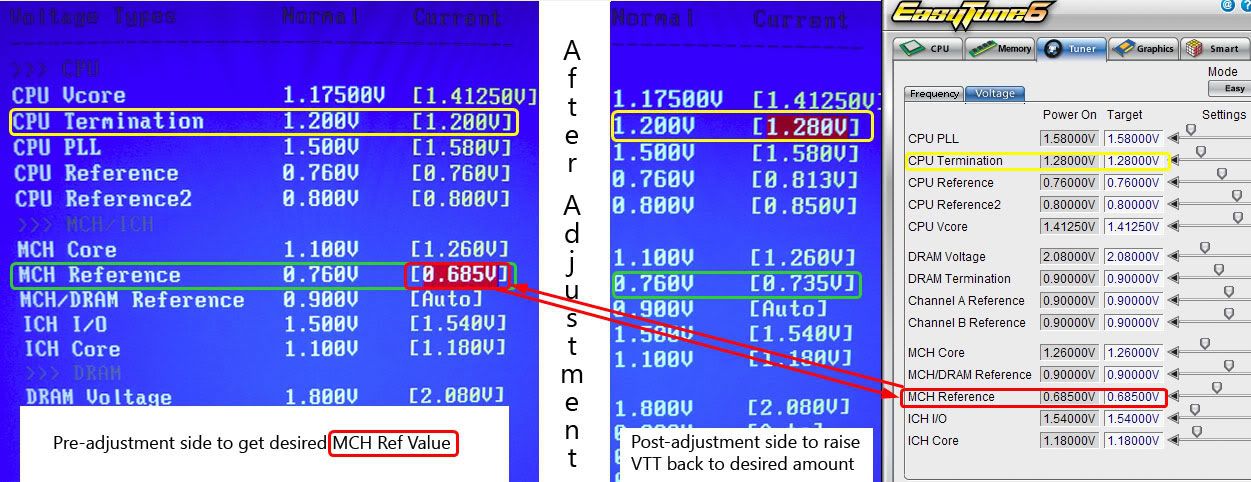
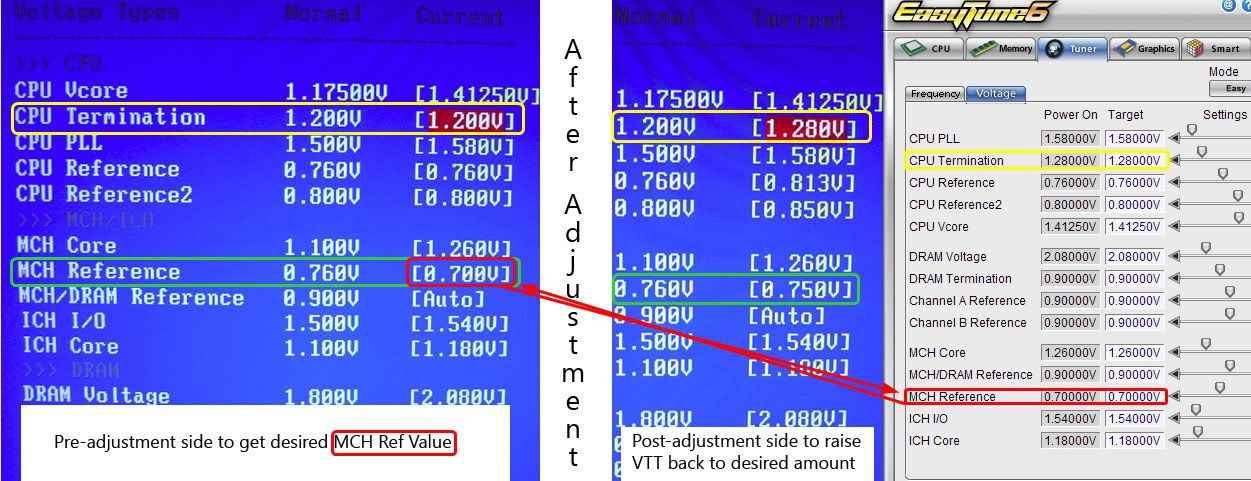
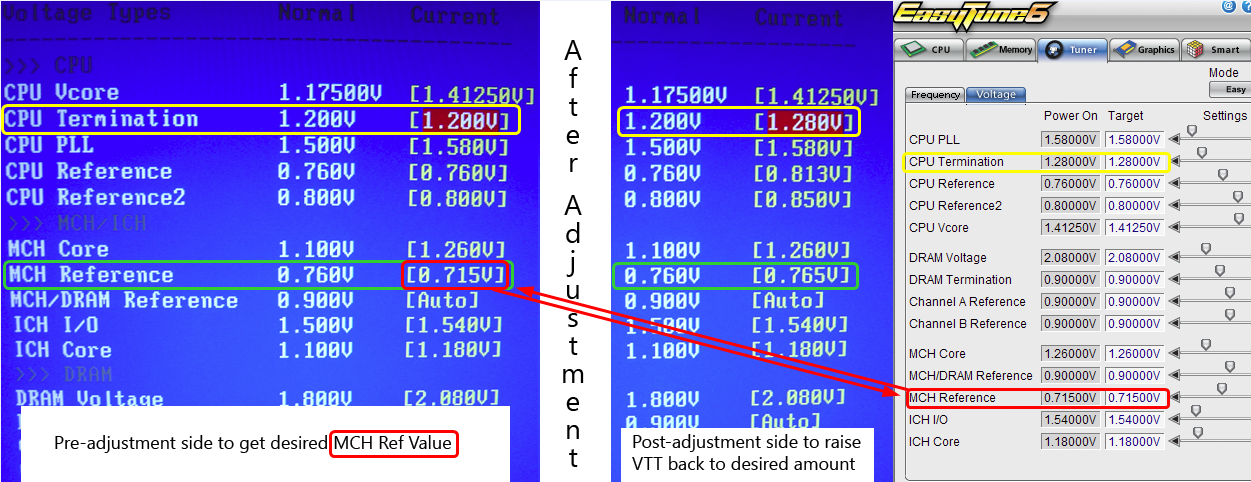
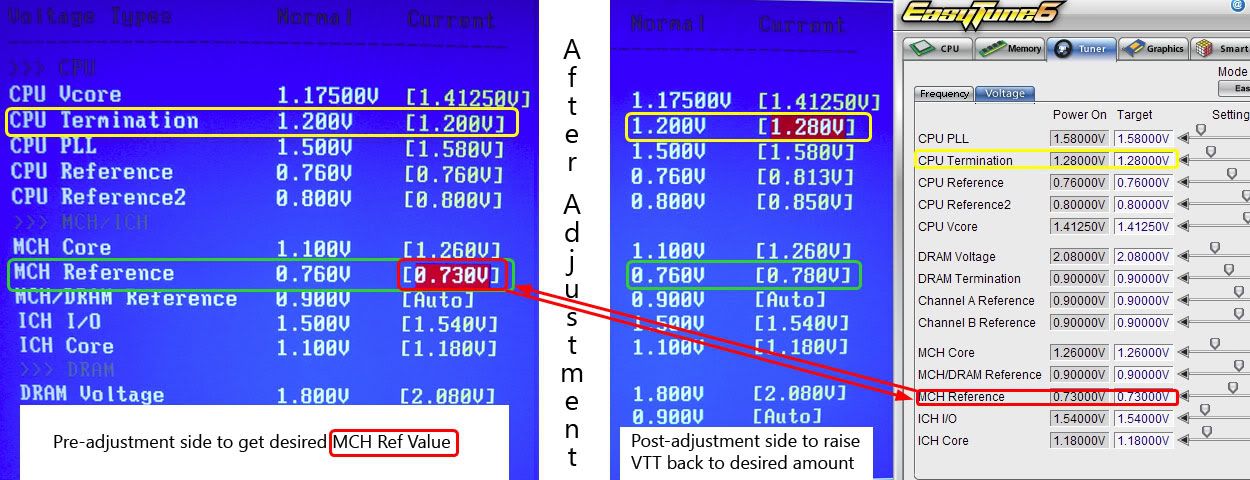
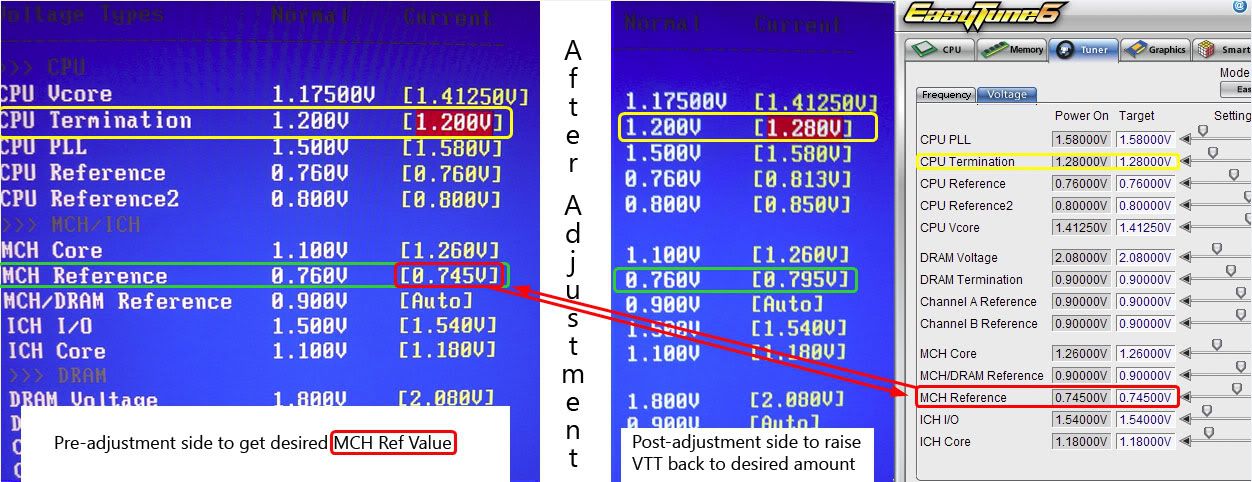
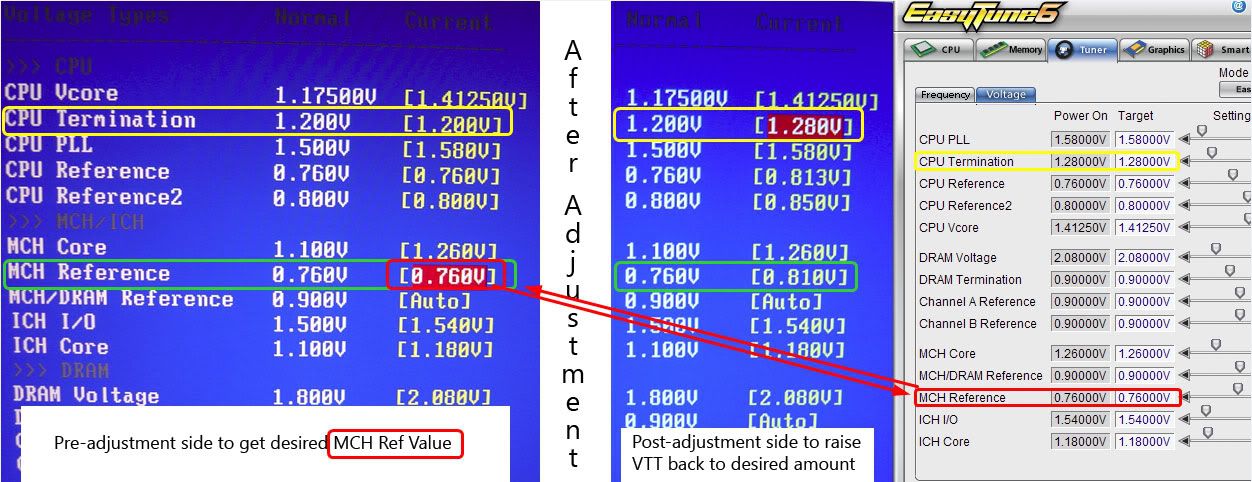
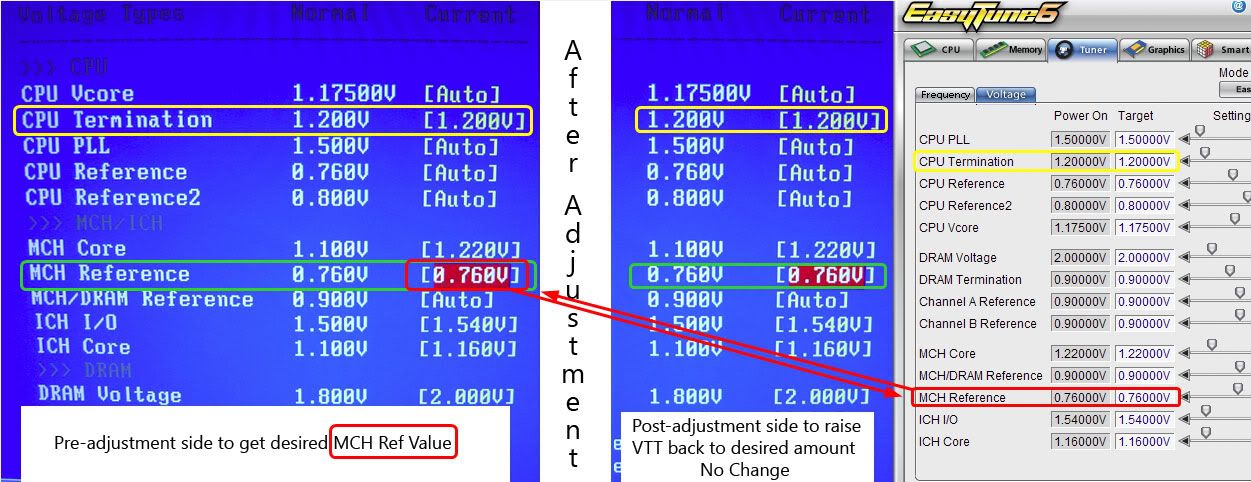
    The Ref Settings in the BIOS are .xx % values of/X Vtt so this tends to throw off many users when they set something and then compare to EasyTune. So you need to keep the % amounts in mind when changing these Ref voltages, and it is easiest to do it at stock Vtt and then raise your Vtt back up to where you want to run it. If you Make any deviation from the stock % for MCH Ref of .63% the value will be reflected in ET

    Here is Four Common examples of this, all using MCH Ref, and 1.30 Vtt (Termination). All of these but the last WILL Change what you see for MCH Ref in EasyTune as well. This way I hope you can see how this works, and then maybe better find your way to tuning your Ref voltages

    *** Examples Below using 1.3 Vtt ***

    (MCH Ref .68% AKA .68 in ET)
    For example if you set 1.3 Vtt and .884 MCH Ref, ET would show .68 MCH Ref as .884 would be .68% of Vtt.

    (MCH Ref .70% AKA .70 in ET)
    Another example if you set 1.3 Vtt and .91 MCH Ref, ET would show .70 MCH Ref as .91 would be .70% of Vtt

    (MCH Ref .72% AKA .72 in ET)
    Another example if you set 1.3 Vtt and .936 MCH Ref, ET would show .72 MCH Ref as .936 would be .72% of Vtt

    STOCK MCH Ref VALUES at .63% (To Help show how ET Seems to always show .76 for users)

    First Example shows stock values for Ref used, .63%. That would be MCH Ref manually set but Value unchanged (.76) and then Vtt Raised to 1.3, or manually set to .819 and Vtt Manually set to 1.3..........

    (Stock MCH Ref W/ 1.3 Vtt / .76 in ET)
    If you set 1.3 Vtt and .819 MCH Ref ET would show .76 MCH Ref as .819 would be .63% of Vtt

    This Example shows Stock Vtt and Stock MCH Ref used.........

    (Stock MCH Ref W/1.20 Vtt or .76 in ET)
    If you set 1.2 Vtt and .756 MCH Ref ET would show .76 MCH Ref as .756 would be .63% of Vtt.


    That is just ONE example, and how to manipulate it, of the Many Ref Voltages in the BIOS Vs. what you see in Easytune.

    Here are all the values affected by other Values in the BIOS and their respective Percentages.

    CPU Termination (Vtt) Automatically changes the following if manually set >>>

    CPU Reference Voltage (.63% of Default Vtt/1.20)
    CPU Reference2 Voltage (.67% of Default Vtt/1.20)
    MCH Reference Voltage (.63% of Default Vtt/1.20)

    DRAM Voltage Automatically changes the following if manually set >>>

    MCH/DRAM Reference Voltage (.50% of Default Dram Voltage)
    DRAM Termination Voltage (.50% of Default Dram Voltage)
    Channel A Reference Voltage (.50% of Default Dram Voltage)
    Channel B Reference Voltage (.50% of Default Dram Voltage)

    If you want a higher or lower than stock % / Value for any of the above settings you will find it easier to set the Dram Voltage or Vtt back to stock (Or above or below to find and be able to choose alternate % Values), then adjust desired setting to the % / Value you wish to use.

    Then once you have selected a % range you want to use for said setting then go back and raise your Vtt or Dram Voltage back to what you choose to use and the corresponding settings will self adjust and still be set to the .xx % amount that you set them to.
    there were some misunderstanding about voltage values in ET6 when these boards first released and that were reviewed by users on the net and then stated that ET6 software had some kind of a bug and some of voltage values were wrong or something.
    it's about time someone take the time to write and explain about the BIOS vs. ET6 voltage values and all that with an easy to understand english.
    i can now use the post as a ref instead of keep repeating myself on these voltage setting stuff and never sure that any readers would understand.

  2. #2
    Registered User
    Join Date
    Jan 2007
    Posts
    79
    Quote Originally Posted by pangingIII View Post
    there were some misunderstanding about voltage values in ET6...
    it's about time someone take the time to write and explain about the BIOS vs. ET6 voltage values...
    i can now use the post as a ref instead of keep repeating myself...
    When this board came out there were a few posts claiming that this board was the best/easiest overclocker... ever - and for the most part that's true. Then there followed a volley of posts remarking on the boards wacky Auto voltages, then came posts of high voltages (possibly) killing 45nm cpu's, some people are very unclear of how to make BIOS settings and as for GTL Ref's that's the equivalent to rocker science for most.
    As good as this board is, I think it still warrants a good overclocking guide, we all like to push our cpu's near their limit and the closer we get to that limit... well, it requires a lot of patience and 'know-how'.
    There is very good information in these forums - but it's all so fragmented.
    I for one have a bit (OK, a lot) of difficulty piecing together or even understanding some of this information - yet alone putting it into a practice that works!

    Generic oc guides help but as we know the hardware we all use is different, BIOS's are different, terminology in BIOS's are different, one BIOS has a GTL % another has a voltage and so on, should vTT be higher than vCore, how much higher should PLL be above vCore, what are safe ranges, should I start with 0.635 or 0.667 references, what about the NB... and the list goes on.
    People can very soon lose interest if reading an article if not specifically geared to their hardware and these days we have busy lives and 'just want a quick fix' however right or wrong that is.

    This is just my little rant for this morning, I've always found guides for my previous motherboards but so far I've not seen one for this family of boards, challenge - prove me wrong.
    There's always the argument that the information on these forums will always be fragmented, that's how a forum works but we used to have good overclocking guides... so why don't we now?
    Also as technology improves there still seems to be such a void between those that design/make/know and us the consumers when it comes to understanding what we are playing with - though there may be good reasons for that.

    * This post isn't directed at pangingIII or anyone else for that matter - just used the quote above as a starting point.
    GigaByte EP45-UD3P F7, Q9650 @ 4GHz 1.28125v, 4x1GB Crucial 8500, Dominator fans, CoolerMaster Pro 850W, 2x320GB in RAID0, EVGA 8800 Ultra, SATA Blu-Ray, Cooled by: Thermaltake, S-Flex, Swiftec, Laing & Tygon.

Tags for this Thread

Bookmarks

Bookmarks

Posting Permissions

  • You may not post new threads
  • You may not post replies
  • You may not post attachments
  • You may not edit your posts
  •