

Canon 20D
EF 24mm f/2.8
1/100 sec
ISO 400
f/2.8
-2/3 EV




Canon 20D
EF 24mm f/2.8
1/100 sec
ISO 400
f/2.8
-2/3 EV
This is the end of my driveway where our room mate got stuck.
Taken with a FujiFilm FinePix s1000 on the "Snow" setting.
I crunch for you Gramps R.I.P.
Photo:
Canon T2i(550d) w/ Magic Lantern
Canon 20mm F/2.8
Canon 50mm F/1.8
Canon 70-200mm F/4L
C&C is always welcome on my photos.
PC
Asus Crosshair IV Forumla, AMD 1090t-Crunching away @4.1ghz, Noctua NH-U12P SE2,4x2 Musikin Silverline's, Sapphire 6950 2gb(flashed to 6970 and running at 950/1450), Corsair HX650, NZXT Tempest.
http://500px.com/KodyHungenberg


Oh Dcresource i guessOriginally Posted by Soulburner

Sweet pics Metric, Nate.P and Malcontent., i see others have got inactive., Maxxx, Nordling-san ??
Camera: Nikon D40
ISO: 200
Shutter: 1/30
Aperture: f/5.6
Focal Length: 55mm
Exposure Bias: -0.7 stop
Lens: Nikkor 18-55mm f/3.5-5.6G DX EDII VR
Sound: Asus Essense ST | Wharfedale Diamond 9.1 | Norge 2060 Stereo amp | Wharfedale SW150 sub (coming soon)
Camera Gear: Canon 6D | Canon 500D | Canon 17-40L | Canon 24-105L | Canon 50mm f1.4 | Canon 85mm f1.8 | Rokinon 14mm f2.8 | Sigma 10-20EX HSM | Benro A3580F + Vanguard SBH250 | Bag full of filters and stuff


Was busy over the weekend. Rented the 70-200 and went to the San Diego Zoo again. Found some new stuff this time. I will post some photos tonight.
I'm still here, just been going through my 2000 pictures from the Romania trip, picked out the best of them (311 of them), now I'm going through those and editing the ones I like, and then I'll post some..... ROFL...
I've spent about 2 weeks doing this.
That car is a pain in my....stuck at the bottom of the drive way blocking my 4runner from getting out...Oh I forgot to add it snowed at least another 6 inches from yesterday when I took that pic.
I crunch for you Gramps R.I.P.
Photo:
Canon T2i(550d) w/ Magic Lantern
Canon 20mm F/2.8
Canon 50mm F/1.8
Canon 70-200mm F/4L
C&C is always welcome on my photos.
PC
Asus Crosshair IV Forumla, AMD 1090t-Crunching away @4.1ghz, Noctua NH-U12P SE2,4x2 Musikin Silverline's, Sapphire 6950 2gb(flashed to 6970 and running at 950/1450), Corsair HX650, NZXT Tempest.
http://500px.com/KodyHungenberg

You sir need to try Lightroom 2. It will save you loads of time and give you better results, too...
If you haven't tried it, do it. 30 Day trial...
System
ASUS Z170-Pro
Skylake i7-6700K @ 4600 Mhz
MSI GTX 1070 Armor OC
32 GB G.Skill Ripjaws V
Samsung 850 EVO (2)
EVGA SuperNOVA 650 G2
Corsair Hydro H90
NZXT S340
I am using Lightroom 2...
But if you put all this together....
High School HomeWork
+
Being a geek building computers
+
My computer business (Parkersoft)
+
Time to hang out with friends
+
Taking pictures
+
Editing pictures
+
Only 24 hours in a day.......
Haha, thats why it's taking me 3 weeks to do all this. xD
I just don't have the time to sit down for 4 hours and do it all in one shot.
Main: oo7
i7 920 D0 (4Ghz) || Asrock X58 Extreme
Corsair 8GB DDR3 1600 || HIS HD 6850 1GB
Corsair HX850 PSU || 2x Seagate 500GB 7200.12
3x Dell E2311H 23" LED LCD (Eyefinity)
[Flickr] - Canon 30D || 50mm f/1.8 PRIME || 28-135mm f/3.5-5.6 IS USM
Canon 1D Mark IIN
24-70 f/2.8L
ISO 100
f/5.6
1/100
68mm
Simple one light setup with 580EX II behind model bounced against wall.

Main Rig:
CPU Intel i5 2500K @ 4500mhz
Mobo Gigabyte GA-Z68X-UD3H-B3
Memory 4x4GB Corsair Vengeance DDR3 1600
Video Cards Sapphire 5850
PSU Silverstone ST75F Strider 750W
Hard Drive OCZ Solid 3 60GB | OCZ Vertex 2 60GB | Samsung 103SJ's 4TB
Cooling Thermalright Ultra 120 | 1 Yate Loon D12SM 120MM
Thats some serious equipment, Shim!
Cam/ Black Painted Adidas Box
f/ needle hole
Exposure/ 180 Sn.
Light/ 2x1000 Watt Spots
Film: Ilford Graphic B&W
"Me"


Intel DP55KG-Core i5-750-Kingston Hyperx DDR3 1800MHz-EVGA 9800GX2SC-High Power HPC 1000 G14C 1000W-HP W2448HC HDMI
Intel DP55KG-Core i5-750-Kingston Hyperx DDR3 1800MHz-Sparkle 8800GTX-SilverStone ST1000NV 1000W-Samsung T260HD
Can I too?
And my stupid never-gonna-made-sharp-photo D50 Nikon.. Or maybe that just my eye's...
Nikon D50
Nikkor 35-105 3.5-4.5
105mm
F4.5
1/160
ISO 200
R0bert, sharpness comes from having a good lens.
It also helps if you can sharpen in post processing, I use a Smart Sharpen in Photoshop on all of my pics.
System
ASUS Z170-Pro
Skylake i7-6700K @ 4600 Mhz
MSI GTX 1070 Armor OC
32 GB G.Skill Ripjaws V
Samsung 850 EVO (2)
EVGA SuperNOVA 650 G2
Corsair Hydro H90
NZXT S340
I now have a Mark III.
I've gone from 6 lenses to 3. I'm trying to streamline my lens setup.
My goal is to get the Sigma 12-24 or Canon 16-35L next.
Then its time to move onto the primes. I would love to own the trinity (35L, 85L, 135L) sometime in the near future.
Main Rig:
CPU Intel i5 2500K @ 4500mhz
Mobo Gigabyte GA-Z68X-UD3H-B3
Memory 4x4GB Corsair Vengeance DDR3 1600
Video Cards Sapphire 5850
PSU Silverstone ST75F Strider 750W
Hard Drive OCZ Solid 3 60GB | OCZ Vertex 2 60GB | Samsung 103SJ's 4TB
Cooling Thermalright Ultra 120 | 1 Yate Loon D12SM 120MM
Another good method is to use a filter under sharpen called unsharp mask in photoshop. This is the method I use to sharpen my pictures (when need be).
And yes, sharpness does also come from having a good lens too.
Main Rig:
CPU Intel i5 2500K @ 4500mhz
Mobo Gigabyte GA-Z68X-UD3H-B3
Memory 4x4GB Corsair Vengeance DDR3 1600
Video Cards Sapphire 5850
PSU Silverstone ST75F Strider 750W
Hard Drive OCZ Solid 3 60GB | OCZ Vertex 2 60GB | Samsung 103SJ's 4TB
Cooling Thermalright Ultra 120 | 1 Yate Loon D12SM 120MM
I've got Nikkor 50mm 1.8 lens so that's not the one I'd expect photos of not being sharp, while it still does make them unsharp. Maybe issue with my hands or what, I got to finally try some shooting with tripod. But then the earth's movement could be an issue.
But I see it only while viewing on 100% and almost always I resize the pics so it's almost impossible to tell, it just annoys me.
Camera: Nikon D300
Exposure: 0.005 sec (1/200)
Aperture: f/2.8
Focal Length: 150 mm
ISO Speed: 400
Exposure Bias: 0/6 EV
Golden-Bellied Mangabey
http://www.flickr.com/photos/maxxxracer/3130666720/

Sweet pics guys.
Camera: Nikon D40
ISO: 200
Shutter: 1/200
Aperture: f/7.1
Focal Length: 55mm
Exposure Bias: -0.7 stop
Lens: Nikkor 18-55mm f/3.5-5.6G DX EDII VR
Sound: Asus Essense ST | Wharfedale Diamond 9.1 | Norge 2060 Stereo amp | Wharfedale SW150 sub (coming soon)
Camera Gear: Canon 6D | Canon 500D | Canon 17-40L | Canon 24-105L | Canon 50mm f1.4 | Canon 85mm f1.8 | Rokinon 14mm f2.8 | Sigma 10-20EX HSM | Benro A3580F + Vanguard SBH250 | Bag full of filters and stuff
Really nice pics
24/7 Setup: Asus maximus x38 / E8500 E0 (500x8) Dtek Fuzion / Ballistix old rev 4-4-4-4 @ 1000MHz / 2900XT Ek fullcover cf / Silverstone TJ-07
Bench: Commando / Tpower i45 / P5K / E8500 E0 @ http://valid.x86-secret.com/show_oc.php?id=433935 / modded mach2 r507 / Old rev ballistix /
180mm f/3.5L
Maybe the 100mm f/2.8. Metric has one, looks like a great lens.
I am by no means a Canon lens expert, but Metric gets some great photos out of the 100 2.8.

Thanks Maxxx
The 100mm has been really fun to work with - quiet, fast, sharp and amazing bokeh (8 blades)
Camera: Canon Digital Rebel XTi
ISO: 200
Shutter: 1/200 (Flash Sync)
Aperture: f/2.8
Focal Length: 100mm
Exposure Bias: None
Lens: EF 100mm f/2.8 Macro USM
[ 3770K @ 4.2 : H100i : ASRock Z77E-ITX : GTX560 Ti : 16GB DDR3 1800 : +4TB : Bitfenix Prodigy : 2x Dell S2340M : Filco Majestouch-2 [Cherry Brown] : BX8a Deluxe]
Amazing Metric.
Sound: Asus Essense ST | Wharfedale Diamond 9.1 | Norge 2060 Stereo amp | Wharfedale SW150 sub (coming soon)
Camera Gear: Canon 6D | Canon 500D | Canon 17-40L | Canon 24-105L | Canon 50mm f1.4 | Canon 85mm f1.8 | Rokinon 14mm f2.8 | Sigma 10-20EX HSM | Benro A3580F + Vanguard SBH250 | Bag full of filters and stuff
Smart Sharpen replaced Unsharp Mask in Photoshop CS2 as the best sharpening method. It is more advanced and does a better job. Try 50-100%, .2-.5, Lens Blur, More Accurate. Adjust between those numbers depending on photo size. Really large pics will need closer to 200%.
The 50mm 1.8 is not sharp at f/1.8. I'm not sure what aperture you are using most of the time but it doesn't get really sharp until you are around f/2.8 I think...I don't have this lens personally so I'm just going off what I've read. It could also be focus accuracy?
I really need that lens
I like this picture. It has a vintage feel to it. Only thing I would have done is keep the cord on the right from touching the edge of the frame, but that's nitpicking.
System
ASUS Z170-Pro
Skylake i7-6700K @ 4600 Mhz
MSI GTX 1070 Armor OC
32 GB G.Skill Ripjaws V
Samsung 850 EVO (2)
EVGA SuperNOVA 650 G2
Corsair Hydro H90
NZXT S340
 Posting Permissions


 Reply With Quote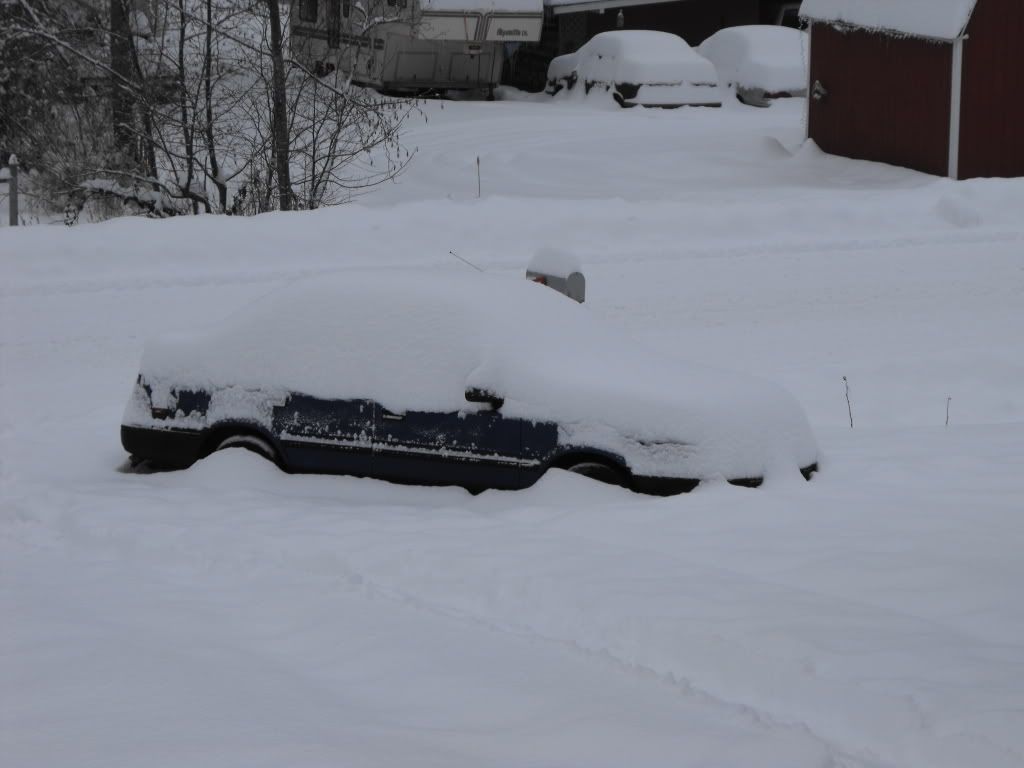


Bookmarks