-
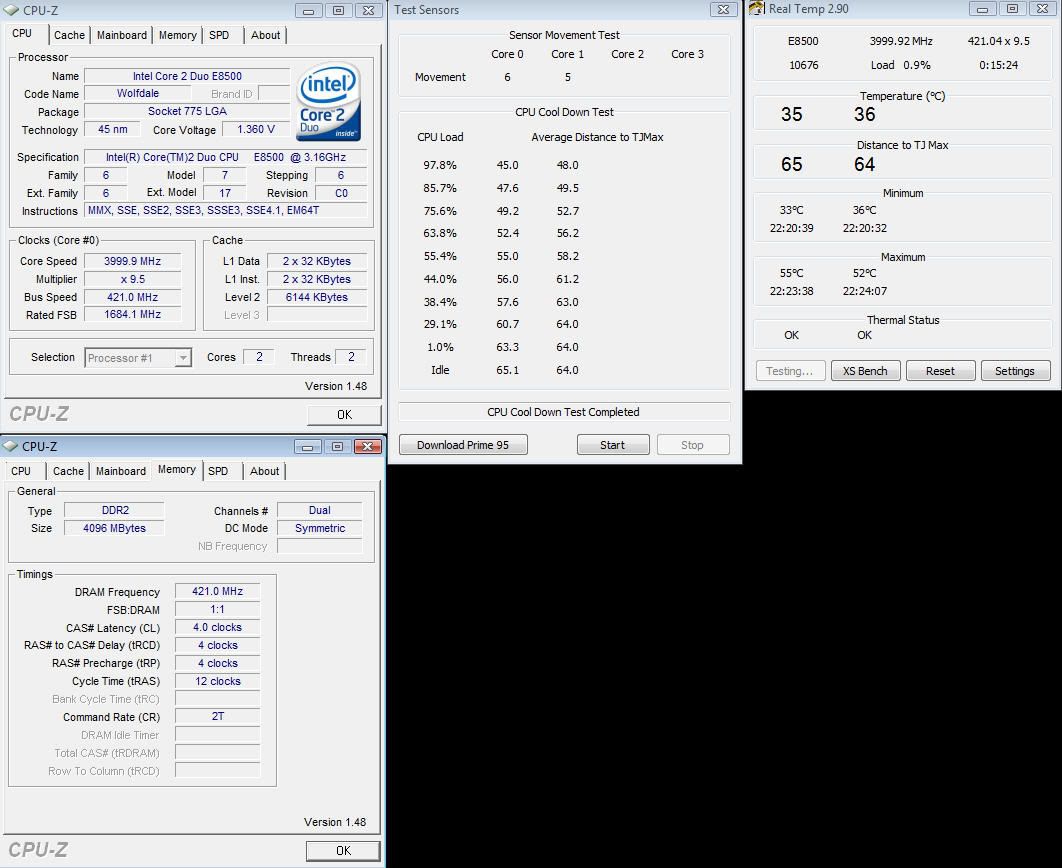
Bullu$: Looks like RealTemp helped you confirm what you already suspected. Core1 is stuck at a Distance to TJMax of 64. When the load drops from 29.1% to 1.0%, core0 cools down 2.6 degrees. That's normal. Core0 doesn't budge. That's not normal. That looks to me like a stuck sensor. There is also another indication when you compare the 38.4% level to the 29.1% level. Core0 moves 3.1 while core1 only moves 1.0. I'm a little biased but I love this new test. It makes it very simple to spot a sensor or sensors that have issues.
SportsFanBoy: According to Intel, TCase is measured with a thermocouple attached to the geometric center of the IHS by cutting a groove into the top of your CPU. When you are running an application like Prime95 at full load, the core temperature might be 25C hotter than the TCase temperature. These CPUs dissipate heat that quickly over that small of a distance. Contact rge who did some very interesting testing of this or scroll back about 20 pages or so to find his work. An 80C core temperature would not put your TCase temperature over Intel's rating.
Intel refers to their recent release as TJ Target numbers. A TJ Target number of 80C may translate into an actual TJMax of closer to 90C. The information released by Intel last summer and in the fall didn't really clear this up. The TJ Target numbers do not equal TJ Max for a significant number of 65nm CPUs that they've produced.
I have no idea how much long term heat an Intel CPU can take. I do know that they seem to be able to take far more heat than people would think. Here's an example you can share with your friends over at Tom's. Three hours running Prime95 Small FFTs without the CPU fan turned on definitely created some heat: 
http://img204.imageshack.us/img204/276/hote8400fw5.png
If your Q6600 is running stable and not thermal throttling then don't worry about the heat. If Intel thought 80C was too much heat then they'd lower TJMax and prevent their CPUs from ever reaching that temperature. Intel actually did the opposite and raised TJMax as their manufacturing process matured. Heat related warranty / RMA claims must have been a non issue. I've never had a problem even with all of my insane testing.
concretefire: I'll think about your snapshot idea for RealTemp. I just use the Print Screen key on my keyboard. After you push this you can go into any image editing program and Paste your screen shot from the Clipboard in and save it to the file type of your choice. I use an old version of Photoshop Elements 2.0 but even Paint is good enough for screen shots. Irfanview is an excellent freeware image display program that also lets you Paste and Crop images without a lot of effort. If you want an image of only RealTemp then hold down the ALT key when you push Print Screen. This will send an image of only RealTemp to your Clipboard.
Tags for this Thread
Posting Permissions
- You may not post new threads
- You may not post replies
- You may not post attachments
- You may not edit your posts
-
Forum Rules
Bookmarks