

Not looked at your other posts, but have you tried with 1 stick of ram then manually setting the correct voltage for the ram once in bios, then place the other stick or sticks of ram in the motherboard?Originally Posted by flyfisher


Not looked at your other posts, but have you tried with 1 stick of ram then manually setting the correct voltage for the ram once in bios, then place the other stick or sticks of ram in the motherboard?
i5 2500K @ 4.9GHz MSI Z77 MPower G.Skill Trident 8GB 2400C10
EVGA GTX 1070 SC 8GB @ 1784/4004MHz Corsair HX 750 PSU
Samsung 830 256GB Creative ZxR Thermalright Silver Arrow
NEC 24WMGX3 24" TFT Fractal Design Define S Win 7/10 64bit
Thanks, mine works fine, I was hoping the others with the endless reboot problem can find a solution.
has anyone else noticed the UD3L and UD3LR for sale? anyone know the differences between them and the older UD3 boards?
im building a rig for a friend of mine and was curious if anyone had any experiences with those boards. he wants a quad core plus a lot of ram and wants to get an entire rig running for under 900 bucks, and shaving 30 off of the board price will allow a TRUE instead of a AC7/Xig.
i suppose we could run a q9400 instead of a 9550 for the price savings if the UD3LR is totally out of the question.

Read this UD3LR and UD3L
or GIGABYTE Ultra Durable 3 Motherboards
Last edited by stasio; 12-11-2008 at 08:37 PM.
Need a Gigabyte latest BIOS?
Z370 AORUS Gaming 7,
GA-Z97X-SOC Force ,Core i7-4790K @ 4.9 GHz
GA-Z87X-UD3H ,Core i7-4770K @ 4.65 GHz
G.Skill F3-2933C12D-8GTXDG @ 3100 (12-15-14-35-CR1) @1.66V
2xSSD Corsair Force GS 128 (RAID 0), WD Caviar Black SATA3 1TB HDD,
Evga GTS 450 SC, Gigabyte Superb 720W
XSPC RayStorm D5 EX240 (Liquid Ultra)
NZXT Phantom 630 Ultra Tower
Win 7 SP1 x64;Win 10 x64
What BIOS are you on? I was on F7a when that kept happening to me. I flashed back to the F5 BIOS it came with and it hasn't happened since. I might actually give F4 a try since a lot of people are saying it's better for quads.
Are you saying it does the endless reboot loop at 100% stock settings too?
If so check your components.
Otherwise: Quote from Clunk.org.uk...
Static tRead Value Available options 1~15. This is the crucial tRD on earlier boards (shown in memset & elswhere as Performance Level) If your rig is reposting continually chances are its because of this value being too tight. It's nice to have it channel based as it's sometimes practical to run at 8 on channel A and 9 on Channel B for example.
GigaByte EP45-UD3P F7, Q9650 @ 4GHz 1.28125v, 4x1GB Crucial 8500, Dominator fans, CoolerMaster Pro 850W, 2x320GB in RAID0, EVGA 8800 Ultra, SATA Blu-Ray, Cooled by: Thermaltake, S-Flex, Swiftec, Laing & Tygon.
Isn't PL 9 usually a sufficiently loose value for most overclocks? That's where I had PL at when those reboots happened; dropping it even lower to 10 doesn't seem like it would do much good.
GA-EP45-UD3P w/ Intel Q9650
2x2GB G.Skill 1066 PK
Sapphire Radeon 4870X2
ASUS Xonar D2
WD 150GB Velociraptor, 1TB Caviar Black
Corsair HX1000W
Xigmatek HDT-S1283 w/ Ultra Kaze 3000 @ 2400RPM
Lian-Li A70B
i had the endless reboot where it would never even get into the bios ,once. it happend when i tried to use my new mushkin memory. the problem was one stick was bad,took out one stick still endless boot,took out second stick put in first stick back in then it booted right up.thats the only time ive gotten the endless reboot.but when you have performance level too tight ,it will boot three times then take you back to bios with red OC failure screen so you can make the needed adjustments
_________________________________________________
............................ImAcOmPuTeRsPoNgE............................
[SIGPIC][/SIGPIC]
MY HEATWARE 76-0-0
Whats the general consensus regarding a BIOS for a quad? F4? or F7a?
F7a gave me endless reboots (more than just the usual three with F5 and F4) when I put in settings it didn't like. F5 is decent, but I like F4 more since I don't have to raise voltages as high.
GA-EP45-UD3P w/ Intel Q9650
2x2GB G.Skill 1066 PK
Sapphire Radeon 4870X2
ASUS Xonar D2
WD 150GB Velociraptor, 1TB Caviar Black
Corsair HX1000W
Xigmatek HDT-S1283 w/ Ultra Kaze 3000 @ 2400RPM
Lian-Li A70B

Just installed vista 64
For some reason my 4850 ATI Graphics card is showing a 1.0 Score in Vista experience for both graphics results. Strange thing is my 3D Vmark is about 7k.
I been searching all day for an answer and can't seem to find one. I am using all the recent drivers etc.
Anyone have any ideas why this might be happening? Everything else gets a 5.9...
Thanks!
E8400
GA-EP45-UD3P
VisionTek HD 4850
ZEROtherm Nirvana NV120
Antec Twelve Hundred
OCZ Reaper HPC 4GB 1066 PC8500
CORSAIR CMPSU-750TX 750W
Vista Home Premium on Western Digital VelociRaptor WD3000GLFS 300GB
Storage: (4) Western Digital Caviar Black 1TB Storage
Scratch Disk: Seagate ST3640323AS 640GB 7200 RPM
Did you retest it since installed?
I have been struggling with this board and have found that by far the most important part in the bios is the MCH reference!!!.
@1.184Vcore in windows I tried everything to get prime going, everything I tried failed in 1min. So setting the MCH correctly has gotten me a couple hours on the same settings, PLL/CPU term are at stock
Q9650
Gigabyte UD3P, OCZ 2x2GB 1066
Asus Top 4850 + Accelero S1 rev2
2x WD Raptor 74gb raid0 + 1TB storage
Antec TP3 Trio 550w, Windows XP
Aerocool Spiral Galaxies Modded
37"Olevia 537H
Fixed it...
Seems as though you need to follow these steps to get corrupt scores out of Vista:
1. Click Start, type the following path in the "Start Search" box,
and then press ENTER:
%SYSTEMROOT%\Performance\WinSat\DataStore
2. Delete all the .xml files in the folder.
3. Click Start, type performance information and tools in the Start Search box,
and then click Performance Information and Tools in the Programs list.
4. If the following information appears, click Refresh Now to update the
Windows Experience Index:
Your Windows Experience Index needs to be refreshed.
If you are prompted for an administrator password or confirmation,
type the password or click Continue.
Windows Experience Index assesses the components in the computer.
5. Note the value that appears next to Your computer has a
Windows Experience Index base score of.
6. Click Update my score.
Last edited by 36Chambers; 12-12-2008 at 01:53 PM.
E8400
GA-EP45-UD3P
VisionTek HD 4850
ZEROtherm Nirvana NV120
Antec Twelve Hundred
OCZ Reaper HPC 4GB 1066 PC8500
CORSAIR CMPSU-750TX 750W
Vista Home Premium on Western Digital VelociRaptor WD3000GLFS 300GB
Storage: (4) Western Digital Caviar Black 1TB Storage
Scratch Disk: Seagate ST3640323AS 640GB 7200 RPM
4 phase power :/
can it handle an OC'd yorkfield without blowing up? im guessing no
anyone got the EP45T-UD3P?


Please read thread title prior to post
//RETIRED-o00o--°(_)°--o00o-OVERCLOCKER//
Pretty much everyone in this thread has one.
GIGABYTE GA-EP45-UD3P
E8400@4.25Ghz
4x1Gb Ballistix PC-6400@5-5-5-15 1000Mhz
8800GTS 640Mb
WD 74Gb Raptor
Maxtor 250Gb
Vigoor Monsoon II TEC disconnected
Sceptre 20.1"
Avermedia M780 PCI-Ex1
Vista 64Bit HP
he's asking about ep45 T-UD3P. the ddr3 version.
_________________________________________________
............................ImAcOmPuTeRsPoNgE............................
[SIGPIC][/SIGPIC]
MY HEATWARE 76-0-0
yes the ddr3 version. wondering if anyone has it and was able to get to do any overclocking.
Anyone else have annoying high pitch noise from the power on this board when DES/C2E is enabled?
I have read about issues with other people videocards ect.. before where they would make a high pitched noise. Well my board makes an annoying noise when I have the DES/C2E enabled. You know the 6 lights on the board, well this noise corresponds with the 2nd green led or 2nd phase power supply. So currently that is the light/phase that is on at idle on my computer and this noise is driving me crazy. If I open a program it will throttle up a little and then the sound goes away for a second or I get like a fast beeping sound when its throttling.
Any help? Should I RMA it??
Q9650
Gigabyte UD3P, OCZ 2x2GB 1066
Asus Top 4850 + Accelero S1 rev2
2x WD Raptor 74gb raid0 + 1TB storage
Antec TP3 Trio 550w, Windows XP
Aerocool Spiral Galaxies Modded
37"Olevia 537H
I'm not sure what you mean - is it a high pitched whine/whistling from the mosfets under load?
If so I also have it during IntelBurnTest and other testing programs that max out the CPU. Found out yesterday that it also occurs when playing Crysis. From what I've read here it's normal.
Although I haven't tried disabling C2E to see if the noise will disappear.
If that's not what you're talking about, just ignore my post :-)
Gigabyte GA-EP45-DQ6
Intel Q9650
Corsair Dominator DDR2 PC8500 4x2 GB
Club3D 4870x2
Corsair HX1000
3x Western Digital Raptor 150GB 16MB Raid0
Hitachi Deskstar 320GB
Antec P180
Swiftech 655
Swiftech GTZ (CPU)
XSPC X20 Delta (NB)
Ek 150ml res
TFC 480 w/8x YateLoons DL12 in push/pull @1000RPM
MasterKleer 11.1mm ID tubing
HP LP2475w 24" + ViewSonic VX922 19"
Vista Ultimate 64bit SP1
I just did some quick tests on max fsb and GHz with my Q6600.
It was easier to hit 500FSB on my UD3P then it was to hit 470FSB on my P5E. I would have got 4.0GHz easy (500x8) if it was so hot today
- dam summer
I need a bit of help from you guys.
I've got my system 24/7 stable at 460x9, but naturally I want more...
My goal is 500x9 so on my way there I'm trying out 480x9.
I can pass IntelBurnTest and have currently been running Prime95 for 8hrs.
The problem is that if I download e.g. a zip-file of 60MB, it will be corrupted (Winrar reports this).
Everything works fine at 460x9.
I've tried raising vcore, MCH, GTLs - and just about everything else - and I *still* get corrupted files.
My settings at 460x9 which is stable:
mem freq: 920 (2.00B) - haven't played with this yet
mem timings: 5-5-5-15
LLC: enabled
Vcore: 1.3625V
VTT: 1.36V
PLL: 1.5V
Cpu Ref: 0.861V
MCH: 1.36V
MCH Ref: 0.861V
MCH/DRAM: 0.9V
ICH I/O: 1.5V
ICH: 1.2V
DRAM: 2.1V
DRAM Term.: 1.05V
CH A Ref: 0.9V
CH B Ref: 0.9V
--------------
And my "stable" settings at 480x9 that will corrupt files:
mem freq: 960 (2.00B) - haven't played with this yet
mem timings: 5-5-5-15
LLC: enabled
Vcore: 1.4V
VTT: 1.38V
PLL: 1.5V
Cpu Ref: 0.874V
MCH: 1.38V
MCH Ref: 0.874V
MCH/DRAM: 0.9V
ICH I/O: 1.57V
ICH: 1.2V
DRAM: 2.1V
DRAM Term.: 1.05V
CH A Ref: 0.9V
CH B Ref: 0.9V
--------------
Can you help identify which settings I should change to get this puppy stable - and hopefully closer to my 500x9 goal?
Thanks!
Gigabyte GA-EP45-DQ6
Intel Q9650
Corsair Dominator DDR2 PC8500 4x2 GB
Club3D 4870x2
Corsair HX1000
3x Western Digital Raptor 150GB 16MB Raid0
Hitachi Deskstar 320GB
Antec P180
Swiftech 655
Swiftech GTZ (CPU)
XSPC X20 Delta (NB)
Ek 150ml res
TFC 480 w/8x YateLoons DL12 in push/pull @1000RPM
MasterKleer 11.1mm ID tubing
HP LP2475w 24" + ViewSonic VX922 19"
Vista Ultimate 64bit SP1


Ryzen 5 7600-Deepcool GammaxxV2-Gigabyte B650M GAMING X AX-16 GB Corsair DDR5-Gigabyte Eagle 6700XT-Corsair RM650-5x Artic Silver 140mms-Carbide 400R-Acer B246WL-FiiO E10/M40x-Fiio K5 Pro/LP6-M5/BLON-3.
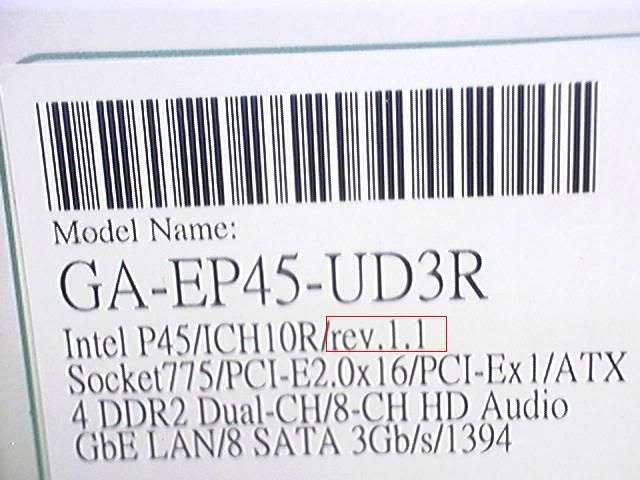
Any info on new revisions being released?
Someone on another forum posted they received a UD3R rev1.1 board
Gigabyte P55A-UD4P
i7 875k
4x2gig G-Skill DDR3 1600 "ECO"
ATI 4870x2
X-Fi XtremeGamer Fatal1ty Pro
80gig X-25M & 2 640gig WD HDD's
PC P&C Silencer 750 Quad
Lite-on 16x DVD R-RW
Extended Ascension
Water cooled
 Posting Permissions


 Reply With Quote


Bookmarks