

is the F5a bios only for UD3P ou also UD3R???
I'll post some maximum fsb with q6600 later


is the F5a bios only for UD3P ou also UD3R???
I'll post some maximum fsb with q6600 later
I know this is a dumb question, but I'll ask anyway:
Does anyone know if Gigabyte plans on releasing a DDR3 version of a UD3 board?
Edit: LGA 775 P45 DDR3 version
Last edited by my87csx481; 10-27-2008 at 06:37 PM.

the only thing i am missing on this board is the voltage monitoring and temp monitoring of all voltages, NB/SB FSB etc....

Some pics of socket clearance - Xigmatek HDT-S1283
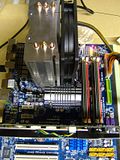
pangingIII
You have been VERY helpful posting your settings. Its just what I was looking for and using them as a template I have been posting easily into windows past 500 FSB. This will probably be my 24/7 as they are nice and low voltages for some good clocks. So thanks!
EP45-UD3P F5a
E8400 467x9 2x2GB 2.40B (333 strap) 1121 DDR2, PL8

2500k @ 4.8 Ghz
Asus Sabertooth P67 (1502)
G.Skill Ripjaws 1600 DDR3 8GB
OCZ ZX Series OCZ-ZX1250W PS
PowerColor 4870x2
Crucial C300 SSD 128GB
150GB Western Digital Raptor
Westinghouse LVM-37w3 1080p Monitor
Win 7 Ultimate
Cooling: CPU-H70 with 2 San Ace 120x38mm fans+4Scythe S-FLEX SFF21F 120mm, Sunbeam Fan Control, Silverstone TJ09 case.
My UD3P arrived yesterday and I've just starting testing today. This is my first experience with a Gigabyte board and I'm still trying to familiarize myself with the BIOS. I do wish it showed actual chipset voltages in the BIOS like my DFI and Biostar boards. I may have missed it but I don't see where you can adjust the GTL Ref values?
Ryzen 9 on the test bench... Sometimes older generation/tech as well.
I had the same problem with an Asus P5Q Deluxe. It turned out to be a software problem. I shorted cmos and pulled the battery for a few minutes and flashed bios. I also formated my drives, so Im not sure exactly what my problem was but that cleared it up.Originally Posted by zodden

BTW, this board looks kick ass. I want it!
No stability pics but hey whatever right? lol

Core i5 2500K @ 4.8GHz 1.31v [L041C123] | Gigabyte P67-UD3P-B3 | Corsair H60 | 4GB G.Skill Ripjaws X DDR3-1866 8-9-8-24-1T | Samsung F3 1TB |
ASUS GTX 670 2GB| PCP&C Silencer 500W | Antec Three Hundred "Blacked Out" | Dell Ultrasharp 23" U2311H IPS 1920x1080
http://www.gigabyte.com.tw/Products/...=GA-EP45T-UD3P
On another note, ordered the ud3p, q9550 and 8 GB of G.skill RAM, due to arrive on Monday. Time to step up from my old 939 system.
Lurking since 2006
time for a stupid queston
how do you manually set the voltages i have been using DFI boards for the last 4yrs and the bios had a set voltage + what ever was in the field next to them for what ever your were changing, i am assuming that the settings listed in the gigabyte's bios are the actual setting and not an addition to the stock voltage?
what is the "termination" voltage?
also has anyone fiddled around with the "load line calibration" yet to see if it's worth turning on?
CPU Q6600 @ 3.15Ghz D-tek CPU Block
GIGABYTE GA-EP45-UD3R 350Mhz FSB
RAM G.SKILL F2-8500CL5D-2GBHK DDR2 1066
GPU Nvidia 8800GT MCW-60 700Mhz Core 1.0 GHz Mem
PSU Cooler Master realPower 550W
Storage 3 500 GB WD Caviar SE16 in RAID 0 + 300gb WD
Misc. CM stacker STC-T01 w/ Cross-flow fan, 2 MCR-320 Rads, DCC 355 W/ Petras Top, 12 YateLoon D12SL-12, ~12ft Tygon 9/16 ID tubing

Crunching for [XS]
In the first bios column, I think its named MIB Intelligent settings or something close to that. In there is all your settings, towards the bottom are all your voltage settings. In this board you can change voltages in small increments.
As for accuracy? Well the voltages you set in bios are not necessarily what you will see in easy tune or hardware monitoring, just like in Gigabytes other P45 offerings, the values vary. What you set in Vcore in bios will read a different number in easy tune and CPU-ID. As to which is accurate? People around here say the numbers in easytune and cpu-id are the correct voltages, at least for Vcore unless I am mistaken.
LLC works great on this board. I have not seen any Vdroop with it on, and from the OCCT measurements not voltage spikes either. I have it on right now as its so helpful in trying to stabilize over 500 FSB overclocks, at least for me it has been.
2500k @ 4.8 Ghz
Asus Sabertooth P67 (1502)
G.Skill Ripjaws 1600 DDR3 8GB
OCZ ZX Series OCZ-ZX1250W PS
PowerColor 4870x2
Crucial C300 SSD 128GB
150GB Western Digital Raptor
Westinghouse LVM-37w3 1080p Monitor
Win 7 Ultimate
Cooling: CPU-H70 with 2 San Ace 120x38mm fans+4Scythe S-FLEX SFF21F 120mm, Sunbeam Fan Control, Silverstone TJ09 case.
sweet, explains why my oc attempt was such a failure :P
CPU Q6600 @ 3.15Ghz D-tek CPU Block
GIGABYTE GA-EP45-UD3R 350Mhz FSB
RAM G.SKILL F2-8500CL5D-2GBHK DDR2 1066
GPU Nvidia 8800GT MCW-60 700Mhz Core 1.0 GHz Mem
PSU Cooler Master realPower 550W
Storage 3 500 GB WD Caviar SE16 in RAID 0 + 300gb WD
Misc. CM stacker STC-T01 w/ Cross-flow fan, 2 MCR-320 Rads, DCC 355 W/ Petras Top, 12 YateLoon D12SL-12, ~12ft Tygon 9/16 ID tubing
Crunching for [XS]
Hers's where Im at right now, wish I had a higher multi on this chip. It will go alot higher, but have not had time to push it. Soon though, very soon I will find the max for this.

hers the best i could get setting voltages manually. any input you guys could give would be appreciated. thank you.heres my updated ss. also anyone else having problems being able to set vtt below 1.42 w/ success?also why does pll goe from 1.50 then the next increment is1.57?
Last edited by radaja; 10-26-2008 at 02:46 PM.
_________________________________________________
............................ImAcOmPuTeRsPoNgE............................
[SIGPIC][/SIGPIC]
MY HEATWARE 76-0-0
Hi,
Could anyone tell me if on their Gigashyte EP45-UD3P board when any setting is changed in the bios, their boards shuts down and the restarts.
As it happens on mine, even when I alter the time
Very annoying.
I'm liking my UD3R so far. I got back to the OC I had on my Black Pearl with less voltage (ie less droop) and so lower temps. The only bad is setting Command Rate has 0 effect. Oh well. It's a great board in my limited experience. With the better temps, I could probably push a little further now, but I just wanted to get back to stable ASAP.
Its normal when you overclock, the NB has to change latencies so it must turn completely off, this is normal for intel chipsets.
Where are ppl getting these F4-4 and F5A BIOSes? I'm only seeing F3 on the Gigabyte site. My UD3R board came with F3.
Thanks in advance.
PS I am newb overclocker but I've got my E8500 (C0 stepping
I am roughly familiar with tuning Vcore and MCH volts (from my P5W-DH board) but all of these extra voltage options are new to me so I'm taking it sloooow.
Thanks for the answer, but you misunderstood, I am not overclocking, this is with stock settings.
Everytime I change a setting in the bios, even if I were to change the time in the bios, the board will shutdown then restart. This is on the default bios.
The UD3 & UD3R share the same bios (F3) while the UD3P has a seperate bios (F4).
Gigabyte P55A-UD4P
i7 875k
4x2gig G-Skill DDR3 1600 "ECO"
ATI 4870x2
X-Fi XtremeGamer Fatal1ty Pro
80gig X-25M & 2 640gig WD HDD's
PC P&C Silencer 750 Quad
Lite-on 16x DVD R-RW
Extended Ascension
Water cooled

Hello. I'm new to the Intel chipset bios and need a little help please. Can you all briefly help me with a few settings & explanations?
My previous motherboard was the Asus 750i. Ran my Q6600 G0 @ 3.6 daily with 1.57 vcore. 1.5v for the NB & SB. MCP 1.6. HT<--> 1.4 for almost six months and no crashes.
On this bios, what are main voltages that need to be increased? What value is the NB, SB, MCP equivalent on this Intel board?
Here is the layout of the voltages:
CPU PLL=
CPU Termination=
CPU reference=
CPU Vcore=
MCH Core=
MCH/DRAM Reference=
MCH reference=
ICH I/O=
ICH Core=
DRAM Voltage=
DRAM Termination=
Channel A Reference=
Channel B Reference=
I'd like to hit 500fsb with 500x7=3500 stable. I use the latest OCCT going back to the nvidia board.
Here are my specs:
Q6600 G0, vid 1.2750, 3.6 (400x9) with a Asus 750i
Adata 800 ddr2 5-5-5-18
ABS Tagan 900w
-water cooling with swiftech gt
I have many problem with this board, Can't go above 4.26 to get othos stable. since i change this board from MIIF..... very hard to find the proper voltage
____________________________
Q9550 L845B822 @ 4.2 GHZ l EP45-UD3R REV 1.1 F12 BIOS l Crucial Ballistix 4GB 2x2GB(5-5-5-14) @2.0 V l GIGABYTE GTX 460 1024 MB
LIAN LI PC-8NWB l CPU COOLER TR 120 Extreme l ENERMAX 460 WATT
____________________________i7 2500K @ 4.80 GHZ l P67A UD3P F6A BIOS l G.Skill Ripjaw 4GB 2x2GB @1600 MHZ(9-9-9-24) @1.56 V l EVGA GTS 420
LIAN LI PC-7FW l TuniQ 120 Extreme l TR 600 W
____________________________
try upgrading the bios to F5a, also do a hard reset of the bios after the update is done, touch the reset jumper pins with a screw driver to short them to reset the bios, make sure pc is completely off from behind the psu, it should fix your problem.
here's my oc to 4ghz.,me also same like radaja.,cannot set the VTT lower than 1.42.,i dunno why.,already try everything i could..
Core i7 860 4200Mhz > Asus Maximus III Formula > Corsair Dominator GT 2x2GB 2000 8-9-8-24 > 2x60GB Corsair Force F60 Raid-0 SSD > Samsung Spinpoint 1TB F3 > HIS HD5970 2GB DDR5 > Silverstone TJ-07 > Corsair HX620 PSU > Dell S2409W > Windows 7 Ultimate x64 > EK Supreme HF > Danger Den 5970 Full Copper > EK FB Maximus III Formula > EK RAM Dominator GT > Laing DDC 3.2 + EK X-Top V2 > TFC XChanger 480 > EK Multioptions X2 Advance 250 > Tygon R3603 Tubing > Bitspower Fittings > Lamptron FC Touch
Nice !! Well,Do you plan to get higher that speed ? For my E8600 I need above 1.60 VTT boot up to window in FSB 500+, I'm not sure for for around FSB 450. I'll try soon.
But for over 4.33 GHZ I can't get any stable at all.
____________________________
Q9550 L845B822 @ 4.2 GHZ l EP45-UD3R REV 1.1 F12 BIOS l Crucial Ballistix 4GB 2x2GB(5-5-5-14) @2.0 V l GIGABYTE GTX 460 1024 MB
LIAN LI PC-8NWB l CPU COOLER TR 120 Extreme l ENERMAX 460 WATT
____________________________i7 2500K @ 4.80 GHZ l P67A UD3P F6A BIOS l G.Skill Ripjaw 4GB 2x2GB @1600 MHZ(9-9-9-24) @1.56 V l EVGA GTS 420
LIAN LI PC-7FW l TuniQ 120 Extreme l TR 600 W
____________________________
 Posting Permissions


 Reply With Quote














Bookmarks