-
Hmm i may be on 2 something if your willing to try....
Ok If your BIOS looks like Below then try adjusting Values@STOCK CPU CLOCKS to find how the Volts scales....
Im cleaning my loop and will check back later, This should work , Use Stock CLOCKS so you Know youll stay cool while testing
1st ,,
CPU VDD and CPUNB VDD should set or Raise VID values when VDD is raised...
The Higher the CPU VDD the Higher you Can raise your Volts while ADDING CPU Voltage (V)...
If you run the CPU @ 1.4volts the VDD should be raised to say 1.35 - 1.4VID then you add CPU VOLTAGE or needed Vcore...
2nd,,
CORETEMP will show VID value OR AOD..
I use CORE TEMP to see VID and HWmonitor to see Vcore value...
If i know im gonna use more than 1.4volts for CPU i set CPU VDD to where my VID reads 1.4vid in CORETEMP @ STOCK CLOCKS ... Then i ADD VCORE(in your Case CPU VOLTAGE(V) ).
What ever VID shows in CORETEMP as you raise value of CPU VDD the NBVDD will raise at the same rate...
So if you Raise The NBVDD it will raise the VID values just like CPUVDD does...
Im on water but i Know the Max VID is to be 1.55vid ..I use this for Both...
Remeber,,
Set the CPU @ stock CPU CLOCKS set VDD values for BOTH CPU/NB to Read 1.35vid in coretemp..(The VDD value is same for both,, if you Need more VID Raise the CPUVDD ONLY use CPU VOLTAGE(V) if Xtra Vcore is needed..
Note:
The NB VDD does not need to go above 1.35vid unless you are pushing The NB over 2400mhz...
IF you Set NBVDD higher than CPUVDD it will self adjust to NBVDD(VID values)NBVID will not adjust higher than CPUVID it will default to what you set for NBVDD(VID value) value.
If your worried about the Voltage going through the roof it wont!
Keep Vcore set @1.31v while you raise the VDD youll see what i mean.. As you Raise the VDD it should Raise your Vcore too and well above if needed...This should enable you too increase Volts above 1.45volts While using CPU Voltage(V) to dial in cores once the VID is where you want it. I believe im on the right track for ya..
790GX/3 and this Mobo adjust the same way Seeing they Did not implement VID seperate in Bioses this works for now.
I usually raise the VID to be with in .500v or my CPU vcore..
Example ,,
1.45v for CPU i would Set Default value for Vcore then Raise the VDD to get 1.45 vid = 1.45vcore...Then you add more CPU Voltage(V) to go above 1.45v.
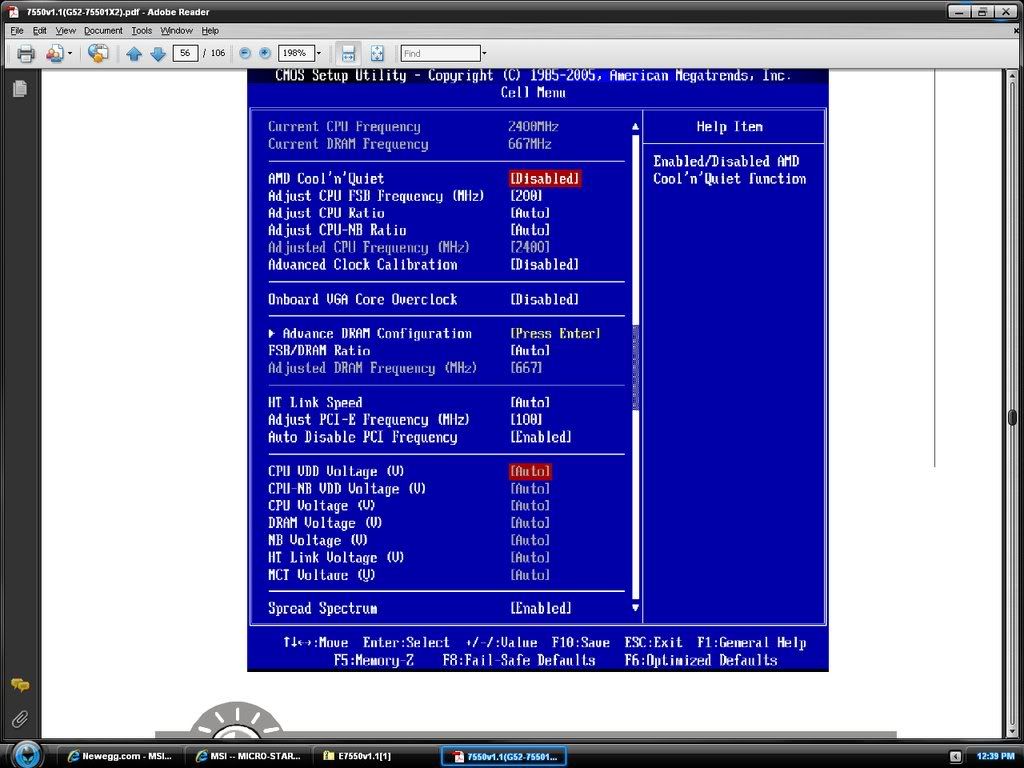
I hope this does it..Watch your Temps,,They should not go up much or any @Stock Clocks.
Small steps and If all goes good then start Clocking that thing.
 Posting Permissions
- You may not post new threads
- You may not post replies
- You may not post attachments
- You may not edit your posts
-
Forum Rules





 ..........


 Reply With Quote
Bookmarks