

Thank you Cryptik, I'll start there.Originally Posted by CryptiK


Thank you Cryptik, I'll start there.
Ket's 1306 at the moment. I have 1402 but just have not flashed to it as of yet.
Rampage Extreme/ QX9650 / Watercooled / Crucial Ballistix / Sapphire HD4870 CF / WD6400AAKSx2 Matrix Raid, WD Raptor 74g, 7200.10 320g / Soundblaster X-Fi Premium / MM UFO / Corsair TX750
I used 1306 and then Ket's 1306 when I was plying around with my Q6600. Got 200mhz more out of it than I could with my old P35 board.
Rampage Extreme/ QX9650 / Watercooled / Crucial Ballistix / Sapphire HD4870 CF / WD6400AAKSx2 Matrix Raid, WD Raptor 74g, 7200.10 320g / Soundblaster X-Fi Premium / MM UFO / Corsair TX750
hi could any1 tell me which way the two bios chips onboard face they have little semi curcules which way do thay point any1 take a picture to help me because I took them out swaped them over to try and get the board to post but no luck. Need to put them back the right way to send it back or they won't replace it thanks
Thank you Pntgrd ,I'll try the 1306 bios and I'm sure I'll be back here with OC questions.
Sure david, the notch on both chips faces the back of the case when the board is installed.
Hope you have better luck with the new board. I have also sent mine back and hope to get a fully functional replacement too.
Ci7 990X::Rampage III Extreme::12GB Corsair Dominator 1866C7GT::2 x EVGA SC Titans in SLI::Corsair AX1200::TJ07::Watercooled
Ci7 920 3849B018::Rampage II Extreme::6GB GSKILL Trident 2000C9 BBSE::EVGA GTX580::Antec Signature SG850::TJ09::Aircooled w/TRUE 120X
i just realized....
in order get DMA for IDE drives the Marvel bios needs to be enabled, otherwise itll be MultiWord2
Get the Q9550 it has the slightly higher multi.. You might get a little higher then me.
_____________________________________________
Rig = GA-P67A-UD3P Rev 1.0 - 2600K @ 5.2~GHz 1.5v~, 1.489~v Under Load - Swiftech Water Cooling - 2 X 4GB Corsair DDR3 2000Mhz @ 1868MHz~ 9,10,9,27 @ 1.65v~ - Asus 6970 @ 950MHz / 1450MHz - 3x Western Digital RE3 320Gb 16Mb Cache SataII Drives in Raid0 - Corsair HX 850w Power Supply - Antec 1200 Case - 3DMark 11 Score = P6234 - 3DVantage Score = P26237
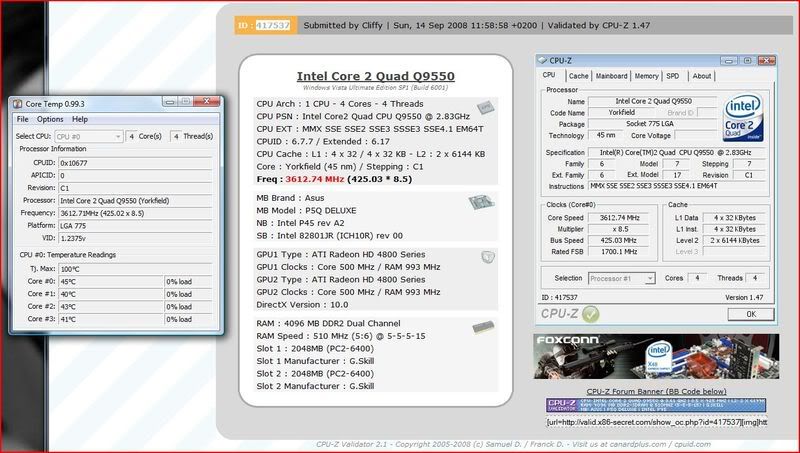
Current settings are below. Running my Q9550 at 3.6Ghz with less voltages than the actual VID, done 4hrs prime blend stable which is plenty for me. CPU seems stable at 4Ghz with 1.257v but aint been able to get the rest of the system stable yet.
Any advise or input on how to tighten up these memory settings would be greatly appreciated.
Code:AI Overclock tuner: Manual CPU Ratio Setting: 8.5 FSB Strap to North Bridge: 333 FSB Frequency: 425 PCI-E Frequency: 101 DRAM Frequency: 1021Mhz DRAM CLK Skew on Channel A1: AUTO DRAM CLK Skew on Channel A2: AUTO DRAM CLK Skew on Channel B1: AUTO DRAM CLK Skew on Channel B2: AUTO DRAM Timing Control: Manual 1st Information : CAS# Latency: 5 DRAM RAS# to CAS# Delay: 5 DRAM RAS# Precharge: 5 DRAM RAS# Activate to Precharge: 15 RAS# to RAS# Delay : 5 Row Refresh Cycle Time: 55 Write Recovery Time: 9 Read to Precharge Time: 5 2nd Information : READ to WRITE Delay (S/D): AUTO Write to Read Delay (S): AUTO WRITE to READ Delay (D): AUTO READ to READ Delay (S): AUTO READ to READ Delay (D): AUTO WRITE to WRITE Delay (S): AUTO WRITE to WRITE Delay (D): AUTO 3rd Information : WRITE to PRE Delay: AUTO READ to PRE Delay: AUTO PRE to PRE Delay: AUTO ALL PRE to ACT Delay: AUTO ALL PRE to REF Delay: AUTO DRAM Static Read Control: Disabled DRAM Read Training: Disabled MEM. OC Charger: Disabled AI Clock Twister: Moderate AI Transaction Booster: Manual Common Performance Level [10] Pull-In of CHA PH1: DISABLED Pull-In of CHA PH2: DISABLED Pull-In of CHA PH3: DISABLED Pull-In of CHA PH4: DISABLED Pull-In of CHB PH1: DISABLED Pull-In of CHB PH2: DISABLED Pull-In of CHB PH3: DISABLED Pull-In of CHB PH4: DISABLED CPU Voltage: 1.2275 CPU GTL Voltage Reference (0/2): 0.670 CPU GTL Voltage Reference (1/3): 0.670 CPU PLL Voltage: 1.56 FSB Termination Voltage: 1.26 DRAM Voltage: 2.00 NB Voltage: 1.26 NB GTL Reference: 0.640 SBridge Voltage: AUTO PCIE SATA Voltage: AUTO Load Line Calibration: Enabled CPU Spread Spectrum: Disabled PCIE Spread Spectrum: Disabled CPU Clock Skew : Normal NB Clock Skew : Normal Advance CPU Settings CPU Ratio Setting: 8.5 C1E Suppport: Disabled Max CPUID Value Limit: Disabled Intel® Virtualization Tech: Disabled CPU TM Function: Disabled Execute Disable Bit: Disabled
- - - - - - - - - - - - - - - - - - - - - - - - - - - - - -
I7 920 DO 3.3Ghz 1.09V (Still clocking) 3910A313
TRUE Black 2*Xilence 120 Push Pull
Gigabyte UD5 F8 Bios
6GB Patriot Viper 1600 7-7-7-24-1T
Saphire HD4850
Enermax Noisetaker 600W
Coolermaster ATCS 840
- - - - - - - - - - - - - - - - - - - - - - - - - - - - - -
correct me if I'm wrong but the default recovery bios should let me get into bios screen with my q9650 right if not then I'm screwed with a replacemant board. Any advice on how to fix board that won't post since updating to 1306 or whatever all my fans which are connected to the board spin to so board is not dead right so ....... What next don't want to send it back if don't have to thanks
Have you tried turning it off and then pulling the power cord yet?. If that doesn't work then pull the cmos battery for 10 minutes.
Rampage Extreme/ QX9650 / Watercooled / Crucial Ballistix / Sapphire HD4870 CF / WD6400AAKSx2 Matrix Raid, WD Raptor 74g, 7200.10 320g / Soundblaster X-Fi Premium / MM UFO / Corsair TX750
What about switching the bios chips around?
intel G860
asus p8z77-m pro skt1155 bios 1205
Samsung 2x4b ddr3 1333@1600 8.10.9 1.53v
MSI gtx560ti twin frozr 1gb
1x120gb pny prevail elite/1x WD RE4 2TB
Lg Slimline Dvd/rw sata
Dell 2405FPW 24"
Fractal Arc mii
Xonar DX/Dell soundbar
Hiper 580watt
3.9ghz e6300-http://valid.x86-secret.com/show_oc?id=139796
http://www.techpowerup.com/gallery/1834.html
Anybody here have the P5Q DELUXE with the new BIOS build 1402 i got the 0803 version still, any changes? is it worth it?
Thanks
CPU: i7 920 batch #3838B556 D0
Motherboard: Gigabyte EX58-UD5
Memory: Gskill 3x1Gb 1600
Graphic: Sapphire 4890 1GB
HDD: 2x F3 500 Raid 0
Can anyone answer me please
right ive tried both of these and no such luck 1 possitive thing is now keyboard comes on but no grapics card and no post anything else to try
yes i dont think you will need to do anything but not 100% sure. try ringing the dealer and see if they can tell you or if they will flash them for you
Well, I am running a Q9400 which is a pretty recent chip, the shipping bios supported my cpu no problem. As to your chip I can't say but maybe ask around as to what bios was present on recent purchased boards, then go to the asus website and see what bios supports what cpu. Best I can tell you.
Larry
ps. I Think my board came with the 0704 bios or something like that, board was purchased within the last month or so.
Q9650
Asus P5Q-D Bios 1406
280 GTX FC Block
2x2gb OCZ Flex II PC2 9200
Water Cooled/ Iwaki MD20/ D-Tek Fuzion
XFX 850 Watt
OWC SSD
Hello XS-ers,
This is my first post here and I have a bit of an issue with this board.
P5Q-Dlx BIOS 1201
Q9550
Corsair 2x2 GB @ 800 CL4
Powercolor HD 4870
2x WD 6400AAKS in RAID0 on ICH10R
The problem is that the system is not stable at stock freqs. I have to go to 8.5x400 and DDR-800 to find rock-solid stability in IntelBurnTest, OCCT, Everest, etc. It doesn't seem to be voltage-related, because I am at 3.4 GHz with 1.13... vcore and 1.10 vNB, less than what Auto sets. I suspected the board is only stable at 1:1 ratio, but it's not stable at 333 an DRAM-667. Tried all the straps but that doesn't seem to make any difference. What do you think might be the problem ?
#3702
cl/volt to mem

Greeting All,
First time poster here. Also fairly new to OC. Quick question...just upgraded my box to the P5Q Deluxe and a Q9550 (C0, of course). I am targeting a 100% stable 24/7 OC of 3.4 GHz. Actually, I've got that, but I think my Q9550 may be a dog...or a vcore blackhole to be more precise. I had to up the VCore to 1.315V in the bios to get it prime stable. Does that sound reasonable? I haven't touched any of the more esoteric settings like the CPU PLL, etc...does that help reduce VCore requirements. One thing I did was make sure Load Line Calibration was off...my first attempt got me a much lower vcore with LLC on, but when I read the technical details about the purpose of vdroop, I decided it wasn't worth it, even if I had to run the volts much higher. Just looking for some advice about lowering the vcore and still keeping the stable OC.
Q9550(C1)@3.4GhZ 400x8.5@1.32v
4GB Gskill (2x2GB) F2-8000CL5D-4GBPQ PC1000 DDR2
OCZ OCZ600ADJSLI 600W ATX12V 2.01, BTX, EPS12V
LIAN LI PC-65 USB B2 Silver Aluminum ATX Mid Tower
BFG 8800GT OC
ASUS P5Q Deluxe
2 X Seagate Barracuda 7200.10 ST3320620AS
Sunbeam CR-CCTF 120mm
Has anyone gotten a '87xxxx' board yet? Any changes from '86xxxx'?
You're definitely in need of higher vNB, as you are running a quad and 2 x 2GB ram. Try raising it to 1.26v and re-test. Try vPLL = 1.52v, vFSB = 1.12v, vcore = 1.20v also, I think 1.13v may be too low for vcore at 3.4GHz. After you get the whole system stable you can start lowering vcore anyway and find out what it needs.
Ci7 990X::Rampage III Extreme::12GB Corsair Dominator 1866C7GT::2 x EVGA SC Titans in SLI::Corsair AX1200::TJ07::Watercooled
Ci7 920 3849B018::Rampage II Extreme::6GB GSKILL Trident 2000C9 BBSE::EVGA GTX580::Antec Signature SG850::TJ09::Aircooled w/TRUE 120X
I'm not sure I understand what that means. If you are referring to vDIMM, that's on auto and Memtest86+ finds no errors.
I'm stable now at 3.4 GHz with 1.10 vNB and 1.138... vcore, but I can't find stability at stock freqs, not even with higher voltages or Auto. I tried 1.26 vNB and 1.26 vcore and I climbed down to these levels because the system is stable at 3.4. But I will try again what you suggested.
I have to mention one more thing: at stock freqs and Auto settings in BIOS, the Stress Cache module in the Everest Stability Test fails, but the other tests run OK.
P182 w/ 4x 120mm TriCool @ Low | CMPSU-750TX | P5Q-Dlx BIOS 1201 | Q9550 + AS5 + Tuniq | Corsair 2x2 GB @ 800 Mhz, CL4 | Powercolor HD 4870 | 2x WD 6400AAKS in RAID0 on ICH10R | Asus DRW-2014S1T-retail
So you're saying you were not stable at stock, and had to overclock to 400FSB (remaining on the default MP of 8.5) to become stable? Something's is not right with your stock settings in that case - were you leaving everything on auto?
Perhaps your ram is running at too low a voltage/too tight timings, or the AUTO setting is making the boards PL (tRD) too low, when at stock. However unless you are manually setting everything to 'stock speeds & voltages' you can't really say that it is at stock settings.
When you have everything at stock, as you described it, using a combination of CPU-Z and memset, please state what your memory speed and timings are, and what the board's PL is. Also, what did you have the ram voltage set to?
Ci7 990X::Rampage III Extreme::12GB Corsair Dominator 1866C7GT::2 x EVGA SC Titans in SLI::Corsair AX1200::TJ07::Watercooled
Ci7 920 3849B018::Rampage II Extreme::6GB GSKILL Trident 2000C9 BBSE::EVGA GTX580::Antec Signature SG850::TJ09::Aircooled w/TRUE 120X
Hello all
I just got this board with an e8400 E0 today (actually its the p5q-pro)
Goal is for 4.2 ghz stable. Does anyone have some sort of template of mobo settings that I should use? IE nb voltage and what settings I should have enabled/disabled.
Thanks in advance
Are you manually setting your PL level at stock? If so, to what? Maybe it's too aggressive. Try something like PL of 12, "moderate" and disable read training and static read. At least this helps you rule out some things.
Also, don't put so much stock in Memtest...I have seen it pass with ease only to fail Prime blend. After Prime blend failing I made adjustments to memory related settings allowing it to then pass.
Maybe manually set your vDIMM to manufacturer recommended level but keep in mind board tends to overvolt so if rated at 2.1v perhaps set to 2.02v.
Maybe try different BIOS ver. too?
Asus P5Q-E (Bios 12.01)
E8600 @ 4.2 Ghz (10x420) ; vid 1.25
Idle @ 1.304v ; Load @ 1.320v (Prime stable)
Corsair CM2X2048-8500-C5D (1050 Mhz @ 5,5,5,15) tRD @ 8
Nvidia 8800 Ultra
Thermalright Ultra 120
XP SP3


 Reply With Quote



Bookmarks