

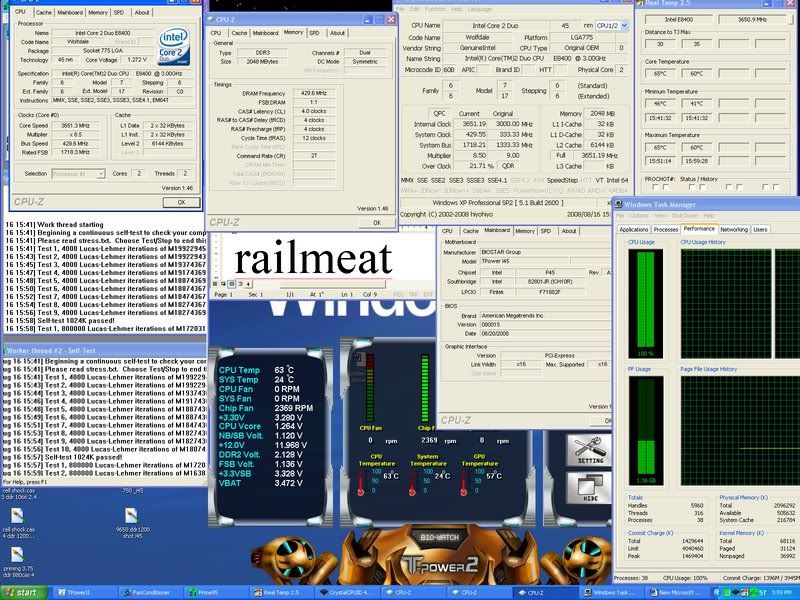
this board is really nice i could do 620MHz on air but i think its the ram cant do much more.


this board is really nice i could do 620MHz on air but i think its the ram cant do much more.
I'm glad it was obvious to you after the fact. It was not to me because 449 was 1 hour prime stable, 450 was a complete avalanche needing a bios restore. That seemed too drastic. I'm happy one more piece of the puzzle has been added for all of us that are ignorant. Thanks for your help solving the matter.Originally Posted by mrcape

NICE!
what kind of ram and specs?
BIOSTAR TPOWER I45 UNOFFICIAL THREAD
BIOSTAR TPOWER BOLT MOD FOR HEATPIPE AND HEATSINK
BIOSTAR TPOWER I45 BIOS FLASHING PROCEDURE
ABIT IP35 PRO HEATPIPE MOD
ABIT IP35 PRO BIOS FLASHING PROCEDURE
IP35 Pro: 9650@4000Mhz, par overclocker; Freezone Elite; 4Gb GSkill DDR-800@DDR-1068 (2 x 2gb); XFX 8800 GTS; Areca 8X PCIe in Raid 0 working at 4x speed; 4-250 Gb (single platter) 7200.10 drives; Giga 3DAurora case with side window.
thats nice but what can u get stable?
heres mine,bulletproof,amazing temps,voltages. 3.6 ddr860 4-4-4-12 voltages are crazy low,this tells me i have a winner of a cpu chip in my hands(priceless)
eyeball that nb and fsb term vtt volts...
http://i76.photobucket.com/albums/j1.../24_7setup.jpg
heres 4 ghz without even trying but it dont count it being worth squat cause i didnt tweak it to be stable and not really into hi voltages\temps for no more fps in games.let alone degration on my cpu for no gain in gaming.
http://i76.photobucket.com/albums/j1...cassuperpi.jpg
4ghz ddr900 4-4-4-12 noticed no gains in anything excpet pointless super pi time.
[IMG][/IMG]
Last edited by railmeat; 08-17-2008 at 12:14 AM.
Stacker830 Watercooled
windows7 ultimate 64 bit!!!
heatkiller(rev3) on 2500k@ 4.5ghz 1.35v,8 gigs 2133 ripjaws 1.5v
Swiftech Mcp-655,1/2in tygon,13x120 sunnons on junk ps,
(2)triple 120mm rads,Biostar TP67XE(rev 5.2)
150 gig velicraptor (stable drive) ssds r still buggy!!
xfi-xtrememusic,klipsch ultras, sen hd-595s
Evga Hydro gtX 590,co0lermaster-1250 watt,
24" Sony fw-900 black ops at @ 2304x1440 85hz/85fps SOLID
G@m3r 4 L1Fe!!
http://s76.photobucket.com/albums/j1...0VIEW%20ALL--/
3dmark 11 http://3dmark.com/3dm11/1102387
Glad it worked .
Like you, I found it nightmare to overclock past 449, took a while to get there, this was with trial and error, not easy when you are overclocking your first quad core and threads like this weren't available. Most people seem to be overclocking dual cores and not many quad cores. Also quite a few people were saying the I45 was not good for clocking quads, so i wasn't sure that my board coukld actually get past 449.
I am still new to overclocking noob
I am using gskill PQ PC2-8000C5 memory.
As Ace-a-rue says Auto setting is fine for dual cores, but as ddogg and me have found out , it needs to be tweaked for quad core (i have a q9300)
@mrcape
If adjusting gtls was so obvious, why didn't you offer advice to ddogg, when you could see he was struggling to get past 449.
Not everyone is an expert overclocker like you seem to think you are.
To end on a positive i'm really glad I bought this motherboard and hope other people have some good overclocking adventures on what is a fine motherboard.
Well done Biostar!
Last edited by shaolinchicken; 08-17-2008 at 12:36 AM.

Nice FSB, but why so much Vcore?
As allready asked: what RAM?
Also I would like to know Your other voltage settings in BIOS.
Vmods - what can possibly go wrong? ©
Vcore i left @ auto in bios so the high volts
ddr +.6v
chipset +.35
FSB +.35
CPU PLL 1.6v
Ram is Corsair pc8500 very old pair i had lying around.
i am doing 3.8ghz 24/7 prime stable @ 1.36v
Last edited by farookh; 08-17-2008 at 02:33 AM.
Thanks farookh!
I have another question related to older LGA775 CPUs.
Does this mobo support for example Celeron D 347 and P4 631?
Some say P45 should support them but it depends on manufacturer...
Vmods - what can possibly go wrong? ©
go to the 1st page of this thread; i provided a link that shows all the cpu's that are supported by this board.
Last edited by Ace-a-Rue; 08-17-2008 at 08:31 AM.
BIOSTAR TPOWER BOLT MOD FOR HEATPIPE AND HEATSINK
BIOSTAR TPOWER I45 BIOS FLASHING PROCEDURE
ABIT IP35 PRO HEATPIPE MOD
ABIT IP35 PRO BIOS FLASHING PROCEDURE
IP35 Pro: 9650@4000Mhz, par overclocker; Freezone Elite; 4Gb GSkill DDR-800@DDR-1068 (2 x 2gb); XFX 8800 GTS; Areca 8X PCIe in Raid 0 working at 4x speed; 4-250 Gb (single platter) 7200.10 drives; Giga 3DAurora case with side window.
Ace-a-Rue, I have looked this CPU support list several times last week.
I formulated my last post wrong.
What I meant was why doesn't Biostar support older CPUs?
Hopefully it will with newer BIOS?
Vmods - what can possibly go wrong? ©
good question!...try to look up at intel's site to see if you can find the specs for the P45 and see if it mentions what cpu's it would support.
BIOSTAR TPOWER BOLT MOD FOR HEATPIPE AND HEATSINK
BIOSTAR TPOWER I45 BIOS FLASHING PROCEDURE
ABIT IP35 PRO HEATPIPE MOD
ABIT IP35 PRO BIOS FLASHING PROCEDURE
IP35 Pro: 9650@4000Mhz, par overclocker; Freezone Elite; 4Gb GSkill DDR-800@DDR-1068 (2 x 2gb); XFX 8800 GTS; Areca 8X PCIe in Raid 0 working at 4x speed; 4-250 Gb (single platter) 7200.10 drives; Giga 3DAurora case with side window.
500 1-1 Ballistix PL-9 3.750 Quad9450@1.44v
Some screens of a 1-1 config using 4 Ballistix 6400 @2.2v
I don't think I'll use this for 24/7 as voltages have to be up considerably 1.44 VCore, fsb 1.6, NB 1.54. Maybe once I really feel it is stable I'll try to pull the NB and FSB down. I did lower the DDR voltage to 2.2 v a while after doing the screen. Seems to be holding up ok.
Last edited by ddogg; 08-17-2008 at 02:36 PM.
Those ballistix should do 4-4-4 easily @ 500. maybe take 2 out and just keep the best ones in for today. get a fan on them crank up the vdimm and post another screen
very good quad overclock.
The damn Intel homepage support sucks. Can't find any info there (probably I'm n00b).
OK, seems supporting older Celerons was my mistake. But Pentiums should work. For example:
http://support.asus.com/cpusupport/c...=P5Q%20Premium
Vmods - what can possibly go wrong? ©
Thanks, trans am,
What do feel an acceptable push volage would be on the Ballistix ... Maybe 2.4 or 2.5?
Also, the Gskill 8500 will run at 500, but seems to need pl 10 to be stable which costs me 300 MB/s in MemTest. Anybody know any tricks with some other voltage or memory adjustment that might stabilize it at pl9? I really don't want to fry it and 2.3v did not stabilize it, yet 300 MB/s is substantial.
I may be better off sticking with 465/560 on a 5/6 multiplier, but 500/2000 just sounds better.
the pentiums could work or they might not on this biostar board...the lowest common denominator on their chart is celeron dual core...i guess you could try it to see if it posts.
other thing you could do is email tech support and ask them...sometimes the website postings could be behind with the updates.
BIOSTAR TPOWER BOLT MOD FOR HEATPIPE AND HEATSINK
BIOSTAR TPOWER I45 BIOS FLASHING PROCEDURE
ABIT IP35 PRO HEATPIPE MOD
ABIT IP35 PRO BIOS FLASHING PROCEDURE
IP35 Pro: 9650@4000Mhz, par overclocker; Freezone Elite; 4Gb GSkill DDR-800@DDR-1068 (2 x 2gb); XFX 8800 GTS; Areca 8X PCIe in Raid 0 working at 4x speed; 4-250 Gb (single platter) 7200.10 drives; Giga 3DAurora case with side window.
you could try RAS to CAS delay for read and write at = 6 and then set PL=9, but that will slow it down in speed...remember, the L2 cache and having four cores puts a huge strain on the memory and MCH, which is why you will have a difficult time getting above 470 FSB.
BIOSTAR TPOWER BOLT MOD FOR HEATPIPE AND HEATSINK
BIOSTAR TPOWER I45 BIOS FLASHING PROCEDURE
ABIT IP35 PRO HEATPIPE MOD
ABIT IP35 PRO BIOS FLASHING PROCEDURE
IP35 Pro: 9650@4000Mhz, par overclocker; Freezone Elite; 4Gb GSkill DDR-800@DDR-1068 (2 x 2gb); XFX 8800 GTS; Areca 8X PCIe in Raid 0 working at 4x speed; 4-250 Gb (single platter) 7200.10 drives; Giga 3DAurora case with side window.
I popped out the Ballistix and put in the GSkill without changing settings and it seems to be holding up so far. Maybe I forgot to change something when I was comparing before. So much stuff to keep up with. Here is where I am on the GSkill:
/add: btw, I also tested some 2x1g Mushkin 6400 and a new set of 2x1g Dominator 8500. Neither could hold up. The Mushkin came close but the Dominator, on my particular board with this CPU, is nothing but trash. Lucky to hit 400. Hopefully others will fair better with it, but it is so bad I'm gonna stick it in an ECS board (to give you my perspective
I'll try comparing PL10 against changing ras to cas r&w=6 on the GSkill 8500. Thanks for the suggestion.
Last edited by ddogg; 08-17-2008 at 06:10 PM.
your cpu-z and memset screens show p45 with ddr3 some bug I guess/
The first thing you need to do is open you case. Do you have an extra fan laying around anywhere? You are going to need a fan if you want to do this. With the case upright place a fan on the top of you video card. (make sure its a plastic fan or else you will short out the video card). You don't need to mount the fan just let it stand upright and aim it blowing in the direction of your memory dimms. If you have a 120mm fan you should be able to hit the NB at the same time. Once you have the fan going boot up and get in the bios. drop you cpu multi to 7 to take the cpu out of the equation. You want to concentrate on ram clocking now.
get in the mem settings and run 4-4-4-15 to start out. keep rest on auto. increase vdimm .5 mhz and reboot. keep doing this until you can get windows to load. once in windows open cpuz and check the timings . then open superpi and run a 1m run. if it passes go for a 8m run. If you get errors reboot and raise vdimm some more. try not to exceed 2.5v keep messing around. play with nb voltage a bit. start at 1.35 and keep going up. some times lower NB voltage can help. higher is not always better. but 1.5v seems about right for this. if 4-4-4 @500mhz doesnt work at all drop your fsb to 450 and go from there.
7.5 @500mhz 5-5-5 and run a spi 1m run and see how fast it goes
try running multi at 8 x 469 (3752mhz) fsb 1:1 at 4-4-4- and run spi and compare the time and report back
you are discovering the sweet spot of your cpu and now you need to find the sweet spot of your ram so you have maximum performance.
Last edited by trans am; 08-17-2008 at 06:21 PM.
Yep, it is a bug. Using the Biostar TP-I45 with DDR2. I think there is a Beta back a few pages with this fixed but I was lazy. Sorry for the confusion.
get the fan over the dimms and do waht I said
run the same cpu frequency as before 3.7xxghx 7.5 * 500 and run spi 1m
reboot and set multi at 8 at 469 or 470fsb and ram at 4-4-4- run spi 1m again and compare. if its stable keep raising the fsb
also try 5-4-5 or 5-5-4 anythings better than 5-5-5.
Last edited by trans am; 08-17-2008 at 06:34 PM.
superpi is one of many benches..passing 1M, 8M or 16M does not make it a stable system...i would bet if you are trying for high FSB using 4-4-4-12, it won't pass the mustard with SuperPI or EVEN the new intel burn test.
BIOSTAR TPOWER BOLT MOD FOR HEATPIPE AND HEATSINK
BIOSTAR TPOWER I45 BIOS FLASHING PROCEDURE
ABIT IP35 PRO HEATPIPE MOD
ABIT IP35 PRO BIOS FLASHING PROCEDURE
IP35 Pro: 9650@4000Mhz, par overclocker; Freezone Elite; 4Gb GSkill DDR-800@DDR-1068 (2 x 2gb); XFX 8800 GTS; Areca 8X PCIe in Raid 0 working at 4x speed; 4-250 Gb (single platter) 7200.10 drives; Giga 3DAurora case with side window.
Must be a telepathy thing going on as I did all that near exactly as you suggested (this ain't my first ram BBQ). No way in hell you, me, or anybody else is going to do 4-4-4-x at anywhere close to 500 on this particular board and CPU with Ballistix 6400. Best I could do was like 465 9t 4-4-4-15. Frankly I think the fixation on 4-4-4-12 is a throwback to the old days and is not necessarily the target on the later Intel Chipsets.
To give a perspective, @450 all 4's you are looking at 5035 MB/s in MemTest. All 5's give you 4861. Sure that is a bit, but at 500 all 5's I'm doing near 6000 MB/s. I guess if a board and a set of ram would both do the same fsb then certainly one would want to go tighter all things considered but that is impossible. On the other hand I've seen encoding apps drop speed when the timings are too tight.
<Edited out dumb rant on dumb benchmarks>
Btw, 12.50 second SuperPi
Last edited by ddogg; 08-17-2008 at 08:38 PM.
Got my board Friday, just waiting on my new cpu block to show up. (should be here the same day as the hurricane)
“You Americans are so gullible. No, you won’t accept communism outright, but we’ll keep feeding you small doses of socialism until you’ll finally wake up and find you already have communism. We won’t have to fight you. We’ll so weaken your economy until you’ll fall like overripe fruit into our hands." Nikita Khrushchev
Good work ddogg, nice to see you hit 500mhz, I have got to 500mhz, but not managed to stablize it yet.
Having fun trying though.
At least we know that the board is capable of reaching 500mhz on the 45nm quads.
Last edited by shaolinchicken; 08-18-2008 at 02:47 AM. Reason: missed a bit
 Posting Permissions


 Reply With Quote

Bookmarks