MMM
Page 3 of 4 FirstFirst 1234 LastLast
Results 51 to 75 of 77

Thread: unlocking the new Athlons/Durons/thortons

  1. #51
    Xtreme X.I.P.
    Join Date
    Nov 2002
    Location
    Shipai
    Posts
    31,147
    equito, the new locked durons have a new locking mechnism. modding the bridges doesnt work anymore, except for the mp mod it seems... the cache can NOT be enabled on the new cpus after week 39/40.

    amd couldnt change the voltage pins because then the new chips would have been incompatible with some boards i guess...

  2. #52
    Registered User
    Join Date
    Dec 2003
    Posts
    2
    Yesterday I bought one of it. His week is 46. last of L2 was cut. I try to cenntect it but cash was still 64k. others of L2 was connected, but I have decided to check it, and they was unconnected in fact...
    What does it mean? Maybe L1 is unconnected too. Maybe it is fake?

    Sorry for bad english

  3. #53
    X. I. P.
    Join Date
    Jul 2002
    Location
    Sioux Falls, SD U.S.A.
    Posts
    2,127
    OK, looks like I was being too cautious. Since I thought I had nothing to lose I went deeper with my sanding and bam! started seeing the circuits of my dead 1700+.

    This is an adaptation of saaya's first drawing. None of my L2 and L9 circuits go all the way to the core as in saaya's drawing. The one red circle shows a trace that appears to terminate under the 8-pin SMD, it does NOT connect to the SMD.

    How can I tell? Because I can see copper where the one trace does connect and the red-circled trace still has some substrate above it, I cannot see the copper trace on it.

    Two hours of bleary-eyed peering thrugh the microscope and sanding. I'm done for the night. I might need to clean up this drawing a bit but it's essentially correct.

    (Edit)After some more sanding, the four traces going off the magnified area end up terminating at the core.
    Attached Thumbnails Attached Thumbnails Click image for larger version. 

Name:	l2-l9-layer1(1).png 
Views:	1053 
Size:	41.4 KB 
ID:	6633  
    Last edited by sjohnson; 12-20-2003 at 08:10 AM.

  4. #54
    Xtreme X.I.P.
    Join Date
    Nov 2002
    Location
    Shipai
    Posts
    31,147
    none of the traces go to the core? are you sure? maybe on the next layer... ?

    what happens with the yellow traces that leave the zoomed area? where do they go?

    have you looked at the circuit under a microscope or magnifying glass?

    thx a lot sjohnson!

  5. #55
    X. I. P.
    Join Date
    Jul 2002
    Location
    Sioux Falls, SD U.S.A.
    Posts
    2,127
    The sanding went so slowly that I wasn't able to clean enough off to give it a perfect look, so I may be wrong about the traces not going to the core. Scraping next to the core is difficult as you probably already know saaya.

    I'm using a very nice Bausch & Lombe medical stereo-microscope to examine the traces. Bought it at an estate sale for 25 USD

    I'll do some more sanding this evening (isn't world time sucky, I'm just getting up to go to work) and make changes as needed.

    No need for thanks, it's kind of fun lol...
    The plural of "anecdote" is not "data."

  6. #56
    Xtreme X.I.P.
    Join Date
    Nov 2002
    Location
    Shipai
    Posts
    31,147
    yeah, its really nice to see the guts of a cpu you played with for years isnt it?

    damn i wish i had a microscope im using a simple magnifying glass wich more or less has a 2x zoom effect :/

    since i meassured the voltage on the bridges while the cpu was running, i found out that the right L2 bridge didnt have any voltage at all, so my plan was to cut the trace going to that bridge before it reaches the bridge where it is set to ground somewhere. then connect the trace from the core to another trace of the L2 bridges wich DOES get some volts since the bridge is connected.

    i cut 2 traces that were ging to the bridges, comming from the core, and the cpu would not boot! so the traces are not useless! if the cpu would have been completely die locked, then it wouldnt matter if the traces would have no contact afaik.

    i carefully sanded the package of my duron 1600 until the traces were accessable, then i carefully cut the trace that leads to the right L2 bridge ,i already mentioned.
    next step was to cover the other traces with clear epoxy again, what i just did. im now waiting for the epoxy to dry out and then i will connect the two traces and see what happens

  7. #57
    X. I. P.
    Join Date
    Jul 2002
    Location
    Sioux Falls, SD U.S.A.
    Posts
    2,127
    Originally posted by saaya
    none of the traces go to the core? are you sure? maybe on the next layer... ?

    what happens with the yellow traces that leave the zoomed area? where do they go?

    have you looked at the circuit under a microscope or magnifying glass?
    Just finished some more sanding. I need a life lol...

    Working on the next layer only after I get the whole chip first layer traced. Might be a while, this is slow going

    The four yellow traces that leave the zoomed layer all meet up and go to the core, about across from the "L6" mark.

  8. #58
    Registered User
    Join Date
    Dec 2003
    Posts
    2
    It is so interesting to read your postings...
    If you guys unlock the Duron, so I think you will be the international heros. :-)
    I think that L9 is have a some meaning. Because when I tried to unlock the cache (I have 4th of L2 was cut, and all of L9 was cut), so I connected 1st and 4th of L9, then turned on computer. but he did not start... When I cut only 1st of L9, so computer started... Maybe the part of locked cache is really bad..
    Maybe it have another meaning.
    Why I connect L9: because here (In russia) we have experience to connect 1st and 4th of L9 and connected pin AF8 to GND, AH8 to GND that is equivalent L2.

    Why I wrote it all, maybe it help you to unl:banana::banana::banana::banana: it. Because I have Duron 1400 (46 week) too...

  9. #59
    X. I. P.
    Join Date
    Jul 2002
    Location
    Sioux Falls, SD U.S.A.
    Posts
    2,127
    Thanks, hws . Who knows what bit of information might lead to an unlock?
    The plural of "anecdote" is not "data."

  10. #60
    Registered User
    Join Date
    Dec 2003
    Location
    UK
    Posts
    11
    I tried the Lv2 mod but have had no success so far despite trying a few times. I am scratching the 'cut' Lv2 bridge and completely filling it with Silver conductive paint from Maplins.
    Each time i try to boot with the paint on it beeps lots of times,although works fine when i remove it with a rubber. The chip i got is:
    DHD1400LV1C T807117260549
    MIUHB 0338VPMW
    It is actually very strange! The bridges are completly differnt to all the photos/pictures i have seen, so i hink this thread is about two different cpu's. As this crude picture shows:


    The shown loops are actually more complicated but would only confuse the matter if i did show them.
    My main problem is that the bridge i am trying to connect is very small - smaller than a Tb core - it certainly cant be see without a magnifying glass.

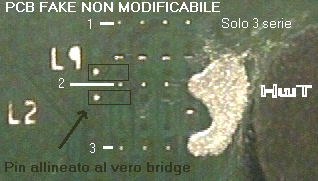
    This article HERE (in Italian) may be explaining my problem. If I understand the article correctly (via Google translator) AMD has changed the bridges i.e. thorton core. It looks like the the connection points are misaligned from the traces as to make painting impossible.
    The article alludes to an upcomming pin-mod but it's not yet available.

    Here is a close-up of what my chip looks like as shown on the above mentioned site:

    If you look very carefully you can see that the connections are not so simple anymore, even if you do scratch to get to them.

    I had another go today but had the same result! So i'm watching this hread like a hawk and will help contribute if i can.
    Last edited by del_35; 12-23-2003 at 07:27 AM.

  11. #61
    Xtreme Enthusiast
    Join Date
    Nov 2002
    Location
    SoCal, USA
    Posts
    562
    Originally posted by del_35
    If you look very carefully you can see that the connections are not so simple anymore, even if you do scratch to get to them.
    The connections are as simple as before once you scratch the surface:
    Attached Thumbnails Attached Thumbnails Click image for larger version. 

Name:	l2.jpg 
Views:	908 
Size:	53.6 KB 
ID:	6709  

  12. #62
    Xtreme X.I.P.
    Join Date
    Nov 2002
    Location
    Shipai
    Posts
    31,147
    del_35, the dots you connected are fake and are notconnected to the bridges as at all! you have to scratch off the first clear epoxy layer, then you see the copper bridge that has been cut, and can connect the two sides agfain. its really really small thus very hard to do though. if you had a problem with connecting ther fake spots already you shouldnt try to connect the real bridge as its even a lot smaller.

    and about the L9 bridges, as i wrote before, they are a second way to set the cache size. you can either set the cache size by the L2 bridges, or by using the L9 bridges. amd cut all the L9 bridges though and disabled the option to set the cache by connecting some pins.

    havent had time to connect the two traces yet, maybe tomorrow...

  13. #63
    Registered User
    Join Date
    Dec 2003
    Location
    UK
    Posts
    11
    You have to scratch off the first clear epoxy layer, then you see the copper bridge that has been cut, and can connect the two sides agfain
    Sorry if i didnt make it clear but this is what i am trying to do at present, i might go buy a decent magnifying glass and it should be ok then. I am tring to conect the hidden dots.
    Do you think if i successfully connection the laser cut bridge it will renable the Lv2 cache? Anyone done it yet?

    Originally posted by EQuito
    The connections are as simple as before once you scratch the surface:
    You have the older core there. The new ones have fake dots.

    EDIT: Been trying again today but it didnt work. It must be locked
    Last edited by del_35; 12-23-2003 at 07:28 AM.

  14. #64
    Xtreme X.I.P.
    Join Date
    Nov 2002
    Location
    Shipai
    Posts
    31,147
    yes, your chips is before week 39/40 right? then you can enable the extra L2 cache!

    check the first pic i posted in this thread, it shows the bridge array
    http://www.xtremesystems.org/forums/...5&pagenumber=1

  15. #65
    Registered User
    Join Date
    Dec 2003
    Posts
    4
    my DHD1600DLV1C MIXIB 0345 UPMW duron ( so week 45 ) in an nf7-s motherboard is multiplier unlocked! dunno why but it is. any suggestions?

  16. #66
    Registered User
    Join Date
    Dec 2003
    Posts
    4
    http://break.darkangel.hu/duron4.JPG here is the screenshot whit a 10x multiplier , no mod made on the proc

  17. #67
    Xtreme Enthusiast
    Join Date
    Dec 2003
    Location
    Louisiana
    Posts
    659
    There seem to be sporadic reports of unlocked Durons. I saw an unlocked week 47 over at AMDMB and a 44 (I think) at OC forums. Give the L2 mod a try - see if the extra cache will work. I did it on an older Duron 1400 and it worked like a champ.
    Bedroom: D201GLY2, Celeron 220 (1.2ghz/512k cache); 1gb DDR2 PC-5300; Geforce 6200 PCI
    -----------------
    Gaming: Core 2 Duo E4500@2.93ghz (266x11); Abit IP35-E; 3gb Crucial Ballistix PC5300@400mhz (4-4-4-15); XFX Geforce 8800GS@680/800 10123 3dmark06
    -----------------
    HTPC: Athlon 64 X2 BE-2300 (1.9ghz); ECS mATX mb; 2gb Crucial PC5300; Radeon HD2600 Pro 256mb (DXVA HA in BD and HD-DVD)

    Originally posted by Thunderbird1Ghz(Geforce4Ti4200) at Sharky Forums
    And you arent gonna believe this, but that DVD rom will even read regular CD roms!!!!!!!

  18. #68
    Xtreme X.I.P.
    Join Date
    Nov 2002
    Location
    Shipai
    Posts
    31,147
    maybe the lock doesnt work on all chips and some are still unlocked?

  19. #69
    Registered User
    Join Date
    Dec 2003
    Posts
    4
    should i give the simple l2 cache enable mod a try?

  20. #70
    IT Engineer in the making
    Join Date
    Jun 2003
    Location
    Former Kingdom of Bavaria
    Posts
    2,094
    Well, I thought about the whole multiplier locking thing today and came to the following conclusion:
    IMHO, AMD locks the chips' multipliers on the die level and not on the OPGA PCB or perhaps on the connection interface between the die and the package (more likely).
    You ask me why I come to this conclusion? It's quite simple:

    The question that came up in my mind was:
    How come that there are still reported cases of CPUs with a production week >40 and they are still unlocked???

    AMD is building Durons with Tbred-A core now, so they seem to have plenty of stocks left.
    Perhaps these unlocked week >40 chips were built with DIEs that were left in stock from a production earlier this year and were then planted onto a week >40 package.

    Well, sadly that would mean that we could never unlock these locked chips!

    Perhaps I'm wrong and I'm open for any comments or possible corrections, but if it's true, were at a dead end trying to unlock these new chips and analysing/studying the differences in package.

    Just my

    I hope I'm wrong, though

    Edit: Perhaps I'm even seeing it the wrong way and the PCB is the real difference, but would it make a difference if there was a connection change on the package, exactly at the point where the DIE is connected to the PCB? We could never change that, too.
    Last edited by celemine1Gig; 12-23-2003 at 11:35 AM.
    Quote from one of our professors:
    "Reality is hiding in the imaginary part."

  21. #71
    Xtreme Enthusiast
    Join Date
    Nov 2002
    Location
    SoCal, USA
    Posts
    562
    Originally posted by del_35
    You have the older core there. The new ones have fake dots.
    You mean older packaging. As you can see in the pic above, I didn't connect the fake dots.
    I scrapped the protective layer and got down to the real dots for both FSB and cache.

  22. #72
    Registered User
    Join Date
    Dec 2003
    Location
    UK
    Posts
    11
    Originally posted by EQuito
    I scrapped the protective layer and got down to the real dots for both FSB and cache.
    Did your CPU mod then? Is it ok to cover the fake dots too or does this stop the chip working/moding? should i be just aiming to cover the hidden/covered bridge?

    EDIT: I went back again just now and it seem i have managed something.
    It just booted but only registered 128k of Lv2 cache!!!! It also said unknown CPU 1400mhz
    I'm guessing this means all my cache isnt available for some very strange reason.
    Last edited by del_35; 12-23-2003 at 09:11 PM.

  23. #73
    Xtreme Enthusiast
    Join Date
    Nov 2002
    Location
    SoCal, USA
    Posts
    562

    Thumbs up

    Go check my post on the first page of this thread.

  24. #74
    Registered User
    Join Date
    Nov 2003
    Location
    kent wa.
    Posts
    7
    well i figured i would thorough my 2 cents in here i found a local store that i bought a new 0403 1600 duron it was unlocked. so i went back and bought 2 more all 3 are mixib dlv1c 1600 durons the last numbers of the s/n's are 682, 685,and 689 so they should have came out all about the same day and about right after one another.

    but 2 of these durons are locked the 85 and 89 is locked and the 82 is unlocked so i dont think it is the week and stepping that is unlocked but maybe just a lucky chip that gets through amd's new locking process

    btw this duron will prime 2200 mhz at 1.5 in bios 1.47 in windows on an nf7-s and 1733 1.15v
    Last edited by v8vega350; 02-07-2004 at 11:36 PM.
    bunch of stuff put in a case and it seems to work

  25. #75
    Xtreme X.I.P.
    Join Date
    Nov 2002
    Location
    Shipai
    Posts
    31,147
    yepp i think there are a few chips that dont get locked for some reason, too bad intels locking mechsnism locks all chips and doesnt leave a few unlocked like here

    the cpus are def die locked, no way to unlock them unless we know how the locking mechnaism on the die looks like and how it owkrs. and even then it would be a huge work load to unlock them...

Page 3 of 4 FirstFirst 1234 LastLast

Bookmarks

Bookmarks

Posting Permissions

  • You may not post new threads
  • You may not post replies
  • You may not post attachments
  • You may not edit your posts
  •