

Looking good, Unk!
This is #3 font in light gray.
The problem in Vista is the two-tone nature of the taskbar (MS's attempt to make it look rounded, I guess).
A bolder font might solve the issue, I think.
Any way to match the style of the clock?



Looking good, Unk!
This is #3 font in light gray.
The problem in Vista is the two-tone nature of the taskbar (MS's attempt to make it look rounded, I guess).
A bolder font might solve the issue, I think.
Any way to match the style of the clock?
"Let's face it, we're not changing the world. We're building a product that helps people buy more crap - and watch :banana::banana::banana::banana:." - Bill Watkins- CEO Seagate Technology
My favorite uncle,,,, Have you any suggestions for calibration on water? I have a cpu only loop, D-tek v2, MCP355 w/ XSPC top, MCR320-QP rad so the cooling is top notch, will this affect the calibration, ie smaller difference between ambient and cpu temp? This is on my quad.
Ambient air 19- 20c reported by lian li fan control, temp sensor on cold side of rad,
Water temp reported by same controler at idle is one degree above ambient, RT reports another one higher than that at stock speed and low volts, CPUz reports 1600 w/ speedstep enabled.
OCed @ 3200 idle RT reports 23-25c speedstep still on, load 35-36c CPUz reading 1.2v.
This is about 5c less than coretemp, what do you think? anyone else on water care to speak up?
btw, thanks again, great work!
Last edited by WoodButcher; 05-22-2008 at 06:21 PM.
Q6600@ 3.4 Underwater, P5E-VM HDMI, 4GB OCZ 5,5,5,15 EVGA 8800GT, P.C.P.&C 610w
It was a pretty quick fix to get the cores in the System tray sorted. Now you can add and delete them in any order you wish and they will stay in the proper 0, 1, 2, 3 order. Thanks for the suggestion guys. It drove me crazy too but I thought fixing it would be harder than it actually was. I'll post an update later tonight to the beta section.
clokker: My first suggestion would be not to use a gray font on a gray background. On that background you're pretty much forced to use white. Did you install the RTFont? If so then show me a picture of that font compared to the clock. I think the size of RTFont is about the same as your clock. From this I can use Fony and should be able to create a font style very similar to the clock for you. I've found that's the best way to get just what you're looking for.
WoodButcher: I have zero experience with water. I do know that you need to make comparisons to your water temperature when running my Calibration test. I think even with a great water cooling system, your reported core temperatures at idle are still going to be about 3C or 4C above your water temp but I haven't done any testing with my IR gun to confirm this. No heatsink or water block is going to be 100% effective at removing all of the heat. As long as you are close to the above numbers during Calibration, your reported temps should be pretty good. Try a calibration setting of +1.0 and see how it looks.
Last edited by unclewebb; 05-22-2008 at 06:33 PM.
Not that RealTemp 2.56 was horrible but I've listened to users and here is version 2.57
http://www.fileden.com/files/2008/3/...alTempBeta.zip
It has three fixes. The tray icons are now sorted each time you add a new one in the Settings window so it is a lot less confusing. Great idea.
When you mouse over each tray icon, it will show a full list of the core temperatures. Do you like this better than just showing the temps over the left most tray icon?
The last minor fix was that you can save the Tray icon state now. If you like always looking at the Minimum, Maximum or Average temperature, set it to that in the tray menu and then open up the Settings window and click on Save. Now each time you start the program it will use your favorite setting.
Thanks for everyone's input. It all adds up to a better program.
How do I "install the font"?
RTFont.fon is present in the RealTemp directory, what else needs to be done?
"Let's face it, we're not changing the world. We're building a product that helps people buy more crap - and watch :banana::banana::banana::banana:." - Bill Watkins- CEO Seagate Technology
In XP you go into your control panel and open up the Fonts drawer. You then drag the RTFont into this folder. I've heard in Vista that you right click on RTFont and an "Install" option pops up that you can select.
Uncle is it possible that you can change the VID to detect real time voltages on the core ?
Hey, that works! On my Vista x32 I have been doing a copy and paste to the Fonts folder but thanks for mentioning that "install" option.Originally Posted by unclewebb

I downloaded your 2.57 but it shows 2.56.
| Intel Core i7-2600K | ASRock P67 EXTREME4 GEN3 | G.SKILL Sniper Series 8GB (2 x 4GB) DDR3 1866 | EVGA GTS 450 |
| Swiftech APOGEE Drive II CPU Waterblock with Integrated Pump | XSPC RX360 | Swiftech MCP655-B Pump | XSPC Dual 5.25in. Bay Reservoir |
| Thermaltake 850W PSU | NZXT SWITCH 810 | Windows 7 64-bit |
[SIGPIC][/SIGPIC]
I know there is a bug that sometimes when you try to download the same link, Firefox will grab the last version you downloaded out of your cache. Try deleting the files in your cache and then download again.
Tools -> Options -> Advanced -> Cache is where that setting is hiding in Firefox. I'll go check the Fileden. Sometime the problem seems to be them.
CPU-Z does a really good job reporting both VID and actual core voltage. I don't see a need for me to re-invent the wheel. I just added VID to RealTemp because users requested it and CoreTemp seems to be getting this value wrong on the new 45nm processors.Uncle is it possible that you can change the VID to detect real time voltages on the core ?
Edit: I just clicked on the above beta link and I got version 2.57 so it is there.
Last edited by unclewebb; 05-22-2008 at 09:05 PM.
FirefoxActually I do like Firefox.
Real Temp 2.57
Core0
Core1

| Intel Core i7-2600K | ASRock P67 EXTREME4 GEN3 | G.SKILL Sniper Series 8GB (2 x 4GB) DDR3 1866 | EVGA GTS 450 |
| Swiftech APOGEE Drive II CPU Waterblock with Integrated Pump | XSPC RX360 | Swiftech MCP655-B Pump | XSPC Dual 5.25in. Bay Reservoir |
| Thermaltake 850W PSU | NZXT SWITCH 810 | Windows 7 64-bit |
[SIGPIC][/SIGPIC]
Well I'll be damned.
Your font in white.
Not bad, not bad at all.
"Let's face it, we're not changing the world. We're building a product that helps people buy more crap - and watch :banana::banana::banana::banana:." - Bill Watkins- CEO Seagate Technology
[QUOTE=unclewebb;3008819
CPU-Z does a really good job reporting both VID and actual core voltage. I don't see a need for me to re-invent the wheel. I just added VID to RealTemp because users requested it and CoreTemp seems to be getting this value wrong on the new 45nm processors.
[/QUOTE]
Well im not asking any re-inveting on this, just asking if a real time monitor is possible so i dont have to depend on CPU-z
Demo: I only wrote RealTemp because I saw this great void of accurate temperature information for Core processors. When 45nm arrived and my reported temps were being reported WAY too high by CoreTemp, Everest, HW Monitor, etc, I finally decided if you want something done right you've got to do it yourself.
CPU-Z has been at it for a long time and is the king of CPU info. It's also doing everything right. I'll stick to trying to become users first choice when needing accurate temperature information for their Intel Core processors.
clokker: I was going to mention that the system clock uses an anti-aliased font so it looks a little smoother than other stuff in the tray area. I need to spend more time playing around with the million and one options when creating a font to see if I can get the same effect.
msgclb: What's your thoughts on having all of the core temperatures appear above each core when you mouse over them? The method I used in previous versions only had the temperature information over the first Tray Icon and then the rest were labelled, Core 1, Core 2, Core 3. I did this so when I was getting ready to choose a tray icon menu, I didn't have a bunch of information popping up and getting in the way. I might make the previous way an option to keep me happy.
Last edited by unclewebb; 05-23-2008 at 06:32 AM.
Well, I for one liked it better before, when hovering the cursor over core 0 showed all core temps, and only ID'd and showed single temps for the other cores. Too cluttered and redundant otherwise.
Just my opinion.
EVGA 680i NF68 A1 \ QX6700 \ TRUE 120 \ 2X2GB OCZ 800 \ 8800 GTX 768mb \ X-FI XtremeGamer \ CL 5.1 Inspire T6100 speakers \ WD320, WD500 \ Gigabyte 570 tower \ ViewSonic 22" \ PC Power & Cooling 750W \ XP Pro
I agree. On dual cores it doesn't matter too much but on Quad cores to have the exact same information pop up 4 times as you move along the tray area is useless information. As long as you know that the temp information will pop up when you go to the left most core then you don't need to see it again and again and again.
CoreTemp pops up all 4 temps over each Tray Icon so that's almost reason enough to go back to my previous way!
Any more opinions?
Last edited by unclewebb; 05-23-2008 at 08:14 AM.
The way you have the labels in this version is better but I'm not going to complain if you add another option.
I was wondering why the clock looks liked it does. The Real Temp icon looks like it's aligned to the top of the tray where the clock is either centered or to the bottom. I've played around with Fony but so far I'm lost.
How would you get a hold of the font properties for that clock?
| Intel Core i7-2600K | ASRock P67 EXTREME4 GEN3 | G.SKILL Sniper Series 8GB (2 x 4GB) DDR3 1866 | EVGA GTS 450 |
| Swiftech APOGEE Drive II CPU Waterblock with Integrated Pump | XSPC RX360 | Swiftech MCP655-B Pump | XSPC Dual 5.25in. Bay Reservoir |
| Thermaltake 850W PSU | NZXT SWITCH 810 | Windows 7 64-bit |
[SIGPIC][/SIGPIC]
msgclb: I thought Fony was a great idea. It's simple and I liked the price.
It seems to work best if you have a copy of RTFont somewhere handy like on your desktop. Start Fony, open RTFont on your desktop and you're ready to start editing. This font only contains the numbers from 0 to 9. It doesn't contain any letters because RealTemp doesn't use letters in the tray area.
Click on the number 0 and it will show you what it looks like. Click on it to edit it and then save it back to your desktop.
Go into your Fonts folder and delete RTFont if you have it installed there. Drag your newly created RTFont from your desktop into your fonts folder so the system can properly install it. Fony seems to have a bug that it doesn't let you work over presently installed fonts but if you do it my way and work on a separate copy on your desktop then it works fine.
I'm not sure what Font is used for your clock in Vista. If you had a few pictures of all of the digits then it would be easy enough to copy their design. Without anti-aliasing it still might not be what you're looking for. I'll look into getting anti-aliasing to work in RealTemp. The font code in RealTemp is about the only thing that wasn't coded by me so I need to put on my thinking cap! Font alignment up or down in Windows is not consistent.
Last edited by unclewebb; 05-23-2008 at 09:03 AM.
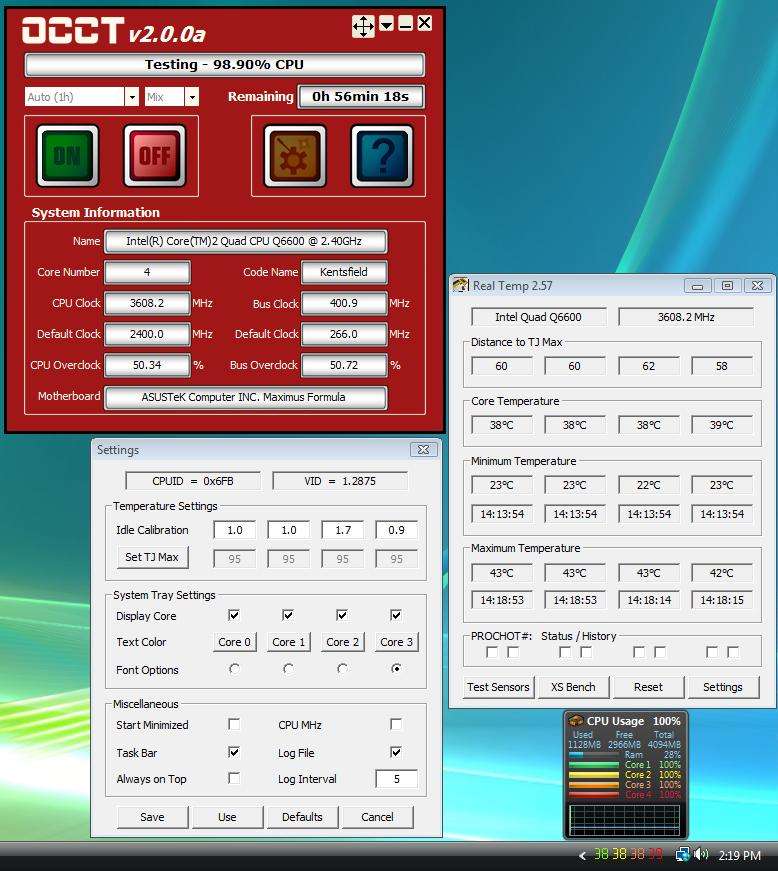
Working good here buddy!!
My colors now match my CPU meter. I have my favorite settings all picked out so far!
CPU clock is correct for me too by default...
Last edited by Talonman; 05-23-2008 at 10:25 AM.
Asus Maximus SE X38 / Lapped Q6600 G0 @ 3.8GHz (L726B397 stock VID=1.224) / 7 Ultimate x64 /EVGA GTX 295 C=650 S=1512 M=1188 (Graphics)/ EVGA GTX 280 C=756 S=1512 M=1296 (PhysX)/ G.SKILL 8GB (4 x 2GB) SDRAM DDR2 1000 (PC2 8000) / Gateway FPD2485W (1920 x 1200 res) / Toughpower 1,000-Watt modular PSU / SilverStone TJ-09 BW / (2) 150 GB Raptor's RAID-0 / (1) Western Digital Caviar 750 GB / LG GGC-H20L (CD, DVD, HD-DVD, and BlueRay Drive) / WaterKegIII Xtreme / D-TEK FuZion CPU, EVGA Hydro Copper 16 GPU, and EK NB S-MAX Acetal Waterblocks / Enzotech Forged Copper CNB-S1L (South Bridge heat sink)
This is the changes that I want to make.

I don't known what this would look like because every time I install it all I see is my old RTFont. The RTFont doesn't show up in the Fonts folder. All I see is RTFont_0 that I can delete. Using Fony I know it's there along with RTFont_0 to RTFont_4. Somehow I've got to delete all those font files.
| Intel Core i7-2600K | ASRock P67 EXTREME4 GEN3 | G.SKILL Sniper Series 8GB (2 x 4GB) DDR3 1866 | EVGA GTS 450 |
| Swiftech APOGEE Drive II CPU Waterblock with Integrated Pump | XSPC RX360 | Swiftech MCP655-B Pump | XSPC Dual 5.25in. Bay Reservoir |
| Thermaltake 850W PSU | NZXT SWITCH 810 | Windows 7 64-bit |
[SIGPIC][/SIGPIC]
I've found another way to install fonts in Vista.
Open the Fonts folder. Right-click in the window and from the pop-up select "Install New Font...". From the Add Fonts dialog navigate to the fonts file you want to install.

| Intel Core i7-2600K | ASRock P67 EXTREME4 GEN3 | G.SKILL Sniper Series 8GB (2 x 4GB) DDR3 1866 | EVGA GTS 450 |
| Swiftech APOGEE Drive II CPU Waterblock with Integrated Pump | XSPC RX360 | Swiftech MCP655-B Pump | XSPC Dual 5.25in. Bay Reservoir |
| Thermaltake 850W PSU | NZXT SWITCH 810 | Windows 7 64-bit |
[SIGPIC][/SIGPIC]
msgclb: In XP it's pretty easy. You just drag and drop font files to or from the Font directory. For some reason, it appends _0 to RTFont so it becomes RTFont_0 in the XP Font folder. If you have multiple versions then you'll probably need to delete / uninstall all of those first. I think XP only allows you to have one version of RTFont in your fonts folder.
I used Fony because it was pretty simple to do what I needed but I haven't checked out the options too much. Maybe this weekend. There is lots of extra room in the Settings area now so I could add on some extra features to give users more control over the Fonts that Windows selects for them. At least RealTemp users don't have to get eye strain trying to read the tiny font CoreTemp uses.
I know personally, something minor like how a program looks in the tray makes a difference.
I think that I've found Microsoft's official way to install/uninstall fonts in Vista.
http://windowshelp.microsoft.com/Win...301033.mspx#E3
This is almost the same as I described above except they used the Control Panel to get to the Fonts folder and the File menu that I didn't know existed.
| Intel Core i7-2600K | ASRock P67 EXTREME4 GEN3 | G.SKILL Sniper Series 8GB (2 x 4GB) DDR3 1866 | EVGA GTS 450 |
| Swiftech APOGEE Drive II CPU Waterblock with Integrated Pump | XSPC RX360 | Swiftech MCP655-B Pump | XSPC Dual 5.25in. Bay Reservoir |
| Thermaltake 850W PSU | NZXT SWITCH 810 | Windows 7 64-bit |
[SIGPIC][/SIGPIC]
Uncle, are the latest updates just cosmetic...or are you making the accuracy of the program better?
Gigabyte EP45-DQ6 - rev 1.0, F13a bios | Intel Q9450 Yorkfield 413x8=3.3GHz | OCZ ProXStream 1000W PSU | Azuen X-Fi Prelude 64MB X-RAM| WD VelociRaptor 74HLFS-01G6U0 16MB cache 74GB - 2 drive RAID 0 64k stripe | ASUS 9800GT Ultimate 512MB RAM (128 SP!!) | G.SKILL PC2-8800 4GB kit @ 1100MHz | OCZ ATV Turbo 4GB USB flash | Scythe Ninja Copper + Scythe 120mm fan | BenQ M2400HD 24" 16:9 LCD | Plextor 716SA 0308; firmware 1.11 | Microsoft Wireless Entertainment Desktop 8000 | Netgear RangeMax DG834PN 108mbps; firmware 1.03.39 + HAWKING HWUG1 108mbps USB dongle | Digital Doc 5+ | 7 CoolerMaster 80mm blue LED fans | Aopen H700A tower case | Vista Home Premium - 32bit, SP1
The recent changes are mostly cosmetic and to make it easier for users to use and experiment with the features that are already available in RealTemp. I haven't made too many significant changes to accuracy since the original version. There hasn't been a need to which is a good thing.
One feature I like in the new Settings window is you can open it and click on the Default button to see what your temps would be with no calibration and then click on the Cancel button to restore your calibration settings for an easy A / B comparison. It's also possible to run two instances of RealTemp at the same time with different calibration factors for easy comparisons.
Having digits after the decimal point for choosing calibration factors might help get your idle temperatures another degree closer to the truth but that's not a big difference.
As long as TjMax is selected correctly and you do the calibration as outlined in the docs, your reported temps will be very accurate from idle to TjMax. Since RealTemp's introduction, I've only needed to make one change to TjMax and that was after I tested my E2160 - M0. Intel's docs that show the Thermal Specification of 73.2°C for this processor misled me into believing that TjMax was likely 95°C like similar processors with this Thermal Spec but testing showed that it was only 85°C for my E2160. I quickly fixed that when I saw that error but that was a while ago.
I also made a change somewhere along the way where I added half a degree to my calibration formula to compensate for rounding errors in my calculations.
Once I have the latest beta version finalized and uploaded to the main TechPowerUp site I plan to go back and try some more real world testing with the new features. There isn't a lot of room for improvements in accuracy but testing and proving that on a regular basis needs to be done to convince users that RealTemp can be trusted. I've never seen any testing of any kind from the other core temp monitoring programs. I wonder why?
msgclb: Thanks for posting the official way to handle Fonts in Vista.
Last edited by unclewebb; 05-23-2008 at 07:02 PM.
Using this method I'm not having any problems installing fonts. I got rid of my extra fonts using the command prompt in administrative mode. I've made some changes to my RTFont. The first image is my new version and the second is a previous one. I'm going to take some images of the differences and do some more testing before I will be satisfied.

| Intel Core i7-2600K | ASRock P67 EXTREME4 GEN3 | G.SKILL Sniper Series 8GB (2 x 4GB) DDR3 1866 | EVGA GTS 450 |
| Swiftech APOGEE Drive II CPU Waterblock with Integrated Pump | XSPC RX360 | Swiftech MCP655-B Pump | XSPC Dual 5.25in. Bay Reservoir |
| Thermaltake 850W PSU | NZXT SWITCH 810 | Windows 7 64-bit |
[SIGPIC][/SIGPIC]


 Reply With Quote


Bookmarks