MMM
Page 2 of 5 FirstFirst 12345 LastLast
Results 26 to 50 of 104

Thread: Sapphire HD3870X2 Low performance

  1. #26
    Xtreme Addict
    Join Date
    Jul 2007
    Posts
    2,103

    Please bare with me on this...I got your Point..2x256bit though = 57.7x2.

    Im pretty shure i know what your talking about ...I just dont know how to explain A better example about what im talking about..

    Example:If i were too..

    SLI two GTS512mb's or even GTS1big's you will only get 512mb(57.7) of bandwidth because of 256bit controler and SLI...It defaults to ONE cards memory for both cards regardless...Fact


    I dont think this is the case with the 3870x2... Crossfire( I may be wrong) uses all the vram on the x2. unlike SLI. Both cores do not have to share 512mb....Each core uses its own 512mb...GPU1 uses 512mb and GPU2 uses the other 512mb. Both GPU's dont use the same 512mb shared like the GTS in SLI.


    This means means the 3870x2 2x256bit should have 57.7 per 512mb..Per GPU..?

    3870x2 GPU's use a total of 1gig with (2x256bit controlers )this means 512mb for each core...I Know that i said there is a total of 114gb/s when in crossfire mode at 100% This will hold true if the card uses all 1gig..Im trying to find this out..Ive always thought Unlike the GTS in SLI the 3870x2 uses a seperate 512mb for each GPU .Each GPU always has 512mb at hand...This is where Nvidia would lack in SLI. You can (Only use the Memory from ONE GTS/card) for both Cards/GPU's in SLI .You will not be able to use the Vram on the secondary card..Which means you will only have 57.7 for both GTS cards!...

    Well Bandwidth wise Nvidia's Ultra which has 106Gb/s with 768mb would be higher if it had 1gig..On second thought if the 3870x2 used 512mb for Both GPU's =28.8gb/s there is no way it could Run HIGH res and beat the GTX/Ultra . I know GTS 256bit bus can push 1gig but at 57.7. With that inmind the 3870x2 would have to run 512mb per core or all 1gig is combined on one 256bit contoler somehow..It has 2x256bit though!

    I really hope im wrong,But i know for fact 2 GTS512mb total in SLI only use 512mb, despite there being 1gig total between two cards..I pretty shure that Crossfire will use the Vram that is on its own card for its own GPU.Crossfire alternates between both cards using the Vram dedicated for each GPU.

    Yes we all know GPU-Z is suppose to read 57.7 for each GPU when selected on the 3870x2....Ive been searching for the Info on 3870x2 Crossfire and 1gig vram . I cant believe No one has even brought this point up before..

    All ive found is that SLI/CROSSFIRE uses the max Vram of the highest card...
    What bugs me is the 3870x2 is ONE CARD with 1gig of ram and 2x256bit controlers.I really need to know if this single card uses the Max ram(all of it) Or only half of it..On a side note Even a GT/GTS with 1gig runs at 57gb/s with a 256bit bus/controler. Rember There are (two 256bit buses on 3870x2) Each GPU' uses thier own 256bit and 512mb ,57.gb/s for each core instead of both using the same 256bit controler...I cant find any documentation that says the 3870x2 only uses 512mb of its 1gig for Crossfire..

    It wouldnt make sense to have 1gig on a 3870x2 if you only use 512mb and one 256bit controler to get only 57GB/s now would it.

    Thanks
    "AMD...Like the perfect Storm,...Everything needs to be just right"
    X555x4SuperCore@4450mhz@1.64v..........

    RYZEN 7 1800x/ ASUS ROG STRIX VEGA64/ =EK NICKEL WB, Feser THC 2x360 1x480
    X470 Gigabyte Aorus7, Patriot 3400mhz 16gb dual2x8
    SSD Samsung 970pro,,860EVO

  2. #27
    Xtreme Member
    Join Date
    May 2006
    Location
    Heilbronx, Germany
    Posts
    397
    the hd3870x2 is not a "single" card. itīs in fact two cards on one pcb. itīs the same as if u would have two hd3870 cards in crossfire. thatīs why it doesnīt have 1gb vram. the gpus on the card can only take advantage of their 512mb vram connected thru a 256bit mem interface.
    ur right that each gpu uses itīs full 512mb on itīs own. they donīt share their vram. thatīs why cf-modes like "scissor" are possible, which should be one of the advantages over nvidiaīs sli. but it still has to load the same textures to both 512mb framebuffers on each "card".
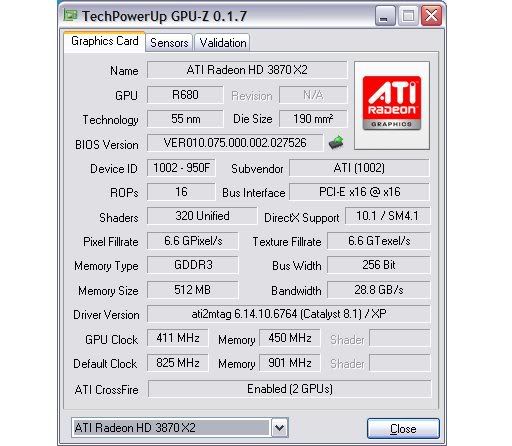
    i donīt see why u want to believe that the memory interfaces add to each other. the 28.8gb/s u saw on one of the screenshots is the bandwidth in 2d-mode with lower clocks than in 3d-full-screen-mode.
    i say it again.. bandwidth doesnīt increase with more vram. a 8800ultra wouldnīt have a higher bandwidth with 1gb. my hd2900 has more memory bandwidth and is only a 512mb vram card.


    MSI 790FX-GD70 (BIOS 1.D4)//PhenomII 1090T
    2x 2GB G.Skill F3-12800CL7D-4GBRH//ASUS EAH5970
    OCZ Agility 120GB//2x Hitachi Deskstar (2x500GB) RAID0//ZALMAN ZM850-HP 850W

    DFI LanpartyUT RDX200 CF-DR (BIOS 12/23/05)//AMD Opteron 165 CCBBE 0616 XPMW 334x9 1.375Vx112%
    2x 1024 MB G.SKILL F1-4000BIU2-2GBHV PC4000//2x Sapphire HD2900PRO(modded bios 845/950) 512mb CrossFire
    2x WD Caviar RE2 WD4000YR (400 GB) RAID0//OCZ GameXStream 700W

    Motorola Milestone CyanogenMOD 6.1.0 RC0 Android2.2.1

  3. #28
    Xtreme Enthusiast
    Join Date
    Aug 2002
    Location
    London,Uk
    Posts
    950
    Quote Originally Posted by HeX_00 View Post
    Just gotta say, thanks for that great flashing guide jpercel!

    Did this with my Powercolor X2 last night and it worked a treat!

    One thing I did notice though is that both my cards had 64kb BIOS's (according to ATiFlash) but GPU-Z gave me a 44 + 64 BIOS files...

    Eitherway, they flashed fine and now my Crysis and UT3 fps problems are gone
    Did anyone else have the same issue? from gpu-z i get two files, 43 and 62kb's(i assume thats just space on hdd being slightly different right?) but in dos using atiflash both cores show up as 64kb. Do you just flash the 43kb one to the slave, and the bigger bios to the master core? might try ripping the bios's through dos and see if i get a different result, maybe vista +gpu-z + getting bios isn't the best method.
    Mail Me | 3500+ , dfi sli-dr, g-skill la, 2x6800gt, 600w pcz, stacker case, air cooled

  4. #29
    Xtreme Addict
    Join Date
    May 2007
    Location
    Hampshire, UK
    Posts
    1,656
    Quote Originally Posted by drunkenmaster View Post
    Did anyone else have the same issue? from gpu-z i get two files, 43 and 62kb's(i assume thats just space on hdd being slightly different right?) but in dos using atiflash both cores show up as 64kb. Do you just flash the 43kb one to the slave, and the bigger bios to the master core? might try ripping the bios's through dos and see if i get a different result, maybe vista +gpu-z + getting bios isn't the best method.
    I have a Powercolor 3870x2 & I have flashed it many times. GPU-Z captures the cards BIOS as 43/62k but if you type (atiflash -ai 0) to display the slave cards info it shows as 62k.

    I just ignored it first time out & now I just go straight to prompt change path to the bios folder & type in the command & don't worry about it.

    CN


    Home / Play Rig Asrock Z87 OC Formula/AC, i7 4770K L310B487, 8GB Corsair Dominator Platinum 2666 CL10, BeQuiet Dark Power Pro P8 1200W PSU, 120GB Corsair Force GT SSD, 2 x 1TB WD Sata Drives Mirrored, Palit 680GTX JetStream, Antec Kuhler 920, Windows 10 Pro, Logitech LX700 Deskset, AOC 27" Monitor.

    Work 24/7 Rig Gigabyte GA-Z97X-SOC Force, i7 4790K L418C133 ,8GB Team Xtreem LV 2600, PC Power & Cooling 850WPSU, 120GB OCZ Vertex 3 SSD, 2 x 500GB Hitachi Sata Drives Mirrored, Antec Kuhler 620, Windows 10 Pro 64 Bit, Logitech LX700 Deskset, Benq 27" Monitor.

    Home NAS DFI P35 T2RL Motherboard, Intel E6850 CPU, 8GB Nanya DDR2 6400, 2X 2TB Toshiba DT01ACA200 SATA Drives, ZFS RAID Mirror On Intel ICH9 AHCI, Artic Blue 850W PSU, Marvell Yukon 88E8053 Gigabit Ethernet, FreeNAS 9.2.1.5 RC, 64-Bit On 4GB USB2 SanDisk Cruizer Blade Thumb Drive.

  5. #30
    barfastic
    Guest
    i had the same problem but when i downloaded the 8.3 my card worked GREAT. crysis at 40+FPS at 1680x1050 and 2xAA.

    if you ahvent downloaded the newest cat, go get it, and make sure u actually HAVE deleted your previous drivers.

    other than that, digg around a bit, the solution is out there.

  6. #31
    Xtreme Addict
    Join Date
    Nov 2007
    Location
    Toronto, Canada
    Posts
    1,491
    Quote Originally Posted by jpercel View Post
    Kotz!

    Follow these steps to fix the powerplay issue: I wish ati would fix this though because doing this is a pain in the *** and it MAY void your warrenty.

    First download GPU-z 1.7
    http://downloads.guru3d.com/GPU-Z-0.....html#download

    This tool will allow you to extract your video card bioses..That's right your 3870x2 has two bios files!

    When you open Gpu-z it will display your cards info. Next to the bios version number is an arrow. Click it and it will extract the first bios file. Save it to your desktop and rename it "backup0" or whatever. At the bottom of the tool it will give you the option of selecting the second card. Click the down arrow and select the second card then extract that bios to the desktop and name it "backup1" or whatever. Double check the two files: one should be like 44kb and the other should be 64kb. Which ever one is the 44kb file is the (slave) card which we will get into later.

    Now that you have those files download the atibios editor
    http://www.computerbase.de/downloads...i_bios-editor/

    Open each file and change the low power 3d clocks. Make them the same as the high power 3d clocks. Also make the voltage the same. Do not change the 2d or startup clocks unless you want to for some reason. Also make sure your changes are the same for each bios ex. dont make one bios file have a low power 3d frequency clock 300mhz and the other have 400mhz. Save both files under different names like "card0" and "card1" because you want to keep your original bios files in case you screw up your flash. Remember "card0" should be like 44kb because its the slave card.

    The bios editor you downloaded should contain the ATI Flash utility.
    Next you need to make a windows boot disk in order to get into dos. After your boot disk is created make a folder called "boot" and place the "atiflash" application file in that folder along with the backup bios files and the modded bios files.

    Get a pen and paper and write down all your file names from the "boot" folder including their sizes.
    card0 = 44kb
    card1 = 64kb
    backup0 = 44kb
    backup1 = 64kb
    something to that effect.

    Write down the following commands in sequence because you may have to reference them in a "blind flash" This occurs when you flash your bios incorrectly and upon a boot the screen goes blank but everything boots normal. Blind flashing involves booting from your boot disk and typing the commands without being able to see them. That is why you need to write everything down and have your backup files.

    Next restart the comp and hopefully your boot disk should take you to the dos prompt.

    You should see "A:"
    (write down the following commands)

    Type "cd\boot" then hit "enter"

    Type "atiflash -ai 0" then "enter"
    (this command will display the info of your slave card. Make sure file size is about 44kb)

    Next type "dir" then hit "enter"
    (this will list all the files from your floppy disk. Verify that the file names and extensions match what you have written down. Dos my have displayed the file "backup1" as "b~1". If you blind flash you will use "b~1". Also extensions are files that have like .rom or .bin attached to the name. Ex "card0.rom". If you have extensions then use them when flashing.

    Type "atiflash -p 0 card0" or "atiflash -p 0 card0.rom" if you have extensions.
    (remember card0 is the name of your bios file)

    If the flash was done properly you should see at the end something like "10000kb writen" "10000kb verified".

    Now for the master card:
    Type "atiflash -p 1 card1"

    If the flash was done properly you should see at the end something like "10000kb writen" "10000kb verified".

    Thats it your done now just reboot and hope you dont need to do a blind flash.

    If you have any doubts or if something is different from what I have written, do not proceed, rather write everything down and post it.
    Is doing this still necessary? I did it with my first card (great little tutorial BTW), and now that I've got a second, I'm wondering whether to flash the second one too.

    Would the procedure be the same? Is it necessary? Or with Cat 8.3 should I just flash back to the stock bios?
    RIG 1 (in progress):
    Core i7 920 @ 3GHz 1.17v (WIP) / EVGA X58 Classified 3X SLI / Crucial D9JNL 3x2GB @ 1430 7-7-7-20 1T 1.65v
    Corsair HX1000 / EVGA GTX 295 SLI / X-FI Titanium FATAL1TY Pro / Samsung SyncMaster 245b 24" / MM H2GO
    2x X25-M 80GB (RAID0) + Caviar 500 GB / Windows 7 Ultimate x64 RC1 Build 7100

    RIG 2:
    E4500 @ 3.0 / Asus P5Q / 4x1 GB DDR2-667
    CoolerMaster Extreme Power / BFG 9800 GT OC / LG 22"
    Antec Ninehundred / Onboard Sound / TRUE / Vista 32

  7. #32
    Xtreme Member
    Join Date
    Jul 2005
    Posts
    294
    Thanks for the instructions on the bios flashing. I am getting ready top do mine. I have a question about the gpuz reading though. Is there an issue with gpuz and vista64? Gpuz shows my bandwidth to be 28.8GB/s but everest shows each gpu to have a bandwidth of 56.3GB/s. Which one is correct?
    ASUS Rampage II
    Core i7 920 D0 @ 4.2GHz
    Corsair TR3X6G1600C8 3x2GB DDR3 1600MHz
    Radeon 5870
    Raid 0 2x1TB WD on SATA 3/4
    Seagate 160GB on SATA 1
    LG Bluray ROM/DVD RW
    Corsair HX1000W

  8. #33
    Registered User
    Join Date
    Dec 2007
    Location
    Brooklyn NY
    Posts
    89
    Quote Originally Posted by ElAguila View Post
    Thanks for the instructions on the bios flashing. I am getting ready top do mine. I have a question about the gpuz reading though. Is there an issue with gpuz and vista64? Gpuz shows my bandwidth to be 28.8GB/s but everest shows each gpu to have a bandwidth of 56.3GB/s. Which one is correct?
    me 2.......... just checked it out
    Asus Rampage III Extreme i7 970@ 4.26
    g-skill ripjaw 12g kit@1855 2 gtx580 sli
    275T samsung lcd, pci Express X-Fi Titanium Fatal1ty

  9. #34
    Xtreme Member
    Join Date
    May 2006
    Location
    Heilbronx, Germany
    Posts
    397
    when u read the first few posts of this thread u see a screenshot of gpu-z showing exactly those 28.8gb/s. itīs because of the 2d-clocks.
    everest is reporting the bandwidth at 3d-clocks.
    both is correct.


    MSI 790FX-GD70 (BIOS 1.D4)//PhenomII 1090T
    2x 2GB G.Skill F3-12800CL7D-4GBRH//ASUS EAH5970
    OCZ Agility 120GB//2x Hitachi Deskstar (2x500GB) RAID0//ZALMAN ZM850-HP 850W

    DFI LanpartyUT RDX200 CF-DR (BIOS 12/23/05)//AMD Opteron 165 CCBBE 0616 XPMW 334x9 1.375Vx112%
    2x 1024 MB G.SKILL F1-4000BIU2-2GBHV PC4000//2x Sapphire HD2900PRO(modded bios 845/950) 512mb CrossFire
    2x WD Caviar RE2 WD4000YR (400 GB) RAID0//OCZ GameXStream 700W

    Motorola Milestone CyanogenMOD 6.1.0 RC0 Android2.2.1

  10. #35
    Xtreme Enthusiast
    Join Date
    Dec 2007
    Posts
    751
    Quote Originally Posted by MadDias View Post
    what do u guys always have with pcie bandwidth all the time?
    his card doesnīt exchange data beween the gpus through pcie.
    on the other hand, the card that is bottlenecked by a 8x pcie-lane has yet to be build.
    his problem with 3dmark06 is his cpu. @2.6ghz he gets the same cpu score as u intel guys would have with a 1.8ghz c2d.
    his score seems right to me.
    Thats a low score even for a single 3870, never mind 2. With a C2D he should be hitting around 11k if he had 1 3870 - but he has basically 2.
    i7 860 @ 4.2Ghz | ASUS Maximus III Formula | 8GB Corsair Dominator DDR3 1600 | ATi 5970 | 3x WD Raptor X HDD's | NZXT Khaos Case | Corsair 1000w PSU | Swiftech H20 Cooling CPU | Windows 7 x64 | Sony Bravia 52" LCD Display


    3DMark06 Score - 20k Club | Youtube Account

  11. #36
    Xtreme Member
    Join Date
    Jul 2005
    Posts
    294
    Quote Originally Posted by MadDias View Post
    when u read the first few posts of this thread u see a screenshot of gpu-z showing exactly those 28.8gb/s. itīs because of the 2d-clocks.
    everest is reporting the bandwidth at 3d-clocks.
    both is correct.
    Thanks for clearing that up for me.
    ASUS Rampage II
    Core i7 920 D0 @ 4.2GHz
    Corsair TR3X6G1600C8 3x2GB DDR3 1600MHz
    Radeon 5870
    Raid 0 2x1TB WD on SATA 3/4
    Seagate 160GB on SATA 1
    LG Bluray ROM/DVD RW
    Corsair HX1000W

  12. #37
    Xtreme Member
    Join Date
    Mar 2008
    Location
    Fremont
    Posts
    260
    I just bought the 3870x2 and I got the same issue. Can anyone post how it suppose to looks like in GPU-Z? Please.

    Q9450 w/120 extreme
    Maximus II Formula
    G.Skill 4gb 8800 w/ crosair fans
    Sapphire HD4870 512 w/ T-Rad2
    2x 300gb velociraptor RAID0
    2x 500 gb SATA
    Cooler Master 850w PSU
    CM 590 Case

  13. #38
    Xtreme Addict
    Join Date
    Jul 2007
    Posts
    2,103
    With the newest GPU-Z it will read 28.8gb/s = Normal in 2D mode and the core will be half the normal clocks for GPU 0..and GPU 1 will show full speed...

    The Ram should always say 512mb when you click each Core...


    The problem is when the card is STUCK/locked in 2d MODE and Not switching it for 3D mode..

    256mb of ram and 400mhz cpu on one core or even on both is all youll get..When you have a card stuck in 2D mode(low power state) its like having a single 3870 when this happens...Although it shows Both cores enabled(crossfire)

    There is a Known Powerplay Switching problem that has made it happen...The PowerPlay funtion frying and staying in 2dmode or disabling One GPU and memory bank..


    3Dmark06 ,,ORB results show...

    @2400mhz the 3870x2 should run at 13500+ and thats with a Phenom
    @3000mhz it will be 15700/16000+ and that with a Phenom

    a Q6600 @2400mhz/3000mhz has a very simalar score!

    Most recent GPU-Z...Clicking the lowest/second 3870x2 box,,will show you that secondary GPU is at full speed...gb/s should change when in 3Dmode while enabling AMD GPU tool or gaming.

    Last edited by gOtVoltage; 03-30-2008 at 06:53 PM.
    "AMD...Like the perfect Storm,...Everything needs to be just right"
    X555x4SuperCore@4450mhz@1.64v..........

    RYZEN 7 1800x/ ASUS ROG STRIX VEGA64/ =EK NICKEL WB, Feser THC 2x360 1x480
    X470 Gigabyte Aorus7, Patriot 3400mhz 16gb dual2x8
    SSD Samsung 970pro,,860EVO

  14. #39
    Xtreme Member
    Join Date
    Mar 2008
    Location
    Fremont
    Posts
    260
    that's what I have but the second GPU is showing default clock is 411 and memory is 450. I guess I need to use Rivtune to tune it up. but some how when I use 3850 on 3dmark06 my CPU score is 2xxx and once I use 3870x2 my CPU score is 15xx with same stock setting. Strange?

    Q9450 w/120 extreme
    Maximus II Formula
    G.Skill 4gb 8800 w/ crosair fans
    Sapphire HD4870 512 w/ T-Rad2
    2x 300gb velociraptor RAID0
    2x 500 gb SATA
    Cooler Master 850w PSU
    CM 590 Case

  15. #40
    Xtreme Member
    Join Date
    Feb 2008
    Posts
    172
    When I first ran 3DMark06 with my single 3870X2 i got 19284 (Q6600 @ 3.6GHz, DRAM @ 1800 MHz).

    Then, after I removed the card and replaced stock heatsink/fan with an EK block, I got only 11416 in 3DMark - with Q6600 OC'd to 4050MHz ?!!

    I have no idea whats going on here. Btw I have a 1200W PSU and both 6- and 8-pin plugs connected to the card. Also using latest catalyst 8.3.


    Why is there a difference in default and memory clocks between the 2 cores?

    EDIT: removed 3DMark06 screenie as I was using different drivers. Thanx cadaveca for pointing this out.
    Last edited by polar bear; 03-31-2008 at 11:36 AM.

    Rig #1: Maximus Extreme X38 BIOS 0904 | Intel Q6600 rev. G0 @ FSB450*9=4050MHz Vcore=1.575 V_NB=1.61 V_FSB=1.54 | 2x 1GB Corsair Dominator DDR3-14400 1800MHz @ 7-7-7-20-1T V_DIMM=2.06 | 4x WD Raptor 36GB 10000RPM in RAID0 | 1x Samsung SpinPoint T166 250GB 7200RPM | 2x Radeon HD 3870X2 CrossfireX | Thermaltake Toughpower 1200W | Case: Zalman GT1000 | CPU cooling: EK-Supreme + Laing DDC Ultra + PA 120.3 | Chipset cooling: EK blocks + Zalman Reserator XT | GFX cooling: EK-FC3870 X2 + Laing DDC Ultra + PA120.2 | Vista Ultimate 32bit SP1 | 3DMark06: 20116 | Build log

    Rig #2: Asus Striker II Formula 780i BIOS 0902 | Intel E6600 rev. B2 @ FSB400*9=3600MHz Vcore=1.40 V_NB=1.32 | 2x 1GB Corsair Dominator DDR2-8500 1066MHz @ 4-4-4-15 V_DIMM=2.20 | 1x Western Digital Raptor X 150GB 10000RPM | 3x XFX 8800GTX in 3-SLI OC to 650/1000 | Thermaltake Toughpower 1200W | Case: Thermaltake Armor | CPU cooling: Swiftech Apogee GTX + Swiftech MCP655 + PA120.2 | GPU cooling: Zalman ZM-GWB8800 GTX/Ultra + Zalman Reserator 1 Plus | Vista Home Premium 32bit SP1 | 3DMark06: 15223 | Build log

    Rig #3 (HTPC): Asus P5K Premium/Wifi-AP P35 | Intel E6550 @ stock | 2x 1GB Corsair DDR2-6400 800MHz | 1x Samsung SpinPoint T166 250GB 7200RPM | XFX 8600GTS | Corsair HX620W | Vista Home Premium 32bit | Case: Silverstone SST-LC20B | CPU cooling: Zalman CNPS9500 LED | Vista Home Premium 32bit


  16. #41
    I am Xtreme
    Join Date
    Mar 2005
    Location
    Edmonton, Alberta
    Posts
    4,594
    different drivers cannot be used as compares. Your problem lies here.

  17. #42
    Xtreme Member
    Join Date
    Mar 2008
    Location
    Fremont
    Posts
    260
    that exactly that I have but I never see my 3dmark06 score get that high highest I got is 10500 something like that with the 3870x2 also the heat came out is very hot but at least keeps the GPU in around 50c I guess that's ok right? So will one rather buy 2 3870 or buy one 3870x2 since 2 3870 is still cheaper and I think will be faster than 1 3870x2? Any suggestion?

    Q9450 w/120 extreme
    Maximus II Formula
    G.Skill 4gb 8800 w/ crosair fans
    Sapphire HD4870 512 w/ T-Rad2
    2x 300gb velociraptor RAID0
    2x 500 gb SATA
    Cooler Master 850w PSU
    CM 590 Case

  18. #43
    I am Xtreme
    Join Date
    Mar 2005
    Location
    Edmonton, Alberta
    Posts
    4,594
    Yeah i got a suggestion, and don't take this the wrong way...start another thread for your issues. You cannot post so little information about your system and expect an answer. We'd love to help, but cannot with so little info.

  19. #44
    Xtreme Member
    Join Date
    Mar 2008
    Location
    Fremont
    Posts
    260
    good idea

    Q9450 w/120 extreme
    Maximus II Formula
    G.Skill 4gb 8800 w/ crosair fans
    Sapphire HD4870 512 w/ T-Rad2
    2x 300gb velociraptor RAID0
    2x 500 gb SATA
    Cooler Master 850w PSU
    CM 590 Case

  20. #45
    Xtreme Member
    Join Date
    Feb 2008
    Posts
    172
    Auch, didnt notice that, well spotted! Will rerun with both at 8.2 then repost screenshot.

    Rig #1: Maximus Extreme X38 BIOS 0904 | Intel Q6600 rev. G0 @ FSB450*9=4050MHz Vcore=1.575 V_NB=1.61 V_FSB=1.54 | 2x 1GB Corsair Dominator DDR3-14400 1800MHz @ 7-7-7-20-1T V_DIMM=2.06 | 4x WD Raptor 36GB 10000RPM in RAID0 | 1x Samsung SpinPoint T166 250GB 7200RPM | 2x Radeon HD 3870X2 CrossfireX | Thermaltake Toughpower 1200W | Case: Zalman GT1000 | CPU cooling: EK-Supreme + Laing DDC Ultra + PA 120.3 | Chipset cooling: EK blocks + Zalman Reserator XT | GFX cooling: EK-FC3870 X2 + Laing DDC Ultra + PA120.2 | Vista Ultimate 32bit SP1 | 3DMark06: 20116 | Build log

    Rig #2: Asus Striker II Formula 780i BIOS 0902 | Intel E6600 rev. B2 @ FSB400*9=3600MHz Vcore=1.40 V_NB=1.32 | 2x 1GB Corsair Dominator DDR2-8500 1066MHz @ 4-4-4-15 V_DIMM=2.20 | 1x Western Digital Raptor X 150GB 10000RPM | 3x XFX 8800GTX in 3-SLI OC to 650/1000 | Thermaltake Toughpower 1200W | Case: Thermaltake Armor | CPU cooling: Swiftech Apogee GTX + Swiftech MCP655 + PA120.2 | GPU cooling: Zalman ZM-GWB8800 GTX/Ultra + Zalman Reserator 1 Plus | Vista Home Premium 32bit SP1 | 3DMark06: 15223 | Build log

    Rig #3 (HTPC): Asus P5K Premium/Wifi-AP P35 | Intel E6550 @ stock | 2x 1GB Corsair DDR2-6400 800MHz | 1x Samsung SpinPoint T166 250GB 7200RPM | XFX 8600GTS | Corsair HX620W | Vista Home Premium 32bit | Case: Silverstone SST-LC20B | CPU cooling: Zalman CNPS9500 LED | Vista Home Premium 32bit


  21. #46
    Xtreme Member
    Join Date
    Feb 2008
    Posts
    172

    Rig #1: Maximus Extreme X38 BIOS 0904 | Intel Q6600 rev. G0 @ FSB450*9=4050MHz Vcore=1.575 V_NB=1.61 V_FSB=1.54 | 2x 1GB Corsair Dominator DDR3-14400 1800MHz @ 7-7-7-20-1T V_DIMM=2.06 | 4x WD Raptor 36GB 10000RPM in RAID0 | 1x Samsung SpinPoint T166 250GB 7200RPM | 2x Radeon HD 3870X2 CrossfireX | Thermaltake Toughpower 1200W | Case: Zalman GT1000 | CPU cooling: EK-Supreme + Laing DDC Ultra + PA 120.3 | Chipset cooling: EK blocks + Zalman Reserator XT | GFX cooling: EK-FC3870 X2 + Laing DDC Ultra + PA120.2 | Vista Ultimate 32bit SP1 | 3DMark06: 20116 | Build log

    Rig #2: Asus Striker II Formula 780i BIOS 0902 | Intel E6600 rev. B2 @ FSB400*9=3600MHz Vcore=1.40 V_NB=1.32 | 2x 1GB Corsair Dominator DDR2-8500 1066MHz @ 4-4-4-15 V_DIMM=2.20 | 1x Western Digital Raptor X 150GB 10000RPM | 3x XFX 8800GTX in 3-SLI OC to 650/1000 | Thermaltake Toughpower 1200W | Case: Thermaltake Armor | CPU cooling: Swiftech Apogee GTX + Swiftech MCP655 + PA120.2 | GPU cooling: Zalman ZM-GWB8800 GTX/Ultra + Zalman Reserator 1 Plus | Vista Home Premium 32bit SP1 | 3DMark06: 15223 | Build log

    Rig #3 (HTPC): Asus P5K Premium/Wifi-AP P35 | Intel E6550 @ stock | 2x 1GB Corsair DDR2-6400 800MHz | 1x Samsung SpinPoint T166 250GB 7200RPM | XFX 8600GTS | Corsair HX620W | Vista Home Premium 32bit | Case: Silverstone SST-LC20B | CPU cooling: Zalman CNPS9500 LED | Vista Home Premium 32bit


  22. #47
    Xtreme Member
    Join Date
    Feb 2008
    Posts
    172
    ie now using exactly the same settings - same cpu OC, same memory clock, same ATI driver... ie no discernible difference. And still a HUGE disparity between the results.

    In particular the SM 2.0 and 3.0 scores are nearly twice as much in one compared to the other.

    In comparison, I'm getting 15223 with 2x 8800GTX in SLI with E6600 at 3.6. I would think the 3870X2 should score even higher than this. Something is up with the 11k score

    Rig #1: Maximus Extreme X38 BIOS 0904 | Intel Q6600 rev. G0 @ FSB450*9=4050MHz Vcore=1.575 V_NB=1.61 V_FSB=1.54 | 2x 1GB Corsair Dominator DDR3-14400 1800MHz @ 7-7-7-20-1T V_DIMM=2.06 | 4x WD Raptor 36GB 10000RPM in RAID0 | 1x Samsung SpinPoint T166 250GB 7200RPM | 2x Radeon HD 3870X2 CrossfireX | Thermaltake Toughpower 1200W | Case: Zalman GT1000 | CPU cooling: EK-Supreme + Laing DDC Ultra + PA 120.3 | Chipset cooling: EK blocks + Zalman Reserator XT | GFX cooling: EK-FC3870 X2 + Laing DDC Ultra + PA120.2 | Vista Ultimate 32bit SP1 | 3DMark06: 20116 | Build log

    Rig #2: Asus Striker II Formula 780i BIOS 0902 | Intel E6600 rev. B2 @ FSB400*9=3600MHz Vcore=1.40 V_NB=1.32 | 2x 1GB Corsair Dominator DDR2-8500 1066MHz @ 4-4-4-15 V_DIMM=2.20 | 1x Western Digital Raptor X 150GB 10000RPM | 3x XFX 8800GTX in 3-SLI OC to 650/1000 | Thermaltake Toughpower 1200W | Case: Thermaltake Armor | CPU cooling: Swiftech Apogee GTX + Swiftech MCP655 + PA120.2 | GPU cooling: Zalman ZM-GWB8800 GTX/Ultra + Zalman Reserator 1 Plus | Vista Home Premium 32bit SP1 | 3DMark06: 15223 | Build log

    Rig #3 (HTPC): Asus P5K Premium/Wifi-AP P35 | Intel E6550 @ stock | 2x 1GB Corsair DDR2-6400 800MHz | 1x Samsung SpinPoint T166 250GB 7200RPM | XFX 8600GTS | Corsair HX620W | Vista Home Premium 32bit | Case: Silverstone SST-LC20B | CPU cooling: Zalman CNPS9500 LED | Vista Home Premium 32bit


  23. #48
    I am Xtreme
    Join Date
    Mar 2005
    Location
    Edmonton, Alberta
    Posts
    4,594
    E8400 @ 3.6ghz, one 3870x2:

    16676

    http://service.futuremark.com/compare?3dm06=6023631

    E8400 @ 3.6ghz, two 3870x2:

    18236

    http://service.futuremark.com/compare?3dm06=6023585


    Yeah, I'd say something was wrong there...can you try 8.3 hotfix driver for comparison?

  24. #49
    Xtreme Member
    Join Date
    Feb 2008
    Posts
    172
    Solved! Turns out I had catalyst AI disabled which resulted in the low score. I had been experimenting with FSX and forgot to turn it back on. Have not completed 3DMark06 yet just realized its already better cause opening of return to proxicon got 120 fps. Will post screenshot and link when it's complete.

    So maybe a note to OP to check if his catalyst AI is disabled too...
    Last edited by polar bear; 03-30-2008 at 11:51 PM.

    Rig #1: Maximus Extreme X38 BIOS 0904 | Intel Q6600 rev. G0 @ FSB450*9=4050MHz Vcore=1.575 V_NB=1.61 V_FSB=1.54 | 2x 1GB Corsair Dominator DDR3-14400 1800MHz @ 7-7-7-20-1T V_DIMM=2.06 | 4x WD Raptor 36GB 10000RPM in RAID0 | 1x Samsung SpinPoint T166 250GB 7200RPM | 2x Radeon HD 3870X2 CrossfireX | Thermaltake Toughpower 1200W | Case: Zalman GT1000 | CPU cooling: EK-Supreme + Laing DDC Ultra + PA 120.3 | Chipset cooling: EK blocks + Zalman Reserator XT | GFX cooling: EK-FC3870 X2 + Laing DDC Ultra + PA120.2 | Vista Ultimate 32bit SP1 | 3DMark06: 20116 | Build log

    Rig #2: Asus Striker II Formula 780i BIOS 0902 | Intel E6600 rev. B2 @ FSB400*9=3600MHz Vcore=1.40 V_NB=1.32 | 2x 1GB Corsair Dominator DDR2-8500 1066MHz @ 4-4-4-15 V_DIMM=2.20 | 1x Western Digital Raptor X 150GB 10000RPM | 3x XFX 8800GTX in 3-SLI OC to 650/1000 | Thermaltake Toughpower 1200W | Case: Thermaltake Armor | CPU cooling: Swiftech Apogee GTX + Swiftech MCP655 + PA120.2 | GPU cooling: Zalman ZM-GWB8800 GTX/Ultra + Zalman Reserator 1 Plus | Vista Home Premium 32bit SP1 | 3DMark06: 15223 | Build log

    Rig #3 (HTPC): Asus P5K Premium/Wifi-AP P35 | Intel E6550 @ stock | 2x 1GB Corsair DDR2-6400 800MHz | 1x Samsung SpinPoint T166 250GB 7200RPM | XFX 8600GTS | Corsair HX620W | Vista Home Premium 32bit | Case: Silverstone SST-LC20B | CPU cooling: Zalman CNPS9500 LED | Vista Home Premium 32bit


  25. #50
    Xtreme Member
    Join Date
    Feb 2008
    Posts
    172

    Rig #1: Maximus Extreme X38 BIOS 0904 | Intel Q6600 rev. G0 @ FSB450*9=4050MHz Vcore=1.575 V_NB=1.61 V_FSB=1.54 | 2x 1GB Corsair Dominator DDR3-14400 1800MHz @ 7-7-7-20-1T V_DIMM=2.06 | 4x WD Raptor 36GB 10000RPM in RAID0 | 1x Samsung SpinPoint T166 250GB 7200RPM | 2x Radeon HD 3870X2 CrossfireX | Thermaltake Toughpower 1200W | Case: Zalman GT1000 | CPU cooling: EK-Supreme + Laing DDC Ultra + PA 120.3 | Chipset cooling: EK blocks + Zalman Reserator XT | GFX cooling: EK-FC3870 X2 + Laing DDC Ultra + PA120.2 | Vista Ultimate 32bit SP1 | 3DMark06: 20116 | Build log

    Rig #2: Asus Striker II Formula 780i BIOS 0902 | Intel E6600 rev. B2 @ FSB400*9=3600MHz Vcore=1.40 V_NB=1.32 | 2x 1GB Corsair Dominator DDR2-8500 1066MHz @ 4-4-4-15 V_DIMM=2.20 | 1x Western Digital Raptor X 150GB 10000RPM | 3x XFX 8800GTX in 3-SLI OC to 650/1000 | Thermaltake Toughpower 1200W | Case: Thermaltake Armor | CPU cooling: Swiftech Apogee GTX + Swiftech MCP655 + PA120.2 | GPU cooling: Zalman ZM-GWB8800 GTX/Ultra + Zalman Reserator 1 Plus | Vista Home Premium 32bit SP1 | 3DMark06: 15223 | Build log

    Rig #3 (HTPC): Asus P5K Premium/Wifi-AP P35 | Intel E6550 @ stock | 2x 1GB Corsair DDR2-6400 800MHz | 1x Samsung SpinPoint T166 250GB 7200RPM | XFX 8600GTS | Corsair HX620W | Vista Home Premium 32bit | Case: Silverstone SST-LC20B | CPU cooling: Zalman CNPS9500 LED | Vista Home Premium 32bit


Page 2 of 5 FirstFirst 12345 LastLast

Bookmarks

Bookmarks

Posting Permissions

  • You may not post new threads
  • You may not post replies
  • You may not post attachments
  • You may not edit your posts
  •