

KTE, I had a lot of cpu and cooling, i had some experience i can cut my finger if the temps are so wrong.
I'm totally sure the temp was about 100°, because i burned my finger one time by touching the heatpipe. Trust me


KTE, I had a lot of cpu and cooling, i had some experience i can cut my finger if the temps are so wrong.
I'm totally sure the temp was about 100°, because i burned my finger one time by touching the heatpipe. Trust me
Just wanted to let you folks know, Vista64 crashed again (due to OC)...
Wanted me to do the phone verify thing for the 3rd time (Genuine Advantage My Azz)!
Sorry, MS.. But I'm really not in the mood to spend another 20-30 minutes on the phone with someone who barely speaks English.
I'm reformatting tonight to 32Bit XP Pro, so I'm kinda starting from scratch..
Ubuntu is looking better all the time! Sorry for venting on you guys, I'm just a little aggrevated...
As far as install time and such, XP seems much better.. I'll keep ya posted!
AMD FX-8350 (1237 PGN) | Asus Crosshair V Formula (bios 1703) | G.Skill 2133 CL9 @ 2230 9-11-10 | Sapphire HD 6870 | Samsung 830 128Gb SSD / 2 WD 1Tb Black SATA3 storage | Corsair TX750 PSU
Watercooled ST 120.3 & TC 120.1 / MCP35X XSPC Top / Apogee HD Block | WIN7 64 Bit HP | Corsair 800D Obsidian Case
First Computer: Commodore Vic 20 (circa 1981).
It's not you that I doubt at all but it's hard to trust your computer monitoring when the physical limit of the chip is far less. Have you read the K10h guides by AMD? 70C the TCC shuts the system down, because the chip gets damaged at and after it. I've tested this on two Phenoms, one with a thermocouple embedded within the die and it certainly did shut off before POST at 70-72C. It didn't start for a while after either.Originally Posted by misteroadster

And now you're saying 80-120C torture tested fine on air without any chip damage, but actually allowed you more MHz? You have to understand how crazy that sounds
Do you have a DMM? Try measuring the heatsink base temp with a DMM when it's reading +70C chip.
Put it this way. 50C real chip temperature makes the heatsink hot to touch, and >70C would burn your finger.
I'm about to try your procedure now... fingers crossed I don't blow the chip.
Vista is a beast. Not the ideal test platform at all.
I'm going to install Vista Ultimate 32b or 64b one of these days. have a lot of work to do.
I just did all the testing.
I tested and my results agree with yours on some accounts and differ on others.
For testing I used 1.536V at 2448MHz with only the stock HSF and no other fan (a known easy stock volts stable value).
- Firstly, I could not bootup at above 1.45V nor 1.432V no matter what.
- Secondly, I could not bootup when BIOS temp read >50C.
- Thirdly, ~63C BIOS temp made the system reboot even before POST.
So I had to set 1.3V in BIOS, bootup and then use AOD to increase volts. VCore fluctuated from 1.480V to 1.536V idling and vdroop was huge, 1.432V load.
Using stock HSF at ~1780RPM and a 120mm side attachment at 800RPM, this is what I'm idling now:
Removing the 120mm fan, with just stock HSF at 1780RPM, idle is around 45C. This is what I idled 2-3secs after I took off the stock heatsink fan at ~1.5V 2448MHz:
Shall we begin?
If I show you the whole range of temperatures, you will see, the higher the heat went, the lower the VCore went and vice versa.
No fan on the stock heatsink, Prime95 after about 1 minute ->
Gack, that was the exact second I was attaching a 252CFM 5000RPM 120mm fan on there!
It still did not error, I ran SuperPi with that heat in the background once too. It is really awful that the CPU did not shut down, it had no safety mechanism.
BUT.. the board and heatsink were untouchable above 65C EVEREST readings and MOSFETs were above 125C as the CPU started smelling burnt very strongly as soon as it hit 75C and that went really bad at 100C! (the moment I shut it off). I was standing right over the chip, smoky smell like that of burnt hard plastic.
But I tried overclocking at 80C and 97C... no go. Max I got before BSoD was even lower than max I could bootup with 1.4V. This is max I managed then at such a high Vcore, temps and no fan:
Also, a word of strong caution: DON'T TRY THIS! You'll burn your chip and blow up your MOSFETs. If you have zero fans at 22C ambient around the PWM area with this high VCore, all the PWM area of the board will be toasting and even warm up the DIMMs much more.
What's worse is... inside engineering details tell us that at >1.45V Phenom CPU even at 2300MHz on air won't be idling below 40C. It will idle a lot more.
So, that makes us conjecture "our core temps are actually a lot higher" ...
We need answers now. My chip is now idling 2C above ambient and if I take the 120mm away it'll be 20C above ambient. Say the value is 20C too little, then that means I took it to 127C and no error?
The sensor might simply scale wrong and have an too low offset. Someone should drill a hole in his phenom and put a probe in there.
EDIT: DFI/sapphire mobo uses an extra sensor for cpu temp reading. There is an shutdown option in the bios whom can be set to 85°/90°/disabled. That option relies on the external sensor. Makes sens cuz it might be able to power off the system even if the prozessor locked up.
@KTE: What power consumption does an freezed system have in opposite to an locked one? For me a freezed system is a system with frozen input but not powered of. Power consumption lays between idle and load then.
Last edited by justapost; 02-20-2008 at 04:22 AM.

So are we testing for max cpu speed at max temp now
jking I'll stick with 48c loaded...
That is not good however if the chip doesn't shut itself down.
That's true, some could. My 9500 didn't, checked how I'm supposed to. Can't modify this one, so no way to check.
If the scaling was wrong, you can find this out using a DMM pretty easily. Heatsink can't be 70C if the chips internally below 85C real now, can it?
-------------
BTW, in case you didn't know, Dell has configured a lineup offering of tri-core and quad-core K10h products it'll be offering mainly for businesses it seems and Kyoto University recently ordered 1,664 Barcelona Opteron quad-cores for a supercomputer.
http://www.tgdaily.com/content/view/36092/135/
http://www.infoworld.com/article/08/...omputer_1.html
That's actually much better than what most expected, incl. myself. It ultimately means the major dealers and buyers don't share our outlook and it's positive for AMD.
Check out AMD's Markham Lab details here: http://www.tgdaily.com/content/view/36094/135/
And here's latest and best version of Memtest86+ so far, updated to support much more hardware: http://infomars.fr/forum/index.php?showtopic=1522
--------------
Also you can disable cores using CPU-Z incase you didn't know.
EDIT ->
I'm not sure Achim. What you describe as freeze is what I witness here and describe as that too. But I suppose hang/freeze/lockup are describing the same thing as a user observes: applications and computer stop responding and move out of user control but are still powered on, i.e. optical drive will open/close.
BTW, the new Cat 8.2 drivers are great. Fix many bugs, this was an update worthwhile. I'd move into it if I was you.
Last edited by KTE; 02-20-2008 at 05:00 AM.
What did your DMM probe read at 125°?
There is no peltier effect between IHS and the cooler i assume.
If the sensor is calibrated at 60° and the scaling is too high, it would explain too low idle and too high load temps.
Had the DMM probe near the ihs for quite a while. The gap between probe and cpu temp readings increased with higher cpu temps from 10° to 20°, never went above ~55° cpu temp.
In the server market they still have an advantage in power consumption due to not using fbdimm's. And scaling is also still better.
I heard that some OEM's received b3 barcelonas.
EDIT: Here is an link in english saying they prepare the shipment.
http://www.cnet.com/8301-13924_1-9866698-64.html
No i did not, gonna try it I assume I can not disable core0.
Thx, gonna try em at work tomorrow, we use an HD2600XT in an CAD machine, and some apps still have open-gl issues. Hope they integrated some of their firegl fixes into 8.2.
Ocing is lengthy here atm, tring to breack the 2.5GHz wall my be has, but the freeze occures only after ~3hrs.
Last edited by justapost; 02-20-2008 at 05:51 AM.
Welcome to the "core freezes" club!Ocing is lengthy here atm, tring to breack the 2.5GHz wall my be has, but the freeze occures only after ~3hrs.
Me: 2665MHz froze after a few hours. Guess how it froze?
I had nothing but the installation of WMP9 open (idling) when I was ticking file association options -> it was idling 118W, and then, first the screen background applications froze with the mouse pointer still moving, so I looked over to the power meter and it suddenly jumped to 199-200W AC and then the mouse pointer eventually froze. It gets stuck at 199-200W AC until I reboot.
This is the problem nearly all of us are facing -> we need to collaborate and hunt this down, as to why and how to alleviate it. Unfortunately many users will have to carefully test this as well as me, or we'll make no progress. Remember those settings of mine are still around 100MHz below what I have max P95/Memtest 20hr stable.
Can this be the idle clock speed fluctuation I talked about much earlier (Achim caught it too)?
I think it must be. When you oc and at higher MHz your system freezes, the same reaction typically occurs -> jump in power consumption.
I'll now have to open a monitoring tool and just stare at it for hours to see the various speeds when it locks up.
The MOSFETs at 75C CPU with 1.446V VCore measured 125C with the DMM.
Never had the right setup to measure the CPU temp.
Hmm.. the temp even from the top of the IHS I measured 11C lower than when embedded within the IHS at just idle. Don't recall load temps.There is no peltier effect between IHS and the cooler i assume.
If the sensor is calibrated at 60° and the scaling is too high, it would explain too low idle and too high load temps.
Had the DMM probe near the ihs for quite a while. The gap between probe and cpu temp readings increased with higher cpu temps from 10° to 20°, never went above ~55° cpu temp.
AMD's 45nm quad was first sampled December and partners already have working samples. For a company rumored so in death trouble, that's pretty good.In the server market they still have an advantage in power consumption due to not using fbdimm's. And scaling is also still better.
I heard that some OEM's received b3 barcelonas.
I'll explain more in a bit.No i did not, gonna try it I assume I can not disable core0.
Hmm mine does not freeze idling. It freezes above 2.5GHz-2.55GHz after ~3hrs. At 2.6GHz it freezes ~2hrs prime95.
I can use very low voltages for 2.5GHz, increasing em makes no difference (also tried the voltage settings you recommended in the DFI thread).
Due to that i do not have a vdroop or voltage fluctuations above ~0.016V.
Temps are allways below 50°.
Does a higher nb multi have an positive impact on the oc capability of the core's? I did not try it with a higher nb multi till now.
It's very simple.
Using the parameter coremask you can set the number of cores to boot.
You can either use the CPU-Z.exe application Right-Click>Properties>Target area to set this or use Command Prompt like I do.
First you'll have to type the application path followed by -coremask=x.
x = the number of cores you want to have after bootup. Change this value appropriately.
So, if I want to have 4 cores showing, then I type this in the Target box of CPU-Z shortcut or in Command Prompt:
The "x" replaceable values are these:Code:"C:\Documents and Settings\Tye_2\My Documents\cpuz_144\cpuz.exe" -coremask=F
Thus when I set "C:\Documents and Settings\Tye_2\My Documents\cpuz_144\cpuz.exe" -coremask=7 and then I restarted, my system booted up as follows with 3 cores.Code:F = 1111 = 4 cores 7 = 0111 = 3 cores 3 = 0011 = 2 cores 1 = 0001 = 1 core
If I now want to change it to 4-cores on the next bootup, I type the following:
When it restarts, it'll restart with 4-cores as I set it. Easy really.
If its P95 freezing then that's just plain old instability. Usually lack of VCore/cooling.
If I leave 1.28V on 2.7G it fails only on core 3 after 3-4 hours repeatedly while all others pass. Moving up every notch until I get to 1.372V will fail. It needs minimum 1.372V to pass for that core, massive jump. Then as the core frequency scaling ends, you see that you reach the area of diminishing returns: massive voltage > little increase.
I can bench 2.84GHz with decent cooling but it's actually slower than 2.754GHz, because the system is past it's limits.
No way, higher NB multi will actually be tougher as your CPU Nb will require more volts and give off more heat altogether.Does a higher nb multi have an positive impact on the oc capability of the core's? I did not try it with a higher nb multi till now.
Keeping low Nb, HT, RAM is the best way to check for core limits.
So far I'm running 2665MHz again. It's not froze yet, but this time I have Memset open in view so when it does, I can see the various speed readings to determine if they are part of the cause.
Last edited by KTE; 02-20-2008 at 08:10 AM.
This core temperatures inconsistency is going to become an issue. Not as faulty as Penryn is so far, although AMD has admitted it and are going to try and fix this issue (by calibrating) but it is quite problematic since the temperatures are there for a reason and they help immensely to users in all fields, let alone just overclocking and finding instability and trends. Since all my 5 Phenom's and that of other users have behaved differently, it would be very meaningless and futile for anyone to try and take their core as generalized for Phenoms. Best you can say is, "my core behaved like this".
I hope some people have done research and won't be one eyed following this, because if you read the docs and/or ask AMD, it's wrong, for whatever reason. I hope the author is just mistaken.
Core Temp: http://www.alcpu.com/CoreTemp/howitworks.html
First of all (you can ask EVEREST Devs) you only get one core temperature reading in any software, which we covered long ago.. because AMD guides only give data for you to obtain one temperature reading!AMD chips report the temperature by a special register in the CPU's NB. Core Temp reads that register and uses a formula provided by AMD to calculate the current temperature.
The formula for the K8 is: 'Core Temp = Value - 49'.
The formula for the K10* is: 'CPU Temp** = Value / 8'.
The sensor in AMD CPUs can report temperatures between -49C and 206C.
*K10 = Phenom (Agena), Opteron (Barcelona). The K10 reports a temperature value that is relative to a certain predefined value, it doesn't report the actual processor temperature! So take that into consideration.
**CPU Temp is because the Phenom\Opteron (K10) have only one sensor per package, meaning there is only one reading per processor.
Secondly, the four cores altogether have 8 sensors not one! 6 temperature probes in the NB alone. The predetermined value is a factory calibrated value the core probes check against to determine power saving/throttling. This is old news of September when Barcelona was released, i.e. http://www.techonline.com/product/un...hood/202103647
I hope no ones gullible enough to discard all resources around and just believe the page blanket eyed. K8 and Intel info is correct though as far as my knowledge goes.
Temperature issue is extremely vital depending on where you are and in what situation, as knowing your PSU voltages is. You cannot diagnose far too many problems if this parameter did not exist. I think all with some sense can realize this as do those who provide the temperature readings in the first place. I only remember Intel extremists disregarding this issue with P4 to downplay the fact it had a massive temperature problem. Nevertheless, the point being, we have large variance and discrepancies between user data.
Also, obtaining chip IHS temperature is faulty and bound to be errorsome of reality! Only embedding within the core near to the Tcase probes after modifying the core IHS will lead you to the more correct values of those probes. The temperature delta between my core IHS temperature with a n-type probe and the embedded probe was almost 14C when measured idling at the same ambient and settings.
Keep this all in mind.
Haven't had time to do alot of testing, and I have to leave for work in a few but check this out....
This is from a chip that struggled to even boot at 2.5Ghz under Vista64!
I think I'll be sticking with XP on this machine.
The one bad thing is AOD is alot less reliable than it was under Vista, but Hey I don't mind OC'ing through BIOS...
Kinda makes me wonder about that 9600 Std. It actually did a little better under Vista than this one did, might have to stick it back in when I get done playing.
AMD FX-8350 (1237 PGN) | Asus Crosshair V Formula (bios 1703) | G.Skill 2133 CL9 @ 2230 9-11-10 | Sapphire HD 6870 | Samsung 830 128Gb SSD / 2 WD 1Tb Black SATA3 storage | Corsair TX750 PSU
Watercooled ST 120.3 & TC 120.1 / MCP35X XSPC Top / Apogee HD Block | WIN7 64 Bit HP | Corsair 800D Obsidian Case
First Computer: Commodore Vic 20 (circa 1981).
Well, that was a given for me. I had assumed you had tested it on XP too because this was a known problem (as well as many others) of Vista.
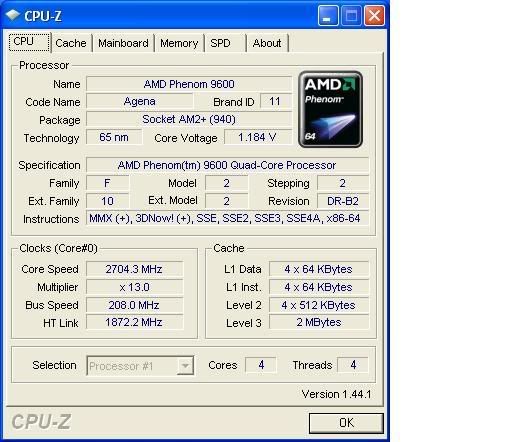
With 1.184V VCore?
You're lucky you even hit 2300MHz at those volts. I would increase that much more, like 1.4V at least if you want to see what the core can reach and then work downwards.
AOD isn't really reliable until you move over to BIOS >P0F. Since then I have not once had an error with it, whatsoever. Before that, it becomes almost a nightmare... you can make it better by switching everything off as I did so you only have one page to loadup in it.
My 2665MHz setting just froze 2 minutes ago as I came back to the PC and I've verified it wasn't clock fluctuations which froze it, but a random YouTube video playback. So now I've rebooted the same settings again but this time.. with the TLB Fix enabled. Let's see how far it goes now.
I have a SERIOUS problem!
I flashed my machine to the P0H bios, using AFUD412.
Everything seemed to go OK, cleared/flashed/verified/completed sucessfully.
Now my machine won't even post....
Any suggestions, or am I just screwed...
AMD FX-8350 (1237 PGN) | Asus Crosshair V Formula (bios 1703) | G.Skill 2133 CL9 @ 2230 9-11-10 | Sapphire HD 6870 | Samsung 830 128Gb SSD / 2 WD 1Tb Black SATA3 storage | Corsair TX750 PSU
Watercooled ST 120.3 & TC 120.1 / MCP35X XSPC Top / Apogee HD Block | WIN7 64 Bit HP | Corsair 800D Obsidian Case
First Computer: Commodore Vic 20 (circa 1981).
Looks like it can be used to disable specific cores. Nice find, thank you.
Yepp, just had to find a good starting point to go for 2.6GHz. A direct jump via multi with just upped voltages vcore 1.4 vnbcore 1.3V did not work.
Making my way with 12x212+ now by increasing the ref HT in small steps.
2.5GHz worked fine with 1.22V vcore 1.07V vnbcore. Seems 1.275V/1.2V was not enough for 2.505GHz going on with 1.3V vcore 1.2275V vnbcore atm. Will look at this point closer once I reached the cpu limit looks like a big step must be done to get over this point with my cpu.
I thought about better stability due to lesser difference between nb and cpu speed.
dave
Have you reseated everything and let the board stand along in the clear cmos position for atleast an hour. Make sure your only trying 1 stick of ram. if you got a regular pci video card now would be the time to try that also. Be sure to remove any power from the board while it sets in clear cmos position and the battery.
KTE
Speaking of disabling specific cores KTE let us know if disabling core 3 (bad core via prime 99% of the time) allows for higher cpu clocking.
Straight from MSI
Looks like asus my might have a better bite of the ability to do something for there users.MSI Tech. 02/20/2008 Like we have stated, is there going to ever be the ability to disable certain cores on the amd quad chips? The answer is no.
Last edited by jonspd; 02-21-2008 at 04:06 AM.
You would get that if you didn't flash with parameters /p /b /n /c
ALWAYS do this.
I had the same problem about 2 weeks ago by this mistake. Wait a while, clear CMOS for over 30 minutes by removing the battery, leave only one DIMM in and try booting. Your best bet is to get into the BIOS, set bootup to FDD or CD-ROM drive and use something like UBCD4Win/UBCD/Linux LiveCD (etc) to load another BIOS on whatever media you flash on OR just flash this BIOS again but using the above switches. Should work fine.
Let me know if you get no POST after an hour attempting this.
You're welcome.
I've tried nearly all the ways to clock Phenom and found the best, quickest and most accurate understanding giver is by working your way up slowly moving from one perfectly stable setting to another.
I usually try max valid and max benchable before this though, but after this too.
AFAIK the multipliers and PLLs are separate, hence the no effect. Otherwise, there certainly would be.I thought about better stability due to lesser difference between nb and cpu speed.
Check out these articles.
1. The following AMD CPU's compared for power efficiency: http://www.tomshardware.co.uk/proces...iew-30178.html
Unfortunately, they made a crucial mistake. They used BIOS P0F which disables the TLB Fix only on the first core and not on the other three (unless done manually). Pity, it would've been useful.Phenom 9600 (Agena B2) 2.3GHz 65nm
Athlon X2 BE-2400 (Brisbane G2) 2.3GHz 65nm
Athlon 64 X2 4600+ (Windsor F2) 2.4GHz 90nm
Sempron 3600+ (Manila F2) 2.0GHz 90nm
2. X2 K8 and X4 K10h compared throughout the clock ranges: http://209.85.135.104/translate_c?hl...-phenom-22756/
Very useful IMO as they tried to show the max possible for Phenom by 2008 compared to what we can already have with X2 (and more really). I'm not sure about the NB though as I'm pretty sure unless they manually clocked it down, it would be 2000MHz which is 200MHz more than retail Phenoms so far. Not a large difference generally if any at all, but in memory sensitive applications, it can very well be.Phenom 9900 (Agena B2) 65nm @ 2.2GHz/2.4GHz/2.6GHz/2.8GHz
Vs.
Athlon 64 X2 6000+ (Windsor F3) 90nm @ 2.2GHz/2.4GHz/2.6GHz/2.8GHz
Happy reading.
The problem with disabling only one core specific is this:
How does Windows label core0/1/2/3? In which rotation and manner? (diagram)
If we can find out how then we can disable the same core2 always. When Windows usually disables a core, it will do it in numerical order only, rather than picking a core in-between to disable (i.e. core 3/4). That's a limitation I've not yet surpassed yet but maybe I have and don't know how to test up on it.
That means they've stopped major BIOS production to me and withdrew their resources elsewhere (rev2.0/P45/X48/780/790). So they're now just going to spend very light and easy resources and fixes to the present BIOSes after many months now and then. This is inline with what I'm seeing here. The last BIOS P0H is now 30 days old. If they don't produce a decent better BIOS than 1.2 out officially, I would not recommend buying the board out clear.Straight from MSI
MSI Tech. 02/20/2008 Like we have stated, is there going to ever be the ability to disable certain cores on the amd quad chips? The answer is no.
LOL! I don't believe this
Coming back online after January 2006 one thing you strikingly notice is... why are there so many myths and total FUD campaigns about AMD related <anything> popping up hour to hour and people trying to only spread it worse and worse into a total mess of confused lies rather than deal with it and find and relate facts?
I don't get it. Some are known brand lunatics plain out by all. They and their opinion can be ignored by anyone sane and is trite.
But a few others are also picking up on anything and just furthering some more FUD around. It seems too many are wanting and trying hard to find and concoct any excuse to spread some poor remark and abuse on AMD products as a whole. Like I should have done when my Phenom wasn't booting for 3 or so weeks at the start or how my Wolfdale didn't POST even uptil now for the last 3 weeks by saying: "It's a fudged core, AMD/Intel is selling fudged cores and ripping us off!".
Please. I am getting tired of answering to misleads, misunderstandings and misconceptions due to repeated ignorance that it's not even funny anymore. At least try and understand and learn and troubleshoot a problem before jumping to a ludicrously preposterous belief.
Recently, I have just heard this in the last 4 days. A few (new to oc) users reporting AMD is selling processor with fudged 3rd cores (i.e. not stock speeds reachable).
How poor can analysis get?
Before you believe this, just step back and see if:
-You're using an AM2 motherboard
-You're using Vista
Change or get "fixed" those two above parameters if you get the "Clock Interrupt" BSoD and then come and update me if your 3rd core isn't working or if something other was the issue.
OR even, why not just drop in this thread and post me your Minidumps back to analyze what is causing the problem better rather than guessing conspiracy theories.
It's fine to say AMD Phenoms have a weaker one core traditionally. We have mostly experienced this. But to say they are selling faulty 3rd cores illegally which can't even reach stock MHz is gross libel, as its untrue.
Make important note.
I flashed to the POH BIOS last night all went well it seemed I setup AOD to run at startup to disable TLB and then this morning my wife booted into Windows and it froze and gave a high pitched noise. I was sleeping so I told her to just turn it off and I went down stairs later and it is in a continuous post loop go's through the drive check my 2900XT red light flashes then it starts over I tried clearing the BIOS with the jumper I even took a stick of RAM out but it is stuck in this loop. I pulled the battery out of the board and unplugged the PSU and came to work any ideas?
Phenom 9950 125W @ 3.2 1.30V 24/7
Asus M3A32 MVP WiFi 1200 BIOS
OCZ Titanium XTC DDR 800 2x2 Gb
Zalman 9700
2X Visiontek 4870's Crossfire
2x74 GB Raptors RAID 0
1X 300 GB Velociraptor
Corsair 750W TX 60AMP 12V
Vista Ultimate 32
You did set BIOS defaults before you flashed, right?
When did you get this problem, running stock or overclocked?
What did you type to flash the P0H BIOS?
If it froze on booting after Windows basic libraries, then maybe you have something starting up which is causing this, i.e. AOD Assistant. I never leave this running as it usually causes me this problem (freezing).
This BIOS is the most stable so far. A BIOS doesn't cause such a problem, the rebooting and whatever caused the freezing is what will cause no subsequent bootup. You might also have had a power surge/spike. Can you verify if you generally experience electrical problems at your house?
Can you check your power supply voltages idle/load?
Leave it off yet. The reboot loop will mean BIOS isn't clearing. You will have to only try one DIMM after clearing for over 30 minutes and shutting down power whilst doping so with minimal peripherals connected to get into the BIOS, set everything up at stock and then reboot.
EDIT:
Dave I've just seen a 0749[mxxw] and it's so far hitting 3.0-3.1GHz at 1.3-1.312V stable stock cooler. Test your CPU fully, yours is the closest batch.
Last edited by KTE; 02-21-2008 at 08:12 AM.
The downcore control located on the Phenom NorthBridge
Bus:0h
Device:24h
Function:3h
Offset:BEh
Bit:3,2,1,0 = 0000000000000000b (All 4 core enable)
Bit 0 = Core0
Bit 1 = Core1
Bit 2 = Core2
Bit 3 = Core3
Register Definition:
0b = Enable Core
1b = Disable Core
Example: TolimanTricore
I want to disable core3 = 1000b
I want to disable core2 = 0100b
I want to disable core1 = 0010b
I want to disable core0 = 0001b
Edit the register with WPCRedit or Read&Write tool then RESTART.Code:Host Bridge bus 0 (0x00), device 24 (0x18), function 3 (0x03) Common header Vendor ID 0x1022 Model ID 0x1203 Revision ID 0x00 PI 0x00 SubClass 0x00 BaseClass 0x06 Cache Line 0x00 Latency 0x00 Header 0x80 PCI header Subvendor ID 0x0000 Subsystem ID 0x0000 Int. Line 0x00 Int. Pin 0x00 Capabilities Secure Device Capability Offset F0h Dump 0 1 2 3 4 5 6 7 8 9 A B C D E F 00 22 10 03 12 00 00 10 00 00 00 00 06 00 00 80 00 10 00 00 00 00 00 00 00 00 00 00 00 00 00 00 00 00 20 00 00 00 00 00 00 00 00 00 00 00 00 00 00 00 00 30 00 00 00 00 F0 00 00 00 00 00 00 00 00 00 00 00 40 FF FF FF 3F 44 00 90 0A 00 00 00 00 00 00 00 00 50 00 00 00 00 00 00 00 00 00 00 00 00 00 00 00 00 60 00 00 00 00 04 00 7F 12 00 00 00 10 52 80 01 00 70 53 11 04 00 01 01 18 00 14 0C 20 00 14 09 09 00 80 81 83 00 E6 E6 41 E6 00 08 00 00 00 00 40 40 00 90 00 00 00 00 0B 6C 00 00 00 46 81 B5 00 00 00 00 A0 00 29 0A 80 80 98 1C 10 00 00 00 00 00 00 00 00 B0 00 00 00 00 00 00 00 00 00 00 00 00 00 00 00 00 C0 00 00 00 00 00 00 00 00 00 00 00 00 00 00 00 00 D0 00 00 00 00 29 0F 81 C8 16 18 00 03 28 51 00 00 E0 00 00 00 00 30 12 00 00 99 3F 07 02 00 00 00 00 F0 0F 00 10 00 00 00 00 00 00 00 00 00 22 0F 10 00
Good Luck
Last edited by tictac; 02-21-2008 at 08:26 AM.
Thanks Cutie
I'll try it in a moment.
Make sure Offset:BEh using 16bit access mode
or Offset BCh using 32bit access mode
or Offset BFh using 8bit access mode
make no mistake ok
Last edited by tictac; 02-21-2008 at 08:41 AM.
 Posting Permissions


 Reply With Quote






Bookmarks