

hard to believe this map+hp,s very high quality config is actually playable on my system



hard to believe this map+hp,s very high quality config is actually playable on my system
Intel Core 2 Extreme QX9650
Gigabyte ep45-ud3lr
Sapphire HD6970
Team Xtreem 2*1gb 1300
1TB Western Digital
u wanna knoe something? There is a card out there that can play this game at 60fps, its just locked up in NORAD! how could they make a game that looks like that with 8800gtxs? they couldn't have, i say big green gave Crytech some concept cards to make this game (ie UberGeDuberForce G100 ) u cant make a 30ft rod with 20 ft of steel
Case-Coolermaster Cosmos S
MoBo- ASUS Crosshair IV
Graphics Card-XFX R9 280X [out for RMA] using HD5870
Hard Drive-Kingston 240Gig V300 master Seagate 160Gb slave Seagate 250Gb slave Seagate 500Gb slave Western Digital 500Gb
CPU-AMD FX-8320 5Ghz
RAM 8Gig Corshair c8
Logitech 5.1 Z5500 BOOST22
300Gb of MUSICA!!
Steam ID: alphamonkeywoman
http://www.techpowerup.com/gpuz/933ab/
which one is better for iq, the file in your first link or hp,s very high quality config?Originally Posted by Seraphiel

Intel Core 2 Extreme QX9650
Gigabyte ep45-ud3lr
Sapphire HD6970
Team Xtreem 2*1gb 1300
1TB Western Digital


Well Here is the best auto-config file i could cook up, its has every command at the best state, A Hybrid of Other config files.
My Rig can do EpicFLOPs, Can yours?
Once this baby hits 88 TeraFLOPs, You're going to see some serious $@#%....
Build XT7 is currently active.
Current OS Systems: Windows 10 64bit
can you try mine?
My Rig can do EpicFLOPs, Can yours?
Once this baby hits 88 TeraFLOPs, You're going to see some serious $@#%....
Build XT7 is currently active.
Current OS Systems: Windows 10 64bit
Ultra high :P At 1920x1080p No AA i get 20-30FPS in DX10 with the 20FPS being on the Last level with heavy firefights.
I still gotta figure out the stuttering, But These cfg also tells the hardware to off-load some of the physics onto the GPU and CPU instead of being all on the CPU. I'm still tweaking it and getting it ready for the 9800GTX cards
My Rig can do EpicFLOPs, Can yours?
Once this baby hits 88 TeraFLOPs, You're going to see some serious $@#%....
Build XT7 is currently active.
Current OS Systems: Windows 10 64bit
does silentiums cfg add sunshafts in xp like hp,s does or do you still have to modify cvargroups files?
Last edited by RAMMAN; 12-25-2007 at 02:32 AM.
Intel Core 2 Extreme QX9650
Gigabyte ep45-ud3lr
Sapphire HD6970
Team Xtreem 2*1gb 1300
1TB Western Digital
mine and his does.
My Rig can do EpicFLOPs, Can yours?
Once this baby hits 88 TeraFLOPs, You're going to see some serious $@#%....
Build XT7 is currently active.
Current OS Systems: Windows 10 64bit
i must say the silentium config is highly optimised.perfect for playing through the whole singleplayer campaign or even multiplayer! basically im seeing high quality settings+sunshafts+very high quality water.shadows seem a dark medium quality but becomes very high quality when you get close enough.just what i always wanted.ironically i can now turn on 2xAA and still get higher fps than if i had everything at very high

Intel Core 2 Extreme QX9650
Gigabyte ep45-ud3lr
Sapphire HD6970
Team Xtreem 2*1gb 1300
1TB Western Digital
That doesn't actually help anything unless your running a single core system. Very good for single core though, I would suggest anyone with a single core system to enable this through console, of config file, that is, if you have a beefy GFX card. If you dont, dont waste the time.
Last edited by Decami; 12-25-2007 at 01:19 PM.
This post above was delayed 90 times by Nvidia. Cause that's their thing, thats what they do.
This Announcement of the delayed post above has been brought to you by Nvidia Inc.
RIGGY
case:Antec 1200
MB: XFX Nforce 750I SLI 72D9
CPU:E8400 (1651/4x9) 3712.48
MEM:4gb Gskill DDR21000 (5-5-5-15)
GPU: NVIDIA GTX260 EVGA SSC (X2 in SLI) both 652/1403
PS:Corsair 650TX
OS: Windows 7 64-bit Ultimate
--Cooling--
5x120mm 1x200mm
Zalman 9700LED
Displays: Samsung LN32B650/Samsung 2243BWX/samsung P2350
Its not that command, Its still running sys_physics_CPU 1, so it still mutli-core. it just shares the physics commands with the GPU to smooth it just abit.
My Rig can do EpicFLOPs, Can yours?
Once this baby hits 88 TeraFLOPs, You're going to see some serious $@#%....
Build XT7 is currently active.
Current OS Systems: Windows 10 64bit
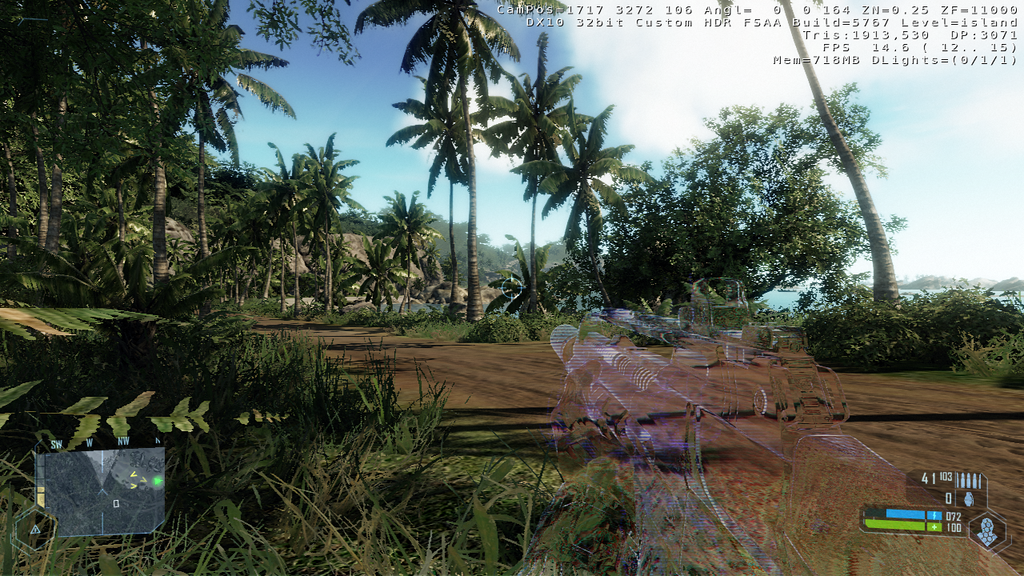
I found the pictures hard to believe until I downloaded the Jungle map and config file myself and tried out. Now I'm a believer. It turned out looking exactly like those screenshots. I was able to run around between 15-25FPS which may not be playable for the real game but was more than enough for me for this brief demo. This game really has potential. Just like FarCry it will became a benchmark for latest cpu/gpus.
Here is what I got so far with my V2 of my CFG. That I haven't posted yet.
But Its for Quad Cores / 8800GTX or Above only.
These picture was taken by me at 1280x720 at 16xQ AA!!! It was also semi-playable. These is the first level of the game.
I will try to take pics of the jungle and island Custom levels later.
My Rig can do EpicFLOPs, Can yours?
Once this baby hits 88 TeraFLOPs, You're going to see some serious $@#%....
Build XT7 is currently active.
Current OS Systems: Windows 10 64bit
Oh ok, I think I understand now, very interesting.
This post above was delayed 90 times by Nvidia. Cause that's their thing, thats what they do.
This Announcement of the delayed post above has been brought to you by Nvidia Inc.
RIGGY
case:Antec 1200
MB: XFX Nforce 750I SLI 72D9
CPU:E8400 (1651/4x9) 3712.48
MEM:4gb Gskill DDR21000 (5-5-5-15)
GPU: NVIDIA GTX260 EVGA SSC (X2 in SLI) both 652/1403
PS:Corsair 650TX
OS: Windows 7 64-bit Ultimate
--Cooling--
5x120mm 1x200mm
Zalman 9700LED
Displays: Samsung LN32B650/Samsung 2243BWX/samsung P2350
it seems 2 of the special commands i have will not enable. If i could get them to enable, The framerates would be alot better.
My Rig can do EpicFLOPs, Can yours?
Once this baby hits 88 TeraFLOPs, You're going to see some serious $@#%....
Build XT7 is currently active.
Current OS Systems: Windows 10 64bit
I copied the Config file and the Game does look a lot better if the Custom setting left alone. I think mine had not made use of more than one core because I seem to be getting better Frame Rates. With just a single 3870, I was shocked at how well it did run.
Now the bad, I'm still seeing Objects appear out of nowhere, and Hidden Surface glitches, though fewer now, are still there.
Last edited by Donnie27; 12-27-2007 at 06:09 AM. Reason: gamar clean up
Posted by duploxxx
I am sure JF is relaxed and smiling these days with there intended launch schedule. SNB Xeon servers on the other hand....
Posted by gallag
there yo go bringing intel into a amd thread again lol, if that was someone droping a dig at amd you would be crying like a girl.qft!
you will always see object popping due to the way Crysis does draw distance. For some reason or another this is less apparent in DX10.
This post above was delayed 90 times by Nvidia. Cause that's their thing, thats what they do.
This Announcement of the delayed post above has been brought to you by Nvidia Inc.
RIGGY
case:Antec 1200
MB: XFX Nforce 750I SLI 72D9
CPU:E8400 (1651/4x9) 3712.48
MEM:4gb Gskill DDR21000 (5-5-5-15)
GPU: NVIDIA GTX260 EVGA SSC (X2 in SLI) both 652/1403
PS:Corsair 650TX
OS: Windows 7 64-bit Ultimate
--Cooling--
5x120mm 1x200mm
Zalman 9700LED
Displays: Samsung LN32B650/Samsung 2243BWX/samsung P2350
Wrong :P
DX10 uses Item hidding and Rapid Landscape morphing to keep a good performance.
Go into Sandbox 2, and Load up a map, anyone, then Look at the map upclose. Then go about 3000 clicks in the air and free fall. Then you'll start to see what I'm talking about.
My Rig can do EpicFLOPs, Can yours?
Once this baby hits 88 TeraFLOPs, You're going to see some serious $@#%....
Build XT7 is currently active.
Current OS Systems: Windows 10 64bit
That's really not practical, though, if you're playing the game, you'd never notice. You'd be too busy killing things.
Thermaltake Armor Series Black
GIGABYTE GA-P35-DS3R
Q6600 3.6 GHZ Thermalright Ultra 120 eXtreme
4 GB Corsair XMS2 w/ OCZ XTX Ram Cooler 2 x 60mm
9800GT 512MB
18X Pioneer DVD-RW Burner
720 Watt Enermax Infiniti
4x640GB RAID 10
Windows 7
http://s31.photobucket.com/albums/c3...boys%20Crysis/
My New config file V2.
I minimized the memory usage in general.
I also maximized the graphics and CPU usage to really take advantage of quad cores, maximized graphics memory for the 8800GTX/Ultra series.
As You can see in those pics, For a Decent sized Island. Its only about a 512MB of System memory. These pics where taken at 1920x1080p with a 4xQ AA (Custom AA setting I tweaked via command lines) and I'm still getting 16-34 FPS in crysis at these settings.
PS. I'm looking for Testers and feedback for Quad Core + 8800GTX/Ultra users
Last edited by Warboy; 12-27-2007 at 06:05 AM.
My Rig can do EpicFLOPs, Can yours?
Once this baby hits 88 TeraFLOPs, You're going to see some serious $@#%....
Build XT7 is currently active.
Current OS Systems: Windows 10 64bit
17-34 FPS? Scraps. Not even playable for me. Bickering over a handful of frames when you aren't getting anywhere near 60 isn't worth it. Shelf Crysis for a few generations. This game should've been optimized for hardware that was out when it came out with the ability to unlock these higher settings later on like Doom3 did with ultra. The problem is it wasn't optimized for current high end hardware and it doesn't even take advantage of a quad - Crytek has lied about alot of things with Crysis...
i7-2600k @ 4.8Ghz 1.38v L044A892
ASUS P8P67 LGA
16GB G.Skill Rip Jaws DDR3 1600Mhz Memory
1/2" ID Masterkleer, Swiftech MCP-655, Thermochill PA120.3 Rad, XSPC Rasa, MCW-60
Cooler Master UCP 1100 Watt PSU
GTX 680 1300/7000
Lian Li PC V-2000
I agree, having such awesome graphics and nothing to play it on is a rather anticlimactic situation. When I first saw Crysis I was like, COOL! But now it's like WOW, I can't really play it...
Thermaltake Armor Series Black
GIGABYTE GA-P35-DS3R
Q6600 3.6 GHZ Thermalright Ultra 120 eXtreme
4 GB Corsair XMS2 w/ OCZ XTX Ram Cooler 2 x 60mm
9800GT 512MB
18X Pioneer DVD-RW Burner
720 Watt Enermax Infiniti
4x640GB RAID 10
Windows 7
OH CRAP, I should have saved a screen shot of the 25% rendered "Prophit". The game only redered his head, weapons and feet LOL.
Posted by duploxxx
I am sure JF is relaxed and smiling these days with there intended launch schedule. SNB Xeon servers on the other hand....
Posted by gallag
there yo go bringing intel into a amd thread again lol, if that was someone droping a dig at amd you would be crying like a girl.
ha....thats rich.
You do Know once a game is avg over 30FPS it becomes un-noticeable the difference between 30 and 70 FPS right?
I get 28-47 FPS, On a lower res, 1280x720 4xQ AA, and it runs smooth. I'm just demo'ing the graphics that my cfg file can use.
My Rig can do EpicFLOPs, Can yours?
Once this baby hits 88 TeraFLOPs, You're going to see some serious $@#%....
Build XT7 is currently active.
Current OS Systems: Windows 10 64bit

No, it doesnt.
All along the watchtower the watchmen watch the eternal return.
 Posting Permissions


 Reply With Quote






Bookmarks