

Setfsb, ICS9LPRS906CGLFOriginally Posted by [XC] gomeler

enable Ultra fsb, otherwise you hit a limit at 520fsb and get an error.


Setfsb, ICS9LPRS906CGLF
enable Ultra fsb, otherwise you hit a limit at 520fsb and get an error.
>i5-3570K
>Asrock Z77E-ITX Wifi
>Asus GTX 670 Mini
>Cooltek Coolcube Black
>CM Silent Pro M700
>Crucial M4 128Gb Msata
>Cooler Master Seidon 120M
Hell yes its a mini-ITX gaming rig!
![Send a message via AIM to [XC] gomeler](images/misc/im_aim.gif)
Thanks for the help guys, for some reason I must have missed that. I'm an idiotBack to clocking this quad, 485x9 works with 1.525vcore, time to see what she can do on a single-stage with more attention to tweaking

i just got this board, and am confused...
on the platinum, all 8 pins on the 2x4 connector are open. on the neo2, 4 of them are blocked off. is this right? am i supposed to, or should i pull off the block and use all 8 pins? use this in combination with the standard molex connector?
i7 2700k 4.60ghz -- Z68XP-UD4 F6F -- Ripjaws 2x4gb 1600mhz -- 560 Ti 448 stock!? -- Liquid Cooling Apogee XT -- Claro+ ATH-M50s -- U2711 2560x1440
Majestouch 87 Blue -- Choc Mini Brown -- Poker Red -- MX11900 -- G9
Pull off the block its just there for users who have a 4p PSU. As for the molex, I don't use it and have no problems.
Core i3-550 Clarkdale @ 4.2GHz, 1.36v (Corsair A50 HS/F) LinX Stable
MSI H55-GD65 Motherboard
G.Skill 4GBRL DDR3-1600 @ 1755, CL9, 1.55v
Sapphire Radeon 5750 1GB
Samsung F4 320GB - WD Green 1TB
Xigmatek Utgard Case - Corsair VX550

if your PSU has an 8-pin plug use it there (take off the cover) If your PSU has a 4-pin plug, just plug it in there in the free 4 holes. The molex is used in tha case of crossfire or full complete pci population
Alright, that's pretty much what I expected, just making sure... the only thing that didn't make sense is why the Platinum doesn't have the blocker...
Fitting 7/16" tubing over an MCP655 inlet (at least from the angle I attempted) might have been the hardest thing I've ever done in my life.
i7 2700k 4.60ghz -- Z68XP-UD4 F6F -- Ripjaws 2x4gb 1600mhz -- 560 Ti 448 stock!? -- Liquid Cooling Apogee XT -- Claro+ ATH-M50s -- U2711 2560x1440
Majestouch 87 Blue -- Choc Mini Brown -- Poker Red -- MX11900 -- G9
Who knows... my FR (v1.1) didn't have the blocker either.
Do you have some OC value suggestions for setting an Q6600 (G0) to 3Ghz for stable 24/7 use?
CPU Voltage
VTT FSB Voltage
NB Voltage
SB I/O Power
SB Core Power
Ram: Transcend Axeram 800+ Stock : 4-4-4-12@1.85v intended for 1066 5-5-5-15, voltage still to be found.
Got my board in. Hit 500 x 7 with no problems. It automatically adjusted my motherboard voltages when I increased the FSB. So far, I like it! Scoring 14k in 3DMARK'06 with 8800 GT.BTW, FSB jumper set at 333.
I tried up to 1.6.
somehow I find superpi faster on 1.1 bios.
Maybe i sux @ spi.
Am still back to 1.1.. heehee...
(individual preference i guess.
Juz to share mine : E4300 w/neo2-fr
(Its abit slow... i really dun know how those guys get such madness timings.)
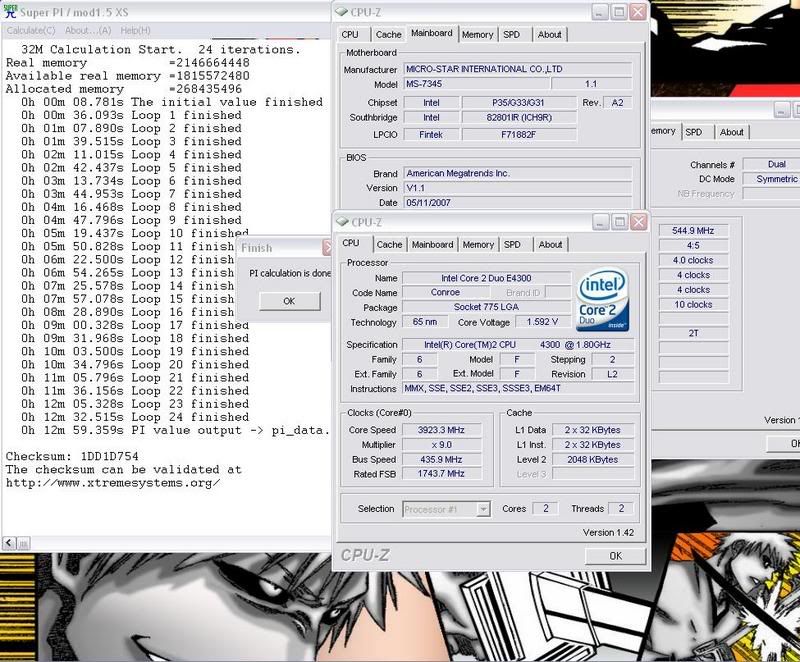
You are using Q6600 SLACR? G0 rev?
If so, I think stock voltages
should hit 3ghz easily.
Why dun you juz set the jumper to 333mhz fsb.
(Beside the 1st pcie-1x slot.)
Wow!
Luv to see your results.
yeap SLACR, thats what i did initialy, stock is 1.25 but looks more stable with 1.26v . i wonder about the rest of the voltages, system seems more stable with those tweaked a tad as well but having a hard time finding the best minimums.
Set strap jumpers to 333 but thinking of changing to 266 (should i?) just to have the default clocks option back
whats with the PCIE 1x again?
Last edited by monographix; 12-17-2007 at 01:36 AM.
Oh, juz referring to where the jumpers are located.
What added features are there in the 1.76 beta bios and where did you find the betas?
Asus A8V DLX Ver2.0
X2 3800+, Crucial Value 2GB (Samsung chip)
EVGA 6600GT 128MB, SB Audigy 2
Antec Neopower 480
MSI Neo2-FR Ver1.1 Bios 1.1
Q6600 B3 L725
OCZ GOLD 2GB
NV 7300GT 512MB
Antec Earthwatts 500
I get my MSI P35 neo 2 fr . I want to tested max FSB , but i cannot set a lower multi . I have 1.4 bios .
Anybody got a Vdroop mod for it yet?
i want to get this board th run with a e6750 and a 8800 gt. looks like a great combo that will support cyrsis. Such a beautiful game so many requirements. hoping to do a new build with this board

I've problems overclocking with 2GBx2 memory kit. Anyone using 2GBx2 RAM with this board? Mind sharing some infos on the RAM?
Core i7 920
Scythe Mugen 2
Silicon Power DDR3-1333 2GBx3
Gigabyte EX58-UD4
Palit GTX 260 Sonic 896MB
Samsung Spinpoint F1 640GBx2 Matrix RAID
Samsung Spinpoint F2 1TB
Creative Audigy 2 ZS
Winfast TV2000 XP Expert
Antec Earthwatts 650W
Coolermaster CM 690
LG W2442PA
Win 7 RC x64
I have 2x1Gb Transcend "Axeram 800+" DDR2 800 4-4-4-12 @ 1.85v stock, running at 1066 5-5-5-12 @ 2.10v (testing 2.05v)
I also prefer bios 1.1 because of the reduced memory latency, for example with 1.6/1.76 my memory is auto set at 5-6-6-18 (800MHz)and with 1.1 is set at 5-5-5-13 .
I have a Q6600 G0 and 4x1GB Team Elite DDR 800.
Max fsb I run into was 480MHz but for every day use (most of the time) I have the follwing settings (bios 1.1):
-fsb 400MHz x 8(3.2GHz)
-mem 960 MHz 1:1.2 (auto 5-5-5-16)
-cpu vcore 1.2875
-mem 1.90v (default)
-cpu vtt 1.250
-NB 1.300
-SB 1.6
-sb v 1.05 (default)
Running prime 95x4 gives me a max 55C on the cpu using TT Big Typhoon and 34C on the NB (temp probe). On idle it's about 26C for cpu and 27C NB.
I just love this board so far.
As a note, running 4 dimms gives you about 4% less bandwidth and need loose latencies compared to 2x1GB.
Did you disable Intel Speedstep? Btw, the lowest multiplier is 6x.
I just found out that BIOS 1.1 lets the owner to set Vcore 0.05V lower than VID. Vdroop is is small too.
Core i7 920
Scythe Mugen 2
Silicon Power DDR3-1333 2GBx3
Gigabyte EX58-UD4
Palit GTX 260 Sonic 896MB
Samsung Spinpoint F1 640GBx2 Matrix RAID
Samsung Spinpoint F2 1TB
Creative Audigy 2 ZS
Winfast TV2000 XP Expert
Antec Earthwatts 650W
Coolermaster CM 690
LG W2442PA
Win 7 RC x64
Of course i did .
I have paired the ocz 4-4-3-15 4GB EB with the board b4.
I couldn't scale pass 820mhz.
Its weird, that on the same pair,
my friend did 1090mhz.
I have no idea if its a compatibility issue or what.
You might want to take a look.
http://www.futron.sg/forum/viewtopic.php?t=25
I have since sold off the rams.
I still like the board very much.
It's something weird with memory settings/compatibility on this board.
I can do up to 1100MHz on 5-5-5-16 but no more than 820MHz on 4-4-4-12.
Maybe they can fix this in some new bios. Actually I would like them to improve 1.1 bios and forget about the others.
Update on my settings:
Q6600 G0 - 4x1GB ddr800 team elite - bios 1.1
400x8 3.2GHz - 960MHz 5-5-5-16 (1:1.2)
CPU 1.275v (almost default)
mem 1.90v (default)
CPU Vtt 1.200 (default)
NB 1.250 (default)
SB 1.5 (default)
Runs great for a 24/7 setup, low temps, fans on 5v.
Last edited by tty; 12-21-2007 at 10:48 AM.
 Posting Permissions


 Reply With Quote

Bookmarks