

Has anyone gotten their ram upto ddr1200 or close to it? I can get to about 1180 with 2.2v on the ddr and then it's like a wall and no voltages will get rid of errors in memtest. I'll keep at it but if anyone has done it speak up please.




Has anyone gotten their ram upto ddr1200 or close to it? I can get to about 1180 with 2.2v on the ddr and then it's like a wall and no voltages will get rid of errors in memtest. I'll keep at it but if anyone has done it speak up please.
IP35-Pro
E8400
EVGA 8800GTS-512
2gb BallistiX PC8500
2 150gb Raptors in raid0
-------------------------
GA EP45-UD3P (r1.6) work in progress
Q6600 @ 3.6ghz w/Thermalright Ultra Extreme 120
Patriot Viper PC8500 2x2gb

Ok so I need to update the intel chipset drivers for sure, will do that. Need a optical mouse/keyboard when doing that *looks at pile of junk*.
1) Can anyone tell me what RAM settings I should be running at, I have the crucial RAM from newegg.com 2 x 1 Model# BL12864AA804 http://www.newegg.com/Product/Produc...82E16820146565
On the website it says to run it at 2.2v So I set it to that and it seems to run fine I guess, but maybe the issues I list below may be in conjunction with the RAM voltage. My timings are 5-5-5-15 2T and I hope the 15 and 5's are in the right place lol
2) CPU-Z is showing my core speed @ 1224 w/ a multi of x6 and a bus speed of 204. Now in bios it is set 9 x 204 = 1804. I have version 1.41 of CPU-Z
(My core voltage is @ 1.170 in CPU-Z but in bios @ 1.32 ???)
3) When running prime95, do I just take the .exe file and copy/paste in another directory and then run one test on CPU 0 and another on CPU 1?
4) Core Temp restarts my damn computer when I open it...
5) TAT gives me the error "Error Enumerating on Demand Clock Modulation Support." Terminating Tool
6) Can someone list anything other then the new intel chipset drivers or software I should be installing as well please!
I have to admit; it's been forever since I got into bios and overclocking so please bare with me. 5th Abit mobo in like 7 years so I know my way around the bios, it's just getting the settings right. Thanks for the help in advance
-Terry
Update:
Issue#4 was corrected by downloading the correct version or just re-downloading period...
Issue#2 was corrected somewhat; read a very nice sticky on this chipset about the CIE1 or whatever it's called, having a idle multi & a what I set in bios. It's like having 2 different modes, which is nice, but then again not nice. Just gotta figure out where in the bios can I turn this off.
Issue#1 has been corrected by just changing the settings in the bios and sticking to what the website suggests
Issue#3 was fixed by just downloading the correct file/better of orthos and running that as my bench/overclock tester
Last edited by terrybogard; 10-10-2007 at 02:22 PM. Reason: updates on issues
Zero System Black
Mobo: eVGA x58 SLI Micro
CPU: Core i7 920 D0 #3943 @4.0Ghz
Heatsink: Dark Knight Edition from Xiga (Waiting on ND-14)
RAM: Corsair C8D 9-9-9-24 1.65v
Video: XFX 5870 1GB 1000/1300
PSU: OCZ GamerXtreme 700W
Sound: Creative X-Fi Platinum w/ Z-5500's
Display:Samsung T260HD
Key: Saitek Eclipse
Mouse: Logitech G9x
Case: Corsair 800D
O/S: Win7 Ultimate x64
That's not the case with my IP35 Pro. I have usb keyboard/mouse (usb support set to bios), i have made two formats in this system and both times i haven't had a prob when installing intel's inf. Of course it loses keyboard and mouse when installing the usb driver, but after a while it finds them.Originally Posted by Ace-a-Rue

Some other things that i've seen mentioned in earlier posts. My IP35 Pro v1.00 came with bios 10 installed. Plus vmem undervolts (with ddr reference voltage set to 0%. With 2.325v in bios, i get 2.3v idle and 2.28v under load.
Last edited by JoeBar; 10-10-2007 at 12:57 PM.
Project ZEUS II
Asus Rampage II Extreme
Intel I7 920 D0 3930A @ 4.50GHz (21 X 214mhz)
3 x 2GB G.Skill Trident 1600 @ 1716MHz (6-8-6-20-1N)
2 x Asus HD 6870 CrossFire @ 1000/1100MHz
OCZ Vertex 2 60GB | Intel X25-M 120GB | WD Velociraptor 150GB | Seagate FreeAgent XTreme 1.5TB esata
Asus Xonar DX | Logitech Z-5500 | LG W2600HP 26" S-IPS LCD
Watercooling setup:
1st loop -> Radiator: 2 x ThermoChill PA120.3 | Pump: Laing DDC-3.25 with Alphacool HF 38 top | CPU: Swiftech Apogee XT | Chipset: Swiftech MCW-NBMAX | Tubing: Masterkleer 1/2" UV
2nd loop -> Radiator: ThermoChill PA120.3 | Pump: Laing DDC-3.2 with Alphacool HF 38 top | GPU: 2 x EK FC-6870 | Tubing: Masterkleer 1/2" UV
Assembled in Mountain Mods Ascension Trinity
Powered by Corsair Professional Series Gold AX1200


DDR2-118x seems to be the limit on my board as well.
Tried all possible slot configurations, various DDR2 memory kits ( tested on various boards, reaching DDR2-1250+ ), various BIOSes, settings, etc.
Still, DDR2-118x wall.
Coding 24/7... Limited forums/PMs time.
-Justice isn't blind, Justice is ashamed.
Many thanks to: Sue Wu, Yiwen Lin, Steven Kuo, Crystal Chen, Vivian Lien, Joe Chan, Sascha Krohn, Joe James, Dan Snyder, Amy Deng, Jack Peterson, Hank Peng, Mafalda Cogliani, Olivia Lee, Marta Piccoli, Mike Clements, Alex Ruedinger, Oliver Baltuch, Korinna Dieck, Steffen Eisentein, Francois Piednoel, Tanja Markovic, Cyril Pelupessy (R.I.P.), Juan J. Guerrero
Thank you all for the quick responses about my raptor. did the write zeros thing from the WD Diagnostics tool and my raptor is running fine. First I tried it without doing this and it would fail to load windows half the time.
First thing I wanted to do was update the bios so I installed Flashmenu and downloaded bios 12. But it seems to be stuck at "Programming Main Block 22%". its been this way for 10 min now. Has this happened to anyone else? I really don't want a dead board. Im thinking about just restarting but im scared.
I've just tested with ddr reference set to +2%. Vmem undervolting is absolutely the same. So no real help.
Project ZEUS II
Asus Rampage II Extreme
Intel I7 920 D0 3930A @ 4.50GHz (21 X 214mhz)
3 x 2GB G.Skill Trident 1600 @ 1716MHz (6-8-6-20-1N)
2 x Asus HD 6870 CrossFire @ 1000/1100MHz
OCZ Vertex 2 60GB | Intel X25-M 120GB | WD Velociraptor 150GB | Seagate FreeAgent XTreme 1.5TB esata
Asus Xonar DX | Logitech Z-5500 | LG W2600HP 26" S-IPS LCD
Watercooling setup:
1st loop -> Radiator: 2 x ThermoChill PA120.3 | Pump: Laing DDC-3.25 with Alphacool HF 38 top | CPU: Swiftech Apogee XT | Chipset: Swiftech MCW-NBMAX | Tubing: Masterkleer 1/2" UV
2nd loop -> Radiator: ThermoChill PA120.3 | Pump: Laing DDC-3.2 with Alphacool HF 38 top | GPU: 2 x EK FC-6870 | Tubing: Masterkleer 1/2" UV
Assembled in Mountain Mods Ascension Trinity
Powered by Corsair Professional Series Gold AX1200
Are you checking with a voltmeter? Mine undervolts to but not by much.
IP35-Pro
E8400
EVGA 8800GTS-512
2gb BallistiX PC8500
2 150gb Raptors in raid0
-------------------------
GA EP45-UD3P (r1.6) work in progress
Q6600 @ 3.6ghz w/Thermalright Ultra Extreme 120
Patriot Viper PC8500 2x2gb
No, i'm referring to uguru readings. Vdrop between idle and load is 0.02v.
Undervolting is 0.025v idle and 0.045v load
Project ZEUS II
Asus Rampage II Extreme
Intel I7 920 D0 3930A @ 4.50GHz (21 X 214mhz)
3 x 2GB G.Skill Trident 1600 @ 1716MHz (6-8-6-20-1N)
2 x Asus HD 6870 CrossFire @ 1000/1100MHz
OCZ Vertex 2 60GB | Intel X25-M 120GB | WD Velociraptor 150GB | Seagate FreeAgent XTreme 1.5TB esata
Asus Xonar DX | Logitech Z-5500 | LG W2600HP 26" S-IPS LCD
Watercooling setup:
1st loop -> Radiator: 2 x ThermoChill PA120.3 | Pump: Laing DDC-3.25 with Alphacool HF 38 top | CPU: Swiftech Apogee XT | Chipset: Swiftech MCW-NBMAX | Tubing: Masterkleer 1/2" UV
2nd loop -> Radiator: ThermoChill PA120.3 | Pump: Laing DDC-3.2 with Alphacool HF 38 top | GPU: 2 x EK FC-6870 | Tubing: Masterkleer 1/2" UV
Assembled in Mountain Mods Ascension Trinity
Powered by Corsair Professional Series Gold AX1200

Looks like you fixed most of your problems. However I would suggest lowering your DDR voltage to 2.0v. It will most likely still work just fine. I have 2 sets of them and they will both do 1000mhz at the 5-5-5-15-30-2T settings at only 2.0v.
System
ASUS Z170-Pro
Skylake i7-6700K @ 4600 Mhz
MSI GTX 1070 Armor OC
32 GB G.Skill Ripjaws V
Samsung 850 EVO (2)
EVGA SuperNOVA 650 G2
Corsair Hydro H90
NZXT S340
Thanks for the reply. I've heard that there is a problem but was hoping someone had done though.
Heres where I've gotten to so far with a combination of fast cpu and ddr. I've gotten into the low 1180's for the ddr with the 7x and lower clock on the cpu.
IP35-Pro
E8400
EVGA 8800GTS-512
2gb BallistiX PC8500
2 150gb Raptors in raid0
-------------------------
GA EP45-UD3P (r1.6) work in progress
Q6600 @ 3.6ghz w/Thermalright Ultra Extreme 120
Patriot Viper PC8500 2x2gb
Through out this whole thread you are warned not to use flashmenu to update the bios. It doesn't work half the time. The same thing happened to me and it bricked my board but I eventually got it working again. DO NOT USE FLASHMENU!
This is what I measured with my Fluke meter and my system in the bios. I didn't measure under 2.2v. Tomorrow I'll take a few readings at idle and with Orthos blend running.
Setting...............uguru in bios............dvom reading
2.2v...................2.21v...................... .2.189v
2.225v................2.23v....................... 2.209v
2.250v................2.25v....................... 2.235v
2.275v................2.29v....................... 2.258v
2.30v..................2.31v...................... 2.286v
2.325v.................2.33v...................... 2.308v
2.350v.................2.35v...................... 2.335v
2.375v.................2.38v...................... 2.360v
2.400v.................2.41v...................... 2.392v
2.425v.................2.43v...................... 2.411v
IP35-Pro
E8400
EVGA 8800GTS-512
2gb BallistiX PC8500
2 150gb Raptors in raid0
-------------------------
GA EP45-UD3P (r1.6) work in progress
Q6600 @ 3.6ghz w/Thermalright Ultra Extreme 120
Patriot Viper PC8500 2x2gb
Then I must have balls of steel then...used windows-based flash for both my IP35 and IP35 Pro boards with no problems.
System
ASUS Z170-Pro
Skylake i7-6700K @ 4600 Mhz
MSI GTX 1070 Armor OC
32 GB G.Skill Ripjaws V
Samsung 850 EVO (2)
EVGA SuperNOVA 650 G2
Corsair Hydro H90
NZXT S340
Ok I'll make those changes in the bios, but I got a small annoying thing I need to change.
Issues:
1) Abit Uguru doesn't work, so I'm wondering If I should just uninstall it and then go ahead and reinstall it again.
2) Tat still gives me issues; so can someone point me to a link of a version that has worked and is updated please
3) C1E & EIST have got to go; it's killing my computer...Well it's causing freezes when I go from not needing power to BAM there you go. I want to disabled this stuff; but where in the bios can I find it *reading manual as he's typing*
4) Is it safe to do the Intel chipset update with still using USB, because I can't find any optical mouse/keyboard to use
-Terrybogard
update(s):
Issue#3 was fixed by just finding in the manual where to go and disabling that crap, thank the mobo gods.
Last edited by terrybogard; 10-10-2007 at 03:59 PM. Reason: updates on issues
Zero System Black
Mobo: eVGA x58 SLI Micro
CPU: Core i7 920 D0 #3943 @4.0Ghz
Heatsink: Dark Knight Edition from Xiga (Waiting on ND-14)
RAM: Corsair C8D 9-9-9-24 1.65v
Video: XFX 5870 1GB 1000/1300
PSU: OCZ GamerXtreme 700W
Sound: Creative X-Fi Platinum w/ Z-5500's
Display:Samsung T260HD
Key: Saitek Eclipse
Mouse: Logitech G9x
Case: Corsair 800D
O/S: Win7 Ultimate x64
my bios is toast. I had no idea flashmenu sucked. I have been using winflash for my last few boards without a problem. Any suggestions on how to get it working again?
Right now it boots and says BIOS Checksum error and it searches for drive A.
I loaded up a boot disk with awdflash and the bios and made an autoexec.bat file telling it to flash. What happens is the flash utility will load and under message it will say: "Please Wait" and it just stays there.
I remember flashing my NF7v2 with the wrong bios and it fried it. You might need to get a new bios chip from Abit, which shouldnt be to bad. The only other way is to flash it the way some users have noted in there sigs or on the first page. I'm sticking with 14 for now; and then move onto beta once the new cooler comes in.
GL though
Zero System Black
Mobo: eVGA x58 SLI Micro
CPU: Core i7 920 D0 #3943 @4.0Ghz
Heatsink: Dark Knight Edition from Xiga (Waiting on ND-14)
RAM: Corsair C8D 9-9-9-24 1.65v
Video: XFX 5870 1GB 1000/1300
PSU: OCZ GamerXtreme 700W
Sound: Creative X-Fi Platinum w/ Z-5500's
Display:Samsung T260HD
Key: Saitek Eclipse
Mouse: Logitech G9x
Case: Corsair 800D
O/S: Win7 Ultimate x64
take the battery out, reset the jumper. cross ur fingures. You could have abit send u another rom chip, if u can get ahold of someone to do that. They are elusive over at abit
try to reflash after clearing cmos over night, if it works your fine
~
You can get the bios chip at the parts store.
http://www.uabit.com/WebStore/produc...5k3hhu3tquj8f4
IP35-Pro
E8400
EVGA 8800GTS-512
2gb BallistiX PC8500
2 150gb Raptors in raid0
-------------------------
GA EP45-UD3P (r1.6) work in progress
Q6600 @ 3.6ghz w/Thermalright Ultra Extreme 120
Patriot Viper PC8500 2x2gb
Probably comes down to CPU limits along with the interaction of the motherboard ...
VapoChill LS [AC] / QX9650 / X6800 / E8500 / Q6600 / CF-3870x2 / 8800 GTS G92 512 / XFX 7950GX2 (H20) / GeIL PC2-8500 C5 / PC2-6400 C4 / SilverStone OP1000 / ST75ZF
Abit IP35-Pro | 3DM06 - 18,264 | PCM05 - 23,577 | PCMVA 13,063
DFI 680i LT | 3DM06 - 24,602
Abit X38 QuadGT | 3DM03 - 120,337 | 3DM06 - 28,176
@Neil,
Well DDR3-1200 ain't that far away from 1198
that I've just reached with a new kit, but still not as good as other mobos.
Tried 5 CPUs, same results
Coding 24/7... Limited forums/PMs time.
-Justice isn't blind, Justice is ashamed.
Many thanks to: Sue Wu, Yiwen Lin, Steven Kuo, Crystal Chen, Vivian Lien, Joe Chan, Sascha Krohn, Joe James, Dan Snyder, Amy Deng, Jack Peterson, Hank Peng, Mafalda Cogliani, Olivia Lee, Marta Piccoli, Mike Clements, Alex Ruedinger, Oliver Baltuch, Korinna Dieck, Steffen Eisentein, Francois Piednoel, Tanja Markovic, Cyril Pelupessy (R.I.P.
Nice!
I'm getting 1188 now but only 5 5 5 12!
IP35-Pro
E8400
EVGA 8800GTS-512
2gb BallistiX PC8500
2 150gb Raptors in raid0
-------------------------
GA EP45-UD3P (r1.6) work in progress
Q6600 @ 3.6ghz w/Thermalright Ultra Extreme 120
Patriot Viper PC8500 2x2gb
i guess i should leave mine in the "bios" mode..sounds like a plan..thanks.
BIOSTAR TPOWER I45 UNOFFICIAL THREAD
BIOSTAR TPOWER BOLT MOD FOR HEATPIPE AND HEATSINK
BIOSTAR TPOWER I45 BIOS FLASHING PROCEDURE
ABIT IP35 PRO HEATPIPE MOD
ABIT IP35 PRO BIOS FLASHING PROCEDURE
IP35 Pro: 9650@4000Mhz, par overclocker; Freezone Elite; 4Gb GSkill DDR-800@DDR-1068 (2 x 2gb); XFX 8800 GTS; Areca 8X PCIe in Raid 0 working at 4x speed; 4-250 Gb (single platter) 7200.10 drives; Giga 3DAurora case with side window.
I'm wondering if I should try my settings @ 4-4-4-12...
I can't find any optical in my place or nearby...think it be safe to update the chipset using usb?
Zero System Black
Mobo: eVGA x58 SLI Micro
CPU: Core i7 920 D0 #3943 @4.0Ghz
Heatsink: Dark Knight Edition from Xiga (Waiting on ND-14)
RAM: Corsair C8D 9-9-9-24 1.65v
Video: XFX 5870 1GB 1000/1300
PSU: OCZ GamerXtreme 700W
Sound: Creative X-Fi Platinum w/ Z-5500's
Display:Samsung T260HD
Key: Saitek Eclipse
Mouse: Logitech G9x
Case: Corsair 800D
O/S: Win7 Ultimate x64
thanks for that link...i tagged that if i blow it with my board.
BIOSTAR TPOWER BOLT MOD FOR HEATPIPE AND HEATSINK
BIOSTAR TPOWER I45 BIOS FLASHING PROCEDURE
ABIT IP35 PRO HEATPIPE MOD
ABIT IP35 PRO BIOS FLASHING PROCEDURE
IP35 Pro: 9650@4000Mhz, par overclocker; Freezone Elite; 4Gb GSkill DDR-800@DDR-1068 (2 x 2gb); XFX 8800 GTS; Areca 8X PCIe in Raid 0 working at 4x speed; 4-250 Gb (single platter) 7200.10 drives; Giga 3DAurora case with side window.
let me do re-install of the Intl INF drivers using joebar's solution....my keyboard is a P/S2 but my mouse is an USB type...will report back in about 5-10 minutes.
BIOSTAR TPOWER BOLT MOD FOR HEATPIPE AND HEATSINK
BIOSTAR TPOWER I45 BIOS FLASHING PROCEDURE
ABIT IP35 PRO HEATPIPE MOD
ABIT IP35 PRO BIOS FLASHING PROCEDURE
IP35 Pro: 9650@4000Mhz, par overclocker; Freezone Elite; 4Gb GSkill DDR-800@DDR-1068 (2 x 2gb); XFX 8800 GTS; Areca 8X PCIe in Raid 0 working at 4x speed; 4-250 Gb (single platter) 7200.10 drives; Giga 3DAurora case with side window.
 Posting Permissions


 Reply With Quote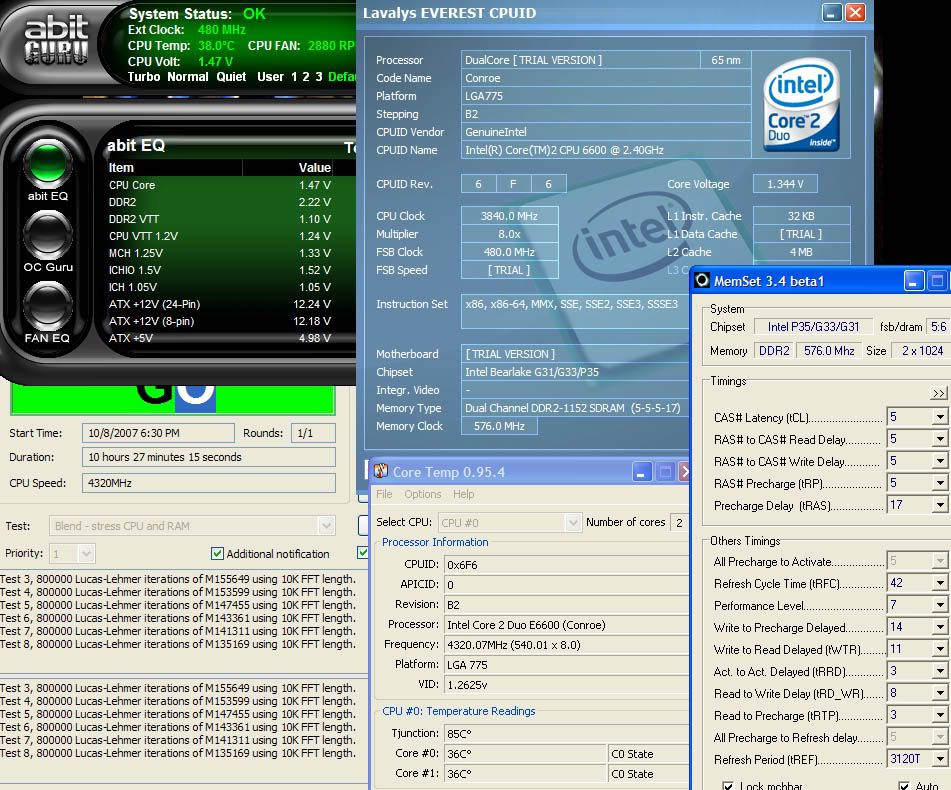


Bookmarks