MMM
Results 1 to 22 of 22

Thread: Critique My Lapping Job (e6600 & Ultra 120-E) (27 pics)

  1. #1
    Registered User
    Join Date
    Jun 2007
    Posts
    45

    Critique My Lapping Job (e6600 & Ultra 120-E) (27 pics)

    This is my first time so feel free to humiliate me.
    And sorry if the pictures completely fail; my camera is and I am not far better.

    When I got my cpu and heatsink I did the razor blade test, but my razor blade was somewhat old so I don't feel it tells the whole truth.
    However, what I did notice was the cpu was rather straight and the ultra 120 was a bit convex.
    I worried at first because I thought that if the cpu was infact concave, then the ultra 120's convex plate would actually make good contact.
    I wasn't about to let that stop me, though, so I said screw it and started my work.


    I bought a piece of glass from homedepot, wet sandpaper 320-600grit from there as well, and 3m wetanddry 800-1000 grit from an auto parts store.


    I had a bucket with soapy water but I found myself using it scarcely. Call me crazy but dry sanding worked faster and "better" for me; maybe this is one of my crucial mistakes but I only wet sanded for 3 or 4 sheets (for each part) out of the 24 or so sheets I had.

    This is my "holding technique" for the ultra 120. There really wasn't a super comfortable way to hold it, but this was the only way it was stable. Taped it up a little after 5 or 6 sheets, when I realized it was lapping my knuckle away.


    Ultra 120


    320grit (sheet 1)


    320grit (sheet 2)


    400grit (sheet 1)


    400grit (sheet 2)


    600grit (sheet 1)


    600grit (sheet 2)


    800grit (sheet 1)


    800grit (sheet 2)


    1000grit (sheet 1)


    1000grit (sheet 1) against graph paper


    Lapping the heatsink 90 degrees to the left or right (basically doing it side to side instead of up and down) was a bit difficult, and I used at most a half a sheet of paper on lapping the heatsink in this fashion.

    The only problem I can report is that the far edges have stripes where the copper is a little less polished. This may have been because I didn't perfectly balance my lapping directions. After the pic I did lap it some more and reduced the stripes to about 1/8" each. At this point I felt no reason to continue as the stripes would not be in contact with the cpu and lapping them to perfection would probably take ~40 minutes. I had spent 3 hours on the heatsink already.

    e6600


    320grit (sheet 1)


    320grit (sheet 2)


    400grit (sheet 1)


    400grit (sheet 2)


    600grit (sheet 1)


    600grit (sheet 2)


    800grit (sheet 1)


    800grit (sheet 2)


    1000grit (sheet 1)


    1000grit (sheet 2)


    As you can see, the grain was different in some of the pictures because I would periodically turn the cpu 90 degrees.

    Yea I'm a jerk for not doing cpu with graph paper. :-/
    I also regret not doing the "water test" for both the heatsink and cpu after they were lapped.

    I did razor test them and they both appeared quite straight this time. I put one against the other and there was a bit of a vacuum pull so I figured it was at least not a complete failure.

    I also wish I had taken pics of the AS5 application, as I feel I could probably use some improvement there.
    All I can say is that the application was done with a razor blade and I did my best to apply as little as possible. The layer was in fact so thin that extra strokes would remove the grease and leave gaps, so I had to take some time to make sure the whole ihs was covered.


    I attached an S-Flex 1600rpm to the ultra 120.
    I'll post temps and stuff in a little bit.
    I'm not fully knowledged in the ways of conroe temps but right now I'm running it at 3465 mhz (385x9) and I'm getting 65/66 c (Core Temp) with two hours of dual-instance prime95 torture test.

    I have to say this didn't reach my highest expectations but it definately wasn't a total failure. I'm going to keep looking to improve temperatures, however. I'm considering lapping it more and buying liquid metal pads or syringe. With the case door open temps go down to 59/60 if I remember correctly, so better fans may also be in the works.


    So anyway, criticism is encouraged and thanks for your time and help.

  2. #2
    Xtreme Member
    Join Date
    Dec 2006
    Posts
    174
    Very nice post, shk.

    That's a big drop in temps with the case open. You might want to remove the grillwork from the fan cutouts on the case, I found I got alot more airflow that way. Be careful, when you cut sheetmetal, you get extremely sharp edges.

    Intel E6600, D975xbx2, 3xWD Caviar, Matrox P650PCIe, Sony DVD-RAM+. TR IFX-14 push/woosh/pull w/Panaflow 1700rpm, 120mm x 38mm. One intake from BACKSIDE of mobo thru cutout over cpu mount.
    3.75 GHz, 1.5 vcore Orthos: 65c @ 24c ambient.

  3. #3
    Xtreme Enthusiast
    Join Date
    May 2007
    Posts
    510
    good lap job looks pretty nice, and agree with above lack of airflow is clear as temps shouldnt change much with side off in a good airflow case.
    Gaming Rig
    Intel E6300
    Intel Mobo
    2 Gig OCZ 800 (800 5,5,5,15)
    Saphire Ati 4870
    22inch LG Flatron W2230S

  4. #4
    Registered User
    Join Date
    Jun 2007
    Posts
    45
    Well I have the Silverstone TJ09 with the default rear exhaust 120mm and the default mid-section intake 120mm.

    I think first and foremost I am going to add a 120mm intake on the top...still have to decide between yate loon/nexus/noctua.

    The other problem is the rear exhaust. The ultra 120 with s-flex 1600rpm is situated right next to the rear exhaust, and I'm pretty sure it's more powerful than the default silverstone fan, so it's probably spewing the excess hot air back into the case.

    Is it really that good to have two fans (same direction) next to each other?
    Wouldn't there be better flow if I just removed the weaker one and ducted the cpu fan out of the case?

  5. #5
    Xtreme Enthusiast
    Join Date
    Feb 2007
    Location
    USA
    Posts
    908
    I do too have a lapped Extreme 120. As you can see, mine was pretty f'ed up as well:


    3 hours later:


    good job on your lapping I tried holding my TT ultra ex 120 in various ways but ended up doing it with a mirror and sandpaper glued to it with water

  6. #6
    Registered User
    Join Date
    Jun 2007
    Posts
    45

    Temp update yay!

    I ducted the cpu fan out and added another intake.

    Voltages are from the bios of the p5k deluxe -- I don't remember which method you guys prefer but I have the voltage damper (for vdroop) enabled so it should be relatively accurate? If there's a better way to measure, please do tell.

    Temperatures are the average of the two cores as reported by Core Temp while running two instances of SP2004 for 1 hour+. They were always the same so luckily I didn't need to actually average any of them.

    E6600
    3465 mhz (1.4750 vcore): 56 C
    3510 mhz (1.4750 vcore): 57 C
    3600 mhz (1.5625 vcore): 66 C
    3672 mhz (1.5875 vcore): 67 C

    Any subjective rantings about my voltages/temps?

    I think the 57 C was decent @ 3510 mhz but the 66 and 67 is notsogood.

    What are "safe" load temps? This thing should run at least 10 years.

  7. #7
    Xtreme Member
    Join Date
    Nov 2006
    Location
    Northern VA
    Posts
    374
    Temps have an effect, but voltages play a bigger role in lifetime shortage.

  8. #8
    Xtreme Member
    Join Date
    Jun 2007
    Location
    Newcastle, UK (at the moment)
    Posts
    119
    Ive bought 3 types of sandpaper, 5 sheets x 320, 5x600, 5x1200. Is that enough?
    I want to lap my Infinity. It has mirror-finish already, but it is not enought...i got some other coolers in addict, so how many sheets do i need for 1 cooler?
    CPU: E6400 [SL9S9 (L637A907)]
    Cooling: modded Scythe Infinity
    GPX: Power Color X1800 XT 512MB 625/1550 > 750/1720 (VCore 1,575V, TT Sonic Tower + 100CFM fan)
    PowerColor X1950 XT 512MB 627/1600 > 670/1710 (VCore 1,40V…working on Vmod, softmod is not possible on this card, not standard PCB) Cooling: modded TT Sonic Tower , AC Accelero 2X (2000RPM), Zalman VF-700
    MB: Asus P5N-E SLI (i680) (VDrop-mod)> MAX FSB 522,5MHz
    Cooling: Noctua NC-U6 + Noctua NF-R8 (1800RPM fan, VERY quiet)
    RAM: 1,5GB Cheap Memory [2x512MB Crutical + 2x256MB Samsung] (533/4-4-4-12)>700/4-4-4-12-1T (2,15V) or 850/5-5-5-12-2T (2,25V)
    HDD: Seagate.7 80GB + Samsung 120GB + Seagate.10 320GB
    Chasis: moded TT Armor, Black with 250mm side-fan (w noise absorbing mats)
    PCU: FSP 700W (the fan is very loud, going to change it)
    Fans: (2x) AC Arctic Fan 12, (2x) Silverstone SST/FM122, (2x) Sharkoon Silent Eagle 2000, 92x38mm DELTA + plenty of fans from 40mm to 250mm

    CPU-Z: CPU-4000MHz, room temp +5* (could do 4100 but my HDD crashed); RAM-860/5-5-5-12-2T; FSB-522,5MHz

  9. #9
    Registered User
    Join Date
    Jun 2007
    Posts
    45
    That sounds fine for 1 cooler.

  10. #10
    Xtreme Member
    Join Date
    Jun 2007
    Location
    Newcastle, UK (at the moment)
    Posts
    119
    Safe load temp is 61,4*C...its Intel specs
    CPU: E6400 [SL9S9 (L637A907)]
    Cooling: modded Scythe Infinity
    GPX: Power Color X1800 XT 512MB 625/1550 > 750/1720 (VCore 1,575V, TT Sonic Tower + 100CFM fan)
    PowerColor X1950 XT 512MB 627/1600 > 670/1710 (VCore 1,40V…working on Vmod, softmod is not possible on this card, not standard PCB) Cooling: modded TT Sonic Tower , AC Accelero 2X (2000RPM), Zalman VF-700
    MB: Asus P5N-E SLI (i680) (VDrop-mod)> MAX FSB 522,5MHz
    Cooling: Noctua NC-U6 + Noctua NF-R8 (1800RPM fan, VERY quiet)
    RAM: 1,5GB Cheap Memory [2x512MB Crutical + 2x256MB Samsung] (533/4-4-4-12)>700/4-4-4-12-1T (2,15V) or 850/5-5-5-12-2T (2,25V)
    HDD: Seagate.7 80GB + Samsung 120GB + Seagate.10 320GB
    Chasis: moded TT Armor, Black with 250mm side-fan (w noise absorbing mats)
    PCU: FSP 700W (the fan is very loud, going to change it)
    Fans: (2x) AC Arctic Fan 12, (2x) Silverstone SST/FM122, (2x) Sharkoon Silent Eagle 2000, 92x38mm DELTA + plenty of fans from 40mm to 250mm

    CPU-Z: CPU-4000MHz, room temp +5* (could do 4100 but my HDD crashed); RAM-860/5-5-5-12-2T; FSB-522,5MHz

  11. #11
    Registered User
    Join Date
    Jun 2007
    Posts
    45
    Excellent, thank you!

    I've seen a few people report 65/66 on load but I think they were just doing benchmarks or some other temporary overclock.

  12. #12
    Xtreme Enthusiast
    Join Date
    Oct 2005
    Location
    Denmark
    Posts
    511
    have been runnning my 628B121 at 70 load for a long time. Everything under 70 for load is 24/7 ready IMO
    Asus Rampage II Gene - i7 920 D0 Lapped - Lapped Noctua NH12U-F
    Sapphire HD4870 X2 - 6GB Corsair Dominator GT@T1 - Windows 7 x64
    2 x WD Velociraptor 150GB Raid 0 - 500GB Samsung T166
    Antec ThreeHundred - Samsung A656 40"- TX650W

  13. #13
    Xtreme Member
    Join Date
    Jun 2005
    Posts
    127
    During regular use, it shouldn't go over 70c. So if you are getting 70c in Orthos, you are good to go.

  14. #14
    Registered User
    Join Date
    Jun 2007
    Posts
    45
    Quote Originally Posted by hot_fifty View Post
    have been runnning my 628B121 at 70 load for a long time. Everything under 70 for load is 24/7 ready IMO
    Quote Originally Posted by Scyth3 View Post
    During regular use, it shouldn't go over 70c. So if you are getting 70c in Orthos, you are good to go.
    Verrrrry interesting. I will consider this, thank you.

  15. #15
    Xtreme Enthusiast
    Join Date
    Nov 2006
    Location
    Cruz Alta - CBA - Argentina
    Posts
    617
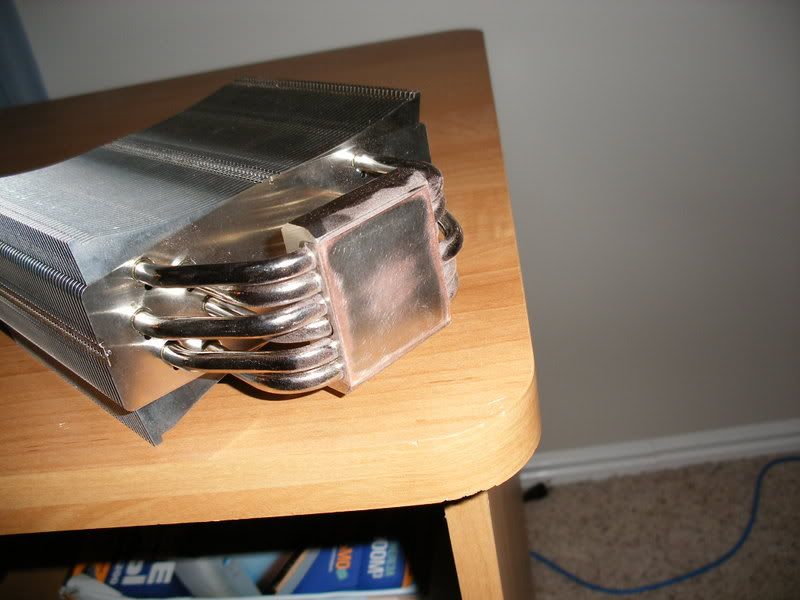
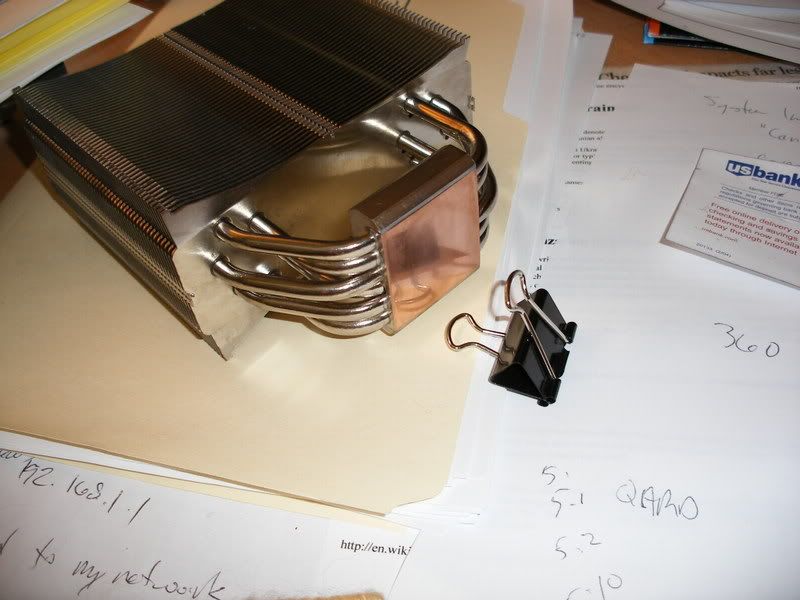
    Here is my TR ultra 120 Extreme lapped
    iMac 24''
    BNDMOD @
    Cruz Alta (Cba.) Argentina

  16. #16
    Xtreme Member
    Join Date
    May 2006
    Location
    SP, Brazil
    Posts
    417
    My Ultra-120 (Non-extreme)


    Rbs.
    Sorry for my bad English


    GA-X38-DQ6 Vdroop moded
    Ballistix Tracer PC8500 @ DDR1188 5-5-5-15 2.08v
    Q6600 L737B 475x8 - 3800Mhz @ 1.39v
    8800GTS G92 @ 830/1945/2200 36ºC idle, 39ºC full load (no mods for now..)

    MCR320 | MCR120 | MCP355 + OCLabs XPtop | MCR-RES | FuZion + washer | MCW60


  17. #17
    Xtreme Legend
    Join Date
    Mar 2005
    Location
    Australia
    Posts
    17,242
    Quote Originally Posted by shk View Post

    What are "safe" load temps? This thing should run at least 10 years.
    10 years my arse
    Team.AU
    Got tube?
    GIGABYTE Australia
    Need a GIGABYTE bios or support?


  18. #18
    Xtreme Member
    Join Date
    Aug 2006
    Posts
    132
    i think you meant 10 days, because i have the feeling on july 22/23, you are getting a q6600!
    jk, great lap job, now i know how to lap mine when i get it.
    oc: 3.9!!!!, but back to 2.4 (stock) for longevity
    1 gig ocz gold ddr 800.
    my rig: p5b deluxe wifi, 600 psu, 7900GT KO, e6600, water cooling, and thermalright nb cooler.

    my css name: theonemuffintorulethemall

  19. #19
    IT Engineer in the making
    Join Date
    Jun 2003
    Location
    Former Kingdom of Bavaria
    Posts
    2,094
    Looks OK, considering that you lapped a heatsink and a CPU for the first time.

    BUT, I must say that you did a perfect job in rounding all the corners/edges.
    Either it's the pics that make it seem like it, or you really did round all the eadges (CPU and heatsink), i.e. you didn't apply even pressure. Next time, please take care about really applying even pressure. You want the surface to be flat, not rounded.
    Quote from one of our professors:
    "Reality is hiding in the imaginary part."

  20. #20
    Registered User
    Join Date
    Oct 2006
    Posts
    96
    I'm very tempted to lap my heat sink, but I'm also afraid it might come out lopsided. Instead of holding the bottom part, can you wrap the fins with cardboard, tape it, and hold it there while lapping?

  21. #21
    IT Engineer in the making
    Join Date
    Jun 2003
    Location
    Former Kingdom of Bavaria
    Posts
    2,094
    Quote Originally Posted by BobHarris View Post
    I'm very tempted to lap my heat sink, but I'm also afraid it might come out lopsided. Instead of holding the bottom part, can you wrap the fins with cardboard, tape it, and hold it there while lapping?

    That would make it even worse. You have to grab the part as low as possible to prevent a leverage effect which causes absolutely uneven results.
    Quote from one of our professors:
    "Reality is hiding in the imaginary part."

  22. #22
    Registered User
    Join Date
    Jun 2007
    Posts
    45
    Quote Originally Posted by celemine1Gig View Post
    Looks OK, considering that you lapped a heatsink and a CPU for the first time.

    BUT, I must say that you did a perfect job in rounding all the corners/edges.
    Either it's the pics that make it seem like it, or you really did round all the eadges (CPU and heatsink), i.e. you didn't apply even pressure. Next time, please take care about really applying even pressure. You want the surface to be flat, not rounded.
    Yea the edges got dulled a little because I swiped too fast and it would catch.

    I didn't think it made a huge difference, though, because it was only the very edge and the processor doesn't touch that.

    My temps have dropped now to 29 C idle and 54 C load at 3510mhz, 1.4750 vcore.

Bookmarks

Bookmarks

Posting Permissions

  • You may not post new threads
  • You may not post replies
  • You may not post attachments
  • You may not edit your posts
  •