MMM
Page 11 of 23 FirstFirst ... 89101112131421 ... LastLast
Results 251 to 275 of 574

Thread: **[OFFICIAL]** GIGABYTE Z77X Owners Club/Discussion/Info (All Model's Welcome)

  1. #251
    Xtreme Addict
    Join Date
    Oct 2006
    Location
    new jersey
    Posts
    1,100
    I have a board that is messed up in its head...i get no power sometimes no lights when powered up at all....take pot off then power comes on puts a stock heatsink on no power agian reseat cpu no power at all....i used the board 10hours tops this should not happen i would think?
    letting it sit without battery for a few i hope that helps the poor thing.
    _________________

  2. #252
    Xtreme Legend
    Join Date
    Mar 2005
    Location
    Australia
    Posts
    17,242
    i would rma it mate, thats isnt normal
    Team.AU
    Got tube?
    GIGABYTE Australia
    Need a GIGABYTE bios or support?


  3. #253
    Xtreme Addict
    Join Date
    Oct 2006
    Location
    new jersey
    Posts
    1,100
    You know me dino i kill even the best of mb's,funny thuo both my p67 ud7's have been under dice/ln2 over 100 times and not even a hicup from them.
    I did just check it again still no power,at least gigabyte rma was very good with my b2 p67 board when i had to send that back.

    *Just got back from microcenter with another ud5h board this one boots np
    Is on sale for $190 there

    **
    This f5 bios likes to freeze up at bios spash screen even when pushed alittle on dice.
    whats better then f5? or go back to f4?
    Last edited by cowie; 06-20-2012 at 03:57 PM.
    _________________

  4. #254
    I am Xtreme
    Join Date
    Dec 2004
    Location
    France
    Posts
    3,462
    you have a UD5H and you are messing with BIOSes F5 and F4? they are pretty old, try out F7 or F8D, they are much more recent.

    With Z77 just use GTL, boot up at like mid 4G and like 1.5v or whatever, then move it up in windows, it is much easier that way and less stress on the CPU, as you don't have to boot at 6ghz lol.
    Last edited by sin0822; 06-20-2012 at 07:51 PM.

  5. #255
    Xtreme Addict
    Join Date
    Oct 2006
    Location
    new jersey
    Posts
    1,100
    With bios i normally dont try to fix whats not broken since i only use this setup a few times a month at most.
    i do use gtl also and getting this mb to get my 3750k to 5.5 with 1.56v but only dx9 benches.It did seem that the f5 was better for using less voltage.

    thanks for all the info with this board sin.
    _________________

  6. #256
    I am Xtreme
    Join Date
    Dec 2004
    Location
    France
    Posts
    3,462
    yea man no problem. There are actually benching BIOSes out there for the UD5H. You can PM Dino for it, or i think perhaps he gave them to stasio to put up at TT.

    You do have dual BIOS, so you can take a chance and flash a new BIOS see how you like it.

    BIOS F9D the most recent seems to be really pleasuring a lot of users, it also has CPU PLL Overvoltage added in there for users to disable if needed, otherwise it is engaged on enable if you OC.

    I think a lot of guys like F8D for benching, so it is just a suggestion. The switch allows you to have one BIOS for normal use, and another for benching or testing, the vreg on these boards are excellent, but if you bench LN2 and you want stronger LLC ask dinos for the BIOS or it might be on TT.

  7. #257
    Xtreme Addict
    Join Date
    May 2007
    Location
    Hampshire, UK
    Posts
    1,656
    Quote Originally Posted by sin0822 View Post
    BIOS F9D the most recent seems to be really pleasuring a lot of users
    2nd that F9d is working great for me.

    @ Cowie

    my 2c...... IMO the early BIOS's although also very good may well allow lower voltages (my 3570K also runs lower volts with the early BIOS's) however the newer ones if you feed them give outstanding results..... may be worth testing them.


    Home / Play Rig Asrock Z87 OC Formula/AC, i7 4770K L310B487, 8GB Corsair Dominator Platinum 2666 CL10, BeQuiet Dark Power Pro P8 1200W PSU, 120GB Corsair Force GT SSD, 2 x 1TB WD Sata Drives Mirrored, Palit 680GTX JetStream, Antec Kuhler 920, Windows 10 Pro, Logitech LX700 Deskset, AOC 27" Monitor.

    Work 24/7 Rig Gigabyte GA-Z97X-SOC Force, i7 4790K L418C133 ,8GB Team Xtreem LV 2600, PC Power & Cooling 850WPSU, 120GB OCZ Vertex 3 SSD, 2 x 500GB Hitachi Sata Drives Mirrored, Antec Kuhler 620, Windows 10 Pro 64 Bit, Logitech LX700 Deskset, Benq 27" Monitor.

    Home NAS DFI P35 T2RL Motherboard, Intel E6850 CPU, 8GB Nanya DDR2 6400, 2X 2TB Toshiba DT01ACA200 SATA Drives, ZFS RAID Mirror On Intel ICH9 AHCI, Artic Blue 850W PSU, Marvell Yukon 88E8053 Gigabit Ethernet, FreeNAS 9.2.1.5 RC, 64-Bit On 4GB USB2 SanDisk Cruizer Blade Thumb Drive.

  8. #258
    I am Xtreme
    Join Date
    Dec 2004
    Location
    France
    Posts
    3,462
    good to hear F9D is working well for you. Can you tell me do you need more or less vcore with F7 compared to F8?

  9. #259
    Xtreme Member
    Join Date
    Jul 2010
    Location
    EU, USA
    Posts
    150
    I just assembled a Z77X-UD5H

    It came with F6 bios, I updated to F8, but it's still unfinished! WTF!
    - memory timings and voltage ignored
    - boot sequence ignored

    So I loaded BIOS version F9d. Is this stuff official? I can now set memory timings & voltage but boot device sequence is still messed up.


    Other than that, the hardware is very stable. PCH/Southbridge heatsink (next to the SATA ports) feels hot, 64C, is that normal?

    Speedfan core temps will show correct values with offset +20.

    Gonna post pics if you guys are nice.


    Using ddr3 Samsung M379B5273DH0-YK0, this stuff is awseome if you can get it out of the package

  10. #260
    I am Xtreme
    Join Date
    Dec 2004
    Location
    France
    Posts
    3,462
    Quote Originally Posted by cab View Post
    I just assembled a Z77X-UD5H

    It came with F6 bios, I updated to F8, but it's still unfinished! WTF!
    - memory timings and voltage ignored
    - boot sequence ignored

    So I loaded BIOS version F9d. Is this stuff official? I can now set memory timings & voltage but boot device sequence is still messed up.


    Other than that, the hardware is very stable. PCH/Southbridge heatsink (next to the SATA ports) feels hot, 64C, is that normal?

    Speedfan core temps will show correct values with offset +20.

    Gonna post pics if you guys are nice.


    Using ddr3 Samsung M379B5273DH0-YK0, this stuff is awseome if you can get it out of the package
    memory timings and voltage ignored? How are the timings ignored? How are you inputting the values?

    Did you load optimized defaults right after you flashed to F9D? All the BIOSes are official BIOSes, you cannot just go out and make a BIOS for another user. For your memory, F9D is the best BIOS for it, it is teh only BIOS where the board will set 1.35v at default.

    How is your boot sequence ignored?

  11. #261
    Xtreme Member
    Join Date
    Jul 2010
    Location
    EU, USA
    Posts
    150
    Quote Originally Posted by sin0822 View Post
    memory timings and voltage ignored? How are the timings ignored? How are you inputting the values?

    Did you load optimized defaults right after you flashed to F9D? All the BIOSes are official BIOSes, you cannot just go out and make a BIOS for another user. For your memory, F9D is the best BIOS for it, it is teh only BIOS where the board will set 1.35v at default.

    How is your boot sequence ignored?
    Yeah mobo set correct voltage by itself, running 1600 @ 8-8-8-22 1.35v

    I would set memory timings, save & exit and no change, but with F9d it saves. Boot sequence is ignored, if you have a SATA3 plugged-in it boots first no matter what you've set in BIOS.

    Great mobo, very stable, defect-free as far as I can tell. But the i5 3570k is disappointing.

  12. #262
    Xtreme Member
    Join Date
    Aug 2007
    Posts
    175
    Quote Originally Posted by cab View Post
    I would set memory timings, save & exit and no change, but with F9d it saves. Boot sequence is ignored, if you have a SATA3 plugged-in it boots first no matter what you've set in BIOS.
    Cant say I see this behavior, I am still on F5 (no need to upgrade). Try the "HDD BBS Priorities". The only unusual behavior I have seen on the UD5H are USB keyboard problems + mSATA drive(s) not being detected.

    GigaBYTE support has explained I need to purchase 1 of 2 of these drives as they are the only ones confirmed to be working =

    Quote Originally Posted by GTS
    Dear customer,

    We are unable to verify this unit as it maybe only for the Dell netbook
    If you use an standard mSATA on the market on this board is it able to register it?
    Quote Originally Posted by chawks2
    Dear vendor,

    Please provide a list of compatible mSATA drives and/or a mSATA drive confirmed to be working in this configuration. Thanks
    Quote Originally Posted by GTS
    A few model of the Intel mSATA been tested on our boards.
    311 "Larsen Creek" SLC / 20G / MSATA
    310 "Soda Creek" MLC / 40G / MSATA
    "The only solid piece of scientific truth about which I feel totally confident is that we are profoundly ignorant about nature...It is this sudden confrontation with the depth and scope of ignorance that represents the most significant contribution of 20th century science to the human intellect."
    -Lewis Thomas, The Medusa and the Snail

    "The best definition we have found for civilization is that civilized man does what is best for all, the savage does what is best for himself."
    -Edwin Hubble

    H.E.A.T
    MarioKart FID-0774-5798-8330

  13. #263
    Registered User
    Join Date
    May 2010
    Location
    Thessaloniki, GR
    Posts
    16
    Quote Originally Posted by cab View Post
    Great mobo, very stable, defect-free as far as I can tell. But the i5 3570k is disappointing.
    Why?

    btw, sin0822 what's your vcore for 4.5Ghz here? http://forums.tweaktown.com/gigabyte...-analysis.html
    i7 2600K @ 4.4 /w Corsair H100
    Gigabyte Z77X-UD5H
    Corsair Vengeance 16GB (4x4) 1600 CL9
    Gigabyte GTX660 Ti
    Crucial M4 128GB

  14. #264
    I am Xtreme
    Join Date
    Dec 2004
    Location
    France
    Posts
    3,462
    the 4.5ghz for testing? i just toss in 1.25v to be safe, it is easy testing and I don't stress the CPU much. Otherwise id use way below 1.25v. You should only need like 1.2v.

  15. #265
    Registered User
    Join Date
    May 2010
    Location
    Thessaloniki, GR
    Posts
    16
    Quote Originally Posted by sin0822 View Post
    the 4.5ghz for testing? i just toss in 1.25v to be safe, it is easy testing and I don't stress the CPU much. Otherwise id use way below 1.25v. You should only need like 1.2v.
    You talk about 2600K?
    i7 2600K @ 4.4 /w Corsair H100
    Gigabyte Z77X-UD5H
    Corsair Vengeance 16GB (4x4) 1600 CL9
    Gigabyte GTX660 Ti
    Crucial M4 128GB

  16. #266
    Xtreme Addict
    Join Date
    May 2007
    Location
    Hampshire, UK
    Posts
    1,656
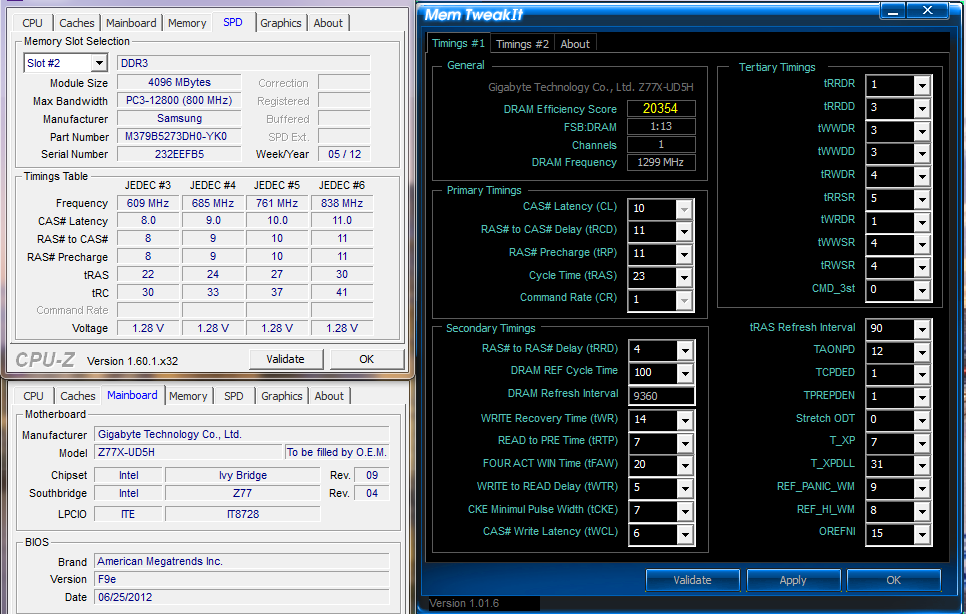
    Hey Sin... you remember I said ages ago I could get my Samsung Green to boot 2600 single stick. Here's a pic I made whilst having another go. Obviously it needs to be slackened off to 32M or hold prime but still its very strange one stick boots so well yet I cant get 2 sticks to boot past 2380mhz. This was done in the DDR3_2 Slot


    Home / Play Rig Asrock Z87 OC Formula/AC, i7 4770K L310B487, 8GB Corsair Dominator Platinum 2666 CL10, BeQuiet Dark Power Pro P8 1200W PSU, 120GB Corsair Force GT SSD, 2 x 1TB WD Sata Drives Mirrored, Palit 680GTX JetStream, Antec Kuhler 920, Windows 10 Pro, Logitech LX700 Deskset, AOC 27" Monitor.

    Work 24/7 Rig Gigabyte GA-Z97X-SOC Force, i7 4790K L418C133 ,8GB Team Xtreem LV 2600, PC Power & Cooling 850WPSU, 120GB OCZ Vertex 3 SSD, 2 x 500GB Hitachi Sata Drives Mirrored, Antec Kuhler 620, Windows 10 Pro 64 Bit, Logitech LX700 Deskset, Benq 27" Monitor.

    Home NAS DFI P35 T2RL Motherboard, Intel E6850 CPU, 8GB Nanya DDR2 6400, 2X 2TB Toshiba DT01ACA200 SATA Drives, ZFS RAID Mirror On Intel ICH9 AHCI, Artic Blue 850W PSU, Marvell Yukon 88E8053 Gigabit Ethernet, FreeNAS 9.2.1.5 RC, 64-Bit On 4GB USB2 SanDisk Cruizer Blade Thumb Drive.

  17. #267
    I am Xtreme
    Join Date
    Dec 2004
    Location
    France
    Posts
    3,462
    you know what is odd, i actually got a boot with 2 stiks and teh 2400 divider, the board set some odd settings, but still fine, and i did 32m very easy.All i did was set everything on auto, set command rate to T2 and then voltage to 1.6v and booted straight, i checked the settings and GTL and wrote down the settings. However GTL doesn't give all the setting, and some of the 3rd timings where different than normal under gray, but gray isn't the right setting for the 2nd timings.Anyways if i input the timings from GTL, i can't post even normally, i think perhaps timings combos are the key. However i tried too and I can boot at 2666 with single stick in 1 or 2. I think it is perhaps a 3rd timing that needs to be in lin with a second timings, perhaps it is throwing things off, maybe the IMC gets way too stressed out with the auto timings set for this kit when you set some of the timings. What is odd tho if i try again i cannot get those same auto timings to occur.

    when i get power back ill look into it more. Ima use your info try and see if i can get it to work on either board.

  18. #268
    Xtreme Addict
    Join Date
    May 2007
    Location
    Hampshire, UK
    Posts
    1,656
    Yeah it would be nice to get at least 2400 running easy. I go through as many combo's of voltages & timings as I can think of every time a new BIOS comes out & so far haven’t come up with anything any better than my first go.

    I didn’t check with GTL as I think it & ET6 need MDAC or something like that to run & I cut that out of the OS I was using.... :facepalm:

    What we need is a nice open BIOS to have a little monkey around with all the mem timings going on in the background

    Edit: I got GTL & ET6 running the problem was just that I had some required services... think dcom & Windows installer disabled
    Last edited by C-N; 07-04-2012 at 02:05 AM. Reason: Correction


    Home / Play Rig Asrock Z87 OC Formula/AC, i7 4770K L310B487, 8GB Corsair Dominator Platinum 2666 CL10, BeQuiet Dark Power Pro P8 1200W PSU, 120GB Corsair Force GT SSD, 2 x 1TB WD Sata Drives Mirrored, Palit 680GTX JetStream, Antec Kuhler 920, Windows 10 Pro, Logitech LX700 Deskset, AOC 27" Monitor.

    Work 24/7 Rig Gigabyte GA-Z97X-SOC Force, i7 4790K L418C133 ,8GB Team Xtreem LV 2600, PC Power & Cooling 850WPSU, 120GB OCZ Vertex 3 SSD, 2 x 500GB Hitachi Sata Drives Mirrored, Antec Kuhler 620, Windows 10 Pro 64 Bit, Logitech LX700 Deskset, Benq 27" Monitor.

    Home NAS DFI P35 T2RL Motherboard, Intel E6850 CPU, 8GB Nanya DDR2 6400, 2X 2TB Toshiba DT01ACA200 SATA Drives, ZFS RAID Mirror On Intel ICH9 AHCI, Artic Blue 850W PSU, Marvell Yukon 88E8053 Gigabit Ethernet, FreeNAS 9.2.1.5 RC, 64-Bit On 4GB USB2 SanDisk Cruizer Blade Thumb Drive.

  19. #269
    Xtreme Member
    Join Date
    Jul 2010
    Location
    EU, USA
    Posts
    150
    I think Linux does not fully support the Z77 chipset yet. I'm getting intermittent hang/freeze in Linux but Windows is very stable. I've tried Ubuntu and Mint, any other experiences?

  20. #270
    ODOC
    Join Date
    Aug 2006
    Location
    Copenhagen - Denmark
    Posts
    2,189
    THC and I got a try with the UD5 :-)

    Gained in memory clocks (1446 > 1491) was on gd65 before.


    http://valid.canardpc.com/show_oc.php?id=2422917

  21. #271
    Xtreme Member
    Join Date
    Mar 2003
    Location
    AZ, USA
    Posts
    127
    CPU-Z says my Z77-UD5H board (bios F9e), 3570k CPU & Samsung 2x 4GB 30nm memory is running:
    DDR3 @ 1.28 volts, 11-11-11-29 timings. CPU core voltage hovering around 0.90 volts at idle (1616 MHz.)
    CPU-Z shows memory slots 1 & 3 as being occupied, but the UD5H printed owner's manual shows those same memory slots numbered as 4 & 3.
    System cannot boot if memory slot 1 is occupied (the slot furthest away from the CPU).
    Note: CPU-Z seems to call the memory slot closest to the CPU as "slot 1". The Gigabyte owner's manual calls the same slot as "slot 4".
    System 1: Intel 3570K, Gigabyte Z77X-UD5H (blue capacitors), dual bioses F15o/F15r, Samsung 2x 4 Gb 30nm ULV DDR3, Sony-Optiarc BD-R, dual-boot: Windows 8 Pro 64-bit, Windows XP SP3 32-bit.
    System 2: Intel E8400; Gigabyte EP45-UD3R, bios F12, 2x 2 Gb G.Skill PC8800, Seagate SATA HD, nVidia 9500GT; Samsung SATA DVD-RW, dual-boot: OSX Lion, Windows 7 64-bit.

  22. #272
    I am Xtreme
    Join Date
    Dec 2004
    Location
    France
    Posts
    3,462
    you are supposed to install in slots 1 and 2 as per the manual.

  23. #273
    Xtreme Member
    Join Date
    Mar 2003
    Location
    AZ, USA
    Posts
    127
    Quote Originally Posted by sin0822 View Post
    you are supposed to install in slots 1 and 2 as per the manual.
    The owner's manual does not match what CPU-Z says, as far as memory slot numbering.
    My guess: the Gigabyte owner's manual has it (the numbering) wrong, and CPU-Z has it correct.
    That is: "slot 1" is now the slot CLOSEST to the CPU. Which is a change from previous motherboard memory slot numbering.
    The previous Gigabyte boards had the slot FURTHEST from the CPU as "slot 1".
    Installing memory in slots 4 & 3 (according to the UD5H owner's manual diagram) will result in CPU-Z showing slots 1 & 3 as being occupied, and that "Dual Channel memory" is enabled.
    Owner's Manual numbering (going from furthest > nearest to the CPU): 1-3-2-4
    CPU-Z numbering (going nearest > furthest from the CPU): 1-2-3-4
    If you simply install 2 memory sticks and follow what the printed owner's manual says about memory slot numbering, the system will be unbootable.
    Edit: CPU-Z version 1.61 x64.
    Last edited by vailr; 07-08-2012 at 08:52 AM.
    System 1: Intel 3570K, Gigabyte Z77X-UD5H (blue capacitors), dual bioses F15o/F15r, Samsung 2x 4 Gb 30nm ULV DDR3, Sony-Optiarc BD-R, dual-boot: Windows 8 Pro 64-bit, Windows XP SP3 32-bit.
    System 2: Intel E8400; Gigabyte EP45-UD3R, bios F12, 2x 2 Gb G.Skill PC8800, Seagate SATA HD, nVidia 9500GT; Samsung SATA DVD-RW, dual-boot: OSX Lion, Windows 7 64-bit.

  24. #274
    I am Xtreme
    Join Date
    Dec 2004
    Location
    France
    Posts
    3,462
    the manual has it right as you are supposed to install in slots numbered 1 and 2 first.

    CPU-z is just a piece of software written by some dudes, it isn't some work of art.

  25. #275
    Xtreme Member
    Join Date
    Mar 2003
    Location
    AZ, USA
    Posts
    127
    Quote Originally Posted by sin0822 View Post
    the manual has it right as you are supposed to install in slots numbered 1 and 2 first.

    CPU-z is just a piece of software written by some dudes, it isn't some work of art.
    Au contraire.
    As stated previously: "If you simply install 2 memory sticks and follow what the printed owner's manual says about memory slot numbering, the system will be unbootable."
    Therefore: the printed UD5H manual is WRONG. And: I'm not the only UD5H user noting the error.
    System 1: Intel 3570K, Gigabyte Z77X-UD5H (blue capacitors), dual bioses F15o/F15r, Samsung 2x 4 Gb 30nm ULV DDR3, Sony-Optiarc BD-R, dual-boot: Windows 8 Pro 64-bit, Windows XP SP3 32-bit.
    System 2: Intel E8400; Gigabyte EP45-UD3R, bios F12, 2x 2 Gb G.Skill PC8800, Seagate SATA HD, nVidia 9500GT; Samsung SATA DVD-RW, dual-boot: OSX Lion, Windows 7 64-bit.

Page 11 of 23 FirstFirst ... 89101112131421 ... LastLast

Bookmarks

Bookmarks

Posting Permissions

  • You may not post new threads
  • You may not post replies
  • You may not post attachments
  • You may not edit your posts
  •