MMM
Page 14 of 28 FirstFirst ... 41112131415161724 ... LastLast
Results 326 to 350 of 695

Thread: ASUS RAMPAGE II GENE (Retail) : ROG. X58 m-ATX preview

  1. #326
    Xtreme Member
    Join Date
    Oct 2008
    Posts
    355
    Quote Originally Posted by ReignsOfPower View Post
    Actually, if you try to mount push pull on our setup with my left to right orientation for the heatsink, u will soon find out the fan clips interfere too much with the NB heatsink to do. I'm forced to use a single loud 1900rpm 37db S-Flex 120x120x25mm fan.

    The fan mounting mechanism is a bit different on the Mega Shadow, hence two fans mounting will work beautiful. Therefore 2x1200rpm 20db fans will give a similar CFM as a 1900rpm (as that's cumulative) but, run much quieter as loudness is a logarithmic scale (its not 20db + 20db = 40db). That, coupled with the Mega Shadow and its less restrictive airflow design (TRUE's need a good static pressure), will work perfectomondo.
    Loud? You should try my Sanyo Denki 9G1212H401 88CFM/40dBA fan! Actually after a few minutes you get used to it, as odd as that sounds. That fan is quite good though, even with the 4870 X2 heating things up it keeps the U6 cool and the CPU cooler, it's got that magic high static pressure for CPU coolers like this (Megahalems). Sounds great though, I'll be expecting a high resolution picture of that Mega Shadow installed. Also let me know what method you use for applying the compound, personally I spread it with a credit card and the temperatures are very acceptable.

  2. #327
    Registered User
    Join Date
    Jun 2009
    Location
    Australia
    Posts
    33
    Quote Originally Posted by aln688 View Post
    Loud? You should try my Sanyo Denki 9G1212H401 88CFM/40dBA fan! Actually after a few minutes you get used to it, as odd as that sounds. That fan is quite good though, even with the 4870 X2 heating things up it keeps the U6 cool and the CPU cooler, it's got that magic high static pressure for CPU coolers like this (Megahalems). Sounds great though, I'll be expecting a high resolution picture of that Mega Shadow installed. Also let me know what method you use for applying the compound, personally I spread it with a credit card and the temperatures are very acceptable.
    Teaser lol


    CPU i7 920 D0 @ 4.2GHz
    Motherboard ASUS R2G
    RAM Corsair XMS3 3x2GB CL7 1600MHz
    GPU ATI 4870x2
    Sound Card Auzentech Prelude 7.1
    PSU Corsair HX1000W
    Cooling Mega Shadow + Noctua NC-U6
    Case Antec P180 Mini Picture

  3. #328
    Xtreme Member
    Join Date
    Oct 2008
    Posts
    355
    Quote Originally Posted by ReignsOfPower View Post
    Teaser lol

    You're terrible. At least show us the heatsink, the manual, the retention mechanism, anything but the box!

  4. #329
    Registered User
    Join Date
    Jun 2009
    Location
    Australia
    Posts
    33
    This better? (Die 56k!!!) (Excuse us for the offtopic-ness by the way lol)


    Last edited by ReignsOfPower; 09-08-2009 at 05:35 PM.

    CPU i7 920 D0 @ 4.2GHz
    Motherboard ASUS R2G
    RAM Corsair XMS3 3x2GB CL7 1600MHz
    GPU ATI 4870x2
    Sound Card Auzentech Prelude 7.1
    PSU Corsair HX1000W
    Cooling Mega Shadow + Noctua NC-U6
    Case Antec P180 Mini Picture

  5. #330
    Xtreme Member
    Join Date
    Oct 2008
    Posts
    355
    Quote Originally Posted by ReignsOfPower View Post
    This better? (Die 56k!!!) (Excuse us for the offtopic-ness by the way lol)

    ...
    Not bad! Very much like my Megahalems, although the base on your heat-sink is mirrored. The back-plate looks different as well. Not enough changes to move from my Megahalems, but minor improvements it seems. So just one question? Why isn't it in your system yet?!

  6. #331
    Registered User
    Join Date
    Jun 2009
    Location
    Australia
    Posts
    33
    Quote Originally Posted by aln688 View Post
    Not bad! Very much like my Megahalems, although the base on your heat-sink is mirrored. The back-plate looks different as well. Not enough changes to move from my Megahalems, but minor improvements it seems. So just one question? Why isn't it in your system yet?!
    Not in the system because I'm still looking for some "Animals" - getting rid of the GT's cause I'm not happy with their compatibility. If I cant find the animals, I'll grab a set of your ram. They should do CL7 @ 1600MHz no problem at 4.2GHz right?

    CPU i7 920 D0 @ 4.2GHz
    Motherboard ASUS R2G
    RAM Corsair XMS3 3x2GB CL7 1600MHz
    GPU ATI 4870x2
    Sound Card Auzentech Prelude 7.1
    PSU Corsair HX1000W
    Cooling Mega Shadow + Noctua NC-U6
    Case Antec P180 Mini Picture

  7. #332
    Xtreme Member
    Join Date
    Oct 2008
    Posts
    355
    Quote Originally Posted by ReignsOfPower View Post
    Not in the system because I'm still looking for some "Animals" - getting rid of the GT's cause I'm not happy with their compatibility. If I cant find the animals, I'll grab a set of your ram. They should do CL7 @ 1600MHz no problem at 4.2GHz right?
    Oh I see. Yes, my RAM runs perfectly with CL7 @ 1600 MHz, the CPU is at 4.0 GHz and the RAM actually runs at 1603 MHz according to the BIOS. You won't have the height problem the GT's have, the XMS3 modules sit snugly under the CPU heat-sink. These XMS3 modules work great.
    Last edited by aln688; 09-08-2009 at 06:29 PM.

  8. #333
    Xtreme PITA to MM
    Join Date
    Nov 2007
    Location
    ATX
    Posts
    682
    is there an issue with this board and SLI gtx295s?

    both my cards work great alone.... and each card works fine in either slot... but 2 in SLI causes discoloration, tearing, pixilation, etc. anything physx locks the machine up.

    i've reinstalled OS many times, used different drivers, different power supplies, different ram. no fix.

    same hardware on my UD5 works flawlessly.

    whats going on here?

  9. #334
    Xtreme Member
    Join Date
    Oct 2008
    Posts
    355
    Quote Originally Posted by fitseries3 View Post
    is there an issue with this board and SLI gtx295s?

    both my cards work great alone.... and each card works fine in either slot... but 2 in SLI causes discoloration, tearing, pixilation, etc. anything physx locks the machine up.

    i've reinstalled OS many times, used different drivers, different power supplies, different ram. no fix.

    same hardware on my UD5 works flawlessly.

    whats going on here?
    I haven't read of a compatibility problem using two video cards in SLI, especially the NVidia 295s. Did you use the same OS and hardware drivers on your RIIG and UD5?

  10. #335
    Xtreme PITA to MM
    Join Date
    Nov 2007
    Location
    ATX
    Posts
    682
    yes. tried win 7 x64 b7600 on both as well as vista HP x64 and xp32. all have the same issue.

    perhaps could be a problem with the RIIG?

    like i said, it works perfect on the ud5 in all 3 OSes

  11. #336
    Xtreme Member
    Join Date
    Oct 2008
    Posts
    355
    Quote Originally Posted by fitseries3 View Post
    yes. tried win 7 x64 b7600 on both as well as vista HP x64 and xp32. all have the same issue.

    perhaps could be a problem with the RIIG?

    like i said, it works perfect on the ud5 in all 3 OSes
    Maybe there's a setting in the BIOS on the RIIG that somehow limits or alters the performance of the PCI Express slots in SLI. You could try completely resetting the BIOS back to defaults, then alter the must-have settings such as ACPI/HDD in order to boot to Windows, try that. Also make sure you're on the latest BIOS, which I believe is 0904.

  12. #337
    Xtreme Member
    Join Date
    Jan 2008
    Posts
    146
    Quote Originally Posted by fitseries3 View Post
    is there an issue with this board and SLI gtx295s?

    both my cards work great alone.... and each card works fine in either slot... but 2 in SLI causes discoloration, tearing, pixilation, etc. anything physx locks the machine up.

    i've reinstalled OS many times, used different drivers, different power supplies, different ram. no fix.

    same hardware on my UD5 works flawlessly.

    whats going on here?
    Double-check your SLI bridge.
    MSI 890GXM-G65
    LAN Gear MOM
    Phenom II 1055T 3.8 Ghz 1.4V Batch 1015DPAW
    Corsair H50 w/120x38
    Asus 5850CU 1000/1125
    4x2048 OCZ DDR3 1600 Obsidian
    Western Digital WD1002FAEX
    GSkill Titan 128 gig SSD
    Silverstone SST 75F-P
    3DMark06 21837
    http://service.futuremark.com/compare?3dm06=13974577

  13. #338
    I am Xtreme
    Join Date
    Sep 2006
    Posts
    10,374
    I didn't have issues with 9800GT's and 285GTX in SLI, which bios are you using ?

  14. #339
    Xtreme PITA to MM
    Join Date
    Nov 2007
    Location
    ATX
    Posts
    682
    0904 bios.

  15. #340
    Xtreme Addict
    Join Date
    May 2007
    Location
    Europe/Slovenia/Ljubljana
    Posts
    1,540
    Can someone tell me what's the trick of those dual holes next to the CPU socket (for CPU cooler)? I haven't measured them yet, but is it possible that one set of holes is for LGA775 coolers and another (outer) set of holes for LGA1366 coolers? I've seen similar feature in some other review (for some P55 mobo), but couldn't find anything for Rampage II Gene. At least not on ASUS webpage.
    Intel Core i7 920 4 GHz | 18 GB DDR3 1600 MHz | ASUS Rampage II Gene | GIGABYTE HD7950 3GB WindForce 3X | WD Caviar Black 2TB | Creative Sound Blaster Z | Altec Lansing MX5021 | Corsair HX750 | Lian Li PC-V354
    Super silent cooling powered by (((Noiseblocker)))

  16. #341
    Xtreme Member
    Join Date
    Dec 2007
    Location
    Seattle, WA
    Posts
    496
    Quote Originally Posted by RejZoR View Post
    Can someone tell me what's the trick of those dual holes next to the CPU socket (for CPU cooler)? I haven't measured them yet, but is it possible that one set of holes is for LGA775 coolers and another (outer) set of holes for LGA1366 coolers? I've seen similar feature in some other review (for some P55 mobo), but couldn't find anything for Rampage II Gene. At least not on ASUS webpage.
    Yep you got it, you can use either 775 or 1366 heatsink
    [SIZE="1"]My Comp...
    i7 @4ghz | ASUS matx Rampage II GENE | 2 Evga SC 285 gtx in SLI| Corsair 850 watt PS | 30gb Vertex SSD of OS | 150gb Raptor | 1.5tb Segate drive | Megahelms cooler | Cooler Master E341 Elite matx case

  17. #342
    Xtreme Addict
    Join Date
    May 2007
    Location
    Europe/Slovenia/Ljubljana
    Posts
    1,540
    Facepalm. How i missed this info before. Ah well. I just ordered Thermalright AXP-140 with Scythe Slip Stream Slim 120mm 2000RPM.
    Seriously, this has been bothering me ever since i bought i7 920. Not having it at 4GHz is a real shame. But Big Shuriken is hitting 100°C almost as soon as i give some serious work to the CPU. I hope this will solve the heat problem
    Intel Core i7 920 4 GHz | 18 GB DDR3 1600 MHz | ASUS Rampage II Gene | GIGABYTE HD7950 3GB WindForce 3X | WD Caviar Black 2TB | Creative Sound Blaster Z | Altec Lansing MX5021 | Corsair HX750 | Lian Li PC-V354
    Super silent cooling powered by (((Noiseblocker)))

  18. #343
    Xtreme Member
    Join Date
    Jan 2008
    Posts
    146
    Quote Originally Posted by scottc19 View Post
    Yep you got it, you can use either 775 or 1366 heatsink
    This isn't entirely true. Because of the surrounding component and the 1366 backplate, you're going to have to test which coolers will clear both the front and back of the motherboard components. My Ultima 90's stock backplate would not clear, so I had to get a 1366 bracket for it. The Ultima 90 is going in my 'old' RII Gene, I'm still using the HR01+ in my new RII Gene.

    Push-pin Intel stock-type mounting (which I despise) will give you the least fitment problems if you're using a S775 heat sink.
    MSI 890GXM-G65
    LAN Gear MOM
    Phenom II 1055T 3.8 Ghz 1.4V Batch 1015DPAW
    Corsair H50 w/120x38
    Asus 5850CU 1000/1125
    4x2048 OCZ DDR3 1600 Obsidian
    Western Digital WD1002FAEX
    GSkill Titan 128 gig SSD
    Silverstone SST 75F-P
    3DMark06 21837
    http://service.futuremark.com/compare?3dm06=13974577

  19. #344
    Xtreme Enthusiast
    Join Date
    Jun 2003
    Location
    Portugal, Lisbon
    Posts
    565
    Grabbed one of these beasts this week.

    The mobo stock is super hot...damm.

    Changed the thermal paste on sb and nb + sb fan 40mm + nb/cpu mb power phases 120mm fan...

    getting 48/50 sb, 48/50 nb - both idle at 4Ghz

    Need a 920 DO or a Xeon... not bad this 920(C0) but a D0 should rock on it.


    "God...i know she's dead :'( but keep her soul alive because in my heart she will never die :'(" VoRtAn_MaDgE
    Nc te eskecerei avó! :'(

  20. #345
    Xtreme Addict
    Join Date
    May 2007
    Location
    Europe/Slovenia/Ljubljana
    Posts
    1,540
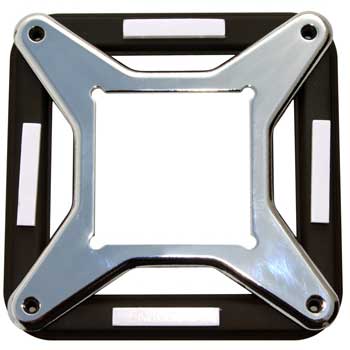
    I was checking the images of RIIG mobo back images and there seems to be some sort of metal shielding in the back of the mobo (under CPU socket). My system is hard to dissasemble, so i'm asking here (and i don't remember how it looked). Is there really a metal backplate there? Coz i think i'll have a problem with a AXP-140 cooler backplate.
    I mean is it possible to place it over that thing?
    Intel Core i7 920 4 GHz | 18 GB DDR3 1600 MHz | ASUS Rampage II Gene | GIGABYTE HD7950 3GB WindForce 3X | WD Caviar Black 2TB | Creative Sound Blaster Z | Altec Lansing MX5021 | Corsair HX750 | Lian Li PC-V354
    Super silent cooling powered by (((Noiseblocker)))

  21. #346
    Xtreme Member
    Join Date
    Sep 2007
    Location
    Belgium, Galmaarden
    Posts
    221
    You have an image of it on hexus yes http://img.hexus.net/v2/motherboards...G_5635-big.jpg

    I hadn't have trouble fitting the backplate for my waterblock, it's just goes around it.


    Quote Originally Posted by Ugly n Grey View Post
    I'm just not seeing the beneift to the AMD stuff right now. I mean it's fun to play with, but so is your willy and it only lasts so long before you need something else to do.

  22. #347
    Registered User
    Join Date
    Sep 2008
    Location
    Sweden
    Posts
    72
    Before I got the 1366 mount for my Apogee GTZ, I used the 775 hole and the backplate over the mobo metal thingy

    It worked fine but the backplate will bend abit but nothing to worry about.

  23. #348
    Xtreme Addict
    Join Date
    May 2007
    Location
    Europe/Slovenia/Ljubljana
    Posts
    1,540
    Thanks guys. I'll just add 4 plastic washers under the cooler backplate so it won't bend over the edge of the socket backplate Should be fairly easy to make them. Same thickness as the socket backplate.
    Last edited by RejZoR; 09-13-2009 at 09:42 PM.
    Intel Core i7 920 4 GHz | 18 GB DDR3 1600 MHz | ASUS Rampage II Gene | GIGABYTE HD7950 3GB WindForce 3X | WD Caviar Black 2TB | Creative Sound Blaster Z | Altec Lansing MX5021 | Corsair HX750 | Lian Li PC-V354
    Super silent cooling powered by (((Noiseblocker)))

  24. #349
    Registered User
    Join Date
    Oct 2008
    Location
    Sofia, Bulgaria
    Posts
    81
    Hi, I need an advice. I'm arguing with a friend who also decided to join Intel, and I've recommended him the same RIG as mine:
    Rampage II Gene
    920 D0
    OCZ 1866 Reaper
    He is afraid that this MOBO won't be able to handle high loads, and won't support the upcoming 6 core CPU's. Also he thinks that it'll be ugly inside his Aurora case. The main problem is that he is short on money, and after selling his AMD rig he'll need an extra 250$, and a lot more if he chose to get the big Xtreme brother. Are there any real advantages of the full ATX board in terms of overclocking a 920 (except sound card, and the extra slots), that are worth the extra $?
    He'll use a single VGA, no SATA controllers, and nothing external at all.
    AMD 1055T | Noctua NH-D14 | Asrock 890gx Extreme3 | 2x2 GB A-Data 2000 | Asus 5770 | PcP&C 700W

  25. #350
    Xtreme Member
    Join Date
    Sep 2007
    Location
    Belgium, Galmaarden
    Posts
    221
    The advice I would give is to let your friend look at the i5 750 or i7 860 tbh. He doesn't seem to be a power user at all (avaible money/system usage), so even the 860 might be too much.


    Quote Originally Posted by Ugly n Grey View Post
    I'm just not seeing the beneift to the AMD stuff right now. I mean it's fun to play with, but so is your willy and it only lasts so long before you need something else to do.

Page 14 of 28 FirstFirst ... 41112131415161724 ... LastLast

Bookmarks

Bookmarks

Posting Permissions

  • You may not post new threads
  • You may not post replies
  • You may not post attachments
  • You may not edit your posts
  •