MMM
Page 1 of 2 12 LastLast
Results 1 to 25 of 34

Thread: Lynnfield P55 - B2B Performance

  1. #1
    Xtreme Owner Charles Wirth's Avatar
    Join Date
    Jun 2002
    Location
    Las Vegas
    Posts
    11,656

    Lynnfield P55 - B2B Performance

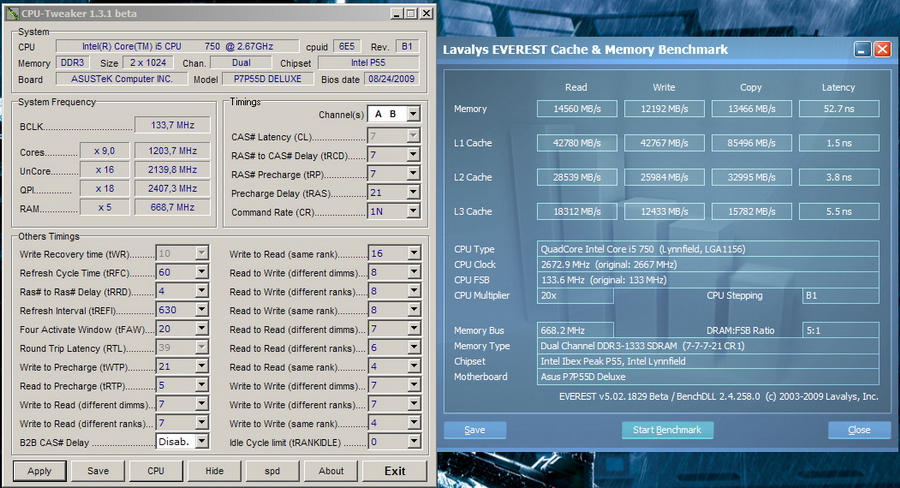
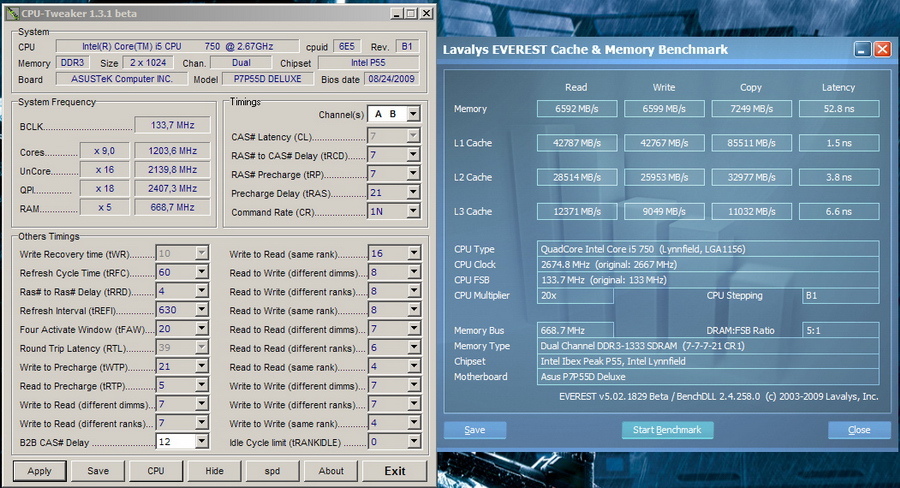
    A brief explanation into Back to Back Cas Delay settings and gaining more performance or showing of high memory speeds without bandwidth.

    Intel i7 870 @ 4Ghz 30c
    200x20 @ 1.3v
    QPI/Vtt 1.1v
    HT ON
    EIST OFF
    C1E OFF
    TURBO OFF

    Kingston 1600C9 @ 2000C9
    Elpida 1.74v

    Gigabyte p55 UD6
    F4E bios

    B2B setting of 1, set in bios, shows as #disabled in CPU-Tweaker

    B2B setting of 6, set in CPU-Tweaker

    B2B setting of 12, set in CPU-Tweaker

    B2B setting of 32, set in CPU-Tweaker

    The major problem is when you use the upper memory rations the B2B setting will be dropped back to 12 in most cases if left on auto.

    The Intel p55 board does now allow manual setting of the B2B in advanced memory timing.

    Elipda, Samsung, and Micron all could function at speed with B2B bios setting of 1 or 4 in CPU-Tweaker

    Tightened 32M
    Last edited by Charles Wirth; 09-07-2009 at 08:42 PM.
    Intel 9990XE @ 5.1Ghz
    ASUS Rampage VI Extreme Omega
    GTX 2080 ti Galax Hall of Fame
    64GB Galax Hall of Fame
    Intel Optane
    Platimax 1245W

    Intel 3175X
    Asus Dominus Extreme
    GRX 1080ti Galax Hall of Fame
    96GB Patriot Steel
    Intel Optane 900P RAID

  2. #2
    no sleep, always tired TheGoat Eater's Avatar
    Join Date
    Oct 2006
    Location
    Iowa, USA
    Posts
    1,832
    hmm - didn't realize you could use such a tight B@B setting as 1 - must try now LOL

    Thanks for the info!

  3. #3
    Xtreme Legend
    Join Date
    Mar 2005
    Location
    Australia
    Posts
    17,242
    i love the bandwidth in B2B=32
    Team.AU
    Got tube?
    GIGABYTE Australia
    Need a GIGABYTE bios or support?


  4. #4
    Xtreme Addict
    Join Date
    Jun 2005
    Location
    TAIWAN
    Posts
    1,257
    Quote Originally Posted by dinos22 View Post
    i love the bandwidth in B2B=32

    B2B:31 for super high memory clk using elpdia BBSE

  5. #5
    Xtreme Guru
    Join Date
    Apr 2005
    Location
    Finland
    Posts
    4,308
    B2B cas delay is like the new Performance Level setting except it only radically affects bandwidth only. It's good that Gigabyte works fine with CPU Tweaker and doesn't require any special bios and allows changing B2B in bios (for a value less than 4 as well). You can get nice performance already at DDR3-1600 CL6-7 with B2B: 1.

    BTW if you don't mind if I'm asking (don't feel like sending a PM) what's the vdroop of the gigabyte board like, I know you mentioned MSI GD80 got like 0.01v.
    Last edited by RPGWiZaRD; 09-08-2009 at 05:30 AM.
    Intel? Core i5-4670K @ 4.3 GHz | ASRock Extreme6 Z87 | G.Skill Sniper 2x8GB @ DDR4-1866 CL9 | Gigabyte GTX 970 OC Windforce 3x | Super Flower Titanium 1000W | ViewSonic VX2268wm 120Hz LCD | Phanteks PH-TC14PE | Logitech MX-518 | Win 7 x64 Professional | Samsung 850 EVO & 840 Pro SSDs

    If all people would share opinions in an objective manner, the world would be a friendlier place

  6. #6
    I am Xtreme
    Join Date
    Jan 2005
    Posts
    4,714
    For those who need more than the brief explanation, I wrote about this timing 2 months ago: http://www.madshrimps.be/?action=getarticle&articID=940

    B2B is what you want to adjust when the 6x memory multiplier is bugged ... hehe
    Where courage, motivation and ignorance meet, a persistent idiot awakens.

  7. #7
    Xtreme X.I.P.
    Join Date
    Feb 2006
    Posts
    2,741
    B2B sets a delay for the number of memory clock cycles to pass before a read is processed.

    Values below 4 don't work on i7 (apart from 0 to disable the logic), so 1-3 will default to 4.

    RTL is the number of Uncore clocks that pass before data arrives at a pad in the IMC.

    Main performance is locked away in the post equation (some of these parameters are available to adjust).
    Last edited by Raja@ASUS; 09-08-2009 at 06:00 AM.

  8. #8
    I am Xtreme
    Join Date
    Sep 2006
    Posts
    10,374
    Are the Asus boards still locked for manual input via the Felix Tweaker tool ?

  9. #9
    Moderator
    Join Date
    Nov 2006
    Posts
    2,609
    Quote Originally Posted by raju View Post
    B2B sets a delay for the number of memory clock cycles to pass before a read is processed.

    Values below 4 don't work on i7 (apart from 0 to disable the logic), so 1-3 will default to 4.

    RTL is the number of Uncore clocks that pass before data arrives at a pad in the IMC.

    Main performance is locked away in the post equation (some of these parameters are available to adjust).
    thanks for info Raja

    Good tests charles high B2b for higher mem freq
    Quote Originally Posted by LardArse View Post
    i think you are asking the wrong person about safety limits, but

  10. #10
    Xtreme Addict
    Join Date
    Nov 2005
    Location
    Germany
    Posts
    1,160
    Quote Originally Posted by Leeghoofd View Post
    Are the Asus boards still locked for manual input via the Felix Tweaker tool ?
    works well with Asus P7P55D Deluxe


  11. #11
    I am Xtreme
    Join Date
    Sep 2006
    Posts
    10,374
    Thanks Crisch Wished they did the same with the X58 ones (though haven't tested the latest biosses there)

  12. #12
    no sleep, always tired TheGoat Eater's Avatar
    Join Date
    Oct 2006
    Location
    Iowa, USA
    Posts
    1,832
    where did you get CPU Tweaker 1.3.1 beta ? as I can't find it

  13. #13
    I am Xtreme
    Join Date
    Sep 2006
    Posts
    10,374
    CPU-Tweaker13b1.zip Is that the one ? Can't open the file on a S478 rig here:p

  14. #14
    Registered User
    Join Date
    Mar 2009
    Posts
    1
    [QUOTE=FUGGER;4001803]A brief explanation into Back to Back Cas Delay settings and gaining more performance or showing of high memory speeds without bandwidth.

    Hey Fugger,
    Toss in a screen shot of the bios page that you tweaked please.

    And have you tried this on the X58 Gigabyte board?

    -Sertain

  15. #15
    Xtreme Owner Charles Wirth's Avatar
    Join Date
    Jun 2002
    Location
    Las Vegas
    Posts
    11,656
    I can do and yes I have tried and it works (needs to be locked down) on GBT.
    Intel 9990XE @ 5.1Ghz
    ASUS Rampage VI Extreme Omega
    GTX 2080 ti Galax Hall of Fame
    64GB Galax Hall of Fame
    Intel Optane
    Platimax 1245W

    Intel 3175X
    Asus Dominus Extreme
    GRX 1080ti Galax Hall of Fame
    96GB Patriot Steel
    Intel Optane 900P RAID

  16. #16
    Xtreme Member
    Join Date
    Jun 2004
    Location
    Milano - Italy
    Posts
    480
    Quote Originally Posted by Leeghoofd View Post
    Thanks Crisch Wished they did the same with the X58 ones (though haven't tested the latest biosses there)
    R2E with latest BIOS 1504 is still locked.

  17. #17
    Xtreme Owner Charles Wirth's Avatar
    Join Date
    Jun 2002
    Location
    Las Vegas
    Posts
    11,656
    I have an update from Intel, requested permission to post.

    One of the XMP engineers goes into B2B, JEDEC and tCCD.

    B2B with a setting of 3 tCLK??

    R2E can adjust B2B, just started playing with it.

    "When I first wrote the XMP spec, I added 4 new parameters to kind of expose these turn around times to overclockers. They were Read to Read, Read to Write, Write to Read and Write to Write pull-in / push-out parameters. So far, I haven’t seen any Module suppliers take advantage of these parameters but..."
    Last edited by Charles Wirth; 09-23-2009 at 11:12 PM.
    Intel 9990XE @ 5.1Ghz
    ASUS Rampage VI Extreme Omega
    GTX 2080 ti Galax Hall of Fame
    64GB Galax Hall of Fame
    Intel Optane
    Platimax 1245W

    Intel 3175X
    Asus Dominus Extreme
    GRX 1080ti Galax Hall of Fame
    96GB Patriot Steel
    Intel Optane 900P RAID

  18. #18
    Xtreme X.I.P.
    Join Date
    Feb 2006
    Posts
    2,741
    In all seriousness, there is no real need to adjust this spacing to anyone's real advantage - you just waste clock cycles on concurrent reads. If the vendors did take 'advantage' of this setting you'd see higher speed kits which in reality run at lower levels of performance - is this what people need? The bigger deal here as it has always been is the tRD, which is not B2B btw.

    Default B2B spacing is the width of the bus (4 clocks for i7 and i5, the GB setting of 1 is default; 4 clocks, they just shifted the table to make more sense to overclockers) - as fast as you can go. For all benches that actually score something, this is where you need it to be. The same goes for any other physical rank to rank delays.
    Last edited by Raja@ASUS; 09-23-2009 at 11:28 PM.

  19. #19
    I am Xtreme
    Join Date
    Sep 2006
    Posts
    10,374
    Does Felix's tool got acces now from the Asus engineers ? or are you adjusting via the bios itself ? (B2B setting was in there from release bios)

  20. #20
    Xtreme Owner Charles Wirth's Avatar
    Join Date
    Jun 2002
    Location
    Las Vegas
    Posts
    11,656
    Raju, True but I provided proof that some high end dram needed the top memory ratio (at low or stock bclk) and the auto bios setting the B2B value to 12 or higher and the answer I got was "it is not supposed to do that" yet this can be seen on three of the boards I tested.

    "I didn’t’ add it to XMP and haven’t suggested that OEM/ODM’s add it as a bios parameter.
    If someone changes that value in the bios, what it REALLY is doing is affecting the tRead time, or total turn around time for a read parameter. The tREAD time is a composition of multiple DRAM and system timing parameters and modifying any one of them past it’s normal parameter “could” artificially reduce the tREAD time. I say COULD because some BIOS vendors and certain chipsets can put a limit on how large a specific parameter range is AND some memory controllers don’t even give a parameter for tCCD and just hard code it to 4 (which is the case in SEVERAL platforms)."

    Its something that we did not see on previous platforms as an issue and even some of the guys here made this mistake and you didnt catch it even though you responded and acknowledged the results as correct, boble's thread where he ran 2300Mhz cas 8 and it was faster than 2300Mhz cas 7 by a large margin... I didnt want to make an example of anyone let alone other sites (gave some sites time to fix/add). Later in that tread (after this thread) you were all over B2B.

    We had Hicookie showing off absurd memory clocks by exploiting this, I never explored the higher value with bclk but I wouldnt be surprised if this allows higher blck with 12+ setting.

    I also gave live demo on this with Kingston, Intel and Gigabyte on reaching highest memory speeds as well as why the Kingston demo had poor bandwidth where I could beat it with low end memory at stock speed.
    Last edited by Charles Wirth; 09-23-2009 at 11:54 PM.
    Intel 9990XE @ 5.1Ghz
    ASUS Rampage VI Extreme Omega
    GTX 2080 ti Galax Hall of Fame
    64GB Galax Hall of Fame
    Intel Optane
    Platimax 1245W

    Intel 3175X
    Asus Dominus Extreme
    GRX 1080ti Galax Hall of Fame
    96GB Patriot Steel
    Intel Optane 900P RAID

  21. #21
    Xtreme X.I.P.
    Join Date
    Feb 2006
    Posts
    2,741
    Quote Originally Posted by FUGGER View Post
    Its something that we did not see on previous platforms as an issue and even some of the guys here made this mistake and you didnt catch it even though you responded and acknowledged the results as correct, boble's thread where he ran 2300Mhz cas 8 and it was faster than 2300Mhz cas 7 by a large margin... I didnt want to make an example of anyone let alone other sites (gave some sites time to fix/add). Later in that tread (after this thread) you were all over B2B.


    I think you are refering to the Corsair/Gskill threads, where CAS 6-7 @ 2K+ got ousted by CAS 8-8 @ 2.4K+ and not cas 8-9 in 32m. This has nothing to do with B2B cos it is disabled at both performance points. Only thing I've always explained is that this is not by definition tRD, yes it will affect the readback time on B2B reads by definition, but not the initial memory access time. Even back there before your thread btw;

    http://www.xtremesystems.org/forums/...1&postcount=13

    ns in that post should be replaced with clocks though.

    What I will acknowledge is that some boards set it up looser than it needs to be (you were right to point that out - I think Massman should have the credit for that though), other than that it's not something that really stoked my fire in terms of performance.
    Last edited by Raja@ASUS; 09-24-2009 at 12:19 AM.

  22. #22
    Xtreme Owner Charles Wirth's Avatar
    Join Date
    Jun 2002
    Location
    Las Vegas
    Posts
    11,656
    2300Mhz cas 7

    2300Mhz cas 8

    no BW screen, cpu-tweaker, or mention of settings but I have a strong suspicion that the B2B setting was on auto and it running a higher value than 4.
    Intel 9990XE @ 5.1Ghz
    ASUS Rampage VI Extreme Omega
    GTX 2080 ti Galax Hall of Fame
    64GB Galax Hall of Fame
    Intel Optane
    Platimax 1245W

    Intel 3175X
    Asus Dominus Extreme
    GRX 1080ti Galax Hall of Fame
    96GB Patriot Steel
    Intel Optane 900P RAID

  23. #23
    Xtreme X.I.P.
    Join Date
    Feb 2006
    Posts
    2,741
    I have the board here and have not seens an insatnce in which B2B shifts as of yet, unless he chanced on something. My comments in that thread had nothing to do with those particular results btw - they were about my CAS 6 2k+ vs Benni'es straight 8's at 2.4K.

  24. #24
    Xtreme Owner Charles Wirth's Avatar
    Join Date
    Jun 2002
    Location
    Las Vegas
    Posts
    11,656
    Link it, Im not sure what you are referring to.

    When I get get back on P55 I will force it and post my method and bios version.
    Intel 9990XE @ 5.1Ghz
    ASUS Rampage VI Extreme Omega
    GTX 2080 ti Galax Hall of Fame
    64GB Galax Hall of Fame
    Intel Optane
    Platimax 1245W

    Intel 3175X
    Asus Dominus Extreme
    GRX 1080ti Galax Hall of Fame
    96GB Patriot Steel
    Intel Optane 900P RAID

  25. #25
    Xtreme X.I.P.
    Join Date
    Feb 2006
    Posts
    2,741
    http://www.xtremesystems.org/forums/...9&postcount=25

    that talking about vs me running Cas 6-7 over 2K

    I checked all the B2B stuff on my board - it was disabeld at all times. To cut to the chase, CAs 6-7-6 over 2000 beat CAS 8-9-8 over 2400MHz, but CAS 6 did not beat CAS 8-8 over 2400. B2B was disabled all the time on the EVGA 657.
    Last edited by Raja@ASUS; 09-24-2009 at 12:37 AM.

Page 1 of 2 12 LastLast

Bookmarks

Bookmarks

Posting Permissions

  • You may not post new threads
  • You may not post replies
  • You may not post attachments
  • You may not edit your posts
  •