MMM
Results 1 to 25 of 4457

Thread: ASUS Maximus II Formula - new P45 king?

Hybrid View

  1. #1
    Banned
    Join Date
    Nov 2007
    Posts
    1,941
    Quote Originally Posted by elsupremo View Post
    Guys, need a little bit of help with my overclock. I have the following stuff:
    QX9650 watercooled
    2x 2GB Gskill DDR2 800
    4870 X2
    Auzentech DTS Xplosion

    Since I've had this CPU, I've been at 4 Ghz, previously on the DFI P35 board. I'm having trouble getting everything perfectly stable on this board. By trouble, I mean: I can pass IntelBurnTest at maximum stress for 20 tests, and it will pass stable. I can do Orthos on all 4 cores Blend and small fft's for hours, and it will be fine. SuperPi stable. 3d Marks stable. However, sometimes doing random things, like repairing Par2 files and installing a game, or playing a game, for instance, USB's will start disconnecting and reconnecting repeatedly, and before I changed my RAM speed, it would even lock up.

    At first, I tried 400 x 10, the settings from my last board. It will pass every stability test, but would still lock up sometimes. Then I tried 450 x 9, and the same thing. With both of those settings, I was trying 1:1 ratio on the RAM, keeping it low, around 800 (400) and 900 (450). However, when it locked up, I changed it to the current setting. I have not had a lock up since, making me think RAM was the issue for the lockups. However, I still have other stability issues: when I'm playing a fairly intensive game like Assassins Creed, sometimes after playing it for awhile, the USB's will start disconnecting and reconnecting (usually it's my fan controller that it disconnects and reconnects, not my mouse/keyboard). Also, sometimes it seems the PCI stuff gets messed up - my sound started losing synch., and being way behind what I was seeing on screen. It seemed possible my graphics got choppier too. It never froze up though.

    I'm not sure what's going on and would like some help. I experimented once by giving 1.35v to NB & VTT, but after playing Assassins Creed for an hour or so, the NB heat built up to 66 degrees C, and it started locking up. It did not do the USB disconnecting though, or the weird PCI issues. I went down a lot (to 1.25V for NB & VTT) to avoid the heat issue, but have been working up slowly trying to make the USB & PCI issue go away. At my current setting, 1.31V for NB & VTT, it doesn't get much warmer than 55 degrees, but I'm still having the issue.

    I'm using BIOS 0802.
    Way to much auto settings and way to high vcore and pll imo.
    Auto settings are not the way to go on this board if stability is to be achived.
    GSkills seem to like clock skew to really stabilize the rig, set them to advanced 300ps it will help alot,
    Get trfc ( row refresh cycle time) off auto and set 55-60.

    450x9 those GSkills should be able to run

    DRAM Static Read Control: Enabled
    Dram Read Training : AUTO
    MEM OC Charger : AUTO
    Ai Clock Twister : Stronger
    Transaction Booster : Manual

    Common Performance Level [8]

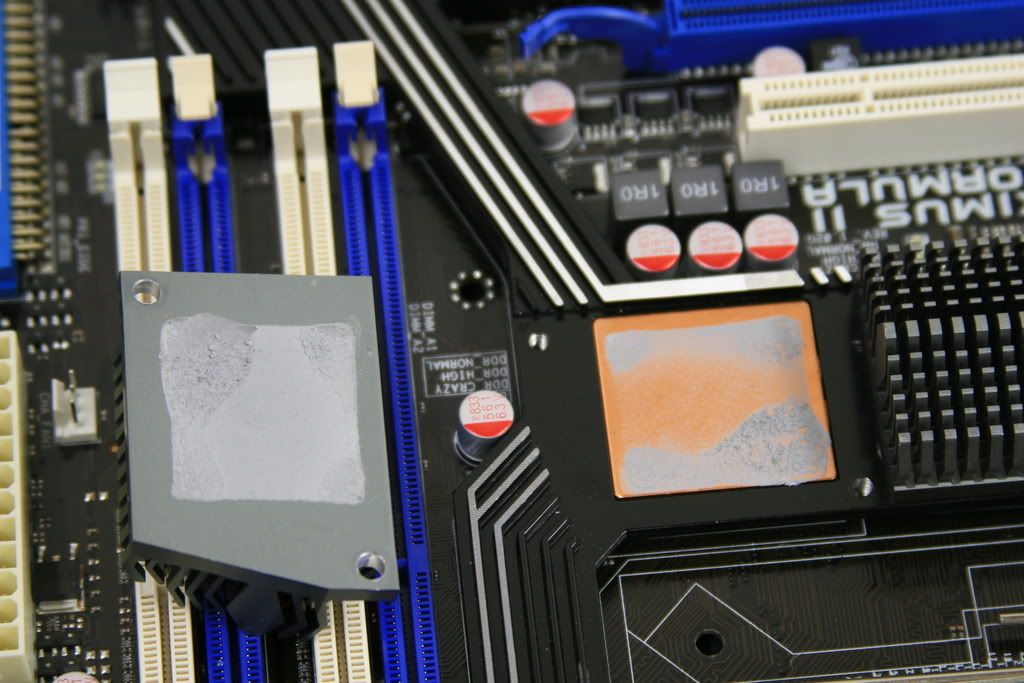
    Your NB temp will also be an issue have you reseated it with AS5 or Ceramique? If not thats the first thing I would do.

    My chip plays nice with a positive value for GTL's so you may need to adjust this to the correct value but I would start with this and adjust volts accordingly.

    Extreme Tweaker
    Ai Overclock Tuner : Manual
    OC From CPU Level Up : AUTO
    CPU Ratio Control : Manual
    - Ratio CMOS Setting : 9
    FSB Frequency : 450
    CPU Clock Skew : Normal
    North Bridge Clock Skew : Normal
    FSB Strap to North Bridge : 333
    DRAM Frequency: DDR2-1081
    Dram Clock Skew CH1 A1 : Advanced 300ps
    DRAM Clock Skew CH1 A2 : Advanced 300ps
    Dram Clock Skew CH1 B1 : Advanced 300ps
    Dram Clock Skew CH1 B2 : Advanced 300ps


    DRAM Timing Control: Manual
    CAS# Latency : 5
    RAS# to CAS# Delay : 5
    RAS# Precharge : 5
    RAS# ActivateTime : 15
    RAS# to RAS# Delay : 3
    Row Refresh Cycle Time : 55
    Write Recovery Time : 6
    Read to Precharge Time : 3

    Read to Write Delay (S/D) : 8
    Write to Read Delay (S) : 3
    Write to Read Delay (D) : 5
    Read to Read Delay (S) : 4
    Read to Read Delay (D) : 6
    Write to Write Delay (S) : 4
    Write to Write Delay (D) : 6

    Write to PRE Delay : 14
    Read to PRE Delay : 5
    PRE to PRE Delay : 1
    ALL PRE to ACT Delay : 5
    ALL PRE to REF Delay : 5

    DRAM Static Read Control: Enabled
    Dram Read Training : AUTO
    MEM OC Charger : AUTO
    Ai Clock Twister : Stronger
    Transaction Booster : Manual

    Common Performance Level [8]

    Pull-In of CHA PH1 Disabled
    Pull-In of CHA PH2 Disabled
    Pull-In of CHA PH3 Disabled
    Pull-In of CHA PH4 Disabled
    Pull-In of CHA PH5 Disabled
    Pull-In of CHB PH1 Disabled
    Pull-In of CHB PH2 Disabled
    Pull-In of CHB PH3 Disabled
    Pull-In of CHB PH4 Disabled
    Pull-In of CHB PH5 Disabled

    PCIE Frequency : 101

    CPU Voltage : 1.35
    CPU PLL Voltage : 1.50
    FSBT : 1.33850
    DRAM Voltage : 2.1
    North Bridge Voltage : 1.39150
    South Bridge Voltage 1.5 : 1.5
    South Bridge Voltage 1.1 : 1.1

    CPU GTL Reference 0 : +20mv
    CPU GTL Reference 1 : +10mv
    CPU GTL Reference 2 : +10mv
    CPU GTL Reference 3 : +20mv
    North Bridge GTL Reference : AUTO
    DDR2 Channel A REF Voltage : AUTO
    DDR2 Channel B REF Voltage : AUTO
    North Bridge DDR Reference : AUTO

    Load Line Calabration : Enabled
    CPU Sread Spectrum : Disabled
    PCIE Spread Spectrum : Disabled

  2. #2
    Xtreme Member
    Join Date
    Mar 2007
    Location
    Greece-Thessaloniki
    Posts
    110
    Some results from me..Still testing..

    It seems to be stable for now (link pack& blend)..

    Click image for larger version. 

Name:	8_500_333_1200_Everest.JPG 
Views:	723 
Size:	136.2 KB 
ID:	85795

    the settings..

    Code:
    Ai Overclock Tuner: Manual
    OC From CPU Level Up: Auto
    Ratio CMOS Setting: 8
    FSB Frequency: 500
    CPU Clock Skew: Auto
    NB Clock Skew: Auto
    FSB Strap to North Bridge: 333
    DRAM Frequency: DDR2-1200 MHz
    
    DRAM CLK Skew on Channel A1: Auto
    DRAM CLK Skew on Channel A2: Auto
    DRAM CLK Skew on Channel B1: Auto
    DRAM CLK Skew on Channel B2: Auto
    DRAM Timing Control: Auto (For now)
    DRAM Static Read Control: Enabled
    DRAM Read Training: Enabled
    MEM. OC Charger: Enabled
    Ai Clock Twister: Moderate (For now)
    Ai Transaction Booster: Manual
    
    PL=8 and the First 2 Pull-in Enabled (Still Testing)
    
    
    PCIE Frequency: 100
    
    CPU Voltage: 1.33
    CPU PLL Voltage: 1.52X
    FSB Termination Voltage: 1.15XX
    DRAM Voltage: 2.25
    North Bridge Voltage: 1.29
    South Bridge 1.5 Voltage: 1.53X (I have Raid)
    South Bridge 1.1 Voltage: 1.13X (I have Raid)
    
    CPU GTL Reference (0): Auto
    CPU GTL Reference (1): Auto
    CPU GTL Reference (2): Auto
    CPU GTL Reference (3): Auto
    NB GTL Reference: Auto
    DDR2 ChA Reference Voltage: Auto
    DDR2 ChB Reference Voltage: Auto
    North Bridge DDR Reference: Auto
    
    CPU Configuration:
    
    Ratio CMOS Setting: 9
    C1E Support: Disabled
    Max CPUID Value Limit: Disabled
    Intel Virtualization Tech: Disabled
    CPU TM Function: Disabled
    Execute Disable Bit: Disabled
    
    Load-Line Calibration: Enabled
    CPU Spread Spectrum: Disabled
    PCIE Spread Spectrum: Disabled

  3. #3
    Registered User
    Join Date
    Sep 2008
    Posts
    46
    CryptiK,

    I don't wanna fight about this computer stuff because this is ridiculous...
    I am sure you will agree with that too.

    Let's start over then, and exchange our infos, and keep this health.

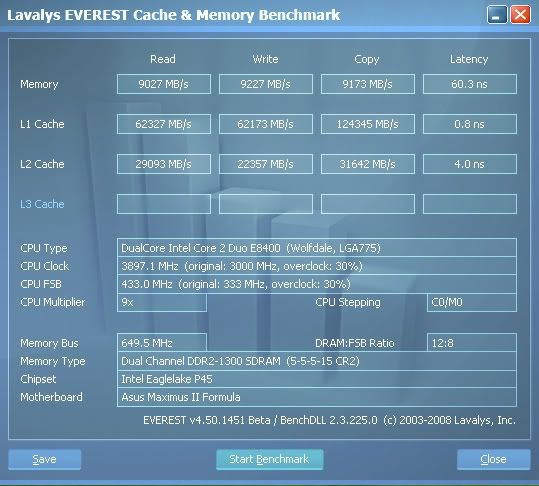
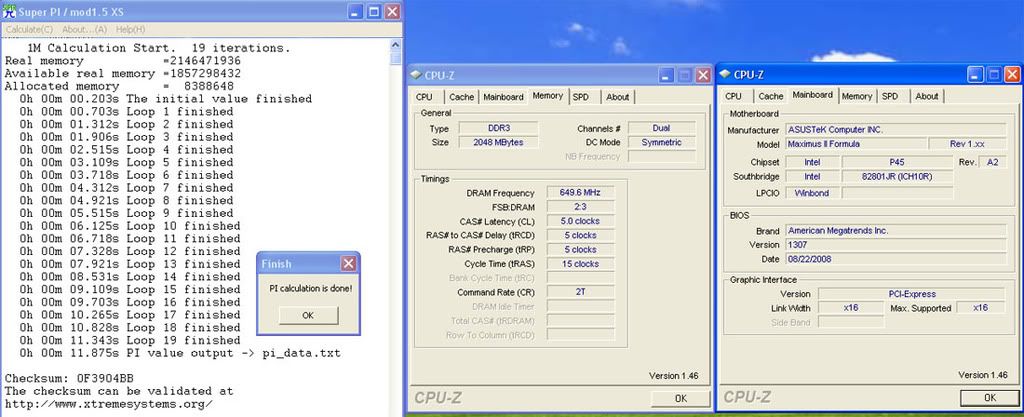
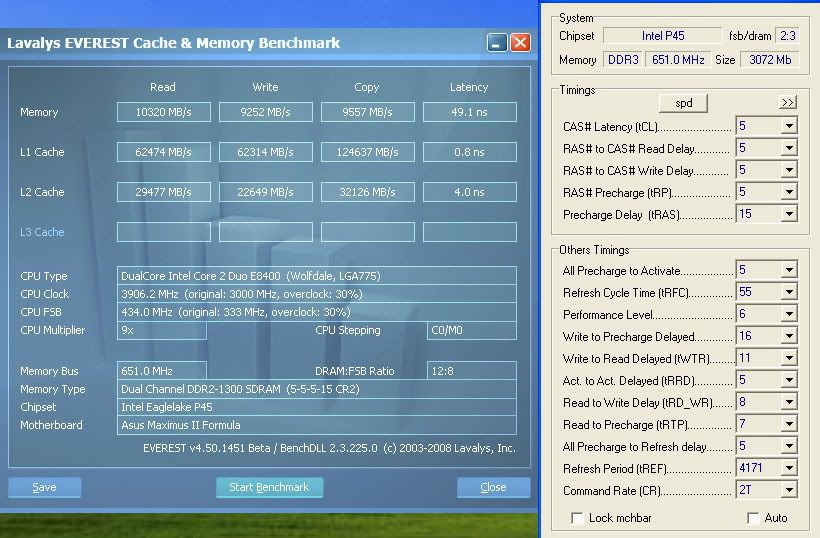
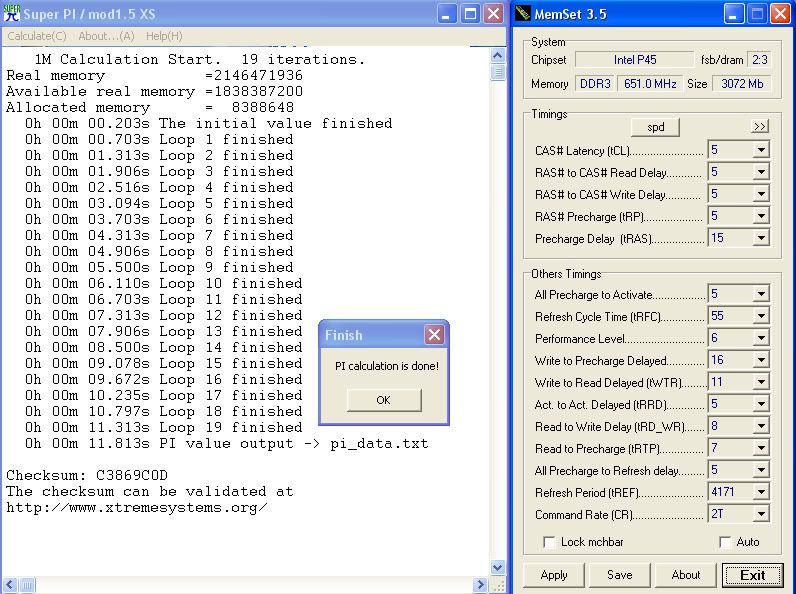
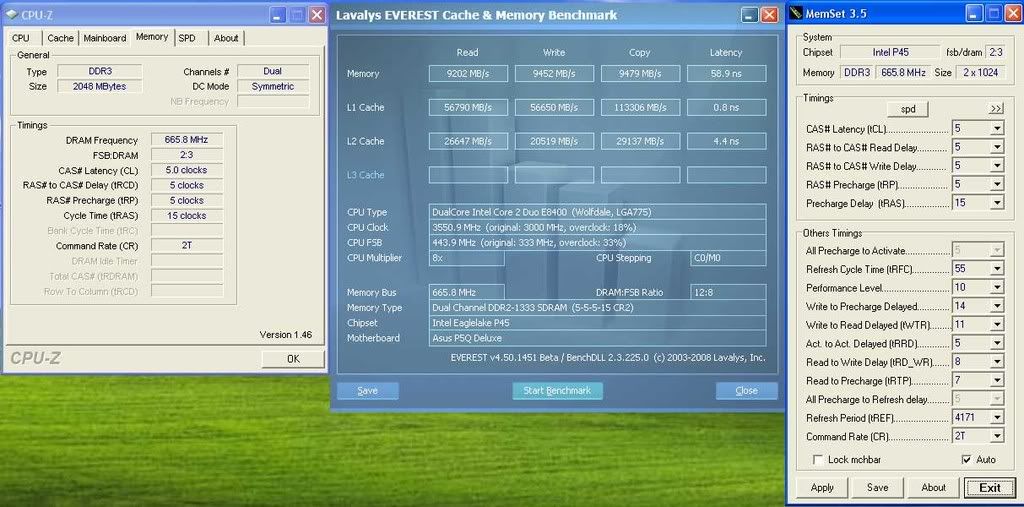
    My point is the M2F can clock some ram at very low volts and with good REAL performance.

    Check this out, I did't even tweak it. I just booted like this now.
    The only bios setting changed were 5-5-5-15, the rest is on auto.

    3.6GHz cpu only
    450FSB only
    DDR2-1080 5-5-5-15 at 1.86v REAL on Maximus II Formula:


    Now, compare that with your P5Q-deluxe DDR2-1333 5-5-5-15 at 2.29v and you will understand my point.
    Last edited by Cable_Tie_Guy; 09-24-2008 at 03:48 PM.

  4. #4
    Xtreme Member
    Join Date
    Jul 2008
    Posts
    435
    Quote Originally Posted by Cable_Tie_Guy View Post
    Check this out, I did't even tweak it. I just booted like this now. The only bios setting changed were 5-5-5-15, the rest is on auto.
    it appears you are confusing Everest benchmark with actual performance. Everest benchmark does not represent real performance, especially on a P45 that could care less about Everest.

    CL444-12 PL8 means nothing to a gaming rig, matter of fact itll prolly be slower.

  5. #5
    Registered User
    Join Date
    Sep 2008
    Posts
    46
    Quote Originally Posted by ThugsRook View Post
    it appears you are confusing Everest benchmark with actual performance. Everest benchmark does not represent real performance, especially on a P45 that could care less about Everest.

    CL444-12 PL8 means nothing to a gaming rig, matter of fact itll prolly be slower.
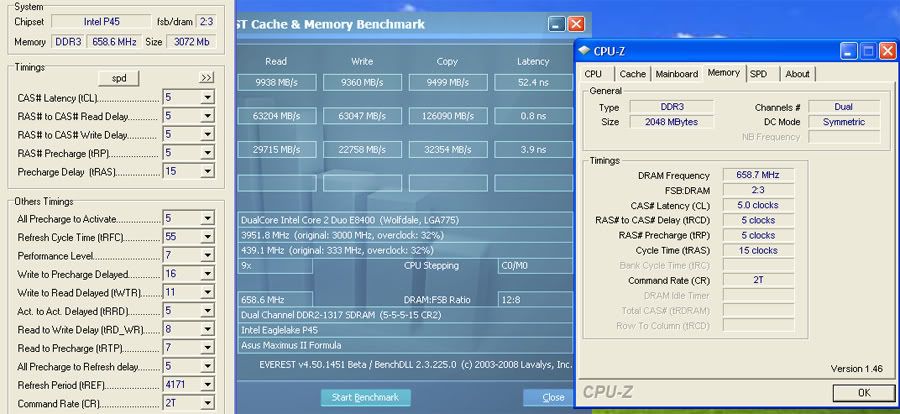
    Who said CL4?
    I am at CL5, check pic again.

    I will say this again, P45 is very limited on memory performance (any brand board). There are some sweet spots and you have to take advantage of it. That is how you do on this chipset. If you want to have the performance expected from a DDR2-1300+ clock, you need to go back to P35 (DFI LP UT) or try some X48. Nvidia chipsets will own any intel chipset when it comes to DDR2 memory performance (mem controler is their especiality), but we know how unstable those chipsets are, so I won't recomend it. That is why I am on a intel too.

    On P45 you should focus on the FSB and CPU clocks, and take advantage of the mem sweet spots.

    It means absolutely nothing to have a high clocked mem on a P45 with a very poor performance. Not smart at all.

    We can play on some 3DMARK too, so you can understand what I am saying too.

  6. #6
    Xtreme Member
    Join Date
    Oct 2006
    Location
    so cal
    Posts
    153
    Quote Originally Posted by Cable_Tie_Guy View Post
    Who said CL4?
    I am at CL5, check pic again.

    I will say this again, P45 is very limited on memory performance (any brand board). There are some sweet spots and you have to take advantage of it. That is how you do on this chipset. If you want to have the performance expected from a DDR2-1300+ clock, you need to go back to P35 (DFI LP UT) or try some X48. Nvidia chipsets will own any intel chipset when it comes to DDR2 memory performance (mem controler is their especiality), but we know how unstable those chipsets are, so I won't recomend it. That is why I am on a intel too.

    On P45 you should focus on the FSB and CPU clocks, and take advantage of the mem sweet spots.

    It means absolutely nothing to have a high clocked mem on a P45 with a very poor performance. Not smart at all.

    We can play on some 3DMARK too, so you can understand what I am saying too.
    It seems to me there are some very impressive memory bandwidth results on the P45 motherboards.
    of course this is dependent on quality and maybe a little luck but none the less not too shabby.
    your right about raw performance in the overclock arena but remember this is not a restrictive FSB chipset where memory overclocking is the only respective characteristic.(we seem to have the best of both worlds)
    One thing I find odd is some modules like to hover at the 1:1 ratio others thrive on the dividers offered
    this could be bios related or perhaps the the fact that some modules have restrictive devices implemented such as on die voltage regulation and the fact that termination is moved to the PCB of the module itself.
    The tricks shared here show that there are ways around the restrictions and DDR2 is not dead

  7. #7
    Xtreme Member
    Join Date
    Jul 2008
    Posts
    435
    Quote Originally Posted by Cable_Tie_Guy View Post
    Who said CL4?
    I am at CL5, check pic again.

    I will say this again, P45 is very limited on memory performance (any brand board). There are some sweet spots and you have to take advantage of it. That is how you do on this chipset. If you want to have the performance expected from a DDR2-1300+ clock, you need to go back to P35 (DFI LP UT) or try some X48. Nvidia chipsets will own any intel chipset when it comes to DDR2 memory performance (mem controler is their especiality), but we know how unstable those chipsets are, so I won't recomend it. That is why I am on a intel too.

    On P45 you should focus on the FSB and CPU clocks, and take advantage of the mem sweet spots.

    It means absolutely nothing to have a high clocked mem on a P45 with a very poor performance. Not smart at all.

    We can play on some 3DMARK too, so you can understand what I am saying too.
    i was using CL4 as an exagerated example.

    the rest of what you just said i agree with

    the sweet spot for gamers or just the avg ocing joe is CL555-15 PL10. any fsb, any ratio, thats the sweet spot.

    it does like speed tho ~ 1066mhz minimum, there is no "max" as long as youre keeping CL555-15 PL10.

    gaming does not care for CL4 or PL below 10, only superpi does. but then again some ppl think superpi IS a game

    do not tune your gaming system using Everest as a guide. it can only be used as a reference and it doesnt represent real world performance in any way.

  8. #8
    Xtreme Member
    Join Date
    Oct 2006
    Location
    so cal
    Posts
    153
    Quote Originally Posted by ThugsRook View Post
    but then again some ppl think superpi IS a game
    It's not


  9. #9
    Xtreme Member
    Join Date
    Oct 2006
    Location
    Orange County, CA
    Posts
    136
    Ty Grnfinger. I really appreciate your time. I would not have touched 90% of those settings you had me change, as I'm a beginning-level overclocker.

    Starting with the settings you gave me, I could not boot into Windows - it would reboot while loading Windows. I am not sure what the relationship is between vcore, PLL, and the GTL volts, so I basically was working a bit blind. I kept the GTL settings you gave me, since I didn't know what else to do with them, and just kept increasing vcore and PLL. I'm having trouble finding a way to boot into Windows and pass a 5 run IntelBurnTest without having high Vcore and PLL. Can you share some strategy about how what to do here, other than just boosting vcore to the stars?

    Quote Originally Posted by Grnfinger View Post
    Way to much auto settings and way to high vcore and pll imo.
    Auto settings are not the way to go on this board if stability is to be achived.
    GSkills seem to like clock skew to really stabilize the rig, set them to advanced 300ps it will help alot,
    Get trfc ( row refresh cycle time) off auto and set 55-60.

    450x9 those GSkills should be able to run

    DRAM Static Read Control: Enabled
    Dram Read Training : AUTO
    MEM OC Charger : AUTO
    Ai Clock Twister : Stronger
    Transaction Booster : Manual

    Common Performance Level [8]

    Your NB temp will also be an issue have you reseated it with AS5 or Ceramique? If not thats the first thing I would do.

    My chip plays nice with a positive value for GTL's so you may need to adjust this to the correct value but I would start with this and adjust volts accordingly.

    Extreme Tweaker
    Ai Overclock Tuner : Manual
    OC From CPU Level Up : AUTO
    CPU Ratio Control : Manual
    - Ratio CMOS Setting : 9
    FSB Frequency : 450
    CPU Clock Skew : Normal
    North Bridge Clock Skew : Normal
    FSB Strap to North Bridge : 333
    DRAM Frequency: DDR2-1081
    Dram Clock Skew CH1 A1 : Advanced 300ps
    DRAM Clock Skew CH1 A2 : Advanced 300ps
    Dram Clock Skew CH1 B1 : Advanced 300ps
    Dram Clock Skew CH1 B2 : Advanced 300ps


    DRAM Timing Control: Manual
    CAS# Latency : 5
    RAS# to CAS# Delay : 5
    RAS# Precharge : 5
    RAS# ActivateTime : 15
    RAS# to RAS# Delay : 3
    Row Refresh Cycle Time : 55
    Write Recovery Time : 6
    Read to Precharge Time : 3

    Read to Write Delay (S/D) : 8
    Write to Read Delay (S) : 3
    Write to Read Delay (D) : 5
    Read to Read Delay (S) : 4
    Read to Read Delay (D) : 6
    Write to Write Delay (S) : 4
    Write to Write Delay (D) : 6

    Write to PRE Delay : 14
    Read to PRE Delay : 5
    PRE to PRE Delay : 1
    ALL PRE to ACT Delay : 5
    ALL PRE to REF Delay : 5

    DRAM Static Read Control: Enabled
    Dram Read Training : AUTO
    MEM OC Charger : AUTO
    Ai Clock Twister : Stronger
    Transaction Booster : Manual

    Common Performance Level [8]

    Pull-In of CHA PH1 Disabled
    Pull-In of CHA PH2 Disabled
    Pull-In of CHA PH3 Disabled
    Pull-In of CHA PH4 Disabled
    Pull-In of CHA PH5 Disabled
    Pull-In of CHB PH1 Disabled
    Pull-In of CHB PH2 Disabled
    Pull-In of CHB PH3 Disabled
    Pull-In of CHB PH4 Disabled
    Pull-In of CHB PH5 Disabled

    PCIE Frequency : 101

    CPU Voltage : 1.35
    CPU PLL Voltage : 1.50
    FSBT : 1.33850
    DRAM Voltage : 2.1
    North Bridge Voltage : 1.39150
    South Bridge Voltage 1.5 : 1.5
    South Bridge Voltage 1.1 : 1.1

    CPU GTL Reference 0 : +20mv
    CPU GTL Reference 1 : +10mv
    CPU GTL Reference 2 : +10mv
    CPU GTL Reference 3 : +20mv
    North Bridge GTL Reference : AUTO
    DDR2 Channel A REF Voltage : AUTO
    DDR2 Channel B REF Voltage : AUTO
    North Bridge DDR Reference : AUTO

    Load Line Calabration : Enabled
    CPU Sread Spectrum : Disabled
    PCIE Spread Spectrum : Disabled

  10. #10
    Xtreme Member
    Join Date
    Oct 2006
    Location
    Orange County, CA
    Posts
    136
    Please help me understand something. I see so many people being able to overclock quite nicely with very low vcore voltages. I even looked back at one of TouGe's posts where he was stable at 3.8Ghz with the same CPU as mine, and I followed it as closely as I was able considering that I have different RAM. I was able to boot into Windows at 3.8ghz with only 1.31v VCore. On my own, I have NEVER been able to actually get into windows at 4 Ghz under 1.5v. I know I'm doing something wrong and I don't understand the voltages.

    My only goal is to get 4 ghz stable 24/7. I was close with bios 0802 (using very high vcore (1.525) and PLL (1.69v), but tonight I updated to 1307 and those same settings don't seem close anymore.

    My G.Skill RAM are non-MicronD9, so they are not top of the line. I suspect RAM is playing a part in my troubles, and of course, the voltages. If someone could help me understand why if I give it enough vcore, I can make it work, but I'm overvolting like mad while other, more knowledgeable people, are getting the same speeds with WAY less volts -I would be so appreciative.

    Quote Originally Posted by elsupremo View Post
    Ty Grnfinger. I really appreciate your time. I would not have touched 90% of those settings you had me change, as I'm a beginning-level overclocker.

    Starting with the settings you gave me, I could not boot into Windows - it would reboot while loading Windows. I am not sure what the relationship is between vcore, PLL, and the GTL volts, so I basically was working a bit blind. I kept the GTL settings you gave me, since I didn't know what else to do with them, and just kept increasing vcore and PLL. I'm having trouble finding a way to boot into Windows and pass a 5 run IntelBurnTest without having high Vcore and PLL. Can you share some strategy about how what to do here, other than just boosting vcore to the stars?

  11. #11
    Xtreme Addict
    Join Date
    May 2005
    Location
    Fayetteville, North Carolina.
    Posts
    1,476
    Quote Originally Posted by elsupremo View Post
    Please help me understand something. I see so many people being able to overclock quite nicely with very low vcore voltages. I even looked back at one of TouGe's posts where he was stable at 3.8Ghz with the same CPU as mine, and I followed it as closely as I was able considering that I have different RAM. I was able to boot into Windows at 3.8ghz with only 1.31v VCore. On my own, I have NEVER been able to actually get into windows at 4 Ghz under 1.5v. I know I'm doing something wrong and I don't understand the voltages.

    My only goal is to get 4 ghz stable 24/7. I was close with bios 0802 (using very high vcore (1.525) and PLL (1.69v), but tonight I updated to 1307 and those same settings don't seem close anymore.

    My G.Skill RAM are non-MicronD9, so they are not top of the line. I suspect RAM is playing a part in my troubles, and of course, the voltages. If someone could help me understand why if I give it enough vcore, I can make it work, but I'm overvolting like mad while other, more knowledgeable people, are getting the same speeds with WAY less volts -I would be so appreciative.
    What CPU, have u messed with GTL's? post all bios settings like mine above. u can copy it and change values to yours.
    Gigabyte Z68X UD7
    Intel Core i7 2600K (testing)
    16GB Mushkin Redline 17000 2133 1.65v
    EK, 3x120 Rad 2xMCP655
    Acer 1200w PSU
    2-128GB Samsung SSD RAID 0
    2-1TB Seagete 32mb RAID 0
    1-1TB Western Digital
    1- Plextor PX-B320SA Blue Ray
    1- Plextor PX-880SA 24x DVD/RW
    2- EVGA Nvidia GTX-480 SLI
    LG 30", Hanns G 28"

  12. #12
    Xtreme Member
    Join Date
    Oct 2006
    Location
    Orange County, CA
    Posts
    136
    Quote Originally Posted by nugzo View Post
    What CPU, have u messed with GTL's? post all bios settings like mine above. u can copy it and change values to yours.


    I have the QX9650.
    2 GB DDR2800 Gskill, NON Micron D9
    4870 X2
    Areca RAID
    Win XP 32bit

    My original post:
    http://www.xtremesystems.org/forums/...postcount=1057

    Grnfinger's reply:
    http://www.xtremesystems.org/forums/...postcount=1059

    You can see my results with his settings here:
    http://www.xtremesystems.org/forums/...postcount=1162


    PHP Code:
    Ai Overclock TunerManual
    OC From CPU Level Up
    Auto
    Ratio CMOS Setting
    9
    FSB Frequency
    450
    CPU Clock Skew
    Normal
    NB Clock Skew
    Normal
    FSB Strap to North Bridge
    333
    DRAM Frequency
    DDR2-1081MHz

    DRAM CLK Skew on Channel A1
    Auto
    DRAM CLK Skew on Channel A2
    Auto
    DRAM CLK Skew on Channel B1
    Auto
    DRAM CLK Skew on Channel B2
    Auto
    DRAM Timing Control
    Manual

    1st Information


    CAS# Latency: 5 DRAM Clocks
    DRAM RAS# to CAS# Delay: 5 DRAM Clocks
    DRAM RAS# Precharge: 5 DRAM Clocks
    DRAM RAS# Activate to Precharge: 15 DRAM Clocks
    RAS# to RAS# Delay:  Auto
    Row Refresh Recycle TimeAuto
    Write Recovery Time
    Auto
    Read to Precharge Time
    Auto

    2nd Information
    :

    Read to Write Delay (S/D): Auto
    Write to Read Delay 
    (S): Auto
    Write to Read Delay 
    (D): Auto
    Read to Read Delay 
    (S): Auto
    Read to Read Delay 
    (D): Auto
    Write to Write Delay 
    (S): Auto
    Write to Write Delay 
    (D): Auto


    3rd Information
    :

    Write to PRE DelayAuto
    Read to PRE Delay
    Auto
    PRE to PRE Delay
    Auto
    All PRE to ACT Delay
    Auto
    All PRE to REF Delay
    Auto
    DRAM 
    Static Read ControlAuto
    DRAM Read Training
    Auto
    MEM
    OC ChargerDisabled
    Ai Clock Twister
    Auto
    Ai Transaction Booster
    Auto


    PCIE Frequency
    100

    CPU Voltage
    1.525
    CPU PLL Voltage
    Auto (usually goes to 1.69)
    FSB Termination Voltage1.31
    DRAM Voltage
    2.1
    North Bridge Voltage
    1.31
    South Bridge 1.5 Voltage
    1.51325
    South Bridge 1.1 Voltage
    1.11325

    CPU GTL Reference 
    (0): Auto
    CPU GTL Reference 
    (1): Auto
    CPU GTL Reference 
    (2): Auto
    CPU GTL Reference 
    (3): Auto
    NB GTL Reference
    Auto
    DDR2 ChA Reference Voltage
    Auto
    DDR2 ChB Reference Voltage
    Auto
    North Bridge DDR Reference
    Auto


    CPU Configuration
    :

    Ratio CMOS Setting9
    C1E Support
    Disabled
    Max CPUID Value Limit
    Disabled
    Intel Virtualization Tech
    Disabled
    CPU TM 
    Function: Disabled
    Execute Disable Bit
    Disabled

    Load
    -Line CalibrationEnabled
    CPU Spread Spectrum
    Disabled
    PCIE Spread Spectrum
    Disabled 

  13. #13
    Xtreme Mentor
    Join Date
    Aug 2008
    Location
    Australia
    Posts
    3,035
    @ Nugzo, I should have been more specific when I said keep it under 65*C, I meant using Realtemp, which is ~ 8-10*C higher than the temp shown by asus probe.

    Quote Originally Posted by radaja View Post
    @cryptik, check this out . all i did was disable LLC and set 1.4vcore in bios,changed fsb from 445 to 456 and its sill priming fine. before i couldnt get prime any higher than 4050.
    Nice work, perhaps LLC was contributing to your instability. What vcore were you at under load with LLC enabled?
    Ci7 990X::Rampage III Extreme::12GB Corsair Dominator 1866C7GT::2 x EVGA SC Titans in SLI::Corsair AX1200::TJ07::Watercooled
    Ci7 920 3849B018::Rampage II Extreme::6GB GSKILL Trident 2000C9 BBSE::EVGA GTX580::Antec Signature SG850::TJ09::Aircooled w/TRUE 120X

  14. #14
    Xtreme Addict
    Join Date
    May 2005
    Location
    Fayetteville, North Carolina.
    Posts
    1,476
    Quote Originally Posted by CryptiK View Post
    @ Nugzo, I should have been more specific when I said keep it under 65*C, I meant using Realtemp, which is ~ 8-10*C higher than the temp shown by asus probe.
    I'm using realtemp. When did you say that?
    Gigabyte Z68X UD7
    Intel Core i7 2600K (testing)
    16GB Mushkin Redline 17000 2133 1.65v
    EK, 3x120 Rad 2xMCP655
    Acer 1200w PSU
    2-128GB Samsung SSD RAID 0
    2-1TB Seagete 32mb RAID 0
    1-1TB Western Digital
    1- Plextor PX-B320SA Blue Ray
    1- Plextor PX-880SA 24x DVD/RW
    2- EVGA Nvidia GTX-480 SLI
    LG 30", Hanns G 28"

  15. #15
    Xtreme Cruncher
    Join Date
    Nov 2006
    Location
    Minnesota
    Posts
    841
    Quote Originally Posted by elsupremo View Post
    I have the QX9650.
    2 GB DDR2800 Gskill, NON Micron D9
    4870 X2
    Areca RAID
    Win XP 32bit

    My original post:
    http://www.xtremesystems.org/forums/...postcount=1057

    Grnfinger's reply:
    http://www.xtremesystems.org/forums/...postcount=1059

    You can see my results with his settings here:
    http://www.xtremesystems.org/forums/...postcount=1162


    PHP Code:
    Ai Overclock TunerManual
    OC From CPU Level Up
    Auto
    Ratio CMOS Setting
    9
    FSB Frequency
    450
    CPU Clock Skew
    Normal
    NB Clock Skew
    Normal
    FSB Strap to North Bridge
    333
    DRAM Frequency
    DDR2-1081MHz

    DRAM CLK Skew on Channel A1
    Auto
    DRAM CLK Skew on Channel A2
    Auto
    DRAM CLK Skew on Channel B1
    Auto
    DRAM CLK Skew on Channel B2
    Auto
    DRAM Timing Control
    Manual

    1st Information


    CAS# Latency: 5 DRAM Clocks
    DRAM RAS# to CAS# Delay: 5 DRAM Clocks
    DRAM RAS# Precharge: 5 DRAM Clocks
    DRAM RAS# Activate to Precharge: 15 DRAM Clocks
    RAS# to RAS# Delay:  Auto
    Row Refresh Recycle TimeAuto
    Write Recovery Time
    Auto
    Read to Precharge Time
    Auto

    2nd Information
    :

    Read to Write Delay (S/D): Auto
    Write to Read Delay 
    (S): Auto
    Write to Read Delay 
    (D): Auto
    Read to Read Delay 
    (S): Auto
    Read to Read Delay 
    (D): Auto
    Write to Write Delay 
    (S): Auto
    Write to Write Delay 
    (D): Auto


    3rd Information
    :

    Write to PRE DelayAuto
    Read to PRE Delay
    Auto
    PRE to PRE Delay
    Auto
    All PRE to ACT Delay
    Auto
    All PRE to REF Delay
    Auto
    DRAM 
    Static Read ControlAuto
    DRAM Read Training
    Auto
    MEM
    OC ChargerDisabled
    Ai Clock Twister
    Auto
    Ai Transaction Booster
    Auto


    PCIE Frequency
    100

    CPU Voltage
    1.525
    CPU PLL Voltage
    Auto (usually goes to 1.69)
    FSB Termination Voltage1.31
    DRAM Voltage
    2.1
    North Bridge Voltage
    1.31
    South Bridge 1.5 Voltage
    1.51325
    South Bridge 1.1 Voltage
    1.11325

    CPU GTL Reference 
    (0): Auto
    CPU GTL Reference 
    (1): Auto
    CPU GTL Reference 
    (2): Auto
    CPU GTL Reference 
    (3): Auto
    NB GTL Reference
    Auto
    DDR2 ChA Reference Voltage
    Auto
    DDR2 ChB Reference Voltage
    Auto
    North Bridge DDR Reference
    Auto


    CPU Configuration
    :

    Ratio CMOS Setting9
    C1E Support
    Disabled
    Max CPUID Value Limit
    Disabled
    Intel Virtualization Tech
    Disabled
    CPU TM 
    Function: Disabled
    Execute Disable Bit
    Disabled

    Load
    -Line CalibrationEnabled
    CPU Spread Spectrum
    Disabled
    PCIE Spread Spectrum
    Disabled 
    First, you need to adjust your GTL's, 1 & 3 for sure and possibly 0 & 2. There is a sticky in this section that explains hows to do this for the M2F. Also your PLL is too high (keep it under 1.60V if possible) and you shouldn't need >1.5V vcore w/ LLC enabled, what are your CPU temps (idle/load)?. Unless you are under some serious water that has to be pretty toasty. You also need to get rid of all those auto settings as well.

    The only time I ran a high FSB was when I did 8x450MHz using the 266 strap and a Performance Level 8 w/ Ai clock twister set to Strong but that was using a P5Q-D--I don't remember all the settings.

    I'd just work on getting your FSB stable @ 450MHz with a 7 multi (w/ Vcore @ 1.26 LLC enabled, PLL: 1.51325V, FSBT: ?, NBV: ?)and once you get it Prime stable for 2 hours just start bumping the multi up 1/2 steps. You need to learn how your chip reacts to changing PLL, vtt, vcore, and GTL's. Just throwing a bunch of voltage at it will only make your OC frustrating and less satisfying. There's a sweet spot there somewhere just take your time and you will find it.
    Last edited by TouGe; 10-03-2008 at 04:42 AM.
    QX 9650 | Maximus II Formula | G.SKILL 4GB (2 x 2GB) PC2 8500 | Sapphire 4850 X2 2GB| Auzen X-Fi Prelude 7.1 | 3x's WD 150GB Raptors & 2x's 1TB Seagate 7200.11 | Silverstone OP1200 | SilverStone TJ07 | Dell 2707WFP

    EK-RES 250 --> Swiftech MCP655 --> Apogee GTZ --> Enzotech Sapphire NB --> Feser X-Changer 360


Tags for this Thread

Bookmarks

Bookmarks

Posting Permissions

  • You may not post new threads
  • You may not post replies
  • You may not post attachments
  • You may not edit your posts
  •