XtremeSystems Forums

Go Back   XtremeSystems Forums > Official Manufacturer Information & Support > Foxconn - Quantum Force

Reply
 
Thread Tools Rate Thread Display Modes
Old 10-24-2008, 07:49 AM   #1
saaya
Xtreme X.I.P.
 
saaya's Avatar
 
Join Date: Nov 2002
Location: 臺北 (Taipei)
Posts: 31,271
Send a message via MSN to saaya Send a message via Yahoo to saaya
Nehalem 101 part1 - 1366 and X58

Hey guys,

thought id post some details so your already prepared for nehalem and how to clock it.
Ill try to post more details here bit by bit as i have the time

What cpu should i get?
well that depends on your budget of course
Here is WHO i would recommend WHAT cpu:

920: ~300US$
people who want to try the latest platform
people who want sli on an intel system or might want it in future
occasional gamers
hardcore gamers
workstation users
overclockers on air

940: ~600US$
workstation users
overclockers on water
overclockers on xtreme cooling
3dmark fetishists

965: ~1000US$
demanding workstation users
overclockers on xtreme cooling*
3dmark fetishists *
bandwidth fetishists
people with a big budget seeking the best of the best

*several people report they cant hit 5Ghz with the 965 chips on ln2, so you might want to wait and see if the extra 400$ for a 965 over a 940 is worth it... if most cpus max out below 5Ghz then the only advantage of the 965 is better memory performance thanks to unlocked memory and uncore multipliers which might not be worth an additional 400$

What Overclocks can I expect?
most 965 chips dont seem to hit 5G on ln2...
So far a 940 should be good enough to max out the current chips under ln2 (23x200=4600Mhz)
the gains from Ln2 are rather small for most chips, only around 300 mhz, and lower than -20 temps dont seem to gain much at all.
Most chips dont like higher voltages than around 1.5v and barely scale above that.

965:
~4.5Ghz 3d stable with all 4 cores on ln2
~3.8Ghz 3d stable with all 4 cores on air
~2100Mhz tri channel stable on air
~220Mhz Bclock
~200Mhz Bclock stable on air
~8GT/s or 4Ghz or below QPI speed, cooling doesnt really matter

940:
max 5Ghz (23x220)
~4.5Ghz 3d stable with all 4 cores on ln2
~3.8Ghz 3d stable with all 4 cores on air
~2100Mhz tri channel stable on air
~220Mhz Bclock
~200Mhz Bclock stable on air
~8GT/s or 4Ghz or below QPI speed, cooling doesnt really matter

920:
max 4.5Ghz (21x220)
~4.5Ghz 3d stable with all 4 cores on ln2
~3.8Ghz 3d stable with all 4 cores on air
~2100Mhz tri channel stable on air
~220Mhz Bclock
~200Mhz Bclock stable on air
~8GT/s or 4Ghz or below QPI speed, cooling doesnt really matter

as you can see all cpus seem to clock about the same so far, with some few 965 cpus clocking to 5g and higher.
cooling is definately a big limitation as core i7 cpus run very hot above stock voltage and speed.
similar to k10 most cpus dont like to run at very low temperatures however and the gain from ln2 over watercooling should be very small.
There are some good cpus that clock very well with cold temps of around -100, but those seem to be the big exception so far.
for most cpus there seems to be no or almost no scaling below around -40C, so phase change cooling will have a big revival it seems


What Performance gains can I expect?
In Audio/Video/CAD and other highly multithreaded applications higher clockspeeds should result in notable performance gains.
Unfortunately you wont see very high gains if you look at games...
Going from DDR3 1066 to DDR3 1600 barely gives any boosts in games or 3d benchmarks actually... its great for synthetic memory benchmarks, but thats about it. And according to this article on bit-tech.net going from 1066 777 to 1600 777 doubled their memory bandwidth in synthetic tests, but this memory overclock plus going from 2.66ghz to 4ghz with a gtx280 gave them a boost of:

4fps in crysis (~10% boost)
6fps in far cry2 (~10% boost)
20fps in hl2 (~10% boost)

so a 50% boost in cpu clocks and a 50% boost in memory clocks results in only a 10% performance boost in games...
Their overclocked 920 was faster than a 965, yet you see there are only very minor gains in gaming performance...
So to spend 3x the money for a 965 over a 920 doesnt make any sense whatsoever if your main focus is gaming.

Clocks:
Instead of the FSB Nehalem uses a reference clock like AMD, but its at 133Mhz and not 200Mhz.
This reference clock is multiplied to create all clocks inside the CPU:

Bclock x CPU Multiplier = CPU Clock (12-256)
Bclock x QPI Multiplier = QPI Clock (2-30)
Bclock x Uncore Multiplier = Uncore Clock (2-30)
Bclock x Memory Multiplier = Memory clock (2-30)

available/working multipliers on 965XE
Bclock x CPU Multiplier = CPU Clock (12-256)
Bclock x QPI Multiplier = QPI Clock (18, 20, 24)
Bclock x Uncore Multiplier = Uncore Clock (10-30)
Bclock x Memory Multiplier = Memory clock (6-30) (max is 14x since Uncore Multiplier needs to be 2x or higher than Memory Multiplier)

available/working multipliers on 940
Bclock x CPU Multiplier = CPU Clock (22)
Bclock x QPI Multiplier = QPI Clock (18)
Bclock x Uncore Multiplier = Uncore Clock (16)
Bclock x Memory Multiplier = Memory clock (6,8) (retail chips might have higher memory multiplier unlocked)

available/working multipliers on 920
Bclock x CPU Multiplier = CPU Clock (22)
Bclock x QPI Multiplier = QPI Clock (18)
Bclock x Uncore Multiplier = Uncore Clock (16)
Bclock x Memory Multiplier = Memory clock (6,8) (retail chips might have higher memory multiplier unlocked)


default Multipliers on 965XE
133 x 24 = 3200MHz CPU
133 x 24 = 3200MHz QPI (6.4GT/s)
133 x 20 = 2666Mhz UnCore
133 x 10 = 1333Mhz Mem (DDR3 1333)

default Multipliers on 940
133 x 22 = 2933MHz CPU
133 x 18 = 2400MHz QPI (4.8GT/s)
133 x 16 = 2133Mhz UnCore
133 x 8 = 1066Mhz Mem (DDR3 1066)

default Multipliers on 920
133 x 20 = 2666MHz CPU
133 x 18 = 2400MHz QPI (4.8GT/s)
133 x 16 = 2133Mhz UnCore
133 x 8 = 1066Mhz Mem (DDR3 1066)


default voltages on 965XE:
default voltages on 940:
default voltages on 920:


Steppings:
retail Core i7 chips will be C0 stepping
some ES Core i7 and nehalem based Xeon chips are B stepping chips
B stepping chips clock a few hundred mhz higher than C stepping chips, at least on Ln2
C stepping chips can take more vdimm, vtt and vcore than B stepping chips without burning the chip, but clock slightly worse

Overclocking:
If you have an XE cpu its all easy, you just change the CPU Multiplier to increase the CPU Clockspeed, thats it...
If you dont have cpu multiplier access, then things get a bit tricky
You need to push up the Bclock, which is related to all other clocks though... so when you increase the Bclock you overclock every part of the processor.
QPI, Uncore and the memory controller/memory.

Crime Scene Investiagtion errr i mean QPI:
You dont really want to overclock QPI though...
Just like HyperTransport QPI is way overpowered for a Desktop system and only really useful for Servers, and you wont see any notable improvements from clocking the QPI bus higher. So while overclocking it wont really give you any benefits, thats what you have to do if you want to overclock your cpu via the Bclock.

It usually maxes out at around 8GT/s, which is around 4Ghz, and as you have seen from the details above, there are only 2 multipliers you can select unfortunately, which will limit your overclocks on Bclock for the 920 and 940 parts. The lowest multiplier you can select is 18. If you do the maths, that means you will be limited to a Bclock of 222. That is IF you processor and board can run 4Ghz QPI... some cant run that high...

Can I get an Uncore do you want more?
Now about Uncore, Uncore is the L3 cache and memory controller, and its powered not by Vcore, but by VTT. I guess Intel couldnt decide what to call this part of the cpu and then went for Uncore which pretty much means its not the core... not very creative, but it gets the job done
Im sure youve seen many if not all mainboard manufacturers using one or two or even 4 phases of a CPU PWM to power the VTT. While on Core2 VTT consumed around 10-15W and you could use a basic PWM to feed it, it now needs double that power, around 30W, and when your overclocking, even more, naturally...

3-some Memories: mhhh good times, good times
The Uncore multiplier needs to be 2x or higher than the memory multiplier.
Since Uncore is locked to 2133Mhz on the 920 and 940 higher memory multipliers than 8x are not available. (retail chips might have higher memory multiplier unlocked) So to reach a higher memory clock than 1066 you need an XE cpu which lets you overclock Uncore and use 10x, 12x and 14x memory multipliers. Or you overclock the Bclock which will result in higher memory clocks as well, but with the highest multiplier of 8x you will just barely make it over DDR3 1600 with a bclock of 200, so memory overclocking seems to be limited on the 920 and 940 chips! (retail chips might have higher memory multiplier unlocked) How big the impact of speeds beyond ddr3 1600 really is highly depends on the applications though...

It seems to be quite useful as well to overclock the Uncore even if you dont want to run huge memory clocks btw. Remember it contains the L3 cache, so overclocking it will reduce L3 cache latencies and we all know that the higher the memory controller is clocked, the more efficient it works and the higher the bandwidth, even if the memory is still running at stock. So High Uncore clocks with low memory clocks at tight latencies will definately be a sweet combo! Again memory enthusiasts will NEED an XE to fully max out the memory potential even at low clocks, since only the XE cpus allow Uncore overclocking... (retail 920 and 940 chips might have higher uncore multipliers unlocked)

Does high Vdimm kill Core i7?
Some say yes, some say no...
for those of you who remember amd going IMC some years back, you might remember that the 90nm shrink brought some problems with it... high vdimm could kill or degrade the integrated memory controller. well how did we work around that back then? vcore had to be increased as well to keep the vcore vdimm ratio more or less the same and things were fine. Later when amd moved to K10, the same thing happened again with some imcs dieing at 1.9v ddr2 vdimm if vcore and other related voltages were kept low.
well for amds imc implementation the memory controller was actually powered by vcore, so thats most likely why the vcore vdimm ratio had to be maintained. for nehalem or core i7 the memory controller is powered by vtt...

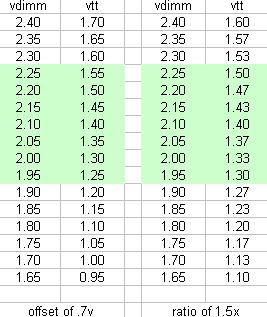
Intel recommends a max vdimm of 1.65v, which is curiously 1.5x vtt...
Several people reported that running higher than default vtt plus higher than 1.65v vdimm works just fine. how come?
From what i know about manufacturing processes, you have to pick the target voltage you want to work with at some point, and then decide what transistor design to use. some transistors can take high voltages but switch slow and are rather beefy, others are small and can switch much faster but will degrade with higher voltages. which is exactly what people reported with vdimm damaged core i7 cpus. one way to work around this and stress the transistors less is by not grounding them to ground but to some other voltage.

I dont know why or how, but vdimm is definately related to vtt, and the fact that intel recommends a max vdimm of 1.5x vtt is not a coincidence if you ask me... its not clear whether this 1.5x ratio exists and if it has to be maintained, or if vdimm has to be within a certain voltage range to vtt, but in either case the resulting highest vdimm/vtt ratios are about the same... once we have relatively cheap 920 cpus available and people can risk burning a cpus im sure it will only be a matter of weeks until we know more about vdimm/vtt on core i7


high uncore and memory clocks are possiblewithout high vdimm, we hit ddr3 2200 with 1.7v vdimm on BloodRage a few days ago


Setfsb Note:
Once you boot at a certain Bclock you will only be able to bump it up by around 25Mhz before the board gets unstable.
Most likely its caused by the chipset and memory training during bootup, core i7 has a built in routine that automatically fine tunes the chipset and memory during bootup.


Here are some recommended settings for you i got a from a friend at intel.
if your reading this, cheers man

How to find max Bclock:
Bclock 133Mhz
CPU Multiplier 12x/14x
Uncore Multiplier 16x or higher
QPI Multiplier 18x
Memory Multiplier 8x or lower
Vcore 1.25v
VTT 1.45v
Vdimm 1.65v

push up the Bclock and increase VTT and QPI volts to get higher.
Max 100% safe VTT seems to be 1.65v


How to find max Mem clock:
Bclock 133Mhz
CPU Multiplier 12x/14x
Uncore Multiplier 16x or higher
QPI Multiplier 18x
Highest Memory Multiplier
Vcore 1.25v
VTT 1.45v
Vdimm 1.65v

push up the Bclock and increase VTT and Vdimm to get higher.
more vdimm and vtt than 1.65v at your own risk
1.8vdimm should be 100% safe though


How to find max CPU Clocks on i7-965:
Bclock 133Mhz or lower
CPU Multiplier 24x
Uncore Multiplier 16x or higher
QPI Multiplier 18x
Memory Multiplier 8x or lower
Vcore 1.25v
VTT 1.45v
Vdimm 1.65v

reduce Bclock, then increase the cpu multipliers step by step.
push up vcore to get higher clocks stable


How to find max CPU Clocks on i7-940/i7-920:
max Bclock
CPU Multiplier 15x
Uncore Multiplier 16x or higher
QPI Multiplier 18x
Memory Multiplier 8x or lower
Vcore 1.25v
VTT 1.45v
Vdimm 1.65v

increase CPU multipliers step by step, push up vcore to get higher clocks stable. if you cant get a multiplier stable, reduce Bclock until your stable.
Max bclock for high multis is slightly lower than for low multis.


The return of the Turbo-Button?
The max turbo multipliers are stored in seperate registers from the "normal" max allowed cpu multipliers, and they can not be changed (unless you hack the cpu ) The turbo multipliers can not be forced to stay on all the time... at least not directly... you can fool the cpu into believing all the conditions that are necessary to run turbo mode are there, even if they are not
the highest boot multiplier is the highest "normal" multiplier...

for the i7-965 it works like this:

IF turbo is disabled
OR vcore is unstable
OR current is too high
OR Tdp is too high:

4 cores will run at 24x133=3200Mhz
3 cores will run at 24x133=3200Mhz
2 cores will run at 24x133=3200Mhz
1 cores will run at 24x133=3200Mhz

IF Turbo is enabled
AND vcore is stable
AND current is ok
AND the TDP is below the limit

4 cores will run at 25x133=3450Mhz
3 cores will run at 25x133=3450Mhz
2 cores will run at 25x133=3450Mhz
1 core will run at 26x133=3600Mhz


for the i7-940 it works like this:

IF turbo is disabled
OR vcore is unstable
OR current is too high
OR Tdp is too high:

4 cores will run at 22x133=2933Mhz
3 cores will run at 22x133=2933Mhz
2 cores will run at 22x133=2933Mhz
1 cores will run at 22x133=2933Mhz

IF Turbo is enabled
AND vcore is stable
AND current is ok
AND the TDP is below the limit

4 cores will run at 22x133=2933Mhz
3 cores will run at 22x133=2933Mhz
2 cores will run at 22x133=2933Mhz
1 core will run at 23x133=3050Mhz

so you see, turbo is really not that useful for most of the cpus, its only useful for the 965, where it basically auto overclocks the cpu... so basically the Core i7 lineup looks like this:

920 2800Mhz BUT if vcore is unstable, current is too high, or temps are too high, it will run slower.
940 3050Mhz BUT if vcore is unstable, current is too high, or temps are too high, it will run slower.
965 3600Mhz BUT if vcore is unstable, current is too high, or temps are too high, it will run slower.

What turbo really is, is a more advanced form of throttling the cpus from those clockspeeds down to a SAFE speed that will work even with high temps, fluctuating vcore and high current. instead of advertising a 3600mhz cpu that throtles down to 3400 or less depending on the situation, which would cause a lot of complains, the cpus are rated at 3200mhz and everything else above it is a BONUS, so nobody can complain


This is it or now, ill add more details later on. if you have any questions, just ask
Attached Images
 

Last edited by saaya; 01-03-2009 at 12:14 AM.
saaya is offline   Reply With Quote
Old 10-24-2008, 03:51 PM   #2
Ghigo
Registered User
 
Join Date: Sep 2006
Posts: 92
Hmm the +2 on multiplier overclock from turbo mode can be forced always active ?
Ghigo is offline   Reply With Quote
Old 10-24-2008, 09:36 PM   #3
HDCHOPPER
Xtreme Addict
 
Join Date: Jul 2007
Location: ARIZONA
Posts: 1,559
whew nehalem going to be a time consumer for me not a AMD fan at all

but when my BLOODRAGE board gets here
it's gonna be fun
and all our new nehalem coustermers are going to get Foxconn aimed at them
__________________

PENT E8400 batch #814A014 ...4.3 at 1.34v~4.7 at 1.45v
FOXCONN MARS
COOLIT Eliminator 7*c idle~27~38*c load $95bucks !
BUFFALO FireStix's ddr2-800 do 1200 eazy at 2.1v
OCZ 2x2 kit pc2 8500 - 1066 @1069 atm
Quattro 1000W
Radeon 2-4850's in crossfire
OCZ Vertex SSD thanks Tony!
ALL PIPED INTO HOUSE AIRCOND ;}
*QUANTUM FORCE* saaya & sham rocks !
*REAL TEMP*
At least you've got some Xtreme software now for working in Xtreme situations! "Unclewebb" rocks !
*MEMSET* Felix rocks !
*SUPER TEC MAN* UncleJimbo rocks !
OVERCLOCKERS MAG..http://www.xtremesystems.org/forums/...d.php?t=197660

Last edited by HDCHOPPER; 10-26-2008 at 12:55 AM.
HDCHOPPER is offline   Reply With Quote
Old 10-24-2008, 09:42 PM   #4
Movieman
I'm feeling BLUE!
 
Movieman's Avatar
 
Join Date: Nov 2005
Location: New Hampshire
Posts: 25,085
Saaya: Cleaned your thread for you..
__________________
The XS WCG team needs your support.
A good project with good goals.
Come join us,get that warm fuzzy feeling that you've done something good for mankind.

Quote:
Originally Posted by Frisch View Post
If you have lost faith in humanity, then hold a newborn in your hands.
Movieman is offline   Reply With Quote
Old 10-24-2008, 10:04 PM   #5
eva2000
Memory Addict
 
eva2000's Avatar
 
Join Date: Aug 2002
Location: Brisbane, Australia
Posts: 11,401
Thanks Sascha for the 101

Looks like memory oc'ing will be alot of fun finding out all the tweaks and sweet spots
eva2000 is offline   Reply With Quote
Old 10-24-2008, 10:08 PM   #6
Movieman
I'm feeling BLUE!
 
Movieman's Avatar
 
Join Date: Nov 2005
Location: New Hampshire
Posts: 25,085
Quote:
Originally Posted by eva2000 View Post
Thanks Sascha for the 101

Looks like memory oc'ing will be alot of fun finding out all the tweaks and sweet spots
Now all I need is Sascha to stop over the house and stand behind me.
HMM, Taiwan to New Hampshire isn't that long a trip is it?
__________________
The XS WCG team needs your support.
A good project with good goals.
Come join us,get that warm fuzzy feeling that you've done something good for mankind.

Quote:
Originally Posted by Frisch View Post
If you have lost faith in humanity, then hold a newborn in your hands.
Movieman is offline   Reply With Quote
Old 10-26-2008, 05:58 PM   #7
Oliver
HEY HEY
 
Join Date: Aug 2006
Location: Copenhagen - Denmark
Posts: 1,903
thx 4 posting
Oliver is offline   Reply With Quote
Old 10-26-2008, 06:17 PM   #8
zanzabar
I am Xtreme
 
zanzabar's Avatar
 
Join Date: Jul 2007
Location: SF bay area, CA
Posts: 9,616
is that memory clock that u posted the actual clock or the ddr clock

and the 940 has a multi of 22 right so that would be a max of 4.88ghz befor a qpi wall thats a nice wall i expected much lower
__________________
warning i use sarcasm, alot
coming soon duel dual rad p180 the reckoning, 720BE 0912epmw, gd70 and a new liquid revamp


give a man some juice and he has juice for a day, give him a juicer and he will have juice for life if he has something to juice

Last edited by zanzabar; 10-26-2008 at 06:29 PM.
zanzabar is offline   Reply With Quote
Old 10-26-2008, 06:26 PM   #9
philbrown23
Banned
 
Join Date: May 2008
Location: vermont, yes i like women
Posts: 1,360
Send a message via MSN to philbrown23 Send a message via Skype™ to philbrown23
wow so this is going to be like amd, man what a bummer. oh well i guess.
philbrown23 is offline   Reply With Quote
Old 10-26-2008, 07:05 PM   #10
Gendo
I am Xtreme
 
Gendo's Avatar
 
Join Date: Jul 2008
Location: The Netherlands
Posts: 248
Sounds exciting on one side; it's a new way of doing things which is always fun. On the other hand it seems that overclocking these cpu's is very limited. I doubt we'll see 6Ghz+ in this first generation of Nehalem
Gendo is offline   Reply With Quote
Old 10-27-2008, 02:30 AM   #11
HawaiianSupermn
Xtreme Member
 
HawaiianSupermn's Avatar
 
Join Date: Aug 2008
Location: Honolulu, Hawaii :D
Posts: 148
Wow, I was just getting used to overclocking current gen, I guess its back to the rear of the short yellow bus for me.
__________________
Under the influence of being Over the Edge!

Doomsday Rig:
TJ10ESA 1200w Zeus
Evga 790i Ultra SLI
Qx6700,6850,9650,9700 5.1ghz-5.4ghzDICE
OCZ 9-9-9-28 1.8v 2000mhz 2x1gb
Evga 9800gx2X2
BFG Ultra OC X2
150gb RaptorX6
Areca 1220 Raid 0
Xonar X2
QuadBoot xp'z-VistaUlt'z
HawaiianSupermn is offline   Reply With Quote
Old 10-27-2008, 04:16 AM   #12
saaya
Xtreme X.I.P.
 
saaya's Avatar
 
Join Date: Nov 2002
Location: 臺北 (Taipei)
Posts: 31,271
Send a message via MSN to saaya Send a message via Yahoo to saaya
i updated the first post with a lot more interesting infos

Quote:
Originally Posted by Ghigo View Post
Hmm the +2 on multiplier overclock from turbo mode can be forced always active ?
unfortunately no...
the highest boot multiplier is the highest "normal" multiplier...

for the i7-965 it works like this:

IF turbo is disabled
OR vcore is unstable
OR current is too high
OR Tdp is too high:

4 cores will run at 24x133=3200Mhz
3 cores will run at 24x133=3200Mhz
2 cores will run at 24x133=3200Mhz
1 cores will run at 24x133=3200Mhz

IF Turbo is enabled
AND vcore is stable
AND current is ok
AND the TDP is below the limit

4 cores will run at 26x133=3450Mhz
3 cores will run at 26x133=3450Mhz
2 cores will run at 26x133=3450Mhz
1 core will run at 27x133=3600Mhz


for the i7-940 it works like this:

IF turbo is disabled
OR vcore is unstable
OR current is too high
OR Tdp is too high:

4 cores will run at 22x133=2933Mhz
3 cores will run at 22x133=2933Mhz
2 cores will run at 22x133=2933Mhz
1 cores will run at 22x133=2933Mhz

IF Turbo is enabled
AND vcore is stable
AND current is ok
AND the TDP is below the limit

4 cores will run at 22x133=2933Mhz
3 cores will run at 22x133=2933Mhz
2 cores will run at 22x133=2933Mhz
1 core will run at 23x133=3050Mhz

so you see, turbo is really not that useful for most of the cpus, its only useful for the 965, where it basically auto overclocks the cpu... so basically the Core i7 lineup looks like this:

920 2800Mhz BUT if vcore is unstable, current is too high, or temps are too high, it will run slower.
940 3050Mhz BUT if vcore is unstable, current is too high, or temps are too high, it will run slower.
965 3600Mhz BUT if vcore is unstable, current is too high, or temps are too high, it will run slower.

What turbo really is, is a more advanced form of throttling the cpus from those clockspeeds down to a SAFE speed that will work even with high temps, fluctuating vcore and high current. instead of advertising a 3600mhz cpu that throtles down to 3400 or less depending on the situation, which would cause a lot of complains, the cpus are rated at 3200mhz and everything else above it is a BONUS, so nobody can complain

Quote:
Originally Posted by Movieman View Post
Saaya: Cleaned your thread for you..
thanks

Quote:
Originally Posted by eva2000 View Post
Thanks Sascha for the 101

Looks like memory oc'ing will be alot of fun finding out all the tweaks and sweet spots
yes, things are getting a lot more flexible now
im still worried about high vdimm though...

Quote:
Originally Posted by Movieman View Post
Now all I need is Sascha to stop over the house and stand behind me.
i take that as a compliment, but no, im into females... but thanks anyways *takes cover from dave throwing bricks*
Quote:
Originally Posted by Movieman View Post
HMM, Taiwan to New Hampshire isn't that long a trip is it?
no, and with the climate and economy going down, i think ill actually walk :P

Quote:
Originally Posted by zanzabar View Post
is that memory clock that u posted the actual clock or the ddr clock

and the 940 has a multi of 22 right so that would be a max of 4.88ghz befor a qpi wall thats a nice wall i expected much lower
well thats IF you can get 222Bclock stable, more realistically is 200, which means your limited to 4400mhz... and yes, the likelihood of your cpu crapping out before 4.8ghz is actually there too, so its not that bad of a qpi limitation. but for the 920 its pretty bad... itll be possible to max out the cpu on air before qpi limits it, but under ln2 the 920 will be pretty worthless... unfortunately as its priced very nicely...

and if you really want to get at it with ln2, then you NEED the 965, the 940 will be qpi limited... if you got a good set of cores you can reach 5ghz+ on the cores... supposedly some guys are already at 5.5... so there you go, a non XE 3.2ghz core i7 that will probabaly follow later wont be useful for LN2... 24x200 is 4.8ghz and thats not the limit for a set of good cores under ln2...

Quote:
Originally Posted by Gendo View Post
Sounds exciting on one side; it's a new way of doing things which is always fun. On the other hand it seems that overclocking these cpu's is very limited. I doubt we'll see 6Ghz+ in this first generation of Nehalem
suicide screenshot with one core, yeah, but 3d with 4 cores, no way

intel should have held back those 6.5g 3d stable 8600s

Quote:
Originally Posted by HawaiianSupermn View Post
Wow, I was just getting used to overclocking current gen, I guess its back to the rear of the short yellow bus for me.
well if your familiar to K8 or K10... this is basically the same with DDR3 and an intel logo on it
__________________
.
Nvidia: Tesla C2050 and C2070 products (GT300) will retail for $2,499 and $3,999

JHH (Nvidia) sep 2009: The best way to always be the number1 is to have no backup plan link
JHH (Nvidia) nov 2009: Tolerance for failure is important, it puts our employees in a position where they are willing to try new ideas link


Solus Corvus - maybe things would get better if people addressed the content of each others posts instead of trying to discredit each other with insults and poisoning the well. Attack the argument not the person.


Hail Voltage! The Solution to AND Source of all our Hardware Problems
saaya is offline   Reply With Quote
Old 10-27-2008, 04:59 AM   #13
freshy
Xtreme Member
 
freshy's Avatar
 
Join Date: Oct 2008
Location: Australia
Posts: 126
thanx for the info saaya, good read , so with a core i7 920 should hit 4ghz on water ok with a good board and be stable ?
__________________
i7 920 Batch "3849B018" ~~ga-ex58-ud5~~6gb ocz blade 2000mhz~swiftech GTZ~~HIS 4870 1gb

freshy is offline   Reply With Quote
Old 10-27-2008, 05:01 AM   #14
saaya
Xtreme X.I.P.
 
saaya's Avatar
 
Join Date: Nov 2002
Location: 臺北 (Taipei)
Posts: 31,271
Send a message via MSN to saaya Send a message via Yahoo to saaya
hmmmmm yes, im not 100% sure, but yeah, 4g on water should be doable for the 920
i havent tried many cpus tho, and i dont know how the retail cpus clock... so you might only get 3.8 or 3.9...
__________________
.
Nvidia: Tesla C2050 and C2070 products (GT300) will retail for $2,499 and $3,999

JHH (Nvidia) sep 2009: The best way to always be the number1 is to have no backup plan link
JHH (Nvidia) nov 2009: Tolerance for failure is important, it puts our employees in a position where they are willing to try new ideas link


Solus Corvus - maybe things would get better if people addressed the content of each others posts instead of trying to discredit each other with insults and poisoning the well. Attack the argument not the person.


Hail Voltage! The Solution to AND Source of all our Hardware Problems
saaya is offline   Reply With Quote
Old 10-27-2008, 05:34 AM   #15
Ghigo
Registered User
 
Join Date: Sep 2006
Posts: 92
Thx golden infos
Ghigo is offline   Reply With Quote
Old 10-27-2008, 05:46 AM   #16
Slovnaft
Xtreme Addict
 
Slovnaft's Avatar
 
Join Date: Jul 2008
Location: Middletown, CT
Posts: 1,293
Send a message via AIM to Slovnaft
Wow thanks for that clockspeed data. 5.5ghz 3d stable already? i'll def be splurging on a 965. can't wait to see those results, i wonder whether 5.5ghz i7 run will beat out a 6.5ghz E86 run on benches that don't value multithreadedness as much as 06?
Slovnaft is offline   Reply With Quote
Old 10-27-2008, 07:56 AM   #17
naokaji
I7 Fanboy
 
naokaji's Avatar
 
Join Date: Mar 2008
Location: Belfast
Posts: 1,477
*Cough cough* now all we need is a release date and price for the Bloodrage

Nice thread Saaya, thx for all the info, will be helpful once the emperor ehh nehalem arrives.
__________________
920 D0, EX58-UD5, 6GB Corsair 1600 7-7-7, 4870x2, 128 GB Samsung PB22-J SSD and 2 old 500GB WD's. Seasonic M12 700W, Cosmos S
Loop1: Swiftech GTZ, Koolance 4870x2 FC, Laing DDC 3.2 with XSPC Res Top, Blackice GTX 360
Loop2: Mips Gigabyte x58 blocks, DDC 3.2 with EK top, pa120.1, xspc acrylic 5,25" res


Come crunch with us for the Cause at WCG, we don't bite
I deny any responsibility for hearing loss or Overspending at PC Shops.
naokaji is online now   Reply With Quote
Old 10-27-2008, 07:59 AM   #18
TheKarmakazi
Title is Under NDA
 
TheKarmakazi's Avatar
 
Join Date: Feb 2008
Location: Buffalo, NY
Posts: 1,592
First off great thread and awesome info!! Thanks for the heads up, I will definitely be getting a 965.... just gotta do a fire sale here and drop all the S775 stuffz (like 6 mobos and 11 cpus lol!). Got plenty of DDR3 ready..


Quote:
Originally Posted by Slovnaft View Post
Wow thanks for that clockspeed data. 5.5ghz 3d stable already? i'll def be splurging on a 965. can't wait to see those results, i wonder whether 5.5ghz i7 run will beat out a 6.5ghz E86 run on benches that don't value multithreadedness as much as 06?
Should be pretty close... Nehalem is supposed to be about 15% faster clock per clock (right?)... So the maths:

5500Mhz x .15 = 825

5500 + 825 = 6325Mhz equivalent E8600

But quad cores have some advantages in non threaded benches also since you can run certain process on certain cores thereby distributing the load. Not too mention by disabling a core or 2 you should be able to gain more Mhz...
__________________

PURE benching, teamwork, determination, skill, dedication.
TheKarmakazi is offline   Reply With Quote
Old 10-27-2008, 07:04 PM   #19
saaya
Xtreme X.I.P.
 
saaya's Avatar
 
Join Date: Nov 2002
Location: 臺北 (Taipei)
Posts: 31,271
Send a message via MSN to saaya Send a message via Yahoo to saaya
Quote:
Originally Posted by Ghigo View Post
Thx golden infos
your welcome!

Quote:
Originally Posted by Slovnaft View Post
Wow thanks for that clockspeed data. 5.5ghz 3d stable already? i'll def be splurging on a 965. can't wait to see those results, i wonder whether 5.5ghz i7 run will beat out a 6.5ghz E86 run on benches that don't value multithreadedness as much as 06?
some wont even hit 5G with all 4 cores 3d stable, so dont expect to much!
i said 5.5g and below, meaning i doubt we will see more than 5.5g anytime soon

Quote:
Originally Posted by naokaji View Post
*Cough cough* now all we need is a release date and price for the Bloodrage
soon and less than BlackOps at launch

Quote:
Originally Posted by naokaji View Post
Nice thread Saaya, thx for all the info, will be helpful once the emperor ehh nehalem arrives.
your welcome


Quote:
Originally Posted by TheKarmakazi View Post
First off great thread and awesome info!! Thanks for the heads up, I will definitely be getting a 965.... just gotta do a fire sale here and drop all the S775 stuffz (like 6 mobos and 11 cpus lol!). Got plenty of DDR3 ready..
heh, well, if you have a good 8600 or 775 board you might wanna keep it, price perf will beat nehalem and in some benches im not sure if nehalem will take the perf crown...

Quote:
Originally Posted by TheKarmakazi View Post
Should be pretty close... Nehalem is supposed to be about 15% faster clock per clock (right?)... So the maths:

5500Mhz x .15 = 825

5500 + 825 = 6325Mhz equivalent E8600
weellll i would say thats an oversimplification
theres no linear scaling and the higher ipc doesnt really do much in 3d apps as we can see from all the benchmark results posted already... its all about the cpu tests and then the added bandwidth of the tri channel imc helps a little too...
__________________
.
Nvidia: Tesla C2050 and C2070 products (GT300) will retail for $2,499 and $3,999

JHH (Nvidia) sep 2009: The best way to always be the number1 is to have no backup plan link
JHH (Nvidia) nov 2009: Tolerance for failure is important, it puts our employees in a position where they are willing to try new ideas link


Solus Corvus - maybe things would get better if people addressed the content of each others posts instead of trying to discredit each other with insults and poisoning the well. Attack the argument not the person.


Hail Voltage! The Solution to AND Source of all our Hardware Problems
saaya is offline   Reply With Quote
Old 10-29-2008, 06:19 AM   #20
Tony
the jedi master
 
Tony's Avatar
 
Join Date: Jun 2002
Location: Manchester uk/Sunnyvale CA
Posts: 3,829
i7 Bclock x CPU Multiplier = CPU Clock (12-256)

AMD HTT ref frequency x cpu multi


i7 Bclock x QPI Multiplier = QPI Clock (18, 24)

AMD HTT X HT Multiplier = HT clock

i7 Bclock x Uncore Multiplier = Uncore Clock (10-30) This is IMC core speed.

AMD HTT x IMC Multi= IMC core clock speed


i7 Uncore clock / Memory Divider = Memory clock

This looks slightly different, probably due to it being DDR3 over DDR2

Overall though, its the same thing

I maximised IMC core clock speed, this is where performance will be gained the most. If you increase IMC speed, keep ram speed sensible and keep tight timings there will be no need for massive vdimm and any risk to the IMC(cpu) overall.
__________________
Got a problem with your OCZ product....?
Have a look over here
Tony AKA BigToe


Tuning PC's for speed...Run whats fast, not what you think is fast

Last edited by Tony; 10-29-2008 at 06:26 AM.
Tony is offline   Reply With Quote
Old 10-29-2008, 06:23 AM   #21
eva2000
Memory Addict
 
eva2000's Avatar
 
Join Date: Aug 2002
Location: Brisbane, Australia
Posts: 11,401
Tony how strong will the IMC be for overclocking headroom for 2x1GB vs 3x1GB x 6x1GB or 2x2GB vs 3x2GB vs 6x2GB ?
eva2000 is offline   Reply With Quote
Old 10-29-2008, 01:07 PM   #22
Tony
the jedi master
 
Tony's Avatar
 
Join Date: Jun 2002
Location: Manchester uk/Sunnyvale CA
Posts: 3,829
No idea yet Eva, i will get going next week although i still need boards. For now i would think 3x1 is easy, 3x2 is near as easy and 6x1 is like 3x2....6x2 will be a lot of load for clocking and 4gb dimms even more.

im going to concentrate my efforts on 3x2gb clocking as most will run 6GB with Vista 64 first then w7 later
__________________
Got a problem with your OCZ product....?
Have a look over here
Tony AKA BigToe


Tuning PC's for speed...Run whats fast, not what you think is fast
Tony is offline   Reply With Quote
Old 10-29-2008, 10:32 PM   #23
saaya
Xtreme X.I.P.
 
saaya's Avatar
 
Join Date: Nov 2002
Location: 臺北 (Taipei)
Posts: 31,271
Send a message via MSN to saaya Send a message via Yahoo to saaya
yeah, very similar... the only difference is that on k10 you can actually ramp up the l3 cache clock independantly from the imc, right?
and yeah, 3x2gb is what everybody will run, except for benchers and xp fans who stick to 3x1gb.

the interesting part is that k10 cant get a ref clock much above 230 and i7 seems to be stuck at about that speed too, even lower actually... i wonder if there is some reason for this or its just a coincidence and the i7 bclock is really just limited by qpi and nothing else...
and if thats the case, then maybe amds ref clock is limited by some other clock that gets derived from the ref clock?
__________________
.
Nvidia: Tesla C2050 and C2070 products (GT300) will retail for $2,499 and $3,999

JHH (Nvidia) sep 2009: The best way to always be the number1 is to have no backup plan link
JHH (Nvidia) nov 2009: Tolerance for failure is important, it puts our employees in a position where they are willing to try new ideas link


Solus Corvus - maybe things would get better if people addressed the content of each others posts instead of trying to discredit each other with insults and poisoning the well. Attack the argument not the person.


Hail Voltage! The Solution to AND Source of all our Hardware Problems

Last edited by saaya; 10-29-2008 at 10:34 PM.
saaya is offline   Reply With Quote
Old 10-29-2008, 10:50 PM   #24
WhiteFireDragon
Xtreme Cruncher
 
WhiteFireDragon's Avatar
 
Join Date: Jul 2007
Location: @ the computer
Posts: 1,460
Send a message via AIM to WhiteFireDragon
ahh it's learning to OC all over with so many terminologies. got too use to the old fsb, multi, and divider. i'm just gonna wait until i actually get nehalem to start fiddling with it if i can ever afford the CPU, mobo, and ddr3 :[
__________________
e8600 @ 4.5ghz
rampage extreme
hd4650 512mb
2x1gb tracers
audigy 2zs
120gb vertex
HX520w

Last edited by WhiteFireDragon; 10-29-2008 at 11:07 PM.
WhiteFireDragon is offline   Reply With Quote
Old 10-30-2008, 03:12 AM   #25
SF3D
HWbot Crew / X.I.P.
 
SF3D's Avatar
 
Join Date: Jan 2006
Location: Finland/Tampere
Posts: 1,516
Good thead Sascha!

This is really informative and helpfull thread for sure.

Overclocking Core i7 is not so hard or different compared to Core 2 Duo
__________________
AOCC2008 WW #5, MOA2008 EU #5, GOOC2008 WW #1, GOOC2009 WW #3, MOA2009 EU #4, MOA2009 WW #4, GB TweaKing #"5" (4,10), Ditech International OC #2 / #2, ASUS ROG OC Showdown # semifinals
SF3D is offline   Reply With Quote
Reply

Thread Tools
Display Modes Rate This Thread
Rate This Thread:

Posting Rules
You may not post new threads
You may not post replies
You may not post attachments
You may not edit your posts

BB code is On
Smilies are On
[IMG] code is On
HTML code is Off
Forum Jump


All times are GMT -8. The time now is 03:42 PM.


Powered by vBulletin® Version 3.7.6
Copyright ©2000 - 2010, Jelsoft Enterprises Ltd.
XtremeSystems